Skyvia pricing starts at $0, $7, $15 or $79 a month, depending on which product you look at. Each number is right, and that’s the first thing that makes Skyvia hard to budget.
The second is Data Integration, the product most teams come for. Its price depends on how much data you sync and how often, so two teams syncing the same apps can pay very different amounts. I’ll show where the money goes and when Coupler.io is the better value.
Key takeaways
- Skyvia sells six products separately, so backups or endpoints add a new bill
- Data Integration starts at $79 a month billed annually, or $99 monthly
- Hourly refreshes cost more: the same $79 buys 10x fewer records than daily runs
- Every changed row counts as a record on each sync, so busy data adds up fast
- The free tier’s 10,000 records a month are enough for testing, not for regular reports
- For reporting, Coupler.io starts at $24 a month, and from the Active plan up your bill doesn’t move with data volume
What Skyvia sells and what each product costs
Think of Skyvia as several tools under one login. You can use one product without touching the others. Each one charges for something different, like how many records you process or how much storage you use.
| Product | What it does | What you pay for | Starting price (annual / monthly) |
|---|---|---|---|
| Data Integration | ETL, ELT, data replication and synchronization | Records per month, run frequency, and features | $79 / $99 |
| Automation | Workflow automation between apps | Tasks per month | $99 / $119 |
| Backup | Data backup and restore | Storage | $7 / $9 |
| Query | Online SQL queries | Queries per day | $15 / $19 |
| Connect | REST API, OData and MCP endpoints | Traffic per month | $15 / $19 |
| Data Studio Connector | Sends data to Data Studio (formerly Looker Studio) | Flat monthly fee | $28 / $35 |
These are entry prices, which I took from the Skyvia pricing page in October 2026. Every product except the Data Studio Connector also has a free plan for testing.
If you want data from tools like HubSpot or Google Ads in sheets, dashboards or a warehouse, Data Integration is the product you’ll pay for. It’s also the hardest one to budget, because the price tracks your usage rather than your team size.
Making sense of Skyvia pricing plans for Data Integration
Every Data Integration plan is priced on two things:
- How many records you get each month. A record is roughly one row that Skyvia creates, updates or exports for you.
- What you can do with them: how often integrations run, how many you can schedule, which mapping features you get, and whether you can buy extra records.
Users and connectors are unlimited on every plan, so they don’t change the price. Here’s how the plans compare:
| Plan | Price from | Records per month | Fastest runs | Scheduled integrations | Scenarios and mapping | Overage |
|---|---|---|---|---|---|---|
| Free | $0 | 10k | Once a day | 2, expire after 30 days | Import, export, replication, sync; target lookup only | No |
| Basic | $79 / $99 | 5M to 200M | Once a day | 5 | Same as Free | No |
| Standard | $159 / $199 | 500K to 200M | Once an hour | 50 | Adds Data Flow, expression and relation mapping, custom queries | $0.06 per 1k |
| Professional | $399 / $499 | 10M to 200M | Once a minute | Unlimited | Adds Control Flow | $0.02 per 1k |
The plan names hide a simple rule: pick the plan by how often your data needs to refresh, then choose the record tier inside it.
- Daily reports and simple imports: Basic
- Hourly dashboards, or reshaping data on the way in: Standard
- Updates every few minutes, or multi-step workflows: Professional
Price alone is misleading, because each plan’s price rises with the record tier you choose. For $79 a month (annual billing), you can get Basic with 5M records or Standard with 500k. Faster runs means fewer records for the same money.
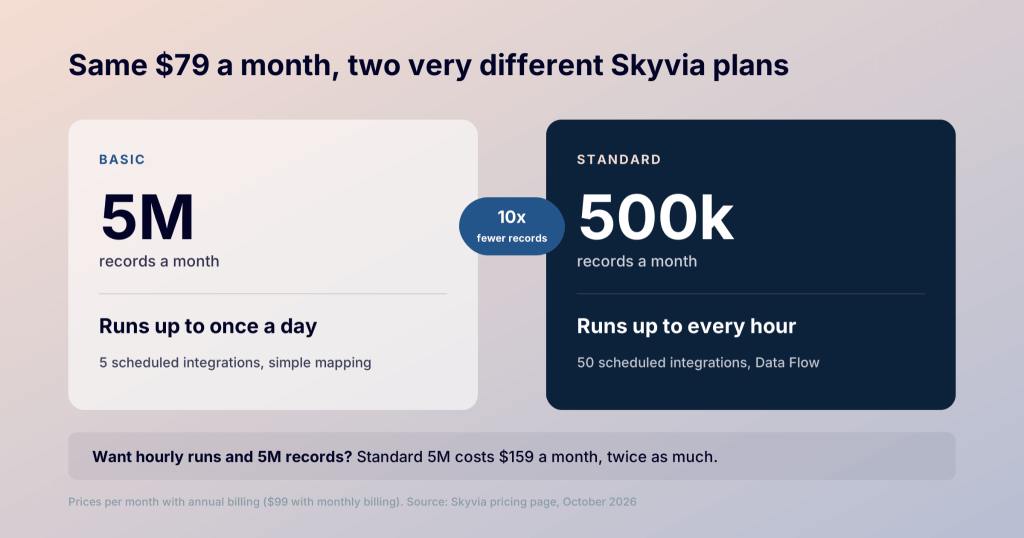
Don’t go by the plan cards’ labels, either. The Standard card says “basic” scenarios, but it includes Data Flow, Skyvia’s builder for pipelines that combine and transform data from several sources. So you don’t need Professional just to shape data before it reaches a dashboard. Above Professional, Enterprise is a custom annual package with unlimited records and instant runs.
What drives up your bill in the Skyvia pricing model
The plan price is only half your budget. The other half is how fast you use up records, and what happens when you run out.
Take two mid-size companies with large email lists. Both send Pipedrive, Zendesk and Mailchimp data to BigQuery and build their reports on it in Power BI. The record volumes are my estimates:
- Team A reviews its customer accounts in a weekly meeting, so daily runs are enough. It uses about 4 million records a month, which Basic 5M covers.
- Team B runs a customer dashboard that sales and support reps check through the day, with each account’s deals, open tickets and recent email activity, so it needs hourly runs and uses about 12 million.
The gap comes from how Skyvia counts records. It doesn’t bill for how much data sits in your apps, but for each row it adds, changes, or removes in the destination. How that’s counted depends on the job:
- Import and replication (copying app data into a warehouse): every row added, changed or deleted, even if no values changed
- Export to a file: every row written
- Data synchronization (keeping two apps in step): every change, on both sides
- Data Flow and Control Flow (multi-step pipelines): every row that reaches the destination
Failed rows and cancelled runs don’t count, and Account > Usage Summary shows what you’ve used.
Changes are what add up. Team B’s dashboard refreshes every hour, and tickets and deals change all day long. Each time a row changes, it counts again. That’s how the same data ends up using three times the records.
Once Team B uses up its monthly records, new runs stop until next month. On Standard and Professional, you can turn on Paid Records to buy more as you go ($0.06 and $0.02 per 1,000). Free and Basic don’t have this option. That leaves Team B two options:
| Option for Team B | Annual billing (per month) | Monthly billing |
|---|---|---|
| Standard 25M | $399 | $499 |
| Standard 10M + 2M extra records | $359 | $419 |
At 12 million records, paying for extras is cheaper. Past about 12.7 million a month (13.3 million on monthly billing), the bigger plan wins. If your usage keeps growing, upgrading is the better deal.
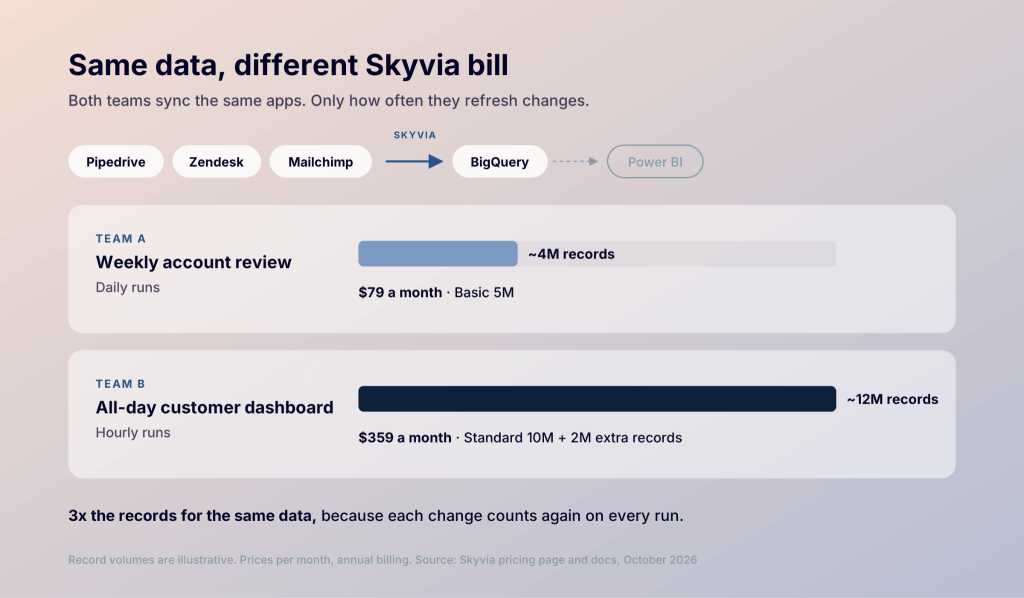
Team B isn’t paying more because it holds more data. It’s paying more because it refreshes more often. If keeping reports fresh is the main reason you’re looking at Standard or Professional, it’s worth seeing what that job costs when the price doesn’t move with record counts.
When Coupler.io is the simpler choice for reporting and analytics
Many teams look at Skyvia for one job: getting data from apps like HubSpot, Stripe, Shopify or Google Ads into reports. If that’s your main need, Coupler.io prices that job differently. You pay by connected accounts and destinations, and refresh frequency is set by the plan rather than draining an allowance.
Coupler.io is a data integration and AI analytics platform. It connects 400+ sources to spreadsheets, BI tools like Data Studio and Power BI, and data warehouses like BigQuery, and AI tools like Claude and ChatGPT. Pricing depends on how many accounts and destinations you connect, plus how often data refreshes. Every plan includes every source.
| Plan | Annual billing (per month) | Monthly billing | Accounts | Destinations | Data volume | Refresh |
|---|---|---|---|---|---|---|
| Starter | $24 | $32 | 3 | 1 | 5,000 rows per run | Daily |
| Active | $99 | $132 | 15 | 3 | Unlimited | Daily |
| Pro | $199 | $259 | 50 | Unlimited | Unlimited | Hourly |
| Custom | Custom | Custom | Custom | Custom | Unlimited | Every 15 minutes |
What this means for your budget: on Active and Pro plans, your bill doesn’t grow with your data. Syncing 10,000 rows or 10 million costs the same. Team B’s 12 million records would sit on the same Pro plan as 10,000.
The Agency plan adds refresh every 15 minutes, SAML single sign-on, a personal account manager, and an enterprise SLA. The Enterprise plan is priced through sales.
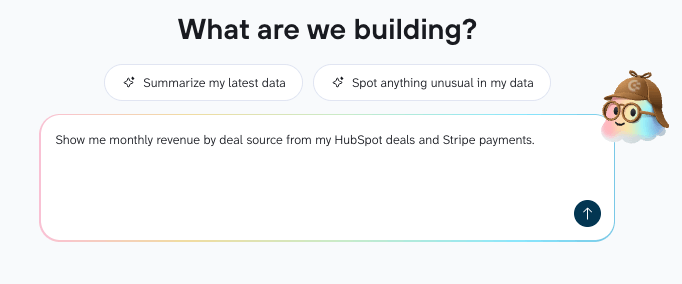
Every paid plan includes Coupler AI, which sets up the data flow for you. Describe the report you need, like monthly revenue by deal source from HubSpot and Stripe, and it helps connect the sources and shape the data. Once the data is ready, Coupler AI also answers questions about it. Ask ‘Which deal sources grew fastest last quarter?’ and get an answer calculated from your refreshed data, in the app or your own AI tool.
Coupler.io doesn’t cover every Skyvia use case, though, especially once you bring in Skyvia’s other products. Here’s where they overlap and where each one is the better pick:
| What you need | Skyvia | Coupler.io |
|---|---|---|
| Easy setup for business teams | More technical, built for data engineers | Yes, built for marketing, finance, and ops teams |
| Data connectors | ~200, strongest for databases and business apps | 400+, including marketing and social platforms |
| Sheets, BI tools, warehouses and AI on one plan | Partly: Data Studio and AI tools need extra products | Yes, including 250+ dashboard templates |
| Your data in AI tools | Through MCP endpoints in Skyvia Connect | Coupler AI on every paid plan, plus Claude, ChatGPT and others |
| Two-way sync and complex ETL | Yes (synchronization, Control Flow) | Partly: joins, appends and aggregations, no two-way sync |
| Backups, API or OData endpoints | Yes, as separate Backup and Connect subscriptions | Not covered |
| Stable billing as you scale | No, it moves with records and runs | Yes, from Active up |
| Security and compliance | SOC 2, hosted on Azure | SOC 2 Type II, GDPR, HIPAA, and DORA aligned |
For an extended feature-by-feature look, see Coupler.io vs Skyvia.

Grow your data on Coupler.io without a bigger bill
Book a demoHow far the Skyvia pricing free tier gets you
Back on Skyvia, the free tier runs on those record rules with a much smaller allowance. It’s built for testing and includes:
- 10,000 records a month, with unlimited manual runs until you hit the cap
- Daily scheduling for two integrations, but the schedules expire after 30 days
- All the standard scenarios (import, export, replication, sync), but only basic data mapping, so no Data Flow, Control Flow, or expression mapping
One full sync of a CRM object with more than 10,000 rows uses up the whole month. So Free suits someone testing connectors or managing data imports now and then. If a report depends on it every week, budget for Basic.
New accounts also get a 14-day trial of each product. Data Integration starts on Professional with 5 million records. When the trial ends, you request the Free plan in Account Settings > Subscriptions and wait for approval. Until then, you can edit integrations but not run them.
What happens when you need more than Data Integration
Every extra Skyvia product is a separate subscription, so if your team also needs backups or an API layer, the bill grows product by product. Here’s how it adds up, starting from Data Integration Basic 5M and each product’s entry plan, then a larger setup for complex ETL:
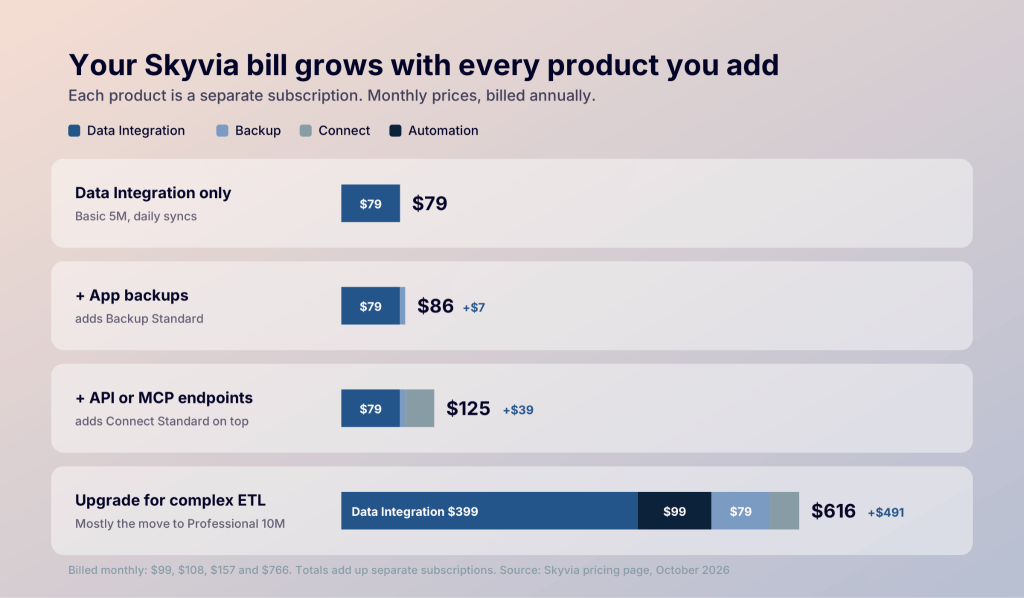
Each product does a different job and has its own allowance:
- Automation runs workflows between apps, like adding a form lead to your CRM. Every action counts as a task, so updating 50 leads uses about 50 tasks. Runs fail when tasks run out.
- Backup keeps copies of your app data so you can restore lost records. Each backup is a full copy, so storage grows with every one you keep.
- Connect gives other tools, including AI assistants, a secure link to query your data. Every request uses traffic, and the link stops answering when it runs out.
- Query lets you look up app data with SQL in your browser, with a cap on queries per day.
- Data Studio Connector feeds Skyvia data into Data Studio for a flat fee from $28 a month.
The AI use case is easy to miss. Skyvia’s MCP endpoints, launched in August 2025, belong to Connect, not Data Integration. To let AI tools query your data through secured endpoints, you need Connect Standard or higher on top of your Data Integration plan.
Skyvia pricing vs Coupler.io: which gives you more for your money
Skyvia is built to move and sync data between systems, and for that job its pricing is fair. For reporting, the better deal depends on how often your data needs to refresh. Here’s what Team A and Team B would pay on each tool (per month, billed annually):
| Setup | Skyvia | Coupler.io |
|---|---|---|
| Team A, daily refresh | $79 (Basic 5M) | $99 (Active) |
| Team A, data doubles | $149 (Basic 10M) | $99 (same plan, unlimited rows) |
| Team B, hourly refresh | $359 (Standard 10M + 2M extra) | $199 (Pro) |
| Team B, data doubles | $399 (Standard 25M) | $199 (same plan, unlimited rows) |
Which one wins depends on the job:
- Daily reports under 5,000 rows a run: Coupler.io Starter at $24, cheaper than any paid Skyvia plan
- Hourly dashboards: Pro at $199, where the same refresh puts Skyvia on Standard plus extra records
- Two-way data sync, multi-step ETL or backups: Skyvia, and Coupler.io isn’t a substitute
If reporting is the main job, the clearest comparison uses your own sources. Run your integrations on Skyvia’s 14-day trial to get a real record count, then see what the same setup costs on Coupler.io.
Get a Coupler.io quote built on your data sources
Book a demoFAQ
Why do other sites list different Skyvia prices?
Most quote annual prices without saying so, which is why you’ll see $79 where monthly billing starts at $99. Others cite Skyvia’s older plans, which split record limits by source, so their numbers won’t match today’s pricing page.
Is annual billing worth it on Skyvia?
Annual billing saves about 20% on Data Integration, for example $79 instead of $99 a month on Basic 5M. If you don’t yet know your record volume, I’d pay monthly for the first month or two and move to annual once usage settles.
When does Skyvia bill for extra records?
At the end of the subscription month, added to your renewal payment if auto-renewal is on. If you’ve switched on Paid Records, check Usage Summary before the month closes.