ChatGPT MCP refers to how ChatGPT implements or uses the Model Context Protocol (MCP) to connect with MCP servers that provide access to external data sources and tools. Instead of pasting CSVs into the chat, you give ChatGPT a secure, scoped path to the data your business already runs on.
The ChatGPT MCP integration can connect directly to your systems. With the Coupler.io connector or plugin, you use a better approach. ChatGPT does not get access to your sources but works with data sets organized, stored, processed, and refreshed in Coupler.io. This way, you can analyze your synchronized marketing, sales, finance, or product data in the middle of a conversation. Here’s what that looks like in practice.
The real-life value of ChatGPT MCP integration
Picture a Monday morning. You’re preparing for the quarterly review, and leadership wants to see which marketing channels drove the most revenue last quarter and whether paid search still deserves its share of the budget.
To answer in ChatGPT today, you’d normally:
- Export Google Ads performance for the quarter
- Export Facebook Ads performance for the quarter
- Pull GA4 conversion data
- Pull revenue from Shopify or your CRM
- Clean and join it so ChatGPT can read it
- Upload the file and start the conversation
Thirty minutes gone before you ask the first question. And it’s a one-time pile. Next week, when the numbers change, you repeat the whole thing.
The MCP for ChatGPT removes that bottleneck. Instead of uploading files, you collect the needed data with Coupler.io once, connect data sets to ChatGPT, and ask directly:
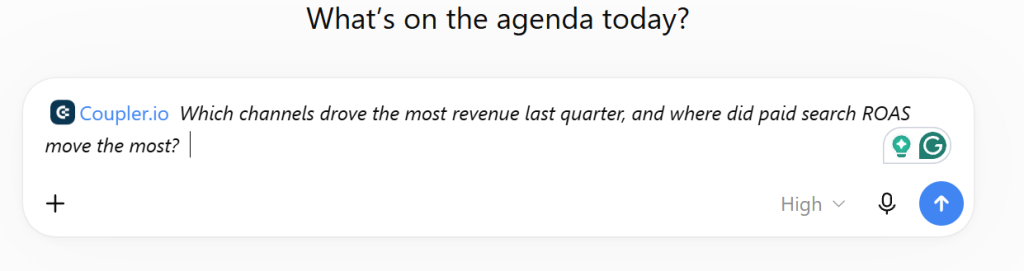
ChatGPT reads the synchronized data sets through the Coupler.io MCP server. The calculations run server-side in Coupler AI Analytical Engine, and the answer comes back in seconds.
Next week, the data flow refreshes on its own, and the same prompt returns the current answer. You skip the setup entirely.
Do you use ChatGPT MCP only for conversational analytics?
Analytics is the common case, but it isn’t the whole story. The Coupler.io MCP server exposes tools that let ChatGPT also configure your data pipeline: create a new data flow, add sources, change refresh schedules, build reusable SQL transformations, and save business context that persists across conversations. Tell ChatGPT to set up a weekly Google Ads flow with daily refresh, review the proposed configuration, and approve it without leaving the chat.
For MCP capabilities outside the Coupler.io scope, see our overview of MCP use cases and MCP servers for marketers.
MCP turns ChatGPT from a passive assistant into an active agent that automates repetitive tasks directly in your tools.
Where do I get a ChatGPT MCP server?
The phrase “ChatGPT MCP servers” is a bit misleading. ChatGPT is the client; MCP servers are the external systems it connects to. ChatGPT now has native MCP support, and the server you need depends on what you want the AI to work with.
So, most likely, when someone says “ChatGPT MCP servers,” they mean MCP servers that work with ChatGPT – not servers that ChatGPT itself provides. For productivity workflows, ChatGPT provides built-in connectors or plugins for the common tools: Gmail, Google Drive, Dropbox, Google Calendar, GitHub, and more. These are useful for reading documents or searching email. They aren’t built for business data analytics.
You can explore this expanding ecosystem through directories like MCP.so and MCP Server Finder, which catalog servers by functionality and compatibility. This community-driven approach means that if you have a specific ChatGPT MCP integration need, there’s likely already a server available, or you can build one using the standardized MCP protocol.
For analytics across your marketing, sales, finance, or product data, you need an MCP server that exposes your synchronized business data sets, with the data preparation and SQL execution happening in a secure layer you control. That is where Coupler.io fits.
What is the ChatGPT integration by Coupler.io?
Coupler.io is a data integration and AI analytics platform that connects data from 400+ business apps and sources, routes it into the destinations your team uses, and serves that data directly to AI tools over the Model Context Protocol. That architecture lets you connect any data source to AI in one step rather than wiring each source into each AI tool separately.
Does Coupler.io provide MCP for ChatGPT? Not exactly.
ChatGPT is a dedicated AI integration in Coupler.io available as a ChatGPT plugin.
Coupler.io ChatGPT plugin to connect over 400 data sources
 Get the plugin
Coupler.io ChatGPT plugin to connect over 400 data sources
Get the pluginWhen you add ChatGPT as a destination on a data flow, Coupler.io’s MCP server makes that flow’s data set visible to ChatGPT. OpenAI’s LLM then queries the data set through MCP tools during your conversation, with the SQL execution happening server-side in Coupler AI Analytical Engine (for the full architecture picture, see how to use the Coupler.io MCP server).
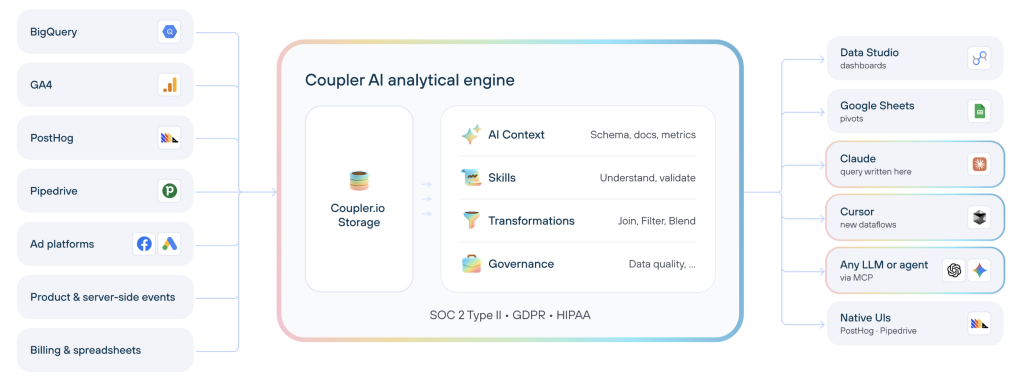
ChatGPT can only access the data flows with ChatGPT configured as a destination, not every data flow in your Coupler.io workspace. Visibility is set per destination, so you decide what each AI client is allowed to see.
What ChatGPT can do over the Coupler.io MCP server:
- Discover and query data sets. List what data you have in Coupler.io and run SQL queries against individual data sets.
- Manage data flows. Create a new data flow, add sources and destinations, change the schedule, or trigger a run on request.
- Build SQL transformations. Join, aggregate, or pivot data sets inside the same data flow and save the transformation so it can be reused.
- Reuse business context and Skills. Save definitions of what your columns and metrics mean, and load AI Skills that encode a standard analytical procedure.
If you want MCP access from a tool that isn’t ChatGPT itself (an orchestration platform like n8n or Make, a custom AI client, or any other MCP-aware assistant), Coupler.io also offers Custom MCP as a destination type. Both routes use the same Coupler.io MCP infrastructure.
Coupler.io also provides the built-in AI Agent to create and manage your data flows and analyze data without an external AI client. It uses the same Analytical Engine, with no destination setup required. You can ask it to connect your data to ChatGPT, and the Coupler AI agent will do the work and request the necessary authorizations.
Let Coupler AI do the data work for you
Tell Coupler AI what you need to know, from which source, and how often. It connects your account, sets up the data flow, keeps it refreshed, and lets you analyze the results inside Coupler.io or another AI tool.
Try for free
And, of course, the setup can be done from ChatGPT itself. Let me elaborate on this.
How the ChatGPT integration by Coupler.io works
The scenario: You run ads across Google, Facebook, Microsoft (Bing), and TikTok in 15 countries. You need to see which countries are delivering the best results across all four platforms so you can allocate your Q4 budget. For that, you create one Coupler.io data flow that unifies the ad-platform data and connects it to ChatGPT.
There are two ways to get there. If you’re already in ChatGPT, use the Coupler.io plugin for ChatGPT and set the whole thing up through conversation. Or configure the data flow yourself in Coupler.io UI with a two-step process.
For the wider view of connection methods beyond MCP (file uploads, Custom GPTs, API Actions, cloud files), see how to connect data to ChatGPT.
Way 1: Set up ChatGPT MCP integration with the Coupler.io plugin
Coupler.io is listed as a ChatGPT plugin in OpenAI’s App Directory. Open the Apps menu in ChatGPT, search for Coupler.io, and connect it. You sign in to your Coupler.io account once; after that, any ChatGPT conversation can create, edit, and query your data flows.
Describe the data you need. For the multichannel scenario above, it may look like this:
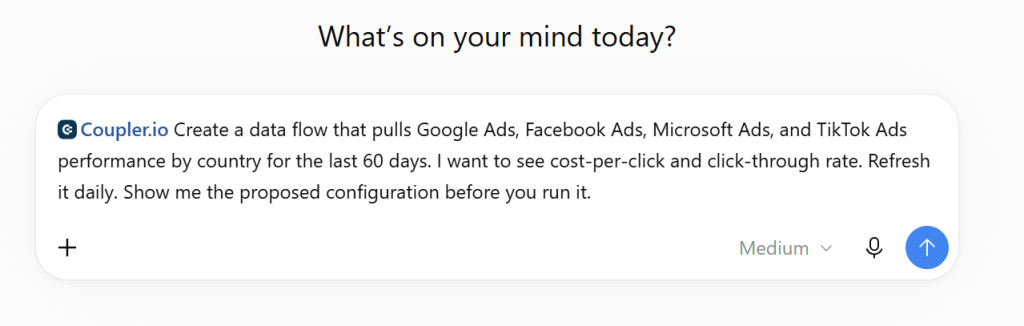
ChatGPT inspects the matching Coupler.io integrations, checks which ad accounts are already authorized, and prepares the data flow. If an account isn’t connected yet, it provides a link to authorize it, since AI can’t do that step for you. You confirm the configuration, including which fields reach ChatGPT (sensitive columns can stay excluded), and the flow runs.
Once the data is synchronized, ask your analytical question in the same conversation:
Compare cost-per-click and click-through rate across the four platforms by country. Rank the top 10 countries by combined performance.
Coupler.io sends the data schema and a small sample to ChatGPT so the model understands the structure. ChatGPT translates your question into SQL, and the Coupler AI Analytical Engine runs the query against the full dataset, performs the calculations, and returns validated results. ChatGPT presents the answer in the conversation.
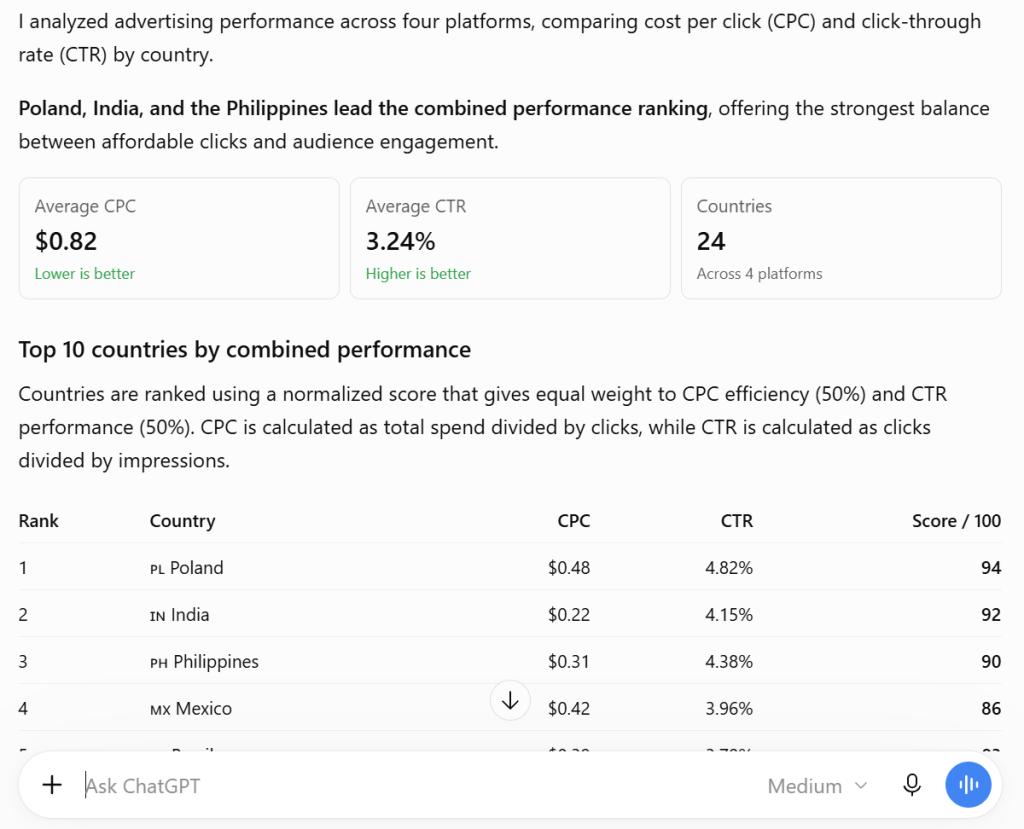
The same conversation can also edit existing flows (adding sources, changing schedules) and build reusable SQL transformations on data sets you’ve already connected.

Install the Coupler.io plugin for ChatGPT
Connect the pluginWay 2: Integrate MCP with ChatGPT in the Coupler.io UI
I’ve already mentioned that the Coupler AI agent can do the setup for you – just ask. If you do not want to give the steering wheel to AI for now, here is what you should do.
Step 1: Create a multi-channel data flow connected to ChatGPT
With the Coupler.io data set template (multi-channel Geo performance), you only need to connect the required ad accounts. Apply any filters or hidden columns to control what ChatGPT will see, and select ChatGPT as a destination.

The data transformation for unifying ad-platform data is already handled on the Coupler.io side. Pick the data view ChatGPT should see, for example, the appended view across all ad platforms.

You can also expose aggregated views. ChatGPT can run its own aggregations in SQL, so this depends on what you want the AI to see, not what it can do.
Run the data flow. Once it completes, ChatGPT can access the dataset whenever you query it.
Step 2: Connect ChatGPT to the MCP server and start your conversation
Install the Coupler.io plugin for ChatGPT. Once ready, the Coupler.io MCP server is available for conversation.
Ask a question that requires your data or use the @coupler.io tag in ChatGPT. ChatGPT recognizes that the answer lives in your Coupler.io data flows and calls the Coupler.io MCP server. The server:
- Authenticates the request against the data flows ChatGPT is allowed to see.
- Translates ChatGPT’s query into SQL.
- Runs the SQL server-side in Coupler AI Analytical Engine against your unified data set (Google Ads, Facebook Ads, Microsoft Ads, and TikTok Ads joined by country and time period).
- Returns the query results to ChatGPT, which presents the answer in your conversation.
Explore examples of how you can use ChatGPT for data analytics.
The whole flow runs in seconds. For a different data source, create another data flow with ChatGPT as a destination. Coupler.io supports ChatGPT integrations with 400+ apps.
Connect 400+ data sources to ChatGPT with Coupler.io
Get started for freeWhat happens to the data when a user sends it to ChatGPT using the MCP integration?
ChatGPT can only access the data flows in your Coupler.io account that have ChatGPT as a destination.
Only the aggregated data needed for your analysis is shared with ChatGPT. Moreover, your data neither leaves Coupler.io’s controlled environment nor is stored, shared, or used for model training. However, data handling policies may vary based on your ChatGPT subscription type.
Don’t connect data flows containing PII (personally identifiable information) or regulated data to AI destinations in Coupler.io unless your plan and security controls allow it.

Data lifecycle with Coupler.io MCP for ChatGPT
When you ask ChatGPT a question about your business data, the sequence is:
- ChatGPT identifies the right Coupler.io data set and calls the Coupler.io MCP server to query it.
- The query runs server-side in Coupler AI Analytical Engine against the latest successful refresh of the data flow.
- The query results, which can be an aggregated metric, a filtered subset of rows, or a set of individual records depending on what the question requires, are returned to ChatGPT.
- ChatGPT uses those results to generate its answer in the conversation.
The data set itself stays in Coupler.io. Only the query results travel to ChatGPT. The scope of what ChatGPT can retrieve matches what you’ve exposed in the destination step: if you’ve hidden sensitive columns or filtered rows, those are invisible to ChatGPT.
Data handling by OpenAI
Once query results reach ChatGPT, they’re handled under OpenAI’s data policies for whichever ChatGPT product and plan you’re using. Those policies vary across ChatGPT Free, Plus, Team, Enterprise, Edu, and the API, and they can be further changed by workspace or account settings (chat history, memory, training opt-outs). Before connecting business data to ChatGPT, review the policies that apply to your plan and configure your account the way you want.
Where the Coupler.io MCP server operates
The Coupler.io MCP server runs inside Coupler.io’s own SOC 2-compliant infrastructure. Data preparation and SQL execution happen there, and the server enforces which data sets each AI client can see. During the session, ChatGPT communicates with the server through the MCP protocol; ChatGPT itself runs on OpenAI’s infrastructure.
What do you get using the ChatGPT integration by Coupler.io?
- No more file uploads. Create a data flow with ChatGPT as a destination once, and the data is ready to query from your next conversation onward. The file-upload step disappears entirely.
- Fresh data on your schedule. Coupler.io refreshes your data flows as often as every 15 minutes. ChatGPT reads whatever the last successful refresh produced. If you need fresher data mid-conversation, ask ChatGPT to trigger a refresh.
- Plain-language questions, server-side SQL. You don’t need SQL, Google Ads Query Language, or any other technical skill. ChatGPT translates your question into SQL and Coupler.io’s Analytical Engine runs it. The AI gets the results, not the raw data set.
- Unified business view. Coupler.io blends data across apps, so a single question about ad spend and revenue reaches both systems at once.
Ask ChatGPT about your business data with Coupler.io
Get started for free