Databricks pricing isn’t a straightforward monthly plan. It involves multiple components for different services. AI functions are priced differently from regular compute tasks, serverless compute charges more per Databricks unit, and classic compute bills per component: Databricks platform charge and a separate VM charge from your cloud provider. Below I break down each meter, show how to estimate costs for your use case, and point to alternatives if your use case is simpler.
Key takeaways
- Databricks has no single price. At Premium list prices in AWS US East, one DBU costs anywhere from $0.15 (classic jobs) to $0.75 (for Databricks Apps), depending on what you run.
- Classic compute splits the bill in two: DBUs go to Databricks and the VMs go to your cloud provider. Serverless folds the VMs into a higher DBU rate, so $0.70 for SQL Serverless and $0.22 for SQL Classic.
- AI is a separate meter. Models bill per token, per hour of provisioned capacity or as a prepaid 1- or 3-month reservation, and AI Functions add model costs on top of the compute running your query.
- If you mainly need Google Ads, HubSpot or Shopify data in a spreadsheet or dashboard, Databricks is more platform than you need. Coupler.io is the simpler path for that reporting job.
Databricks pricing overview: the five layers in your bill
There is no single Databricks price. Before we get to the map, there’s one thing worth knowing up front: on classic compute, a Databricks bill comes from two different companies.
- Databricks DBUs: This is the actual Databricks platform charge. A DBU measures the processing power you consume per hour. You’re billed per second of use, at an hourly rate that depends on workload type, tier, and cloud.
- Cloud infrastructure: Your workloads run on virtual machines from AWS, Azure, or Google Cloud, and your data sits in that cloud’s storage. The cloud provider bills you for both, separately from your Databricks invoice.
If you want one bill, Databricks offers a fully serverless workspace. It manages both the compute and the storage, so your cloud provider doesn’t bill you separately. The per-DBU rate is higher in this plan because it already includes the cost of the underlying VMs and storage.
That’s who sends what. The next question is what makes those numbers big or small, and for that you need the full map. A Databricks bill is built from five layers, and the mix depends on which product you’re running.
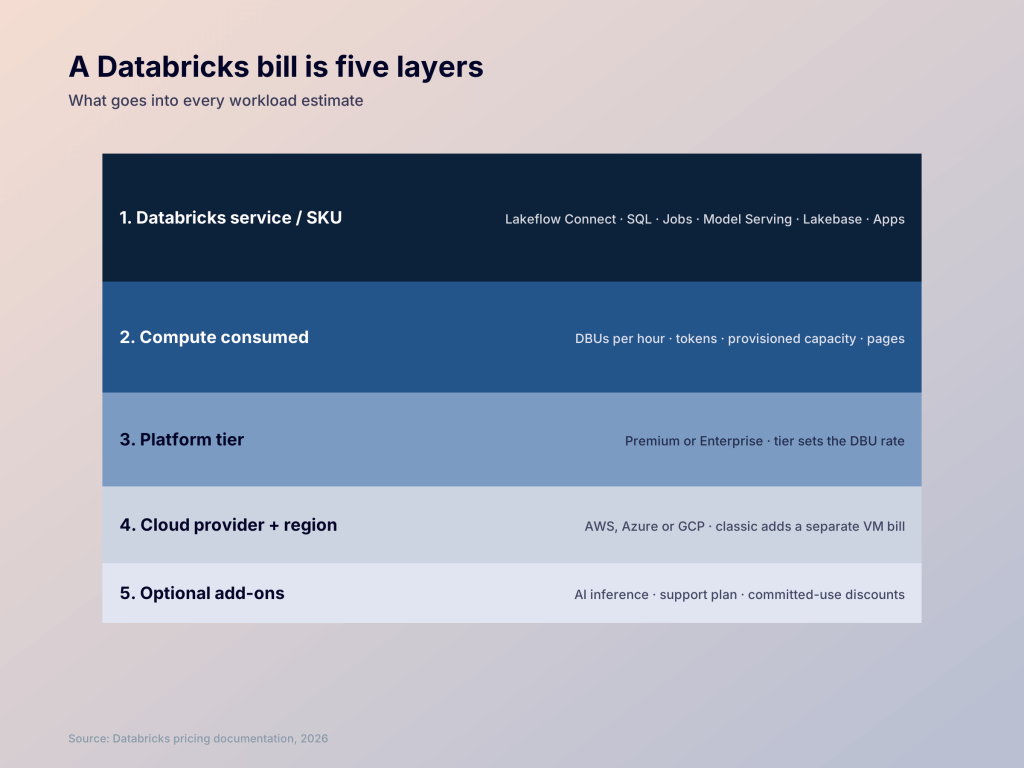
Lakeflow for ingestion leans on one set of these layers. A SQL warehouse running your BI reports leans on another. Model Serving leans on a third. That’s why one DBU rate can’t speak for the whole platform.
Here’s the map the rest of this article points back to.
| Layer | What it means | What makes it vary |
|---|---|---|
| 1. Databricks service / SKU | Which product you’re running: Lakeflow Connect, SQL warehouse, Jobs, All-purpose, Model Serving, AI Functions, Lakebase, Databricks Apps | Each product has its own meter and base rate. Some bill per DBU, some per million tokens, some per page |
| 2. Compute consumed | How much processing power you use, in DBUs (per hour, metered per second). AI products meter differently: tokens, provisioned capacity hours, or pages | Workload intensity, data volume, cluster size, concurrency, idle time |
| 3. Platform tier | Premium or Enterprise on AWS and GCP. On Azure, Microsoft sets the pricing and the top tier is Premium. The tier sets your DBU rate and unlocks features like Enhanced Security and Compliance | Enterprise rates typically run 25–30% above Premium on the same SKU. Jobs at $0.20 vs $0.15 per DBU on AWS is a good gauge |
| 4. Cloud provider + region | On classic compute, the VMs come from AWS, Azure, or GCP and are billed separately. On serverless, the VM cost is folded into a higher DBU rate | Cloud, region, instance type, reserved vs on-demand, egress, Databricks-managed vs cloud-provider storage |
| 5. Optional add-ons | AI inference (per million tokens, provisioned throughput, batch), support plan (Business, Production, Mission Critical), committed-use contracts for discounts | Which models you call, how much serverless GPU time, support tier, commitment length (1 or 3 years) |
Layers 1–3 set your base DBU rate: which product, how much compute, which tier.
Layer 4 adds the cloud infrastructure line on classic compute, or folds into a higher DBU rate on serverless.
Layer 5 is where estimates most often undercount. AI inference, support, and committed-use terms don’t show up on a plain workload cost calculation, but they land on the invoice all the same.
The workload sections below use the same five layers, data engineering, the data lakehouse, operational database, interactive workloads, and AI, so you can find what you’re actually paying for.
The Databricks pricing model is pay-as-you-go compute plus product-specific meters
Since cloud costs are billed separately by your cloud provider and follow their own pricing, let’s dedicate this section to understanding the core Databricks pricing model.
DBU (Databricks Unit) is for compute. You’ll see this unit most often. A DBU is a normalized unit of processing power per hour. It is not tied to one machine size: a larger instance consumes more DBUs per hour than a smaller one, how many DBUs a workload uses depends on the compute resources it uses and the amount of data it processes. Interactive notebooks, scheduled jobs, SQL warehouses and pipelines all consume different amounts of DBUs based on their workloads, so the same unit can judiciously price any cluster or workload.
DSU (Databricks Storage Unit) for storage. A DSU is a standardized unit for measuring storage usage across multiple Databricks products, and the rate varies by region, storage type, data volume, and transactions. You only pay DSUs when your data sits in Databricks-managed storage, so you only incur them when you choose Databricks default storage through a serverless workspace. That covers both the space your data takes up and the API operations (reads and writes) run against it. Instead, if you choose classic compute, you’ll be billed for storage by your cloud provider.
AI usage bills in DBUs. AI usage is metered differently. Most of it is still billed in DBUs, but Foundation Model APIs offer three modes: pay-per-token (DBUs per million tokens), on-demand provisioned throughput (dedicated capacity billed per hour) and reserved provisioned throughput (a prepaid 1- or 3-month term). AI products also carry their own per-DBU rate, so to estimate an AI bill you convert tokens or hours to DBUs, then DBUs to dollars.
Every DBU charge follows the same formula: DBU cost = $DBUs consumed × $ rate per DBU.
For example, a SQL warehouse query batch that uses 10 DBUs at $0.70 per DBU costs $7.00. If you commit to a usage level, discounted rates are available through Databricks Commit Units (DBCUs) on 1-year or 3-year terms, with discounts that depend on cloud, contract structure, and region. Your cloud provider also offers reserved instances that discount the VM side of classic compute.
Even without a commitment, the rate per DBU isn’t constant. It changes with workload type, plan tier, cloud, and region. I’ll cover which rate applies to which compute type in a later section.
Coupler.io as a simpler option for business-data integration and reporting
Databricks is built for teams that run data engineering, large-scale compute, and machine learning on one platform. But many teams don’t need most of that. They need data from Google Ads, HubSpot, Shopify, or QuickBooks in a spreadsheet or dashboard. Setting up a lakehouse for that job means paying for, and learning, a platform built for something much bigger.
Coupler.io is a data integration and AI analytics platform for that job. It connects 400+ business apps to destinations like Google Sheets, Excel, BigQuery, Data Studio, Snowflake, and more, on a schedule you set in its interface.
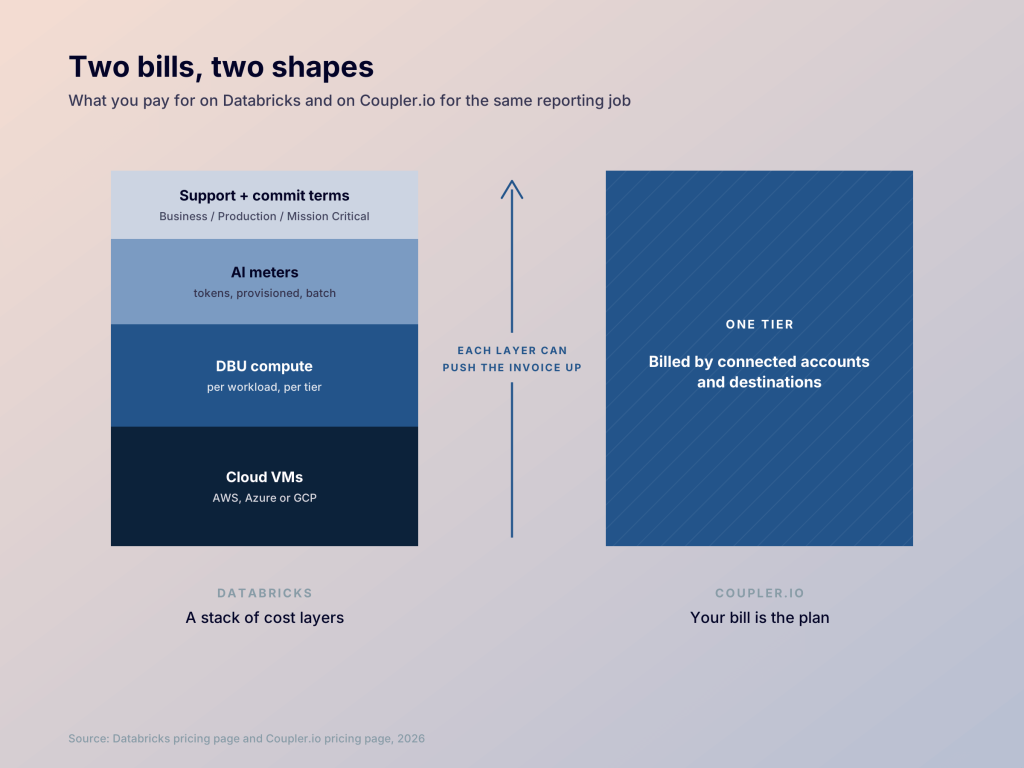
Here’s how they compare by the job you need done:
| Feature | Databricks | Coupler.io |
|---|---|---|
| Lakehouse, data engineering and ML platform | Strong fit | Not built for this |
| Large-scale compute workloads | Strong fit | Not built for this |
| Load SaaS data into various destinations | Possible, with a broader stack to set up | Core use case |
| Easy pricing | Usage-based, with many SKUs and meters | Straightforward plans |
| No-code setup | Possible through partner tools | Core use case |
I’d keep Databricks if you’re processing large datasets, training models, or running pipelines that need Apache Spark. Choose Coupler.io if the real goal is getting marketing, sales, or finance data into reports or databases on schedule.
You can also connect the same data flow to AI tools like Claude or ChatGPT. You apply custom transformations in the middle through the UI, and Coupler.io’s Analytical Engine then handles the calculations. It runs queries against your full dataset and validates the results, while the AI only interprets them. The AI receives your data structure and a small sample, not the full dataset. That helps with privacy and accuracy, too, because the AI explains calculated numbers instead of guessing. The pricing difference is the one most teams feel first with Coupler.io. It’s a straightforward monthly plan you pick based on usage and budget. A custom enterprise tier is also available, if needed.

Review the right stack for SaaS reporting
Talk to Coupler.ioDatabricks pricing breakdown by workload
Data engineering
The Databricks Lakeflow platform provides tools to get data into Databricks, clean and transform it, and make it ready for analytics or AI. It typically covers ingestion, transformation, organization, and orchestration. The primary tools are Lakeflow Connect (built-in connectors for ingesting data), Lakeflow Jobs (scheduling and orchestration), and Lakeflow Pipelines (transformations, dependencies, and data quality checks). Here’s how the Premium tier compares with Enterprise on AWS:
| Workload type | Premium | Enterprise |
|---|---|---|
| Lakehouse Jobs | $0.15 / DBU | $0.2 / DBU |
| Lakehouse Pipelines | $0.35 / DBU | $0.45 / DBU |
| Lakehouse Connect | $0.35 / DBU | $0.45 / DBU |
Lakeflow Connect also has a free tier. Every workspace gets 100 free DBUs per day for managed SaaS and database connectors, which is enough to ingest up to 100 million records a day from eligible sources. At the $0.35 Premium rate in the table above, that allowance is worth $35 a day, or about $1,050 a month. It doesn’t cover Zerobus Ingest, Structured Streaming sources such as Kafka, community connectors or file sources such as Auto Loader, and your real capacity depends on record size and source type.
Data lakehouse
Data Lakehouse is the analytics side of the platform. Your data lives once in open formats (Delta Lake or Apache Iceberg tables) in cloud storage, and you get warehouse-style SQL performance and governance directly on top of it.
Databricks SQL comes in three forms: SQL Classic, SQL Pro, and SQL Serverless. Serverless SQL warehouses cost the most per DBU, but they bundle the cloud instance cost into that rate.
| Lakehouse type | SQL classic | SQL Pro | SQL Serverless |
|---|---|---|---|
| Price | $0.22 / DBU | $0.55 / DBU | $0.70 / DBU |
| Cloud instance cost | Paid separately to your cloud provider | Paid separately to your cloud provider | Included in DBU price |
Operational Database
The operational database handles many small, fast reads and writes from an app: saving an order, updating a user profile, checking inventory. These need low latency and transactions, which lakehouse tables aren’t designed for. Databricks’ product for this is Lakebase. It’s charged as below:
| Category | Price | What you pay for |
|---|---|---|
| Compute | From $0.069 / CU-hour (50% off until Jan 31, 2027) | Running the database. It autoscales with traffic, can scale to zero, and includes the cloud instance cost |
| Storage | From $0.090 / GB-month | Storing data, including the database itself, point-in-time restore and snapshots |
Interactive workloads
Interactive workloads offer notebooks for exploring data and building models, plus the internal apps your team builds on top.
Your notebooks run on all-purpose clusters or interactive serverless compute, depending on your choice. Classic all-purpose clusters start at $0.55 / DBU. Databricks Apps, another offering, hosts data and AI apps like dashboards and chat tools. For this, you pay per hour by app size, at $0.75 / DBU.
Artificial intelligence
The Databricks platform covers everything from calling an LLM to building and running AI agents. It lists these as separate products, including Model Serving, Foundation Model Serving, AI Functions, Agent Bricks, AI Search, Model Training, and Unity Gateway.
Nearly all of them still bill in DBUs, but Databricks AI pricing measures usage differently from the rest of the platform:
- Per token: pay-per-token model calls are billed in DBUs per million input and output tokens.
- Per hour: provisioned throughput, batch inference and dedicated serving endpoints are billed in DBUs per hour.
So you can consume the same DBU either by token count or by the hour, depending on how you use the model.
Genie is the natural-language layer for asking questions about your data. Genie One (for business users) and Genie Agents (formerly Genie Spaces) are free for user interactions, but service principals are excluded, and their usage is billed. Genie Code, the developer assistant formerly called Databricks Assistant, moved to pay-as-you-go on July 8, 2026. Each user gets 150 free DBUs a month, about $10.50 in US East. The free usage covers the model only: the SQL warehouse or serverless compute that runs the query is billed at its normal rate.
If that’s more complexity than your workflow needs, I discuss a simpler option in the next section.
Databricks pricing plans and platform tiers
Databricks has two platform tiers on AWS: Premium and Enterprise, with new accounts defaulting to Premium. The Standard tier has been deprecated on both major clouds. On AWS, remaining Standard workspaces were automatically upgraded to Premium after October 1, 2025. On Azure, the deadline was October 1, 2026, and any Standard workspaces left on that date were automatically upgraded to Premium.
The premium pricing tier offers three workload types: All-purpose compute, Jobs compute and Jobs Light compute. All three include role-based access control, database connection authentication, audit logs, cluster policies and other standard features. Jobs Light, the lightest type, lacks two features the others have.
Conditional authorization is the first check that decides whether a user can sign in to Databricks at all, and Azure AD credential passthrough controls access to data in Azure Data Lake Storage. These are two additional features that the basic tier, Jobs light compute, doesn’t offer.
Lakeflow Spark Declarative Pipelines are priced by edition: Core, Pro and Advanced on classic compute, plus a serverless option. The editions differ in features such as change data capture and data quality expectations, so pick the edition that matches what your pipeline needs. Core is cheaper, and you move up only when the pipeline needs the extra features.
Databricks enterprise pricing
Enterprise is a real pricing tier on AWS and Google Cloud, sitting above Premium with higher DBU rates. Classic Lakeflow Jobs, for example, costs $0.20 per DBU on Enterprise against $0.15 on Premium. The tier is also required for the Enhanced Security and Compliance add-on, which covers standards such as HIPAA, PCI-DSS and FedRAMP. On Azure, Microsoft sets the pricing, and the top tier is Premium.
Databricks offers committed use contracts that discount your usage in exchange for a spending commitment, and the larger the commitment, the bigger the benefit. To get the rates and custom plan, contact sales.
Databricks support pricing
Support is sold separately from your DBU usage, as one of three plans: Business, Production or Mission Critical. This is how they differ:
| Feature | Business | Production | Mission critical |
|---|---|---|---|
| Severity 1 initial response | Within 1 business day | Within 1 hour | Within 1 hour |
| Mission-critical severity response | Not included | Not included | Within 15 minutes |
| Live support hours | 9 AM-6 PM, business days | Severity 1 and 2: 24x7x365 | Severity 1 and 2: 24x7x365 |
| Technical contacts | 2 | 8 | 16 |
| Apache Spark expert support | Up to 2 hours/month | Up to 8 hours/month | Up to 8 hours/month |
Mission Critical also adds proactive monitoring of workspace health and direct access to escalation managers, who send updates every 15 minutes on mission-critical cases. Databricks doesn’t publish support prices. If your order includes no support plan, you’re limited to public documentation and the Help Center. To get Databricks support pricing, contact sales.
Understanding Databricks AI functions pricing
Databricks AI Functions are built-in, SQL-native functions that allow you to apply Large Language Models (LLMs) techniques directly to data stored within Databricks. You call a function like ai_classify or ai_extract on a column, and Databricks sends each row to a model and writes the result back into your table.
Every AI Function call can bill you in two places:
- The compute running your query. This is the SQL warehouse, cluster or pipeline you run it from, billed at its normal rate.
- The model inference. Most AI Functions run on serverless GPUs that Databricks manages, billed on top of your query compute.
AI Functions don’t run on Classic SQL warehouses, and they’re only available in supported regions. You’ll need a Pro or Serverless warehouse, or a cluster on Databricks Runtime 15.4 LTS or above.
There are two kinds of AI Functions, and they’re billed differently.
Task-specific AI Functions:
These are specialized functions to carry certain tasks like parsing documents, extracting fields, or classifying text. Examples include ai_parse_document, ai_extract, ai_classify, ai_summarize and ai_translate. Per DBU price for all these functions is the same, it’s $0.07 per DBU.
However, the total cost varies based on the number and size of pages parsed in case of AI parsing functions. For example, Parsing 1,000 simple-text documents takes 10–15 DBUs, or $0.7-$1.05, while 1,000 documents of complex diagrams cost $5.95-$6.3. The same principle goes with the other types of AI functions. Extracting fields from 1,000 short texts costs $2.10-$4.20, while extracting specific schema values from dense text at the same volume takes 375–700 DBUs, or $26.25-$49.00.
Another category, ai_classify uses LLMs to sort text or document content into custom labels you provide. Classifying 1,000 short texts, like news briefs, takes about 3–6 DBUs, or $0.21-$0.42. Longer documents, like 7–10 page contracts, take 40–60 DBUs, or $2.80–$4.20 per 1,000. That is because the core pricing comes from token consumption of LLMs while classifying. LLMs process text in small chunks called tokens, and a 10-page contract consumes much more tokens than a short news brief.
General-purpose AI Function:
ai_query is a general-purpose AI function that lets you query any supported AI model directly from SQL or Python within Databricks. It gives you full control over the model, its parameters, and prompts.
Estimate Coupler.io for SaaS reporting
Set up a callHow to estimate a Databricks monthly bill without fooling yourself
Databricks pricing depends on these major factors:
Compute type: A DBU has no single price; it depends on the compute that uses it. On Premium in AWS US East, classic jobs list at $0.15 per DBU while classic all-purpose lists at $0.55.
Classic vs. serverless billing: Classic compute adds a separate cloud bill for the machines, while serverless includes them in a higher DBU price.
Plan, region and commitment: Rates vary by the plan (premium or enterprise) and cloud region. Also by the contract term you commit to with Databricks.
AI: Services bill per million tokens, per hour of provisioned capacity, or per page processed, depending on the function.
Beyond DBUs: Storage, network traffic, and other products are billed separately, so a Databricks pricing cost estimate built only from DBU rates will undercount.
So estimate your DBU usage for each of these factors, then calculate the cost in Databricks’ official pricing calculator.
Use case 1: Scheduled batch processing
Say you want to schedule batch processing jobs through an orchestrator. The closest Databricks product is Lakeflow Jobs, so select Jobs Compute in the compute type dropdown. Since you’re choosing classic over serverless, pick your cloud provider and instance type, then enter the number of instances, hours per day and days per month the job runs. The estimated cost appears on screen. You can also switch to serverless compute and compare the two.
Use case 2: LLM application
Say you run a job that summarizes client calls, tags its topic and writes the result into a Delta table. For this kind of workload, compare Databricks LLM pricing under pay-per-token and batch inference.
Start by estimating the tokens you’ll consume. For example, assume about 3,000 tokens in (the transcript) and 300 tokens out (the summary and tags) per call. With GPT-5.6 Luna at 12 queries per minute, the calculator estimates ~$2,488 a month.
Where teams overbuy Databricks for a reporting problem
Sometimes, a reporting problem gets treated like a data platform problem. If your team needs to pull data from tools like Google Ads, HubSpot and Shopify, combine it, and refresh dashboards in Sheets or a BI tool, you don’t need the full Databricks platform.
Databricks makes sense when you need large-scale data processing, complex data engineering, machine learning or a shared platform for multiple data workloads. But if your main requirements are collecting SaaS data, transforming it, loading it into a warehouse or reporting tool and keeping dashboards up to date, a simpler data integration tool may be a better fit.
I say this because Databricks’ managed connectors cover a short list of sources, mainly Salesforce, Workday and SQL Server, and several others are still in preview. Salesforce and Workday run only on serverless infrastructure and bill serverless pipeline DBUs. For the long tail of marketing, e-commerce and finance tools, you usually write and maintain the API script or ETL pipeline yourself.
The Azure Databricks pricing is also complicated for simpler use cases. You need to optimize transformation queries, warehouse storage, and runs to reduce costs. This involves heavy engineering work.
The same goes for AI analysis. Asking questions about ad spend is a low-volume workload, so the hard part isn’t the model, it’s getting correct numbers to it. Coupler.io handles this with an Analytical Engine that runs queries against your full dataset and validates the results, while the AI only interprets them and draws insights.
When Databricks is worth the extra pricing complexity
If your use case needs a true data engineering platform, like heavy data warehousing, advanced machine learning pipelines, real-time streaming or large-scale ETL, Databricks covers all of it. And since the use case is complex, the pricing is a bit complex too: bills compute in DBUs, plus cloud infra fees on classic compute.
But if you just need data integration and reporting, Coupler.io covers that. It connects your SaaS tools through 400+ native data sources, sends the data to the destination you need and builds analytics reports from there, all in a simple UI. Sign up for Coupler.io for free (no credit card required) and try it today.