Instagram public data gives you access to competitors’ posts, captions, likes, and comments. Connect it to Claude, and you can ask questions like, “Which content formats are driving the most engagement?” or “Which brands have partnered with multiple competitors but not with us?” and get instant answers in plain English.
Coupler.io is the simplest option to connect Instagram public data to Claude.ai for social media analytics. It uses an MCP-based connection behind the scenes, but you don’t have to deal with the technical setup. Everything is handled through a user-friendly interface. In this guide, I’ll also cover the other available methods and help you decide which one best fits your use case.
How to connect Instagram public data to Claude using the Coupler.io connector
Coupler.io is a no-code data integration and analytics platform that connects 400+ data sources, including Instagram public data, to Claude for AI analysis.
But sending raw data directly to Claude risks data leakage and AI hallucinations. To avoid this, Coupler’s Analytical Engine performs the required math calculations, then sends only the final results and filtered datasets to Claude for summarization. Here is what it looks like to set up AI integrations in Coupler.io.
Step 1: Create a data flow for Instagram public data
Sign up for a Coupler.io account for free (no credit card required) and create a new data flow with Instagram Public Data as the source. Or simply use the form below, where I’ve preselected Instagram Public Data and Claude as source and destination apps.
Next, connect your Instagram Business account. That’s the only way to access public competitor data. Personal and private accounts won’t work.
Then configure the basic settings:
- For Report type, choose a report designed for public profiles and posts, such as Public Profiles Info or Public Profiles Posts.
- In the Instagram Profiles field, enter the usernames of the accounts you want to collect data from.
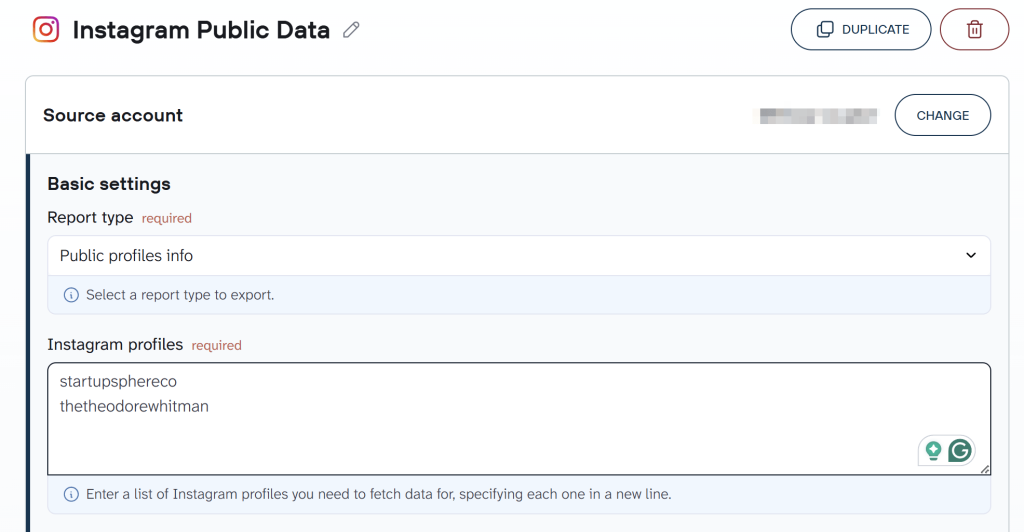
If you’re tracking multiple competitors, you can connect multiple Instagram accounts to the same data flow and compare them all in one place. Or enrich Instagram data with information from other applications from over 400 Claude integrations supported by Coupler.io.
Once everything is configured, click Finish and Proceed.
Step 2: Transform your data and add business context
Before the data reaches Claude, transform it so the model works with clean, relevant information. Filter or aggregate data by date, Instagram account, or content type, and remove columns containing personally identifiable information (PII) so Claude never receives sensitive data. You can also use the formula tab to create custom business metrics and pass them to Claude.
Next, tell Claude how your business thinks about the data. That’s what the Context Editor feature is for. Add your business terms, metric definitions, calculation rules, and anything that should be included or ignored during analysis. Set it up once, and Claude uses that context for every query.
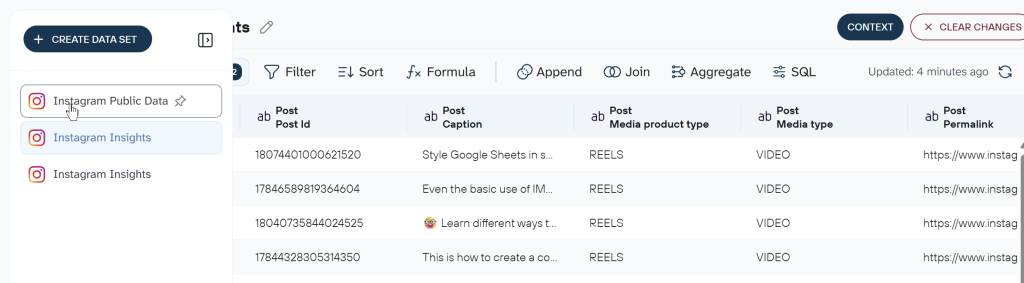
Step 3: Connect Claude and set your refresh schedule
Open the Destinations section and click Get Connector. This opens the Coupler.io connector page inside Claude.ai. Follow the instructions in Claude to authorize it. In addition to Claude web, Coupler.io also supports connections to Cowork and Claude Code.
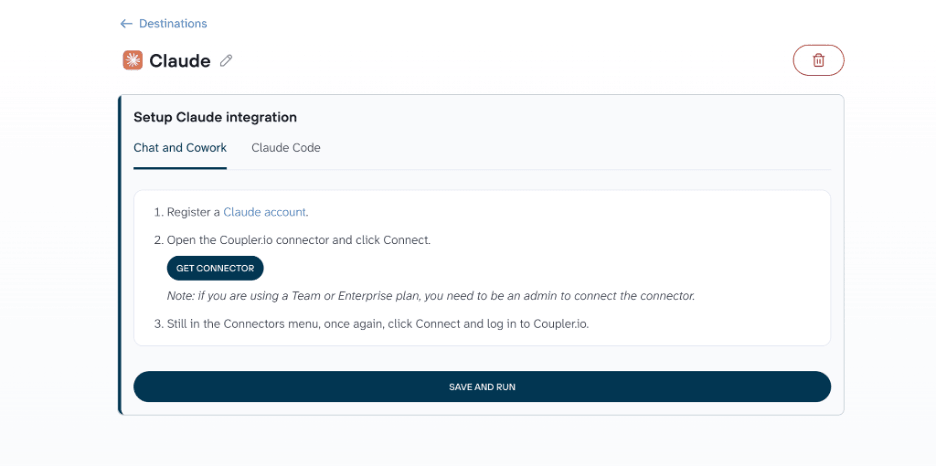
After the setup is complete, return to Coupler.io and click Save and Run.
Coupler.io users can also analyze their data flows right in the Coupler.io AI agent. This is the built-in AI tool that allows you to ask questions about your data, create new data flows and data sets, and more.
On the same page, you’ll find the Automatic Data Refresh option enabled. From there, choose how often the data flow should run so Claude always has access to the latest Instagram public data for analysis.

Explore Instagram competitor data in Claude with Coupler.io
Get started for freeExamples of how to analyze Instagram public data with Claude
Once your data flow is connected, here’s what it looks like to analyze Instagram public data with Claude in practice.
Discover which content formats deserve more investment
Sometimes you may wonder what your competitors’ accounts are doing differently to gain more traction. One way to find out is by analyzing their content formats.
The raw Instagram public data includes the post type, publish date and time, account name, and engagement metrics. But pulling all that data together and calculating averages, performance metrics, and statistical significance yourself is tedious and time-consuming.
Note: Instagram public data only contains posts, images, videos, and carousels information; story performance cannot be tracked.
Ask Claude in a single prompt and get the results in seconds:
Compare all Instagram posts published during the last 90 days in my competitors accounts: "mkbhd", "markrober", "kallaway". Group them by media type (images, videos, and carousels), calculate the average likes and comments for each format, identify the top-performing format, and explain whether the engagement difference is statistically meaningful.
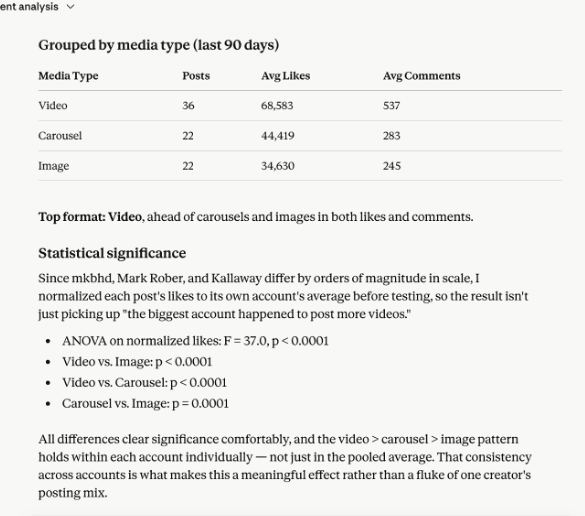
Claude compares the creator’s recent posts with the previous ones to show whether engagement, posting trends, and follower growth are moving in the right direction or starting to lose steam.
It also checks whether videos are actually outperforming other content formats or if it just looks that way. Using statistical tests like p-values and ANOVA, it separates real patterns from lucky spikes. In this example, the results show that Reels performance is consistently better than the other content formats.
Vet a creator before you collab
If you’re planning to collaborate with a creator to grow your brand’s reach, don’t let a big follower count fool you. Some accounts look popular, but the engagement tells a very different story.
Use the following prompt in Claude to evaluate a creator’s profile growth and determine whether the collaboration is worth the investment:
Review the last 60 posts from the “mkbhd” Instagram account. Calculate the average engagement rate, likes, and comments per post. Compare engagement from the most recent 30 posts with the previous 30 posts to determine whether performance is improving or declining. Based on the account's follower count, engagement rate, and recent posting performance, estimate the likely reach and engagement for a sponsored post and summarize whether this creator is a strong collaboration candidate.
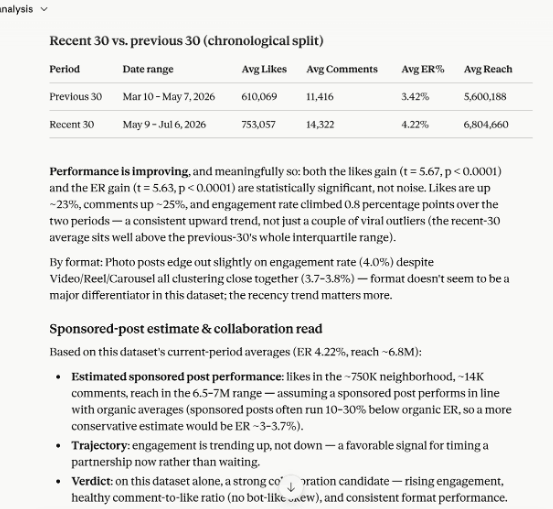
The output compares the most recent 30 posts with the previous 30 posts and highlights the growth across key engagement metrics. It also estimates the expected performance of a sponsored post based on the account’s current engagement levels. Finally, it provides a verdict on whether the creator is a strong candidate for collaboration.
Find the best time to post
Your posting schedule affects how much reach and engagement your content gets. Analyzing your competitors’ posting patterns is one way to optimize it.
Ask Claude to find the days and times that consistently generate the highest engagement for your competitors, and recommend a schedule based on the results:
Compare these Instagram accounts: "mkbhd", "markrober", "kallaway" over the last 120 days. Identify the days of the week and time windows that consistently generate the highest engagement. Compare posting frequency, media types (images, videos, and carousels), average likes, and comments, then recommend the best posting schedule for my account.
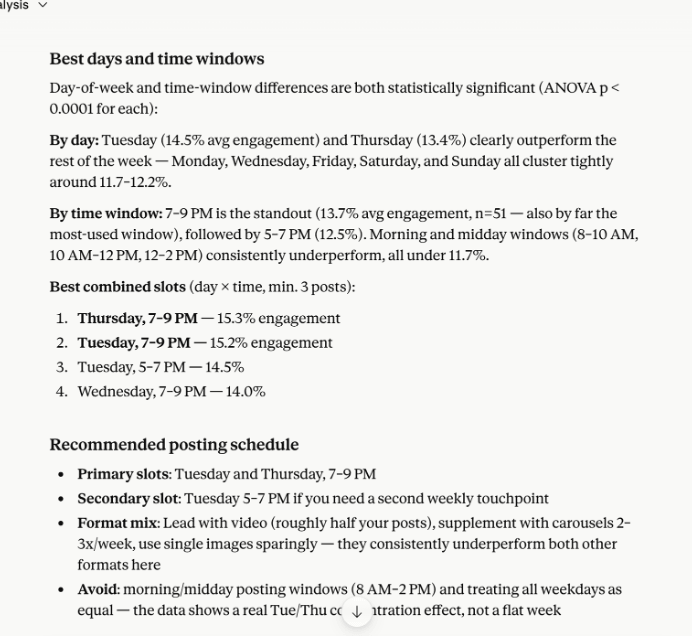
You could see in the output the best days and time windows to post for maximum reach.
Claude prompts for Instagram public data
Instagram public data includes insights from both your own account and public creator accounts. I’ve put together Claude prompts for Instagram public data that cover both scenarios, so you can use the data however it best fits your goals.
Prompts to analyze your own account:
Analyze my Instagram account: <username>. Extract hashtags from my posts captions, rank the top 20 by average engagement rate, likes, and comments, and recommend which hashtags I should continue using.Analyze my Instagram account: <username>. Group my Instagram posts into content themes using captions. Compare average engagement for each theme and identify which ones consistently outperform the others.Run a sentiment analysis on comments from these Instagram accounts: <account names>. Identify which posts triggered the most positive and negative reactions and summarize the recurring themes.Analyze my Instagram account: <username>. Identify posts older than six months that still rank among my highest-performing content. Explain the characteristics these evergreen posts have in common.
Prompts to analyze other creators’ accounts:
Analyze these Instagram creators: <accounts user names> based on follower count, average likes, average comments, posting frequency, and engagement per post. Rank them by potential collaboration value for my brand and explain why.Analyze captions from these Instagram accounts: <insta account names>. Compare caption length, emoji usage, and call-to-action phrases against average likes and comments. Identify the writing patterns that consistently perform best.Scan captions from these competitor Instagram accounts: <account names> for brand mentions and sponsorship hashtags such as #ad, #sponsored, and #partner. Identify which brands appear most often with above-average engagement and have partnered with multiple competitors but not with <your account>.
Track Instagram engagement in Claude with Coupler.io
Get started for freeWhat to consider when you connect Instagram public data to Claude
To get the best out of Claude, I don’t recommend sending raw data directly. Clean the data first and add business context so Claude understands it the same way your team does. For example, your team might call Instagram Reels as “short videos” or carousels as “swipe posts.” With Coupler.io’s Context feature, you define those terms once, and Claude uses them in every conversation.
There’s another reason not to rely on raw data. Instagram public data analysis involves plenty of calculations, like engagement rates in hashtag analysis and month-over-month follower growth. If Claude performs these calculations, the results can be inaccurate because AI models recognize patterns instead of executing calculations on the underlying data. A better approach is to use Coupler.io’s Analytical Engine for calculations and Claude to interpret the results.
When you ask a question in natural language, Claude translates your intent into a query. Coupler.io’s Analytical Engine executes that query on your data and returns the calculated results. It also sends filtered sample datasets so Claude understands the input data structure before generating an answer. Claude then interprets the results, summarizes them, and surfaces meaningful insights.
You can also automate your Instagram analysis with Claude Skills. These are reusable sets of instructions that Claude applies in every new chat session. For example, save the common engagement and growth metrics as a Skill, then run it every week on fresh data to generate recurring reports. Coupler.io also has a built-in AI Agent that works directly on your data flows, so you can run analysis without setting up an external AI tool. If you don’t want to start your analysis from scratch, check out a free prompt library with Skills for marketing, finance, and sales use cases.
Instagram won’t be your only data source for long. Sooner or later, you’ll want to compare it with Facebook Ads (Meta Ads), TikTok Ads, Google Ads, LinkedIn Ads, or HubSpot data, or bring in Shopify and Klaviyo if you want to track how that engagement turns into sales and email revenue. Coupler.io lets you add multiple data sources to the same data flow and analyze data from multiple platforms in the same Claude conversation instead of switching between different tools.
Other ways to load Instagram public data into Claude
Coupler.io isn’t the only Instagram public data connector worth knowing about. Here’s how it compares to the alternatives, from manual methods to a custom connector you build yourself.
| Connection method | Setup effort | Who does the math | Best for | Watch out for |
| Coupler.io | Low (no-code) | Analytical Engine | Recurring analysis of fresh, preprocessed data without any engineering effort. | Scheduled automatic data refreshes depend on your paid plan |
| Manual export | Low | You | One-off analysis | Instagram doesn’t provide a native export method. |
| Third-party MCP connectors | Low to medium | Claude | Full control over data and tools for on-demand queries | Inaccurate results if Claude handles the calculations |
| API scripts | High | Claude or functions you define | Scheduled pipelines to store data directly in a warehouse. | Requires proficiency with APIs; build and maintain cost |
| Function calling | High | Custom defined functions | Open-ended conversational queries across Instagram public data | Requires engineering expertise to create and maintain functions |
| Custom MCP server | High | Claude | Full control, proprietary systems | Build and maintenance cost |
Manual export
Instagram lets you download your own account’s data, but there’s no equivalent export option for other accounts’ public data. For a quick competitor lookup or one-off research task, manually copy the data into Excel/Google Sheets and calculate the metrics yourself. That works, until you need to do it every week. For recurring analysis and continuous monitoring, this approach is impractical. That’s where the following methods come in.
Third-party Instagram public data MCP connectors
There are several third-party Instagram public data MCP connectors available, both community-maintained and built by commercial providers. You can find them on GitHub, through a web search, or in Claude connectors menu. These model context protocol (MCP) servers create a secure connection between Meta’s Graph API and Claude and move data between them.
The catch is that many of them simply pass raw records to Claude. That leaves Claude to calculate the metrics itself. AI models are good at recognizing patterns, but not at performing analytical calculations on raw datasets.
That’s why an MCP connector like Coupler.io makes more sense for this use case. Its Analytical Engine performs the required calculations before sending the results to Claude. Claude then combines those results with the additional context you’ve provided to generate accurate, actionable summaries.
API scripts
Meta provides an Instagram API that lets you fetch public data from Instagram Professional accounts, including Business and Creator profiles. You’ll need a Meta Developer account and app review before you can pull data, and you’ll need to design your API scripts around Meta’s rate limits once you’re live. Build those scripts to retrieve data, transform it, and pass the prepared metrics to Claude for AI-powered insights.
You can also schedule these scripts to run automatically and store the refreshed data in a data warehouse. Claude then queries the latest data whenever it’s needed. You can also build functions within your API scripts so Claude calls specific functions on-demand based on the user query.
That flexibility isn’t free. Someone has to build the scripts, maintain them, and update them whenever the API or data structure changes. If your team already has development resources, that may be a reasonable tradeoff. Otherwise, it becomes an overhead.
Custom MCP server
Instead of exposing individual functions through the Anthropic API, wrap the Instagram Graph API into tools and host them as a remote MCP server. Claude connects to the server once, discovers the available tools, and calls them whenever it needs data.
The server is responsible for authentication, API pagination, and data transformations before passing the results to Claude. It gives you complete control, but also requires development effort and maintenance.
Which Instagram public data connector is right for you?
If you regularly analyze the same metrics in weekly reports or daily alerts, choose a solution that refreshes data automatically. API scripts and Coupler.io both support automatic updates. If you need to fetch fresh data on demand and latency isn’t your primary concern, MCP servers or Coupler.io are better options.
Your technical resources also matter here. Custom MCP servers or API scripts make sense if you already have a development team with time to build and maintain them; without one, it becomes an ongoing maintenance burden.
If your team includes non-technical users, Coupler.io is the easier option. They create a data flow through the UI, connect it to Claude, and start analyzing Instagram public data without writing code. If you also need recurring analysis and accurate calculations, Coupler.io’s Analytical Engine and scheduling features make it a practical choice. If you’d like to try it yourself, sign up for Coupler.io for free. No credit card is required.
Build a multi-source analytical system in Claude
Book a demo with Coupler.ioFAQs
How is Instagram public data different from Instagram Insights?
Instagram public data includes information that’s publicly available on Business and Creator accounts, such as posts, follower counts, likes, comments, and profile details. Instagram Insights, on the other hand, contains private information like reach, follower demographics, likes, comments and saves of your own professional account.
Can Claude access private Instagram account data?
No. Claude can’t access Instagram data on its own. You need to connect Instagram to Claude through an MCP server, API, or another integration. Even then, Meta only allows access to public data from Business and Creator accounts. Private account data isn’t available through the API.
Can I connect Instagram public data to ChatGPT?
Yes. You can connect Instagram public data to ChatGPT using Coupler.io. While the underlying connection mechanism differs from Claude, the process of creating a data flow and connecting it to the ChatGPT destination is pretty similar. Once your data is connected, you can analyze it in much the same way using natural language prompts.
Is it safe to pull public Instagram profile data this way?
Yes, as long as you’re accessing data that’s publicly available through approved methods such as Meta’s API. Accessing private Instagram data is restricted and isn’t available through the official API.