Ask two data engineers what a pipeline tool should do, and you may get two answers. One wants data copied into the warehouse quickly and reliably, with modeling done in SQL afterward. The other wants a single tool that loads data, syncs apps, backs up the CRM, and exposes it all to other software.
If you compare Stitch vs Skyvia, both map neatly onto those two answers. Stitch, now a Qlik product, extracts data from 130+ sources and loads it into a warehouse. Skyvia bundles data integration with backup, querying, workflow automation, and live data endpoints, including endpoints for AI agents.
Which philosophy fits depends on your stack and your budget. The comparison below works through both, using prices and features from each vendor’s own pages in November 2026.
Key takeaways
- Stitch does extract and load only, into 11 warehouse-type destinations. Skyvia covers ETL, reverse ETL, sync and replication, with Backup, Query, Automation and Connect sold as separate products.
- Stitch bills by rows and starts at $100 a month. Skyvia bills by records, offers a free plan, and starts at $79 a month for Data Integration on annual billing.
- Stitch lists SOC 2 Type II and ISO 27001 on every plan, though its pages disagree on which plans include HIPAA. Skyvia lists a SOC 2 Type 2 examination and GDPR support through a DPA.
- Skyvia offers MCP endpoints that let AI agents read and act on connected data. Stitch lists no AI or MCP features.
- Coupler.io suits teams whose pipelines end in reports. This reporting automation platform connects 400+ sources to dashboards and AI tools, prices by connected accounts, and starts at $24/month billed annually.
The short version in one table
Here’s where the two tools stand on the points buyers check first. Plan-level differences name the plan.
| Stitch | Skyvia | |
|---|---|---|
| Approach | ELT: extract and load, transform in the warehouse | ETL, ELT, reverse ETL, sync, replication |
| Other products | None listed | Backup, Query, Automation, Connect |
| Pricing basis | Rows per month | Records per month, plus separate products |
| Entry price | Standard from $100/month | Free plan; Basic from $79/month (annual billing) |
| Trial | 14 days, no credit card | Free plan |
| Sources | 130+ (154 listed on the sources page) | 200+ connectors |
| Destinations | 11, mostly warehouses and lakes | Warehouses, databases, SaaS apps, files |
| Fastest schedule | Every 30 minutes on all plans | Once a minute on Professional |
| AI | None listed | MCP endpoints in Connect; AI service connectors |
| Security | SOC 2 Type II, ISO 27001; HIPAA on Advanced and Premium per docs | SOC 2 Type 2, GDPR via DPA; HIPAA listed on comparison pages |
| G2 rating | 4.4/5 (68 reviews) | 4.8/5 (325 reviews) |
One pipe or a whole toolbox
Most of what separates these tools comes from one design choice. Do you want a single, focused pipe, or a set of tools that share one account?
Stitch is the pipe. Its FAQ is direct about it: “We believe that transformation is best done in your cloud data warehouse, so we focus on E and L.” Integrations run on Singer, an open-source standard Stitch created for writing data extraction scripts. You pick a source, pick a destination, set a frequency, and let it run.
Skyvia is the toolbox. Data Integration handles import, export, replication and two-way sync, with Data Flow and Control Flow for more complex jobs on higher plans. Around it sit four more products. Backup takes snapshots of cloud app data, and Query runs SQL in the browser. Automation handles event-driven workflows, while Connect turns sources into live data endpoints, MCP included.
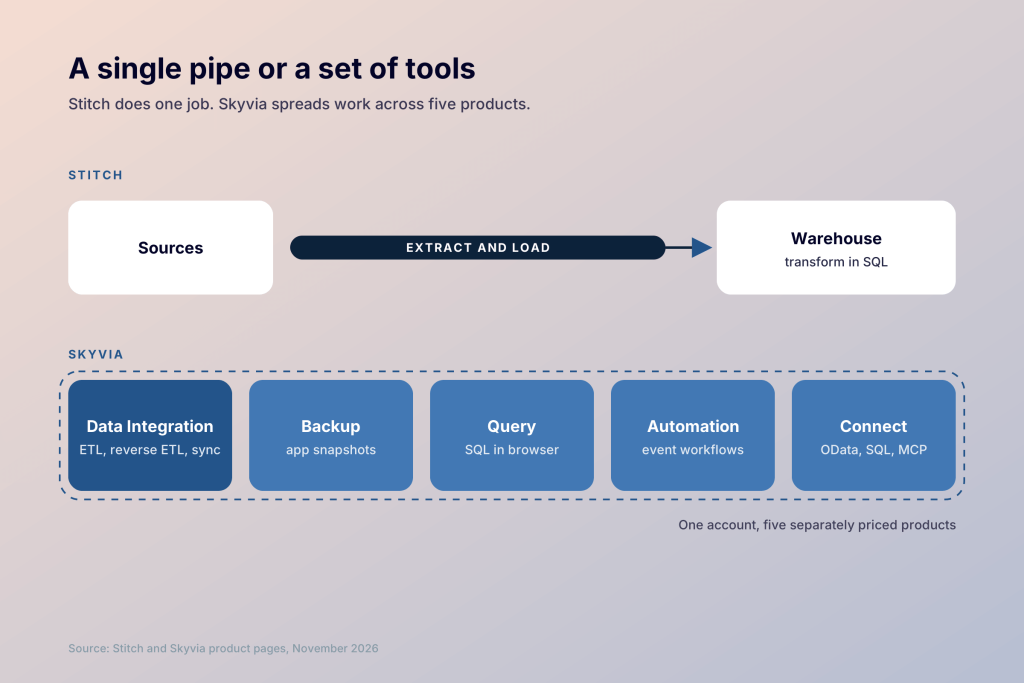
A practical way to choose is to list the data jobs your team runs in a typical month. If almost every job ends in a warehouse, Stitch keeps things simple. If the list also includes CRM backups, app-to-app syncs, or live data access for other tools, Skyvia covers more of it in one place.
Inside the Stitch vs Skyvia audience
Stitch is built for data teams that already run a cloud warehouse and model data in SQL or dbt. Its plans scale by row volume, from 5 million rows a month on Standard to 1 billion on Premium. Standard includes 5 users and 10 standard sources, while Advanced and Premium open up enterprise sources such as Oracle and Workday RaaS. Stitch is part of Qlik, which also offers a service to help Stitch customers move to Qlik Talend Cloud.
Skyvia draws a broader crowd. Its homepage counts “2,000+” customers, and the free plan lets smaller teams test a pipeline before paying. Skyvia’s lower plans keep scheduling simple, and its higher plans add the logic and frequency that data teams need.
Teams sit in the overlap when they have a warehouse but also run app-to-app work. For them, the choice turns on whether those extra jobs belong in the pipeline tool or somewhere else.
Stitch vs Skyvia data sources and how far they stretch
Stitch’s homepage says it connects to “130+” data sources, and its sources page lists 154 entries. Four of them, including Oracle, Google Analytics 360, and Workday RaaS, are tagged Enterprise and need the Advanced or Premium plan. For anything missing, the Import API lets you push data into Stitch directly.
Skyvia lists “200+ pre-built connectors” for cloud apps and databases, among other categories. It adds connectors steadily. September 2026 brought ClickHouse and Sage Intacct, among others, and October added Linear and updated several existing connectors, Snowflake included.
Stitch vs Skyvia destinations, from warehouses to live endpoints
Stitch sends data to 11 destinations. They include Amazon Redshift, Google BigQuery, Snowflake, Delta Lake on Databricks and Azure Synapse, plus PostgreSQL, MySQL, SQL Server and Amazon S3. Standard allows 1 destination, Advanced 3 and Premium 5.
Skyvia writes to warehouses and databases too, and it can also push data back into SaaS apps such as Salesforce or HubSpot. Its sync can keep two systems in step in both directions. Connect adds another kind of destination. It can publish a source as an OData or SQL endpoint for Excel and Power BI, or as an MCP endpoint for AI agents.
Reporting stays outside both products. Once the data lands, charts and dashboards still need a BI tool or a spreadsheet.
Stitch vs Skyvia pricing once volume starts to grow
Both vendors meter volume, but the steps between plans look very different.
Stitch Standard starts at $100 a month, with volumes from 5 million to 300 million rows a month. Advanced costs $1,500 a month and Premium $3,000 a month, both billed annually. Advanced brings 100 million rows, 3 destinations, unlimited users, and enterprise sources. Extra rows and destinations are available as add-ons. Stitch notes the prices are for the US only.
Skyvia’s Data Integration product has a free plan with 10,000 records a month and daily runs. Basic costs $79 a month billed annually or $99 monthly, Standard $159 or $199, and Professional $399 or $499. Paid plans let you pick a monthly record volume up to 200 million. Extra records cost $0.06 per thousand on Standard and $0.02 per thousand on Professional. Backup, Query, Automation, and Connect are priced separately, starting at $7, $15, $99, and $15 a month on annual billing.
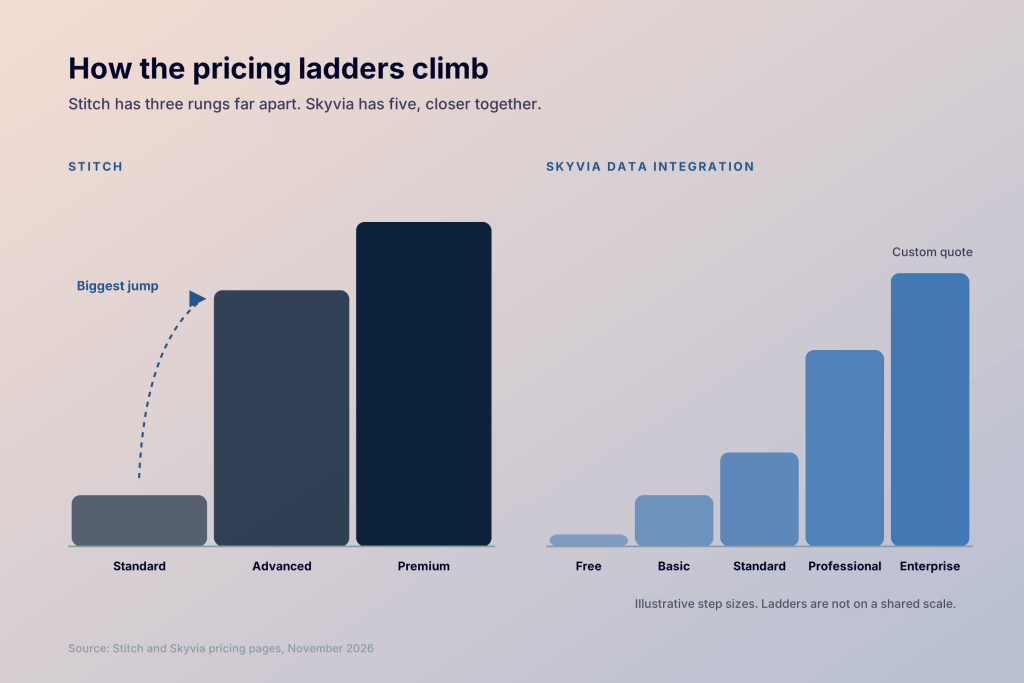
The gap matters most when a team needs enterprise sources or other Advanced features. Standard scales to 300 million rows a month on its own, but those capabilities start at $1,500 a month on Advanced. Skyvia’s steps are smaller, though Skyvia pricing adds up quickly once Backup or Connect sits on top of Data Integration.
Some teams move data mainly to build reports. For them, paying by rows or records can feel like paying for plumbing. Coupler.io, a reporting automation platform for business teams, prices by connected accounts. Plans start at $24/month billed annually, and the Pro plan covers 50 accounts with hourly refresh for $199/month on the same billing.
If that pricing logic fits your reporting stack, the Coupler.io team can map your sources to a plan.

Fit dozens of data accounts into one Coupler.io plan
Book a demoStitch vs Skyvia key features beyond moving rows
Stitch keeps its feature list focused on reliable loading. You set a replication frequency for each integration and choose which tables and fields to sync. Stitch’s pricing page lists post-load webhooks, Connect API access, and cron-based advanced scheduling on every plan. Its documentation tags all three as Advanced or Premium features, and Standard buyers should confirm with Stitch before counting on them. Extraction logs are kept for 7 days on Standard and 60 days on Advanced and Premium.
Skyvia spreads its features across the toolbox. Mapping covers expressions and lookups on higher plans. Data Flow handles multi-step transformations on Standard and up, and Control Flow orchestrates whole sequences of integrations on Professional. In October 2026 they added import replays, which retry failed records without rerunning the full job. A new Create and Load action also builds the target table on the fly.
The difference shows up on a busy day. Stitch users check that loads ran and move on to SQL. Skyvia users may spend more time in the tool itself, building flows and syncs that never touch a warehouse.
Stitch vs Skyvia AI and the MCP question
Stitch lists no AI features on its homepage or pricing page. Its role ends when the data reaches the warehouse, and any AI work happens in whatever tools you connect to that warehouse.
Skyvia has taken a few steps. Connect can expose data sources as MCP endpoints, which give AI agents secure access to real-time data. Skyvia says agents can also “perform actions,” such as adding a record to a CRM from chat. Its documentation includes a guide for using these endpoints with Claude. The same docs list connectors for model providers such as OpenAI and Google Gemini.
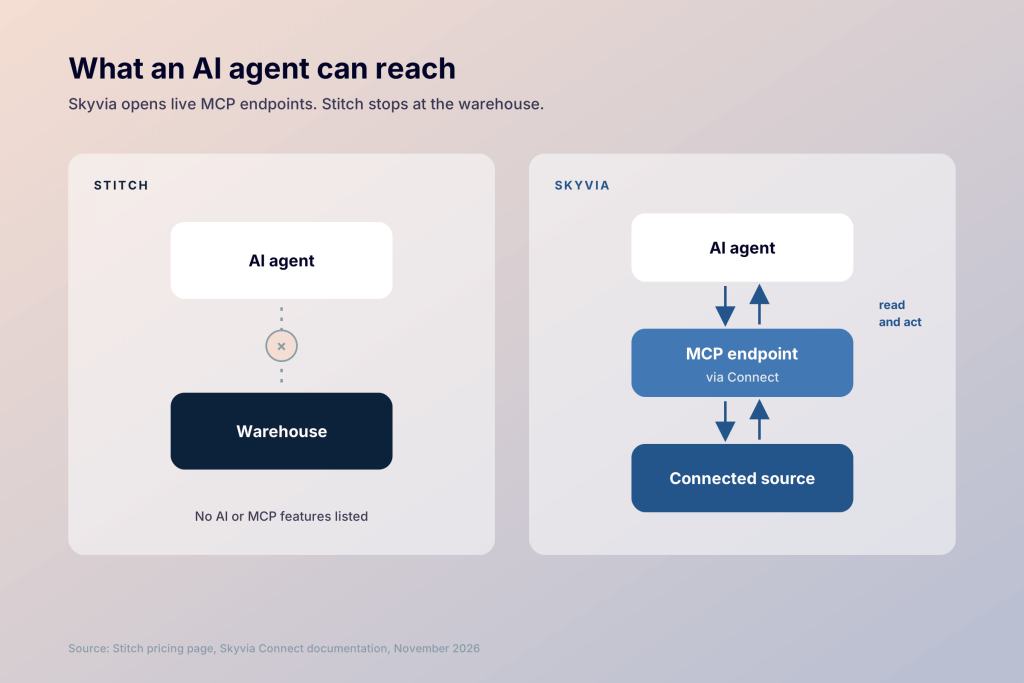
Skyvia’s MCP endpoints let an agent read and write records, but the agent still has to make sense of raw tables. Coupler.io takes a different route. Its Analytical Engine runs the calculations first, and Claude or ChatGPT then explains the already computed results. Its AI Agent answers questions inside Coupler.io itself.
A demo is the quickest way to see how that compares on your own data.
Ask Coupler.io AI about data spread across many sources
Try for freeStitch vs Skyvia security & stability, checked line by line
Stitch lists the longer set of credentials. Every plan includes “SOC 2 Type II and ISO 27001 compliance,” and the security documentation says SSO is available on all plans, with Azure AD, Google Workspace, and Okta among the supported providers. The pricing page also lists HIPAA BAA signing, site-to-site VPN, and AWS PrivateLink on every plan. The documentation is narrower. It ties HIPAA-compliant replication to Advanced or Premium, and VPN or PrivateLink to Premium.
Skyvia states it has completed a “SOC 2 Type 2 examination covering controls relevant to security, availability, and confidentiality.” It supports GDPR through a data processing agreement. Skyvia Cloud runs on Microsoft Azure in the United States and encrypts stored private data with AES-256. Admins can also enforce 2FA. Its security page doesn’t mention HIPAA or SAML SSO, though Skyvia’s tool comparison pages list HIPAA among its standards and ISO 27001 through its Azure hosting. We found no public offer of a HIPAA BAA.
On stability, Skyvia’s September 2026 release added clearer failure statuses in run history. Stitch keeps extraction logs for 7 to 60 days depending on plan. Neither vendor publishes an uptime figure on the pages we checked.
For regulated data, Stitch documents its HIPAA support more clearly, though Standard buyers should confirm it with Stitch sales. For comparison, Coupler.io publishes its SOC 2 Type II and compliance details openly.
Stitch vs Skyvia ease of use, support when a sync fails
G2 reviewers rate both tools highly. Stitch edges ahead on ease of use, 9.4 to 9.3. Skyvia leads on setup with 9.4 against 9.1, and on quality of support with 9.3 against 8.7. It also scores higher on meeting requirements, 9.4 to 8.6. These figures come from two separate G2 comparison pages, since G2 doesn’t compare these two tools directly.
Getting started is easy with both. Stitch offers a 14-day trial with no credit card. Skyvia has a free plan you can keep using at low volume. Stitch support runs by chat and email during regional business hours, with phone support and a dedicated customer success manager possible on some plans. Skyvia offers email support and business-hours live chat, plus a ticket portal with an AI assistant called SkyBot. Its standard email SLA starts at 5 hours for first-level issues. Priority support cuts that to 3 hours, though the support page and pricing page differ on which plans get it.
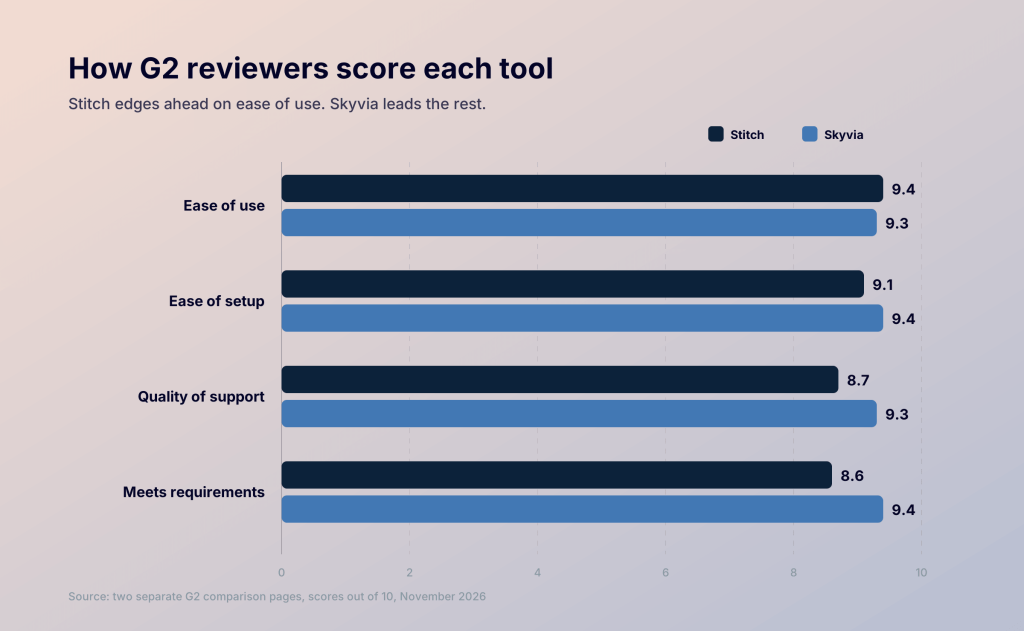
Day to day, Stitch has less to learn because it does less. Skyvia’s higher setup score suggests the first integration comes together easily, while its fuller toolset takes longer to learn.
For teams whose pipeline ends in a dashboard
Some teams compare Stitch and Skyvia when the real goal is a report. They need marketing and sales numbers in Data Studio, Google Sheets, or Power BI, refreshed on a schedule. Or they want to ask Claude about last month’s performance without exporting anything.
Coupler.io is built for that case. It’s a reporting automation platform with 400+ sources. Data lands in spreadsheets, BI tools, warehouses, and AI tools.
Here’s how it lines up with both tools for reporting-focused teams.
| Coupler.io | Stitch | Skyvia | |
|---|---|---|---|
| Pricing basis | Connected accounts | Rows per month | Records per month |
| Entry price | Free plan; paid from $24/month (annual) | $100/month | Free plan; $79/month (annual) |
| Sources | 400+, all on every plan | 130+ | 200+ |
| Destinations | Spreadsheets, BI tools, warehouses, AI tools | 11 warehouses and lakes | Warehouses, databases, apps, endpoints |
| Dashboard templates | 230+ | None listed | None listed |
| AI | AI Agent, AI Integrations, Skills | None listed | MCP endpoints, AI connectors |
Coupler.io won’t replace either tool for every job. Stitch keeps the lead on compliance-heavy warehouse loading. Skyvia keeps it on backups and two-way syncs.
Coupler.io’s strength is the last mile. Templates and AI analysis turn loaded data into answers without a separate BI project. When the warehouse was only ever a step toward a dashboard, that makes Coupler.io a practical Stitch alternative.
A short walkthrough shows how your sources would look as ready-made reports.
Turn multi-source data into Coupler.io dashboards
Try for freeMaking the call between Stitch and Skyvia
Choose Stitch if…
Your team runs a cloud warehouse and models data in SQL or dbt. You want a focused ELT pipe with SOC 2 Type II and ISO 27001 on every plan, plus documented HIPAA support on Advanced and Premium. Your volumes fit Standard, or Advanced’s $1,500 a month fits the budget.
Choose Skyvia if…
You want data loading and app backups under one account, with room to grow from a free plan. Two-way app sync, reverse ETL, or MCP endpoints for AI agents matter to your team.
Consider Coupler.io if…
Your pipelines mostly feed reports and AI analysis. You’d rather pay per connected account and start from ready-made dashboard templates.
Walk away from all three if…
You need high-volume CDC with enterprise orchestration across many teams. A platform like Fivetran or Qlik Talend Cloud may fit that job better. Open-source fans can weigh Airbyte, one of the better-known Skyvia alternatives, and our Skyvia vs Airbyte comparison shows where the two differ.