Supermetrics vs Power My Analytics (PMA) are closely matched, as both tools solve the same job: bringing data from marketing sources to reporting platforms. But depending on whether you’re a freelancer with one client or an agency with ten, the price difference becomes obvious when you add accounts, users, data sources, or destinations.
To make the choice clearer, I tested the tools across two workflows and compared their connectors, features, pricing, AI, security, and more below.
Key takeaway points
- Power My Analytics is the lower-cost Supermetrics alternative for small reporting setups, at $41.63 per month billed annually.
- Supermetrics has a broader source catalog, with 170+ connectors, but some of them are premium, which means access to them depends on the tier.
- Both cover the major PPC data sources used in weekly client reporting, such as Google Ads and Microsoft Advertising.
- Each tool offers report templates, but Supermetrics also includes data blending templates that combine and fix conflicting metrics behind the scenes.
Head-to-head at a glance
| Feature | Supermetrics | Power My Analytics |
|---|---|---|
| Billing model | Starting from $44/month billed yearly. Limits apply to sources, destinations, users, and accounts per source, etc. | Starting from $41.63/month billed yearly. Limits apply to the number of sources, accounts, destination types, AI capacity, etc. |
| Best for | Agencies and marketers that need a broader marketing source catalog | Freelancers and small agencies using common marketing sources |
| Free trial | 14 days, no credit card required. | 14 days, no credit card required. |
| Data sources | 170+ connectors. Some sources are tier-gated. | 80+ connectors |
| Destinations | BI tools, spreadsheets, data warehouses, AI tools. Data warehouses are only available on the Enterprise plan. | Google Data Studio, Claude, ChatGPT, Power BI, Tableau. On the Custom plan, BigQuery, SQL, FTP, etc. are additionally available. |
| Transformations | Custom fields, dynamic currency conversion, naming convention decoding, etc. | Data blending, filtering, sorting, custom calculations |
| AI-powered functionality | Agentic AI, AI integrations, Supermetrics Studio | AI Insights, AI integrations |
| Dashboard templates | ✅ 80+ | ✅ |
| Dataset templates | ✅ Data blending templates | ⛔ |
| Min. refresh frequency | Hourly | Daily by default according to PMA’s knowledge base (hourly with the Hourly Refreshes add-on) |
| Security | SOC 2 Type II, ISO 27001, GDPR, CCPA, encryption in transit and at rest | SOC 2 Type II, ISO 27001, GDPR, encryption in transit and at rest |
| Multi-client/agency features | Client workspaces, hierarchical workspaces, role-based access, team management, client account isolation, white-label reporting, cross-client benchmarking, budget-pacing alerts, APIs for custom analytics products | Multiple client accounts per data source, multi-admin access, account-connection workflows, managed data warehousing |
| Setup time for a first report | ~10-15 min. | ~10-15 min. |
| G2 | 4.4/5 (824 reviews) | 4.5/5 (83 reviews) |
Who the Supermetrics vs Power My Analytics audience is day to day
Power My Analytics audience is freelancers, small agency owners managing one or two clients, and in-house marketing-ops leads on tight budgets. Its Business tier starts at $41.63 per month billed annually and includes 5 live source connections and 5 total accounts. For more, you can purchase additional accounts or move over to another plan.
For report designers who are not ready to connect live accounts, the free Sample Data plan lets them build and test reports using sample data.
Supermetrics, instead, is better suited for agencies and marketing teams expecting their reporting needs to grow across more clients, data sources, and workflows. Its Starter plan costs $44 per month billed annually and comes with 3 public data sources of your choice, 1 core destination, 1 user, and 3 accounts per source. To raise those limits, you either need to buy extras or switch to a higher tier.
How each tool handles common workflows
I tested Supermetrics and Power My Analytics on a single-client report workflow, where setup speed matters, and an agency setup, where account limits and cost take priority.
Use case 1: Weekly paid search report for a single client
Imagine a freelance marketer manages one client and sends a weekly paid search report to Google Data Studio. The report pulls Google Ads and Microsoft Advertising data, covers about 20 to 50 campaigns, and refreshes once a week. The deliverable is a client dashboard with spend, clicks, conversions, CPC, and ROAS.
In Supermetrics, the setup starts from the destination. You choose the Data Studio connector, authorize the Google Ads data source right from there, then do the same for Microsoft Advertising. Select spend, clicks, conversions, CPC, and ROAS, then build the dashboard. A Google-Microsoft Ads report in Data Studio fits the Starter plan, since it stays within 3 public data sources and 1 core destination.
The workflow is straightforward while the report stays in one destination. But the clunky part appears when the client asks for the same figures in Google Sheets for invoice checks or weekly notes. Starter and Growth are built around one core destination, so you need to buy an extra one.
Using Power My Analytics, you connect your sources, create a dataset from their data, start creating a Data Studio report right from PMA’s hub, and select the dataset to connect. Your Data Studio report will open without any premade charts, and the fields from your dataset will be available in the right-hand Data column. Power My Analytics’ starting paid tier includes 5 live source connections and 5 total accounts, which is even more than this scenario needs.
Both Supermetrics and Power My Analytics also publish PPC reporting templates for Google Ads and Microsoft Advertising, among other sources. This reduces blank-page work in Data Studio and gives you a reusable starting layout.
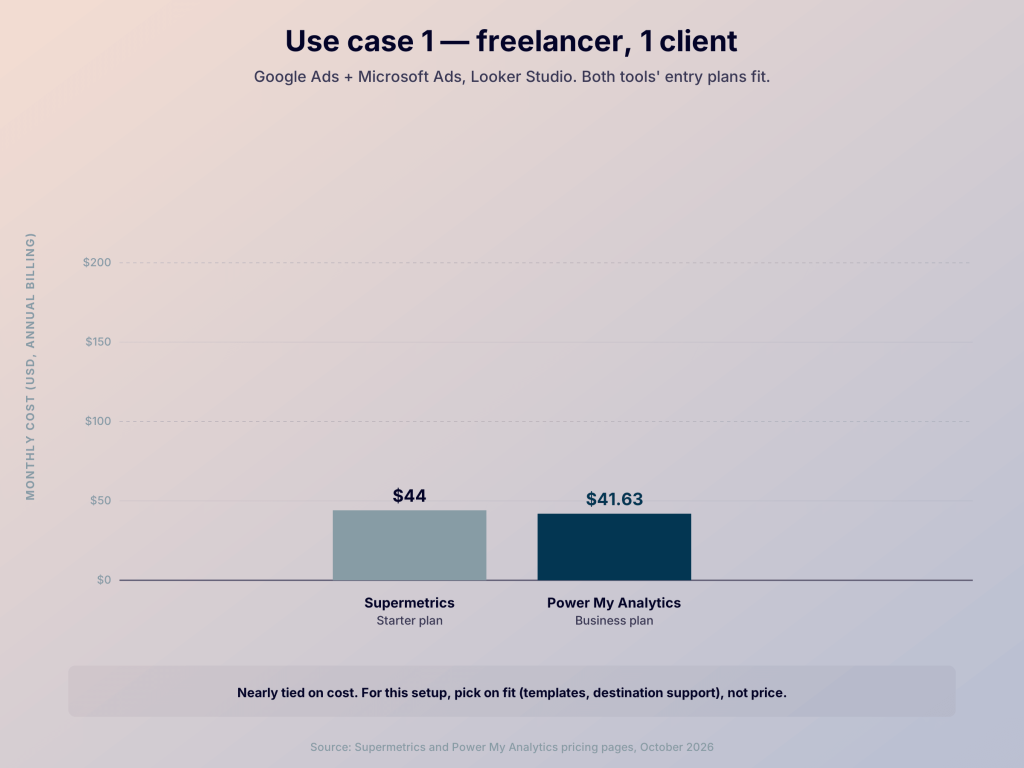
Verdict: PMA wins this scenario because the workflow is narrow, the destination is Google Data Studio, and the source mix is standard. Supermetrics becomes a better fit if the client adds less common marketing sources, needs more destination options, or wants the broader Supermetrics AI stack.
Use case 2: Multi-client reporting without breaking the budget
Now take a small agency with 5 to 10 clients. Each client uses Google Ads, Microsoft Advertising, Meta Ads, and LinkedIn Ads. The agency keeps one Data Studio dashboard per client. That creates 20 to 40 connected ad accounts across four source types. Reports rely on the same core metrics, but each client needs a separate view and account authorization.
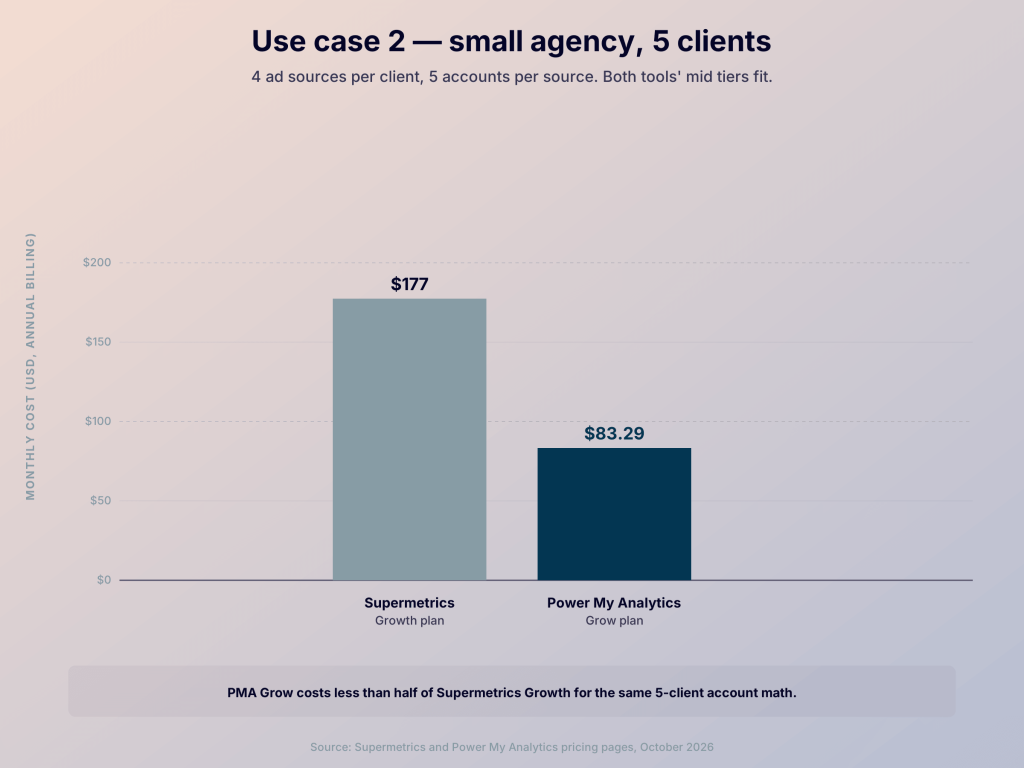
Let’s see what Supermetrics has to offer for this scenario: its Growth starts at $177 per month billed annually. It includes 6 public data sources, 2 users, up to 7 accounts per source, and 1 core destination. At 5 clients, 4 source types mean 5 accounts on each source. The account allowance fits, so the agency can keep the setup inside Growth.
At 10 clients, the same 4 sources create 10 accounts on each source. Growth caps that allowance at 7 accounts per source. So the agency needs to buy more capacity or a different plan. This is where Supermetrics becomes less predictable for a growing agency. The broader source catalog remains useful, but account volume is now part of the buying decision.
As for Power My Analytics, its Pro costs $166.63 per month billed annually. It comes with unlimited sources, 20 accounts per source, Sheets and Excel included, and priority support. 10 clients using 4 source types means 10 accounts per source, so this scenario stays below the Pro limit without a separate account expansion.
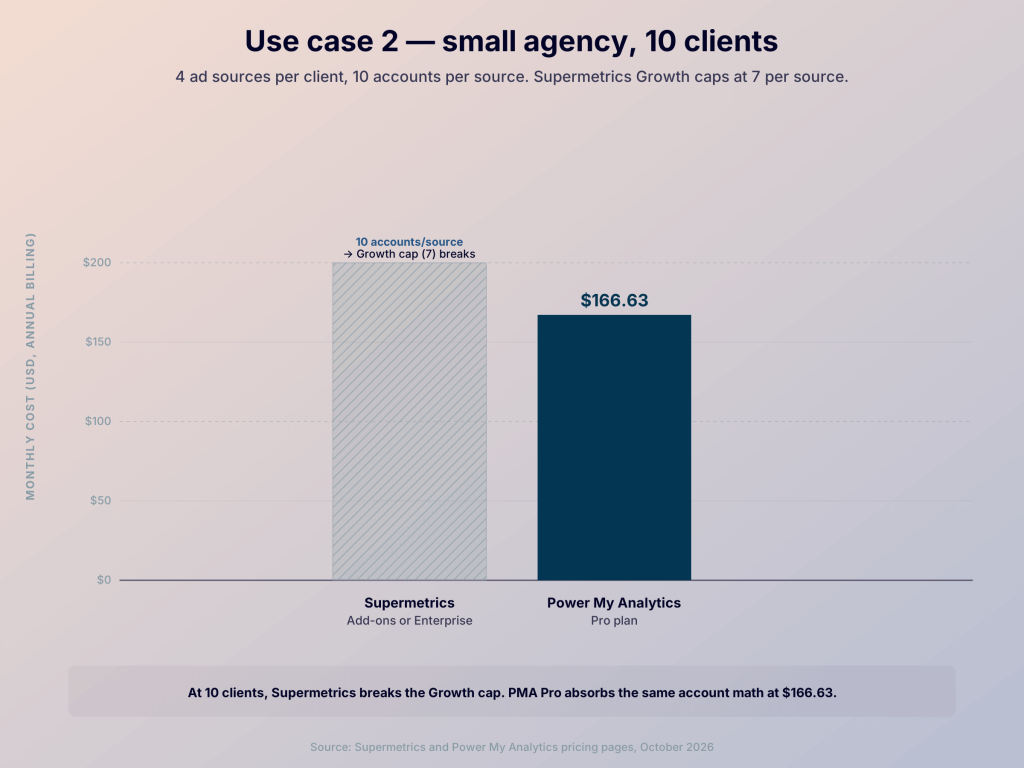
PMA’s commercial model is easier to forecast because the same source mix scales from 5 clients to 10 without crossing the account ceiling. But if one client later needs a niche marketing platform or a more complex transformation, you’ll spend more time working around Power My Analytics’ connector catalog or its simpler preparation layer. For agencies with standardized reporting, this trade-off is easier to accept.
Verdict: PMA is better on price and account capacity. However, Supermetrics is a more practical choice when the agency expects to add less common sources or needs more advanced data preparation.

Match your source stack to Coupler.io
Get a demoWhich Supermetrics vs Power My Analytics data sources matter most
Both tools cover the sources that matter for marketing analytics. Google Ads and Microsoft Advertising sit alongside Meta Ads, LinkedIn Ads, TikTok Ads, GA4, and other common marketing platforms.
Supermetrics has more than 170 connectors. As mentioned earlier in the article, availability of some connectors varies by plan.
Power My Analytics lists 80+ connectors. Its catalog also covers advertising, ecommerce, email, sales, SEO, social media, and web analytics.
For mainstream marketing reporting, data source coverage is broadly similar. But Supermetrics wins when the next source on your roadmap is unusual or less widely supported.
Supermetrics vs Power My Analytics destinations supported
In Power My Analytics, the Business tier comes with destinations such as Data Studio, ChatGPT, Claude, Power BI, and Tableau. Google Sheets and Excel start with Grow, while BigQuery, SQL, FTP, and other exports are only available on the Custom plan.
Regarding Supermetrics, its Starter and Growth plans offer one core destination. It supports Data Studio (Looker Studio), Google Sheets, Excel, Power BI, ChatGPT, Claude, and Copilot. Enterprise opens more options, including data warehouses like Snowflake and BigQuery.
For a freelancer who stays in Google Data Studio, that difference won’t matter, but for a team planning Power BI or warehouse delivery, Supermetrics is a better choice at the higher tier.
Coupler.io takes a different approach: all data sources and destination types are available across all plans, while the number of destinations varies. This gives access to the full range of integrations without upgrading just to unlock a specific source or destination.
Learn more about Coupler.io plans
View pricingHow Supermetrics vs Power My Analytics key features stack up
Supermetrics has the deeper data-preparation layer. It supports custom fields, data blending, currency conversion, and naming convention decoding.
For an agency managing 20 clients with different campaign naming conventions, Supermetrics can extract individual parts of campaign names and map coded values to consistent labels. This reduces manual spreadsheet work and makes it easier to group and compare campaigns across clients, though the relevant transformation rules still need to be configured.
Power My Analytics documents data blending, filters, sorting, and calculated fields, but doesn’t highlight a dedicated feature for decoding campaign naming conventions.
Both tools provide pre-built dashboard templates to help you quickly launch standard reports in the destination. Where Supermetrics differs is in its data blending templates. These are pre-configured setups that merge and harmonize data from multiple platforms at the connector level before it reaches your report.
For a simple weekly report, PMA’s smaller surface is easier to navigate. But Supermetrics is better for data that needs more shaping before it goes to the dashboard.
Where Supermetrics vs Power My Analytics pricing surprises buyers
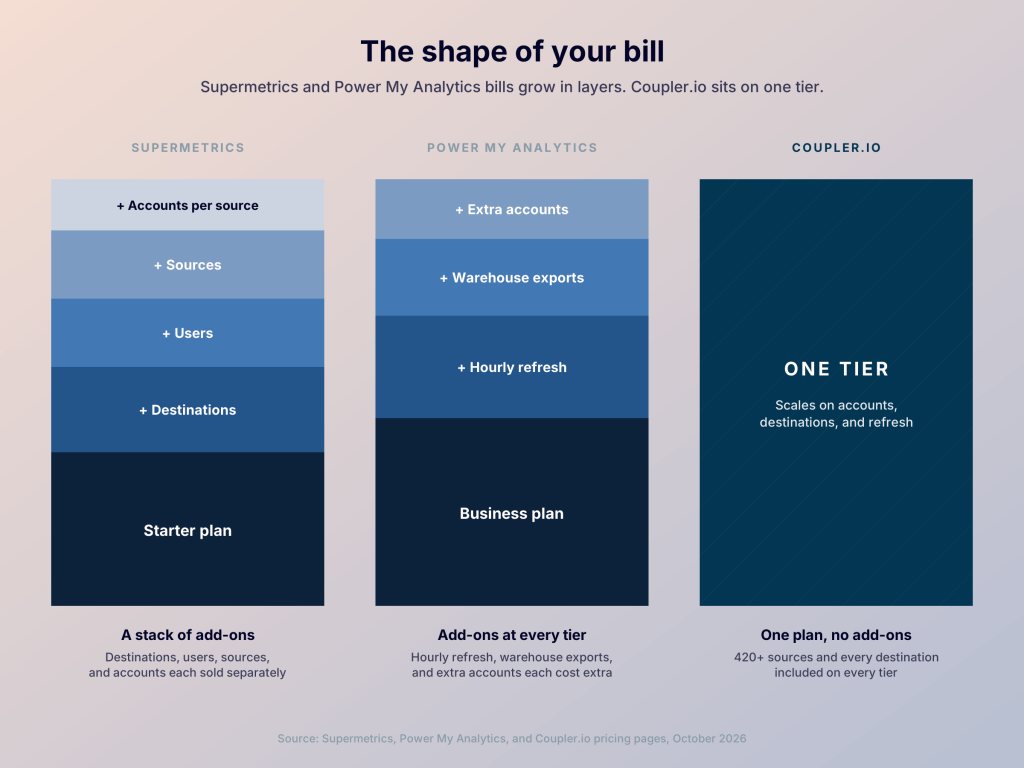
Supermetrics pricing starts at $44 per month billed annually. Starter includes 3 sources, 1 core destination, 1 user, and 3 accounts per source. Growth costs $177 and comes with 6 sources, 1 core destination, 2 users, and 7 accounts per source. On Starter, you can buy extra destinations and users, while on Growth there are also additional sources and accounts available for purchase. For advanced needs, Supermetrics offers the Enterprise plan with custom pricing.
Power My Analytics charges at least $41.63 per month billed annually on the Business plan, with 5 sources, 5 total accounts, 2 admins, 5 Google Business Profile (GBP) locations, and 50 AI Insights credits. On Grow, pricing is $83.29, and it includes unlimited sources, 7 accounts per source, 3 admins, 10 GBP locations, 100 AI Insights credits, as well as Sheets and Excel destinations. The Pro plan costs $166.63 and comes with 20 accounts per source, unlimited admins, and 100 GBP locations. You can additionally buy extra accounts on each of these plans or contact sales for the Custom tier.
Both Supermetrics and Power My Analytics have a free 14-day trial with no credit card required.
The main takeaway is that Power My Analytics offers better price-to-limit ratios at the mid-tier level. Its Grow plan costs less than half as much as Growth in Supermetrics while including unlimited sources, more seats, and the same 7 accounts per source. Their entry-level plans have similar prices, but the included source and account limits differ. Supermetrics may justify its higher price for teams that need its more advanced features or enterprise-level destination options.
Coupler.io is both a PMA and Supermetrics alternative, with all data sources and destination types available on every plan. Instead, it limits the number of accounts, users, and destinations. This makes it easier to choose a plan based on the scale of your reporting setup rather than whether a specific integration is included.
Skip the tier climb with Coupler.io
Book a demoHow Supermetrics vs Power My Analytics AI supports typical workflows
Supermetrics has moved further into AI-assisted reporting. Its current product includes AI chats, Supermetrics Studio, and agents that can build dashboards, explain performance, flag anomalies, and suggest actions. It also connects data to tools such as Claude, ChatGPT, and Gemini Enterprise for conversational analytics.
Power My Analytics has AI Insights for Data Builder tables and datasets, which looks for trends, comparisons, anomalies, and recommendations. However, they use monthly credits and currently analyze datasets and tables up to 10 MB. PMA’s MCP server connects data to ChatGPT, Claude, Copilot, etc., so you can query your marketing data in natural language.
For standard reporting, AI analytics results still need human review in both tools, but Supermetrics has the more developed in-product agent experience.
Coupler AI includes AI Agent, AI Integrations, and Skills. The AI Agent can assemble data flows and let you work with connected data. AI Integrations send data to external AI tools for analysis. Skills guide your AI tools or Coupler’s AI Agent to do recurring data tasks. Also, Coupler.io’s Analytical Engine runs calculations against connected data, after which the AI model only interprets the results rather than making up numbers.
Where Supermetrics vs Power My Analytics security & stability stand in real-world use
Supermetrics publishes SOC 2 Type II and ISO 27001 certifications, GDPR and CCPA compliance, encryption in transit and at rest, and claims a 99.9% uptime guarantee in its blog. Data sits in temporary storage by default, and it’s stored in Supermetrics’ encrypted databases only when a team opts into Custom Data Import or Storage.
Power My Analytics also has SOC 2 Type II and ISO 27001 certification and states GDPR compliance, as well as encryption in transit and at rest. Report-ready data is stored in an encrypted Google Cloud datastore, and Custom customers can use their own warehouse and select sovereign storage options.
The main difference is public reliability detail. Supermetrics reports an uptime figure, while PMA offers more explicit warehouse ownership options but no comparable uptime guarantee.
In practice: Supermetrics vs Power My Analytics ease of use and support
For ease of use, both tools can handle standard reporting without a lengthy setup. Allow around 10-15 minutes for a first report with a straightforward source and destination, although actual setup time depends on the configuration.
Supermetrics also provides 24/5 support. What I learned about Power My Analytics support is that most tickets receive a response within 12 hours, as stated in its knowledge base.
Looking beyond Supermetrics and Power My Analytics
If neither PMA nor Supermetrics meets your needs, check out Coupler.io, a data integration and AI analytics platform with 420+ sources across marketing, sales, product, and finance. It has 210+ dashboard templates as well as destinations including spreadsheets, BI tools, data warehouses, and AI tools.
Coupler AI includes the AI Agent, which works with connected data and helps you create data flows, AI Integrations, and Skills, which allow you to do repeatable analysis without re-explaining everything to AI again.
There’s an honest trade-off: a tiny workflow with one destination and a few accounts is cheaper in Supermetrics or Power My Analytics. Coupler.io makes more sense when the reporting stack is widening, and you want more flexibility in choice of sources, destinations, and dashboards.
| Feature | Supermetrics | Power My Analytics | Coupler.io |
|---|---|---|---|
| Starting price (billed annually) | $44/month | $41.63/month | $24/month |
| Free trial | 14 days, no credit card required. | 14 days, no credit card required. | 7 days |
| Data sources | 170+ connectors. Some sources are tier-gated. | 80+ connectors | 420+ connectors |
| Destinations | BI tools, spreadsheets, data warehouses, AI tools. Data warehouses are only available on the Enterprise plan. | Google Data Studio, Claude, ChatGPT, Power BI, Tableau. On the Custom plan, BigQuery, SQL, FTP, etc. are additionally available. | BI tools, spreadsheets, data warehouses, AI tools |
| AI-powered functionality | Agentic AI, AI integrations, Supermetrics Studio | AI Insights, AI integrations | AI Agent, AI Integrations, Skills |
| Dashboard templates | ✅ 80+ | ✅ | ✅ 210+ |
| Dataset templates | ✅ Data blending templates | ⛔ | ✅ ~100 |
| Min. refresh frequency | Hourly | Daily (hourly with the Hourly Refreshes add-on) | Every 15 min. |
Scope agency setup with Coupler.io
Book a demoVerdict: Which should you choose?
Consider Supermetrics if a broad selection of marketing-specific sources is the deciding factor. It fits agencies that need less common marketing connectors, destination-specific workflows, or a more mature AI layer.
Consider Power My Analytics if you work with major ad platforms and standard reporting destinations. Its Pro plan is also attractive when 5 to 10 clients need several accounts per source.
Pick Coupler.io if marketing reporting has expanded into sales, product, or finance. It also suits those who want to migrate from Supermetrics or PMA to have more dashboards or sources and destinations that aren’t tier-gated.
Next step: list the source accounts, destinations, and refresh cadence in your current setup, then compare the cost of the plans that meet those requirements.
For another side-by-side comparison, see a Coupler.io vs Supermetrics review.