Supermetrics vs Whatagraph comes up when an agency is tired of copying ad numbers into client reports. Both tools pull data from Google Ads, Meta, GA4 and other marketing platforms. Both sell to agencies, from small shops to global networks.
They finish the job in different places, though. Supermetrics moves your data into a tool you already report in, such as Data Studio, Google Sheets, Power BI or Claude. Whatagraph is the tool your clients open to read their report.
Below, we compare the two with prices as of November 2026, for one small agency and one large one. We also cover Coupler.io as a third option.
Key takeaways
- Different end results. Supermetrics delivers data to Data Studio, spreadsheets, Power BI or AI chats. Whatagraph delivers a branded report, live link or PDF email.
- Starting prices. Supermetrics Starter is $44 a month and Whatagraph Max is €699 ($812) a month, both billed annually. They are very different packages, compared below.
- Trying them out. Supermetrics offers a 14-day trial with no card. Whatagraph’s pricing page leads to a demo, while its help center says new accounts start with a 14-day Max trial.
- Large agencies. Past 20 accounts per data source, Supermetrics needs Enterprise. Past 50 connected accounts, Whatagraph needs extra credits at a price its pricing page doesn’t show.
- AI. Supermetrics brings your data into Claude, ChatGPT and Copilot and can edit campaigns from there. Whatagraph lists 13 ready-made IQ Agents that build and fix reports.
- Security. Supermetrics says it passes annual SOC 2 Type II audits and holds ISO 27001. Whatagraph shows an ISO 27001 badge, and none of its pages we checked mention a SOC 2 report.
- A third option. Coupler.io blends ad data with CRM, accounting and e-commerce data, with plans from $24 a month, billed annually.
Supermetrics vs Whatagraph side by side
This table covers the questions agencies ask first. The facts come from each company’s own website as of November 2026.
| Category | Supermetrics | Whatagraph |
|---|---|---|
| Best for | Teams that report in Data Studio, Sheets, Excel, Power BI or AI chats | Agencies that send branded reports to clients |
| How you pay | A package of destinations, data sources, accounts and users, plus extras | Credits, 1 for each connected account, plus an AI usage tier |
| Entry price | Starter from $44/month, billed annually | Max from €699 ($812)/month, billed annually |
| Top plan | Enterprise, quote only | Prime, quote only |
| Free trial | 14 days, no card | Demo first; help center lists a 14-day Max trial |
| Data sources | 170+, some Premium ones on custom packages | 60+ (68 on its integrations page), 23 on Prime only |
| Where data can go | 1 core destination on Starter and Growth; warehouses on Enterprise | Links, emails, exports and AI tools; Data Studio on Prime |
| Users | 1 on Starter, 2 on Growth (up to 5 with extras) | Unlimited |
| AI tools | AI chats, Studio, MCP server, Campaign Management | IQ Agents, Whatagraph IQ, IQ+, MCP server |
| Security | SOC 2 Type II, ISO 27001, GDPR, CCPA | ISO 27001 badge, GDPR, EU hosting |
| Support | Tickets, chat and email; success manager on Enterprise | Live chat; success manager on both plans |
A data connector or a client reporting platform
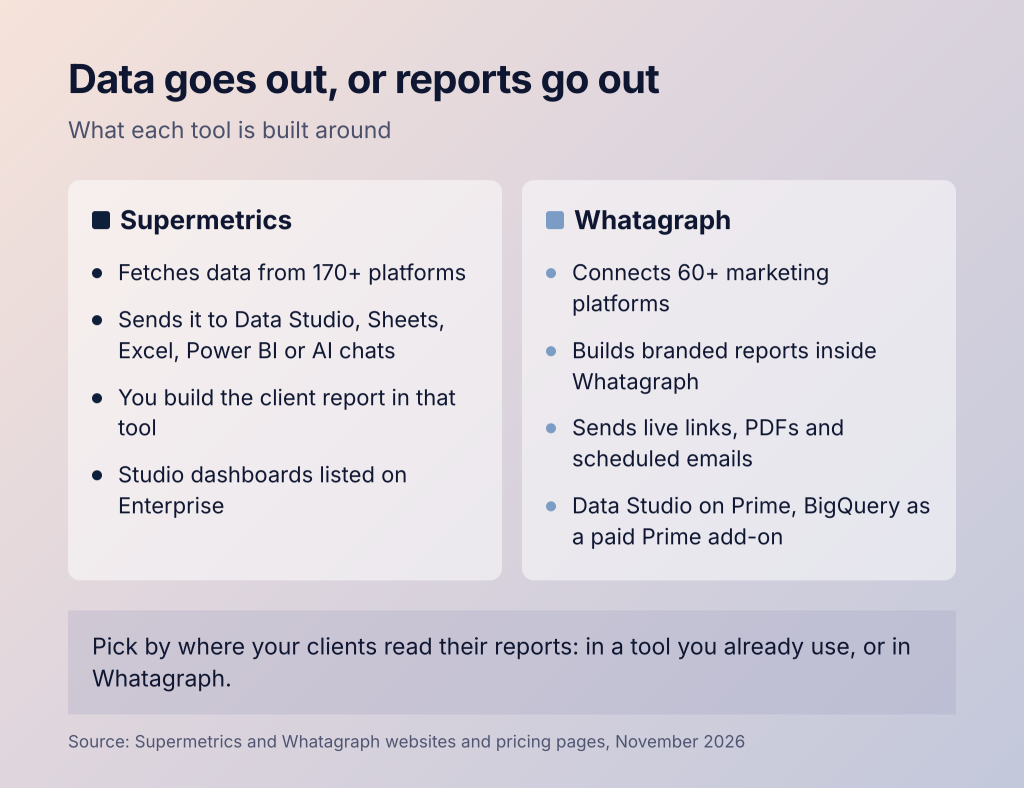
Supermetrics is a connector first. It says it fetches data from 170+ platforms. It puts that data where your team already reports, such as Data Studio, Sheets or Power BI.
Whatagraph is a reporting platform first. You build the client report inside Whatagraph with its templates and branding. Clients get a live link, a password-protected page or a scheduled PDF email.
Each has moved toward the other. Supermetrics Studio builds dashboards with AI and shares them by link or PDF, and the pricing page lists Studio on Enterprise. Whatagraph sends data to AI tools on every plan and to Data Studio on Prime.
If your clients already read reports in Data Studio or Sheets, Supermetrics fits that habit. If you want one tool that builds, brands and sends the report, pick Whatagraph.
Supermetrics vs Whatagraph pricing from 7 clients to 40
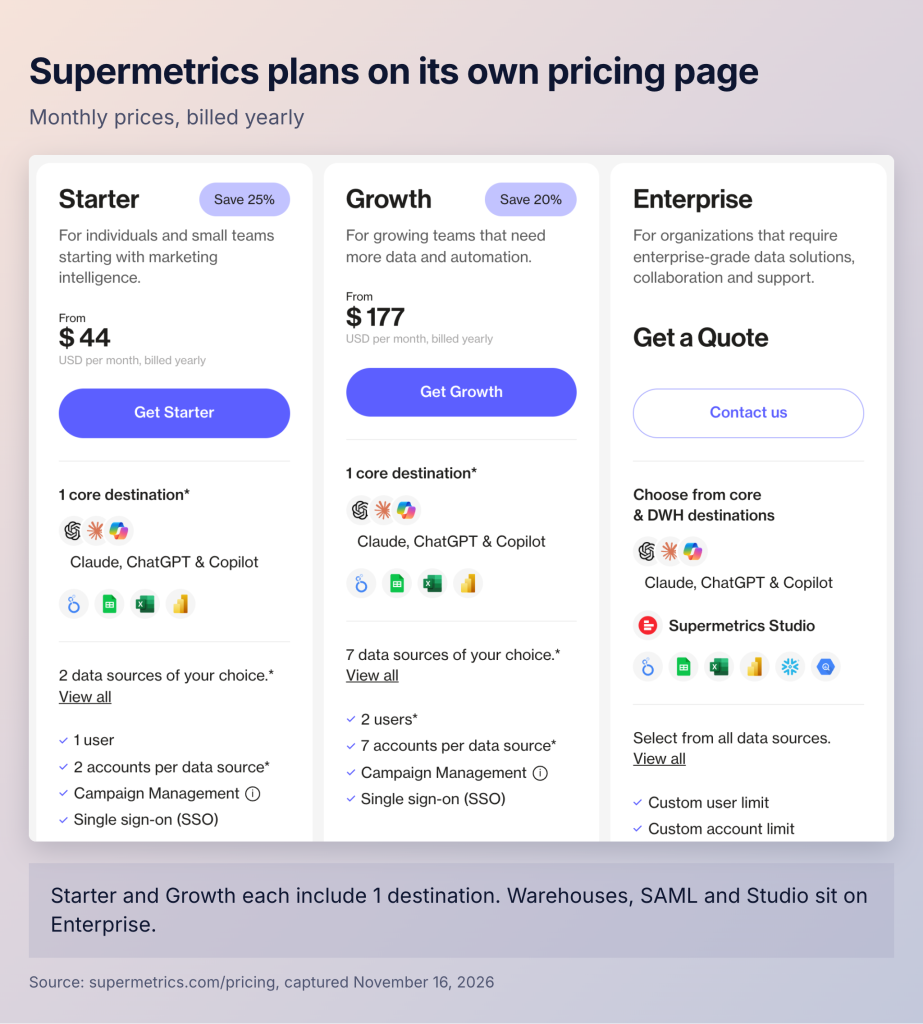
Both vendors publish an entry price and quote the top plan, but they count usage in different units. Supermetrics sells packages of destinations, data sources, accounts per source and users. Starter costs $44 a month, billed annually, with 1 destination, 2 data sources, 2 accounts per source and 1 user. Growth costs $177 a month with 7 data sources, 7 accounts per source and 2 users.
Growth extras cost $149 per destination, $99 per user, $37 per data source and $11 per account, at annual billing rates. Its docs say all data sources share one account limit. The pricing page caps Growth at 20 accounts and 5 users in total. Past that, you need a custom package or Enterprise.
Whatagraph sells credits. One credit covers one connected account, such as one Facebook Ads account or one GA4 property. Max costs €699 a month, billed annually, which its USD view shows as $812. It includes at least 50 credits, unlimited users and unlimited reports.
You can buy extra credits until you reach the next plan level, but the page doesn’t show their price. AI agent use is a second part of the bill. Base usage comes with both plans, and the Mid and Heavy tiers are priced on a call.
Seven clients on published prices
Take an agency with 7 clients. Each runs Google Ads, Meta Ads and GA4, so that’s 3 data sources and 21 accounts. Three people build the reports.
Supermetrics. Starter allows 1 user and sells no extra users, so Growth it is. Its 7 accounts cover 7 clients on each platform, with Data Studio as the destination. The third person adds $99, for $276 a month, billed annually. Client 8 needs extra accounts at $11 each, and the page doesn’t say whether one extra covers all three sources.
Whatagraph. Max fits with room to spare. The 21 accounts use 21 of its 50 credits, and the branded reports are included. Client 17 brings the total to 51 credits, and the pricing page doesn’t show what extra credits cost.
In this setup, the bills are $276 and €699 ($812) a month, both billed annually. Whatagraph’s includes the client reports, while Supermetrics’ needs a reporting tool such as Data Studio.
Forty clients across several offices
Now take an agency with 40 clients on the same 3 platforms: 120 accounts and 12 people in 2 offices. It has four needs. Each team sees only its own clients, staff sign in with SAML, data is copied to BigQuery, and data stays in the EU.
Supermetrics. Forty accounts per source and 12 users are past Growth’s caps, so this is Enterprise. Its plan card lists multiple teams, SAML single sign-on, data warehousing, and data residency and region control. Client Account Isolation, in beta, limits each workspace to its own accounts.
Whatagraph. The 120 credits go well past Max’s 50, and Whatagraph doesn’t publish where extra credits end and Prime begins. Prime includes Data Studio transfer, an enterprise SLA and priority support. BigQuery transfer and SAML are paid Prime add-ons, and the EU data center comes with both plans. Ask how it limits each team to its own clients, since the pricing page doesn’t say.
At this size, both bills are quotes. Ask both vendors to quote the same client list and the same four needs.
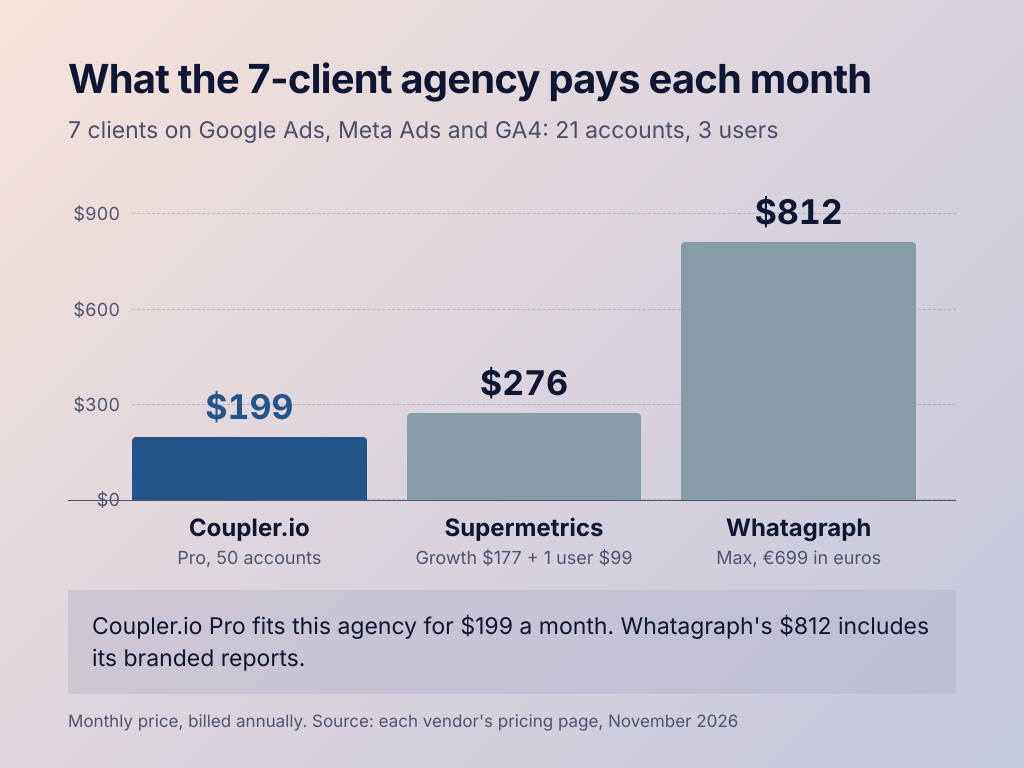
The same agencies on Coupler.io. The 7-client agency fits the Pro plan: 50 accounts, unlimited users and hourly refresh for $199 a month, billed annually. Up to 5 clients fit the Active plan’s 15 accounts for $99 a month. Past Pro’s 50 accounts, you can buy extra accounts through support or move to the agency plan. That plan adds a workspace per client, single sign-on and an enterprise SLA, priced by quote. Compare plans on Coupler.io pricing, or read Coupler.io vs Supermetrics.

Get a multi-client dashboard built around your data
Book a demo with Coupler.ioWho the Supermetrics vs Whatagraph audience really is
Both sell to agencies of every size. Supermetrics says 200,000+ companies in 120 countries use it. Its agency page says it grows “from 5 clients to 5000” and names Dentsu, Publicis, Omnicom and Havas as users.
Whatagraph says 1,000+ marketing agencies and brands use it, and its pricing page speaks to agencies and multi-location operators. Havas and McCann are among the logos on its About page.
A 5-person agency fits Supermetrics’ self-serve plans more easily. Whatagraph’s entry price and unlimited users suit larger account teams, and networks get a quote from either vendor.
Supermetrics vs Whatagraph data sources across ads, CRM and e-commerce
Both cover the main ad, analytics, social and SEO platforms. They differ on CRM and e-commerce sources, and on which plan includes them.
Supermetrics says it connects to 170+ data sources, and its catalog covers paid media, social, SEO, web analytics, e-commerce, email and sales. Premium sources, such as Adobe Analytics, Salesforce and The Trade Desk, need a custom package.
Whatagraph lists 60+ integrations on its homepage and 68 on its integrations page. Its help center lists 23 Premium integrations for Prime only, including Shopify, HubSpot, Salesforce, Snowflake and the custom API. So a Max customer who wants Shopify or HubSpot next to ad spend needs Prime.
Check your sources against both catalogs, or see our Supermetrics alternatives and Whatagraph alternatives.
Where Whatagraph vs Supermetrics destinations send your data
A destination is where your data goes after the tool collects it. For Supermetrics, destinations are the product. For Whatagraph, the report is the product, and most destinations sit on Prime.
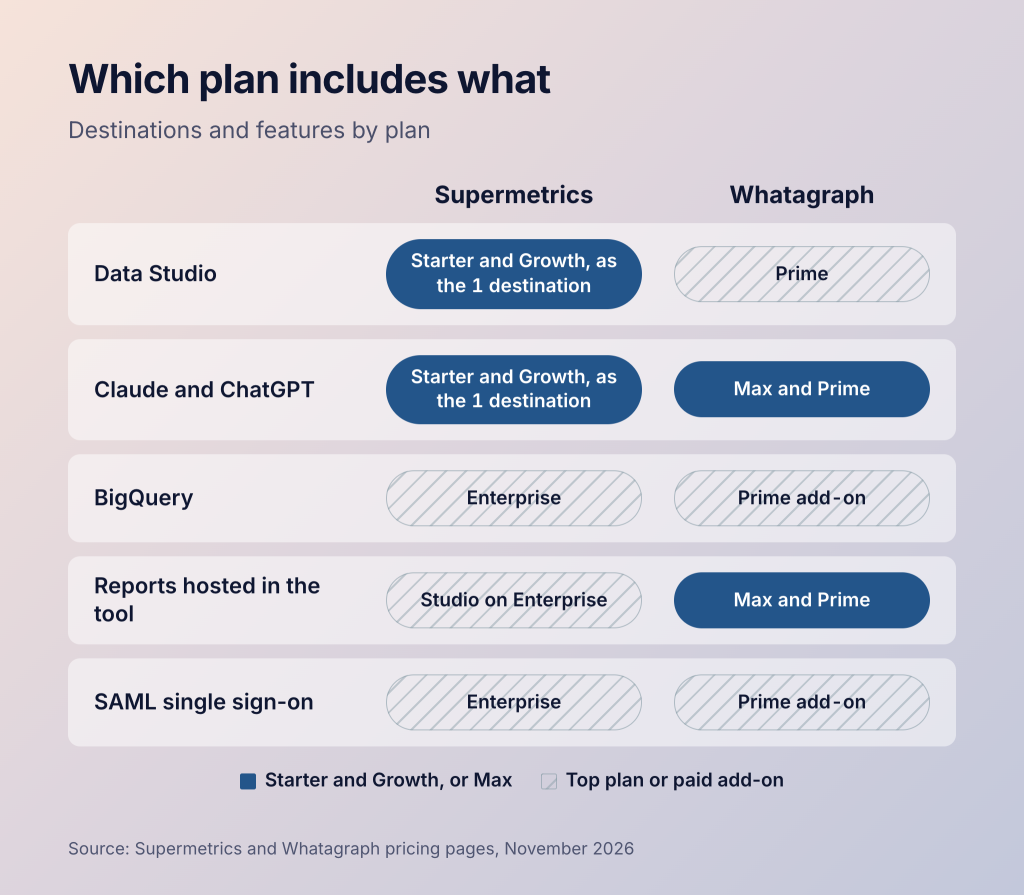
Supermetrics lists Data Studio, Google Sheets, Excel and Power BI as core destinations. AI chats count as one more, covering Claude, ChatGPT and Copilot. Starter and Growth include 1 destination, and Growth can reach 4 with extras. BigQuery, Snowflake and Studio are on Enterprise.
Whatagraph sends reports as live links and scheduled emails with PDF and Excel files. On every plan, AI tools can read your data through its MCP server. MCP is a standard way to connect data to AI assistants like Claude. Data Studio transfer is included on Prime, and BigQuery transfer is a paid Prime add-on. None of the Whatagraph pages we checked list Google Sheets as a destination.
Supermetrics vs Whatagraph key features for client work
Whatagraph’s features center on producing reports for many clients. Supermetrics’ center on getting data out and acting on it. We counted 54 templates on Whatagraph’s templates page. It lists custom branding and linked report templates on both plans, plus goals and alerts, currency conversion and custom metrics. A custom report domain is a Prime add-on.
Supermetrics announced Campaign Management on November 10, 2026, and its pricing page lists it on all three plans. From an AI chat, you can create and edit campaigns on 7 platforms, including Google Ads, Meta, TikTok and LinkedIn. New campaigns start paused, and every change is logged. Its agency page also mentions white-label reporting without naming a plan. Data transformations inside Supermetrics, such as blends and custom metrics, are on Enterprise.
Agents, chats and MCP in Supermetrics vs Whatagraph AI
Supermetrics’ AI works inside the AI tools your team already uses. Whatagraph’s AI works inside Whatagraph on your reports.
Supermetrics’ AI chats bring your marketing data into Claude, ChatGPT and Copilot, and chatting there uses no credits. Starter includes 1,000 AI credits and Growth 4,000, for AI features such as Studio. Its MCP page headline offers access “with any subscription”, while the FAQ below ties it to plans with Data API access. Ask which applies to your plan.
Whatagraph announced IQ Agents on September 29, 2026. An AI agent is a helper that carries out tasks for you, such as building or fixing a report. Whatagraph lists 13 ready-made agents, such as Sweep, which applies the same edit across many reports at once. A person approves their changes to reports, and only admins and managers can use them for now.
Whatagraph says the agents run on Google’s Gemini 3.8 Flash, with Base usage on both plans. IQ+ on Prime adds a chat that clients can use on shared reports. Its MCP server reads data on every plan, and editing works on plans that include those tools.
Where Coupler.io fits with your AI. Both vendors point their AI at marketing data. With Coupler.io, your AI works on data blended from ads, CRM, accounting and e-commerce apps. The AI asks, Coupler.io calculates, and every query is logged, so each number can be checked. AI Integrations bring that data into Claude and ChatGPT, and the AI agent sets up data flows from a description. If you want an AI chat that edits ad campaigns, Supermetrics is the better fit.
Let Coupler AI do the data work for you
Tell Coupler AI what you need to know, from which source, and how often. It connects your account, sets up the data flow, keeps it refreshed, and lets you analyze the results inside Coupler.io or another AI tool.
Try for free
Supermetrics vs Whatagraph security & stability on paper
Both process data in the EU. Supermetrics publishes more security detail.
Supermetrics’ security page says it passes annual SOC 2 Type II audits and holds ISO 27001. SOC 2 is a common security audit for software companies. It follows GDPR and CCPA and processes data on AWS and Google Cloud servers in the EU. SAML single sign-on and data residency controls are on Enterprise. Its services page claims 99.9% uptime, but we found no published SLA.
Whatagraph’s security policy says it follows GDPR and processes data in the EU, on Google Cloud and AWS, with AES-256 encryption. ISO 27001 appears as a footer badge, and the policy names audits only for its cloud providers. None of the Whatagraph pages we checked mention a SOC 2 report for Whatagraph. SAML is a Prime add-on, and Prime includes an enterprise SLA.
Supermetrics launched in 2013 and says it has 300+ staff. Whatagraph’s site gives 2015 as its founding year, and it raised a $7.2 million Series A in 2021. If your clients send security questionnaires, ask both for certificates and audit reports before you sign.
Whatagraph vs Supermetrics ease of use, support and trials
Supermetrics is easier to try on your own. Whatagraph gives more hands-on help once you’re a customer.
Supermetrics lets you try any connector or destination for 14 days without a card. Whatagraph’s pricing page offers only a demo, though its help center says “All new accounts start with a 14-day Max trial”.
Supermetrics’ pricing page promises “24/7 coverage with tickets, chat & email”, while its services page says 24/5. A customer success manager comes with Enterprise. Whatagraph includes live chat and a dedicated success manager on both plans, and Prime adds tailored onboarding.
Whatagraph’s contracts run 1 year and renew unless you cancel at least 30 days before renewal. Neither vendor refunds the rest of a paid period when you cancel.
Where Coupler.io fits if neither tool matches
Some agencies want every plan’s price and limits published before they buy. Others need a client’s Shopify orders or HubSpot deals next to ad spend.
Coupler.io is a reporting automation platform for business teams. It automatically collects and blends data from 400+ apps and keeps it up to date for your reports and AI. For agencies, that means client reports that blend Google Ads, Meta and GA4 with the client’s Shopify or CRM data. Each report lands in the tool that client already uses. Coupler.io holds SOC 2 and ISO 27001, follows GDPR, and is rated 4.9/5 on G2 and Capterra.
| Area | Coupler.io | Supermetrics | Whatagraph |
|---|---|---|---|
| Prices shown online | Every plan except Custom | Starter and Growth, plus extras | Max starting price only |
| Entry price | $24/month, billed annually | $44/month, billed annually | €699 ($812)/month, billed annually |
| Free trial | 7 days | 14 days | Demo, then a 14-day Max trial |
| Sources | All sources on every paid plan: ads, CRM, accounting, e-commerce | Marketing and sales platforms | Marketing platforms; CRM and e-commerce on Prime |
| Destinations | Sheets, Data Studio, Power BI, BigQuery, AI tools (1 on Starter, 3 on Active, unlimited on Pro) | 1 core destination, up to 4 on Growth; warehouses on Enterprise | Reports in Whatagraph; Data Studio on Prime |
| Users | Unlimited from Active | 1 to 5 before Enterprise | Unlimited |
| Security | SOC 2 Type II, ISO 27001, GDPR, HIPAA | SOC 2 Type II, ISO 27001, GDPR, CCPA | ISO 27001 badge, GDPR |
Coupler.io doesn’t replace everything here. Whatagraph keeps its lead on branded client reports, with linked templates and scheduled PDF emails built in. Supermetrics is the better fit for editing campaigns from an AI chat, which Coupler.io doesn’t offer. See Coupler.io vs Whatagraph, the Supermetrics migration page, or check your sources in the connector directory.
Blend client ad spend with revenue in one report
Start your free 7-day trialPicking between Supermetrics and Whatagraph
Pick Supermetrics if
Your clients already read reports in Data Studio, Sheets or Power BI, and you have up to 20 accounts per platform. Larger agencies can get a warehouse, SAML and data residency in one Enterprise contract. Pick it too if you want to manage campaigns from Claude.
Pick Whatagraph if
A branded report is what you sell, and you want one tool to build, send and fix it. Unlimited users and a success manager on both plans suit large, multi-office account teams.
Consider Coupler.io if
Your client reports need ad spend next to sales, CRM or finance data. Every paid Coupler.io plan includes all 400+ sources, from Starter up. Supermetrics limits sources by plan, and Whatagraph keeps CRM and e-commerce sources for Prime. You also want to see full prices before you talk to sales.
Look elsewhere if
You want one marketing data hub with measurement tools, which points to Funnel.io. A data team building models in a warehouse may prefer Fivetran, and networks needing governance across markets can look at Adverity. Our Supermetrics pricing and Whatagraph pricing guides go deeper on each bill.