How to Export Data from TikTok Shop: Orders, Sales, Finance and More

If you run a TikTok Shop for a brand or a client, someone always wants the numbers. Seller Center gives you one manual download at a time, from four different sections.
One export takes a few minutes. Repeating it every week for every shop is what takes the time. This guide shows how to export data from TikTok Shop on a schedule with Coupler.io, just by asking Claude or ChatGPT. It also covers Seller Center exports and the API, and the extra work each one takes to get right.
Key takeaways
- Seller Center works for a one-off file. Weekly reports are where manual exports eat your time.
- Ask Claude or ChatGPT to set up a scheduled TikTok Shop export with Coupler.io, then add your Shopify and Amazon sales to the same report.
- GMV counts orders that were later cancelled or refunded, so it runs higher than what you get paid. Your payouts are in the settlement report.
- Finance data comes from Seller Center’s finance exports, and affiliate data from Affiliate Center or the API.
How to export TikTok Shop sales data automatically with Coupler AI
Coupler.io is a reporting automation platform for business teams. It automatically collects and blends data from 400+ apps and keeps it up to date for your reports and AI. You set up a TikTok Shop export once, and it refreshes with the same filters every time, next to your other sales channels if you need them.
To get started, sign up for a free Coupler.io account and connect your stores. Then add the Coupler.io connector to Claude, so you can set everything up from a chat (ChatGPT and Gemini CLI work the same way).
In the steps below, I use the example of a beauty brand setting up a weekly report in Google Sheets, with its Shopify and Amazon sales next to TikTok Shop and the same data available in Claude for analysis.
Step 1: Set up a scheduled TikTok Shop export
Open a new chat and type what you need:
“Export my TikTok Shop orders with line items for the last 90 days and blend them with my product data, so each item sold shows its current price and stock. Send it to Google Sheets and Claude, and refresh it every Monday at 7 am.”
Coupler AI adds both datasets as data sources and sets the shop, start date, destinations, and schedule. To match each item sold to its product, it writes a SQL transformation that joins the two on SKU ID.
You can read and edit the query before the first run, and the join happens in Coupler.io before the data reaches your sheet. If anything is unclear, it shows a summary and asks you to confirm.
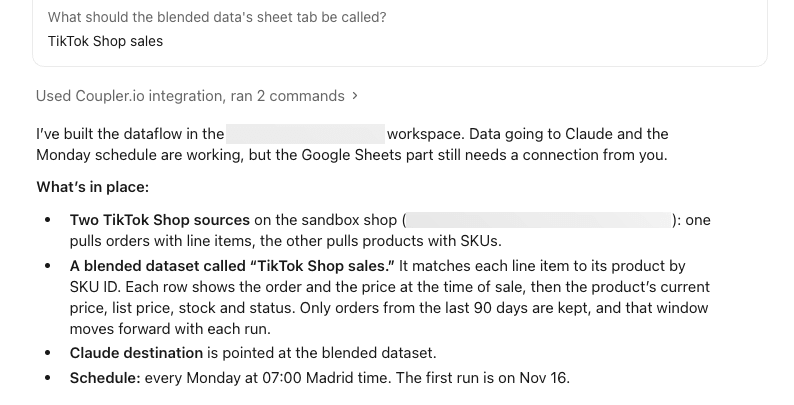
That prompt also sets your TikTok Shop sales data update frequency. Coupler.io can refresh anywhere from monthly to every 15 minutes, depending on your plan.
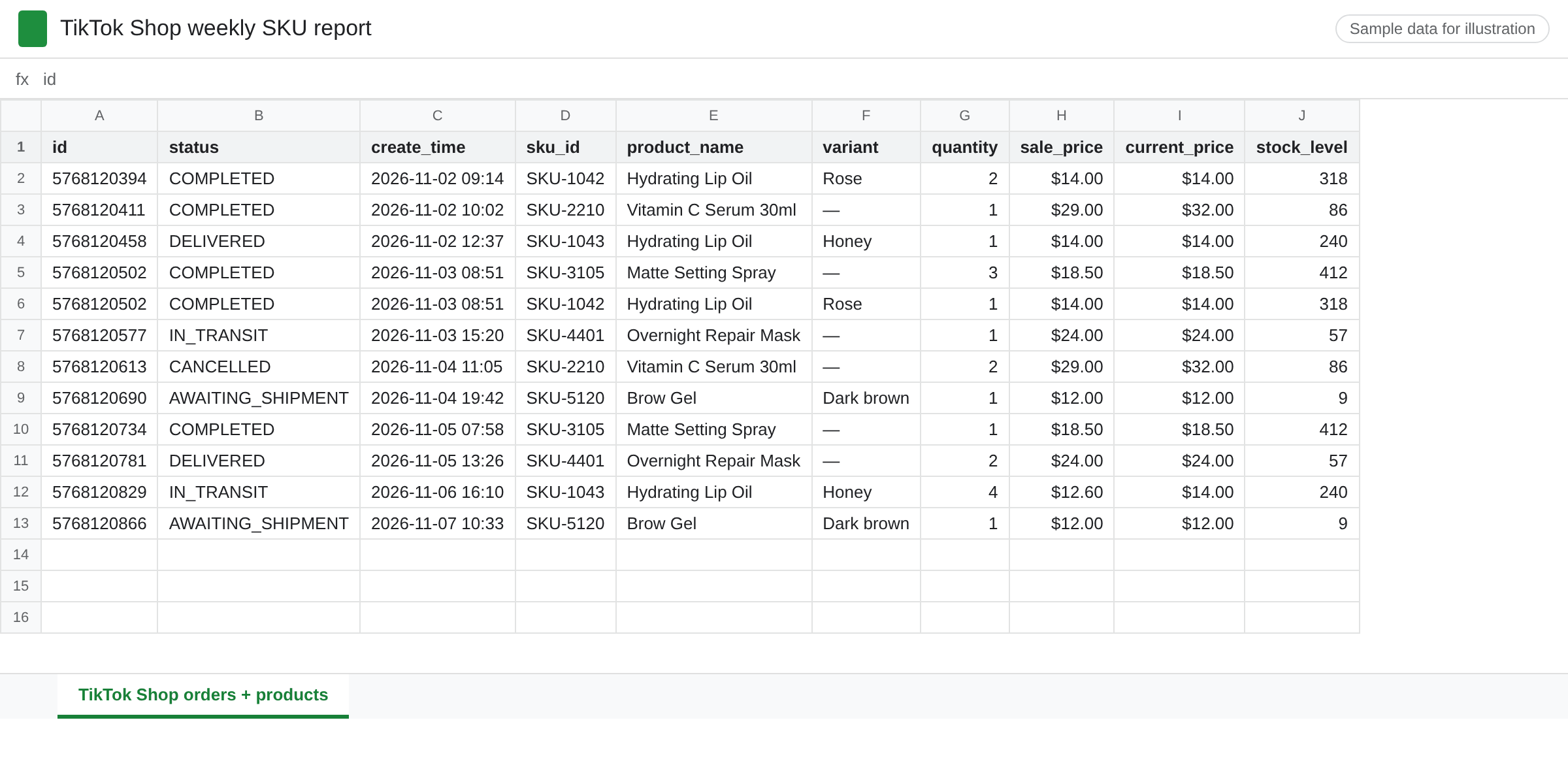
Your sheet fills with one row per item sold, with the product’s price and stock level next to it, and the same data is ready in Claude. From then on, both refresh every Monday without anyone opening Seller Center.
Step 2 (optional): Compare sales across TikTok Shop and other channels
In the same chat, ask:
“Add my Shopify and Amazon Seller Central orders to this flow and match their columns to TikTok Shop.”
Coupler AI adds each store as a data source and maps the order fields to shared columns, so you can compare the same SKU across channels. Everything refreshes on the same schedule, and you can add WooCommerce or eBay the same way.
Because Claude is a destination too, you can ask for the weekly report itself, or TikTok Shop data analytics like which SKUs had high traffic but low conversion. Coupler.io runs the query on the full dataset, and the AI explains the result.
For a report you run every week, save its steps and metrics as a custom AI Skill, so Claude builds it the same way each time.

Blend TikTok Shop and 400+ data sources with Coupler.io
Book a demoWhat Coupler.io exports from TikTok Shop
Two choices shape every export: which dataset answers your question, and which tool your team will read it in.
TikTok Shop data integration capabilities for SKU, order, and shop reports
The TikTok Shop connector pulls six datasets. Pick the one that matches the question your report answers:
| Dataset | What’s in it | Use it to |
|---|---|---|
| Orders | Products, pricing, payment status, fulfilment details | Track order volume and gross sales over time |
| Orders with line items | Variants, quantities, and price breakdowns per order | Analyze sales by product, SKU, and variant |
| Products (with SKUs) | Titles, descriptions, prices, inventory levels | Compare listings and stock |
| Shop performance report | Sales, traffic, customer engagement | Monitor overall shop traffic and sales |
| Products performance report | Sales, views, conversion rates | Find products with strong or weak conversion |
| SKU performance report | Sales, inventory levels, engagement per SKU | Compare individual SKUs |
Orders with line items and the SKU performance report both work at product level, but they aren’t interchangeable. Line items are transactions, one row per item sold with its product ID, so you can regroup sales any way you like. The SKU report is already summed for the dates you pick, and it adds engagement metrics that orders don’t have.
None of the six show what TikTok actually pays you. For that, you’ll need the settlement report.
Not included: affiliate and creator data, settlements, and payouts. For those, use Seller Center’s finance exports or the TikTok Shop API.
You can add TikTok Ads and TikTok Organic data to the same data flow, so ad spend from TikTok Ads Manager, video metrics, and sales share one dataset.
Where to send your TikTok Shop data
Pick the destination by what you’ll do with the data:
- Claude or ChatGPT, to ask which products sold most last month or which SKUs get traffic but don’t convert, without uploading files.
- Google Sheets or Excel, for quick exports and reports you share with colleagues. See TikTok Shop to Google Sheets.
- Data Studio or Power BI, for dashboards that track shop performance over time.
- BigQuery, Snowflake, or PostgreSQL, to keep TikTok Shop history with your other business data.
One data flow can feed several of these at once, so a team on Microsoft tools can get the same data in Excel and Power BI while you check it in Claude.
Other ways to export TikTok Shop data: Seller Center, connected tools, and the API
These three routes work for one-off files or a setup you already have, but each takes more manual work to repeat.
Manual export from Seller Center
For a one-off file, Seller Center is the quickest route. A TikTok Shop Seller Center export (orders, CSV) takes three steps:
- Go to Orders → Manage Orders and filter by status or date.
- Click Export Orders, pick the order range and file format, then click Export.
- Download the file from Export History.
Product data comes from the bulk tools. Go to Products → Manage Products → Bulk action, which some accounts label Batch Tool or Bulk Edit Products. Select your products and download the template for the details you need, such as price, quantity, and SKU. Match it to orders on product ID and SKU ID.
For a TikTok Shop Seller Center analytics export (CSV), go to Data Compass → Product Analytics and open a product’s Details page. The export button in Key Metrics downloads one content type at a time, such as LIVE or video.
Each file of TikTok Shop export data has its own fields, date filters, and format, so combining them by hand is slow. If you run several shops, you repeat every export for each one.
Through Shopify or a multichannel tool
If your TikTok Shop is connected to Shopify, you fulfill TikTok orders from your Shopify admin. That puts them in Shopify’s order export too.
Multichannel tools such as Linnworks download TikTok Shop orders automatically.
They don’t carry all of TikTok Shop’s reporting data, though. Fees, payouts, and Shop Analytics metrics like views and conversion stay in Seller Center.
Feed tools like Productsup move product data into TikTok Shop, and apps like Kalodata focus on market research, so neither replaces an export.
TikTok Shop data API
The TikTok Shop data API gives a developer raw access to orders, products, analytics, finance, and affiliate data through TikTok Shop Partner Center. In practice, that means:
- You need a developer to build the integration, including shop authorization and signed requests.
- App setup and review add time. In the US and UK, compliance review alone can take three weeks or more.
- Someone has to maintain it as TikTok updates the API and its rate limits.
- In return, you get the most control, including finance and affiliate data in bulk.
TikTok Shop financial data export methods
Seller Center has three finance exports, and the question you’re answering decides which one.
The settlement report shows what you’re paid after fees, refunds, and adjustments. Go to Finances → Statements (or Payouts), click Export, pick a date range, and download the file from Export History. It arrives as an Excel workbook with five sheets, and Order details is the one you’ll use most: each SKU with its net sales, shipping, fees, and adjustments.
For sales totals, Finance → Reports → Sales Reports gives you a file by day, month, or year. Transactions list every financial movement, and that view covers recent transactions; older statements stay in Export History.
Settlement files use the statement date, so match rows on order ID before comparing them with a sales report. Each order’s sale, fees, and refund then line up even when they settle in different weeks.
For longer history, a developer can pull statements and transactions as JSON from the API’s finance endpoints.
Can I export my TikTok Shop affiliate data?
Yes, from Seller Center or the API. In Affiliate Center, go to Analytics → Performance and use the export option on the creator, product, video, or LIVE lists.
For larger volumes, TikTok has Affiliate APIs. They’re off by default, and a TikTok partner manager has to approve access. Coupler.io doesn’t pull affiliate or creator data.
The commission you pay per order does appear in finance data: the settlement report’s Order details sheet has affiliate commission columns.
Which TikTok Shop sales number to report: GMV, net sales, or payouts
Exported sales data tells you what customers paid, not what TikTok paid you. Shop Analytics counts GMV as “the total amount paid for orders during the selected period, including canceled and refunded orders,” dated by payment time (TikTok Shop Academy).
Pick one number per report, and use its source and date every time:
| Number | What it counts | Where to get it | Date it uses |
|---|---|---|---|
| Gross GMV | Every paid order, including later cancellations and refunds | Shop Analytics, Shop performance report | Payment time |
| Net sales | Gross sales minus refunds and seller discounts | Settlement report, Order details sheet | Statement date |
| Payout | Net sales plus or minus shipping, fees, and adjustments | Settlement report, total settlement amount | Statement date |
Creator analytics and TikTok Ads Manager count sales their own way too, so keep their figures out of the same report.
The gap can be bigger than you’d expect. In this sample week, the same shop shows $10,000 or $8,500, depending on which number you pick:
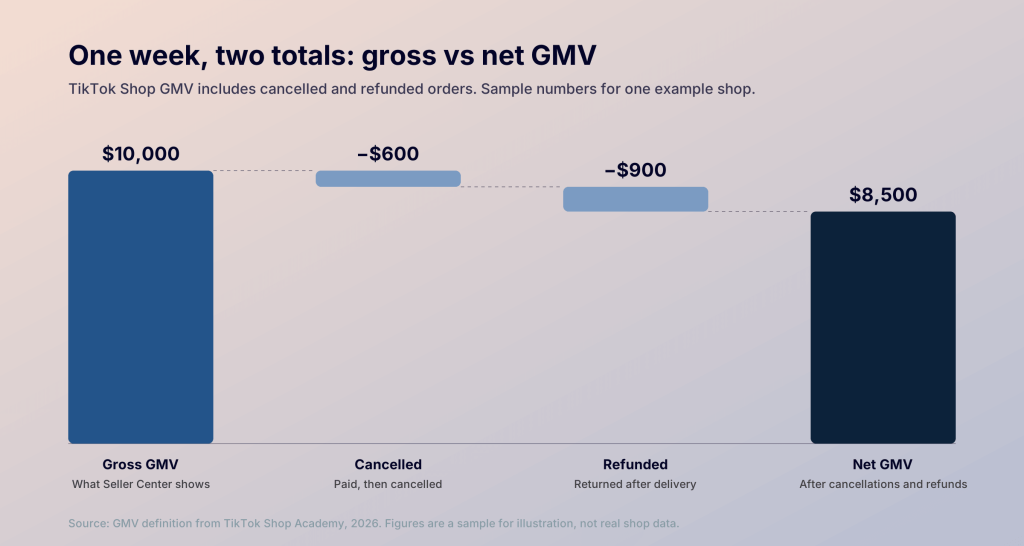
Coupler.io’s Orders data is filtered by the date an order was created, not paid, so totals can differ slightly from Shop Analytics. If the data includes an order status column, a filter in Coupler.io can drop cancelled orders on every refresh. Refunds, partial refunds, and adjustments are settled later, though. For net sales or payouts, the settlement report is the source to use.
TikTok Shop export data methods compared
The biggest difference between the four ways to get TikTok Shop export data is how much work it takes to keep exporting after the first file.
| Method | What you get | What you do | Repeats automatically |
|---|---|---|---|
| Coupler.io | Orders, line items, products, and three performance reports in Sheets, BI tools, warehouses, or AI tools | Connect TikTok Shop and describe the export, or fill in a form. No integration to build or scripts to maintain | Yes, on the schedule you set |
| Seller Center | Files from Orders, Products, Analytics, and Finance, each with its own fields and date filters | Set filters and click Export in each section, every time | No |
| Shopify or a multichannel tool | TikTok orders next to your other channels | Nothing extra if your shop is already connected | Depends on the tool |
| TikTok Shop API | Raw JSON, including finance and affiliate data | A developer builds and maintains an app | Yes, once it’s built |
In short, the choice comes down to whether the report repeats and whether it needs finance or affiliate data:
- A one-off export: Seller Center.
- Recurring reports, or several shops and channels in one place: Coupler.io.
- Order management across channels: Shopify or a multichannel tool.
- Custom extraction, including finance and affiliate data: the API.
Whichever you pick, keep your TikTok Shop export data on one sales definition and one date basis across every report.
Keep TikTok Shop reports refreshed with Coupler.io
Book a demoFAQ
How do I combine TikTok Shop export data from several shops into one report?
In Seller Center, you export each shop separately and merge the files by hand. In Coupler.io, add each shop as a data source in one data flow, and Coupler.io appends them into one dataset on every refresh.
Does TikTok Seller Center support scheduled exports?
Not according to TikTok’s guides. Every Seller Center export they describe starts with a click and gives you a snapshot.
Is “Download your TikTok data” the same as a TikTok Shop export?
No. Download your TikTok data is a privacy tool for personal accounts. The file covers your account information, such as watch history and purchases you made as a shopper, not TikTok Shop export data like orders or sales.
What’s in a TikTok Shop financial data export CSV file?
That depends on the export. You export transaction data to CSV from the Transactions view, where each row is one financial movement. Sales reports download as CSV too, totalled by day, month, or year. The settlement report is the exception: it arrives as an Excel workbook with five sheets, not a CSV.