The right Claude skills for agencies depend on where your team loses the most time: audit, analysis, or delivery. If you want to know what the top 10 Claude skills for digital agencies are, you’ll find them organized exactly in this article.
What are marketing skills in Claude?
Claude marketing skills are reusable workflows built specifically for AI marketing tasks: campaign analysis, SEO audits, content creation, competitive research, and client reporting. They work the same way as any other Claude Skill: load automatically when the task matches, run the same procedure every time, and don’t need to be re-explained between sessions.
The operational irony of running a digital agency is that the more clients you win, the more time you spend on work that doesn’t scale. Claude can handle most of it (audits, performance reviews, client reports). But without a persistent memory of how your agency works, every session starts from scratch. Marketing skills let you fix that without doing it manually every time.
Whether you’re looking for Claude skills for marketers or agency-specific workflows, the options fall into two categories.
Anthropic’s official marketing plugin: It provides 8 skills covering the full marketing workflow:
/performance-report, /campaign-plan, /draft-content, /content-creation, /seo-audit, /competitive-brief, /brand-review, and /email-sequence. Once installed, you invoke them by typing / in chat, or Claude runs them automatically when a matching task comes up. The skills are available in claude.ai (paid plans), Claude Code, and Claude Cowork
Community-built skills: Coupler.io goes further by connecting Claude to live data from your actual ad accounts and analytics platforms. Instead of Claude working from data you paste in, it pulls directly from Google Ads, Meta, GA4, and 400+ other sources via the Coupler.io MCP connector.

Automate client work in Claude with Coupler.io
Book a demoBest Claude skills for digital agencies
The best Claude skills for digital agencies follow the order an agency actually works through a client account.
1. Audit
2. Performance analysis
3. Client-facing reporting and delivery
Audit
Before you analyze performance or build a client report, you need to know the account is set up correctly and the data can be trusted. The three Skills in this section cover both.
That starts with a paid ads audit.
1. Google Ads settings audit by Coupler.io
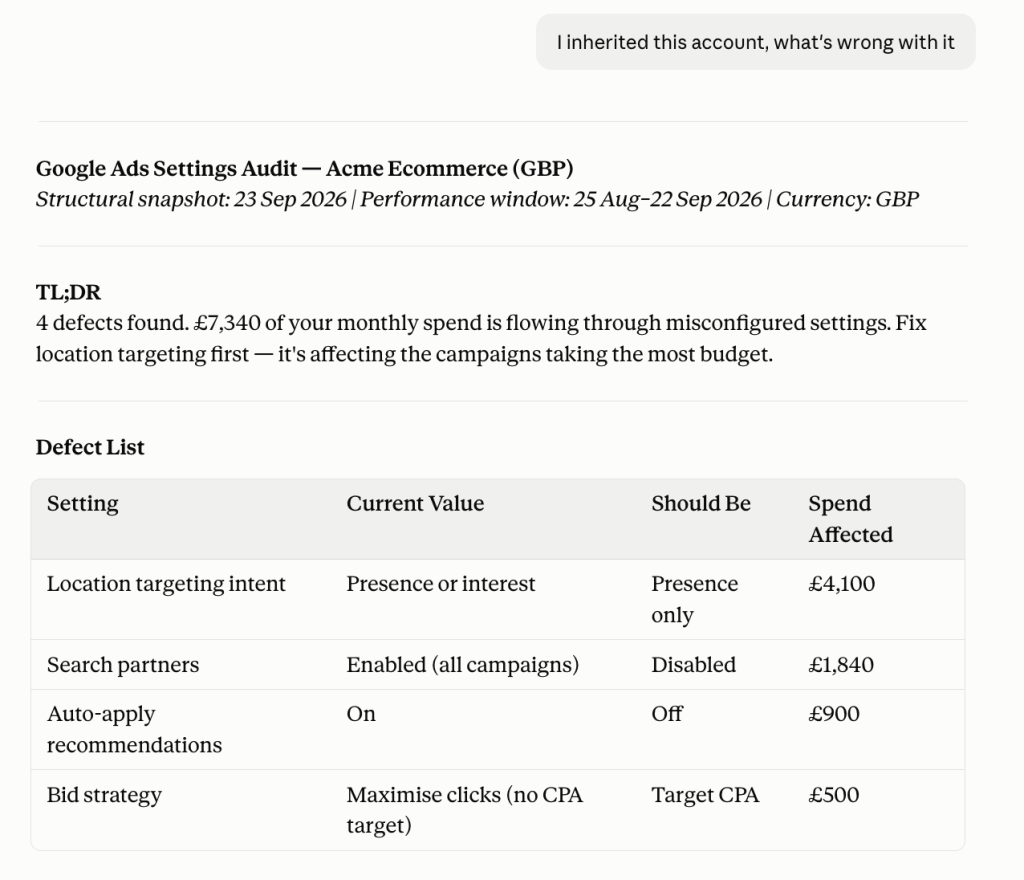
Inheriting a Google Ads account is rarely a clean handover. Wrong location targeting, search partners turned on by default, auto-apply recommendations making changes no one approved. Nothing looks obviously broken, but the budget is bleeding quietly.
The Google Ads settings audit skill audits the account settings and tells you what is misconfigured and how much spend is flowing through each issue. The findings are ranked by budget impact, not by technical severity.
It connects to the account through Coupler.io and is read-only. It only flags problems and doesn’t touch anything.
Trigger phrases: ‘Audit my Google Ads settings‘, ‘I inherited this account, what's wrong with it', ‘Why is my traffic showing outside my area‘
Example: An agency onboards a new e-commerce client spending £10,000 a month on Google Ads. They ask Claude, ‘I inherited this account, what's wrong with it?’ The skill pulls the account data through Coupler.io and comes back with issues. Every finding shows the spend behind it.
Where it’s available: Part of the Coupler.io connector for Claude. Also downloadable from the Claude skills library or GitHub under: marketing/google-ads-settings-audit.
Prerequisites: Coupler.io account with Google Ads connected, and the Coupler.io MCP connected to Claude.
2. Facebook Ads pixel and attribution audit by Coupler.io
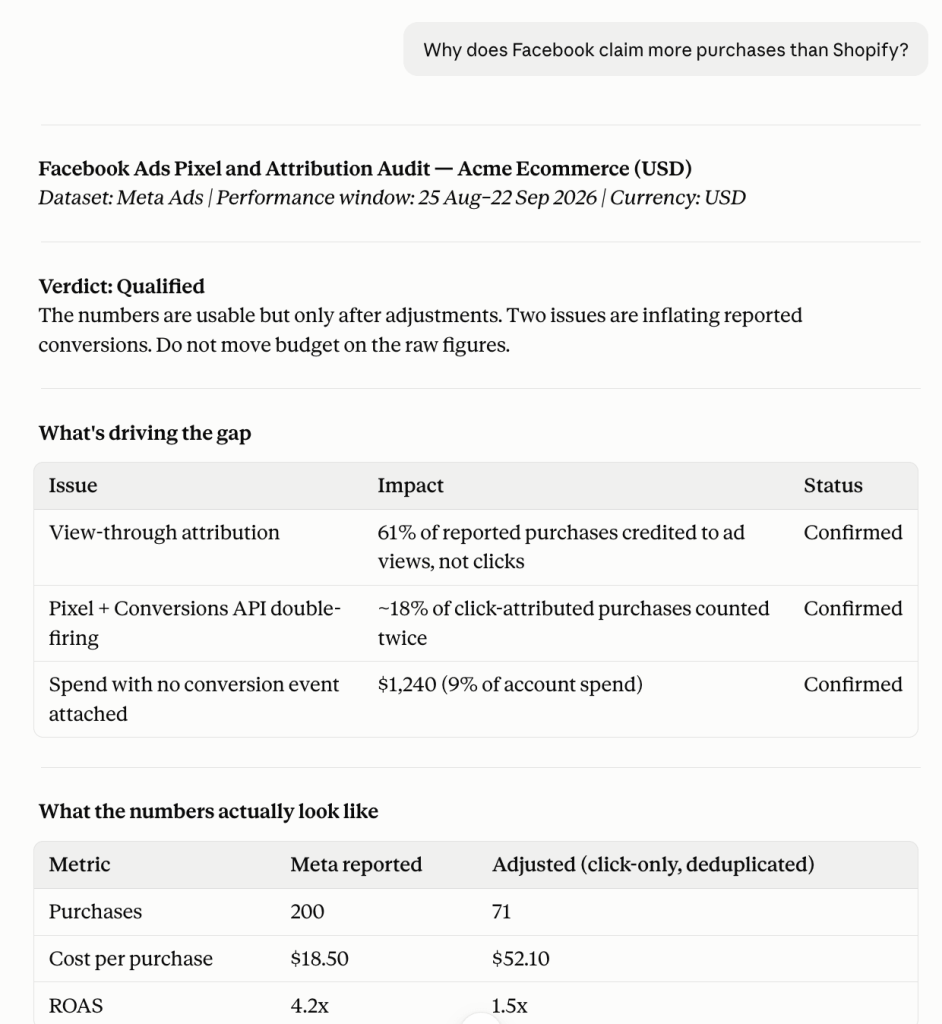
Facebook says 200 purchases. Shopify says 90. The client wants to know why. These situations are commonly seen in agencies.
The answer is almost always in the measurement layer: view-through credit inflating the numbers, the pixel and Conversions API both firing on the same purchase, spend running with no conversion event attached. None of it shows up as an error in Ads Manager.
This skill audits your Meta measurement setup and gives you a confidence verdict (High confidence, Qualified, or Not usable) before you report any of those numbers to a client. Run it before any other Meta skill. Every performance review and client report downstream inherits whatever’s broken here.
Trigger phrases: ‘Can I trust my Meta conversion numbers‘, ‘Why does Facebook claim more purchases than Shopify‘, ‘Are my conversions being double counted‘
Example: An agency notices Facebook is reporting 3x the purchases Shopify shows for the same period. They ask Claude, ‘Why does Facebook claim more purchases than Shopify?‘ The skill identifies that view-through attribution is crediting Meta for purchases from people who saw an ad but never clicked. This accounts for 68% of reported conversions.
Where it’s available: Part of the Coupler.io connector for Claude. Also downloadable from the skills library or GitHub under: marketing/facebook-ads-pixel-and-attribution-audit.
Prerequisites: Coupler.io account with Facebook Ads connected, and the Coupler.io MCP connected to Claude.
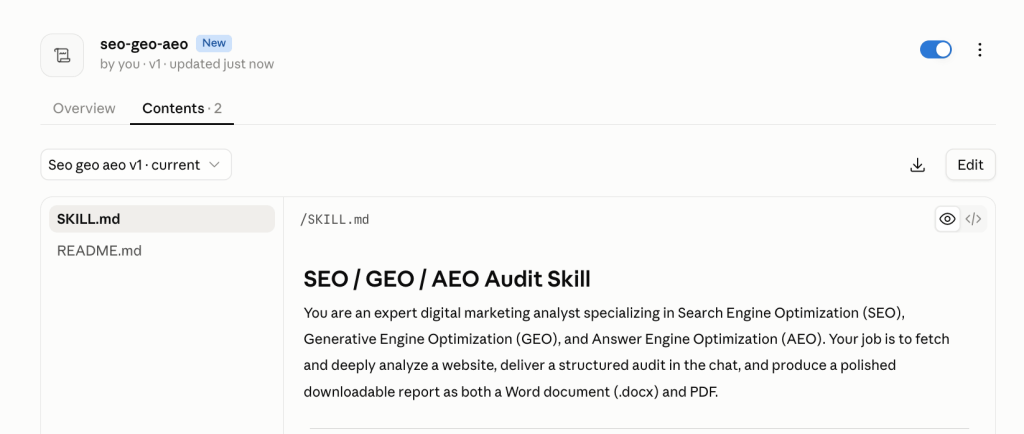
3. SEO & AI-search (GEO/AEO) audits – community skill
A lot of agencies are still optimizing for one search channel. But clients are being discovered (or not) through ChatGPT Search, Perplexity, and Google AI Overviews too. A site can rank well on Google and be completely invisible to AI search. These are different problems with different fixes.
The SEO & AI-search skill audits a client’s site across three dimensions in one run:
- traditional SEO,
- GEO for AI-powered search, and
- AEO for featured snippets and voice search.
It also flags keyword research gaps: pages targeting terms with no content depth to support them. Each gets its own score. They are never blended, so you know exactly which channel has the problem. For agencies running programmatic SEO campaigns, the Full Audit mode crawls the entire site and delivers a downloadable Word doc and PDF ready to send to a client.
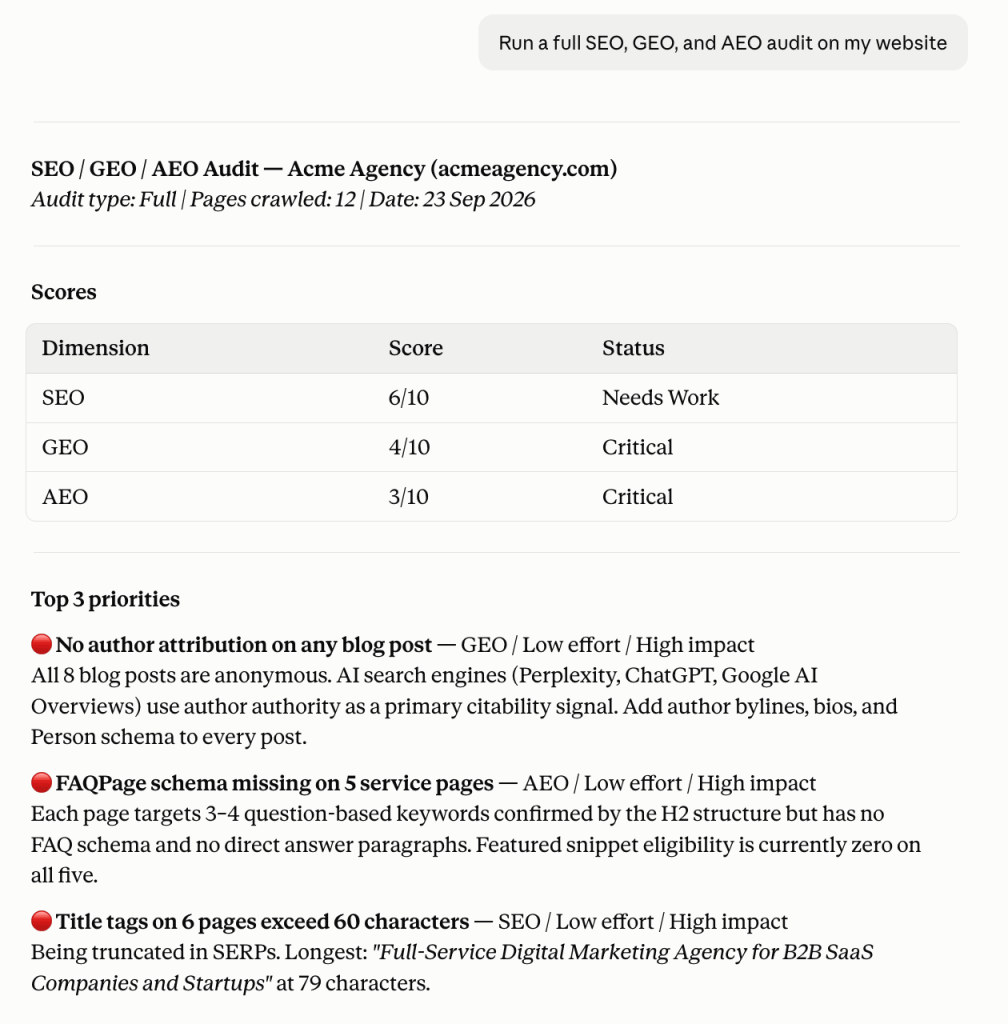
Trigger phrases: ‘Audit this site for SEO‘, ‘Why isn't this site ranking?‘, ‘Run a full SEO, GEO, and AEO audit on my website‘
Prerequisites: No external integrations required. Just a URL and Claude with the skill installed.
Example: If an agency onboards a B2B SaaS client whose organic traffic dropped after a Google update. They run ‘Run a full SEO, GEO, and AEO audit on my website‘. The skill comes back with three critical findings: no author attribution on any blog post, FAQPage schema markup missing on six question-targeted pages, and five service page titles over 60 characters. GEO score: 5/10. All three fixes are low-effort and in the client’s hands the same day.
Run ad and SEO audits across every client in Claude
Talk to Coupler.ioPerformance analysis
Every client call starts with the same question: how are things performing? These skills make sure you have a real answer before you pick up the phone.
4. Marketing analytics by Coupler.io
Running clients across Google Ads, Meta, LinkedIn, TikTok, and blog means the data is always in four different places. Pulling it together before a client call is the work nobody accounts for when scoping the retainer.
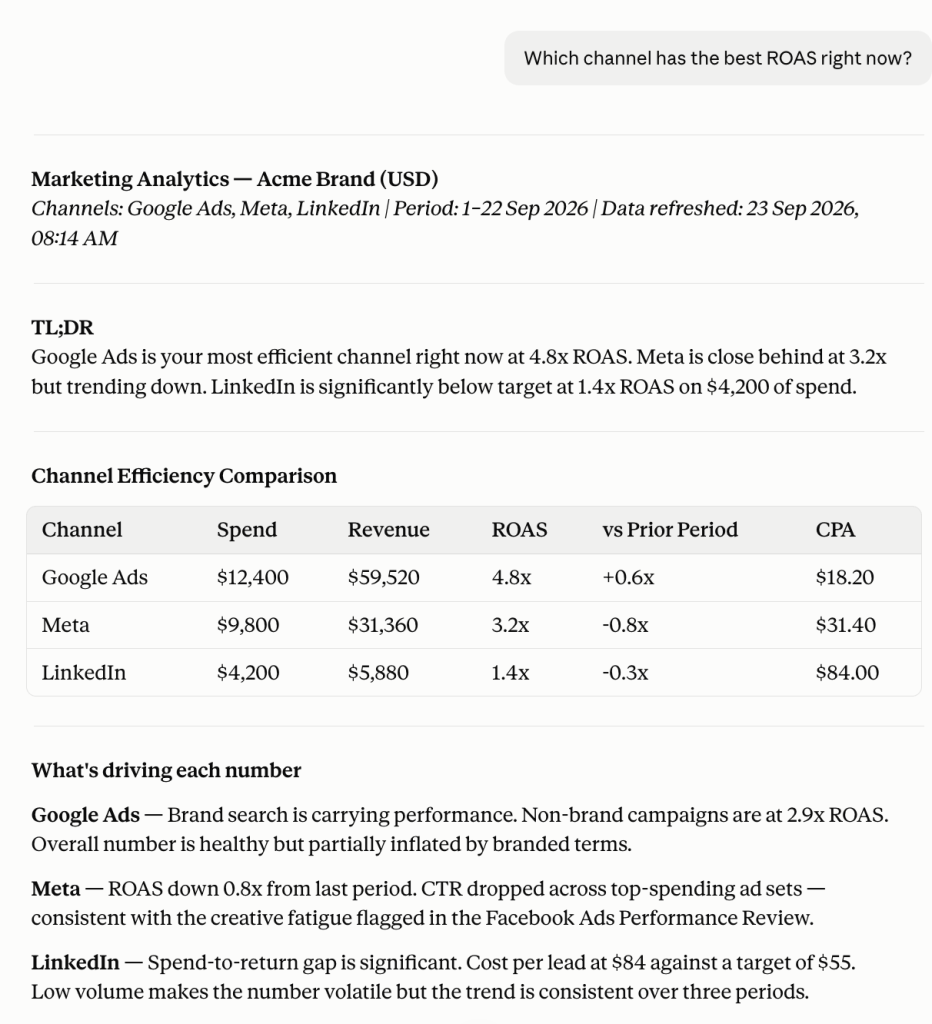
The marketing analytics skill queries all connected platforms in one question and returns a cross-channel view. It includes period-over-period changes, channel efficiency by CPA and ROAS, trend detection, and anomaly detection with severity tags. Every number comes from your actual account data through Coupler.io.
Trigger phrases: ‘How is my marketing performing this month?‘, ‘Compare paid vs organic this quarter‘, ‘Which channel has the best ROAS right now?‘
Example: An account manager has a client call in 30 minutes across three active channels. They ask, ‘Which channel has the best ROAS right now?‘ The skill returns a side-by-side efficiency comparison across Google Ads, Meta, and LinkedIn with period-over-period changes and two recommendations.
Where it’s available: Part of the Coupler.io connector for Claude. Also downloadable from the skills library or GitHub under: marketing/marketing-analytics.
Prerequisites: Coupler.io account with at least one marketing platform connected, and the Coupler.io MCP connected to Claude.
5. PPC analytics by Coupler.io
The weekly PPC review is one of the most repeated tasks in any paid media agency. It is the same funnel check, efficiency comparison, and budget pacing questions across each client and platform.
The PPC analytics skill runs that review across all connected ad platforms in one go. It traces the paid funnel per platform from impression to conversion, ranks platforms by CPA and ROAS (not by spend), and checks budget pacing so you catch overspend mid-month.
It also splits brand from non-brand traffic automatically. Brand campaigns are structurally efficient and will always inflate your overall numbers if you don’t separate them.
One thing the skill is deliberately strict about: it never adds up conversions across platforms. Google and Meta both claim credit for the same purchase under their own attribution models. Adding them together double-counts. The skill reports per-platform numbers side by side and flags the gap against an independent source like GA4 when one is connected.
Trigger phrases: ‘How are my paid ads performing this week?‘, ‘Compare CPA across Google and Meta‘, ‘Am I on track with my ad budget this month?‘
Example: A paid media agency runs weekly reviews across six client accounts. Instead of logging into each platform separately, the account manager asks ‘How are my paid ads performing this week?‘ for each client. The skill returns per-platform funnel traces, an efficiency-ranked comparison table, and budget pacing for each account. Six reviews that used to take a morning now take an hour.
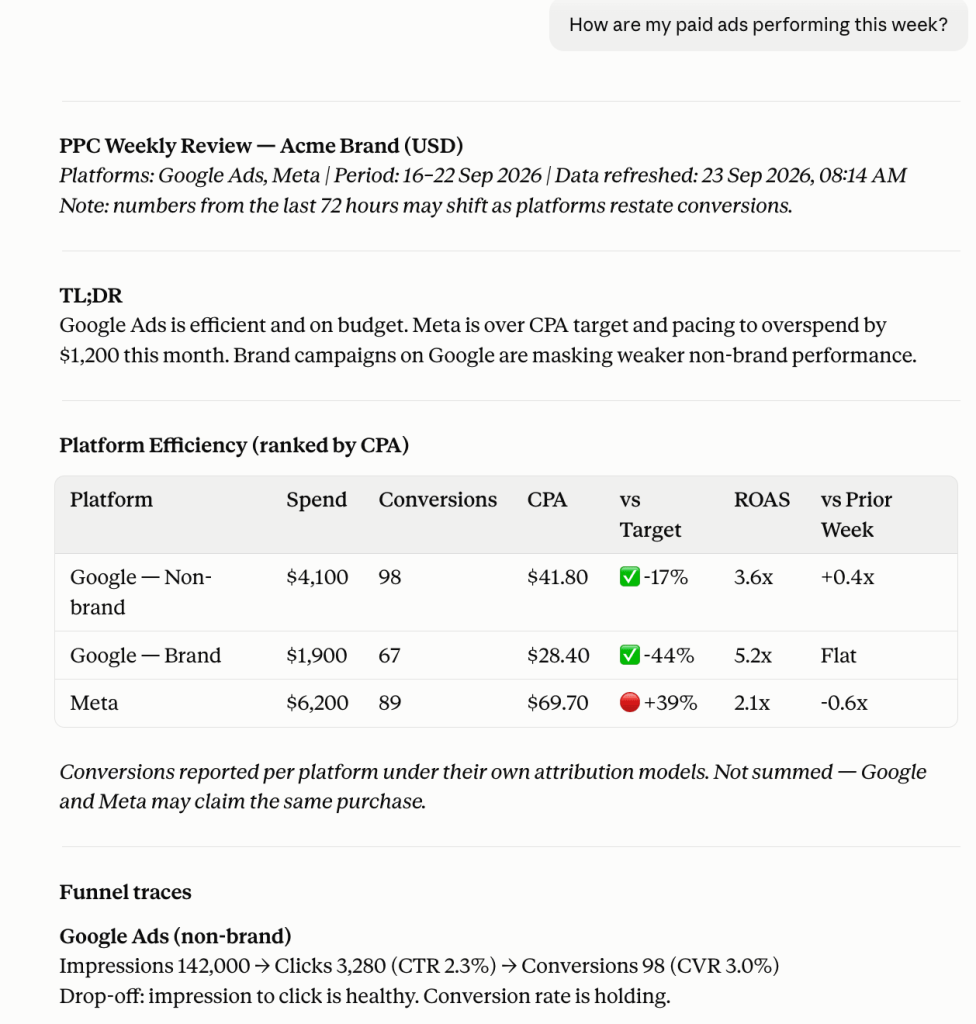
Where it’s available: Part of the Coupler.io connector for Claude. Also downloadable from the skills library or GitHub under: marketing/ppc-analytics.
Prerequisites: Coupler.io account with at least one ad platform connected, and the Coupler.io MCP connected to Claude.
6. Facebook Ads performance review by Coupler.io
Meta’s reporting shows you a number and a percentage next to it. What it doesn’t tell you is which campaign moved it, or whether the change came from delivery, audience, or creative.
The Facebook Ads performance review skill breaks the movement down into its three components: CPM, CTR, and conversion rate. It also reads the auction: rising CPM alongside rising frequency means audience exhaustion. Different issues need different fixes.
Trigger phrases: ‘How are my Meta ads doing?‘, ‘Why did my cost per result go up?‘, ‘What changed on Facebook this month?‘
Example: When a client’s Meta cost per lead jumps 35%. The account manager asks, ‘Why did my cost per result go up?‘ The skill identifies the cause: CPM is flat, but CTR dropped 38% across three top-spending ad sets running the same creative for six weeks. Audience exhaustion. The fix is a creative refresh, and it took 10 minutes to diagnose.
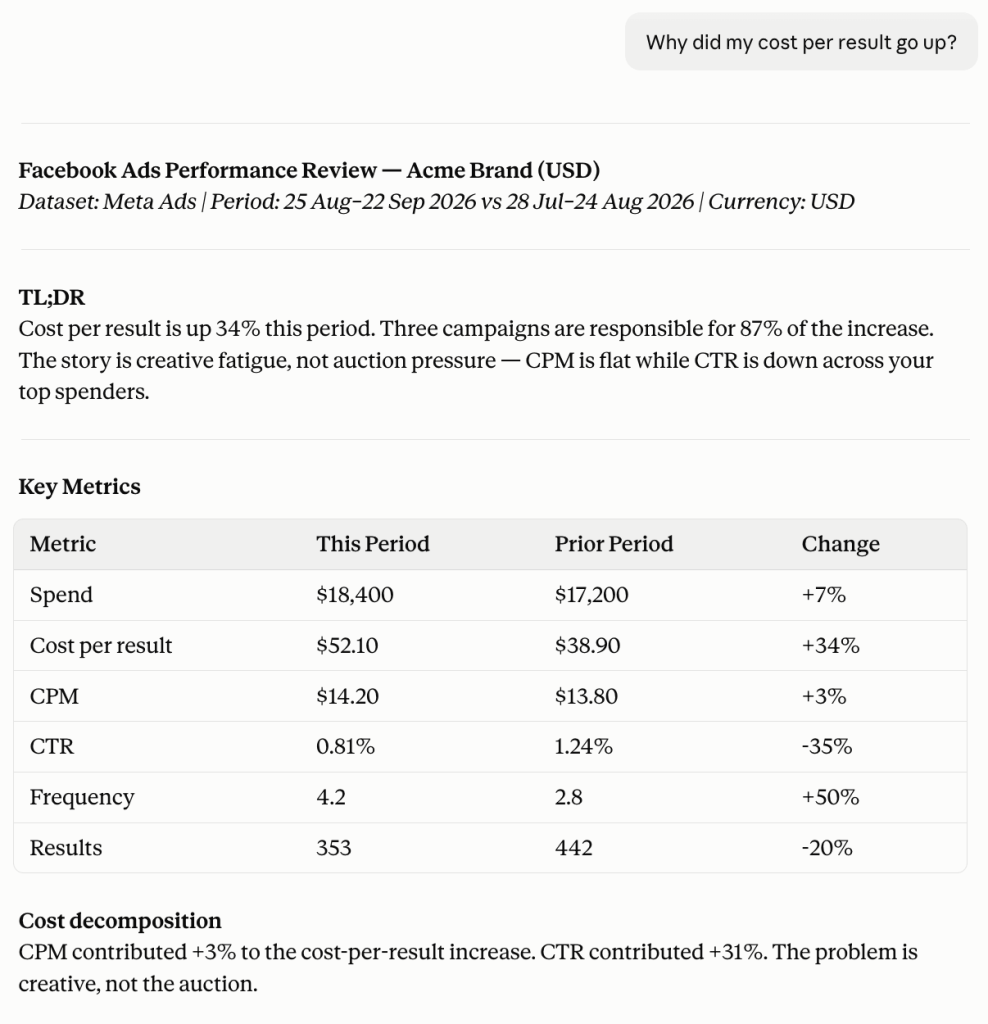
Where it’s available: Part of the Coupler.io connector for Claude. Also downloadable from the skills library or GitHub under: marketing/facebook-ads-performance-review.
Prerequisites: Coupler.io account with Facebook Ads connected, and the Coupler.io MCP connected to Claude.
Compare channel performance in Claude with Coupler.io
Get started for freeClient reporting and delivery
The analysis is the easy part. The 45 minutes between finishing it and sending something to a client is where the time goes. Structuring the narrative, formatting the numbers, checking that nothing looks off before it lands in someone’s inbox. These two skills handle that gap.
7. Report generation by Coupler.io
Analysis output cannot be a client report. It is still raw material. The report generation skill handles the conversion. It structures the findings into TL;DR, key metrics, context, recommendations, and next questions.
It also runs a Phase 2 validation pass before anything goes out. It checks arithmetic, units, time periods, and whether every claim in the report is actually supported by the underlying data. If something doesn’t check out, it gets flagged to fix it before delivery.
It works with any analysis output: from the Coupler.io skills covered in this article, from a raw AI response, or from notes you paste in yourself. Output format is your choice: markdown for docs, summary text for Slack or email, formatted tables for decks.
Trigger phrases: ‘Write a report from this analysis‘, ‘Give me a TL;DR I can send to the client‘, ‘Sanity-check this draft before I send it‘
Example: An account manager finishes a PPC analytics run and asks ‘Give me a TL;DR I can send to the client.‘ The skill structures the findings, validates the numbers against the source data, and returns a formatted summary. It goes straight into the client email without a rewrite.
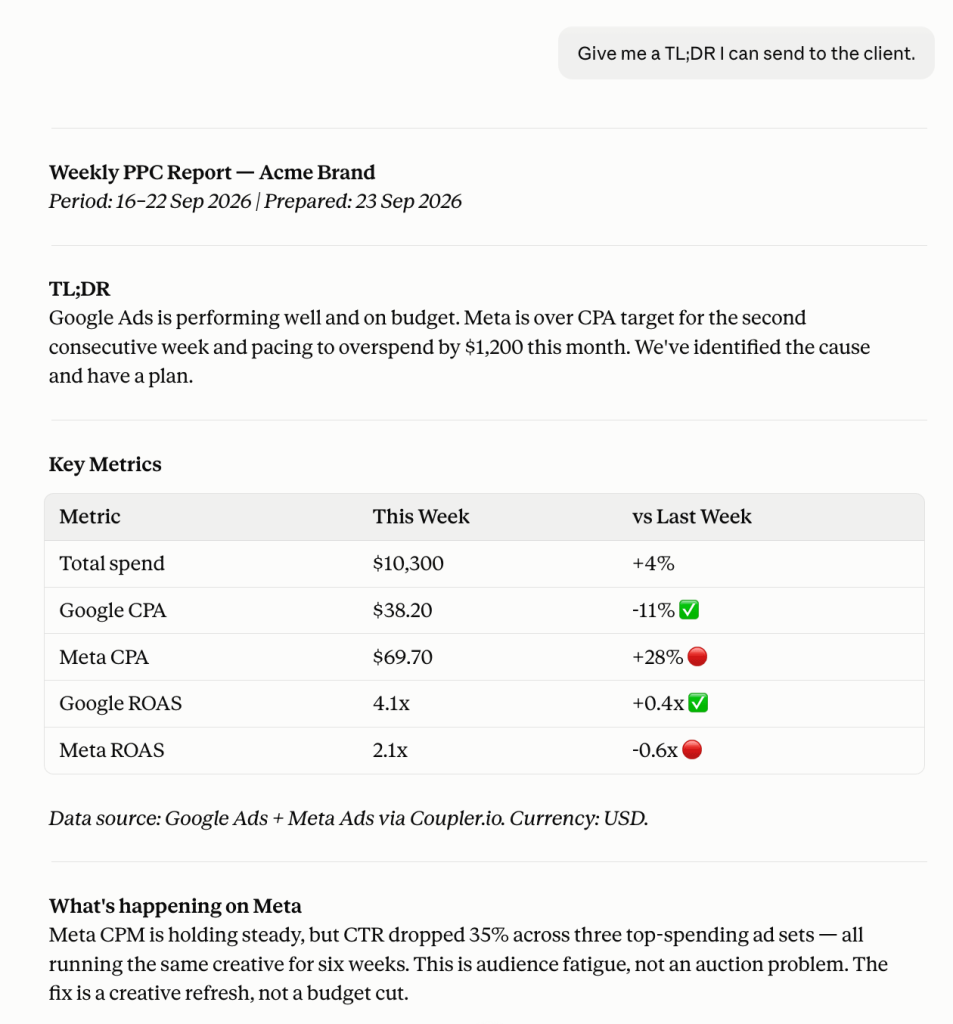
Where it’s available: Part of the Coupler.io connector for Claude. Also downloadable from the skills library or GitHub under: capability/report-generation.
Prerequisites: Coupler.io MCP connected to Claude. Works best paired with a Coupler.io analytics skill (marketing-analytics, ppc-analytics, or any other domain skill covered in this article).
8. Client reporting: Excel & PowerPoint by Anthropic
At some point, the analysis has to leave Claude and land in a format the client can open, edit, and present.
Anthropic’s official Excel (XLSX) and PowerPoint (PPTX) skills handle exactly this. The XLSX skill builds real formula-based spreadsheets with charts, data formatting, and the color-coding conventions. The PPTX skill creates real .pptx files with slide layouts, themes, charts, and speaker notes.
For an agency, the practical value is the formula enforcement. A budget tracker or campaign performance sheet built with hardcoded values breaks the moment a client tries to update a number. A formula-based file built with the XLSX skill stays functional.
Both skills pair naturally with Report Generation. The skill structures and validates the analysis. XLSX or PPTX turns it into the file format the client works in.
One thing to note: Anthropic’s own documentation describes these as reference and demonstration skills. You may test them against your specific use case before rolling out to client work.
Trigger phrases: ‘Build an Excel tracker for this campaign‘, ‘Create a PowerPoint summary of this month's performance‘, ‘Turn this report into a deck‘
Example: An account manager has a validated monthly PPC report and needs to send the client a deck and a budget tracker. They ask Claude, ‘Turn this report into a deck‘ and ‘Build an Excel tracker for this campaign.‘ The PPTX skill produces a formatted .pptx with performance slides and recommendations. The XLSX skill builds a formula-based budget tracker the client can update themselves. Both files are ready to attach to the same email.

Where it’s available: Open-source from Anthropic’s official GitHub repo. Install in Claude skills. Also available at github.com/anthropics/skills.
Prerequisites: Code execution enabled in Claude settings. No external data connections required. These skills work from whatever content you provide in the conversation.
Turn analysis into client reports with Coupler.io
Get started for freeCustom skill creation
No two agencies work the same way. Custom skill creation helps encode your specific requirements, like your onboarding checklist, reporting format, or the way you write to clients.
9. Build a custom skill by Coupler.io
The skills above cover the most common agency workflows. But the most effective Claude skills for a digital agency are the ones built around how that specific agency operates: a QA pass before reports go out or a recommendation format your team has refined over years. That’s where custom skill creation is useful.
In the Skills library, hit Create Skill. Give it a name (it saves as a slash command, like /weekly-ppc-review), add a description so the agent knows when to trigger it, and write the instructions (the exact steps you want the agent to follow every time). The skill is available to use immediately.
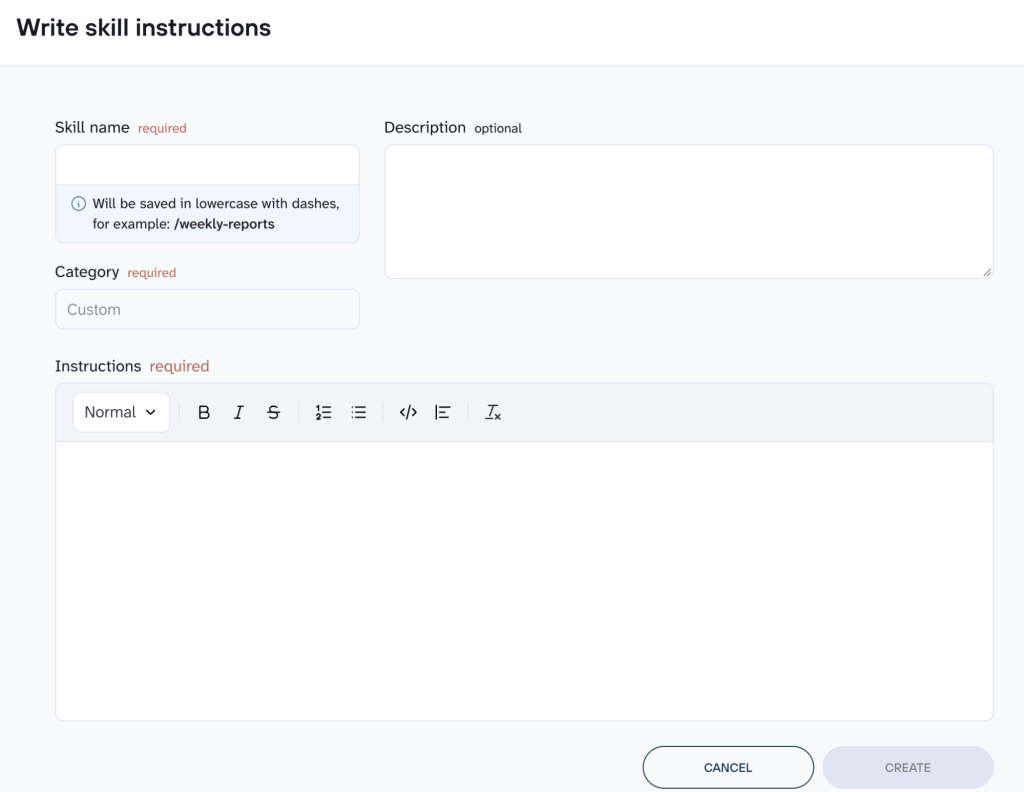
Trigger: via slash command (/your-skill-name) or automatically when the agent detects a matching task
Where it’s available: Inside Coupler.io’s AI Agent interface under the Skills tab. No external install required.
Prerequisites: A Coupler.io account with the AI Agent feature enabled.
10. Skill creator by Anthropic
Coupler.io lets you build custom skills inside the platform. But if you want to build skills inside Claude itself, Skill Creator is Anthropic’s official tool for that. It requires Claude Code.
Describe what you want the skill to do, and it walks you through the full process: asking clarifying questions, drafting the skill .md file, writing test prompts, running them, and iterating based on results. The output is a skill file saved to .claude/skills/ that Claude loads automatically whenever the task matches.
If your agency doesn’t run Claude Code, you can still use skill-creator in Claude.ai chat to draft the SKILL.md instructions conversationally. But to actually install and deploy the skill, you need Claude Code.
For agencies that do run it, you get the full eval pipeline: blind output comparisons, a grader that checks pass/fail against your criteria, and a browser-based reviewer with quantitative metrics across iterations.
Where it’s available: Claude Code. Install via:npx skills add https://github.com/anthropics/skills --skill skill-creator
Prerequisites: Claude Code with the skills CLI installed.
How to install Claude skills for your agency
There are two ways to get the Claude skills running, depending on which ones you’re installing.
Coupler.io Claude skills
The six Coupler.io skills covered in this article don’t require manual installation. They’re built into the Coupler.io connector and become available in Claude automatically once you connect data to Claude via Coupler.io as an MCP.
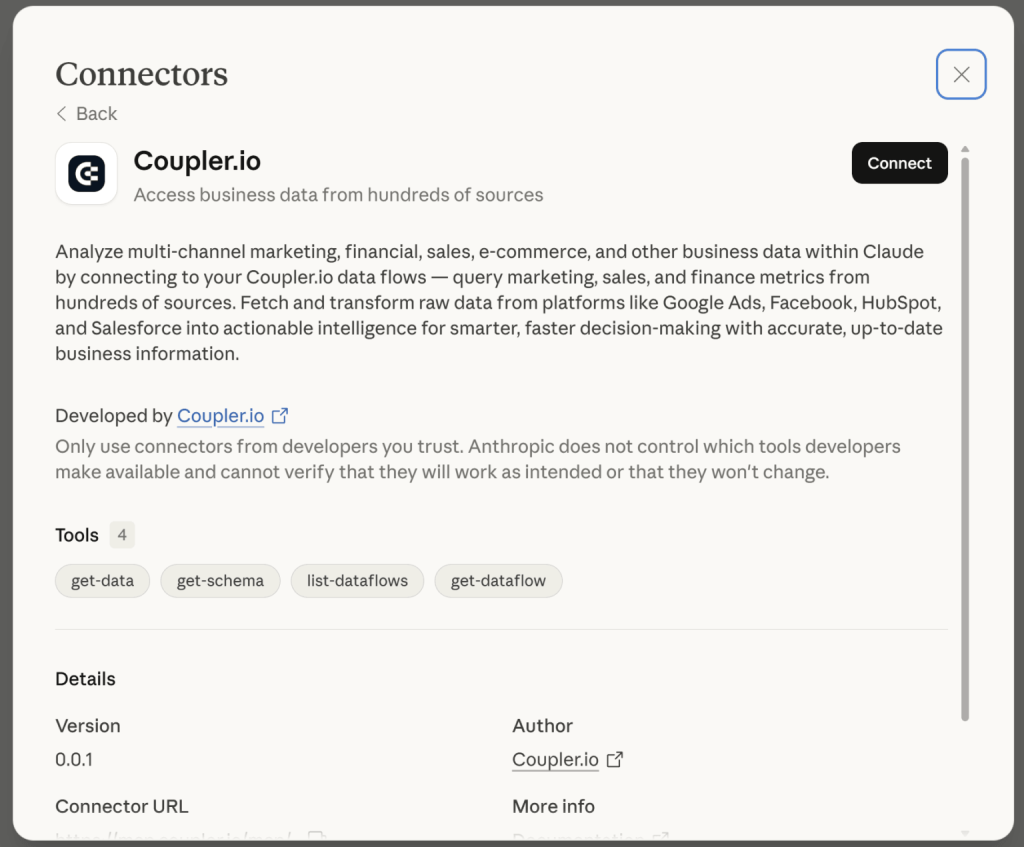
Community and third-party skills
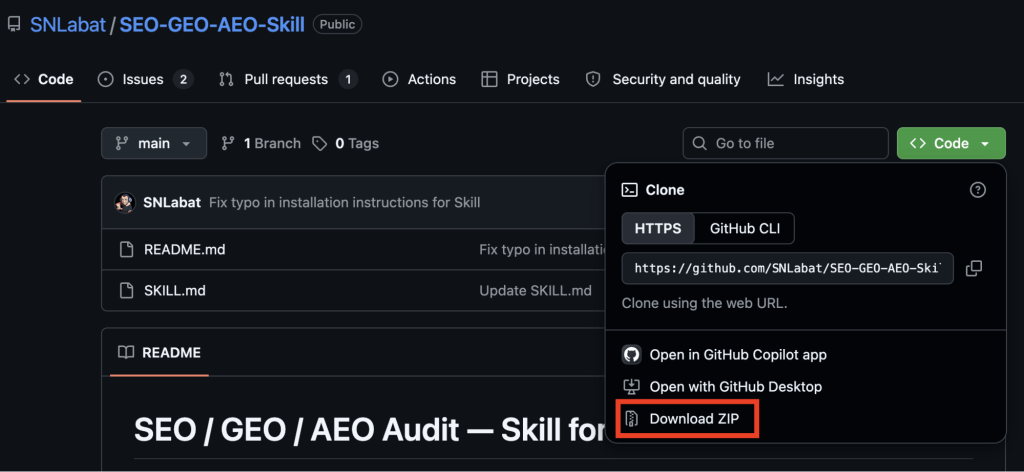
For the SEO & AI-Search Audit skill, you’ll need to install it manually.
Download the ZIP file from the skill’s GitHub page
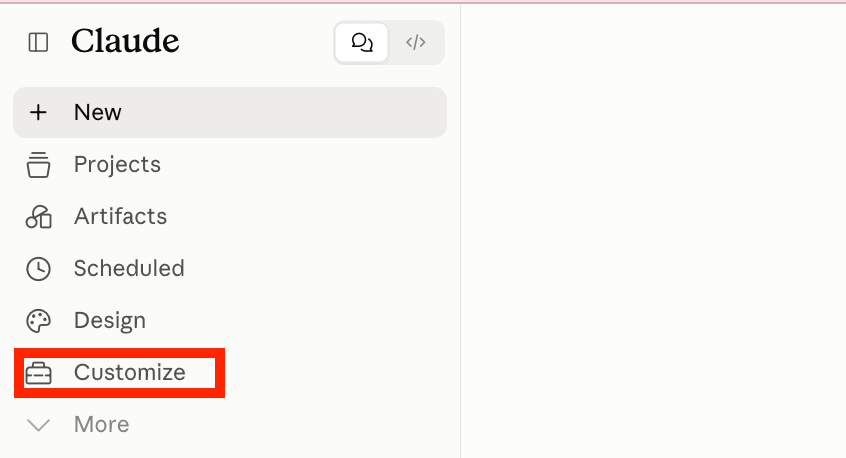
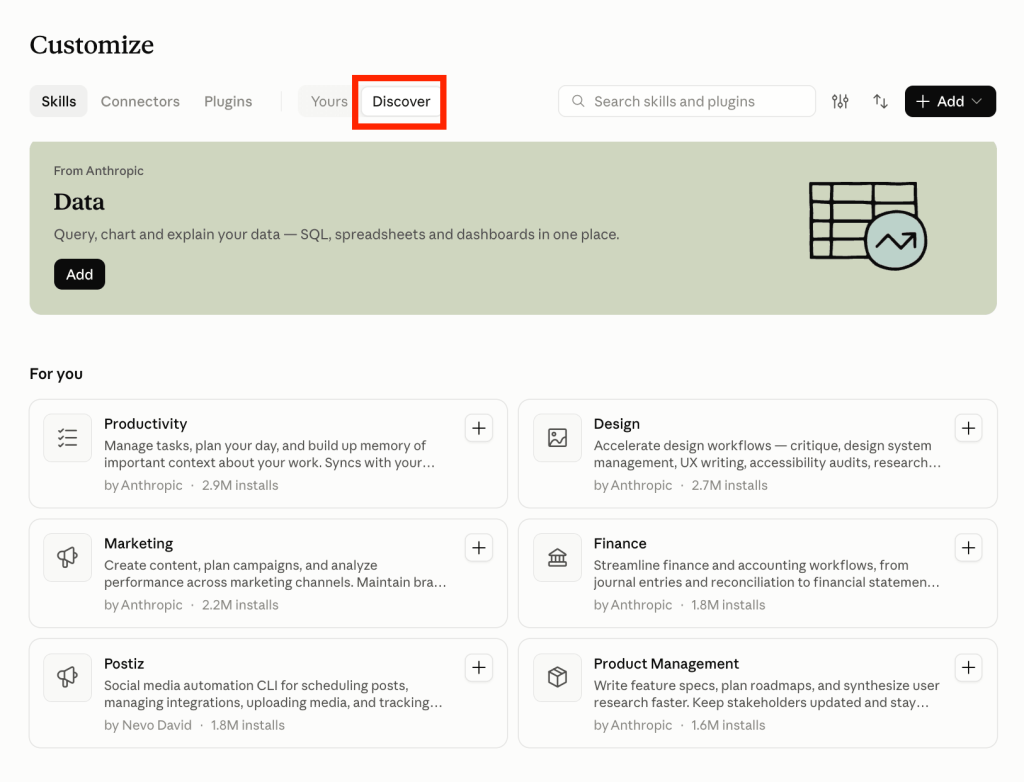
Log in to Claude and click Customize from the left menu
Click Add and select the upload option. Drop the ZIP file
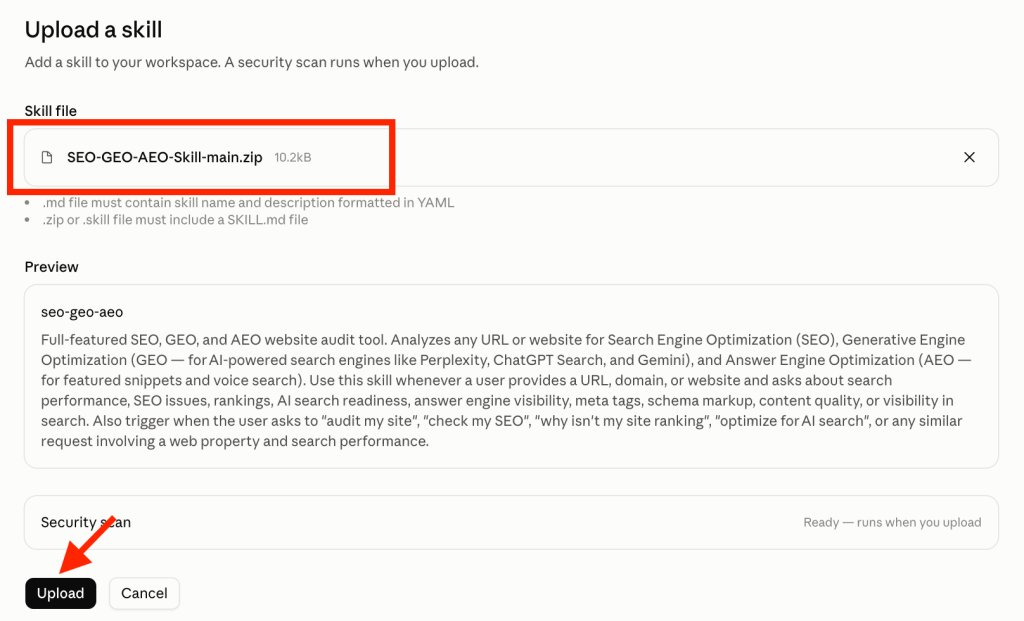
The skill is active immediately and carries over to future sessions
The Anthropic Marketing plugin skills (/performance-report, /seo-audit, /competitive-brief) and the Skill Creator are built into Claude.ai for paid plan users. Go to the Discover tab under Customize → Skills to find and add them.
Pick one workflow from this list that your team repeats every week. Set up the skill. Run it once. The time it saves in the first month will tell you exactly where to go next.
If you’re running paid media for clients, start with the Google Ads Settings Audit. It pays for itself the first time it catches a misconfigured account before the client does. If reporting is where your team loses the most time, start with Report Generation and work backwards from there.
The top Claude skills for digital agencies covered here represent the best Claude skills for business teams running multi-client workflows, and they’re all free to explore. The only cost is the hour it takes to set up the first one.
Connect 400+ data sources to Claude with Coupler.io
Get started for freeFAQ
Are Claude skills free to use?
Most Claude Skills are free. The skill files themselves are open source, including Anthropic’s official skills and Coupler.io’s library. The Coupler.io connector requires a Coupler.io account, which has a free trial and paid plans depending on how many data sources you connect. Some community skills require external API keys to function, but the skills themselves have no price tag.
What are the best Claude Code skills for digital agencies?
The Anthropic Marketing plugin works in Claude Code and Claude Cowork. Install with:
claude plugin marketplace add anthropics/knowledge-work-plugins
claude plugin install marketing@knowledge-work-plugins
All Coupler.io skills for digital agencies out of the box once you connect the Coupler.io MCP to Claude. You can also install them separately into Claude Code from the marketplace. Add the repo as a plugin marketplace, then pick the plugin (s) you want.
Because Claude Code stores skills at the project level (.claude/skills/), every team member working in that project inherits the same skills automatically. It is useful for agencies where multiple people touch the same client account.
What are good skills to add to Claude for digital agencies?
Start with the Claude marketing skills that match what your team does most. For paid media agencies: the Google Ads Settings Audit and PPC Analytics skills. For content or SEO agencies: the SEO & AI-Search Audit. For any agency that sends client reports: Report Generation and the Excel or PowerPoint skills. The Coupler.io connector and Anthropic’s Marketing plugin both have free tiers to explore before committing.
Which Claude skill is most effective for copywriting?
There’s no single official Claude skill dedicated to copywriting. The closest options are Anthropic’s /draft-content and /brand-review skills from the Marketing plugin. The first drafts content across formats,the second checks copy against your brand voice and flags deviations. For agency-specific copywriting standards, the most effective approach is building a custom skill in Coupler.io or using Skill Creator to encode your own tone guidelines and copy structure.
Do Claude skills work across multiple client accounts?
Yes, that’s the core value for agencies. A skill encodes a procedure once and runs it the same way regardless of which client account you’re analyzing. The Coupler.io skills pull from whichever data source is connected at the time, so the same PPC analytics skill works across every client account you have connected.
What’s the difference between Claude skills and MCP connectors?
They do different things and work best together. An MCP connector gives Claude access to your data (Google Ads, Meta, GA4), whatever you’ve connected through Coupler.io. A skill tells Claude what to do with that data: how to run the audit, what to check, how to structure the output.