Skyvia vs Integrate.io is what many teams type in their search box when looking for a cloud ETL platform. Both promise code-free pipelines built in a visual editor, with no infrastructure to manage. On paper, they look close.
The gap shows up once your pipelines get complicated. Integrate.io puts its weight into transformation depth, with logic-heavy pipelines and compliance controls aimed at regulated industries. Skyvia spreads wider, covering ETL, reverse ETL, replication, and backup at a lower entry price.
The sections below put them head to head, so you can see which one fits your pipelines.
Key takeaways
- Depth vs breadth. Integrate.io goes deeper inside each pipeline, with 220+ transformation functions plus optional SQL and Python. Skyvia covers more kinds of data work, including backup and replication.
- Different pricing shapes. Skyvia has a free plan, with paid Data Integration tiers starting at $99/month and scaling with record volume. Integrate.io charges a flat $1,999/month with unlimited data and pipelines.
- Compliance fit. Both list SOC 2 and HIPAA support with a BAA. Integrate.io adds a pass-through architecture and hands-on security reviews, which regulated teams tend to value.
- AI maturity. Integrate.io’s Helm copilot can draft and debug pipelines from plain-English prompts. Skyvia’s AI work centers on MCP endpoints that let AI assistants query your connected data.
- Who each tool suits. Integrate.io fits mid-market and enterprise teams with complex, logic-heavy pipelines. Skyvia fits SMB to mid-market teams that want to self-serve and start small.
Side-by-side at a glance
| Updated October 2026 | Skyvia | Integrate.io |
|---|---|---|
| Best for | SMB to mid-market teams wanting several data jobs on one self-serve platform | Mid-market and enterprise teams with complex pipeline logic and regulated-data needs |
| Pricing model | Per product; Data Integration by monthly records, schedule frequency, scheduled integrations | Flat fee, unlimited data, pipelines, connectors, users; add-on packages via sales |
| Entry price | Free; Basic $99/mo | Core $1,999/mo |
| Data sources | 200+ connectors | 150+ sources and destinations |
| Destinations | Warehouses, databases, SaaS apps, storage; OData/SQL/MCP endpoints | Warehouses, databases, SaaS apps (Salesforce focus), files, SFTP |
| Workflows and transformations | ETL, ELT, reverse ETL, replication, sync, plus separate Backup, Automation, Query and Connect products; mid-level transformations (mapping, Data Flow) | ETL, ELT, CDC, reverse ETL, orchestration; heavy transformations (220+ functions, SQL, Python, data quality checks) |
| AI capabilities | MCP endpoints for AI assistants; OpenAI connector | Helm copilot (prompt-to-pipeline, debugging), Smart Transform, MCP |
| Security certifications | SOC 2, GDPR, HIPAA with BAA, PCI DSS via payment provider | SOC 2 (annual audit), GDPR, CCPA, HIPAA with BAA |
| Support model | Self-serve, support desk; priority support and onboarding on Enterprise | 24/7 on every plan, dedicated Solution Engineer, 30-day onboarding |
| G2 rating | 4.9/5, ~323 reviews | 4.4/5, ~213 reviews |
Comparing Skyvia vs Integrate.io key features
On paper, the two feature pages read almost the same. Both offer a visual builder and a long list of connectors. The differences show up in what each platform builds around that core.
Integrate.io: depth inside a single pipeline
- Transformation library: 220+ low-code functions for joins, lookups, aggregations, pivots and filters.
- Code when you need it: SQL and Python, plus LLM-based transformations. Smart Transform builds a step from sample input and the output you want.
- Built-in data quality: validation rules catch nulls, duplicates, outliers and format errors mid-flow. Lineage and version rollback let you trace every change.
- CDC and API control: change data capture keeps warehouse tables close to the source. Pipelines can be exported as JSON or triggered via API.
Skyvia: breadth across many data jobs
Skyvia’s core Data Integration product handles import, export, replication and two-way sync. Import scenarios double as reverse ETL, pushing data back into tools like Salesforce or HubSpot. Mapping and Data Flow cover mid-complexity transformations.
Around that core sit separate products that share one account and one set of connections:
- Backup: scheduled and manual snapshots of cloud app data, with one-click restore.
- Automation: event-triggered workflows between apps and databases.
- Query: SQL or a visual query builder, straight from the browser.
- Connect: turns your sources into OData and SQL endpoints, plus MCP endpoints for AI assistants.
Transformation depth vs workflow breadth: two different ETL philosophies
Integrate.io bets that the hard part is the logic inside a pipeline, so it offers fewer workflow types with more control each. Skyvia bets that the hard part is the number of data jobs a team juggles, so it covers more of them with less depth.
Neither wins in the abstract. Depth is a feature only if your pipelines need it. Breadth is a feature only if you want one tool instead of three.
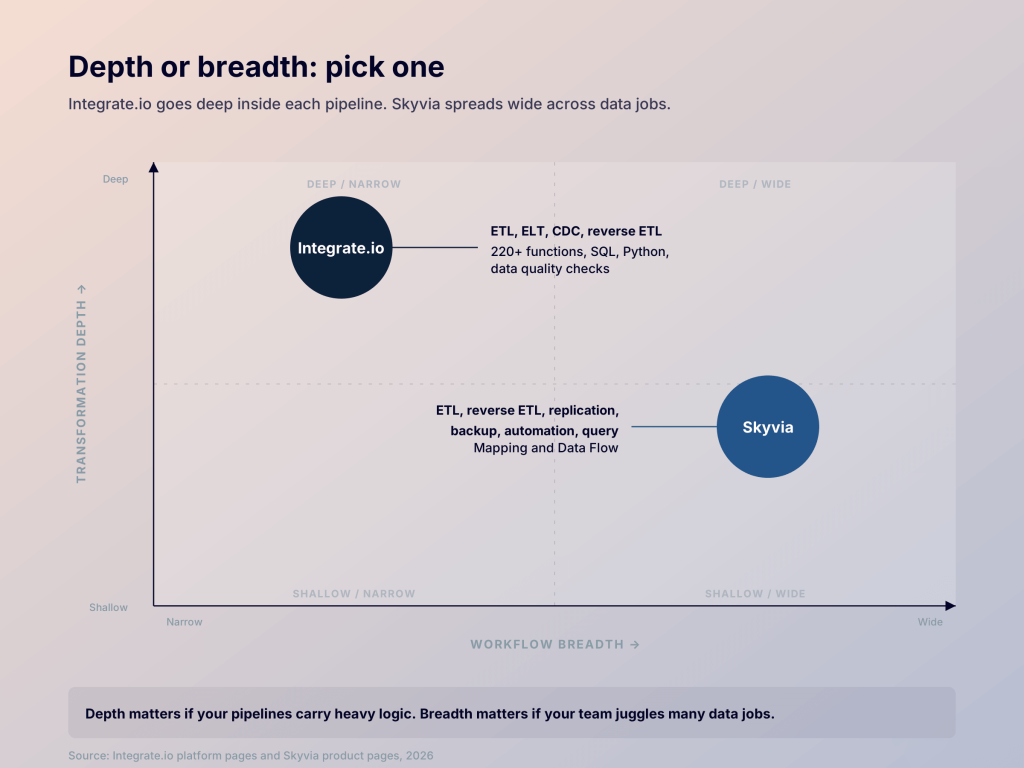
Here’s a simple test. Open your messiest pipeline and look at what happens between source and destination. If most of the work happens in the middle, Integrate.io earns its price. If the job is mostly moving data and keeping copies of it, Skyvia fits better.
That’s why regulated teams and teams with complex logic tend to choose Integrate.io, while SMB-to-mid-market teams usually pick Skyvia. The exceptions matter, though. One messy client-file pipeline can justify Integrate.io for a small team. A larger team that mostly syncs and backs up CRM data may be better off on Skyvia.
Mapping Skyvia vs Integrate.io data sources
Connector counts are a little misleading here. Skyvia lists 200+ connectors, while Integrate.io’s 150+ counts sources and destinations together.
Skyvia leans toward business apps. That means CRMs like Salesforce and Dynamics 365, accounting tools like QuickBooks and NetSuite, and the major databases. REST and GraphQL connectors cover anything missing.
Integrate.io is tuned for operational data work. It’s strongest on databases and SFTP file drops, with a universal REST connector for custom APIs. It also says it builds new connectors on request within 24 to 48 hours.
Either way, check your exact source list on both connector pages before you shortlist.
Where Skyvia vs Integrate.io destinations fit the stack
On the warehouse side, the two tools are close. Both load into Snowflake, BigQuery, Redshift and Databricks, and both support reverse ETL into business apps. The difference is what happens beyond the warehouse.
Skyvia helps people reach data where they already work. Skyvia Connect exposes sources as OData or SQL endpoints that Excel and Power BI can query directly. Its MCP endpoints let AI assistants like Claude do the same in plain language.
Integrate.io focuses on operational destinations, such as two-way Salesforce sync and transformed files delivered over SFTP. Its CDC-fed tables also keep apps and internal tools up-to-date.
Neither tool ships dashboards. Data lands in a destination and stops there, so reporting still needs a separate BI tool.

Build a multi-destination pipeline with Coupler.io
Schedule a callWhat Skyvia vs Integrate.io AI brings today
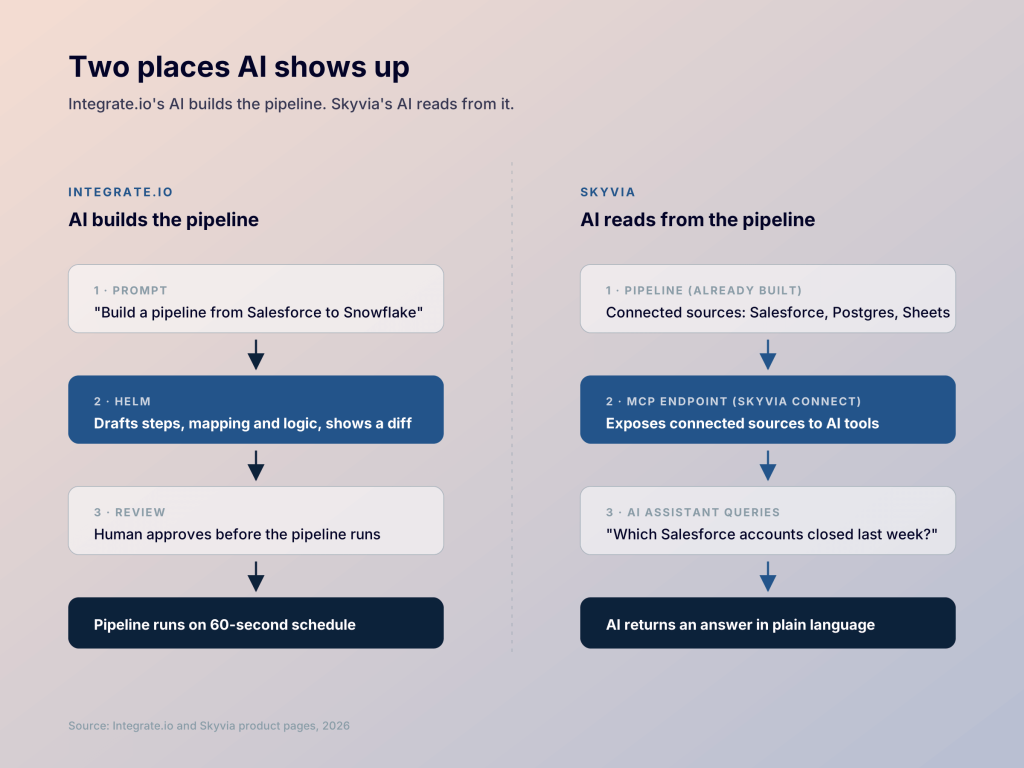
Integrate.io uses AI to help you build pipelines. Skyvia uses it to let AI tools reach your data.
Integrate.io’s Helm copilot drafts pipelines from plain-English prompts and helps debug failed runs. Every change needs human approval before it goes live. Smart Transform and MCP support round it out.
Skyvia’s AI work sits mostly outside the pipeline builder. MCP endpoints, launched in August 2025, let assistants like Claude query your connected sources. An OpenAI connector can also enrich or classify records inside an integration.
Where AI ships today
Both tools point AI at the pipeline. Helm helps you build it, and Skyvia’s MCP endpoints let assistants read what it connects. Useful, but analysis still happens somewhere else.
Coupler.io takes a different route with Coupler AI: an AI Agent that assembles dataflows and surfaces insights from data already loaded. It’s backed by AI Integrations and Skills, with a library of 200+ dashboard templates behind it. That puts it closer to describing what you want and getting a working pipeline, with the dashboard layer included.
Let Coupler AI do the data work for you
Tell Coupler AI what you need to know, from which source, and how often. It connects your account, sets up the data flow, keeps it refreshed, and lets you analyze the results inside Coupler.io or another AI tool.
Try for free
Breaking down Skyvia vs Integrate.io pricing
The two pricing pages look like they belong to different markets. Skyvia starts free and grows with your usage. Integrate.io charges one flat fee and stops counting.
Skyvia offers a free plan with 10k records a month and daily runs. Paid Data Integration tiers run from $99 to $499 a month, or $79 to $399 billed annually. Higher tiers add more frequent runs and advanced mapping. Extra records are billed per 1,000, and Enterprise is custom. The catch: Backup, Query, Connect and Automation are billed separately, so add them up if you’re buying Skyvia for the bundle.
Integrate.io charges $1,999 a month for unlimited data, pipelines, connectors, and users, with 60-second scheduling and 30-day onboarding. Security, role-based access, HIPAA readiness, and tailored support are add-ons quoted through sales. A 14-day free trial needs no credit card.
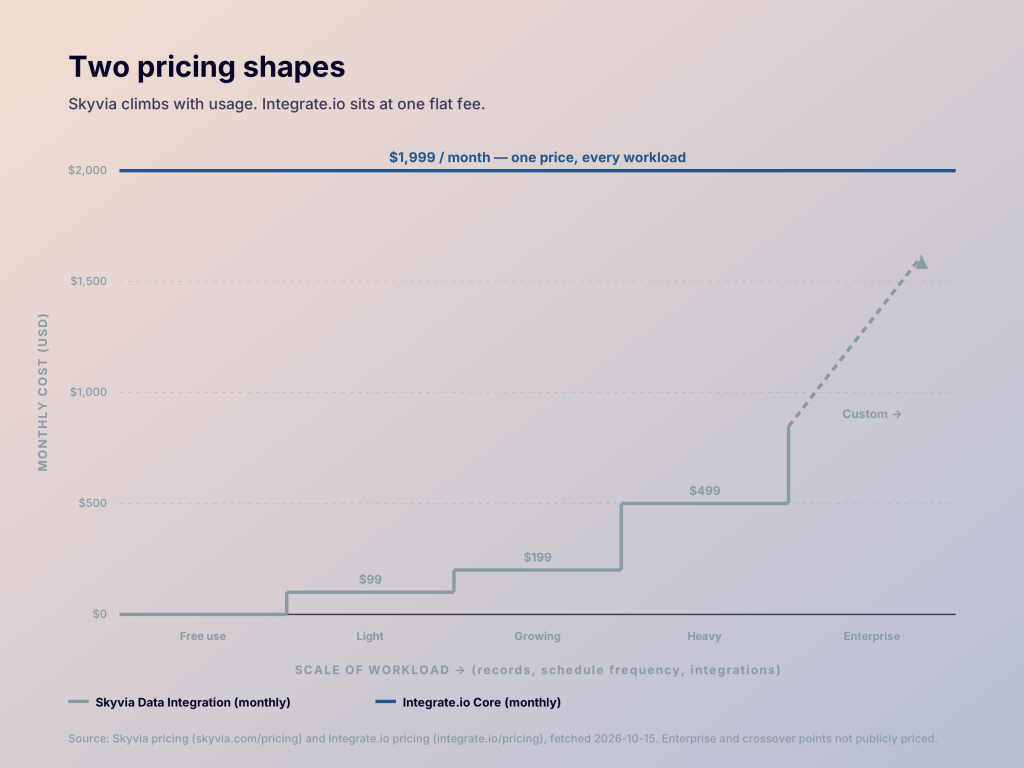
Flat pricing rewards heavy use. For high-volume pipelines, Integrate.io’s fee stays put as you scale. For light workloads, $1,999 is a high floor, and Skyvia will likely cost far less. For teams whose workloads don’t fit either model cleanly, Coupler.io prices by scheduled dataflow runs, not per record or per connector, with transparent published pricing. See Coupler.io pricing.
A closer look at Skyvia vs Integrate.io audience profiles
These tools sit next to each other on the market ladder, not on the same rung.
Skyvia draws mostly small businesses. Think ops and RevOps teams, Salesforce admins, consultants and first-time ETL buyers.
Integrate.io leans mid-market, with customers like Philips and Samsung. It targets data teams with complex pipelines, plus regulated industries like healthcare and insurance.
Where they overlap
The overlap sits in the mid-market. A growing ops team can outgrow Skyvia’s mapping limits, and a lean data team can find Integrate.io’s floor too high. If you’re in that middle zone, let your most complex pipeline decide, not your company size.
Comparing Skyvia vs Integrate.io security & stability
On the compliance checklist, these two look almost identical. Both list SOC 2, GDPR, HIPAA support with a BAA, and TLS encryption in transit. The difference is how each handles your data.
Skyvia encrypts data at rest with AES-256 and stores some data by design, such as backups. That’s expected from a platform with a backup product.
Integrate.io takes a pass-through approach: it says it doesn’t store customer data, with any temporary copies removed within 24 hours. A CISSP-certified team handles vendor risk assessments, and HIPAA readiness is sold as an add-on.
Either way, ask for the audit report, not just the badge. A SOC 2 Type II report shows how controls held up over months, not on a single day. Coupler.io, for example, publishes its SOC 2 Type II and compliance details openly.
Where Skyvia vs Integrate.io ease of use, support differ in practice
Ease of use shows up at two moments: the day you set up your first pipeline, and the day one breaks at 2 a.m. Skyvia wins the first. Integrate.io is built for the second.
Skyvia lets you sign up free and run a first integration through a wizard, with no sales call. G2 reviewers rate its setup highly. Support runs through a help center and email, with priority support on Enterprise.
Integrate.io is demo-led, though its free trial is self-serve. Every plan includes 24/7 support and a dedicated Solution Engineer who guides onboarding. Some G2 reviewers note a steeper learning curve on complex packages.
Looking beyond Skyvia and Integrate.io
Maybe you’ve worked through this Skyvia vs Integrate.io comparison and neither philosophy quite fits. Transformation depth may matter less than you thought, or workflow breadth more. Or the dashboard layer turns out to be the actual missing piece.
In that case, Coupler.io is the alternative to consider. It isn’t a code-free ETL builder like Integrate.io, and it isn’t a bundled workflow suite like Skyvia. It’s a data integration and AI analytics platform, built to shorten the distance from pipeline to insight.
Where Coupler.io sits
- Sources: 400+ data sources across marketing, sales, product, finance and databases.
- Dashboards: 200+ dashboard templates, ready to use. Neither Skyvia nor Integrate.io ships these.
- Destinations: warehouses, BI tools, Google Sheets, Data Studio (Looker Studio), AI tools and APIs.
- Coupler AI: an AI Agent, AI Integrations and Skills, working on data already loaded.
- Pricing: based on scheduled dataflow runs.
- Security: SOC 2 Type II, TLS, AES-256, GDPR and MFA.
- Setup: fully managed SaaS, with no infrastructure to run and no sales cycle.
How the three compare
| Coupler.io | Skyvia | Integrate.io | |
|---|---|---|---|
| Pricing model | Scheduled dataflow runs | Per product, by records and frequency | Flat fee, unlimited usage |
| Entry price | Free plan; Starter from $32/mo | Free plan; Basic from $99/mo | $1,999/mo |
| Data sources | 400+ | 200+ | 150+ sources and destinations |
| Workflow coverage | ETL into BI tools, spreadsheets, warehouses and AI tools | ETL, reverse ETL, replication, backup | ETL, ELT, CDC, reverse ETL |
| Transformation depth | Formulas, filters, joins, aggregation, append | Mapping plus Data Flow | 220+ functions, SQL, Python |
| Dashboard templates | 200+ | None | None |
| AI capabilities | Coupler AI: AI Agent, AI Integrations, Skills | MCP endpoints | Helm copilot, MCP |
Coupler.io doesn’t replace either tool across the board. Integrate.io keeps its edge on transformation depth and HIPAA compliance. Skyvia keeps its edge on bundling ETL, reverse ETL, backup and replication in one platform.
Where Coupler.io pulls ahead is the step after the pipeline. It turns loaded data into dashboards and AI-assisted insight without a separate BI project.
Who should consider it?
Coupler.io suits teams that want managed cloud ETL with dashboard templates and AI built in. It’s a lighter fit if you need extensive transformation logic inside the platform.
If your pipelines depend on complex transformations in a visual builder, Integrate.io is still the right pick. If you need ETL, reverse ETL, backup and replication in one tool at an SMB price, Skyvia is the stronger choice.
Coupler.io makes the most sense when the end goal is a dashboard. In that case, the pipeline is a means to an end, not the product itself.
Already on Skyvia, and the workflow bundle hasn’t turned into insight? The Coupler.io team can scope the alternative for you. See Coupler.io vs Skyvia for the full head-to-head.
Scope Coupler.io for your team’s workload
Get a demoVerdict: which should you choose?
The right pick depends on where your pipelines carry their weight.
Consider Integrate.io if…
You work in a regulated industry, and your pipelines carry real logic, like messy client files or heavy Salesforce prep. You want a visual builder with code as a fallback, plus 24/7 support, and $1,999 a month fits the budget.
Consider Skyvia if…
You want to start free and pay as usage grows, with ETL, reverse ETL, replication, and backup under one account. Your transformations are mostly mapping and lookups, and your team prefers to self-serve.
Pick Coupler.io if…
Your end goal is a dashboard, not a pipeline. You want 400+ sources and 200+ dashboard templates without a sales cycle, and your workload fits pricing based on scheduled dataflow runs.
For a wider shortlist, see this roundup of Skyvia alternatives.