Top AI Tools for Building Analytics Dashboards, and Where Each One’s AI Actually Falls Short

Building a dashboard used to mean SQL, an analyst, and a ticket queue, then another wait once the question changed. AI changed that entry point without replacing BI tools outright. Now anyone can ask a question in plain language and get a chart back instead of filing a request first.
But that shift isn’t even across the market. Some tools built AI into how the product actually works, while others just added a chat box on top of the same dashboards they had five years ago. Both get marketed as “AI-powered,” and the difference matters more than the label.
Coupler.io sits on the first side of that split. It calculates against your connected data. This way, Claude, ChatGPT, or the AI tool your team already uses returns answers grounded in verified numbers. Below, you’ll find details of Coupler.io and other AI tools people actually shortlist when picking AI for creating dashboards in 2026.
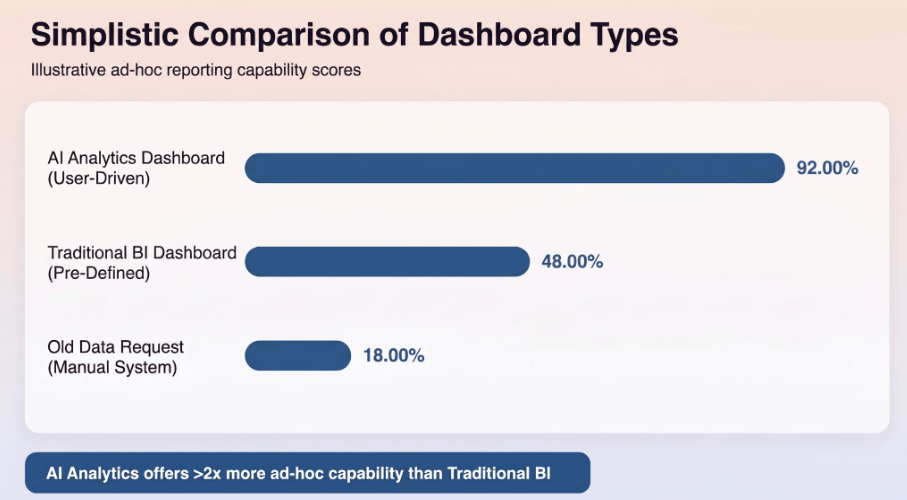
AI analytics vs traditional BI dashboards
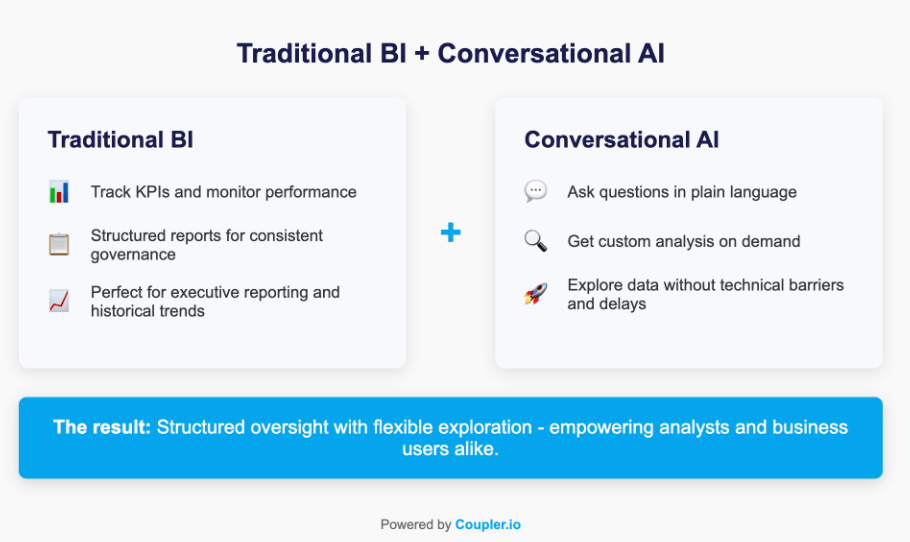
Traditional BI dashboards and AI analytics aren’t really competing for the same job. A dashboard’s value comes from being the same for everyone. It should provide a governed set of metrics, a validated pipeline behind them, and a chart that reads the same way no matter who’s looking at it. That doesn’t go away just because a chat box gets added on top.
What AI analytics dashboards add is a faster way in. Instead of waiting for someone to build the report, anyone can ask the question directly and get an answer grounded in that same underlying data. The catch is that an AI layer is only as accurate as the data model sitting underneath it. And it’s still worse than a dashboard for exact calculations across a large dataset. Or for giving the same answer twice if the question is phrased slightly differently.
Whether AI will replace BI dashboards comes up often. The short answer is no: the two aren’t rivals. A dashboard stays the version everyone can trust, and AI works best as the conversational layer sitting on top of it. Two related terms are worth defining clearly before comparing specific products.
What are AI dashboards?
The mechanism is what separates real AI dashboards from labeled ones. A genuine AI dashboard connects a natural language question to a semantic layer or a live warehouse connection. Then it translates that question into a query and returns a chart generated from the result. Search-and-filter with an AI label on the search bar is not the same thing, even though it often gets marketed that way.
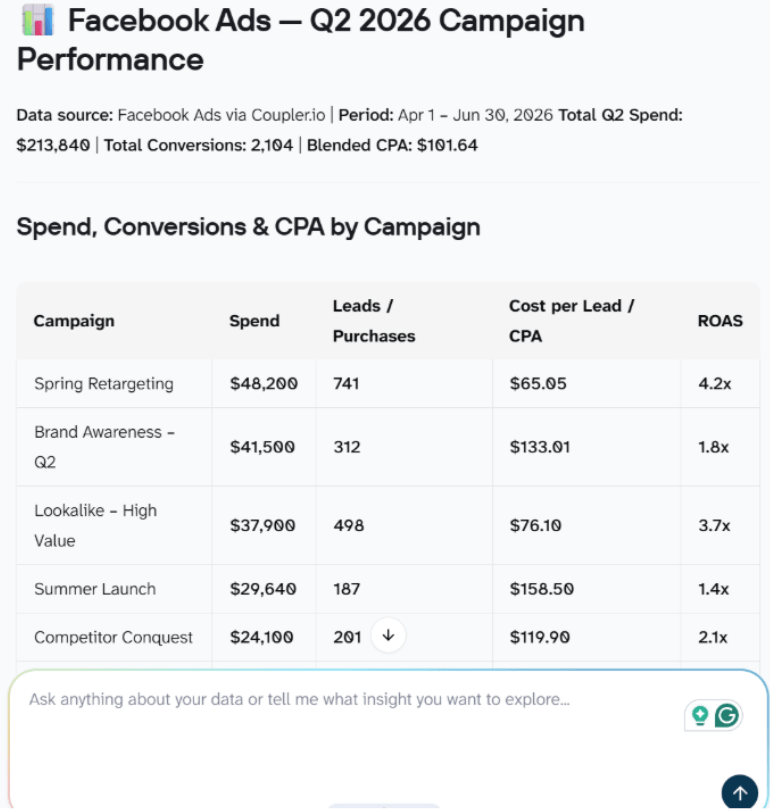
Coupler AI works this way in practice through its AI integrations. Connect your marketing data once, then ask a question like “which channel had the highest cost per lead last month” in Claude, ChatGPT, or another AI tool you use. Coupler.io runs the calculation against your connected data and hands back verified numbers. Claude or ChatGPT then explains the result and visualizes it as a chart in the same conversation.
Here is an example of an AI dashboard as a Claude artifact for weekly performance reporting created by Gabriel Solberg, a B2B Growth Performance Marketer at Right Percent.
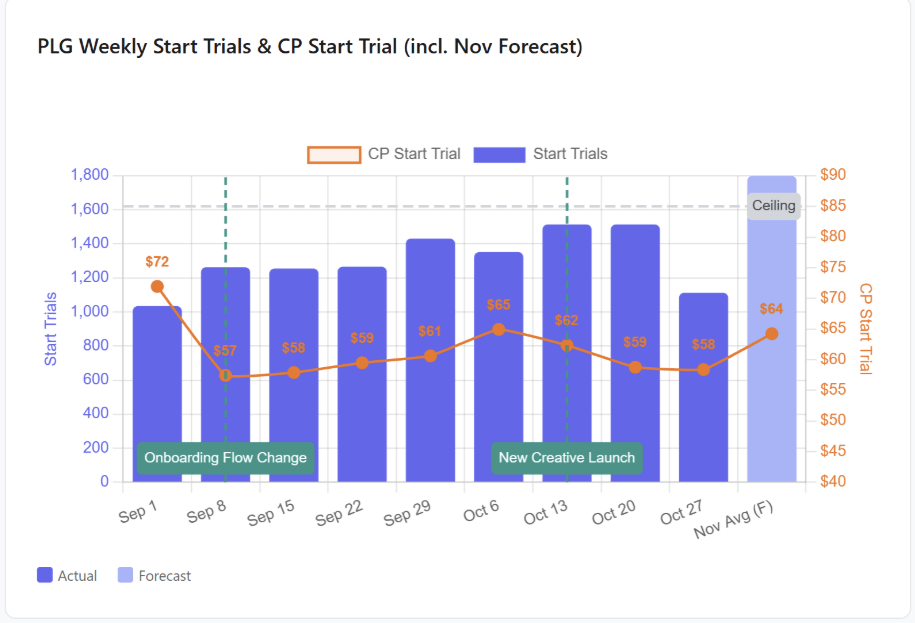
Gabe uses Coupler AI to connect Meta Ads and Google Ads data to Claude. This way, he runs his weekly performance reporting as a Claude artifact and can rerun with fresh data on demand. That setup cut his PPC data analysis and reporting time by 60% and turned daily campaign reviews into a job that takes under 10 minutes.
A few capabilities tend to separate the real ones from the relabeled ones. A genuine AI dashboard generates a query from a plain-language question instead of just matching keywords. It flags anomalies in the underlying data without being asked. It surfaces an insight on its own, rather than waiting for someone to open the dashboard and go looking for it.
Do AI analytics dashboards differ much?
This is the narrower, higher-stakes version of the category. The AI layer doesn’t just help build the dashboard, it runs the analysis that ends up on screen. That distinction matters most to teams that plan to act on the number the AI produces, a budget shift, a staffing call, a bid on ad spend, rather than teams that just want a faster way to browse existing data. If a real decision rides on the answer, it’s worth knowing whether a tool is running actual analysis or just fetching and formatting, which is the question each “best for” line later in this piece is actually answering.
Comparing each analytical dashboard AI tool at a glance
Full profiles of each analytical dashboard AI tool follow below, but here’s the fast version for anyone comparing prices and AI features side by side before reading further. Run the real math against your own team size and query volume as you read this, not just the number in the price column. Several of these tools look cheap until seat count or consumption charges get added in.
| Tool | Starting price | AI feature | Best for |
|---|---|---|---|
| Coupler.io | Free tier, paid from $24/month (annual) | Coupler AI (Analytical Engine, AI integrations, AI Agent, MCP, Skills) | Teams that want trustworthy AI analytics on their business data, in the AI tool they already use |
| ThoughtSpot | $25/user/month | Spotter 3 | Mid-market and enterprise teams on a cloud warehouse wanting agentic search as the primary interface |
| Microsoft Power BI | $14/user/month (Copilot needs Pro/PPU or F64+ Fabric capacity) | Power BI Copilot | Microsoft 365 and Azure shops where cost per user decides the tool |
| Tableau | $15/user/month (Standard) | Tableau Pulse (Standard), Tableau Agent (Cloud+) | Teams prioritizing data visualization depth already inside Salesforce |
| Looker and Data Studio | Contract-based, roughly $60,000 to $150,000/year mid-market (est.) | Conversational Analytics (Gemini) | Google Cloud-native teams on BigQuery wanting governed AI answers |
| Sigma | No public price, sales-led | Sigma Assistant | Spreadsheet-native power users comfortable with a sales-led process |
| Domo | No public price, credit-based | Domo.AI, DomoGPT, Agent Catalyst | Enterprise teams wanting one AI-first platform with budget to match |
| Zoho Analytics | Free tier, Basic from $30/month | Ask Zia AI Agent (Premium tier and up) | Teams on Zoho One wanting AI folded into a plan they’d already need |
| Metabase | Free to self-host, Starter around $100/month | Metabot AI (token-metered, included from the free tier) | Small technical teams wanting a real free option they’re comfortable running themselves |
| Basedash | $1,000/month flat (up to 25 users) | Basedash AI | Smaller teams wanting predictable flat pricing over per-seat or consumption billing |

Turn business data into AI insights with Coupler.io
Book a demoThe best AI tools for creating dashboards in 2026
Here’s what each of these analytical dashboard AI tools actually offers: what their AI does day to day, current pricing, where they fall short, and who they fit best.
1. Coupler.io
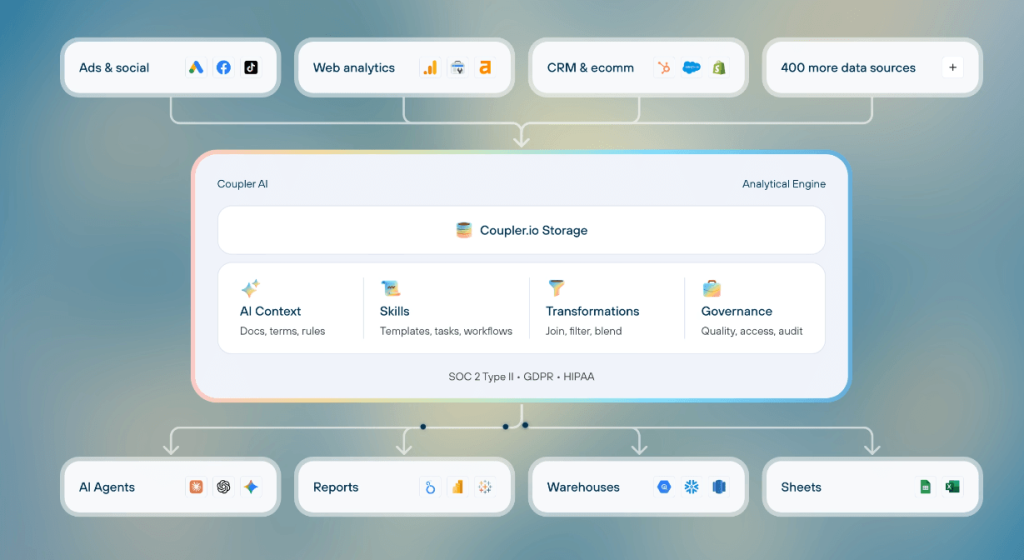
Coupler.io is a no-code data integration and AI analytics platform, and one of the AI tools for creating dashboards that focuses on the data layer underneath them rather than the chart layer on top. It’s built around getting data from 400-plus sources into a warehouse, database, or BI tool, then letting people query it in plain language once it’s there. It supports destinations including PostgreSQL, BigQuery, and Redshift, along with direct connections into BI tools for teams that want the dashboard layer handled somewhere else entirely.
Coupler AI covers three capabilities:
- AI Agent for asking questions and building data flows in plain language
- AI Integrations for using Coupler.io-prepared data in Claude, ChatGPT, Gemini, and other external tools
- AI Skills for repeatable analytical workflows.
Underneath Coupler AI, the Analytical Engine runs the actual math against your dataset and MCP handles the pipe into external AI tools. Coupler AI calculates – AI interprets
Coupler.io also ships a library of dashboard and data set templates covering common use cases like marketing spend, sales pipeline, and customer acquisition, for teams that don’t want to start from a blank canvas.
Coupler.io bills by connected accounts and destinations, not by data flow or seat count. One connected account can power unlimited data flows and dashboards, and higher tiers add more accounts, more simultaneous destinations, and faster refresh frequency. Paid plans start at $24/month billed annually, with a free plan for a single connection and manual refresh. That structure fits teams pushing the same data to a warehouse and a BI tool at the same time without paying per viewer.
Coupler.io isn’t a visualization-first tool the way Tableau or Sigma are. Its strength sits in trustworthy AI analysis: the Analytical Engine runs the math against your connected data, so the AI model interprets verified numbers rather than inventing them. Data prep and refresh happen automatically underneath that.
It is best for teams that want AI answers grounded in actual calculations against their business data, delivered through the AI tool the team already uses.
Design your AI analytics stack with Coupler.io
Book a demo2. ThoughtSpot
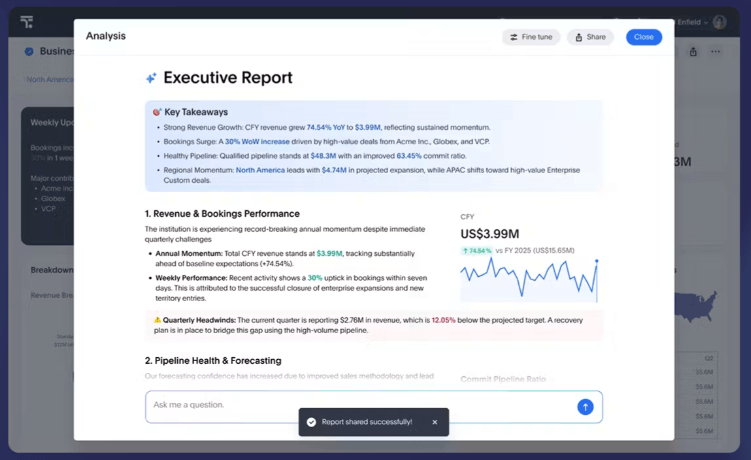
ThoughtSpot built its reputation on search-driven analytics before “AI dashboard” was a category. Its current AI layer, Spotter 3, extends that into a full agent. It handles natural language search, generates Liveboards on the fly, and runs SpotIQ for anomaly detection and forecasting, all without a person setting up the alert first.
Pricing runs Essentials at $25/user/month and Pro at $50/user/month, with Spotter capped at 25 queries per user per month and 250 million rows on the Pro tier. Enterprise pricing is custom. Publicly reported deals put the median contract around $68,400/year.
The catch is in that query cap. Twenty-five AI queries a month sounds generous until a team actually starts relying on Spotter as its default interface, at which point real usage pushes into overage costs fast. It is the best fit for mid-market and enterprise teams already running a cloud warehouse who want agentic search to be the primary way people interact with their data, not a bonus feature bolted onto existing dashboards.
3. Microsoft Power BI (Copilot)
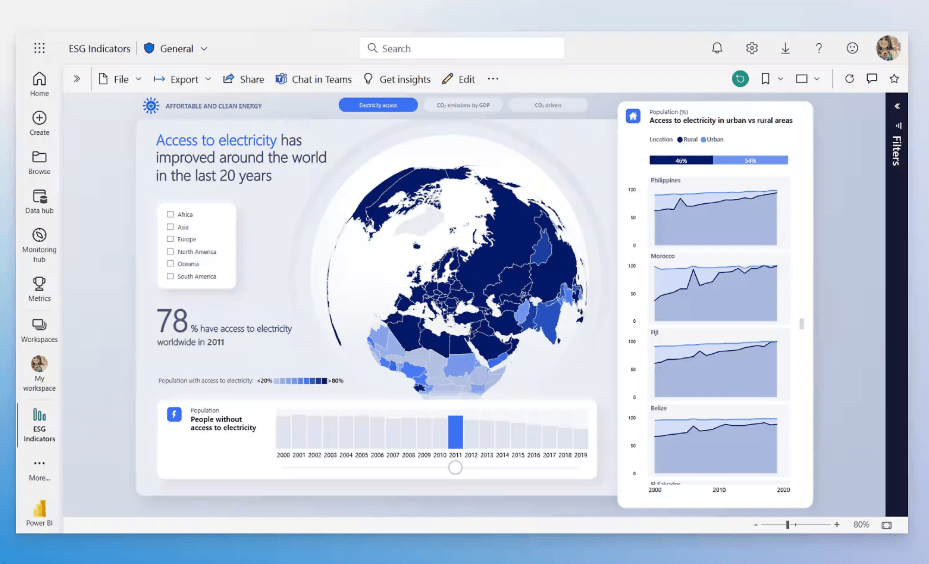
Power BI’s AI layer is Copilot. It covers DAX generation, automatic report summarization, and a natural language Q&A visual that lets someone type a question directly into a report. Pricing sits at $14/user/month for Pro and $24/user/month for Premium Per User, both raised from $10 and $20 respectively in April 2025. Copilot itself requires either the PPU tier or F64-and-above Fabric capacity, so the Pro tier alone won’t unlock it.
Microsoft has since introduced Fabric Copilot capacity. It consolidates AI usage across Pro, Premium Per User, and Desktop into one shared, billable pool, instead of spreading it across separate capacities. That makes budgeting a little more predictable. It doesn’t make the capacity itself any larger. How far that capacity stretches is the real question. One practitioner’s field report on Microsoft’s own community forum described an entry-level F2 capacity running out after roughly 20 Copilot questions in a day, well below what Microsoft’s documentation examples suggest. That’s one measured account, not an official ceiling, but it’s worth planning around the pessimistic case rather than the documented one.
It is the best for Microsoft 365 and Azure shops where cost per user is the deciding factor and Power BI is already the default reporting layer.
4. Tableau (Pulse / Tableau Next)
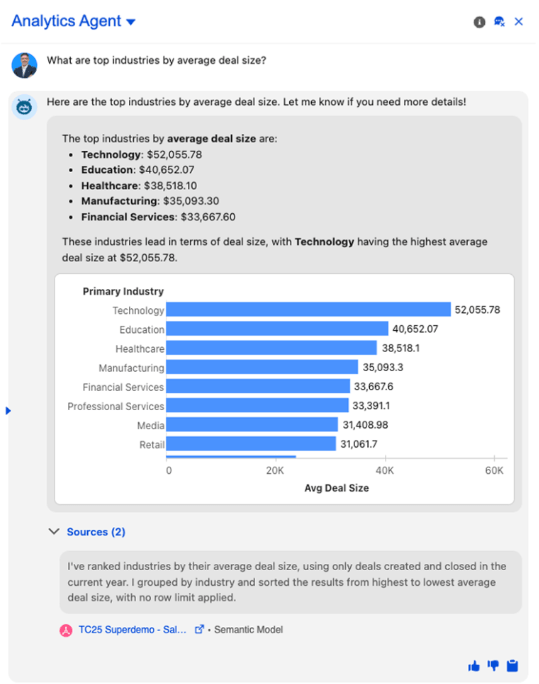
Tableau’s AI story splits into two pieces. Tableau Pulse handles proactive metric digests and anomaly detection, and it’s bundled into the entry-level Standard tier on Tableau Cloud, no separate purchase required. Tableau Agent, which runs on Salesforce’s Einstein Trust Layer for more conversational, agentic analysis, sits one tier up.
Tableau moved away from its old per-role Creator, Explorer, and Viewer pricing. The current Tableau Cloud tiers are Standard at $15/user/month, which includes web authoring, Tableau Desktop, Prep Builder, and Pulse, Enterprise at $35/user/month, which adds advanced management and data management, and Cloud+, which is quote-based and adds full Tableau Agent access along with more sites and premier support. Tableau Next, a separate product built around Tableau Agent and Tableau Semantics, is priced at $40/user/month on its own.
That entry price buys real visualization depth, which is Tableau’s long-standing reputation. It doesn’t buy the full agentic AI experience, which still sits behind a Cloud+ contract with no public number attached to it.
It is ideal for teams that prioritize visualization depth above everything else and are already inside the Salesforce ecosystem, where the Einstein Trust Layer integration actually pays off.
5. Looker and Data Studio (Gemini)
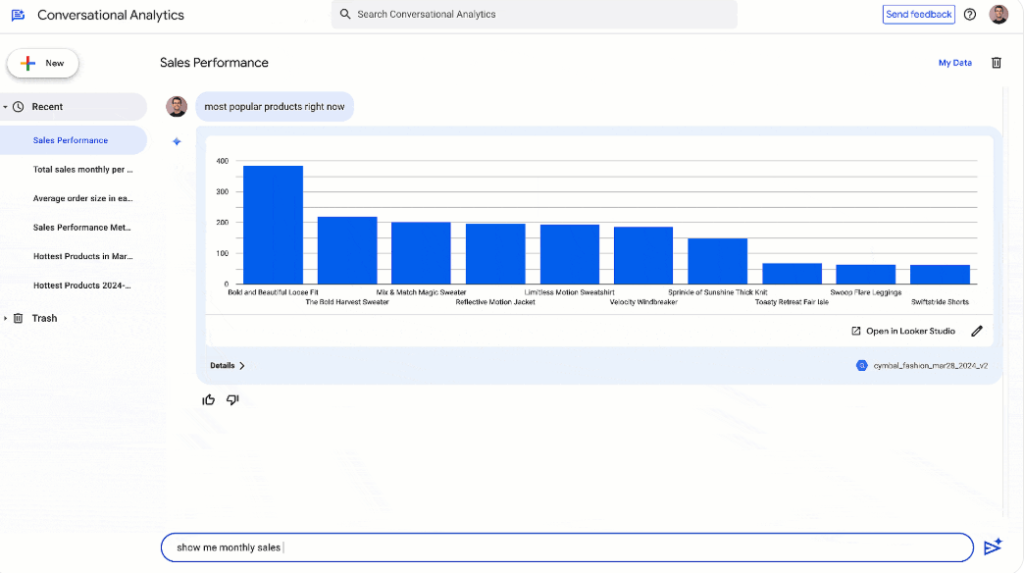
Google’s BI lineup includes two distinct products that get confused constantly, and getting the naming right matters here. Looker Studio was renamed back to Data Studio in April 2026. Looker itself, the enterprise, LookML-based platform, is unaffected by that change and remains a separate product.
Looker is priced by contract, and Google doesn’t publish a number. Third-party deal data puts a mid-market deployment somewhere in the $60,000 to $150,000 a year range as a rough ballpark, though actual contracts vary by seat count and usage in ways no public source fully captures. Its AI layer, Conversational Analytics, is Gemini-powered and stays grounded in LookML. AI-generated answers respect the metrics and business logic a team already defined in code, rather than guessing at what “revenue” means from raw table names. Data Studio’s free tier, by contrast, has a much thinner set of connectors and nothing close to that level of AI depth.
Google currently runs Conversational Analytics on a token-based system with generous monthly allowances and no overage billing during a promotional period, though it has said overage pricing will eventually apply with 90 days’ notice before charges start. The bigger cost here isn’t the contract or the eventual token pricing, it’s the learning curve. LookML is code-first, and that’s a real barrier for teams without someone comfortable writing it. It is best for Google Cloud-native teams already running BigQuery who want AI answers that respect governed business logic rather than AI that just sounds confident.
Turn business data into AI insights with Coupler.io
Book a demo6. Sigma
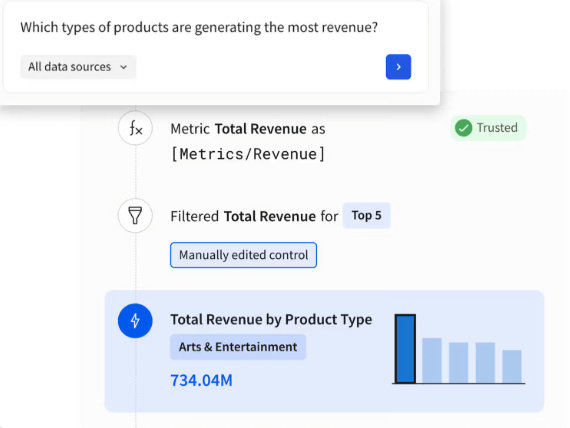
Sigma is spreadsheet-native BI built to sit directly on top of Snowflake, Databricks, or BigQuery, querying live rather than importing a static copy of the data. Its AI layer, Sigma Assistant, handles natural language queries and can explain what a given chart is actually showing in plain terms.
There’s no public starting price. Sigma is fully sales-led, with role-based licensing across View, Act, Analyze, and Build tiers, plus usage credits layered on top. The median annual contract lands around $60,500. There’s no free tier, and a cloud warehouse is a hard requirement going in.
Sigma queries live against the warehouse instead of caching data locally. That architecture pushes compute cost onto your warehouse bill directly, on top of a Sigma contract you can’t estimate without talking to sales first. Sigma is suitable for teams whose power users already think in spreadsheets and don’t mind working through a sales-led buying process to get there.
7. Domo
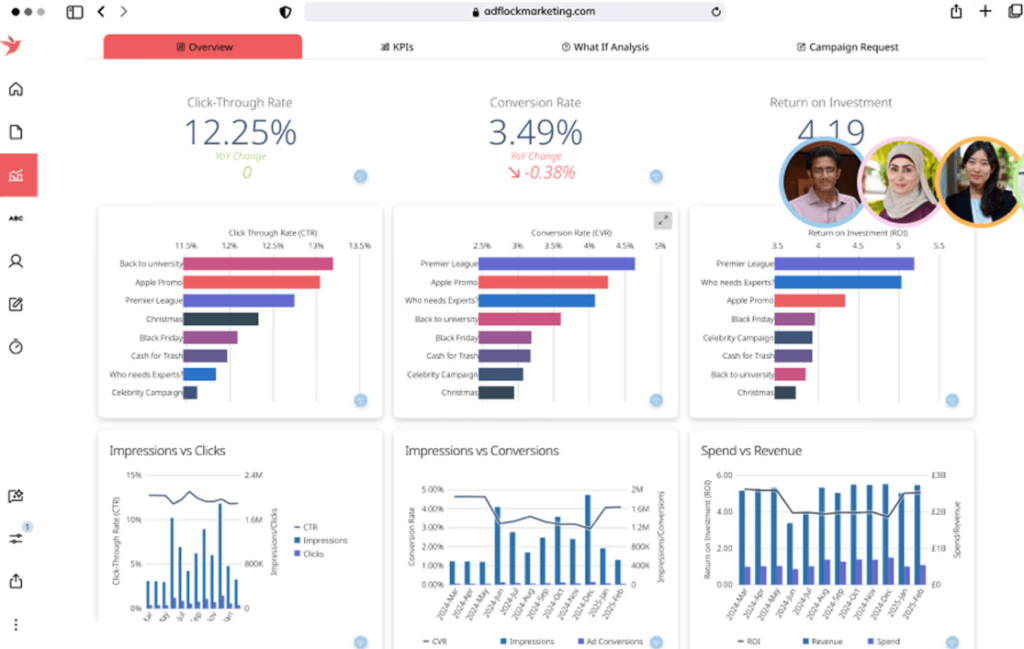
Domo positions itself as an AI-first platform end to end rather than a BI tool with AI added on. That shows up across Domo.AI, DomoGPT for conversational querying, Agent Catalyst for building no-code AI agents, and a dedicated AI SQL assistant, all sitting on top of more than 1,000 connectors.
Pricing runs on credit-based consumption with no public list price. Realistic entry pricing lands around $30,000 to $50,000 a year, Enterprise deployments run $100,000 to $200,000-plus, and the average contract sits around $134,000 a year.
The credit system is the thing to understand before signing anything. Consumption is opaque. It includes AI queries alongside everything else running through the platform, and that combination makes total cost hard to predict before you commit to a contract. It is the best for enterprise teams that want a single AI-first platform end to end and have the budget to match that ambition.
8. Zoho Analytics
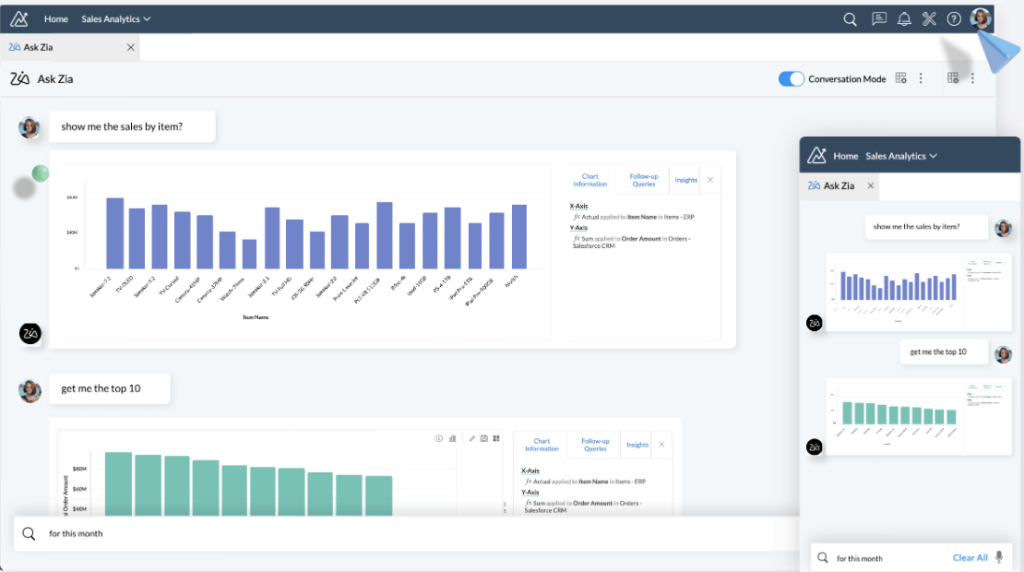
Zoho Analytics runs Ask Zia for natural language queries and automatic narrative summaries of a report, plus a separate DSML Studio for teams that want to build their own AutoML models on top of the same data. It connects to more than 500 sources and integrates natively with the rest of the Zoho ecosystem, which is its biggest draw for teams already using Zoho One.
There’s a free tier for smaller use cases. Paid plans run Basic around $30/month, Standard around $60/month, Premium around $145/month, and Enterprise around $575/month. Worth being precise about the AI: Zoho’s own pricing page lists the LLM-powered Ask Zia AI Agent, along with conversational analytics and automated insights, as a Premium and Enterprise feature specifically. Basic and Standard don’t include it.
Performance is the other honest limitation. Both visualization depth and query performance drop off past roughly 10 million rows, even on the Enterprise tier. That rules it out for teams working with very large datasets. It is suited for teams already running on Zoho One and willing to go at least Premium to get the AI Agent alongside the rest of the ecosystem integration.
9. Metabase
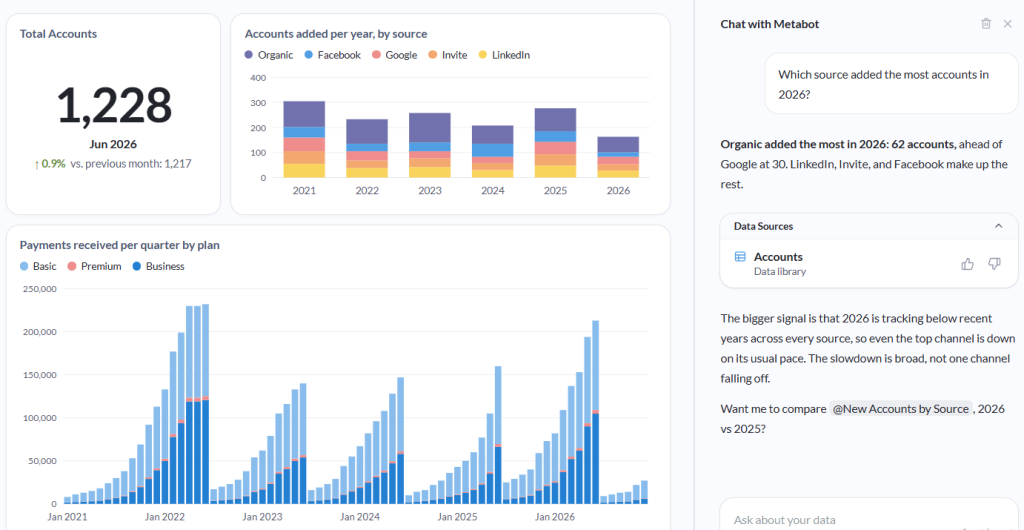
Metabase is open source and free to self-host. That makes it the only tool on this list with a real free path, rather than a free tier with hard limits. Paid hosted plans start around $100/month for Starter. Pro runs $575/month and is required for row-level security and embedding. Enterprise is custom-priced, with a median around $20,000 to $39,000 a year.
Metabot AI, Metabase’s natural language querying and SQL generation layer, is included across every plan, including the free, self-hosted one, not sold as a separate paid add-on. What costs money is Metabase’s hosted AI service itself: usage beyond an included 1 million tokens runs $3.75 per million tokens, though anyone can skip that entirely by bringing their own AI provider API key instead.
One thing worth knowing before assuming self-hosting is free: infrastructure costs to run it properly still land around $15,000 to $20,000 a year, once hosting, maintenance, and someone’s time get counted. It is ideal for small technical teams that want a real free starting option and are comfortable running the infrastructure themselves.
10. Basedash
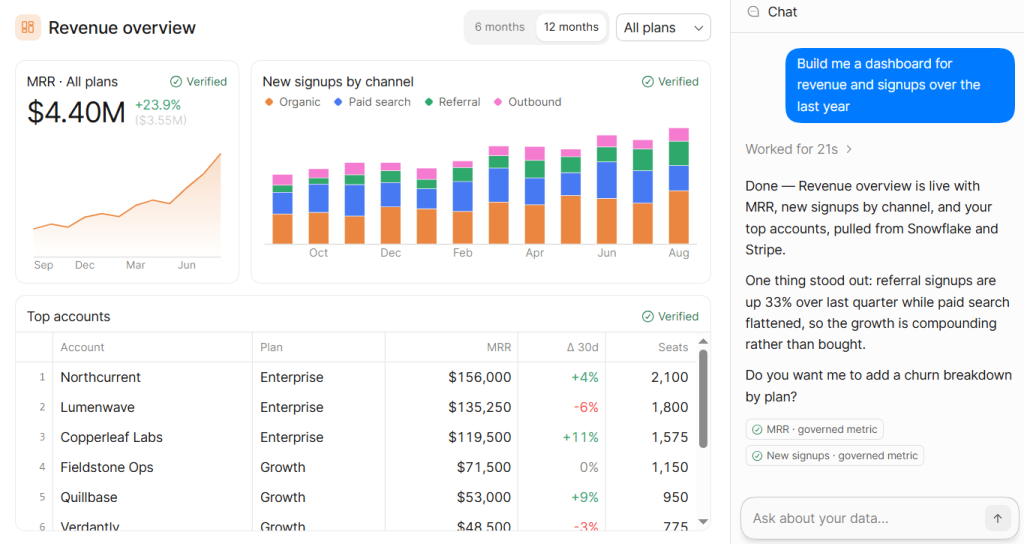
Basedash is flat-rate, AI-native BI built to compete directly with Hex, Sigma, and Metabase, but priced differently from all three. The Startup plan runs $1,000/month flat for up to 25 users, AI credits included in that price rather than metered separately, with more than 750 data source connectors available.
An Enterprise tier adds SSO, SCIM, audit logs, and self-hosting for teams that need them. The trade-off is maturity rather than price or features. Basedash is newer and runs a smaller ecosystem than the legacy players on this list, despite a strong connector count on paper. It’s also less battle-tested at real scale than tools that have been in enterprise deployments for a decade or more.
It is best for smaller teams that want predictable flat pricing instead of managing per-seat costs or watching a consumption meter.
Which AI dashboard tool is right for you
Ten AI dashboard tools are a lot to hold in your head at once. Here’s the shortest path to a shortlist, organized by the problem you’re actually trying to solve rather than by feature list. If:
- Scattered source data is the real bottleneck, not chart design, look at Coupler.io first. Blending and cleaning data before AI gets asked to analyze it solves the problem most of the other tools on this list assume is already solved. The Analytical Engine handles the math, Skills cover repeatable analyses, and you can query through Claude, ChatGPT, Gemini, or another AI tool your team already uses.
- Your team already lives in a cloud warehouse and wants agentic search as the main interface, ThoughtSpot fits that specifically.
- You’re already paying for Microsoft 365 or Azure, Power BI Copilot is the cheapest path to AI-powered dashboards per seat, with the Fabric capacity caveat in mind.
- Visualization quality matters more than anything else and you’re in the Salesforce ecosystem, Tableau’s entry tier gets you there, provided you don’t need full Tableau Agent yet.
- You’re Google Cloud-native and want AI answers grounded in governed business logic rather than a best guess, Looker’s Gemini-powered Conversational Analytics is built for exactly that.
- Your power users already think in spreadsheets, Sigma meets them where they already are.
- Budget isn’t the constraint and you want one AI-first platform end to end, Domo is built for that scale.
- You’re already running Zoho One, Zoho Analytics keeps AI in the same ecosystem, though you’ll need Premium or above to get the actual AI Agent rather than just Standard.
- A real free, self-hosted option matters, Metabase is the only tool here that includes AI querying even on its free tier, with no forced upgrade to unlock it.
- Predictable flat pricing matters more than per-seat billing, Basedash is built around that trade-off specifically.
Common issues when building AI dashboard tools into your stack
A few problems show up across nearly every tool in this list, regardless of price or feature set, and they’re worth knowing before committing to any of them.
Semantic layer accuracy is the biggest one. AI is only as good as the data model sitting underneath it, the same point raised earlier about the difference between a real AI dashboard and AI for dashboards that’s just search-and-filter with a label stuck on it. A poorly modeled dataset produces confident, well-formatted, wrong answers just as fast as it produces right ones.
Consumption-based pricing catches teams off guard too, particularly with Domo’s credit system and Metabase’s token-metered hosted AI service. Both meter usage in ways that are hard to estimate accurately before a team starts using the product at real volume.
Vendor lock-in to a specific cloud warehouse is the third recurring issue, especially with Sigma and Looker, both of which are built to query live against a warehouse rather than store data independently. Switching warehouses later means rethinking the BI layer at the same time.
If your interactive dashboards depend on data that needs blending or cleaning before AI can answer anything useful about it, that’s the part Coupler.io handles.
Trust the numbers in your AI analytics with Coupler.io
Book a demoFAQs
What’s the difference between AI analytics dashboards and traditional BI dashboards?
Traditional BI dashboards get built once and answer whatever questions someone anticipated when designing them. AI analytics dashboards flip that order. The question comes first, and the AI layer builds the analysis in response to it, rather than someone building the report before anyone can ask anything of it.
Can I create dashboards with AI without knowing SQL?
Yes, you can build dashboards with AI using most of the tools in this list. Natural language querying is the whole point of AI-generated dashboards. Products like Coupler.io, ThoughtSpot, Power BI, and Metabase are all built so someone can ask a plain-language question and get a chart back, without writing a query by hand. A few tools, Zoho Analytics among them, only unlock that specific capability on their higher-priced tiers, so it’s worth checking before assuming the entry plan includes it.
Which AI dashboard builders have a free tier?
Zoho Analytics, Metabase, and Coupler.io all offer real free tiers, not just trials. Zoho’s is limited, Metabase’s is free, open-source software you self-host, and Coupler.io’s covers one connection with manual refresh. Most of the other tools on this list offer a free trial rather than an ongoing free option.
What are the best AI tools for performance dashboards specifically?
It depends on where the performance data lives. If it’s scattered across multiple marketing, sales, or product sources, Coupler.io blends it into one place first. If it’s already sitting in a cloud warehouse, ThoughtSpot or Sigma are both built to query that directly with minimal setup.
How do I start building business intelligence dashboards with AI on a small budget?
Metabase’s self-hosted free tier and Coupler.io’s free plan are the two lowest-cost entry points on this list, with Coupler.io’s paid tier starting at $24/month billed annually once you outgrow the free connection limit. Which one fits depends on whether your bigger problem is a shortage of dashboards or a shortage of clean, connected data to build them from.