Meta Ads Manager, formerly Facebook Ads Manager, shows you clicks and spend, but it stops there. You can’t blend that against your CRM data for real customer acquisition cost, can’t run a SQL query against it, and once Facebook’s retention windows close, older data is gone. Facebook Ads has no native PostgreSQL export, so there’s no simple way to connect Facebook Ads to PostgreSQL without some kind of bridge in between.
Coupler.io is a no-code way to get there. With it, you move campaigns, ad sets, ad performance, and lead form submissions into PostgreSQL on a schedule, and the same flow can blend in your CRM data if you need it. It’s not the only way in, though. If you’re after Lead Ads submissions, you’re on a clock since Facebook deletes them after 90 days. So, if you need them the instant they arrive, Facebook’s own native webhook is the better fit. And if your team already owns a data pipeline and just wants Facebook Ads folded into it, go straight to the Marketing API.
How to connect Facebook Ads to PostgreSQL with Coupler.io
Facebook’s API returns campaigns, ad sets, ads, and insights as separate objects, each with its own fields. Normally you’d have to build those joins yourself, Coupler.io removes that work for you, and it’s the fastest path if you want to integrate Facebook Ads with PostgreSQL without engineering time. You won’t need a Meta Developer account either since Coupler.io authenticates through its own already-reviewed app.
Prefer working from an AI tool instead of Coupler.io’s dashboard? You can set up the entire flow, source, destination, and schedule, by prompting Claude, ChatGPT, Cursor, or Perplexity directly. And once your data is in PostgreSQL, the Facebook Ads MCP lets those same tools query it, no need to come back to Coupler.io’s own AI Agent to ask a question.
Let Coupler AI do the data work for you
Tell Coupler AI what you need to know, from which source, and how often. It connects your account, sets up the data flow, keeps it refreshed, and lets you analyze the results inside Coupler.io or another AI tool.
Try for free
Step 1: Connect your account and choose a data entity
Sign up for Coupler.io and create a new data flow. You can get started right away for free using the form below with Facebook Ads and PostgreSQL preselected
Authorize your ad account, then pick from seven data entities: Reports and Insights, List of Campaigns, List of Ads, List of Ad Sets, List of Ad Creatives, List of Ads with Ad Creatives, and List of Sponsored Leads. If you’re building ongoing reporting, start with Reports and Insights, which covers impressions, link clicks, CPA (cost per action), CPC, CPM, and CTR at the campaign, ad set, ad, and account ID level.
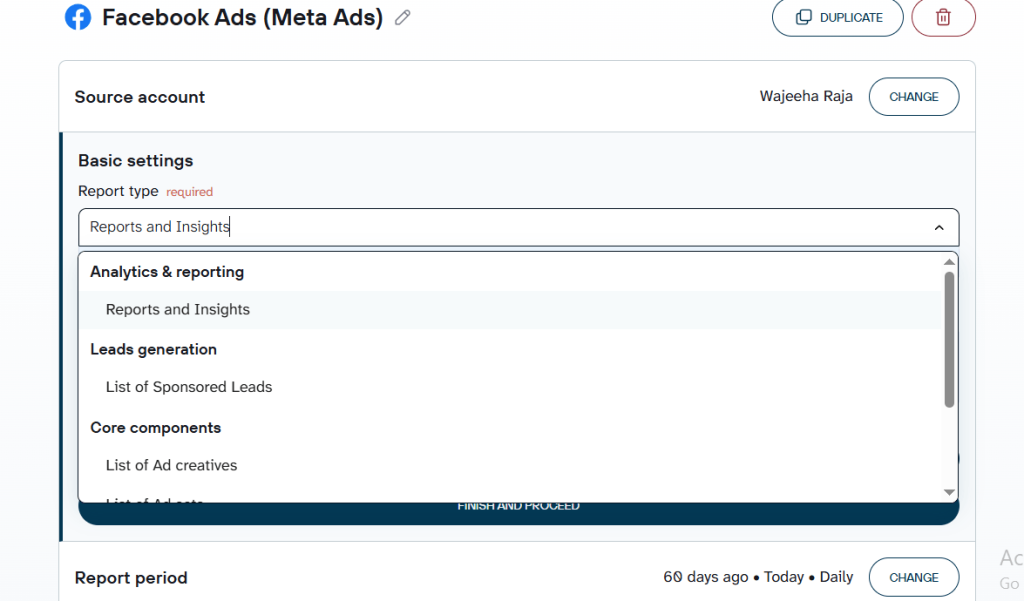
Just need a one-time pull instead of ongoing sync? The same entity works, widen the date filter and skip the schedule. That’s really all it takes to import Facebook Ads data into Postgres without setting anything up long-term.
Since Coupler.io supports over 400 PostgreSQL integrations, you can blend Facebook Ads data with Google Ads, LinkedIn Ads, and other sources.
Step 2: Shape the data before it loads
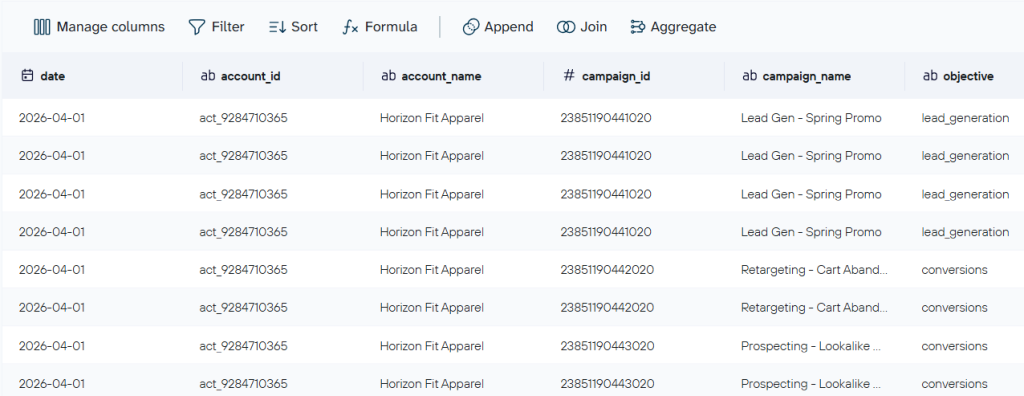
Filter and rename columns, combine several ad accounts, or blend in a CRM or another ad platform like Google Ads in the same flow. You’ll also set your attribution window here, standard, or newer options like incrementality, engagement-based, and first or all conversions. Whichever you pick changes your reported conversions, so it’s worth a deliberate choice rather than leaving the default in place.
Step 3: Connect PostgreSQL and load, to more than one place if you want
Enter your host, port (5432 by default), database name, user, and password, then create or choose a table. Append adds new rows with every refresh, replace clears the table and starts fresh. This applies to warehouse and spreadsheet destinations like PostgreSQL, Redshift, BigQuery, and Snowflake; BI and AI destinations work differently.
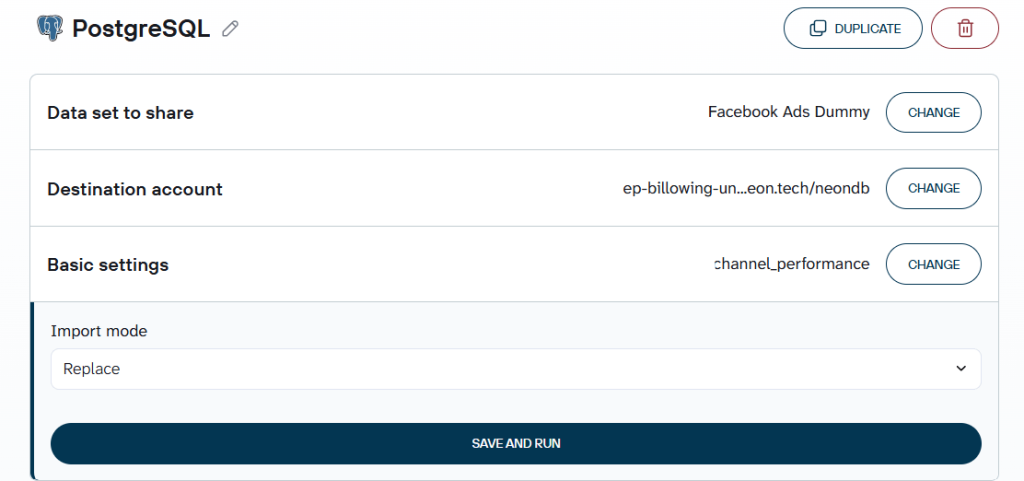
You’re not limited to one destination either. The same flow can push to a live dashboard or spreadsheet at the same time, one setup, one schedule, so you’re not building the pipeline twice.
Check out other guides and sources about Facebook Ads data integration
Set a refresh schedule
How often your data refreshes comes down to which plan you’re on, ranging from daily up to as often as every 15 minutes on faster plans. Adjust this if you want to sync Facebook Ads campaign data with PostgreSQL on a tighter cadence.
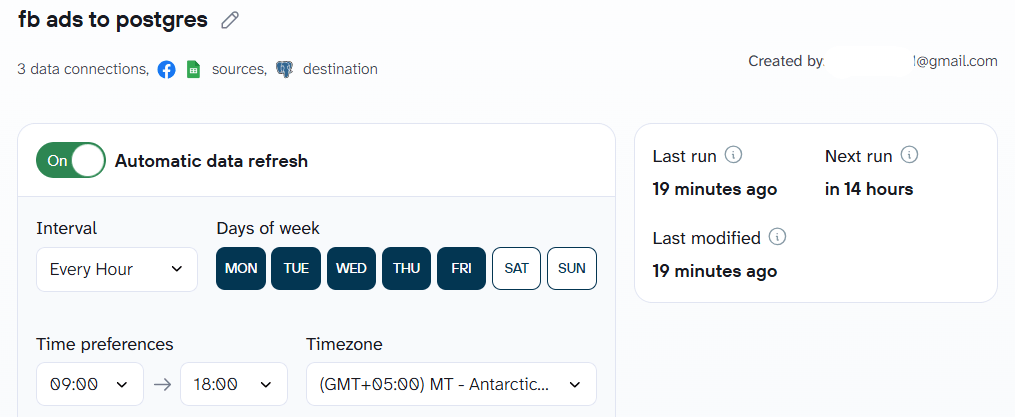
PostgreSQL as a destination now scales to millions of rows following Coupler.io’s most recent upgrade, but each plan still has its own volume ceiling. A flow that hits it doesn’t fail silently, it pauses, emails you, and truncates that run’s dataset until you upgrade or trim what you’re pulling.

Load Facebook Ads into PostgreSQL with Coupler.io
Get started for freeBonus step: Query your Facebook Ads data set with AI Agent
Every campaign has its own idea of what “working” means, but nobody wants to build a separate pivot table for leads versus purchases just to compare them. Once your Facebook Ads data is in PostgreSQL, you can skip that and just ask.
Ask Coupler.io’s AI Agent:
“Using my Facebook Ads data connected through Coupler.io, show total spend, leads or purchases, and cost per lead or cost per acquisition by campaign for Q2 2026. Which campaign is the most efficient?“
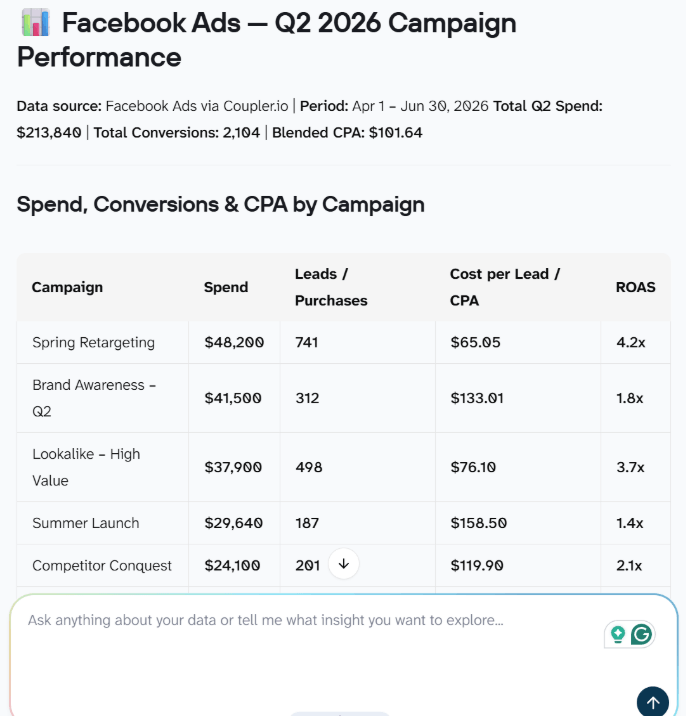
The gap between campaigns is the real finding here.
Spring Retargeting comes back as the standout, a $65.05 cost per acquisition against a 4.2x return, the best of the group. Summer Launch sits at the other end, $158.50 per acquisition and only a 1.4x return, more than twice the cost for less than half the payoff. Across the quarter, blended CPA lands at $101.64 against $213,840 in total spend, so campaigns performing like Summer Launch are the ones dragging that average up.
If one campaign is clearing 4x ROAS while another sitting nearby is barely above 1x, that’s the budget to shift first, not whichever line happens to be spending the most.
What you can do with the Facebook Ads to PostgreSQL integration by Coupler.io
Getting the data into PostgreSQL is only half the job. Here’s what you actually get once it’s there.
Track ad frequency and demographic breakdowns without building a dashboard from scratch.
Coupler.io already has ready-made dashboards waiting for you, across Coupler.io Dashboard, Google Data Studio, and Google Sheets. Clicks, cost, ad frequency, demographic and geographic breakdowns- it’s all there the moment your data lands.
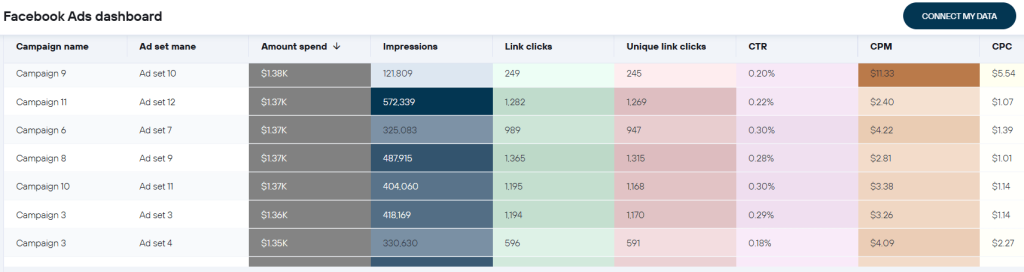
Get a straight answer to a performance question instead of building the report yourself.
Want to know your cost per lead? The “Meta Ads campaigns performance” template already tracks that, along with lead value and average lead value. There’s a creative template too, so you can actually see which ad is pulling its weight. Curious where your ads perform best, or with who? Country and age-and-gender templates cover that, and if you’re juggling several ad accounts, there’s an overview that compares them side by side.
Calculate real customer acquisition cost by blending Facebook Ads with your CRM.
You don’t have to stitch these reports together by hand. Just combine your ad accounts, or bring in a CRM or another platform, right in the same flow. The CRM-blend templates connect Facebook Ads with Pipedrive, Salesforce, or HubSpot, so you get a weekly or monthly funnel that runs from ad spend all the way to closed deal.
Get a database and a live dashboard from one setup.
PostgreSQL doesn’t have to be the only place your data goes. Send it to a dashboard or spreadsheet at the same time, and you’re done, no need to build the same pipeline twice.
Ask which campaign is most efficient this quarter and get a plain answer back.
Once your data’s flowing, just ask Coupler.io’s AI Agent, which runs the numbers through the Analytical Engine instead of guessing. Or if you’d rather work from Claude, ChatGPT, Cursor, or Perplexity, the Facebook Ads MCP does the same thing from inside those tools.
Explore Facebook Ads performance with Coupler.io
Get started for freeHow to get Facebook Lead Ads into PostgreSQL
If you want to connect Facebook Lead Ads to PostgreSQL, you’re usually chasing one thing: getting the data out before it disappears. Facebook only retains lead data for 90 days. After that, it’s unrecoverable through the platform.
With Coupler.io
Use the same setup as the main flow, but select List of Sponsored Leads as the entity and specify which pages and forms to pull from.
This entity captures whatever fields a lead form collects, typically name, email, and phone number, along with submission time and the ad or campaign source. How often your data refreshes comes down to which plan you’re on, ranging from daily to as often as every 15 minutes on faster plans.
If you want leads faster than the schedule allows without a custom build, Coupler.io’s incoming webhook can trigger an off-cycle run the moment a lightweight bridge like Zapier or Make catches Facebook’s native leadgen event and calls it, a middle option between waiting on schedule and the fully custom path below.
Meta’s native Lead Ads webhooks, fully custom
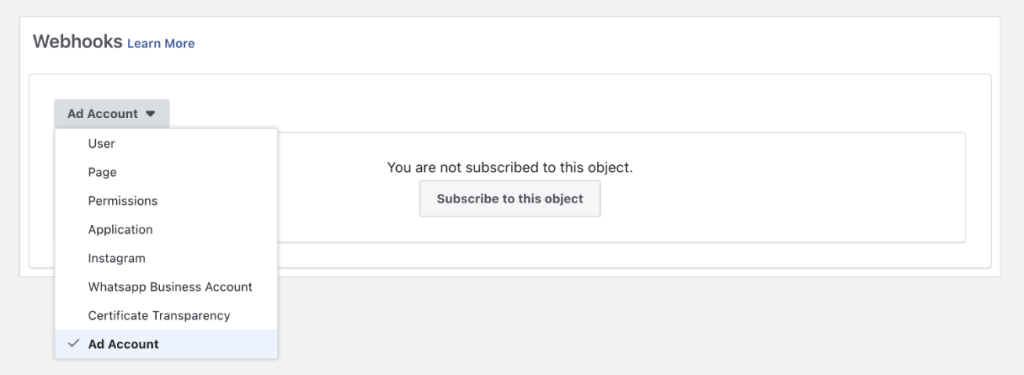
If you need leads the instant they submit, Facebook’s own leadgen webhook is your option. You can subscribe to the leadgen field, where you will need five permissions for full lead and ad-level data: ads_management, leads_retrieval, pages_show_list, pages_read_engagement, and pages_manage_ads, plus pages_manage_metadata for webhook use.
Production access to real leads requires Full Access, the tier formerly called Advanced Access, and the approval sequence matters: submit for App Review first, naming leads_retrieval and pages_manage_ads specifically, and only after approval will you be asked to complete Business Verification. Once the webhook fires, fetch the full lead record using the leadgen_id it sends you.
Build a Facebook Ads to PostgreSQL integration yourself with the Marketing API
This path fits you if your team already owns a data pipeline and wants to transfer Facebook Ads data to PostgreSQL as one more source, or if you need custom sync logic a no-code tool won’t support. It takes engineering time, so it isn’t the default choice for most teams. What you’re trading for full control over the data model is everything below.
Current API status
Only two Marketing API versions are live right now: v24.0, expiring October 6, 2026, and v25.0, released February 18, 2026, no expiration set yet. v23.0 expired June 9, 2026. v26.0 is expected around September 2026, so whatever you build today is already on a clock.
Authentication
You exchange a short-lived token for a long-lived one, good for roughly 60 days. Then, move to a System User token for production, since it isn’t tied to one person’s Business Manager access and won’t expire on a fixed schedule.
Rate limits
ads_management: 100,000 calls per hour on Limited Access or 300 on Dev tier, plus 40 times active ads, per ad account. ads_insights runs higher: 190,000 or 600, plus 400 times active ads, minus a small error penalty. There’s also a flat 100 requests-per-second cap on mutation endpoints. As of May 4, 2026, Meta renamed Standard Access to Limited Access and Advanced Access to Full Access, and the qualification threshold dropped from 1,500 to 500 calls in 15 days, worth tracking continuously.
What breaks without maintenance
On June 15, 2026, Meta retired roughly 85 legacy reach, impression, and video-view metrics across every API version, replaced by Media Views, Media Viewers, and Page Viewers.
On June 22, Nielsen DMA breakdowns were removed with no deprecation window, replaced by Comscore market codes. A script pointed at the old field names on either date broke immediately.
Coupler.io’s Facebook Ads connector was already running on v25 before either deadline hit so it’s not a one-off. Coupler.io keeps its whole lineup of Meta-connected sources current the same way, which is exactly the maintenance a self-built script has to handle on its own.
Common issues to watch for
A few things will trip you up here, whether you build this yourself or use an off-the-shelf tool. Access tier confusion is worth watching right after May’s renaming. Most commonly, version drift catches teams that built against an older Marketing API version and never revisited it. If your sync lacks dedup logic keyed on leadgen_id, duplicate leads will start to show up. And the Advantage+ campaign API restriction, extended to every version on May 19, 2026, shows Meta changing rules under a pipeline that’s already running.
Most of these problems won’t announce themselves until a report looks wrong or a lead goes missing. If you’d rather not track version sunsets and metric deprecations yourself, Coupler.io handles that maintenance on its own schedule, and you can start for free.
Connect 400+ data sources to PostgreSQL or other destinations
Get started for freeFAQs
How do I connect Facebook Ads to PostgreSQL without coding?
Use Coupler.io. Authenticate your account, choose a data entity, connect PostgreSQL as the destination, and set a refresh schedule.
What’s the difference between syncing ad performance data and Lead Ads data?
Ad performance data is reporting that works well on a schedule. Lead Ads submissions are event data where speed matters more, since Facebook only keeps them for 90 days.
Is Facebook Ads to PostgreSQL sync real-time?
Through Coupler.io, refresh is schedule-based, as fast as every 15 minutes on the top-tier plan. True real-time capture needs Facebook’s native Lead Ads webhook.
Do I need a Meta Developer app to use Coupler.io?
No. Coupler.io authenticates through its own already-reviewed app. You only need your own Developer app for a custom Marketing API integration.
Can I connect multiple ad accounts to one PostgreSQL database?
Yes. Combine several ad accounts in the same flow, or run separate flows into shared or separate tables.
Is my Facebook Ads data secure with Coupler.io?
Coupler.io is SOC 2 Type II certified, GDPR compliant, HIPAA and DORA compliant.