
How to Export Data from GoHighLevel to Google Data Studio (Looker Studio), Power BI, Google Sheets, Claude and More

GoHighLevel holds a lot of data you can act on outside the platform, including opportunities, contacts, pipeline stages, invoices, conversations, orders, etc. Exporting it lets you enrich GoHighLevel records with information from other business apps and sources. Combine it with data from Google Ads or Facebook Ads to attribute high-quality leads back to specific campaigns. Or link sales activity with actual revenue by bringing GoHighLevel and finance tools like QuickBooks or Stripe.
Learn how you can automate GoHighLevel data export to spreadsheets, BI tools, data warehouses, and even connect GHL to AI tools with Coupler.io. And see other ways to get data into the reporting tool of your choice.
Let Coupler AI do the data work for you
Tell Coupler AI what you need to know, from which source, and how often. It connects your account, sets up the data flow, keeps it refreshed, and lets you analyze the results inside Coupler.io or another AI tool.
Try for free
Automate data export from GoHighLevel with Coupler.io
I’ve already preselected GoHighLevel as a data source in the form below. You only need to select the desired destination app and click Proceed. You’ll be offered to create a Coupler.io account for free (no credit card required) and get started.
Check out this step-by-step tutorial to complete the connection.
Step 1. Collect GoHighLevel data to export
Connect your GoHighLevel account and select the data you want to export, such as orders, invoices, and so on.
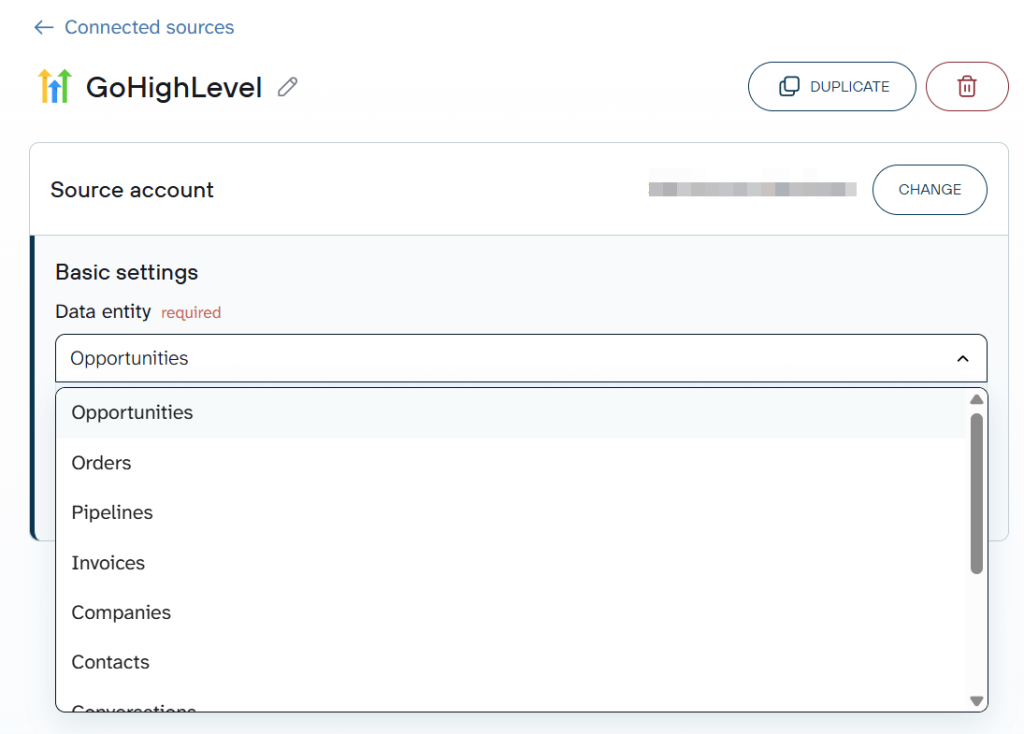
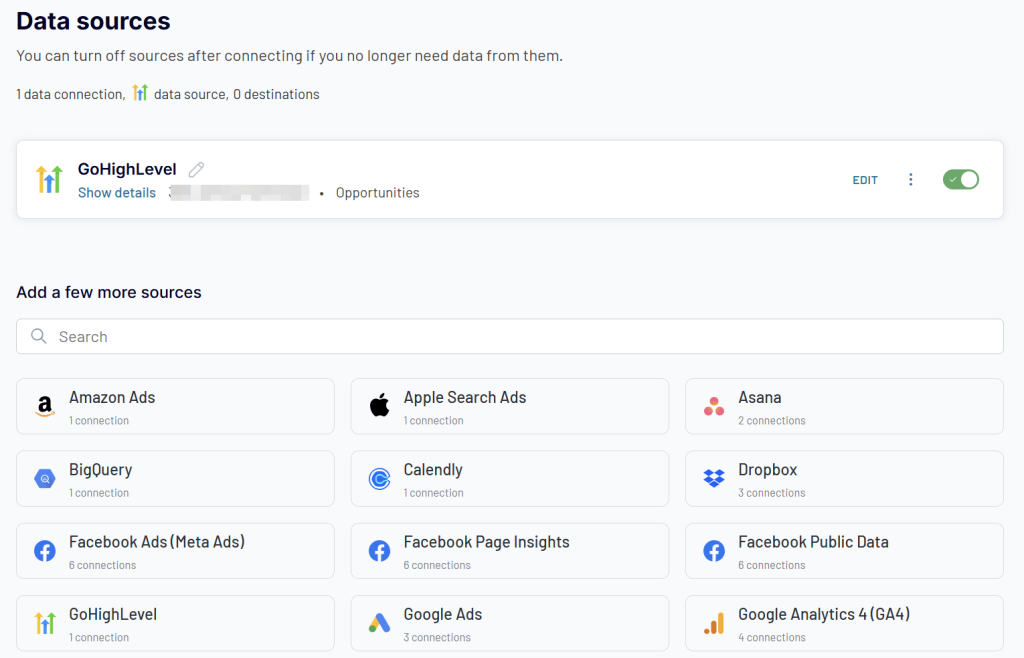
Coupler.io also allows you to combine GoHighLevel data before exporting it! You can blend data from multiple data entities or join information from GHL with other marketing, social media, sales, and business data sources. Just select the needed app and configure it accordingly.
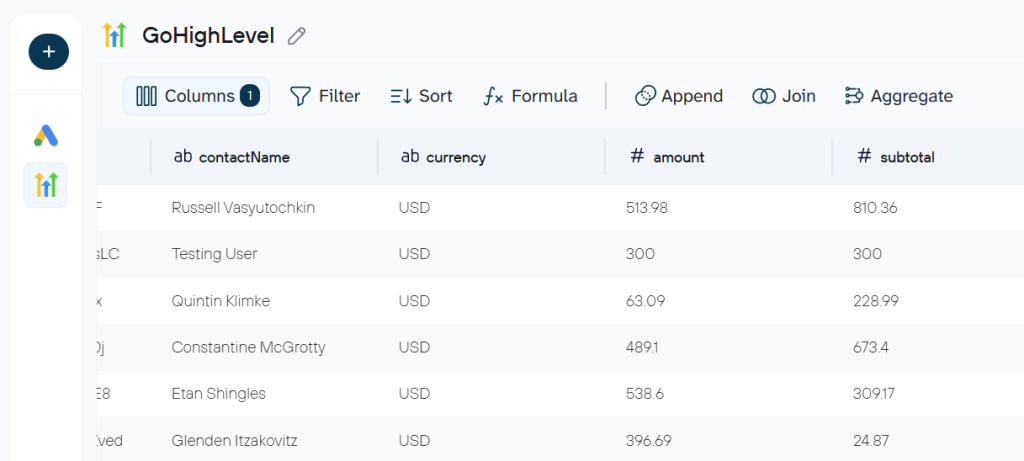
Step 2. Organize GoHighLevel data before export
This step is optional yet essential if you want to get an analysis-ready GoHighLevel dataset. Coupler.io preloads up to 500 rows from GoHighLevel, so you can clean and organize data in the report on the go. This includes column management (reorder, hide, rename, edit, and create), filtering, data blending, and aggregation.
If you’re connecting data from GHL to AI tools, consider adding business context to your data. This will significantly improve your AI conversational analytics experience and increase the accuracy of responses. Coupler.io allows you to add AI context right on the go.
Step 3. Connect data destination and schedule refresh
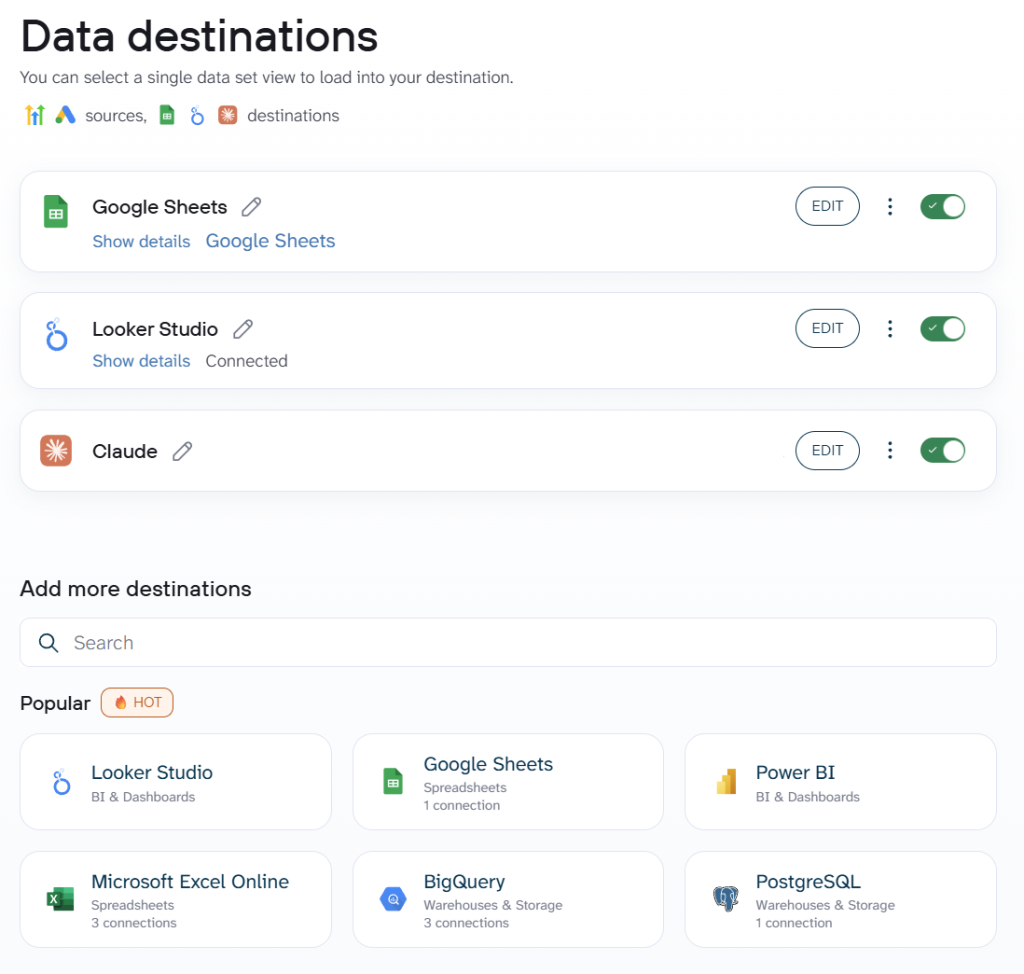
Choose the destination app for your GoHighLevel data and follow the in-app instructions to connect it. What you will definitely love is that you can connect multiple destinations in a single data flow. So, your GHL data set can be loaded to Google Sheets, Google Data Studio (formerly Looker Studio), Claude, BigQuery, you name it.
To always have access to the fresh data from GoHighLevel, enable the Automatic data refresh and configure the schedule.
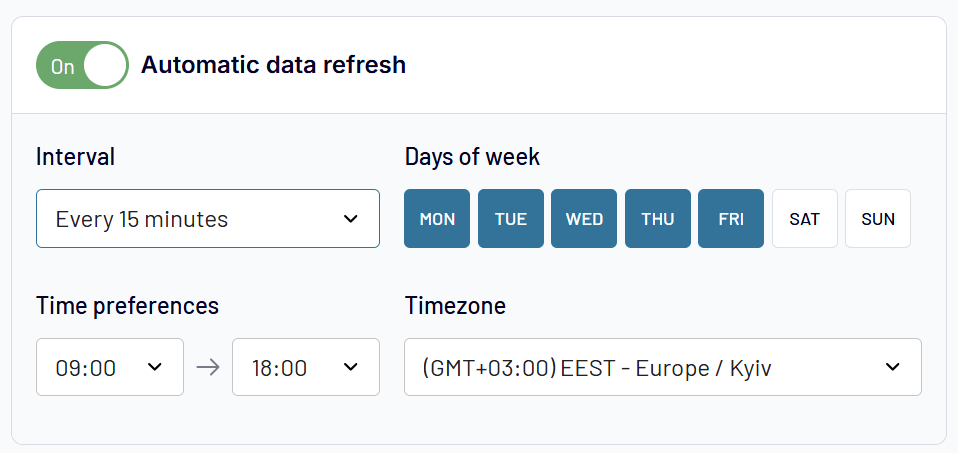
That’s it! In less than 5 minutes, you’ll have your GoHighLevel data exported to whichever destination you need. And that’s not all what you get with Coupler.io.
Bonus step. Analyze GoHighLevel data with AI Agent
When you connect GoHighLevel to Claude or ChatGPT, it’s clear that you want to talk to AI about your data. At the same time, Coupler.io has a built-in AI Agent to ask questions about your GHL data, even if you export it to Data Studio or Google Sheets. The AI-powered conversation takes place right inside the platform and you do not need to share your data with external LLMs.
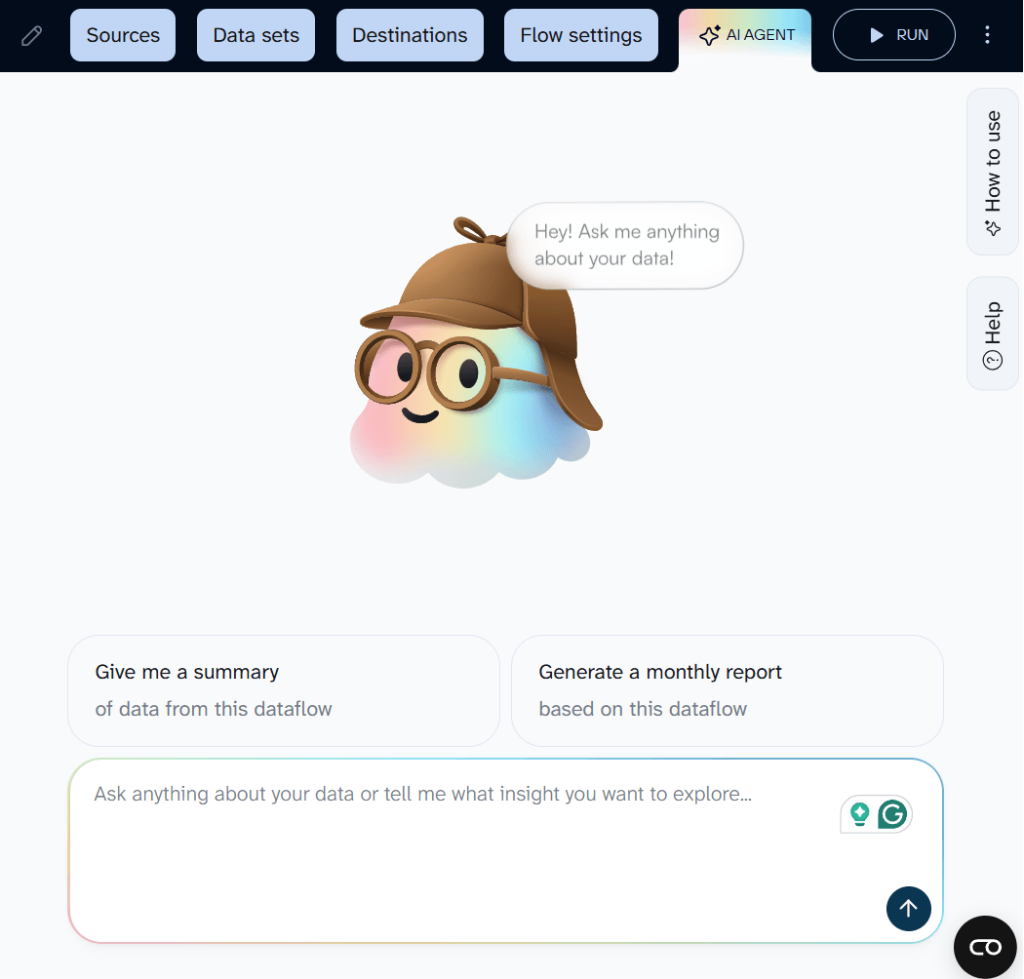
Type your question, and get an answer. The Coupler.io Analytical Engine runs the calculations first, then passes the computed results to AI. That means the numbers in the response are based on your actual dataset, not approximations.
If you prefer working in an external AI tool, Coupler.io MCP connects your GoHighLevel data set to Claude, ChatGPT, Gemini, Perplexity, or other AI Integrations.

Automate GoHighLevel data export with Coupler.io
Get started for freeWhere can you export data from GoHighLevel?
GoHighLevel to spreadsheets (Google Sheets, Microsoft Excel)
Spreadsheet destinations remain popular due to their accessibility, collaborative features, and powerful analysis capabilities, which are already familiar to most business users. Google Sheets and Excel offer familiar environments for data manipulation, basic analytics, and team collaboration, eliminating the need for specialized business intelligence training.
Key use cases
- Team collaboration on lead status and follow-ups.
- Ad-hoc analysis with pivot tables, formulas, and charts.
- Quick data sharing without specialized tools.
GoHighLevel to BI tools (Power BI, Google Data Studio, Tableau, Qlik)
Business intelligence platforms such as Power BI and Google Data Studio (formerly Looker Studio) turn raw GoHighLevel data into professional, interactive dashboards that drive strategic decision-making. These platforms excel at combining multiple data sources, creating sophisticated visualizations, and generating automated reports that keep stakeholders informed about business performance.
Key use cases
- Executive dashboards combining sales, marketing, and financial data.
- White-labeled client reporting for agencies.
- Campaign attribution models across marketing channels.
GoHighLevel to data warehouses (BigQuery, PostgreSQL, Redshift, Snowflake, Supabase)
Database destinations serve businesses with large data volumes, complex analytics requirements, and the need for enterprise-grade data warehousing solutions. These platforms support advanced SQL analytics, machine learning integration, and the ability to combine GoHighLevel data with multiple other business systems.
Key use cases
- Cross-functional data warehousing and company-wide KPI tracking.
- Predictive models for lead scoring, churn, and lifetime value.
- Compliance and audit trail retention. System integration via JSON for web applications and microservices.
GoHighLevel to AI tools (Claude.ai, ChatGPT, Gemini, Perplexity, etc.)
AI tools are a good fit when you want to analyze GoHighLevel data by asking questions rather than building visualizations or writing formulas. Coupler.io not only connects your GoHighLevel data to LLMs but also provides a secure middle layer between GHL and AI. Currently, you can connect GHL to ChatGPT, Claude, Gemini, Perplexity, Copilot, CursorAI, and OpenClaw through MCP.
Key use cases
- Pipeline and deal analysis across sources, stages, and time periods.
- Cross-source questions combining GoHighLevel with ad platform or GA4 data.
- Recurring plain-English summaries of pipeline changes and overdue invoices.
What GoHighLevel data can you export with Coupler.io?
| Name | Description | Why it’s valuable |
|---|---|---|
| Opportunities | Sales prospects and deals in your pipeline | Track revenue potential, conversion rates, and sales performance |
| Pipelines | Structured sales processes and stages | Analyze funnel effectiveness and optimize sales workflows |
| Contacts | Individual customer and prospect records | Build targeted campaigns, analyze customer behavior, segment audiences |
| Companies | Business entities associated with contacts | B2B relationship mapping, account-based marketing strategies |
| Conversations | SMS, email, and chat interactions | Customer service analysis, communication audit trails |
| Invoices | Billing documents and payment records | Financial reporting, revenue tracking, accounting integration |
| Orders | Purchase transactions and order history | Sales analysis, inventory planning, customer purchase patterns |
| Transactions | Payment processing records | Financial reconciliation, payment method analysis |
Turn your exported GoHighLevel data into insight with dashboard templates
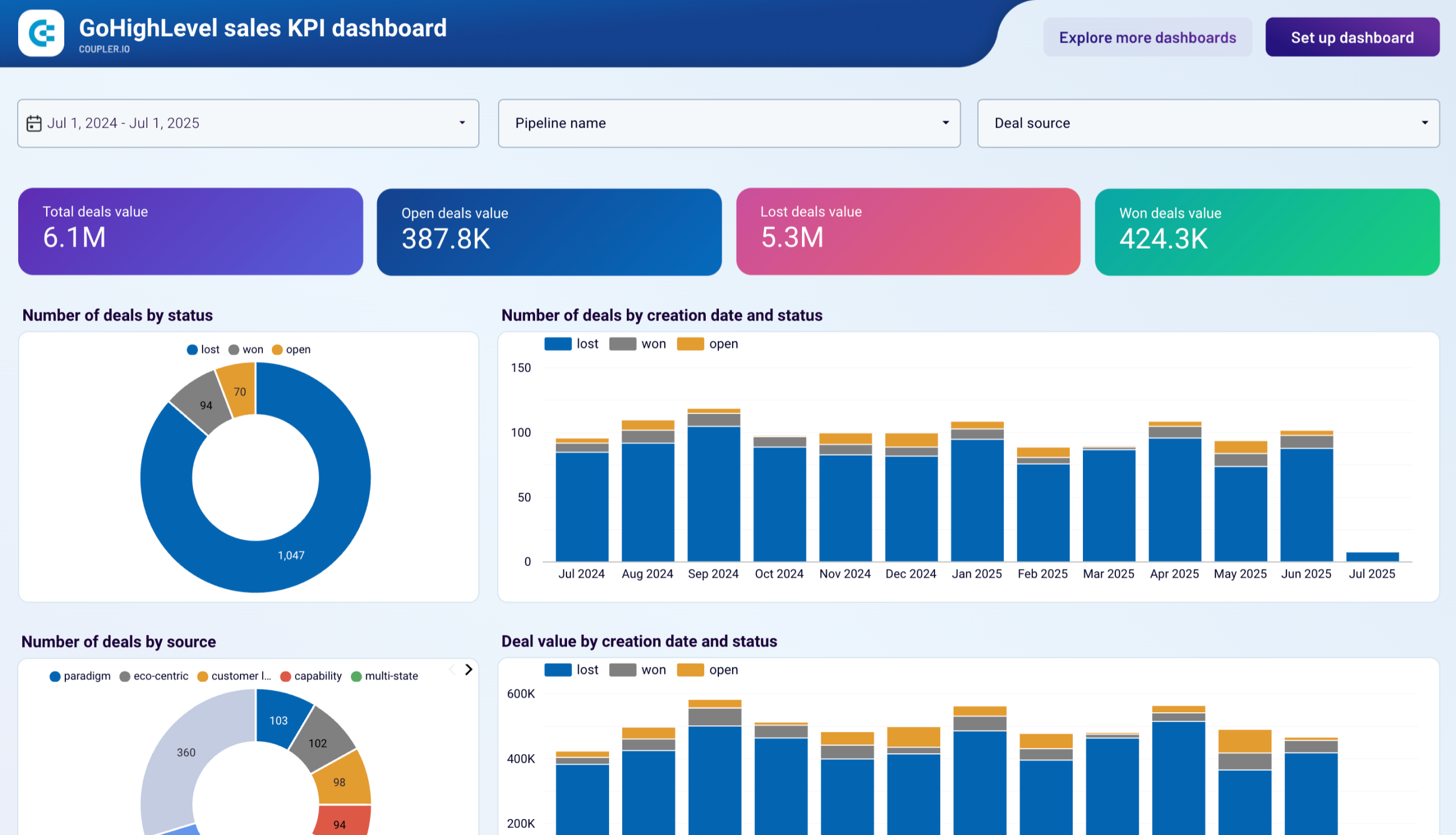
GoHighLevel Sales KPI dashboard
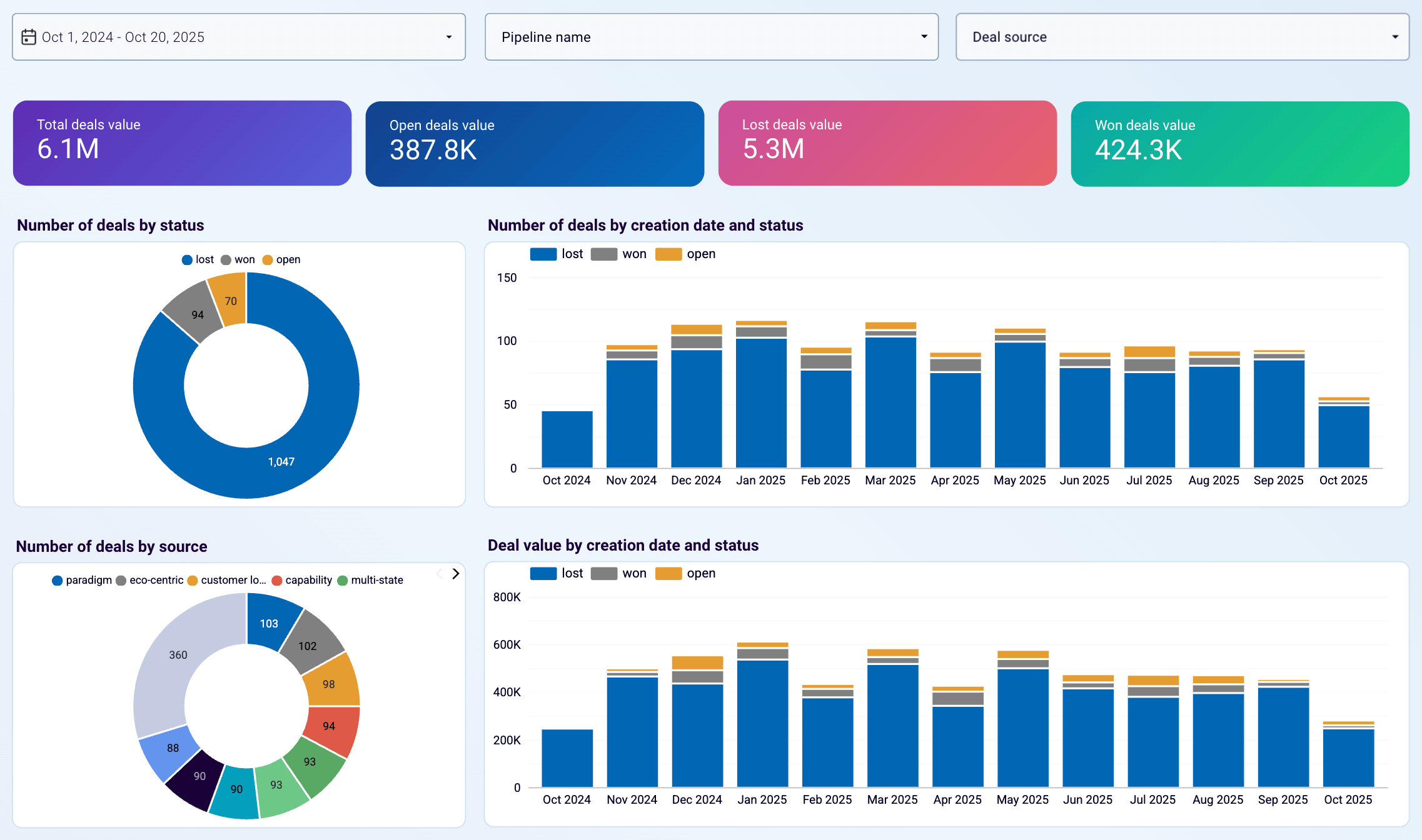
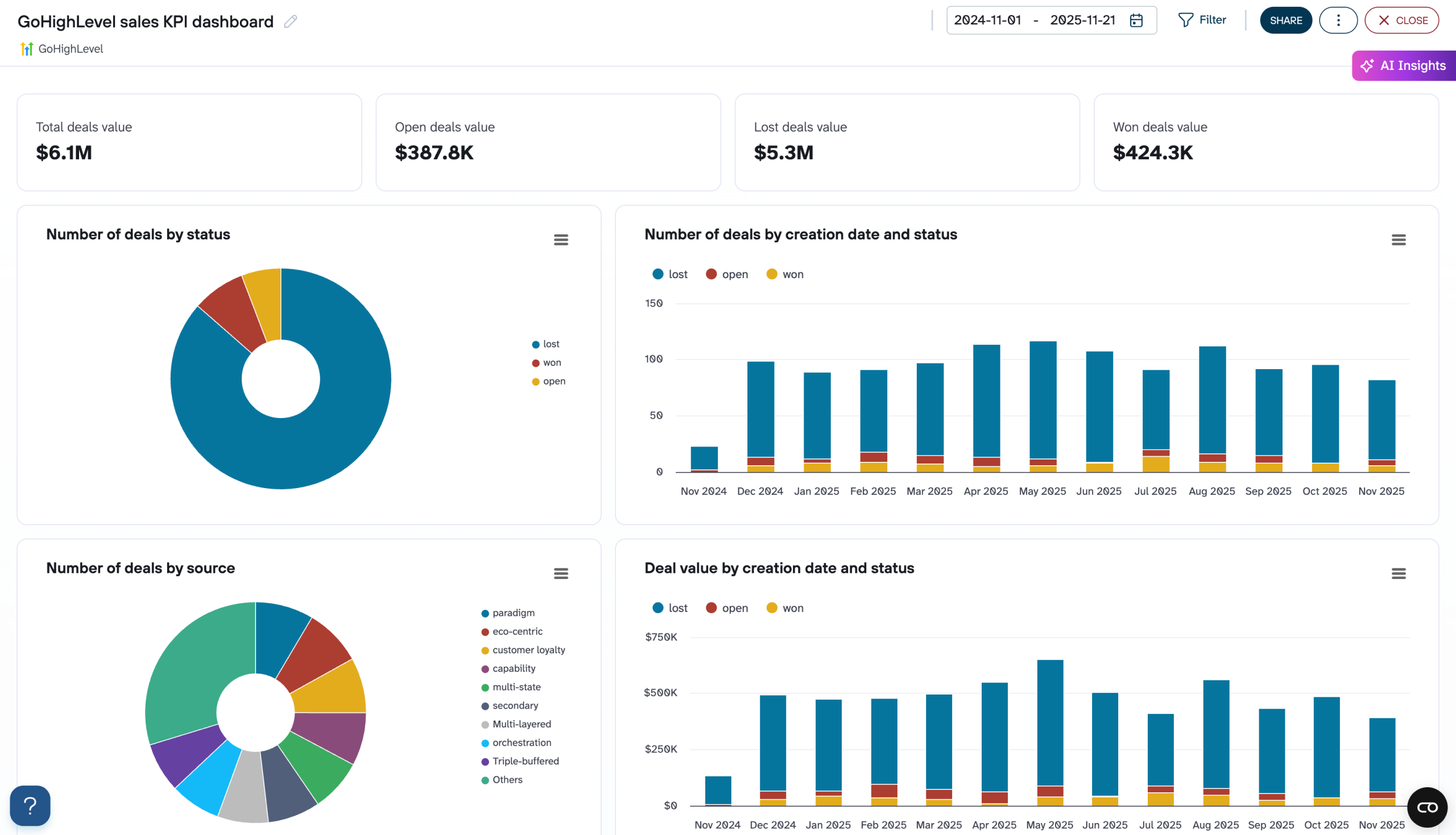
Exporting your GoHighLevel data is just the first step. It needs proper analysis to unlock its potential. The key is organizing your data into meaningful visualizations and reports that reveal patterns, trends, and opportunities. Rather than starting from scratch, use our GoHighLevel sales KPI dashboard template to uncover insights such as:
- Which lead sources generate the most valuable deals
- Where prospects get stuck in your sales pipeline
- Deal distribution across different statuses (won, lost, open)
- Monthly trends in deal creation and values
- Individual deal progression and stage analysis
Sales KPI dashboard for GoHighLevel
 Preview dashboard
Sales KPI dashboard for GoHighLevel
Preview dashboardHere’s how you can leverage the exported GoHighLevel data to make smarter decisions and optimize your sales processes.
Assess your pipeline health and find your best lead sources
Monitor the overall health of your sales pipeline by analyzing the distribution of deals across different statuses and identifying which lead sources are generating the most valuable deals. The dashboard’s pie chart visualization shows the proportion of deals in each category (won, lost, open), while the “Number of deals by source” breakdown reveals your most productive lead generation channels.
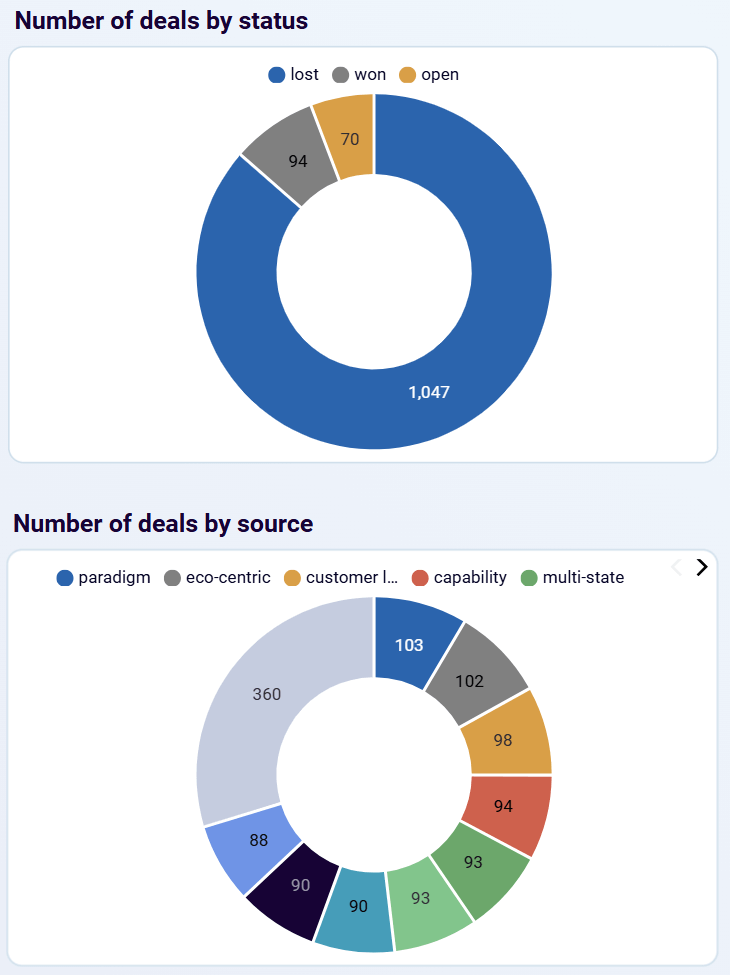
Practical application: If you notice the lost deals segment is disproportionately large, investigate common reasons for deal loss and implement training or process improvements. Simultaneously, focus marketing spend on sources that consistently deliver high-value deals while investigating why certain sources underperform.
Spot sales patterns to boost performance
Analyze deal creation patterns and values over time using the monthly trend charts. The dashboard reveals seasonal patterns in your sales cycle, tracks growth or decline in deal volume and value, and helps correlate sales performance with marketing campaigns or external factors.
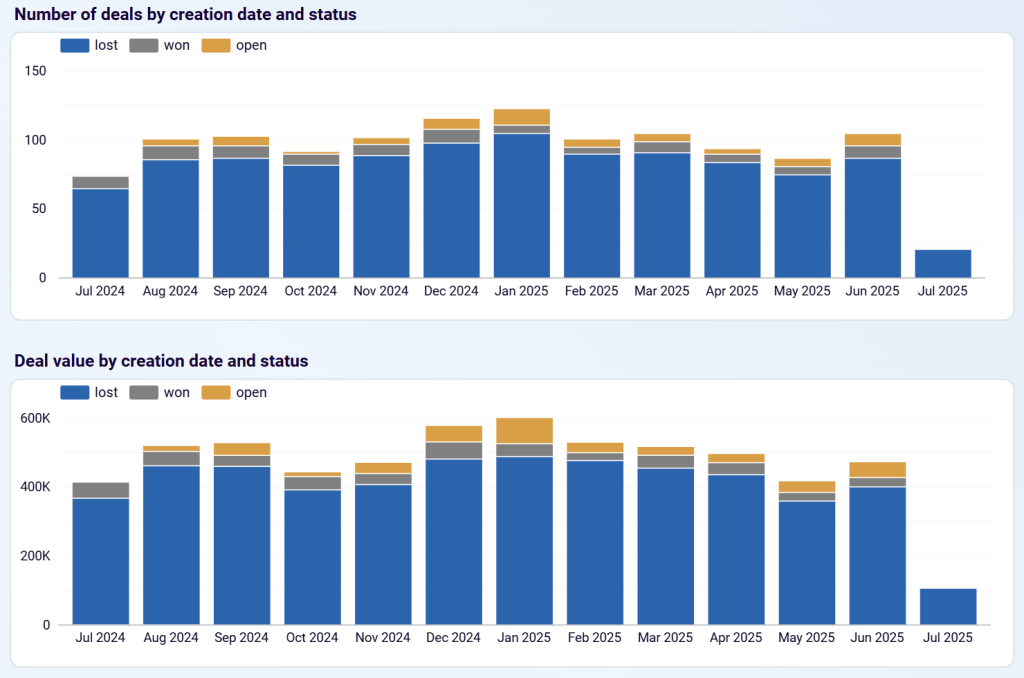
Practical application: Use historical trends to understand your sales patterns and plan resources during peak or slow periods.
Fix your sales bottlenecks
Review how deals progress through your sales stages using the detailed pipeline breakdown. The dashboard helps you identify stages where deals frequently get stuck, understand your sales process flow, and optimize based on stage-specific performance.
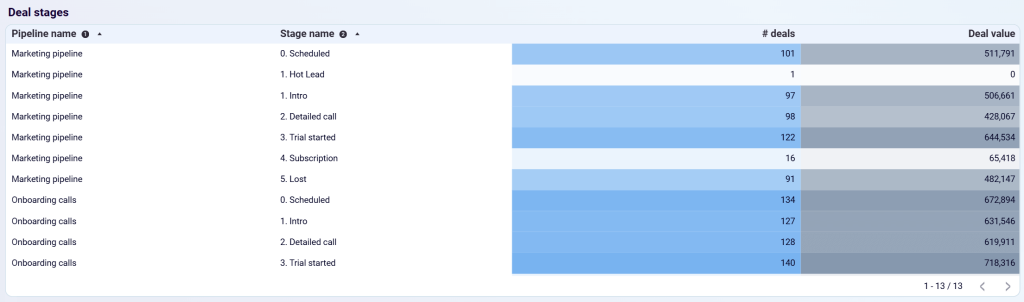
Practical application: If deals consistently stall at a particular stage, provide additional training or resources to help sales reps move deals forward more effectively.
Never miss a high-value deal again
Access detailed information about specific deals through the comprehensive deals table, including deal names, creation dates, current status and stage, deal values, assigned pipeline, and deal sources for attribution tracking.
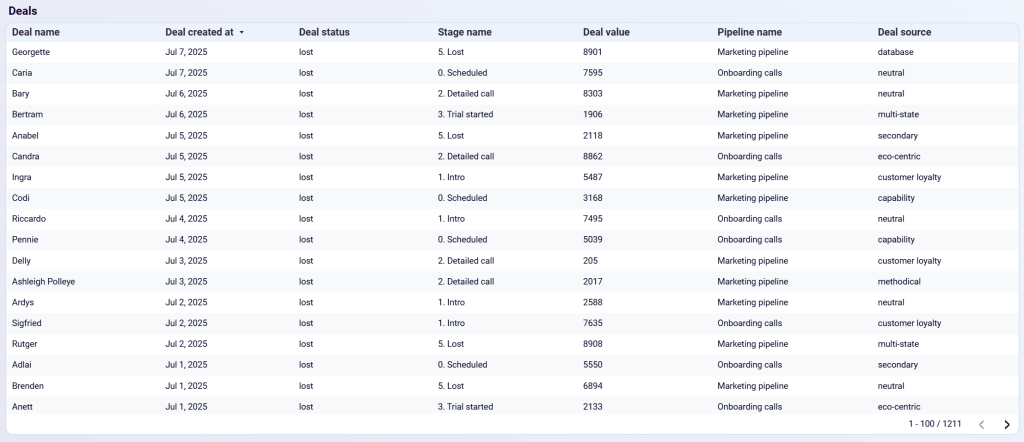
Practical application: Sales managers can quickly identify high-value deals that need attention or follow up on deals that have been in the same stage for too long.
The GoHighLevel sales KPI dashboard is available in Coupler.io and as a Data Studio template equipped with the GoHighLevel connector. Sign up for Coupler.io for free and try the version you like right away.


GoHighLevel customer acquisition dashboard
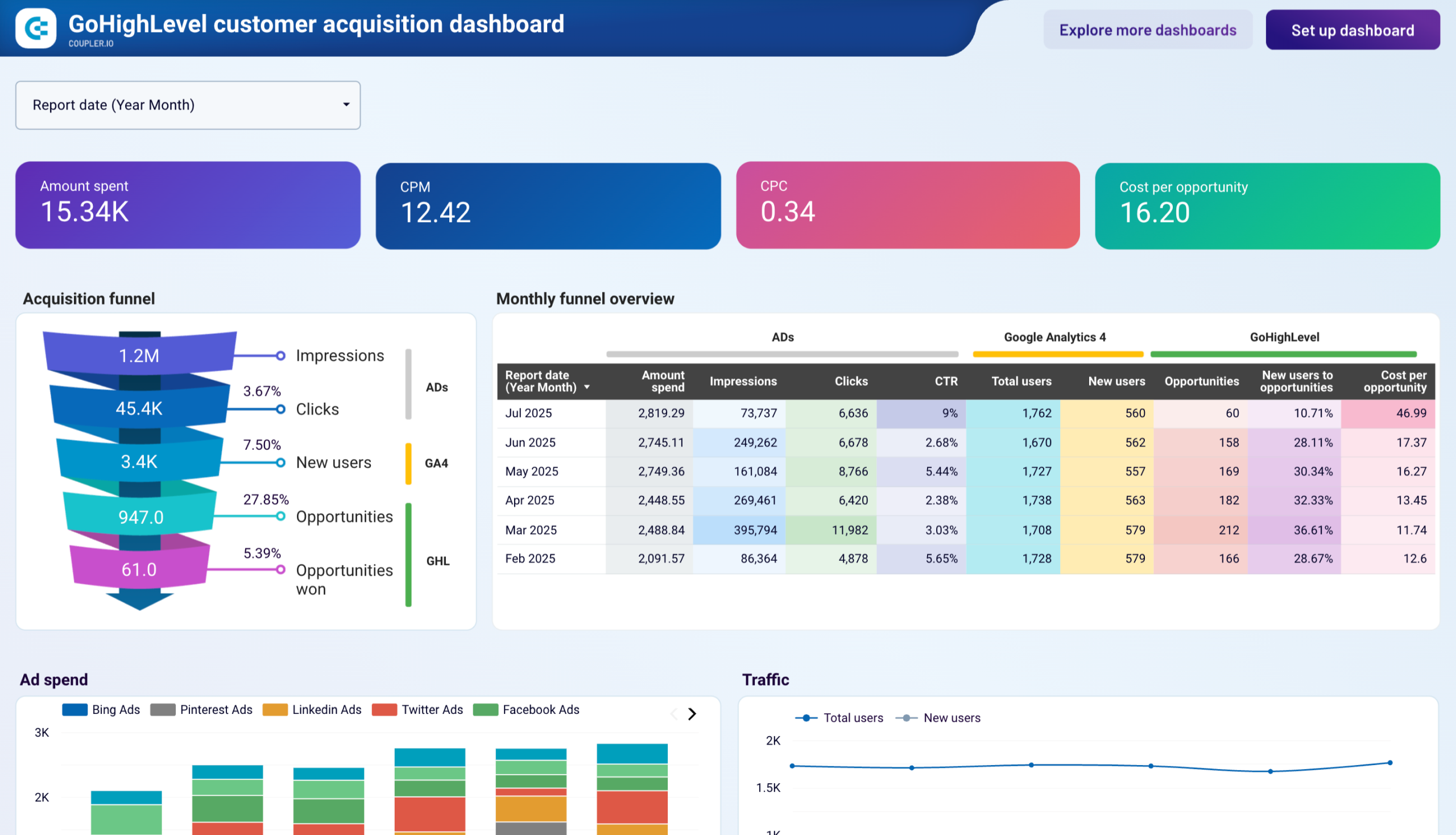
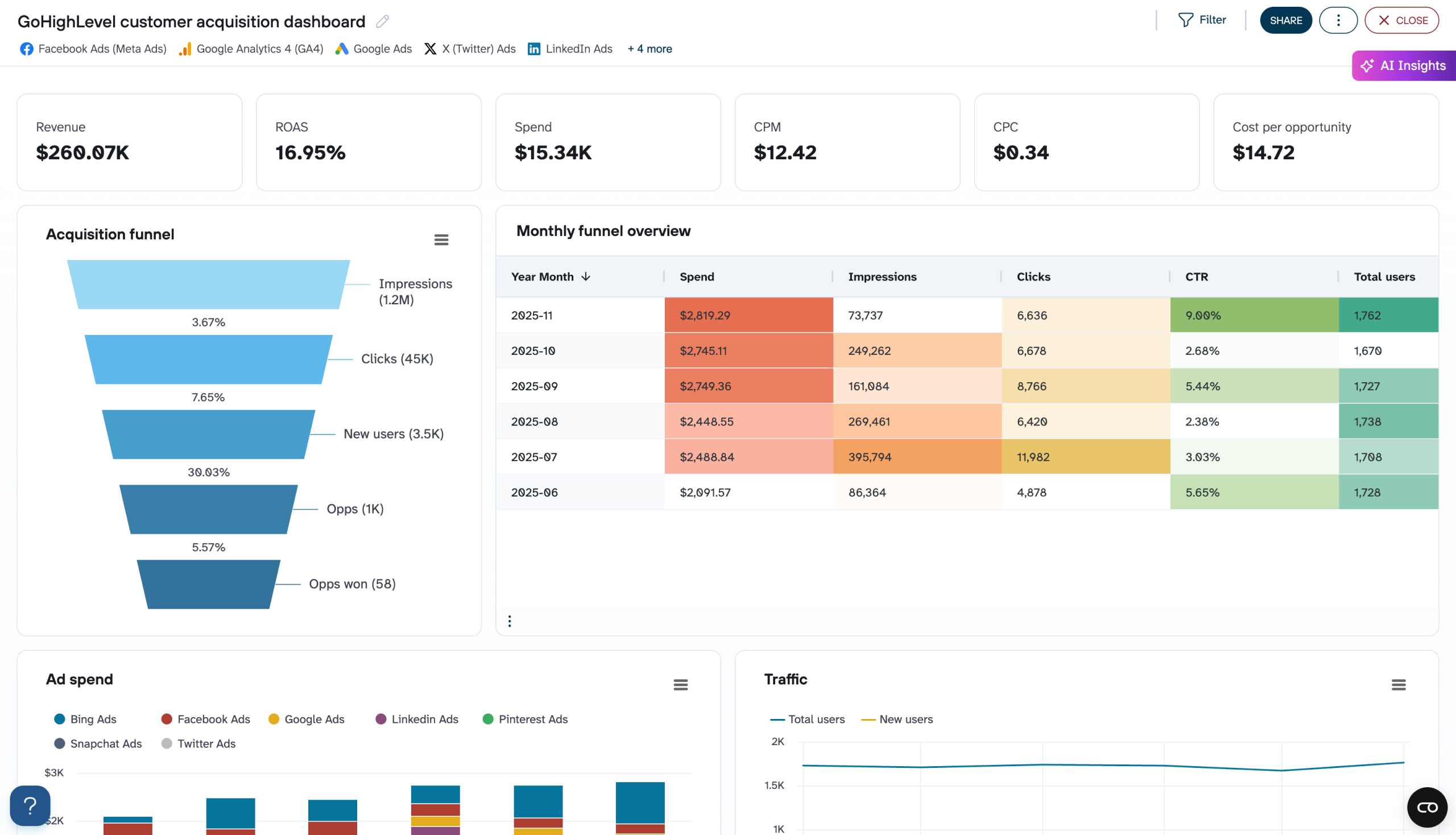
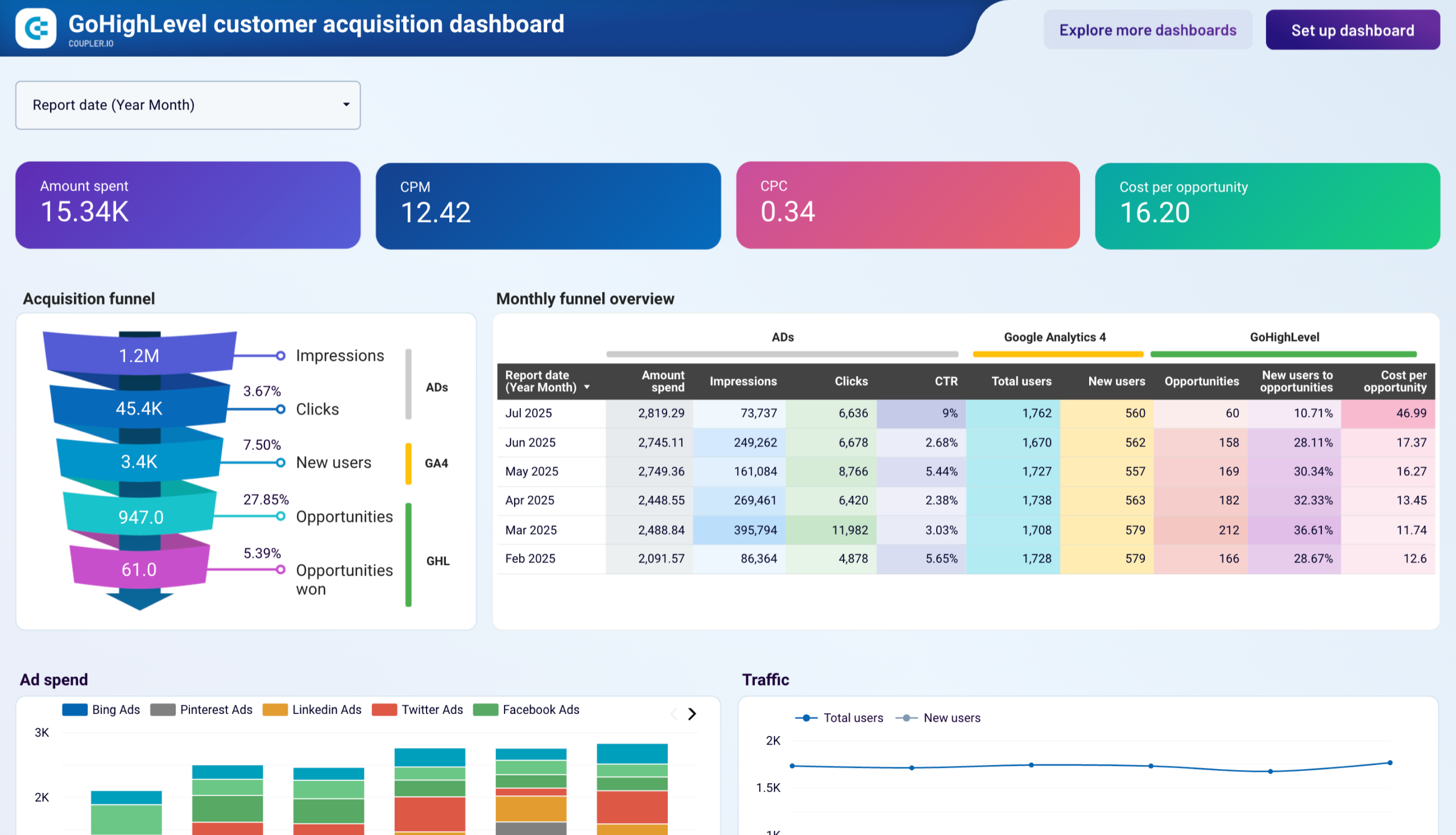
Most businesses struggle to connect advertising investments with opportunities and revenue results from their CRM. Without proper data integration and analysis, you’re stuck making budget decisions based on surface-level metrics (e.g., clicks, impressions) instead of deal closures. With the GoHighLevel customer acquisition dashboard by Coupler.io, you will understand:
- Which advertising platforms generate the highest-quality opportunities
- Where prospects drop off in your acquisition funnel
- Conversion rate optimization opportunities at each stage
- Monthly trends in ad spend efficiency and opportunity costs
- Platform-specific performance and budget allocation analysis
Customer acquisition dashboard for GoHighLevel
 Preview dashboard
Customer acquisition dashboard for GoHighLevel
Preview dashboardHere’s how this GoHighLevel dashboard helps you identify what’s working, what’s not, and where to invest your marketing budget for maximum impact.
Optimize your advertising budget allocation
Monitor the performance of each advertising platform by analyzing cost per opportunity and conversion rates across Facebook, LinkedIn, Twitter, Pinterest, and Bing Ads. The dashboard’s spend distribution charts show budget allocation while conversion metrics reveal which platforms deliver the best ROI.
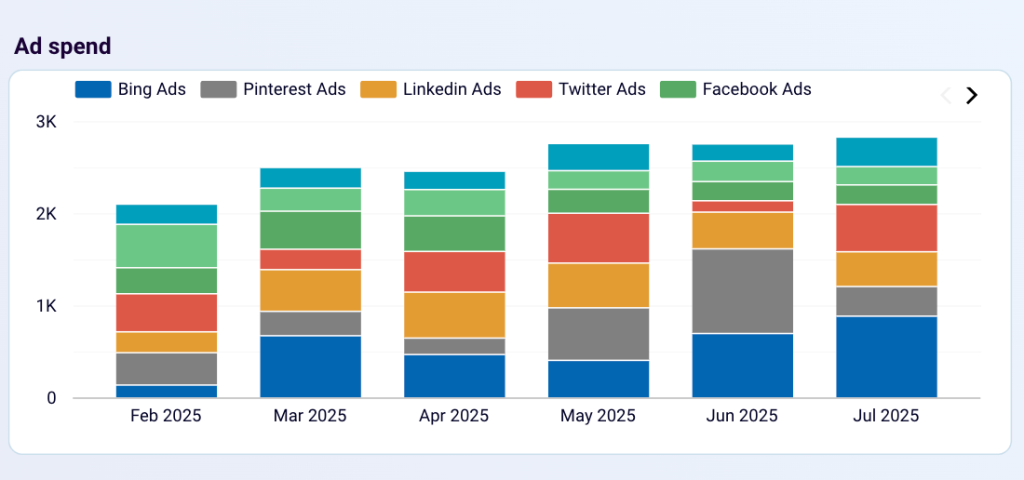
Practical application: If LinkedIn consistently generates opportunities at $15 each while Facebook costs $45 per opportunity, reallocate budget to maximize your marketing efficiency and overall opportunity volume.
Identify funnel bottlenecks to improve conversions
Analyze conversion rates at each stage using the comprehensive funnel visualization. The dashboard reveals where prospects drop off most frequently, tracks user engagement patterns, and helps correlate traffic quality with advertising sources.
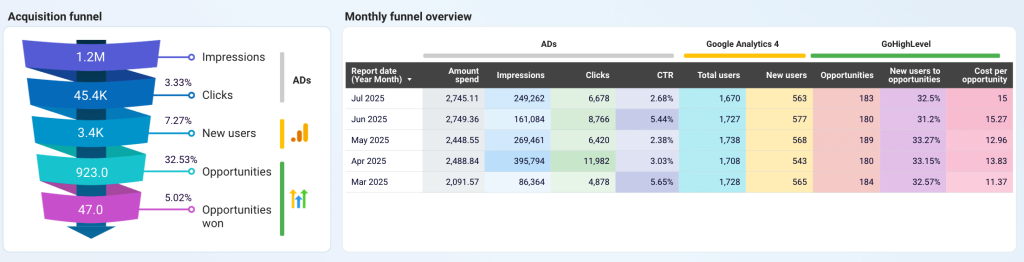
Practical application: If your click-to-user conversion is strong but user-to-opportunity conversion is weak, focus on landing page optimization and lead nurturing rather than increasing ad spend.
Track seasonal performance patterns
Review monthly trends in advertising efficiency and opportunity generation using detailed time-series analysis. The dashboard helps identify peak performance periods, seasonal budget requirements, and optimal campaign timing strategies.
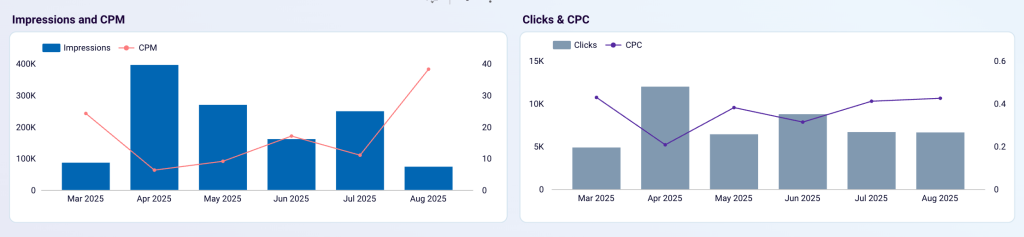
Practical application: Use historical data to increase ad spend during high-converting months while reducing investment during periods of lower efficiency to maximize annual ROI.
This GoHighLevel dashboard template is available for free in Coupler.io and Data Studio. You can connect data from your CRM, ad platforms, and GA4, and set up scheduled data refreshes in under 5 minutes.



Other ways to export data from GoHighLevel
Coupler.io, the no-code data integration platform and AI analytics, offers the benefits of the GoHighLevel API-based integration, but for users without technical knowledge. You only need to connect your GoHighLevel account and specify where to export your data and how frequently you need it to be refreshed.
However, many users still manually export GoHighLevel data via the UI. It’s the most straightforward approach for quick, one-time exports of contact lists, opportunities, and appointments. Yet, you will see how painful it is to create dynamic reports or regular data sharing.
How to export GoHighLevel data manually
The manual CSV export is the simplest way to extract your contact data and other information out of GoHighLevel. Unfortunately, you are quite limited in the data that can be exported in this manner.
And for different data entities, you’ll need to follow different steps to retrieve your data.
For example, to export Contacts, go to the respective section in your GoHighLevel dashboard. Then, select the needed contacts and click the Export button.
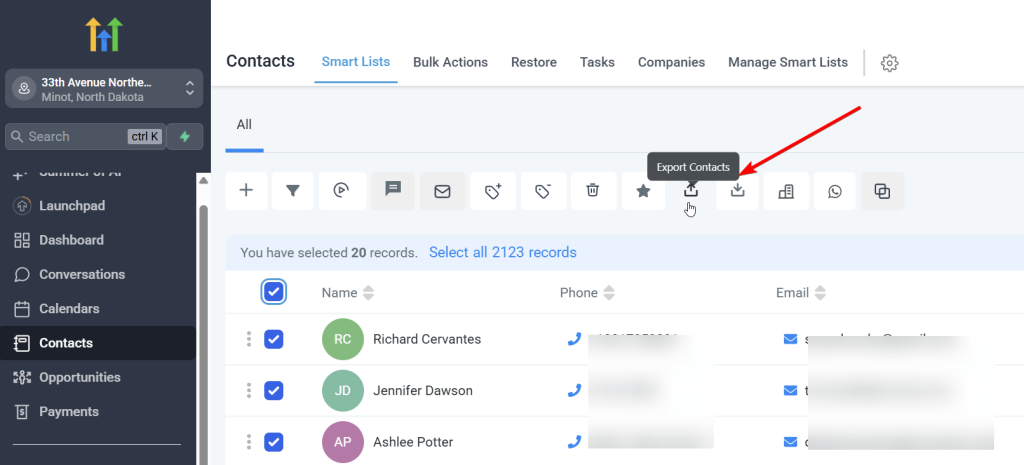
Confirm your export, and in a few moments, a CSV file with your contacts will be downloaded to your computer.
Things are somewhat different for exporting payment-related data entities such as Orders or Invoices. Navigate to the Payments section, then select the needed tab, for example, Orders. Filter the orders required and click the Export button.
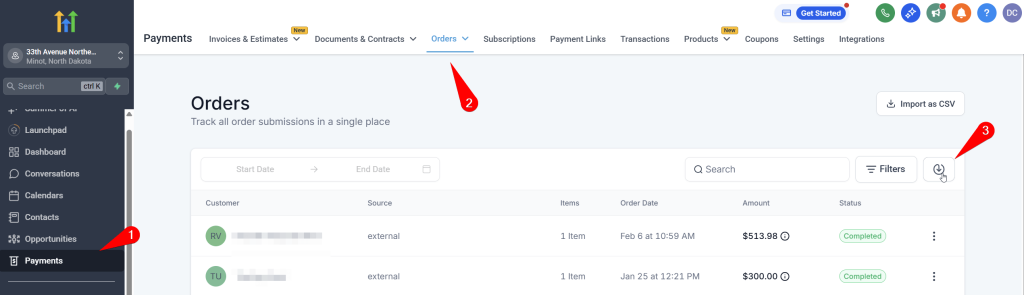
However, you won’t receive the file with the records immediately. You’ll need to wait till an email lands in your inbox with the file. And the waiting time can be pretty long.
Note: The file delivery method depends on the data size and your sub-account permissions.
What data can you export manually?
| Name | Description | Why it’s valuable |
|---|---|---|
| Opportunities | Sales prospects and deals in your pipeline | Track revenue potential, conversion rates, and sales performance |
| Contacts | Individual customer and prospect records | Build targeted campaigns, analyze customer behavior, segment audiences |
| Invoices | Billing documents and payment records | Financial reporting, revenue tracking, accounting integration |
| Orders | Purchase transactions and order history | Sales analysis, inventory planning, customer purchase patterns |
| Transactions | Payment processing records | Financial reconciliation, payment method analysis |
| Subscriptions | Recurring billing and membership data | Revenue forecasting, churn analysis, subscription metrics |
Generally, manual data export from GoHighLevel is basic and limited in scope. It can be fine for occasional quick data sharing, but it’s definitely not a solution for regular reporting.
Can you export data via GoHighLevel API?
The GoHighLevel REST API represents the most flexible approach to accessing your data. Unlike the limited manual export options, the API allows you to retrieve contacts with all their custom fields, complete conversation histories, detailed opportunity progression data, and more.
However, working directly with APIs requires a technical background and programming skills, which makes this option unsuitable for non-developers. You’ll need to:
- Handle API authentication using bearer tokens
- Manage rate limiting to avoid being blocked
- Implement proper error handling for failed requests
- Transform the JSON responses into usable formats such as CSV or database records
- And so on
Additionally, the GoHighLevel API documentation, while comprehensive, requires a solid understanding of REST API concepts and HTTP protocols.
If you need the power of API integration without the technical complexity, just use Coupler.io. It offers a ready-made solution that connects directly to the GoHighLevel API. Coupler.io handles all the technical aspects, making API-level access accessible to non-technical users.
What data can you export via the GHL API?
Although Coupler.io is based on the GoHighLevel API, it only allows you to export 8 data entities. However, we continually work on improving our connector. So, if you need to get other data from GHL, please let us know about it. Here is a list of all options available for export:
| Name | Description | Why it’s valuable |
|---|---|---|
| Opportunities | Sales prospects and deals in your pipeline | Track revenue potential, conversion rates, and sales performance |
| Pipelines | Structured sales processes and stages | Analyze funnel effectiveness and optimize sales workflows |
| Contacts | Individual customer and prospect records | Build targeted campaigns, analyze customer behavior, segment audiences |
| Companies | Business entities associated with contacts | B2B relationship mapping, account-based marketing strategies |
| Conversations | SMS, email, and chat interactions | Customer service analysis, communication audit trails |
| Invoices | Billing documents and payment records | Financial reporting, revenue tracking, accounting integration |
| Orders | Purchase transactions and order history | Sales analysis, inventory planning, customer purchase patterns |
| Transactions | Payment processing records | Financial reconciliation, payment method analysis |
| Form Submissions | Lead capture and contact form data | Lead generation analysis, conversion optimization |
| Survey Submissions | Customer feedback and survey responses | Customer satisfaction analysis, product improvement insights |
| Subscriptions | Recurring billing and membership data | Revenue forecasting, churn analysis, subscription metrics |
| Forms | Lead capture form configurations | Landing page optimization, form performance analysis |
| Surveys | Feedback collection tool settings | Survey effectiveness measurement, response rate analysis |
| Calendar Events | Appointments, meetings, and scheduled activities | Resource planning, appointment analytics, scheduling optimization |
| Products | Service and product catalog items | Inventory management, pricing analysis, product performance |
| Calendars | Individual calendar configurations | Team scheduling analysis, availability optimization |
| Calendar Blocked Slots | Unavailable time periods | Capacity planning, scheduling conflict resolution |
| Email Campaigns | Marketing email campaign data | Email marketing performance, engagement analysis |
| Schedules | Automated workflow timing | Automation effectiveness, timing optimization |
| Estimates | Quote and proposal documents | Sales pipeline analysis, pricing strategy evaluation |
| Tags | Contact and opportunity categorization | Segmentation analysis, campaign targeting optimization |
| Workflows | Automation sequences and triggers | Process optimization, automation performance tracking |
| Tasks | Action items and to-do assignments | Productivity analysis, task completion tracking |
| Users | Team member accounts and permissions | User activity analysis, role-based reporting |
| Calendar Groups | Shared calendar configurations | Team scheduling analysis, resource allocation |
| Invoice Templates | Billing document formats | Template usage analysis, billing process optimization |
| Estimate Templates | Quote document formats | Proposal effectiveness, template performance |
| Links | Tracked URLs and link performance | Link click analysis, campaign effectiveness |
| SMS/Email Templates | Message templates and formats | Template usage, message effectiveness analysis |
| Timezones | Geographic and scheduling preferences | Global scheduling optimization, regional analysis |
| Blog Authors | Content creator information | Content attribution, author performance analysis |
| Blog Categories | Content organization taxonomy | Content strategy analysis, topic performance |
| Sub-account Associations | White label and agency relationships | Client management, account hierarchy analysis |
| Campaigns | Marketing campaign configurations | Campaign performance, ROI analysis |
| Custom Fields | User-defined data attributes | Custom reporting, specialized data analysis |
| Custom Values | User-defined field values | Personalized segmentation, custom analytics |
| Free Slots | Available appointment times | Scheduling optimization, capacity analysis |
| Appointment Notes | Meeting comments and follow-ups | Service quality analysis, client interaction tracking |
| Notifications | System alerts and communication | Communication audit, notification effectiveness |
| Contact Notes | Individual contact annotations | Relationship tracking, service history analysis |
| Media Files | Images, documents, and attachments | Asset management, content usage analysis |
| Custom Objects | User-defined data structures | Specialized business process analysis |
How to choose the export method for your needs
Selecting the right GoHighLevel data export method depends on your technical expertise, business requirements, data volume, and long-term goals. Consider the following aspects to end up with the most efficient option:
- Start with your technical capabilities: If you have no development resources, choose between manual export and Coupler.io. If you have strong technical teams, all three options are viable.
- Consider your data volume: Small, occasional exports work well with Manual CSV. Regular, medium-volume exports suit Coupler.io. High-volume or complex data processing may require custom API solutions.
- Evaluate your budget: Manual exports are free, but they are limited. Coupler.io requires subscription costs but saves development time. Custom API solutions have high upfront costs but lower ongoing expenses for heavy usage.
- Think about scalability: Manual exports don’t scale well. Coupler.io scales easily with your business. Custom API solutions require significant development effort to scale, but they offer unlimited flexibility.
- Assess your timeline: Manual exports work immediately. Coupler.io can be set up within hours or days. Custom API solutions typically require several weeks to several months of development time.
Export data manually if:
✋You need quick, one-time data access – Perfect for occasional exports when you need to quickly download contacts, opportunities, or appointments for immediate analysis or backup purposes.
✋You have limited technical resources – No programming skills, API knowledge, or automation setup required. Simply click the export button and receive your CSV file via email or direct download.
✋Budget is a primary concern – This is a completely free method that doesn’t require additional software subscriptions or development costs.
Create a custom API integration if:
⚒️You have dedicated development resources – Your team includes developers comfortable with REST APIs, authentication handling, error management, and ongoing code maintenance.
⚒️You’re building custom applications – You’re developing proprietary software, internal tools, or specialized business applications that need direct access to GoHighLevel data.
⚒️You have complex integration requirements – You need to combine GoHighLevel data with multiple other systems in sophisticated ways that require custom programming and business logic.
Use Coupler.io if:
✅You want API power without technical complexity – Get comprehensive data access and automation capabilities without needing to write code, manage authentication, or handle error processing.
✅You need regular, automated updates – Perfect for businesses that require daily, weekly, or monthly data synchronization to keep external systems current with GoHighLevel information.
✅You work with multiple destinations – Ideal when you need to send GoHighLevel data to various platforms like Google Sheets, Power BI, databases, or other business tools simultaneously.
✅You need data transformation capabilities – Built-in features for cleaning, formatting, and mapping GoHighLevel data to match the requirements of your destination systems.
✅Your team lacks development resources – Perfect middle ground for businesses that need advanced capabilities but don’t have dedicated developers or technical staff.
✅ You want to analyze GoHighLevel data with AI – Ask questions about your pipeline, opportunities, contacts, and invoices in plain English using AI Agent, or connect to ChatGPT, Claude, and other tools through MCP.
Automate GoHighLevel reporting with Coupler.io
Get started for free


