
At the recent analytics events I visited, one question kept coming up in hallway conversations, especially with agency people: should we drop dashboards and move to AI completely?
So I turned it into a live poll during my session. I asked people to pick the one top tool in their analytics stack: half chose traditional dashboards, and a third chose AI tools only. But once the discussion started, most of the room admitted they use both. And this is the right approach.
BI and AI can and should coexist. But the setup can be error-prone because each tool gets its own copy of the data, and the copies disagree.
The problem of duplicated data flows
Here is the setup I hear described most often.
One pipeline feeds the client’s Data Studio report. A separate one loads the same ad platforms into the agency’s BigQuery warehouse for internal analysis. Then someone connects Claude, and it gets its own export: a third copy. And somewhere, there is still the Google Sheet, refreshed by a script nobody remembers writing.
Eventually, you have four copies of the same Facebook Ads data. Each was built for a purpose. But each refreshes on its own schedule, applies its own filters, and handles attribution windows its own way. When a client renames their campaigns, someone has to carry that change into every copy by hand. Someone always misses one.
Previously, I wrote that the real risk with AI is that we can’t tell when it’s wrong. Duplicated pipelines make it worse.
Disagreeing numbers destroy trust faster than wrong numbers. You can trace and fix a wrong number. Two different outputs leave the client asking which one to doubt, and the honest answer is “I’m not sure.”
Duplicated pipelines affect AI context coherence
AI needs three layers of context: data context, business context, and skills. This context belongs on the dataset, not in a prompt. That only holds if there is one dataset.
If context lives in the pipeline, two pipelines mean two versions of “what counts as a conversion,” and we get another problem. The warehouse flow counts form submissions. The flow behind the AI counts form submissions plus booked calls, because someone updated it after a client meeting.
Nobody broke anything on purpose. One definition changed, and the dashboard and the AI quietly stopped matching. Then the AI explains, very fluently, why conversions are up X% while the client’s report shows them flat.
Befriend BI with AI through a single data foundation
Picking a side won’t help, but having a unified data flow for many destinations will.
In practice, that means one data flow per client. It pulls from the sources once and delivers the result wherever people actually work. Four things change.
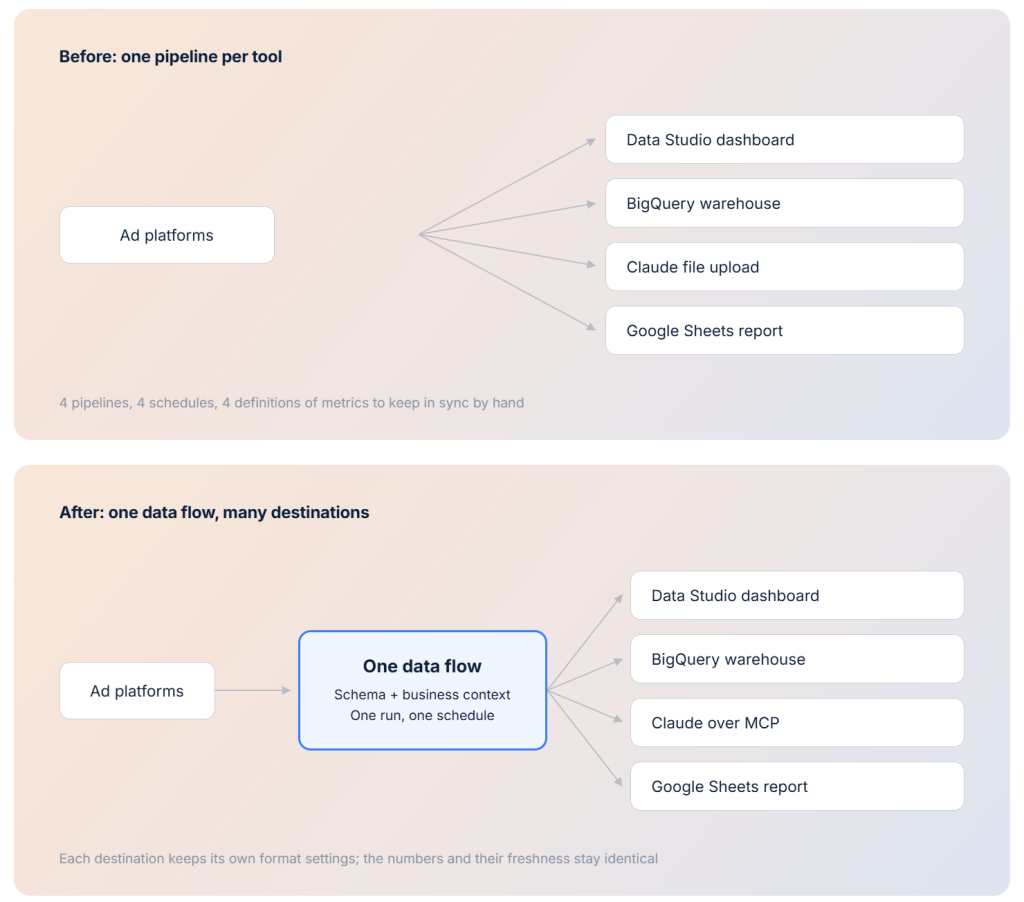
One run feeds every destination. The same run that refreshes the Data Studio dashboard also updates the data set your AI assistant queries or the Google Sheet report you open every Monday. There is no second export and no “AI copy.”
The schema and business context stick to the data flow. Column descriptions, metric definitions, and notes like “lead form changed on March 3” are attached to the data, not to a tool. So the Data Studio dashboard and the Claude analysis work from the same definition of a metric. Change it once, and every destination inherits it.
One schedule refreshes everything. The numbers are identical and equally fresh. Nobody compares yesterday’s dashboard to this morning’s AI answer and calls it a discrepancy.
Each destination still gets the format it needs. A spreadsheet wants flat rows, a BI tool wants clean dimensions, a warehouse wants strict types. Per-destination settings handle that without any destination turning into a new pipeline.
The AI side has one more piece. The model doesn’t receive a raw export to add up on its own. Coupler AI reads the schema and attached context over MCP and writes the query. The Analytical Engine runs it and returns computed results. The model only interprets numbers it never calculated. Same principle as before, now on a shared foundation.
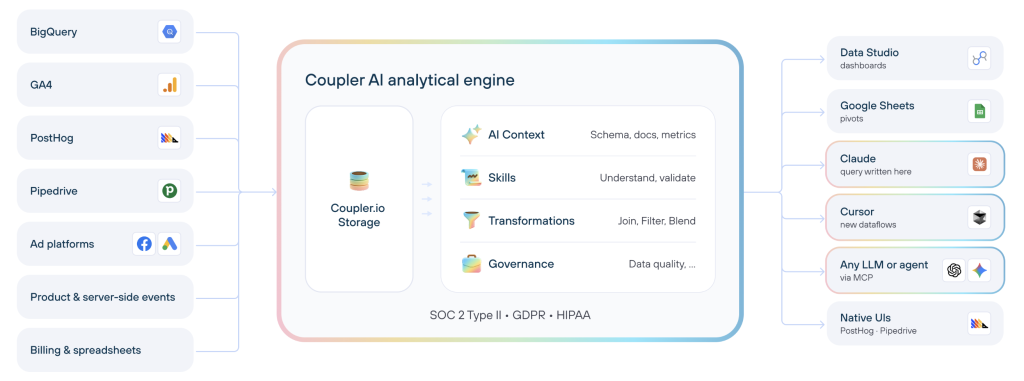
That split matters since LLMs are not good at arithmetic. They can turn a question into a query and explain what the answer means. Ask one to add a long column of ad spend and watch it quietly round. Keeping the math on the Coupler.io side means the AI and the dashboard start from the same definition of a metric, every time. Same principle as before, now on a shared foundation.
So why keep all the tools around? Because they do different jobs.
Dashboards are for the quick check: ad spend last week, organic traffic last month, etc. AI is for the deeper question: why ROAS dropped in week two, and what to shift next month. Spreadsheets stay because some teammates or clients live in them, and for plenty of reporting needs, a sheet is enough. That’s alright.
What changes for agencies?
A manual reconciliation step disappears. You no longer need to spend time analyzing every dashboard, making notes in a rush, and compiling AI summaries.
With one flow, there’s nothing to reconcile. You prepare the story instead of defending the numbers. And when a client asks for the same analysis as a chart or a short written summary, you give them the format they want without running the numbers again.
Adding AI analysis for a client stops being a project. The data flow already exists. The AI is one more destination, operating with the same prepared data.
Onboarding a new client means one data flow, not three. One set of definitions to agree on, one schedule to set, one place to fix when their tracking changes.
And internal reports finally tell the same story as client reports. Your strategist and your client look at different screens and still see the same numbers.
Both tools. One truth
Agencies having both traditional BI and modern AI flows are already doing the right thing.
You need to build one data foundation. Otherwise, you’ll be stuck with duplication and separate pipelines that drift, affecting accuracy and trust. You’ll end up back in the dilemma of choosing the stack.
One data foundation feeds all your tools, with the same schema and context attached. You pick the tool for the job, not the data copy you trust most.
If you’re at MeasureCamps in Berlin, Stockholm, and Brussels, come find me. I’ll show this setup live, and I’d like to hear how your team handles it.



