Google Ads reports are full of numbers. But turning those metrics into clear actions is the hard part. What to pause. What to scale. What to fix first?
ChatGPT for Google Ads integration changes that. When it’s connected to your real campaign data through Coupler.io, it becomes a fast analyst, copywriter, and optimizer in one.
Learn how to use ChatGPT for Google Ads to turn performance data into smart decisions in minutes, not hours, using practical prompts and AI integrations that actually work.
How to use ChatGPT for Google Ads
ChatGPT can support almost every stage of Google Ads work, but it’s most useful when you treat it like a decision assistant, not a magic button.
In this article, I’ll cover six practical ways of using ChatGPT for Google Ads by marketers to work faster and make better calls across campaigns:
| Task | What ChatGPT handles | What you get |
|---|---|---|
| Optimization planning | Analyze performance across 6 key metrics and turn insights into prioritized next actions | Better decisions made faster with data-backed recommendations |
| Campaign planning and goals | Generate campaign ideas, structures, targeting angles, and success metrics | Faster setup with clearer direction |
| Keyword and negative keyword research | Turn landing pages into keyword groups and surface irrelevant or costly queries to exclude | Higher relevance and less wasted spend on wrong traffic |
| Ad copywriting | Draft headlines and descriptions within character limits and create multiple variations | Faster testing and iteration without writer’s block |
| Performance reporting | Convert raw data into plain-language, executive-ready summaries | Less manual reporting work and quicker stakeholder updates |
| Waste detection | Highlight low-performing segments, queries, or ads consuming budget without returns | Budget leaks identified and fixed earlier |
Optimize Google Ads with ChatGPT using connected data
Creating campaigns and ads is only half the work. Most performance gains come from weekly optimization.
After launching campaigns, avoid making changes too early. Google’s algorithms need 7-14 days to learn who converts and how to bid effectively.
| ✅ Monitor for errors only | ❌ Avoid: |
| • Daily spend (no budget leaks) • Disapproved ads or policy violations • Conversion tracking fires correctly • Obvious red flags (zero impressions, extremely high CPC) | • Bid adjustments • Pausing keywords or ads (unless clearly broken) • Rewriting headlines or descriptions |
Start optimizing when you have:
- 7-14 days of data
- 100+ clicks per campaign
- OR 50+ conversions
- OR $500+ spend
Once past the learning phase, focus on these 6 signals:
- Search Terms Report – What queries are triggering your ads? Filter out irrelevant traffic.
- Ad Asset Report – Which headlines/descriptions perform best? Phase out weak assets.
- Keyword Performance – Which keywords drive conversions vs waste spend? Scale winners, pause losers.
- Quality Score – Are your keywords relevant to your ads and landing pages? Check ad relevance, message match, and landing page experience to lower CPC.
- Conversion Rate – Are clicks turning into actual results? Separate traffic problems from offer issues.
- Cost per Conversion / ROAS – Are you hitting your target CPA/ROAS? Ensure campaigns remain profitable.
You don’t have to manually review each report. It takes just a couple of steps to set up a Coupler.io connector to analyze Google Ads campaign performance in ChatGPT.
Step 1: Create a data flow
Start by creating a new data flow in Coupler.io with Google Ads as your data source. Or use our preset form right away by clicking Proceed.
You’ll be offered to get started for free with no credit card required.
Next, authorize Coupler.io to access your Google Ads account and choose what data you want to analyze. You can either:
- Use a pre-built data set template designed for common reporting scenarios (e.g., “Keyword Performance” or “Campaign overview”)
- Build from scratch by selecting specific reports like Campaign Performance, Search Terms, or Keyword data, and setting your date range (e.g., last 60 days)
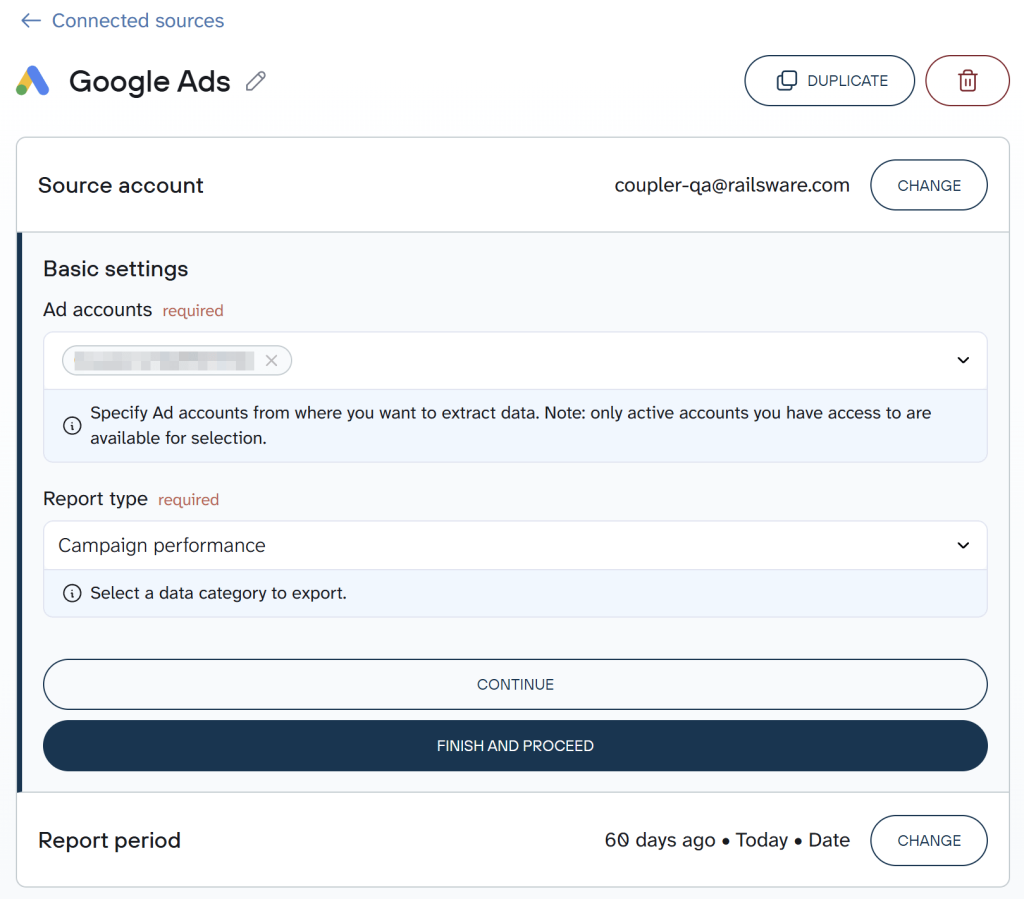
You can also transform your data at this stage: hide sensitive columns, filter date ranges, or combine multiple reports.
Security tip: If you have sensitive data that you’d like not to share with ChatGPT, hide it during this step. As a result, ChatGPT will only query the visible columns.
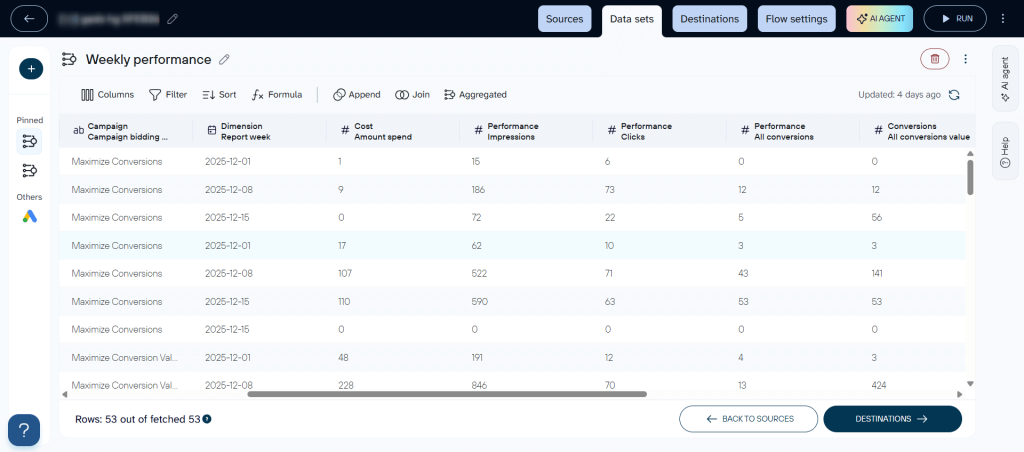
Step 2: Integrate the data set with ChatGPT
Once your Google Ads connector is configured, switch to the Destination tab and select ChatGPT. Follow the setup instructions to connect Google Ads to ChatGPT.
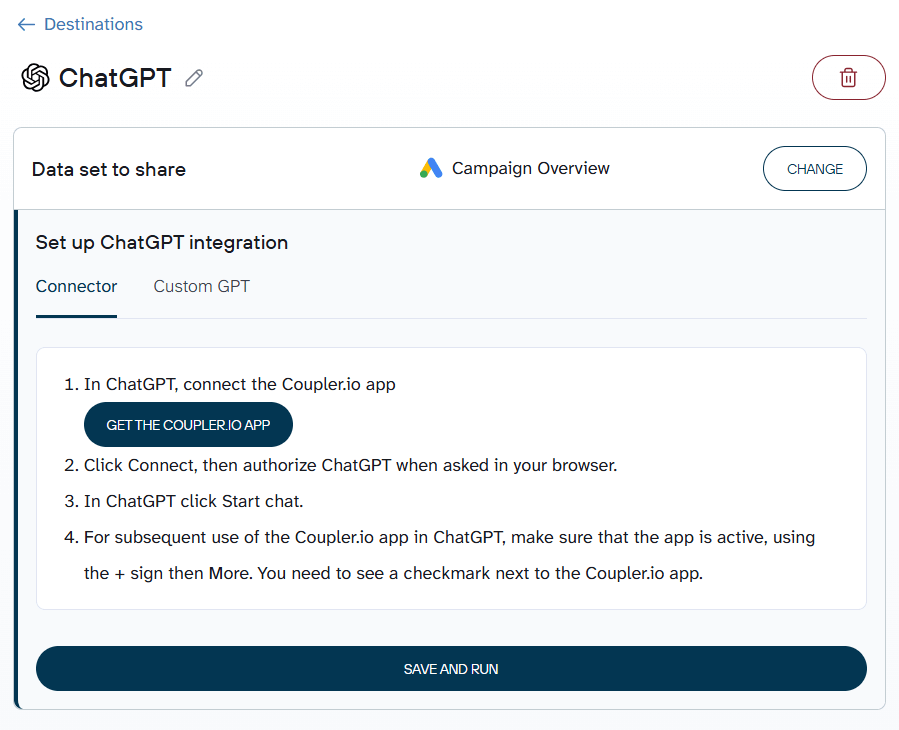
Connect the dedicated Coupler.io app from the ChatGPT Apps Directory and authorize it to access your Coupler.io account.
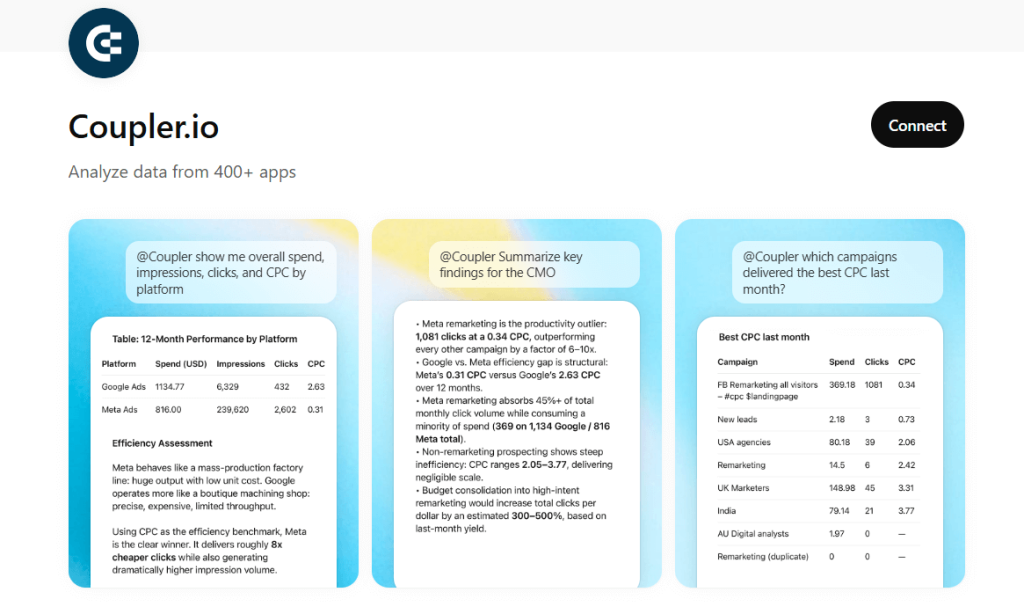
Once connected, you can tag @coupler.io in any ChatGPT conversation or select the Coupler.io app from the apps menu to query your Google Ads data.
Why this works: when you ask ChatGPT a question like “Which campaigns are wasting budget?”, it doesn’t guess. It translates your request into SQL, sends it to Coupler.io’s Analytical Engine, which runs the calculations on your actual data, validates the results, and returns verified numbers for ChatGPT to interpret. No hallucinations — just reliable insights backed by real calculations.
Optional: Coupler.io allows you to connect the same data flow to Claude, Perplexity, Gemini, or Cursor. Explore all supported AI integrations or connect via MCP for advanced setups.
If you’re weighing Coupler.io vs Google Ads MCP, the difference is scope: a single-source Google Ads MCP server pulls Google Ads alone, while Coupler.io feeds the same flow to ChatGPT, Claude, Gemini, and more from 400+ sources.
Examples of reports using the Google Ads ChatGPT integration
Once the integration is active, you can analyze Google Ads data with ChatGPT. Below are the six core monitoring areas and how to handle each with AI.
Search terms report: Eliminate waste and uncover opportunities
The Search Terms Report shows what users actually typed before clicking your ads. This is where budget leaks usually hide—irrelevant queries, low-intent searches, and expensive non-converters.
Prompt: Audit your search intent
Fetch my "[Data flow name]" data flow, and analyze the Search Terms Report for the campaign named "[Campaign name]" for the last 7 days. |
Results:
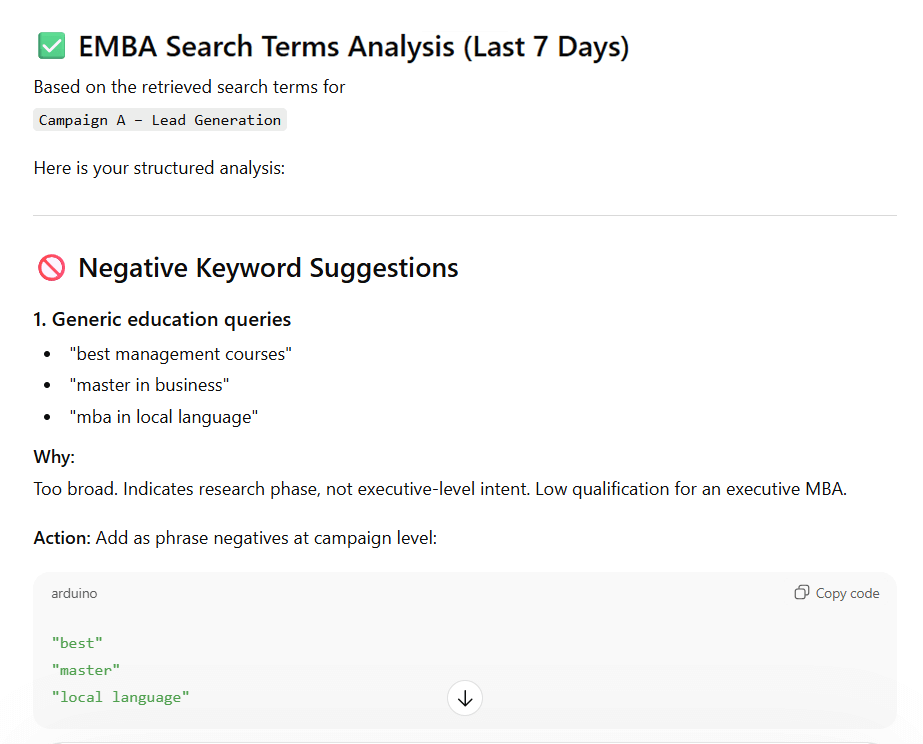
ChatGPT found that the campaign attracted too much generic traffic, leading to wasted spend and zero-conversion queries. It recommended adding negative keywords for broad academic terms and competitor searches, then focusing on high-intent executive queries.
Ad asset report: Improve underperforming headlines
Your Ad Asset Report shows which headlines and descriptions drive the most engagement and conversions. Google automatically tests different combinations, so this report reveals which specific messages resonate with your audience.
Prompt: Optimize your ad creative
Analyze the Ad Asset Report for the last 7 days. |
Results
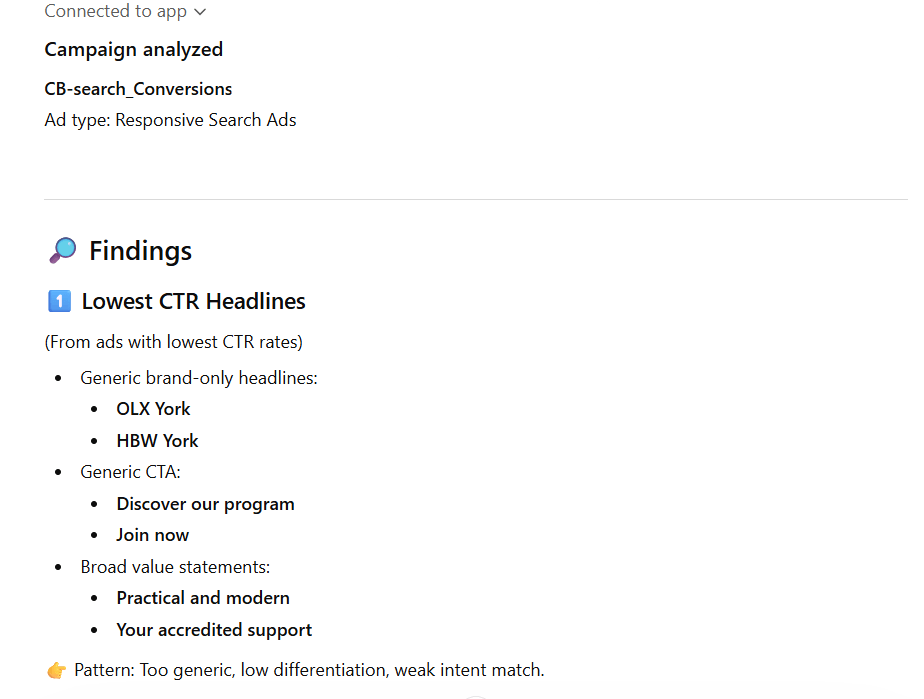
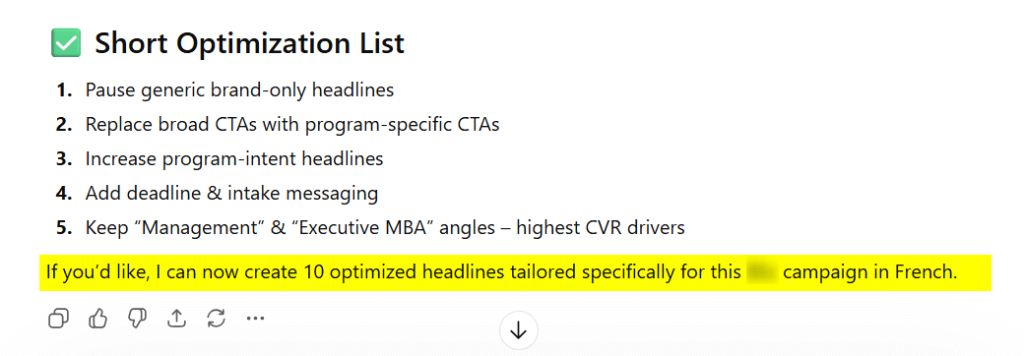
ChatGPT + Coupler.io analyzed the campaign, identified weak and strong headlines based on CTR and conversions, flagged what to pause, and provided actionable optimization recommendations aligned with intent and performance data.
It even went a step further by offering to generate 10 fully optimized headlines tailored specifically to the campaign.
Keyword performance: Scale winners, pause losers
Keyword-level analysis shows which search terms drive conversions and which consume spend without results. ChatGPT can quickly surface the keywords that deserve attention.
Prompt: Optimize keyword-level bids
Analyze keyword performance over the last 7 days. |
Results
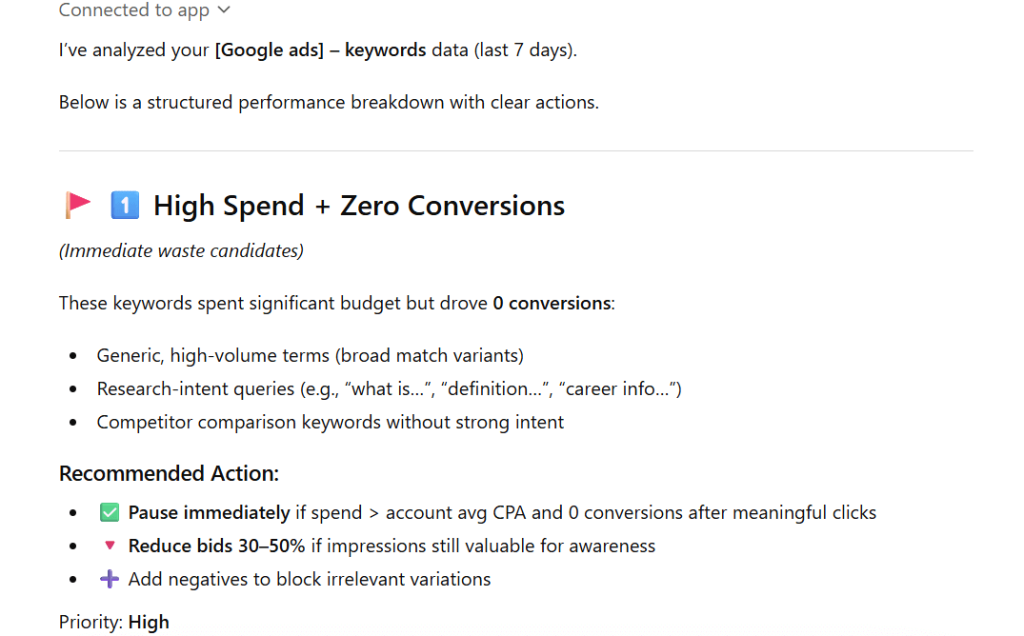
With the Coupler.io app, this prompt becomes a powerful tool for weekly account hygiene and identifying low-hanging fruit. Use it to quickly find ‘bleeder’ keywords that are wasting spend across multiple campaigns.
Quality score: Improve relevance and lower CPC
Quality Score reflects how aligned your keywords, ads, and landing pages are with user intent. It considers ad relevance, expected click-through rate, and landing page experience. A low score means higher CPC and weaker performance.
Using ChatGPT to analyze patterns across low-scoring keywords helps you identify messaging gaps or landing page mismatches.
Prompt: Diagnose your Quality Score
Review keyword-level data including Quality Score components for the last 7 days. |
Results
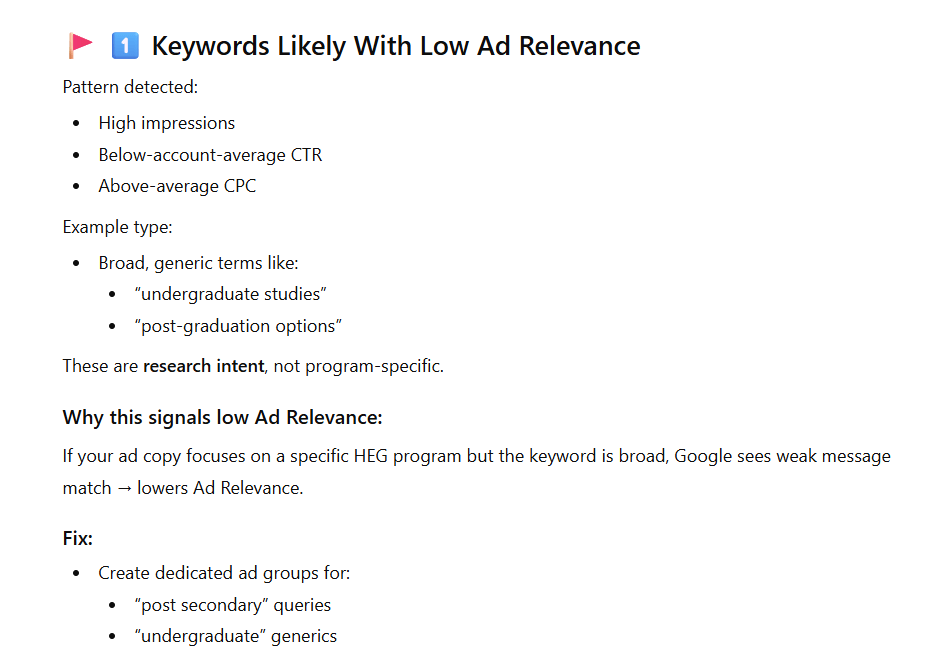
Instead of guessing why CPC is high, you get clear diagnostic insights: which keywords need better ad copy, which need landing page improvements, and where message match is breaking down.
Conversion Rate: Fix weak traffic
Conversion rate shows whether your clicks turn into outcomes. Among all ChatGPT Google Ads performance reports, this one often reveals the gap between traffic volume and actual results. If visitors don’t convert, you’re paying for traffic that doesn’t generate revenue.
One caveat: conversion rate must be evaluated alongside volume — a 100% rate from 2 conversions is meaningless. ChatGPT sometimes overlooks this, treating high percentages as automatically positive. Focus on campaigns with both low conversion rates and sufficient volume, then refine targeting or improve the post-click experience.
Prompt: Align traffic intent with the offer
Analyze conversion rate by campaign and ad group for the last 7 days. |
Results
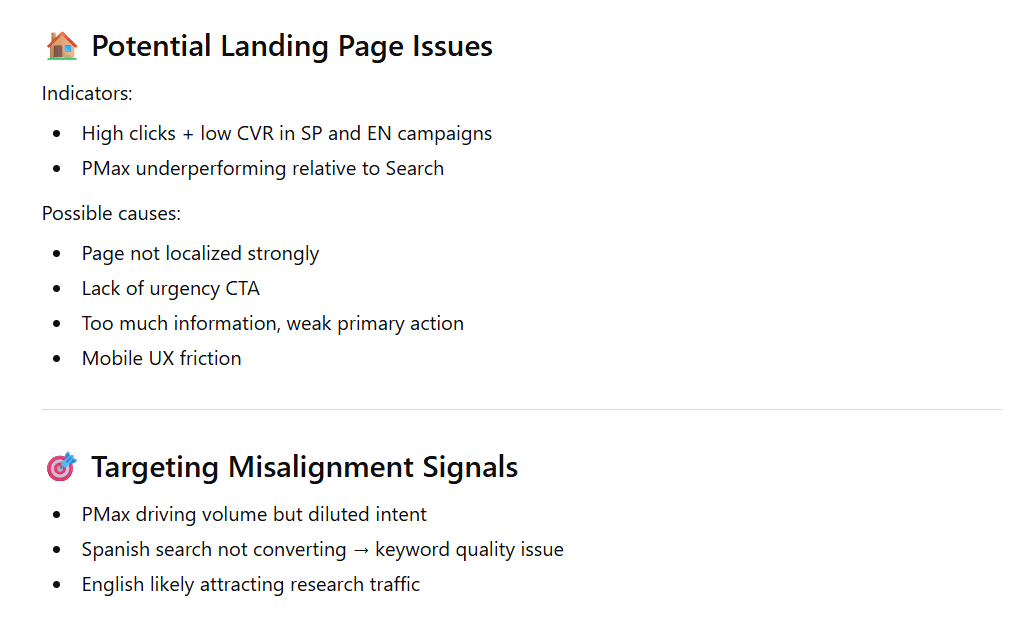
Cost per conversion / ROAS: Protect profitability
Ultimately, performance comes down to efficiency. Cost per Conversion or ROAS determines whether your campaigns are profitable, not just active. Even high-converting campaigns can underperform if acquisition costs are too high.
Using ChatGPT for Google Ads analysis makes it easier to compare campaigns side by side and prioritize budget toward the most efficient segments.
Prompt: Secure your profitability
Analyze CPA and ROAS across campaigns for the last 7 days. |
Results
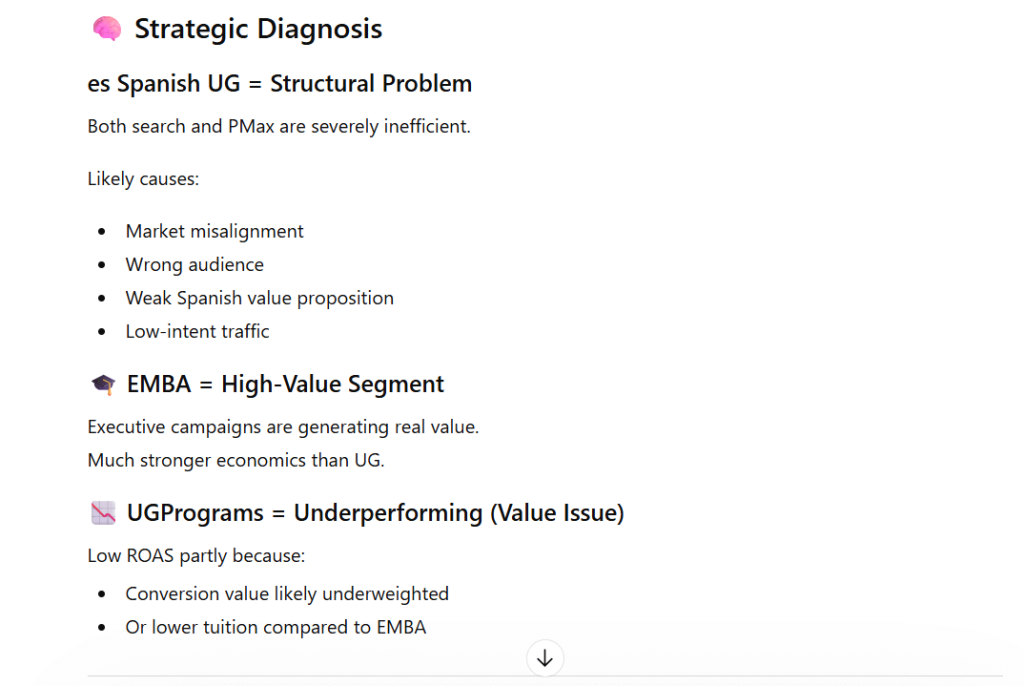
These 6 analyses form a complete workflow of using ChatGPT for Google Ads optimization. Run them every Monday morning, and you’ll catch budget leaks, scaling opportunities, and performance issues before they compound.
What used to take 4–6 hours of manual spreadsheet work now takes about 10 minutes with Coupler.io + ChatGPT.
Planning campaigns and goals with ChatGPT
A lot of Google Ads accounts don’t fail because of bidding or budgets. They fail at the planning stage — campaigns too broad, conversions that don’t reflect real intent, or budget spread across too many ideas at once.
ChatGPT helps you avoid that by forcing structure up front, before you write ads or touch Keyword Planner.
Prompt: generate high-intent campaign ideas and conversion goals
Act as a Senior Google Ads Strategist. Analyze [Insert Business URL/description] and suggest high-intent campaign ideas for [Year]. |
How to use the output
When ChatGPT returns the table, you’re looking for three things.
- A campaign list small enough to execute. If it suggests 12 campaigns for a small budget, ask it to cut the list to the top 3–5 and justify the tradeoffs.
- Conversion actions that reflect intent. “Leads” is not a conversion by itself. A lead can be a demo request, a quote form, a phone call, or a booking. Force a concrete conversion action per campaign so reporting stays clean.
- Metrics that match your business model. Lead gen tracks CPL and qualified lead rate. Ecommerce prioritizes ROAS. Booking-based businesses focus on cost per booking and the booking-to-sale rate.
Make it more accurate by giving ChatGPT one extra constraint — what “good” looks like. For example: “Target CPL under $40,” “We can only handle 30 leads per month,” or “Our average order value is $120.” Even basic numbers help it prioritize realistically.
Examples of reports using the Google Ads ChatGPT integration
What ChatGPT usually produces from this prompt
Before anything else, here’s the exact prompt we used to generate the plan:
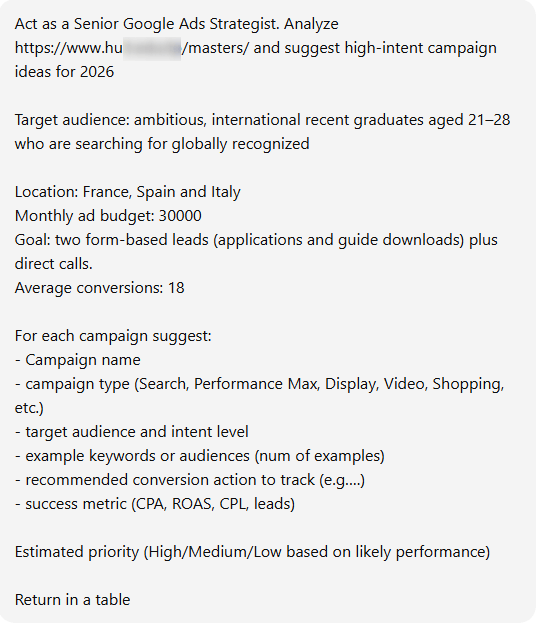
When you run this prompt, ChatGPT usually returns a structured table of campaign ideas split by intent level. In the example below, we used a university Master’s program (“Masters 2026”):
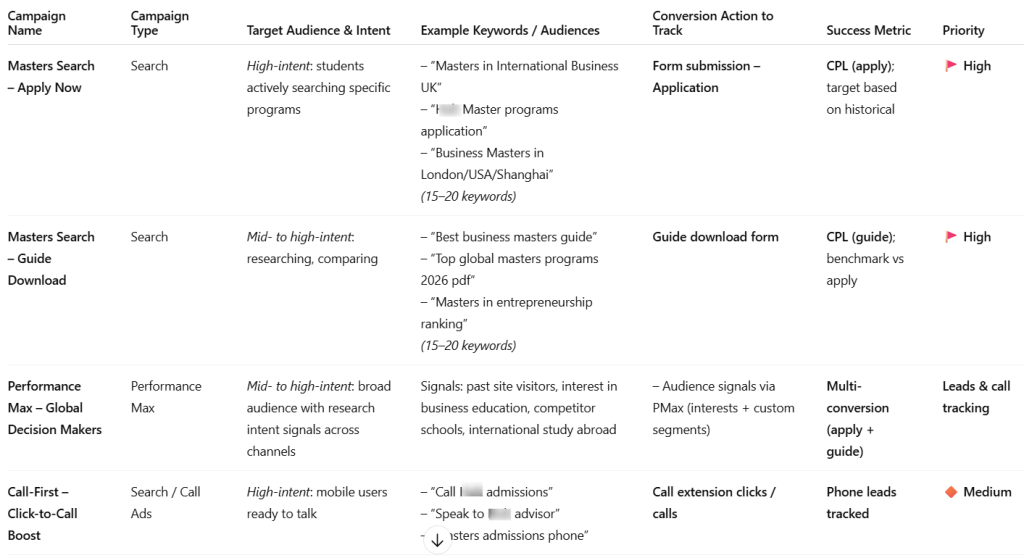
It suggested high-intent Search campaigns (apply now, guide download), a Performance Max campaign, plus supporting layers like video awareness, retargeting, and call-focused Search.
That structure is helpful because it forces you to think in buckets: capture intent first, then scale with supporting campaigns. But it’s still a starting point.
Take the call-focused recommendation. ChatGPT proposed a “Call-First” approach — works well for urgent conversions (plumbers, locksmiths, towing). For an EMBA, though, the decision cycle is longer and people usually need details first. Calls may still matter, but typically as a secondary step.
Treat ChatGPT’s output like a strategist’s first draft: it gives you structure quickly, but your expertise decides what stays, what goes, and what needs reframing.
ChatGPT prompts for Google Ads to find the right keywords and negatives
ChatGPT is great at organizing and structuring keywords. But it shouldn’t replace Google Keyword Planner.
Keyword Planner has Google’s full search database with real search volumes, forecasts, and variations you might otherwise miss. Start there, build a complete list, then use ChatGPT to clean, group, and prioritize.
Let’s look at the sequence.
1. Start with real search data
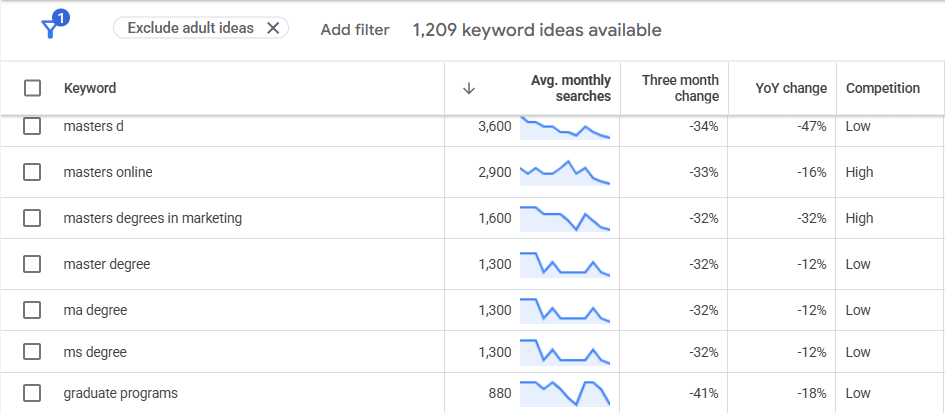
Use Google Keyword Planner to generate keyword ideas and download the full list.
At this stage, the goal isn’t structure. It’s coverage.
You want everything: volumes, variations, long-tails, weird phrasing people actually search for.
2. Export the keywords
Export the list to Google Sheets or CSV (these are the two options available). Make sure to clean up the lists before sharing it with chatGPT by removing any unnecessary headers.
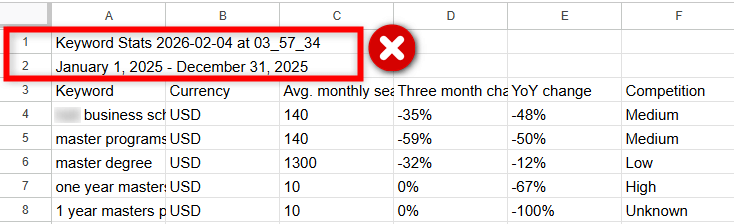
3. Upload/Paste that list into ChatGPT
Paste or upload that raw list into ChatGPT. Ask it to group keywords into tightly themed ad groups.
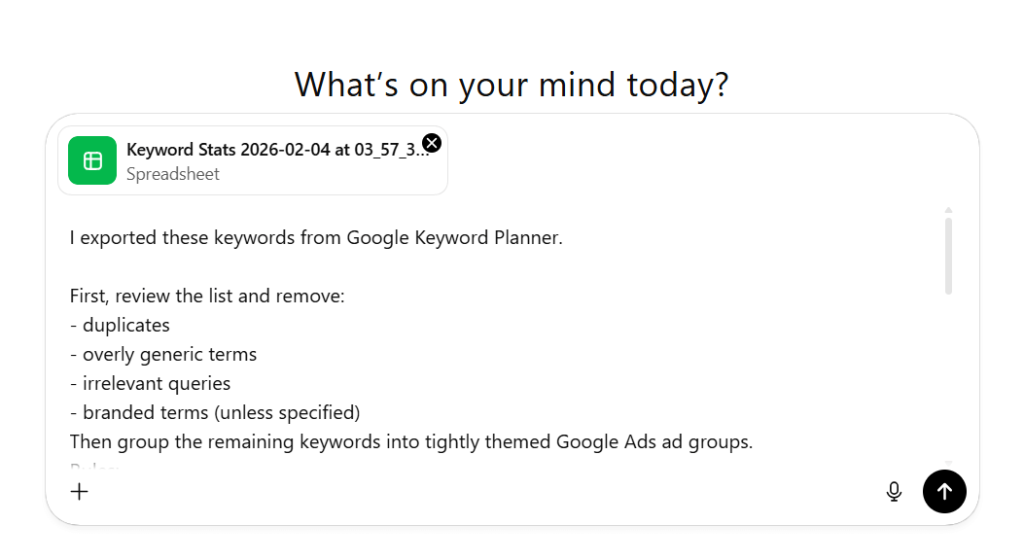
Instead of hundreds of scattered terms, you now get clear clusters with shared intent.
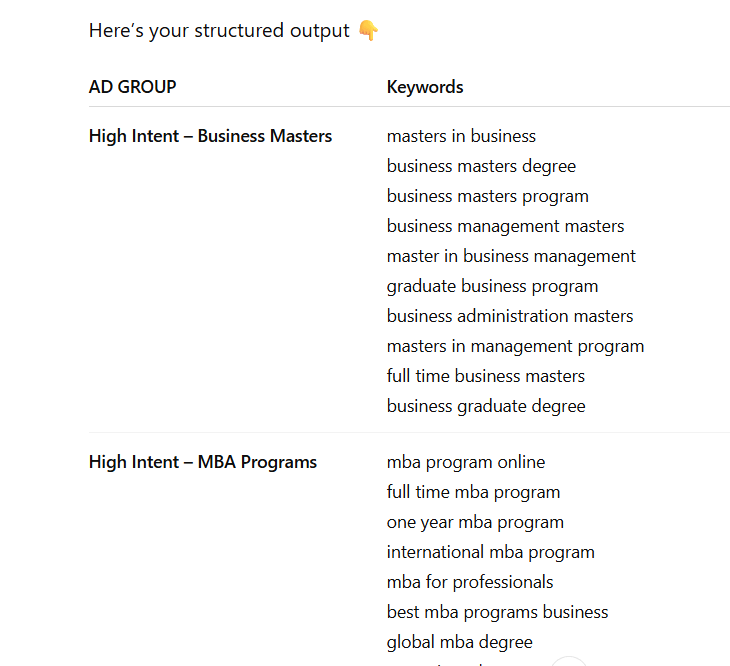
Prompt: group and structure keywords from Keyword Planner
I exported these keywords from Google Keyword Planner. |
How to use the output
Each group becomes one ad group with related keywords, matching ad copy, and the same landing page. Keeping themes tight usually improves Quality Score, relevance, and CTR.
Keyword Planner gives you the data. ChatGPT gives you the structure. Together, they make keyword research faster and cleaner.
Create Google Ads copy with ChatGPT
Writing good Google Ads copy means producing lots of variations fast, then testing what performs. ChatGPT is perfect for this first-draft stage.
One important caveat: Google Ads has strict character limits, and ChatGPT often exceeds them. The following prompts reduce this almost completely.
Headlines
Headlines drive most of your CTR, so you want variety, not ten versions of the same sentence. Mix benefits, features, offers, and questions so different intents are covered.
Prompt
Create 10 Google Ads headlines. |
What this looks like in practice
The image below shows a response: a clean list with headlines, character counts, and categories.
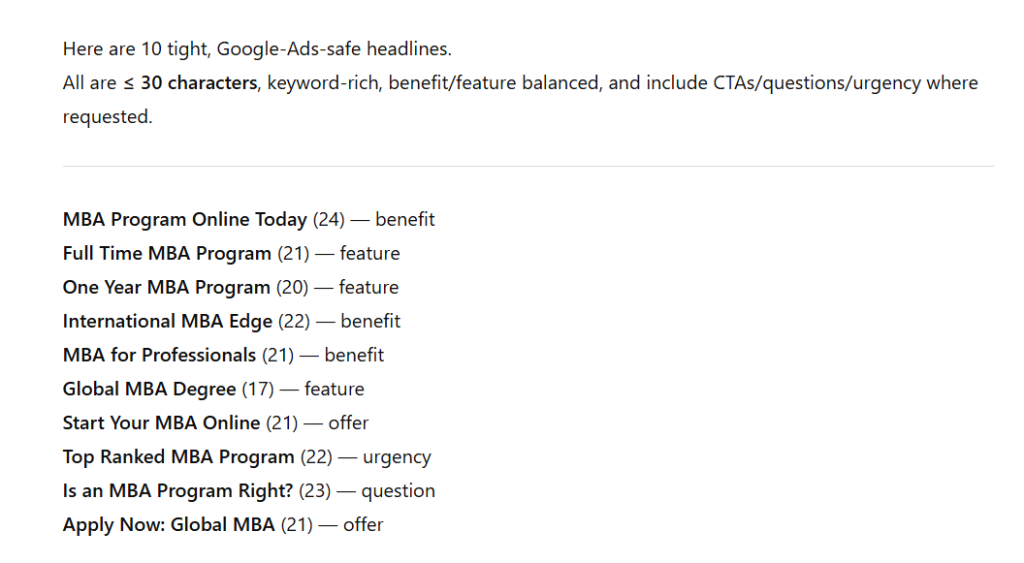
Generate more than you need, then: delete weak or repetitive ones, fix anything over the limit, keep the 6–8 strongest, and upload for testing.
Descriptions
Descriptions support your headlines and reinforce the value. Each one should work independently since Google mixes them dynamically. Here’s the prompt:
Prompt
Write 5 Google Ads descriptions. |
This approach gives you structured, test-ready copy fast while keeping full control over messaging.
What the output looks like
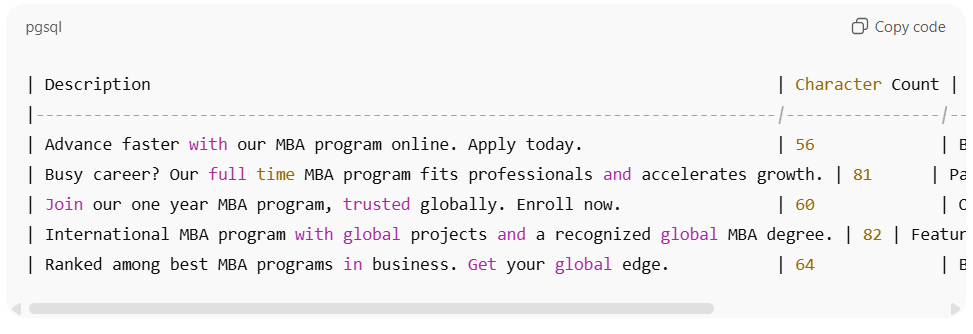
You’ll typically get a neat block of descriptions with counts and intent labels.
Trim anything too long, tighten wording, keep the clearest benefits, and paste directly into Google Ads.
Manage your Google Ads campaigns with other AI tools
ChatGPT isn’t the only way to boost Google Ads performance with AI. Once your campaigns are synced through Coupler.io, your data can be sent to Sheets, BigQuery, or other destinations and queried from whichever assistant you prefer:
- ChatGPT for quick summaries and prompts
- Claude for longer reports and interactive dashboards
- Gemini inside Google Workspace
- Perplexity for research
- Cursor or other AI coding tools for deeper analysis
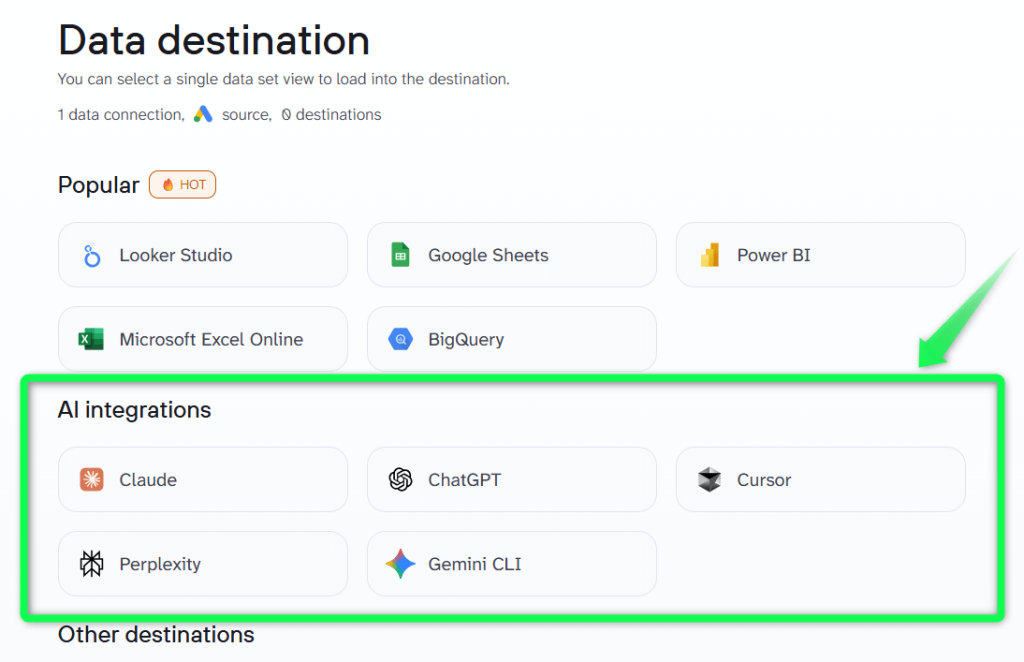
Coupler.io acts as the data layer between Google Ads and your AI tools. Connect once, then query from the tool you already use.
You can explore all supported AI integrations to see what’s possible.
Ask questions directly with Coupler.io’s AI Agent
Google Ads data analysis using ChatGPT or other external tools isn’t the only option. If you prefer not to switch between tools at all, you can analyze your campaigns directly inside Coupler.io.
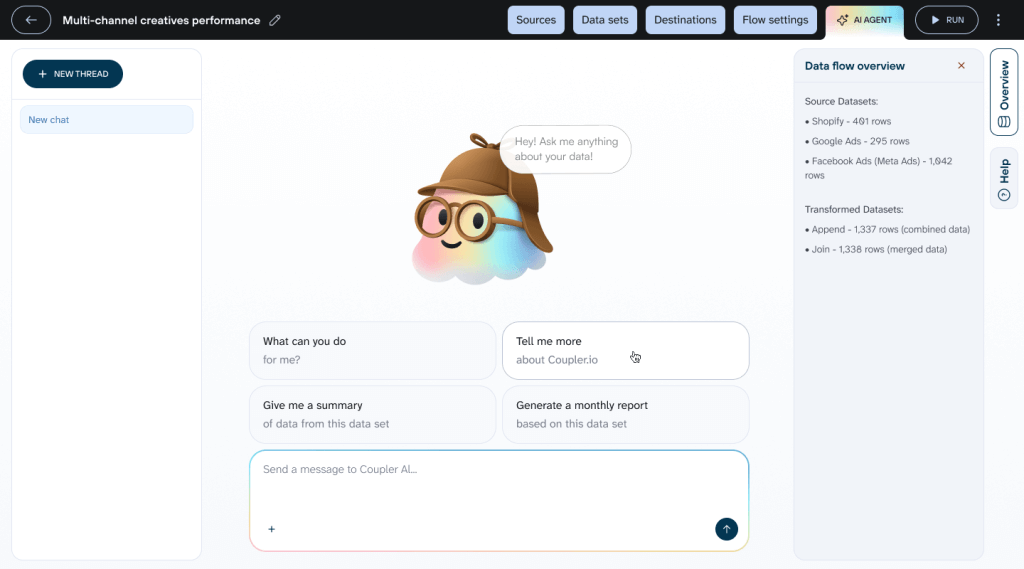
Coupler.io’s built-in AI Agent lets you query your synced Google Ads data without opening ChatGPT, exporting files, or writing formulas. Your data stays inside the platform, and you simply ask questions in plain language.
You can just ask:
“What should I fix first this week?”
And get immediate recommendations based on your latest synced data.
Prompt
What should I fix first to improve performance this week? |
What the Coupler.io AI agent did
From a single question, it pulled the datasets, reviewed campaign efficiency, and pinpointed where the budget was being wasted versus where conversions were cheapest.
It then surfaced:
- The biggest sources of wasted spend
- Underperforming campaigns dragging down CPA
- Quick wins already converting efficiently
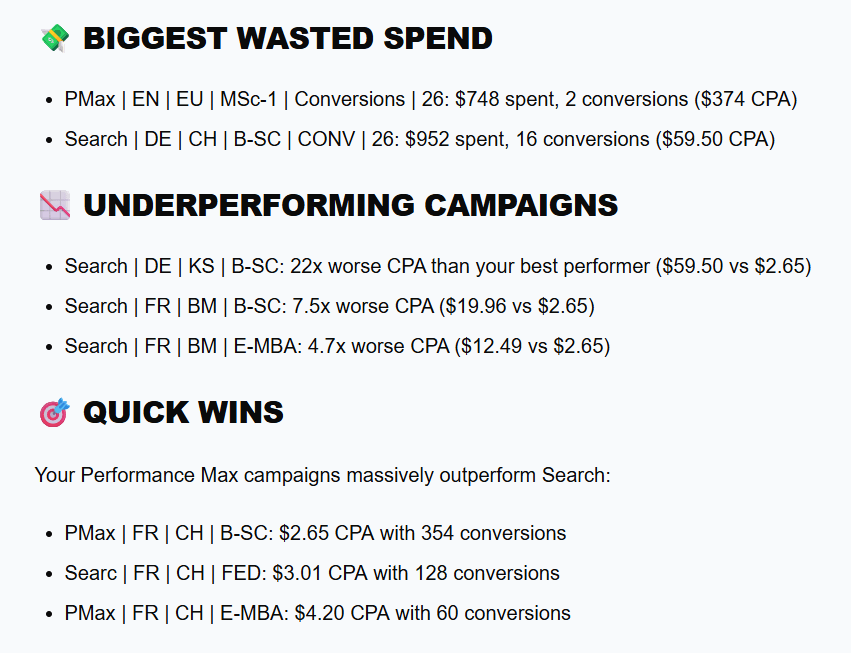
- Three clear, prioritized actions to take immediately
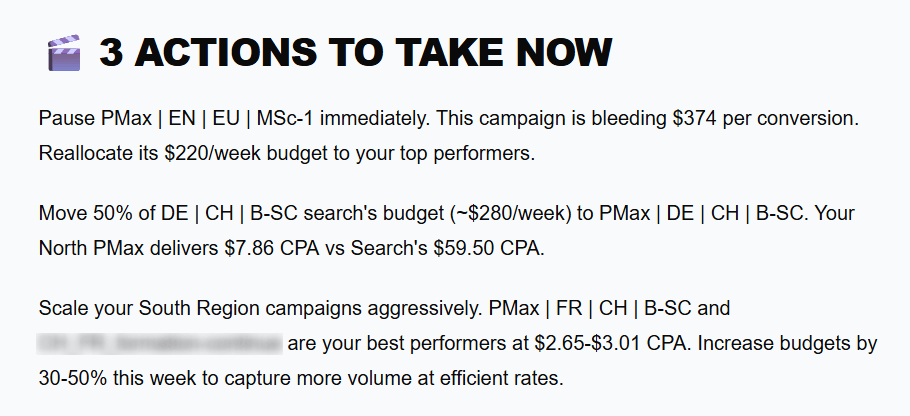
Instead of digging through reports, the AI agent delivered a focused, week-ahead action plan highlighting what to pause, where to shift budget, and which campaigns to scale.
Use external AI tools when you need deeper analysis or custom workflows. Use the in-platform assistant for quick day-to-day checks.
Turn insights into action, faster
ChatGPT for Google Ads isn’t about automating everything or replacing your expertise. It’s about removing the slow, repetitive work that gets in the way of good decisions.
Instead of exporting reports, cleaning spreadsheets, and manually scanning for patterns, you can generate ideas, structure campaigns, write ads, and analyze performance in minutes. That’s what AI-powered Google Ads optimization looks like in practice: AI highlights what matters, and you act faster.
Use ChatGPT to draft. Use synced data to analyze. Then apply your judgment to optimize. That combination of automation and experience is what actually improves results.
Turn Mondays into decisions, not spreadsheets. Sync Google Ads with Coupler.io and let AI surface what to fix first.

Integrate data with ChatGPT using Coupler.io
Get started for freeFAQ
Can ChatGPT access my Google Ads account directly?
No. ChatGPT doesn’t connect to Google Ads directly.
You need a connector like Coupler.io to integrate with ChatGPT and automatically sync your campaign data for conversational analysis.
Can ChatGPT replace a Google Ads specialist?
No.
ChatGPT helps with speed. It drafts ideas, summarizes performance, and suggests optimizations. But strategy, judgment, and business context still come from you.
Think of it as an assistant, not a replacement.
Will Google penalize AI-generated ad copy?
No.
Google evaluates ads based on policy compliance and performance, not how they were written. As long as your copy follows the rules and is relevant, AI-generated text is fine.
In fact, Google Ads already uses AI inside the platform to suggest headlines, descriptions, and text improvements.
Is AI optimization accurate?
It depends on the data source.
If you paste random numbers manually, errors happen. When your data is synced automatically and calculations are validated, insights are much more reliable. That’s why connecting live data through an intermediary like Coupler.io is important.
It’s also good practice to run a quick QA check before deeper analysis. For example, first ask for a simple summary of totals such as spend, clicks, and conversions and confirm they match what you see in Google Ads. Once those numbers align, you can confidently move into deeper optimization and recommendations.
Do I need technical skills to use Coupler.io?
No.
Setup is mostly point-and-click. Choose Google Ads as the source, connect your account, select ChatGPT as the data source and schedule the sync. No coding required.
How often should data refresh?
For most accounts, hourly or daily refresh is enough. If you actively manage budgets or run high-spend campaigns, more frequent updates (up to every 15 minutes) can help you react faster.