
How Small Business Owners Can Use Claude for Data Analytics and Reporting

“Which products actually made money last quarter?” Most owners can’t answer that fast. The numbers exist, but they’re scattered across the store, the ad platforms, and a couple of spreadsheets nobody wants to reopen.
Claude, built by Anthropic, closes that gap: you ask in plain language and get an answer back, no report to build first.
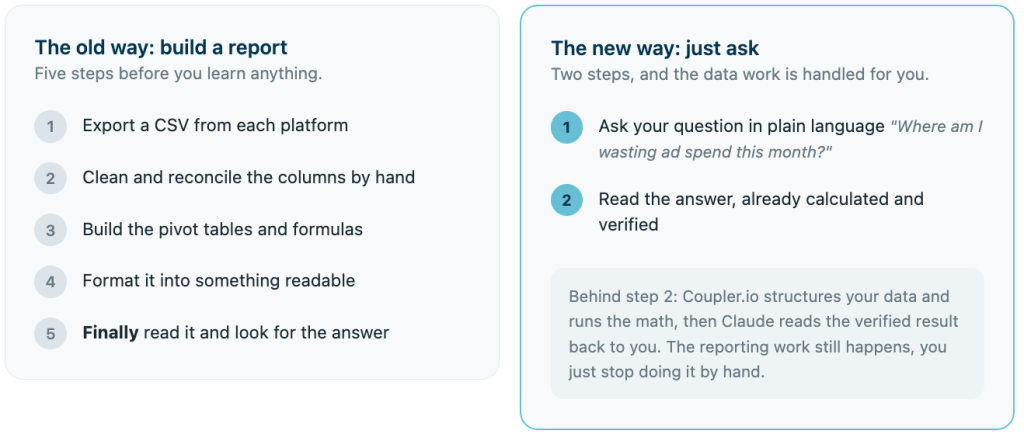
But that answer is only as good as the numbers behind it. Drop a raw CSV into most AI tools and you’ll get a confident answer with wrong math baked in, and when you’re deciding where the budget goes, wrong is expensive. Pair Claude data analytics for small business with Coupler.io and that risk disappears: Coupler.io runs the numbers, Claude explains them, and you get an answer you can actually act on.
What Claude can do for SMBOs
Paste a spreadsheet into Claude, and it earns its keep on a first pass, working like a quick data analyst: it can spot trends or draft a formula you can drop straight into your own sheet. It’s just as handy off spreadsheets, drafting a first pass at content creation for a newsletter or flagging the odd clause in a contract review before you sign. All for free, with nothing to set up.
Where it falls apart is the math. Ask Claude to work out the actual numbers itself, and it’ll sometimes get it wrong without a hint of doubt. No “let me double-check that,” just a wrong figure stated like it’s obviously correct. What you pasted is also frozen the second you paste it: your real Shopify numbers keep moving, Claude’s copy doesn’t. You want to connect Google Ads to Claude, but it can’t touch your spend unless you paste that in separately, which puts you right back to the manual stitching you were trying to skip in the first place.
Here’s what that looks like in practice: paste last month’s sales CSV and ask for average order value, and Claude usually gets close enough. Ask it to reconcile that same file against a separate ad-spend export to get a real cost per acquisition, and now a language model is doing cross-file arithmetic in its head, with nobody checking its work.
That’s the ceiling on Claude working alone. A live data layer is what raises it.
What changes when Claude has a live data layer
Picture your last “quick question” for Claude. You still had to dig up the export before you could even ask it, whether that’s a spreadsheet from your ad platform or API data to Claude from a custom endpoint. Coupler.io removes that step. Now the question comes first, and the numbers just show up.
You’ll sometimes hear setups like this described as AI agents or agentic AI: instead of you handing data to a chatbot, an AI assistant running on an agentic workflow goes and gets it itself. What’s below is one working version of that idea, built for a small business owner
All your sources land in one prepared data set
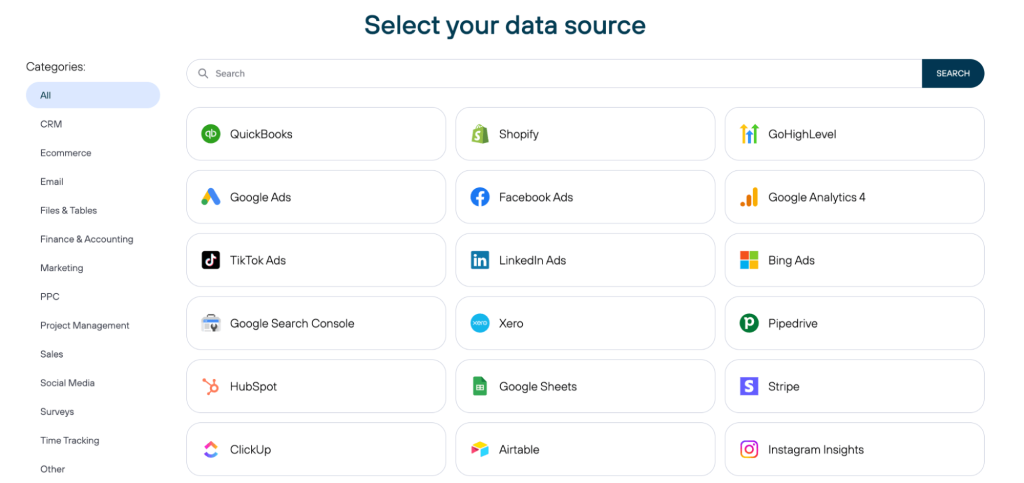
Coupler.io connects 400+ apps, so sales, ad spend, and revenue arrive already blended and ready to query. Whether your files sit in Google Workspace, Google Drive, or Microsoft 365, the setup is the same three steps. You’re not exporting five files and stitching them together by hand before you can even ask a question.
The numbers are checked before Claude sees them
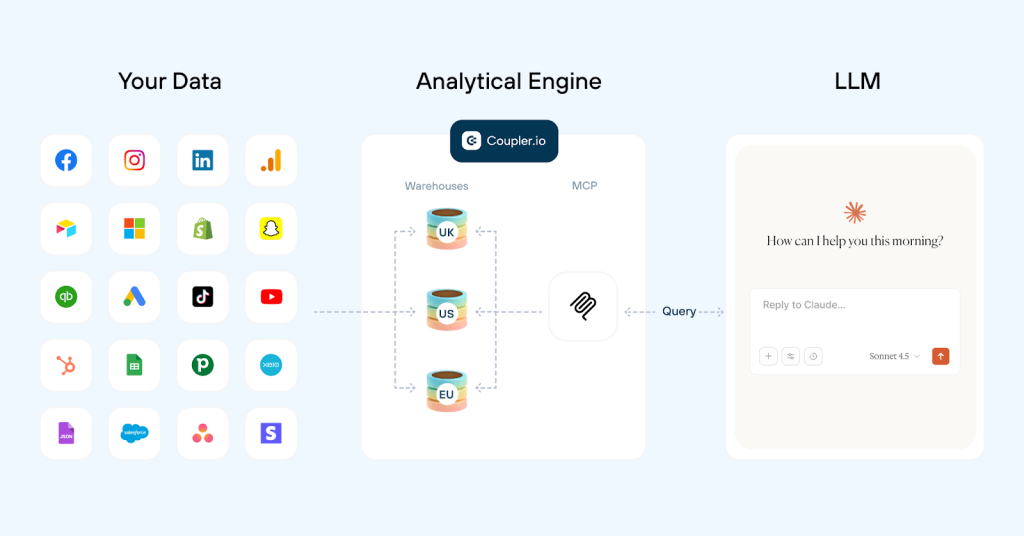
Don’t hand data to Claude in the form of a pasted spreadsheet and ask it to do the math itself. It’s not built for that kind of calculation. Coupler.io’s Analytical Engine runs the calculations and validates the output first, so Claude is only ever reading back a number that’s already been checked.
A growth performance marketer at Right Percent connected his data this way and cut his reporting time by 60%. He now reviews his numbers in under 10 minutes a day, with no data team and no custom code involved. That’s a real business pulse check.
No need to explain your data twice
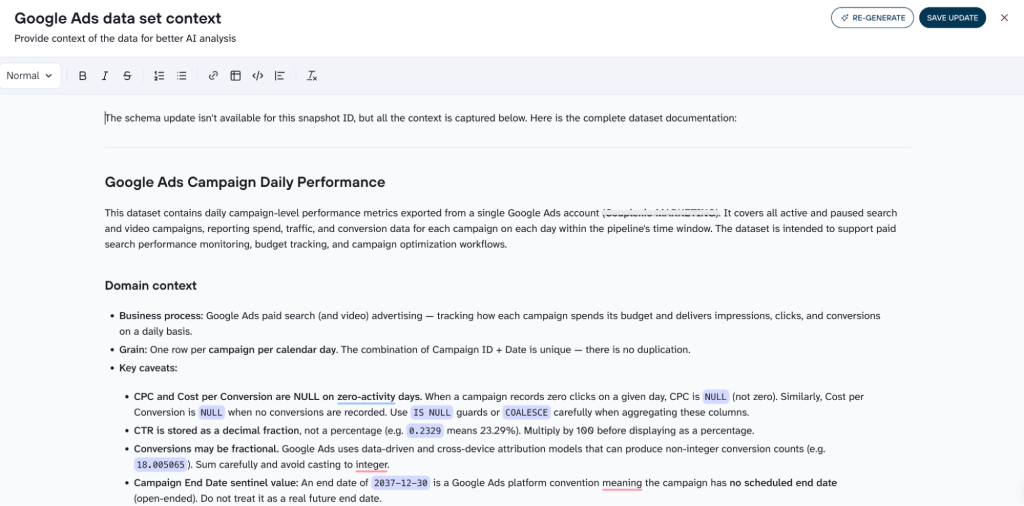
A data feed on its own doesn’t tell Claude much. A column called “qty” could mean units sold or units sitting in the warehouse, and guessing wrong changes the answer. Coupler.io attaches a plain description to each dataset and field, so Claude knows what “qty” actually tracks before it answers anything. That’s the context piece.
AI skills are separate: Coupler.io ships pre-built procedures and instructions (same as Claude Skills) for common requests, like marketing analytics, reporting, etc., where the right questions and calculations are already mapped out. You can also download Coupler.io skills here, add them to your Claude project within several clicks, and eliminate the need to write huge, complex prompts each time from scratch.
Put together, there’s less back-and-forth. Claude data analysis for small business is working from a data set that already tells it what everything means and uses procedures built for exactly this kind of question.

Trust every Claude answer with Coupler.io
Start for freeOne connection, multiple data destinations
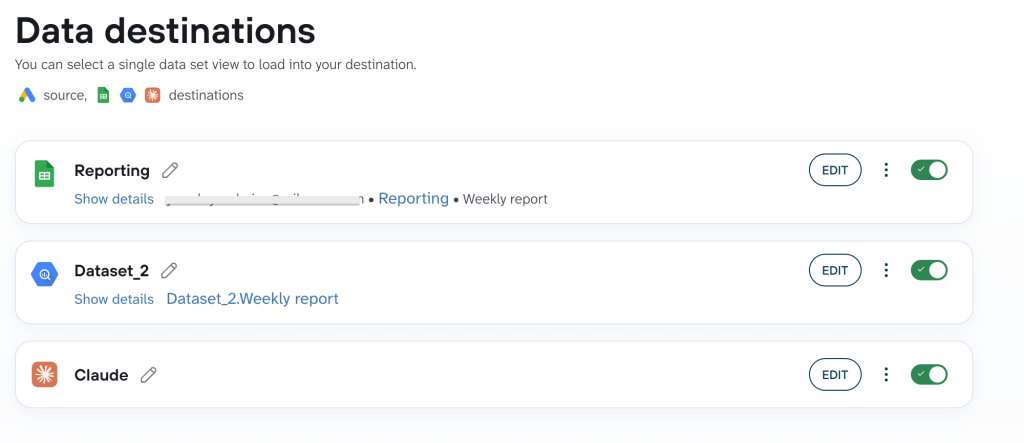
Maybe you already have a report in Google Sheets, or your bookkeeper checks a BigQuery table every Friday. You don’t have to give any of that up to hook Claude in. One Coupler.io connection can feed Claude or other AI integrations and your existing spreadsheet side by side, so whatever you’re already using keeps working exactly the way it did before.
Practical use cases
I decided to show you use cases of AI data analysis for small business below that all run on the same Claude + Coupler.io setup, and each one follows the same simple shape so you can scan it fast: the question you ask, the answer Claude gives back, and the reason you can trust the number.
That last part is what makes this different from pasting a spreadsheet into a chatbot. You ask Claude a question, Coupler.io’s Analytical Engine queries your connected data and checks the result, and Claude reads it back in plain language, sometimes with simple visualizations attached if you ask for a chart instead of a table.
That’s the difference from a guess dressed up as an answer. Claude then reads it back in plain language.
You ask → Coupler.io does the math → Claude explains.
Where am I wasting ad spend?
You’re running campaigns across Google Ads and Meta, and your spend keeps climbing. The question is which campaigns earn their budget and which quietly drain it.
Try: “Compare my Google Ads and Meta campaigns from the last 30 days. Show spend, conversions, and cost per conversion for each, and flag any campaign spending more than $200 with zero conversions.” When Coupler.io connects your Google Ads and Facebook Ads to Claude, data analysis provides a ranked breakdown: the campaigns pulling their weight, the ones bleeding budget, and the exact dollars sitting in dead spend. From there, you can ask follow-ups in the same conversation, like which audiences or creatives are behind the gap. The same setup lets you analyze social media performance with Claude beyond just paid spend.
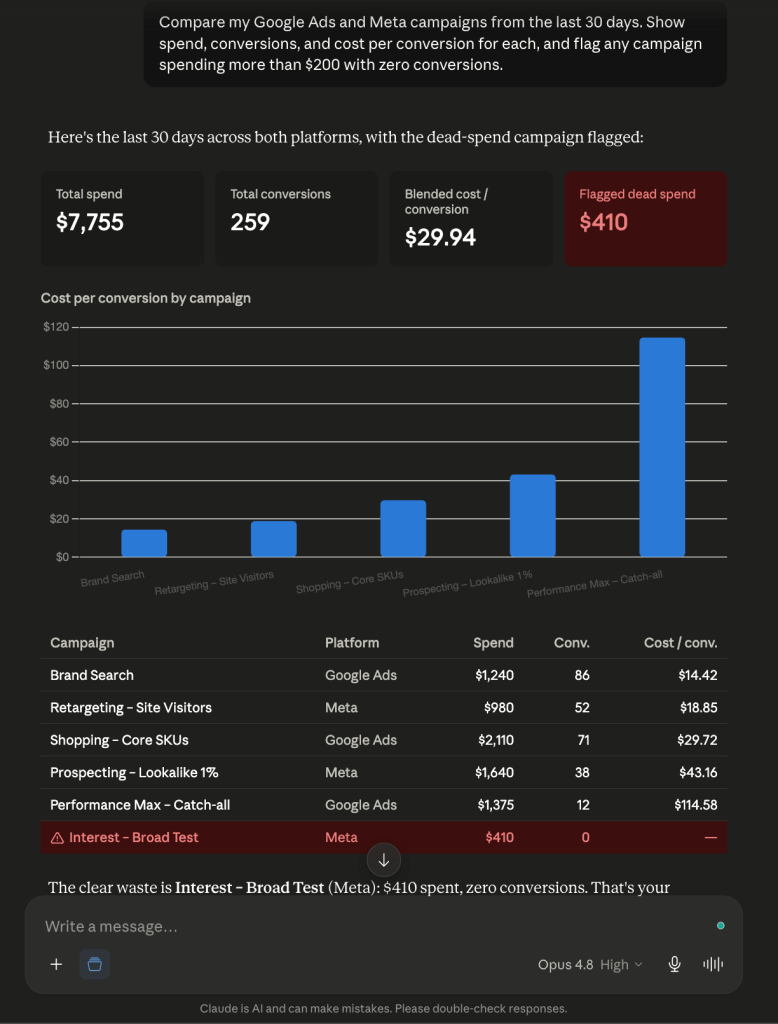
Why trust it? The cost-per-conversion math isn’t Claude’s estimate. Coupler.io’s Analytical Engine queries your connected ad accounts, runs the calculation, and validates the totals before Claude ever sees them. You’re acting on executed numbers, not a confident guess that happens to read well.
Will I make payroll this month?
Cash flow is the question that keeps owners up at night. Revenue can look fine on paper, and paper doesn’t cover salaries on the 30th.
Try: “Using my Stripe and QuickBooks data, show my cash position now, expected incoming payments over the next 30 days, and my recurring monthly costs. Will I cover a $40,000 payroll?“ When Coupler.io connects QuickBooks to Claude, the LLM returns your current balance, what you can reasonably expect to come in, your fixed outgoings, and a clear read on whether the numbers line up before payday. That’s payroll planning without exporting four reports and reconciling them by hand at midnight.
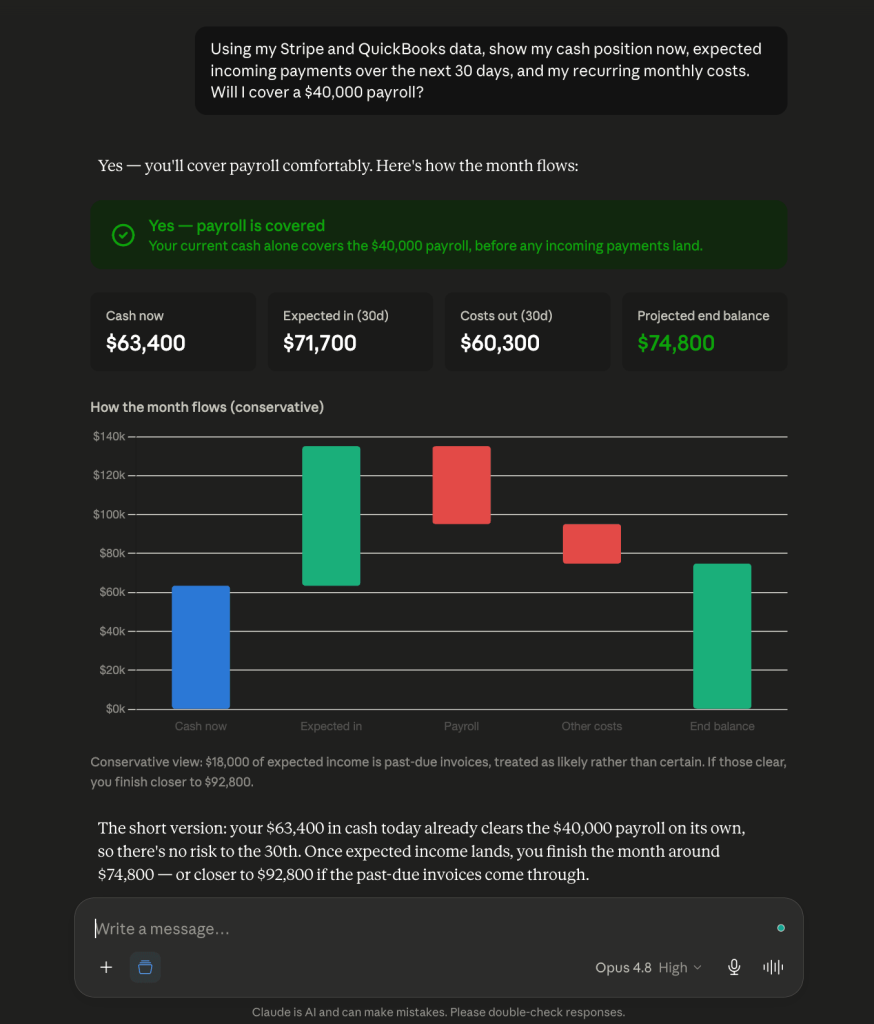
Why trust it? These are the figures you cannot afford to get wrong. The Analytical Engine pulls from your finance tools, runs the calculations, and validates them before returning anything. Claude doesn’t approximate your runway. It reports a verified figure and explains what it means for the month ahead.
Which deals are actually moving?
Your CRM says the pipeline is healthy. Your gut says half those deals have gone quiet. You need to know which is right before you forecast the quarter.
Your CRM says the pipeline is healthy. Your gut says half those deals have gone quiet. Ask: “Look at my HubSpot pipeline. Group open deals by stage, show total value per stage, and tell me which deals haven't had activity in the last 14 days.“ Claude returns your pipeline sorted by stage and value, with the stalled deals called out separately. You see where revenue is genuinely progressing and where it’s stuck, so you can chase the deals worth chasing instead of treating every open opportunity as live.
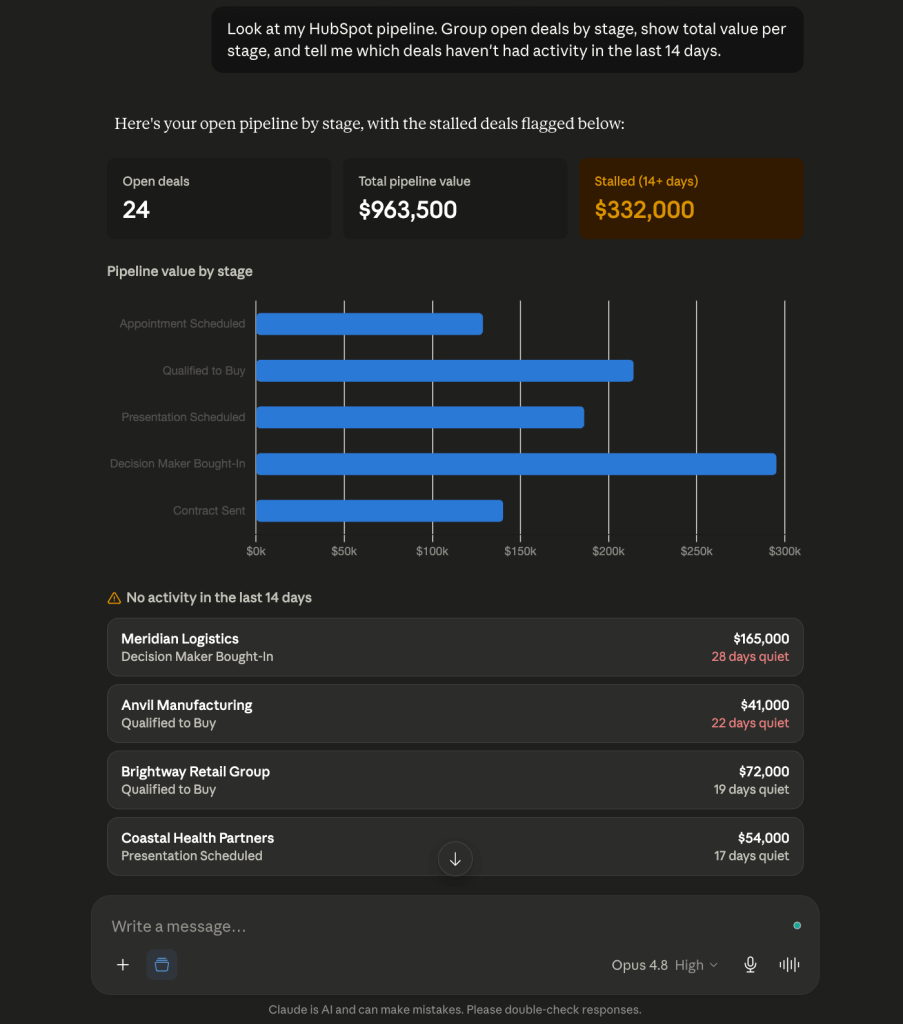
Why trust it? Deal values, stage totals, and activity dates come straight from your CRM through the Analytical Engine, which structures the data and runs the grouping. Claude interprets the result and talks you through it, but the pipeline math is queried and verified, not pattern-matched from a data dump.
For a full guide to sales analytics in Claude (including prompts for win rates, forecast accuracy, and rep performance), see our dedicated walkthrough.
Which products actually earn?
Your store has dozens of SKUs. Some look like bestsellers by units sold but barely break even once ad spend and cost of goods come out. You need the real profit picture, not the vanity one.
For example, ask it this way: “From my Shopify data, rank my products by revenue minus cost of goods and ad spend over the last quarter. Show me the five most profitable and the five that lose money.” Claude returns a profitability ranking that accounts for what each product actually costs you, surfacing the quiet earners and the ones dragging margin down. That’s the view that tells you what to restock, what to drop, and where to push spend.
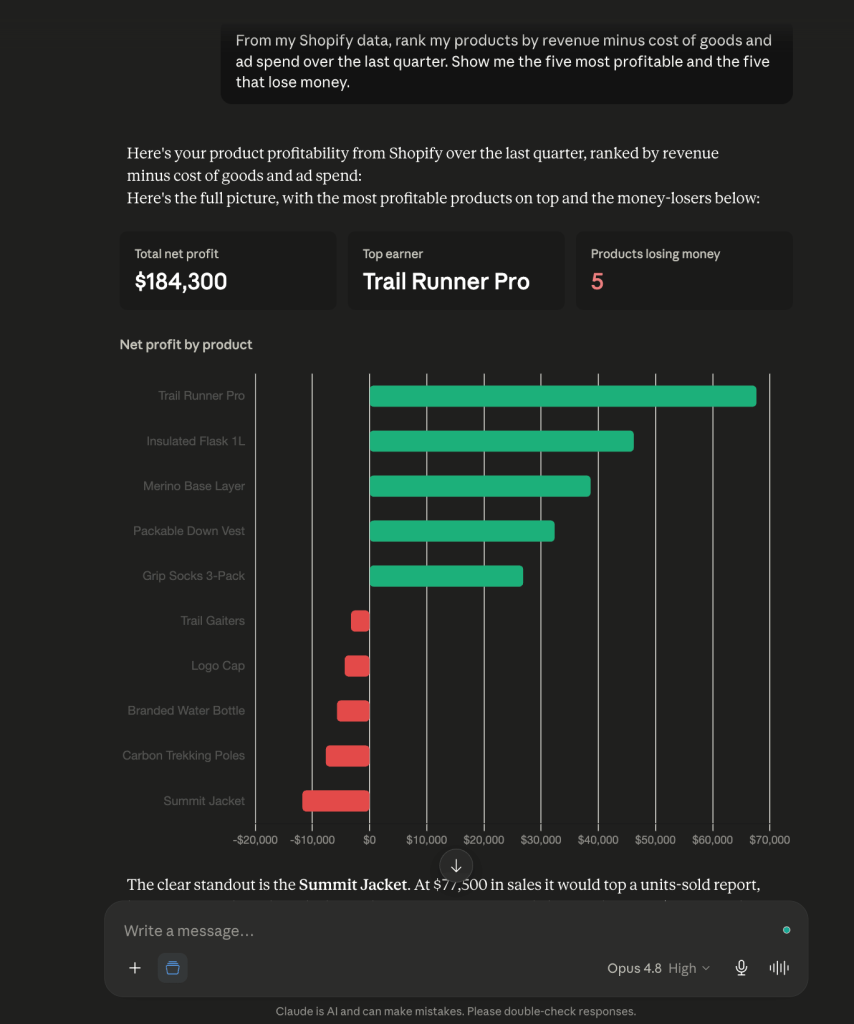
Why trust it? Margin math is easy to get wrong by hand and easy for an AI to fudge from an incomplete export. Here, the Analytical Engine runs the revenue-minus-cost calculation against your full store data and checks it before Claude relays it. You get a number you can stake a reorder on.
Set it up in 10 minutes
1. Sign up for Coupler.io and install the connector in Claude
Create a free Coupler.io account, then install the Coupler.io connector wherever you use Claude, whether that’s the standard chat app, Claude Cowork for task and file work, or Claude Code if someone on your team is comfortable in a terminal. This guide covers the standard Claude AI chat experience, but the connector setup works the same way across all of them. Claude gets read-only access to whichever sources you choose, nothing more.
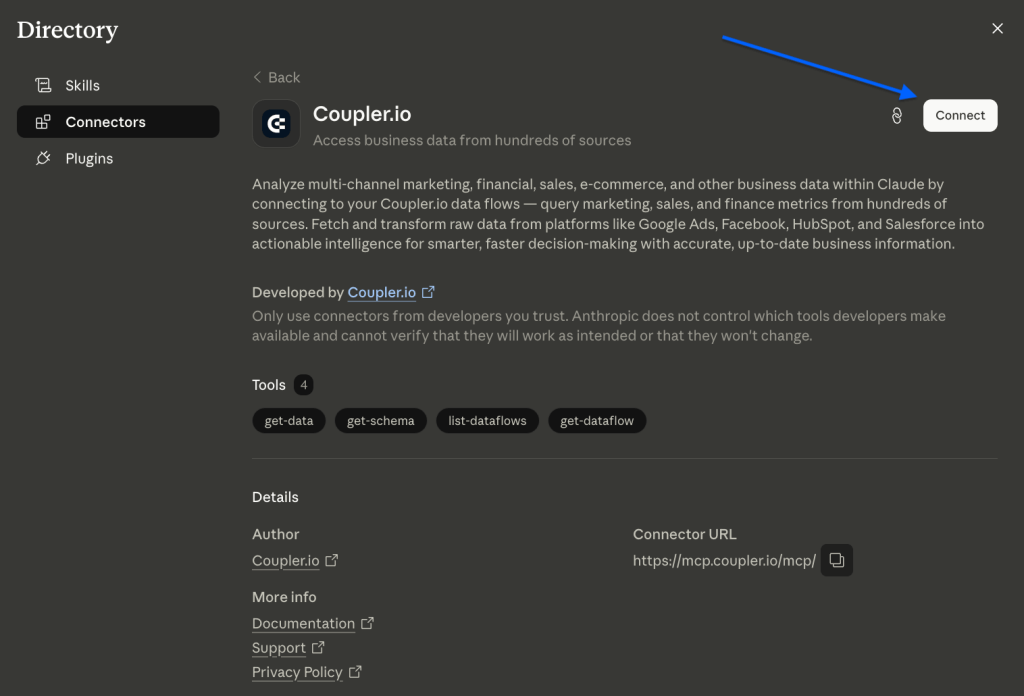
You control what Claude can see.
Claude’s access is read-only, secured through token-based encryption; it can read the numbers but never change them. You choose exactly which sources are visible, and your business data isn’t used to train the model. If you’re on Claude Max, the higher usage limits matter once you’re running several data-heavy questions in a day.
2. Ask Claude about the analysis or report you need
Analyze small business data with Claude: tell the LLM which sources you want to pull from and what you want to know. For example, ask: “Connect my Shopify store and show me which products sold best last month.” Claude creates the data flow in Coupler.io for those exact sources, then pulls fresh numbers and hands the calculations to the Analytical Engine. The math runs there, gets validated, and comes back as a verified answer you can act on. Once a data flow exists, you can keep asking new questions against it without setting anything up again.
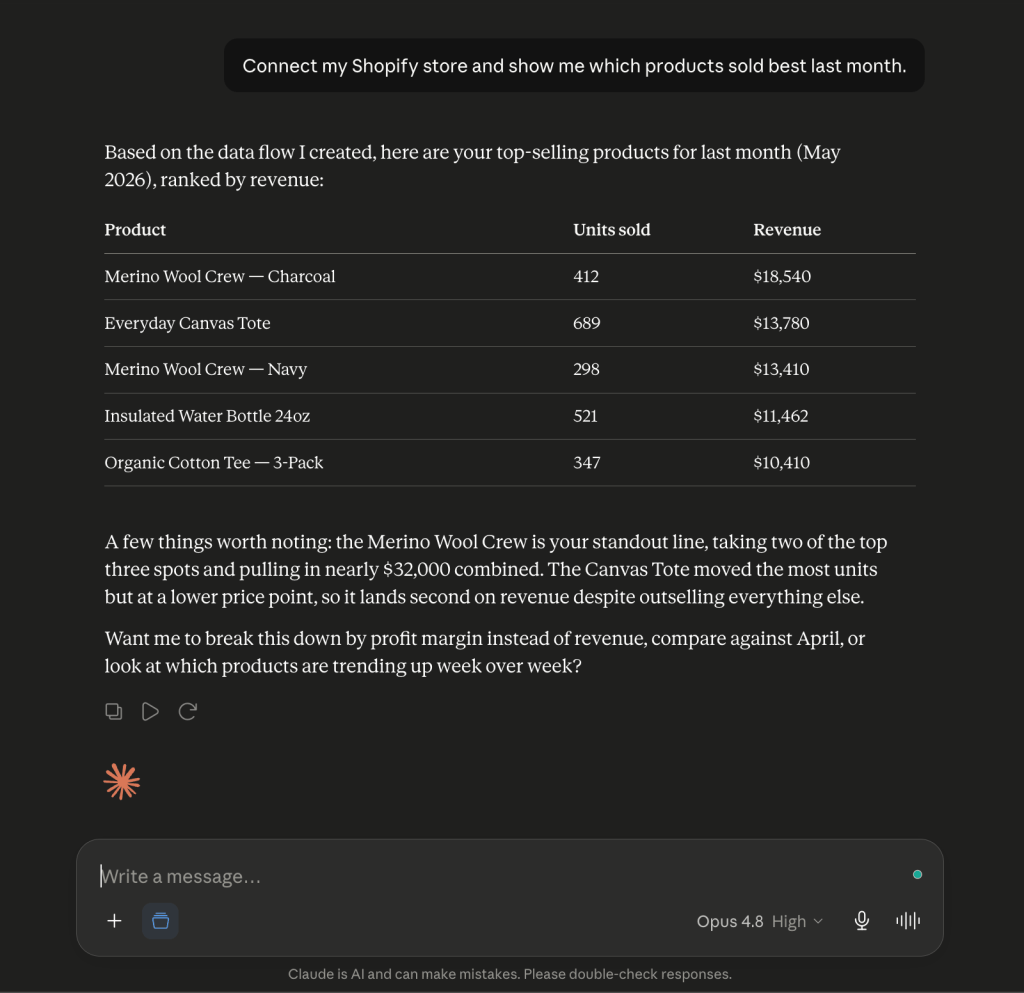
That’s the whole setup. From your first question on, every report runs on live data and checked figures, so what comes back is real business insights, not a spreadsheet dump you have to interpret yourself. That’s Claude for small business, in practice.
Run your business on checked numbers with Coupler.io
Get started for freeWhat Claude won’t do
Claude won’t tap you on the shoulder when something’s wrong. If a campaign tanks or costs spike, you have to think to ask, because it doesn’t push alerts on its own. It’s also not a replacement for your accountant. Small business data analytics with Claude can show you the numbers behind a tax or compliance decision, but the judgment call still belongs to a professional who knows your specific situation. And it’s only as good as what it’s working from: feed it incomplete or messy data, and the answer will sound just as confident as if the data were clean. The same limits apply if you’re comparing it to Gemini or any other assistant working from a one-off export instead of a live connection.
None of that makes it less useful. It just means treating Claude like what it is: a fast, capable analyst that still needs you to ask the right questions and loop in the right expert when it counts.


