
What is Coupler AI? Ask, analyze, and automate work with your business data

AI can make managing and analyzing business data faster, but the results aren’t always reliable. Without the right data, structure, and business context, even a simple request can produce the wrong output or a misleading answer.
Coupler AI, Coupler.io’s umbrella term for AI capabilities, closes this gap. With it, you can use natural-language instructions to:
- Ask questions and get answers from your connected data with AI Agent
- Set up data flows, extended connections, and prepare data for analysis and reporting through conversation
- Work with prepared data in external AI tools like Claude or ChatGPT through AI Integrations
- Run the same type of analysis consistently with Skills
Together, these capabilities remove much of the hands-on work involved in managing and analyzing business data. With AI handling more of that work, your data becomes actionable guidance for faster, better-informed business decisions.
By the end of this article, you’ll know which Coupler AI capabilities fit your workflow and how Coupler.io prepares data before AI works with it.
Three Coupler AI capabilities at a glance
Each capability has its own strengths depending on what you want to accomplish. Here’s what each one does, how it works, and where it can be most useful.
AI Agent: set up, manage, and analyze data through conversation
AI Agent is the conversational experience built directly into Coupler.io. It’s the easiest place to start working with your data using AI.
You can ask questions about your data, set up new data flows, or extend existing ones by describing what you need in plain language.

Access AI Agent from any data flow by clicking AI Agent in the top-right corner, next to Flow Settings. You can also open it straight from the homepage by clicking AI Agent under Analyze with AI in the menu on the left.
1: Ask questions about your data
Open an active data flow and ask a question in plain language. For example:
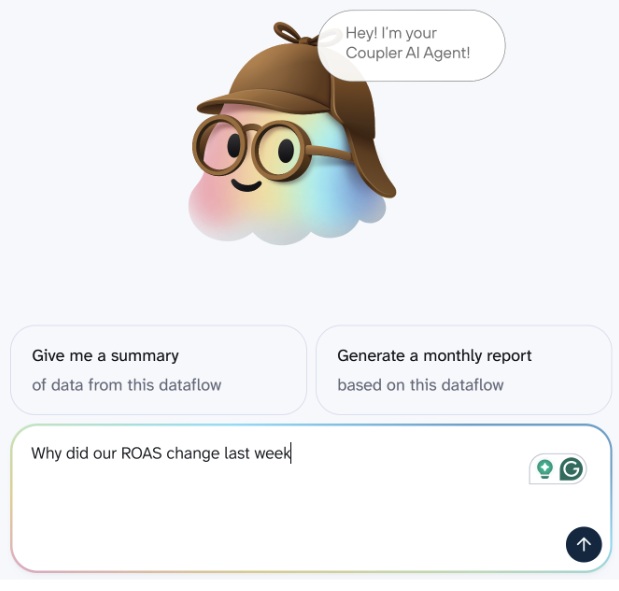
From there, you can continue the conversation based on the answer. You could narrow the time period, compare ROAS across channels, or ask what contributed most to the change.
💡 What happens behind the scenes: AI Agent interprets your question and translates it into a structured query. Coupler.io’s Analytical Engine runs the query against your dataset and performs the calculations. AI Agent then turns the result into a clear answer and lets you continue exploring it through follow-up questions.
I’ll explain this process in more detail later on.
2: Build and adjust data flows through conversation
If your request requires data that isn’t available yet, AI Agent can help you create a new data flow or extend an existing one.
Or, if existing data flows need changes, AI Agent adjusts the setup. You don’t have to go back through the flow settings every time you need another source, different fields, or a change to what the flow pulls.
Suppose you already have a flow that pulls Meta Ads and Google Ads data for a weekly marketing report. If you start running campaigns on LinkedIn, you can ask AI Agent to add LinkedIn Ads data to the setup.
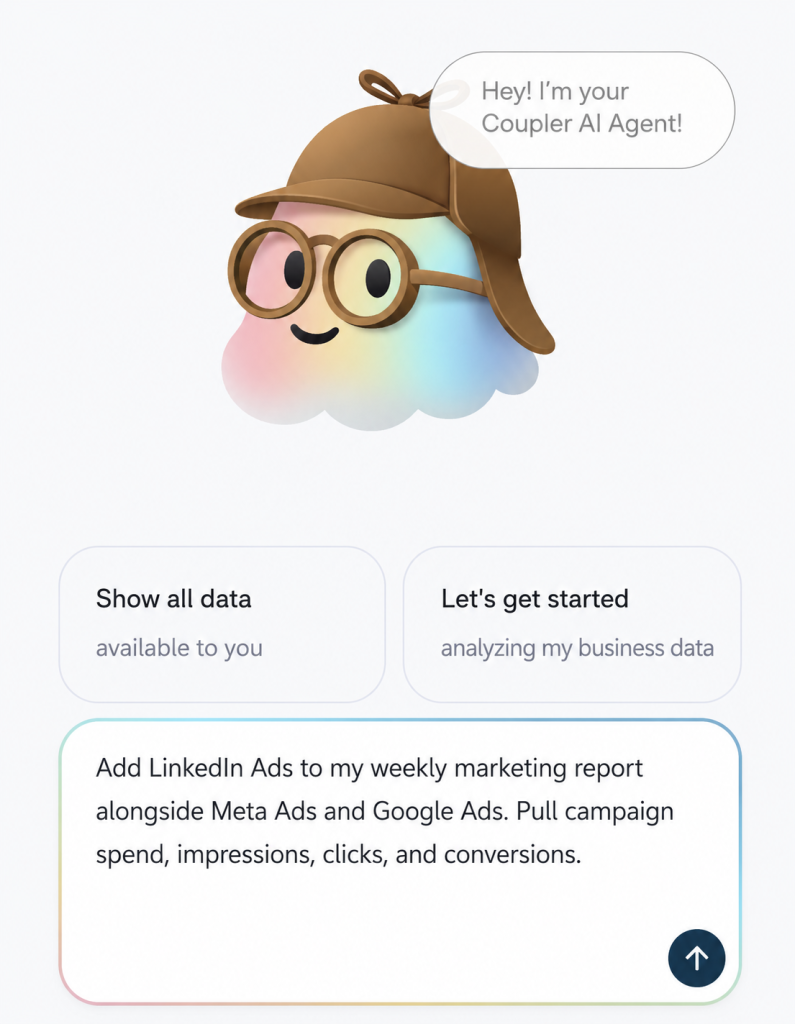
Or, if your report no longer needs certain fields, you can ask it to change what the flow pulls.
This makes AI Agent useful beyond the initial setup. As reporting requirements change, you can keep adapting your data flows by describing what you need.
💡 For new accounts, the /get-started skill works the same way: describe the sources you want to connect and what you want to do with the data, and AI Agent walks you through creating your first flow. |
3: Prepare data for reports and destinations
The end result doesn’t have to be an analysis in AI chat. You might simply need your data prepared and sent somewhere in a useful format.
For example, if you need a report in Google Sheets, AI Agent can help set up the data flow and prepare the output without you having to build the report manually with formulas or pivot tables:
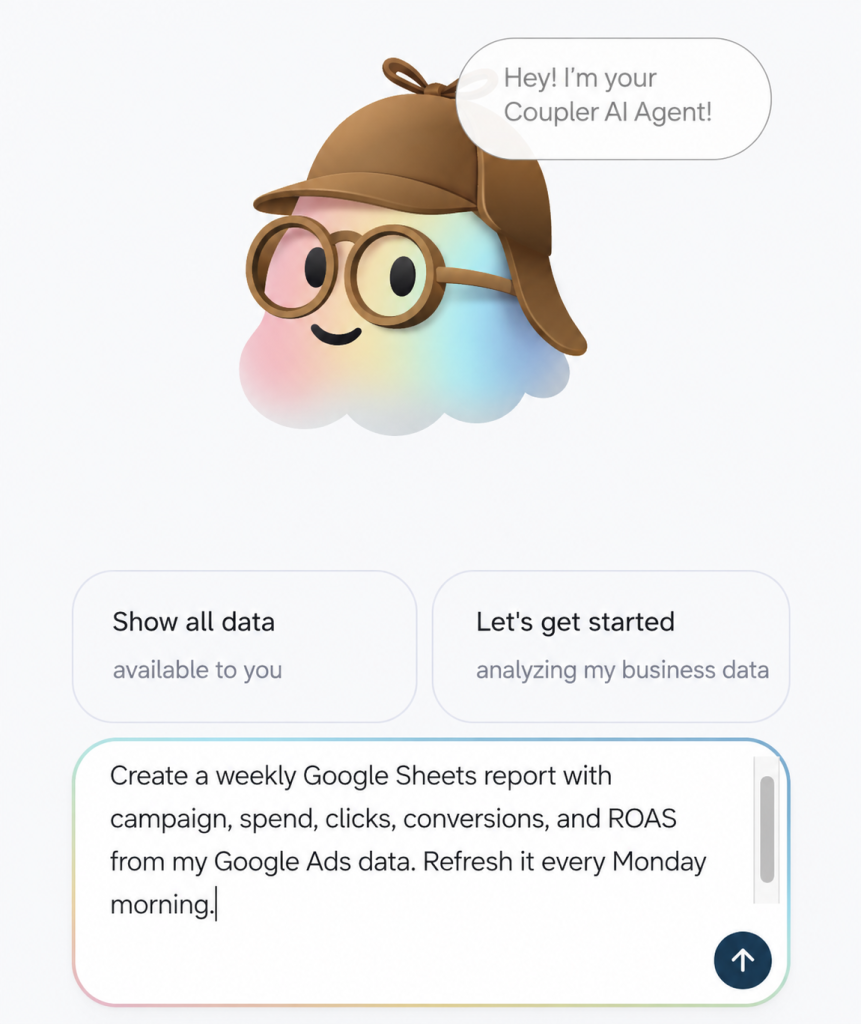
👉 In short, AI Agent isn’t only a place to ask questions about data that’s already there. It can also help you get the right data connected, adapt your flows as your needs change, and prepare the output you need without leaving Coupler.io.

Control every step from data preparation to analysis
Try Coupler AIAI Integrations: use prepared data in your AI tool
AI Integrations connect Coupler.io to supported external AI tools, such as Claude or ChatGPT, so you can work with data prepared in Coupler.io directly from those tools.
Check out available integrations:
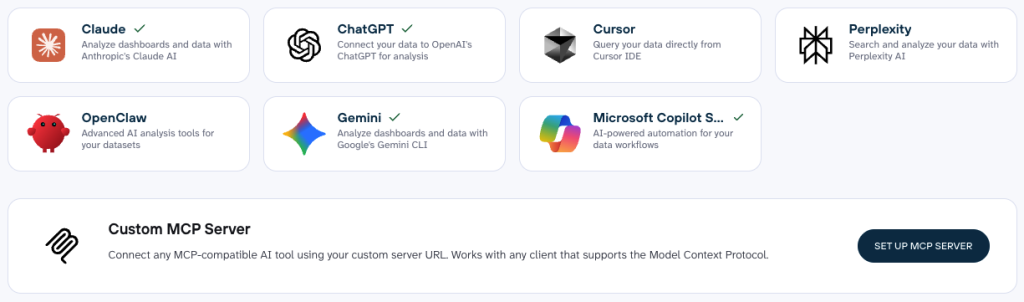
Your data preparation, business definitions, and refresh schedule stay in Coupler.io, while you choose where you want to ask questions and analyze the results.
The connection works through MCP (Model Context Protocol). In simple terms, MCP lets your AI tool access the data you have prepared in Coupler.io without requiring you to export and upload files manually.
The workflow looks like this:
- Connect your data sources to Coupler.io. Pull data from Google Ads, HubSpot, Shopify, QuickBooks, GA4, or any of the 400+ supported sources.
- Prepare the data for analysis. Clean and transform it, combine multiple sources if needed, and add business definitions and context.
- Connect your preferred AI tool. Choose a supported AI destination and establish the connection.
- Ask questions in that tool. Your AI assistant can work with the prepared dataset without you having to export a new spreadsheet every time the underlying data changes.
- Ask questions in any language. Use the language you’re most comfortable with and get structured answers based on your connected data.
Suppose you’re an agency that wants to analyze client performance. Instead of exporting the latest data to a spreadsheet and uploading it to your AI tool, ask the question directly there (in ChatGPT, Claude, or other tool):
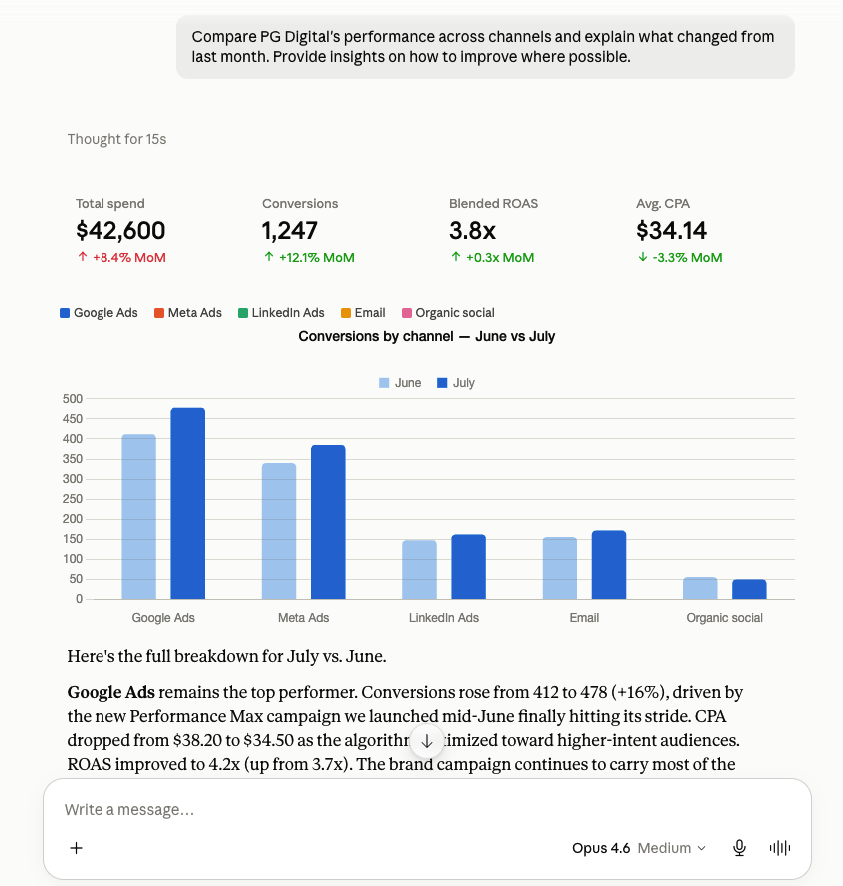
Continue the analysis in the AI tool you already use while Coupler.io remains responsible for preparing and keeping the underlying dataset up to date.
For AI tools without a named integration, Coupler.io also offers a Custom MCP. It provides an endpoint that MCP-compatible clients can use to access data prepared in Coupler.io. Learn how to use Coupler MCP server to set up the connection.
Skills: make recurring analysis repeatable
Skills, or AI Agent skills, are pre-built analytical workflows that let you run the same type of analysis using a consistent method. It means no starting with a blank prompt and no rebuilding the instructions every time.
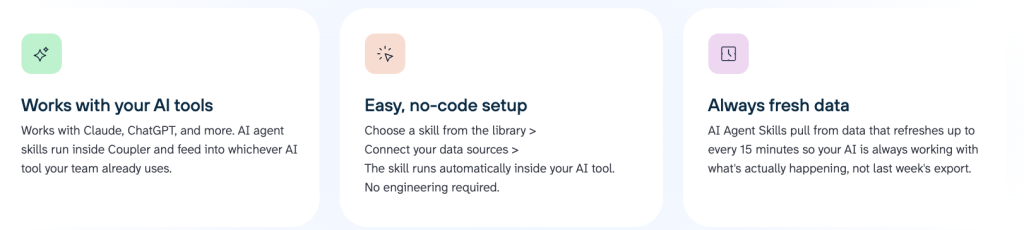
How Skills work:
- Connect your data. Set up the data sources you want to analyze in Coupler.io.
- Choose a Skill. Pick one from the Skills library and add it to your workflow in Claude, ChatGPT, or another supported AI tool. You can find the Skills library on the homepage, in the menu on the left side:
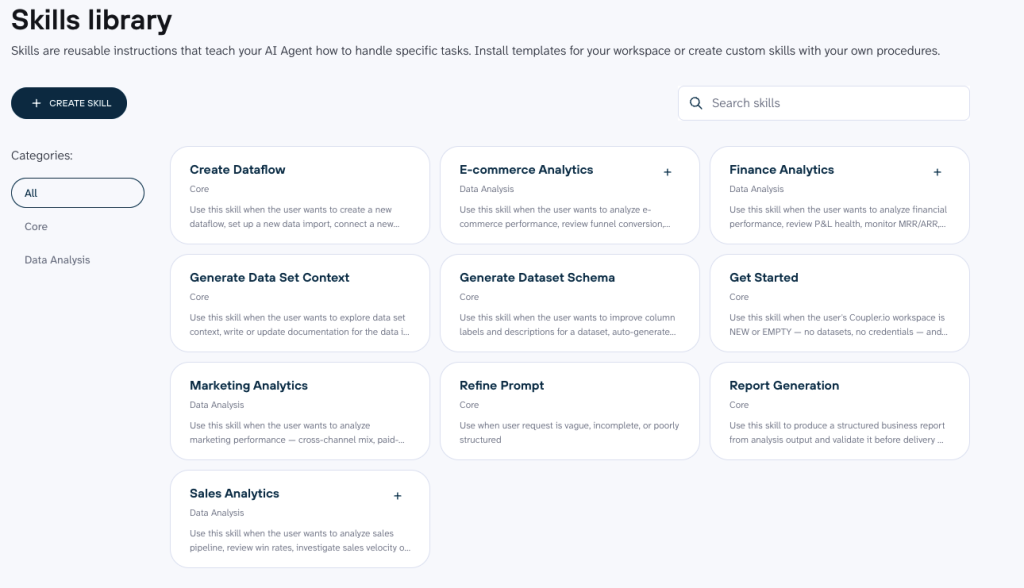
💡 Skills can kick in automatically or you can call them yourself. For example, if you ask about cross-channel ROAS trends, the AI may recognize that the “Marketing analytics” skill is the right fit and use it without any extra input from you. You can also select a specific Skill when you want the analysis to follow a particular method. Automatic invocation saves you a step, while manual invocation gives you more control over how the task is handled.
- Ask your question. The Skill uses its predefined instructions to run the analysis against your Coupler.io data and return the results in your AI chat.
For example, say your team runs the same marketing performance review every Monday. You want to check spend, revenue, ROAS, major changes, and anything that needs attention.
Instead of recreating those instructions each week, you can use a marketing analytics Skill to apply the same approach to the latest data.
Depending on the task, Skills can help you:
- Analyze marketing performance across channels
- Review ecommerce metrics such as conversion, average order value, and repeat purchases
- Analyze financial metrics such as P&L, margins, MRR/ARR, and cash runway
- Review sales pipeline performance, including win rates, deal velocity, and stage conversion
- Turn analysis into a structured report with validated figures and claims
What you get is consistency and speed.
Small changes to a prompt can change what the AI focuses on or how it approaches the analysis. With a Skill, the instructions are already there, so your team doesn’t need to recreate the same reporting logic every Monday morning.
Coupler.io also lets you create your own Skills and share them with your team when the ready-made options don’t cover your workflow:

Give your business data the AI setup it needs
Try Coupler.io for freeHow Coupler.io prepares data before AI works with it
Before AI can analyze your business data, Coupler.io lets you control both how that data is structured and what it means.
Two features handle this:
- Data transformation, which shapes the dataset the AI works with.
- Context, which gives the AI the business definitions it needs to interpret that dataset correctly. This is what the AI sees: table and column definitions, data types, allowed values, units, and more.
This preparation applies whether you’re asking a one-off question or using the same data and definitions for a repeatable analysis.
Transformation: shaping the dataset
Raw data rarely arrives in the exact structure you need for analysis. It may contain dozens of irrelevant fields, unclear column names, or rows that need to be grouped before they’re useful.
Transformation lets you shape that dataset in Coupler.io’s Data Sets section first.

You can:
- Select, hide, and reorder columns
- Rename fields and add descriptions
- Filter out data you don’t need
- Add formulas and calculated columns
- Join or append data from multiple sources
- Aggregate data before it reaches AI
💡 If you want more control over how your data is prepared, you can also use SQL-based transformations. This lets advanced users filter, join, aggregate, reshape, and calculate data with a custom SQL query before AI works with the dataset.
This means the model starts with a dataset that already follows your reporting structure instead of having to make sense of a raw export.
Take branded-search ROAS as an example. If your team has an agreed structure for reporting spend and revenue by campaign and channel, you can prepare the dataset accordingly. When someone later asks about branded-search ROAS, the AI works from that structure rather than deciding for itself which fields to use or how the data should be grouped.
| 💡 Important: Transformation applies the rules you define. It doesn’t automatically identify duplicate events, fix incorrect source data, correct attribution, or decide which metric is right for your business. |
Context: defining what the data means
Transformation gives AI the right structure. Context (also known as AI Context) gives it the right meaning.
A column called revenue, qualified_lead, or ROAS might look self-explanatory. But your company may calculate or use it differently from another business.
The model should not have to guess what a metric means.
With Context, you can define:
- Datasets and individual fields
- Relationships between datasets
- Metric formulas and calculation rules
- Business terminology and naming conventions
- Other information AI needs to interpret the data correctly
For example, suppose your team calculates branded-search ROAS using a specific revenue field and excludes certain campaigns. Context can document that definition. When someone asks why branded-search ROAS changed, the model has your team’s definition to work from instead of interpreting the metric on its own.
| Without Context, a model sees columns. With Context, it sees your business. |
You can add Context manually or use AI Agent to generate a starting point based on your dataset, then review and refine it with your own definitions and business knowledge.
You’ll find the option in the same Data Sets section where you handle Transformation:

The result is a shared foundation for AI analysis. The same prepared data and definitions can support questions in AI Agent or a connected AI tool, as well as repeatable analyses with Skills.
| 👉 To sum up: You control how data is prepared, what each metric means, and which repeatable analyses AI can use. That way, every answer follows your business logic instead of relying on raw columns or a one-off prompt. |
How the Analytical Engine keeps the numbers right
When you ask AI a question about business data, there are two separate jobs involved for AI:
- Understanding what you’re asking
- Calculating the answer.
The AI interprets your question and turns it into a query. Coupler.io Analytical Engine runs that query against your connected dataset and calculates the result. The AI then explains what the result means.
The number comes from a query run against your Coupler.io dataset after its latest refresh. The model receives that computed result and explains it. It doesn’t produce the number from probability alone.
Consider this question:
“What was our branded-search ROAS last month after applying our agreed UTM mapping and duplicate-event rules?”
The UTM mapping and duplicate-event rules aren’t something Coupler.io decides for you. Your team defines those rules when preparing the data. Coupler.io then applies that prepared structure when the query runs.
Here’s what happens from question to answer.
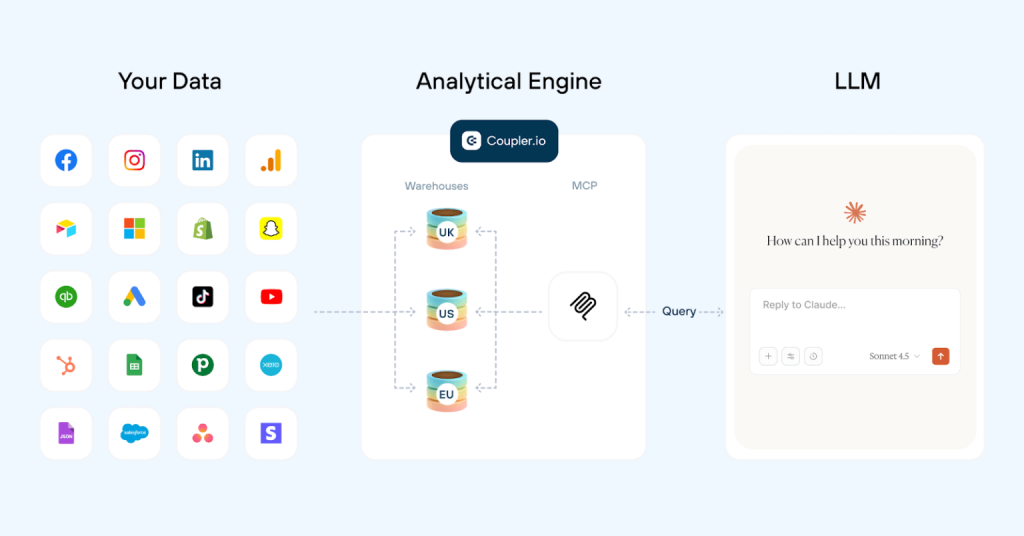
Step 1: The AI reads the schema and Context
First, the model needs to understand what data is available and what it means.
It receives information about the dataset, such as:
- Available columns and their data types
- Sample values
- Dataset and field descriptions
- Relationships between datasets
- Business definitions you’ve added through Context
That last part matters because column names alone don’t always tell the full story (I already covered this when talking about setting up Context).
Step 2: The AI writes the query
Once the model understands the question and the available data, it translates your request into SQL.
For the branded-search ROAS question, that means identifying the relevant spend and revenue fields, applying the appropriate time period and using the structure and rules your team has already defined.
The SQL still gets written, you are just not the one writing it.
This distinction is important. Writing SQL is a language and translation task: turning your plain-language question into instructions the query engine can execute.
It isn’t the calculation itself.
Step 3: Coupler.io runs the query and calculates the result
The query then goes to Coupler.io’s Analytical Engine.
The engine executes it against the connected dataset after its latest refresh. It applies the prepared data structure and the rules your team has configured, then performs the calculations needed to answer the question.
So, in our example, the ROAS figure is calculated from the actual data using the agreed UTM mapping and duplicate-event rules already reflected in how the dataset was prepared.
| 💡 Keep in mind: Coupler.io applies the rules you configure. It doesn’t automatically identify duplicate events, correct attribution, fix bad source data, or decide what your business should measure. |
Step 4: The AI explains the result
Finally, the computed result goes back to the AI.
Now the model can do what language models are particularly useful for:
- Explain the result in plain language
- Highlight notable patterns
- Answer follow-up questions
- Turn the findings into a summary for someone else.
The model explains the number. It does not calculate it. This reduces the risk of AI hallucinations in data analytics because the calculation happens outside the language model, using your actual data.
💡 In practice: B2B performance marketer Gabe Solberg uses this setup to analyze campaigns managing $1M+ in monthly spend. He connected his performance data to Claude through Coupler.io and cut PPC analysis and reporting time by 60%, with daily campaign reviews taking under 10 minutes.
I’m not getting AI’s best guess. Coupler.io does the actual math. Claude just helps me ask the right questions and understand the results conversationally.

The full process looks like this:
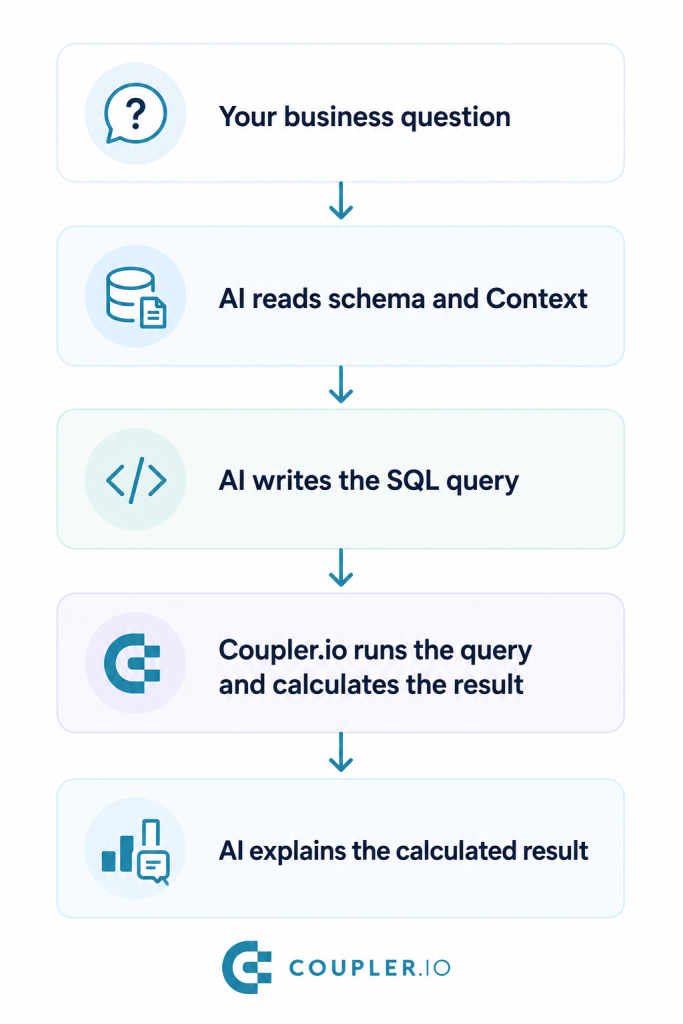
This division of work is what makes query-based analysis different from simply giving an LLM some data and asking it to come up with an answer. AI handles the language and interpretation; Coupler.io handles the query execution and calculations against your connected data.
Why Coupler.io is more reliable than uploading a spreadsheet to AI
Uploading a spreadsheet to ChatGPT or Claude might work well for a quick, one-off analysis. The problem comes when you need to repeat that analysis or rely on the same definitions week after week.
With a file upload, the AI works with a snapshot of your data. You may also need to explain what your metrics mean, how calculations should work, and which business rules to follow. When the data changes, you export and upload a new file and start again.
Coupler.io turns this into a connected workflow instead:
| Upload a CSV/Spreadsheet to an AI tool | Ask through Coupler AI |
|---|---|
| Works from a static snapshot | Works from the connected dataset after its latest refresh |
| The model may need to calculate or infer the result, leading to hallucinations | Coupler.io executes the query and calculation |
| Definitions may need to be repeated in your prompts | Context defines business terms and metrics once |
| The process can vary from prompt to prompt | Skills support consistent, repeatable analysis |
| New data means exporting and uploading another file | Data stays connected to your Coupler.io workflow |
The difference isn’t simply where you ask the question. It’s what happens before and after you ask it.
With the help of Coupler AI, you set the business logic behind every answer: how the data is prepared, what metrics mean and how recurring analyses run. Then, you ask questions in Coupler.io’s AI Agent or the AI tool you prefer. Finally, Coupler AI calculates the result from your connected data before the model explains it.
Connect your data to Coupler.io and get more reliable answers.
Get started for free




