You ask your AI tool which channel drove the most revenue last month. It answers in seconds. A day later someone asks the same question in a meeting, and the number is different. Nothing in the data appears to have changed.
Some variability in AI answers is normal. But when the number itself changes, nobody knows which figure to trust and the decision gets paused. There are a few reasons this happens, and it’s got little to do with “You’re bad at prompting.”
Most of them are things you can fix in your data setup. Here’s why inconsistent AI answers are so common, and what changes when definitions, calculations, and refresh schedules live with the dataset in Coupler.io instead of in a chat.
Why AI gives different answers to the same question
A large language model writes by predicting one word at a time from patterns in its training data. For each word, the artificial intelligence picks from a spread of plausible options (a probability distribution) rather than always taking the most likely one. That randomness is small, but it means you rarely get the same wording twice.
Two other things change without you doing anything:
- Providers (OpenAI, Anthropic, Google) often update AI models without renaming them, so the tool you used in March isn’t the same one you’re using now.
- Conversation history affects the answer. A question asked in a fresh chat gets a different response than the same question in a long thread.
Ask why signups dipped last week and you might get either of these:
“Signups fell from 1,240 to 1,180 last week, a 4.8% decline.“
“Last week's signups came in at 1,180, down 4.8% from 1,240.“
Small wording differences are harmless. But when the analysis varies, that’s a different problem.
“Signups fell 4.8% last week, from 1,240 to 1,180. The decline is concentrated in paid traffic.“
“Signups fell 12%, from 1,340 to 1,180. Organic is where the drop happened.“
Neither run was told what counts as a signup, so each one settled it alone. That’s analytical variation vs output variation.
| Output variation | Analytical variation | |
| What changes | Wording, order of points, style, length | The numbers, and the conclusion drawn from them |
| Where it comes from | The model picking words from a probability distribution | Something in the analysis changed: a definition, a filter, a method, or the data itself |
| Worth fixing | No, it’s cosmetic and expected | Yes, it can be managed |
Analytical variability is fixable, and Coupler.io handles it by applying the same definitions, business rules, and calculation methods to the same question,no matter who asks or how it’s worded. Where to start depends on what’s behind your own mismatched numbers.

Land on one answer however the question is worded
Book a demoCommon causes of inconsistent AI agent answers
If AI keeps giving different answers, the cause is usually one of four things. They tend to compound rather than show up alone.
The agent doesn’t know what you don’t tell it
Take a standard request: “Which channel performed best last month?” A few things are undefined before anyone can answer it.
- Best by what: revenue, ROAS, lead volume, or qualified leads?
- Which conversions count, and which get excluded?
- Does “last month” mean the calendar month or the last 30 days?
- Do the campaigns you paused halfway through belong in the comparison?
You know the answers but the model doesn’t. It picks a reasonable reading and produces a confident answer. Next week, in a new chat, it picks a different reasonable reading and produces a different confident answer.
Say it’s the 9th and you’re running your monthly channel report. “Last month” reads two ways: the last full calendar month, or the last 30 days, which pulls in the first nine days of this month. You ran a promo in that week. Email comes back at 190 conversions one way and 310 the other. Next month, someone asks again and the reading gets picked again.
Both answers are correct, and neither is what you meant. This is what Coupler.io’s AI Agent Skills are for. The Marketing Analytics Skill carries the steps and metrics for paid media reporting, so the report runs the same way each month, whoever asks.
Your business context doesn’t reliably follow the question
You may have explained all of this already, in a chat from three weeks ago. But AI tools keep conversation history inside a thread, and AI context isn’t automatically carried into a new chat.
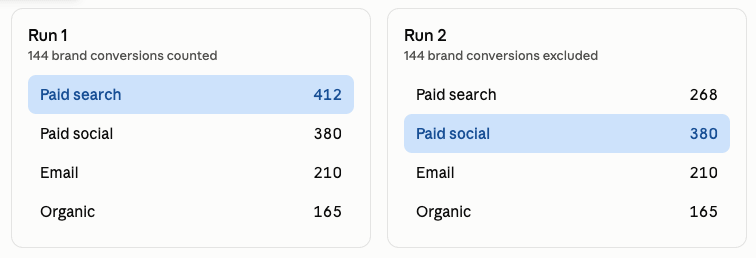
Say two of your paid search campaigns bid on brand terms, and your team leaves them out of channel comparisons. You said so three weeks ago, and the answer came back the way you expected. Ask the same question in a new chat and the exclusion is gone with the thread, so paid search wins instead.
Memory features in tools like ChatGPT, Claude, and Gemini are meant to close that gap. They work well for preferences like tone and formatting. Analytics is harder, because you can’t see right away what got saved or whether it’s still accurate.
Coupler.io keeps this out of memory. AI context is written once into an editor attached to the dataset and passed to the model with every relevant query, and you can open it any time to see exactly what the AI has been told.
The AI is doing the math
LLMs are capable of arithmetic, and newer AI models are much better at it than earlier ones. They can also use calculators or run code, but things can still go wrong. The model can fumble the arithmetic, particularly across long tables or many rows, and it won’t flag when that happens. Or it can calculate correctly using a method you didn’t intend.
Take this graphic. It shows the two standard ways to work out ROAS over a quarter, which give different results when spend varies from day to day.
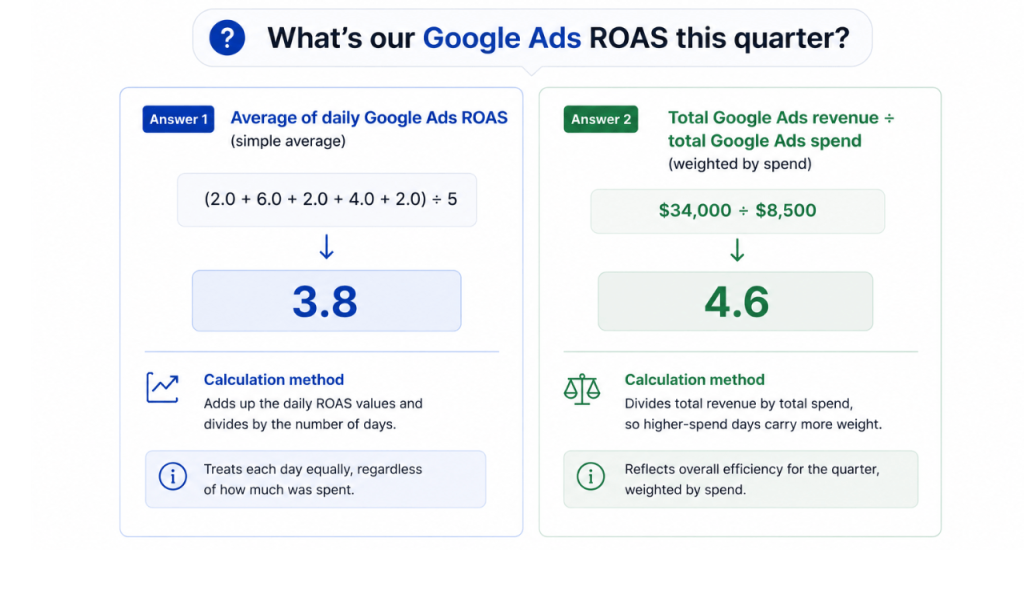
I asked an AI to produce it for this article, and both numbers in it are wrong: (2.0 + 6.0 + 2.0 + 4.0 + 2.0) ÷ 5 is 3.2, not 3.8. And $34,000 ÷ $8,500 is 4.0, not 4.6. The methods are described correctly, the arithmetic isn’t, and nothing in the output flags it.
Unless the calculation is defined somewhere, you don’t know which of the two methods produced the figure in front of you. Coupler.io’s Analytical Engine runs the calculations against your data first, so the AI reports a result instead of working one out.
Your setup only works in your account
Most people build a workaround. A custom GPT with instructions. A Claude Project holding a document that explains the metrics. A few teams go further and look at fine-tuning a model on their own scattered data.
Those work in that tool, for the person who built them. And teams don’t standardize on one AI tool, so a product manager who works in Copilot all day shouldn’t have to switch to Claude because that’s where someone wrote down what counts as a qualified lead.
Projects, custom instructions, and saved prompts all attach the explanation to a tool or an account. The ambiguity they’re compensating for lives in the data, where it’s identical for everyone.
Coupler.io stores those definitions with the dataset. One data flow feeds every tool a team uses, and the same context and Skills apply to any query against that data. The product manager can stay in the tool they use all day, a content manager can ask the same question in Coupler.io’s AI Agent, and both see the same definition of a qualified lead.
Keep AI analytics consistent across your team's tools
Book a demo with Coupler.ioHow to fix inconsistent AI answers with Coupler.io
Every cause above has the same shape. AI analytics gives different answers because the model is making a decision you should have made, and making it fresh each time.
Coupler.io is a data integration and AI analytics platform that connects 400+ business apps to LLMs like Claude or ChatGPT, along with BI tools, spreadsheets, and data warehouses. It also has a built-in AI Agent, so you can ask questions about your data inside Coupler.io.
Let Coupler AI do the data work for you
Tell Coupler AI what you need to know, from which source, and how often. It connects your account, sets up the data flow, keeps it refreshed, and lets you analyze the results inside Coupler.io or another AI tool.
Try for free
Here are some of the ways Coupler.io makes answers more reliable.
Store business context with your data
Business context is what your team knows about the numbers that the dataset doesn’t record.
In Coupler.io, it’s attached to the dataset. What you write there is passed to the model with every query against that data. Coupler.io AI can draft the context from the dataset and a sample of rows; you can then review and edit it.
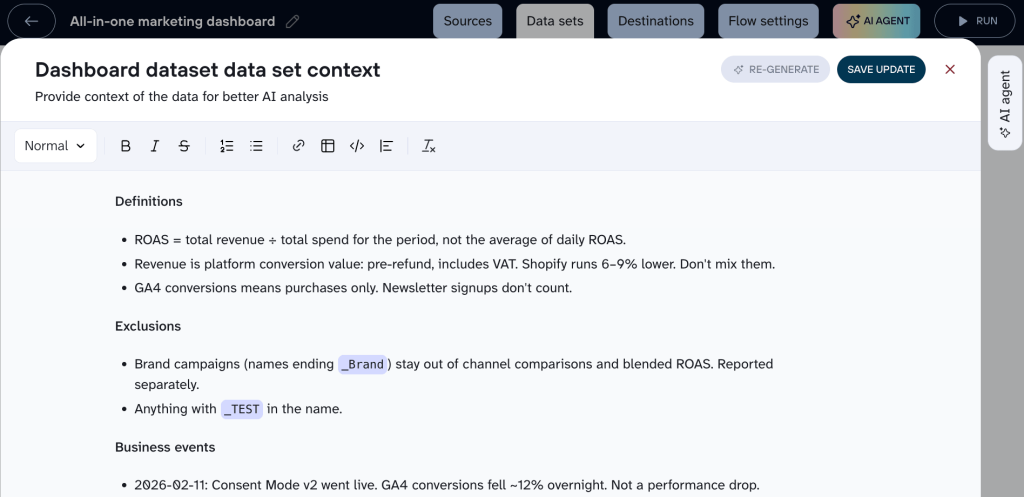
What to write down:
- Definitions your team disagrees about (which conversions count as a qualified lead)
- What stays out of a comparison (brand campaigns in channel reporting)
- Events behind a change (November conversions fell because the campaign was paused for new creatives)
- Fields that don’t mean what they look like ((not set) in a source field means the value wasn’t captured)
Take the channel comparison from earlier. With the brand exclusion written down, paid search comes back at 268 in both runs, and paid social wins in both.
You don’t have to go back to the editor every time. If an answer is wrong because something was missing, tell the AI to write the missing definition into the dataset context, and it applies from the next session on.
Reuse pre-built skills for recurring analyses
A weekly report involves more than the question itself. You need to know which metrics to use, what period to compare, which steps to follow, and how the answer should be presented. If none of that is in the workflow, AI works it out from the request each time.
AI Skills give those recurring instructions a fixed place to live. A Skill defines the steps, metrics, and output format once, so the answer doesn’t depend on who asks the question or exactly how they phrase it.
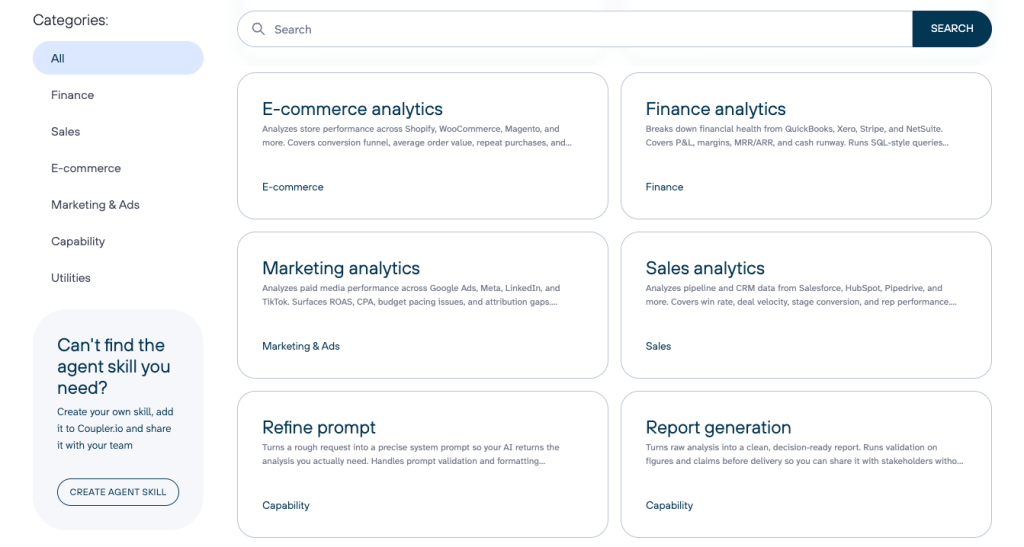
Coupler.io offers a shared library of pre-built AI Agent Skills for marketing, ecommerce, sales, and finance, as well as utility Skills for tasks such as documenting a dataset’s structure or turning a completed analysis into a report. AI can select the relevant Skill automatically, or you can specify one when you need a particular method to be followed.
Run calculations against your data
Context tells the model what your numbers mean, but it doesn’t change who works them out.
Coupler.io’s Analytical Engine handles that part. The calculation runs against your data before the model sees anything.
- You ask a question in plain language.
- The AI writes the SQL for it.
- Coupler.io runs the query over the whole dataset and checks the result.
- The AI gets the finished numbers and writes the answer from them.
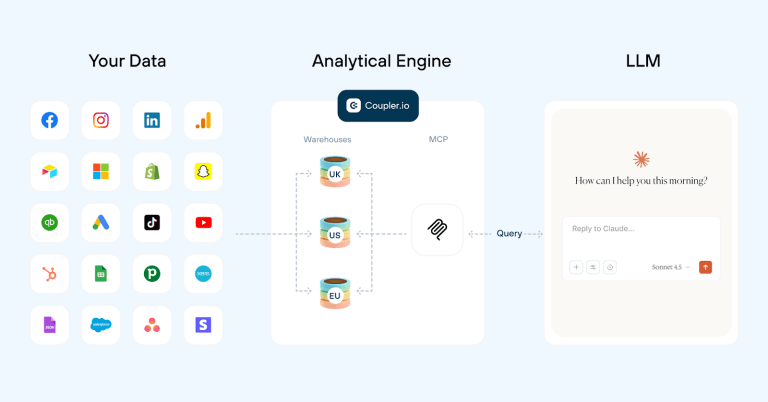
Say you ask for cost per lead by campaign last month. The number comes back with the query that produced it, so a disputed figure has something behind it. You don’t need to read SQL. Ask the AI to explain the query and it tells you what it added up, what it divided by, and which rows it left out.
But some calculations take more than one step. Blended cost per lead across Google Ads, Meta, and LinkedIn means adding up spend and leads from sources with different structures. Worked out from scratch each session, a step can be missed or the lead count misinterpreted. Saved as a SQL transformation in Coupler.io, the same calculation runs on every refresh, and Coupler AI can write it from a plain-language description.
Refresh your data on a schedule
Some of the “the number changed” cases have nothing to do with the AI. It can be that your data shifted, like a refund was issued or a source re-synced overnight.
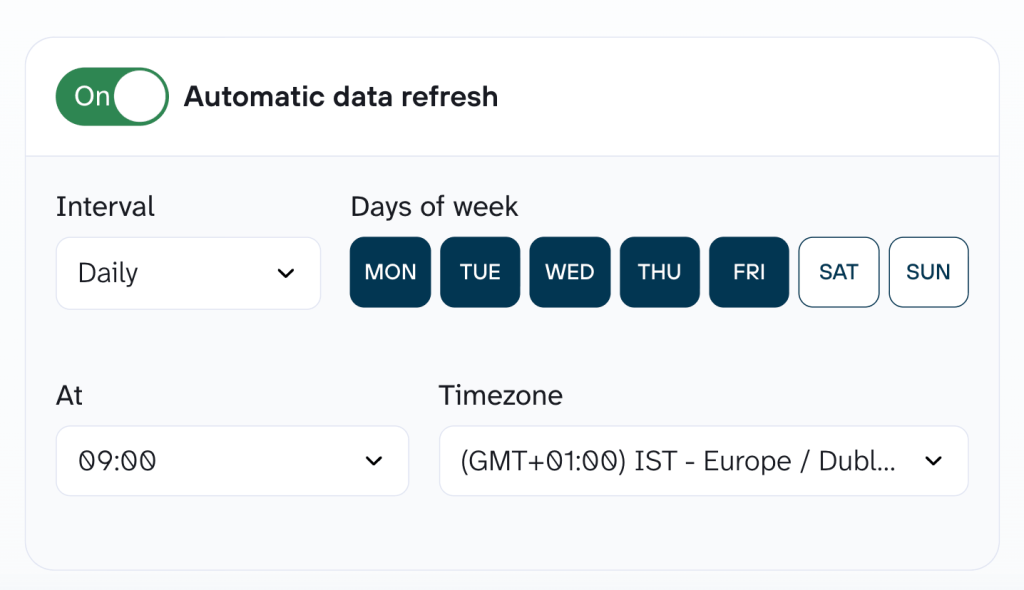
Coupler.io refreshes data on a schedule you set, so everyone queries the same up-to-date dataset instead of whichever export they happen to have. You can see the last refresh time in Coupler.io. If the data hasn’t been refreshed between two runs, the difference came from the analysis rather than the numbers underneath it.
If you’re getting different answers this week, start with the metric your team argues about most and write its definition into the dataset it comes from. Then check whether anyone is still asking the model to calculate it. If it’s a report you run every week, pick the Skill that covers it so the method isn’t rebuilt each time.
Those steps remove most of the variation before you change anything else. In Coupler.io, all of them attach to the dataset rather than to a chat or an account.
Connect 400+ business apps to AI with Coupler.io
Start for freeWhat teams usually try first (and why it doesn’t work)
When AI agents get the wrong answer, most teams’ first instinct is to double check it rather than change anything about how it was produced.
| What you try | What it tells you | What it doesn’t |
| Asking the agent to show its work | How it says it got there | Whether a real query ran |
| Asking twice and comparing | Whether the answer is stable | Whether it’s right |
| Checking against the dashboard | That the two disagree | Which one is wrong |
| Switching to a better model | Fewer arithmetic slips, closer instruction following | Your metric definitions |
| Turning on memory | Some continuity between chats | What got stored, when it’s used, or whether it’s still true |
For a comparison of how the main models handle analysis tasks, see best LLM for data analysis.
Asking twice and getting the same number feels like confirmation, but two runs working from the same wrong assumption will agree every time. And the dashboard check works, it’s just expensive. Dashboards are built for the numbers you track every week, not for reviewing ad-hoc questions. If every answer needs one, people will either stop using the AI or stop double checking.
Prompt engineering belongs on the same list. A more careful prompt raises the odds of getting the reading you wanted, but it has to be rewritten and re-pasted every time, by every person who asks.
All of these catch something. But they run after the fact and none of them changes what the model assumes next time. They produce inconsistent AI answers without fixing what causes them.
FAQs
Does AI give the same answers to everyone?
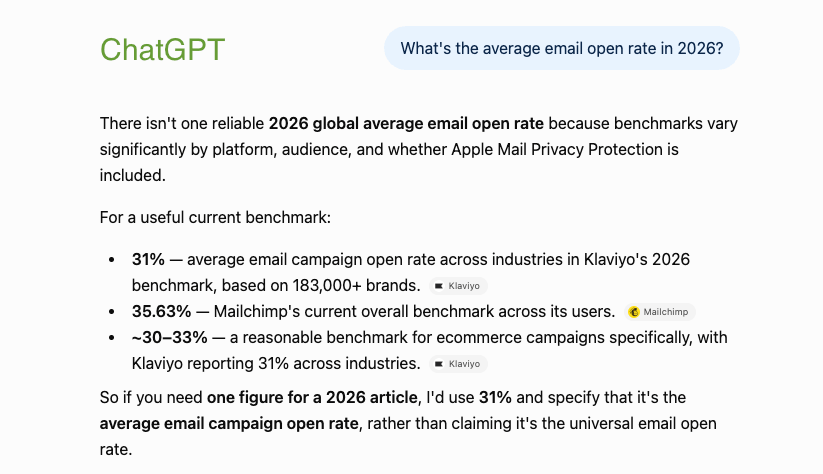
No, and it was never designed to. Why AI gives different answers to the same question comes down to the model version you’re on, your region, your conversation history, and the sampling randomness described earlier. The same AI search query in ChatGPT and Gemini gives different summaries and sources:
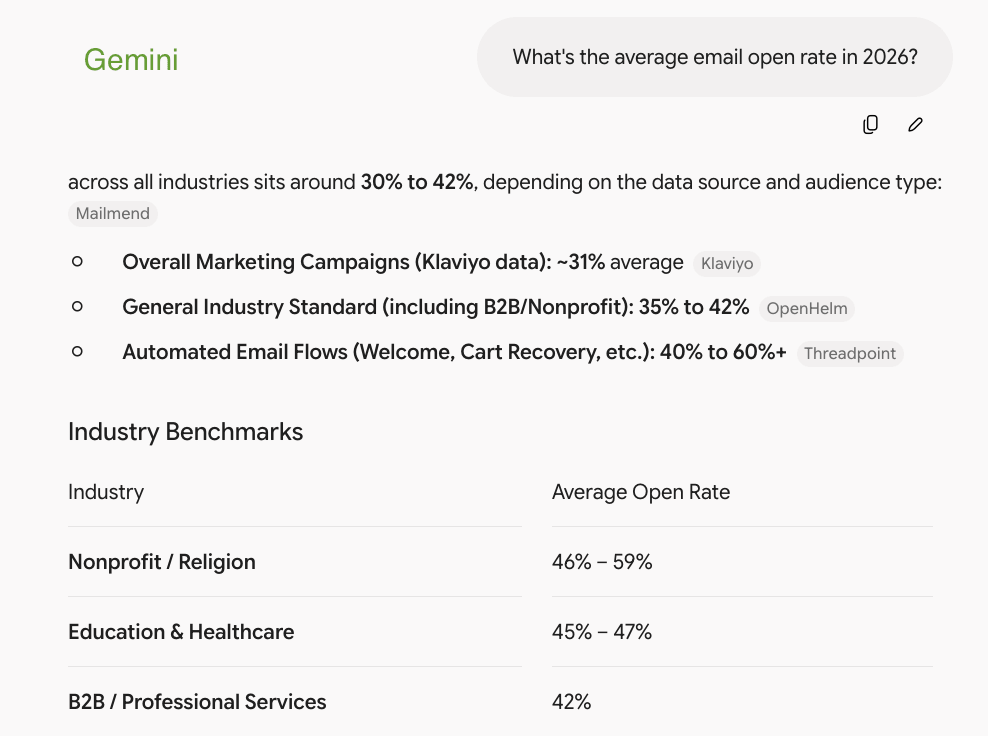
For public questions, that’s mostly fine. Business data is different. Two people can connect to the same dataset, ask the same question, and get different numbers because they phrase the question differently or give the model different instructions. The data is the same, but the definitions aren’t. Changing the tool won’t fix the underlying problem.
Two of us word the question differently. Will we get the same number?
Yes, if the definitions sit in the dataset context and the calculation runs against your data instead of in the chat. Phrasing still affects what gets asked. It doesn’t affect what a metric means, because that’s already written down.
The pre-built Skills weren’t written for our reporting. What if ours works differently?
A Skill covers the method: which metrics to use, what period to compare, how the result is presented. What those metrics mean for your business still comes from the dataset context, and both apply to the same query.
What stops the stored context from being wrong?
Nothing automatic, but a strange answer usually means it’s overdue. Review it after changes like a new attribution model or a redefined conversion goal.
It’s attached to the dataset, so everyone querying that data works from the same context, whoever asks and from whichever AI tool. Edit it once and the next query anyone runs picks up the change.
Is my data safe if the AI is querying it?
Coupler.io sits between your business apps and the AI tool, so the AI never connects to your source systems. The connection is read-only and encrypted, and you choose which datasets and columns are exposed. Coupler.io is SOC 2 Type II certified and GDPR, HIPAA, and DORA compliant.