Many marketing teams already use AI to plan campaigns and write copy. But the AI still can’t reach the apps where the work happens, like your ad accounts or CRM. So someone copies data in and out of the chat by hand and hopes the numbers still match.
MCP servers fix most of that. Once they’re connected, your AI can read and update the apps your team uses, without the copy-paste. This list covers the MCP tools for marketing teams worth connecting in 2026, grouped by job. Each entry shows what the server needs to run and where it falls short.
Key takeaways
- Most servers on this list connect with a sign-in, though Customer.io and Contentsquare need an admin to switch them on first.
- Most servers cover a single app, while Coupler.io blends several into one dataset for cross-channel questions.
- Several servers can create campaigns or edit records, so check what each one can change before you connect it.
- Connecting is usually free, but some servers draw on API units, credits, or monthly call caps.
- Free plans work with limits: Claude allows one custom connector, and ChatGPT supports only some apps.
What MCP for marketing changes in your weekly work
An MCP (Model Context Protocol) server lets your AI tool, like Claude or ChatGPT, work inside the apps your team already uses. You ask a question, and the AI pulls what it needs from the app. Once your apps are connected, you can hand off jobs like these:
- Compare last week’s cost per lead across Google Ads, Meta Ads, and LinkedIn Ads without an export
- Turn a content brief into a week of scheduled LinkedIn posts
- Log call notes and next steps on a HubSpot deal right after the call
- Check which Shopify products will run out before a weekend sale
A note on terms: the MCP server is what the vendor runs, and a connector is how it shows up in your AI tool’s settings. Adding one usually takes a sign-in. Plan limits apply, though. Claude’s Free plan allows one custom connector, and ChatGPT’s Free plan supports only some apps.
New to MCP? Start with the guide to MCP servers for marketers, then come back to pick your tools.
Best MCP servers for marketing teams by job
Every tool here is an official server built by the vendor, and none needs custom code. I judged each one on the four points you’ll see in every entry: AI tools it works with, setup, what it can change, and cost.
All of these MCP tools for marketing teams work in Claude, and most also work in ChatGPT. Most connect with a simple sign-in, but they differ in cost and in what they can change:
| Tool | Best for | Data it reaches | Cost | Can change data |
|---|---|---|---|---|
| Coupler.io | Cross-channel reporting | 400+ apps, blended | Paid plan, free trial | Data flows only |
| Contentsquare | Why traffic doesn’t convert | Your site’s behavior data | Free plan | No |
| Gamma | Turning results into decks | Your Gamma workspace | Credits | Yes |
| Meta Ads | Facebook and Instagram campaigns | Your Meta ad accounts | Free | Yes |
| TikTok Ads | TikTok reporting and creatives | Your TikTok ad accounts | Free | Yes |
| Ahrefs | Backlink and ranking research | Ahrefs’ SEO data | API units | No |
| Semrush | Competitor traffic and keywords | Semrush’s SEO and traffic data | API units | No |
| Firecrawl | Reading competitor websites | Public web pages | Credits | No |
| Klaviyo | Email and SMS campaigns | One Klaviyo account | Included | Yes |
| Customer.io | Tight control over AI changes | Your Customer.io workspace | Included | Optional |
| HubSpot | B2B pipelines | Your HubSpot CRM | Included | Yes |
| Shopify | Store products and inventory | Your Shopify store | Included | Limited |
| Canva | On-brand visuals | Your Canva designs | Included | Yes |
| Buffer | Scheduling social posts | Your Buffer channels | Free plan | Yes |
| Slack | Sharing reports and alerts | Your Slack workspace | Included | Yes |
Why Google Analytics and Google Ads aren’t on this list. Both have official MCP servers, but they need a developer to set up. Coupler.io’s Google Analytics MCP and Google Ads MCP connect with a Google sign-in instead. You can add LinkedIn Ads, Search Console, and over 400 other sources the same way.
Salesforce, Figma, and Google Workspace are left out of this list. Salesforce’s hosted servers need Enterprise Edition and Flex Credits, and Figma’s server is built for design and code work. Google’s Workspace servers are still in developer preview and need a developer to set up.
Best MCP servers for marketing analytics and reporting
Start here if your week runs on reports. Coupler.io and Contentsquare explain what happened, and Gamma turns the findings into something you can present.
Coupler.io
Best for: business teams reporting on several marketing channels
Coupler.io is a reporting automation platform for business teams. It automatically collects and blends data from 400+ apps and keeps it up to date for your reports and AI.
Its MCP server brings that data into Claude, ChatGPT, Gemini, Cursor, and other AI tools that support MCP. In Claude, add it from the connector directory. In ChatGPT, add it as an app. Then sign in and choose which data flows your AI can see.
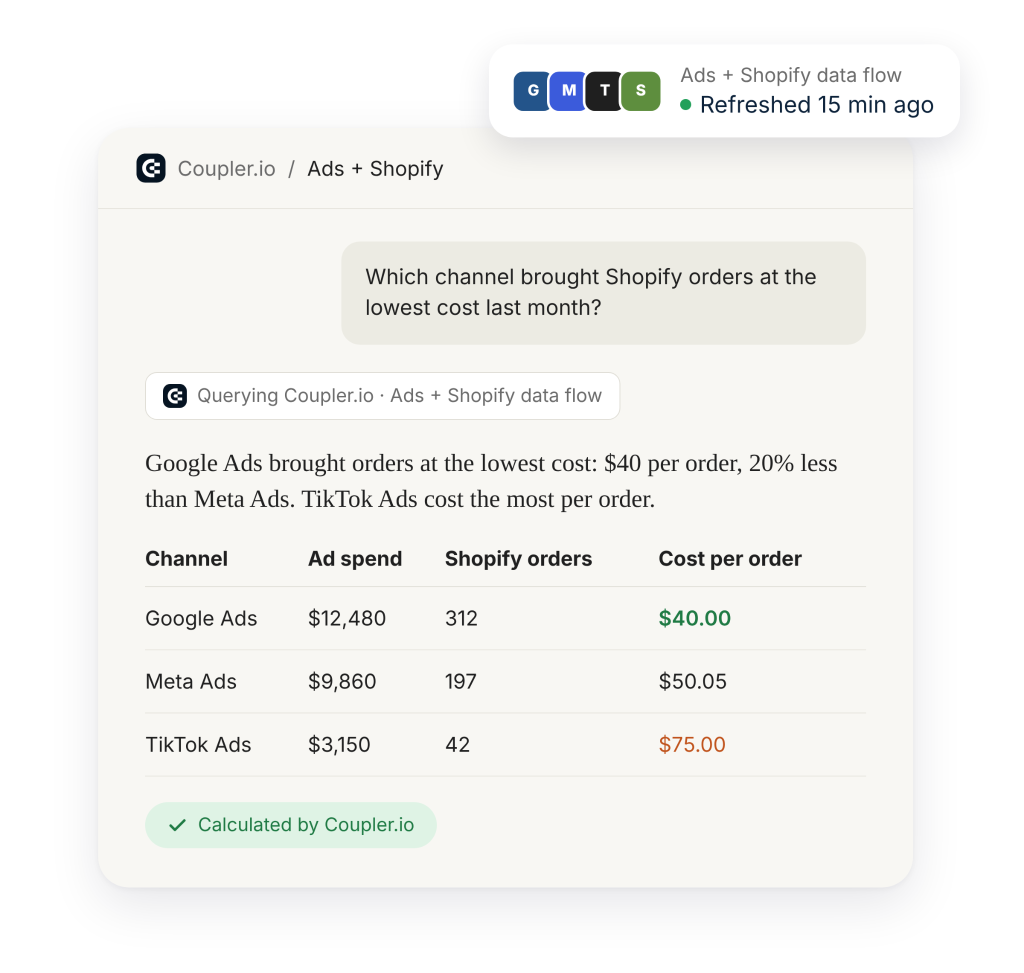
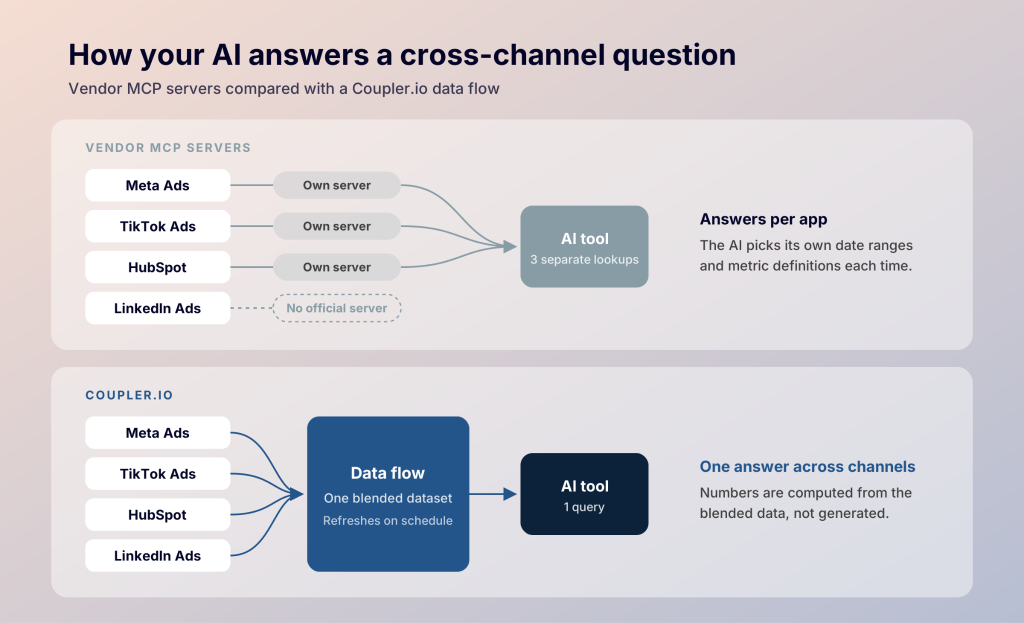
Your AI tool can then query Google Ads, Meta Ads, LinkedIn Ads, GA4, HubSpot data, and more as one blended dataset. With one server per app, the AI lines up dates, metrics, and definitions on its own. Coupler.io blends the data first, so your AI works from one set of numbers. Answers are computed from the data in your data flow, not generated. Each result traces back to the SQL that produced it, so you can check how a number was worked out.
The same data flow can feed marketing dashboards built with Claude or a custom app built with Coupler.io and Lovable. For more ideas, see these MCP use cases.
- Works with: Claude, ChatGPT, and other AI tools that support MCP
- Setup: Coupler.io sign-in, then a data flow, which Coupler AI can set up from a chat in Claude or ChatGPT
- Can change data: Yes, in your data flows: it adds sources, changes fields and filters, and sets the refresh schedule. Your ad accounts and CRM stay as they are
- Cost: Paid plans from $24/month billed annually, with an AI Agent allowance and a 7-day free trial
Example prompt: "Which channel brought Shopify orders at the lowest cost last month?"
Start from a ready-made analysis. Coupler.io’s AI Skills give your AI a tested method for common marketing reports. Examples include Google Ads Budget Pacing, LinkedIn Ads Client Report, or Organic Traffic Drop Diagnosis for Search Console and GA4. Each one tells the AI which data to pull and which analysis to run, so the report comes out the same way every time.

Get blended ad and sales data with Coupler.io
Book a demoContentsquare
Best for: finding out why traffic doesn’t convert
Connect Contentsquare when a campaign brings traffic but conversions drop. Its server lets your AI tool read funnels, journeys, page comparisons, and errors. It works with Claude, ChatGPT, and Microsoft Copilot, and you turn it on in Contentsquare’s settings.
Tool calls are capped per account and shared by everyone connected. The Free plan allows 300 a month, and paid plans raise the limit.
- Works with: Claude, ChatGPT, and Microsoft Copilot
- Setup: Switched on in Contentsquare’s settings
- Can change data: No, it reads behavior analytics
- Cost: Free plan includes 300 tool calls a month, shared across the account
Example prompt: "Compare the checkout funnel for this month and last month. At which step did the drop-off grow?"
Gamma
Best for: turning results into decks
Gamma’s server turns analysis into a first draft you can review and present. From a chat, the AI can create presentations, documents, webpages, and social posts. It can also edit and export them. Claude and ChatGPT both have official Gamma connectors.
Creating, editing, and image generation use Gamma credits, while reading and exporting are free. Engagement analytics need the Pro plan or higher.
- Works with: Claude and ChatGPT
- Setup: Sign-in through the official connector
- Can change data: Yes, creates and edits decks, documents, webpages, and social posts
- Cost: Gamma credits for creating and editing; reading and exporting are free
Example prompt: "Turn this channel summary into a six-slide deck for the client, with one slide per channel and a final slide of next steps."
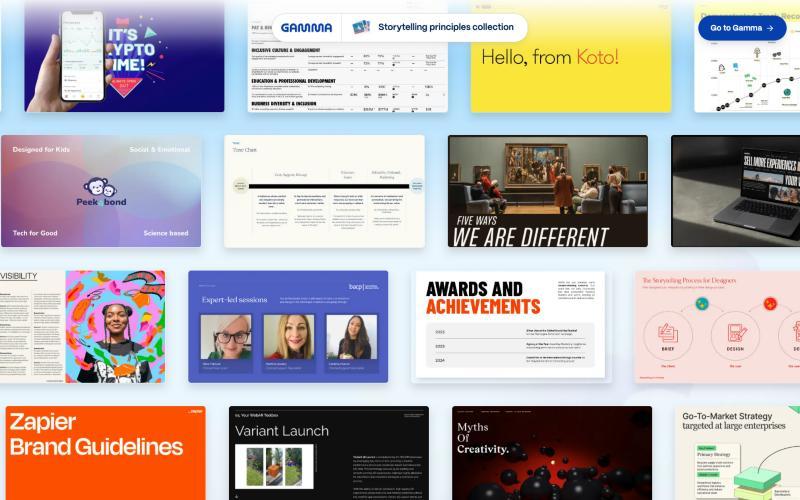
A few examples of decks from Gamma’s inspiration gallery:
Best MCP tools for performance marketing
The two ad platform servers can build and change campaigns from a chat.
Meta Ads
Best for: building and editing Facebook and Instagram campaigns from a chat
Meta’s server gives your AI tool dozens of tools across campaigns, ad sets, ads, product catalogs, and insights. Add mcp.facebook.com/ads as a connector in Claude or ChatGPT, then sign in with Facebook. No developer app is needed. The AI works within the permissions you approve at sign-in, so give each person only the access they need.
New campaigns, ad sets, and ads are created paused, and a person has to switch them on. The server needs creatives at public URLs. Structural edits can also reset an ad set’s learning phase. If you need Meta results next to other channels, Coupler.io’s Meta Ads MCP refreshes them on a schedule and blends them with Google Ads, TikTok Ads, or Shopify data. For a side-by-side with a reporting setup, see Coupler.io vs Meta Ads MCP.
- Works with: Claude and ChatGPT
- Setup: Add mcp.facebook.com/ads as a connector and sign in with Facebook
- Can change data: Yes, creates and edits campaigns, ad sets, and ads (new ones start paused)
- Cost: Free to connect
Example prompt: "Find ad sets with frequency above 4 and falling CTR over the last 14 days, and set up a paused test for the worst one using the image at this URL: [link]."
TikTok Ads
Best for: TikTok reporting and creative analysis without opening Ads Manager
TikTok recently announced its Ads MCP server, and its connector now sits in Claude’s directory. The AI can build campaigns, pull reports, and manage creatives, audiences, and catalogs. You connect it with a TikTok for Business sign-in.
- Works with: Claude, Perplexity, Manus, and a few other AI tools
- Setup: TikTok for Business sign-in
- Can change data: Yes, builds campaigns and manages creatives, audiences, and catalogs
- Cost: Free to connect
Example prompt: "Which TikTok ad groups had the lowest cost per purchase last week, and how did their creatives differ?"
Best MCP tools for SEO and competitor research
Ahrefs and Semrush cover keyword, backlink, and traffic research. Firecrawl reads competitor websites directly.
Ahrefs
Best for: backlink and ranking research on an Ahrefs Lite plan or higher
The Ahrefs MCP server brings keyword research, backlink data, and rank tracking into Claude, ChatGPT, Copilot Studio, n8n, and other AI tools. You connect the remote server, approve a consent screen, and Ahrefs creates an API key tagged for MCP.
Every call draws on your plan’s monthly API units, the same pool as direct API use. Keys made through MCP default to 200,000 units a month, which an admin can change. Each plan also caps how many rows the AI can pull per request.
- Works with: Claude, ChatGPT, Copilot Studio, n8n, and other AI tools
- Setup: Connect the remote server and approve a consent screen
- Can change data: No, it pulls research data
- Cost: Lite plan or higher; calls use your monthly API units
Example prompt: "List keywords where a competitor ranks in the top 5 and we rank 11 to 30, sorted by traffic potential."
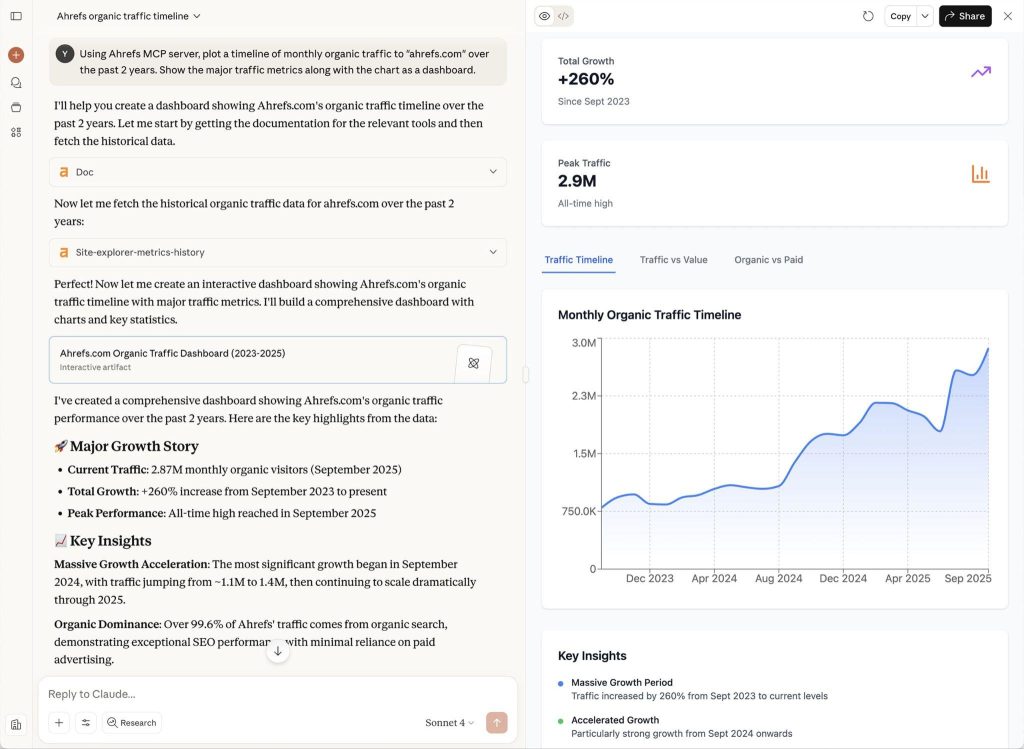
Claude can build an organic traffic dashboard from the Ahrefs server’s data:
Semrush
Best for: comparing your traffic and keywords with competitors’ in Semrush
Semrush’s server covers its SEO API, Trends API, and read access to your Projects. It’s an official app in Claude, ChatGPT, and Perplexity. Sign-in uses your Semrush login, so there’s no key to paste.
SEO data needs Semrush One Starter, Pro+, SEO Classic Pro, or Guru, which include 50,000 API units. Traffic and market data need a separate Trends API subscription. The AI also can’t create projects or change settings.
- Works with: Claude, ChatGPT, and Perplexity
- Setup: Semrush login
- Can change data: No, it can’t create projects or change settings
- Cost: Plan with API units; traffic data needs the Trends API
Example prompt: "Compare organic traffic and top-growing keywords for our domain and our three main competitors over the last six months."
Firecrawl
Best for: reading competitor websites from a chat
Firecrawl is a web research server. It lets your AI tool search the web and read competitor pages, like pricing, landing pages, changelogs, and docs. Separately, its Claude connector can pull marketing data from providers such as Similarweb and Trends. You connect it with one click and a Firecrawl sign-in.
Those data lookups cost far more credits than reading pages. A Trends lookup costs 5 credits, while Similarweb channel data costs 550 per row. Claude shows the cost of each call in its reply.
- Works with: Claude and other AI tools that support MCP
- Setup: One click and a Firecrawl sign-in
- Can change data: No, it reads web pages and data
- Cost: Credits per call, from 5 for a Trends lookup to 550 per row of Similarweb data
Example prompt: "Read the pricing pages of our four closest competitors and build a table of plans, prices, and limits."
Best MCP tools for email marketing, CRM, and ecommerce
Klaviyo and Customer.io run lifecycle campaigns, HubSpot holds your CRM data, and Shopify covers the store itself.
Klaviyo
Best for: analyzing and building email and SMS campaigns
Klaviyo’s server lets your AI tool pull campaign and flow performance and create campaigns from a prompt. It’s listed in Claude’s connector directory and ChatGPT’s apps, so setup is a sign-in. You need an Owner, Admin, or Manager role in Klaviyo.
The listed connector links to one Klaviyo account. Agencies with several client accounts need a custom connector, which you add with Klaviyo’s server URL. The same route lets you block changes by adding read-only=true to that URL.
- Works with: Claude and ChatGPT
- Setup: Sign-in with an Owner, Admin, or Manager role; custom connector for several accounts
- Can change data: Yes, creates campaigns; read-only mode needs a custom connector
- Cost: Uses your existing Klaviyo account
Example prompt: "Compare last month's campaigns by open and click rate, and list the three weakest subject lines."
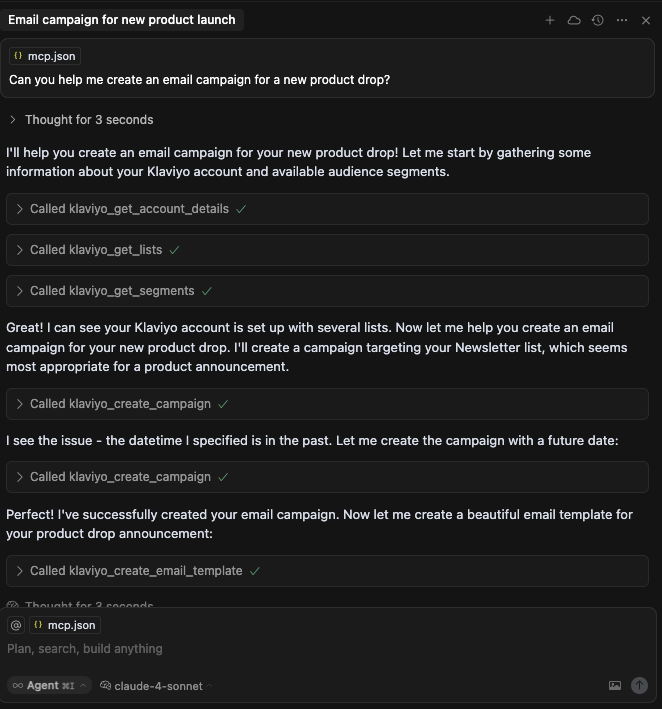
Once you know which campaigns worked, it can build the next one. Here it creates a product launch campaign in Cursor:
Customer.io
Best for: lifecycle teams that want tight control over AI changes
Customer.io’s server works with Claude, ChatGPT, and Cursor. Each person signs in with their own login and permissions. Access starts read-only, and each user decides whether to grant write access to their own connection.
Before anyone can connect, an account admin turns MCP on for the whole account in AI settings. Even with write access, the AI can’t edit live campaigns or segments unless an admin allows it.
- Works with: Claude, ChatGPT, and Cursor
- Setup: Admin turns MCP on, then each person signs in
- Can change data: Only if each user allows it; live campaigns also need admin approval
- Cost: Uses your existing Customer.io account
Example prompt: "Which journeys had the biggest drop in conversion this month, and which step lost the most people?"
HubSpot
Best for: B2B teams that run their pipeline in HubSpot
The remote HubSpot MCP server connects your AI tool to CRM records like contacts, deals, and tickets, plus activities such as calls, meetings, and emails. It can also read campaigns, landing pages, and blog posts. It powers HubSpot’s own connectors for Claude, ChatGPT, Microsoft Copilot, and Gemini. You add it with a HubSpot sign-in.
Writes are limited to CRM records and activities, so campaigns, landing pages, and blog posts stay read-only. To see deals next to ad spend, Coupler.io’s HubSpot MCP joins your HubSpot data with Google Ads, LinkedIn Ads, or 400 other sources in one data flow.
- Works with: Claude, ChatGPT, Microsoft Copilot, and Gemini
- Setup: HubSpot sign-in
- Can change data: Yes, CRM records and activities; campaigns and content stay read-only
- Cost: Uses your existing HubSpot account
Example prompt: "Summarize deals that moved to closed-lost this quarter and group the reasons by lead source."
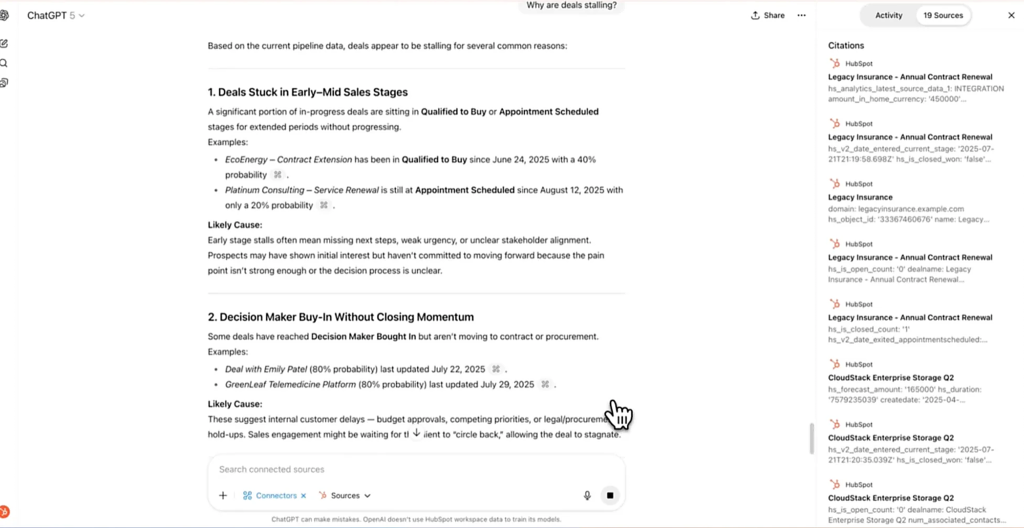
It works for open deals too. Asked why deals are stalling, ChatGPT cites the HubSpot records behind each point:
Shopify
Best for: checking products, orders, and inventory in a Shopify store
Shopify’s official connector for Claude and ChatGPT works with products, collections, inventory, orders, customers, discounts, and store analytics. You add it in your AI tool, then approve access in your Shopify admin. Without write access, it only reads data.
Orders, customers, and analytics stay read-only even with write access, and the connector can’t issue refunds or touch payments. Order lists come back 50 at a time, so large pulls need another route, such as Coupler.io’s Shopify MCP. It refreshes orders and inventory on a schedule and can join them with Google Ads or Meta Ads spend, so you can see cost per order by channel.
- Works with: Claude and ChatGPT
- Setup: Add it from your AI tool’s connectors, then approve in your Shopify admin
- Can change data: Only with write access; orders, customers, and payments stay off-limits
- Cost: Uses your existing Shopify store
Example prompt: "Which products sold best last month, and which of them are running low on inventory?"
Best MCP tools for content and team workflow
These servers handle the work around the numbers. Canva and Buffer cover visuals and posts, and Slack shares results with the team.
Canva
Best for: teams that make on-brand visuals often
Canva’s remote server connects your AI tool to your designs and brand assets. From a chat, you can find designs, create a new one from a prompt, fill in a brand template, and export files. Sign-in is a browser login, and the AI reuses it in later sessions.
The AI works inside your Canva permissions, so check what it can access before you connect a shared brand workspace.
- Works with: Claude and ChatGPT
- Setup: Browser login, reused in later sessions
- Can change data: Yes, creates designs and fills in brand templates
- Cost: Uses your existing Canva plan
Example prompt: "Create three Instagram post variations for the spring sale using our brand kit, then export them as PNGs."
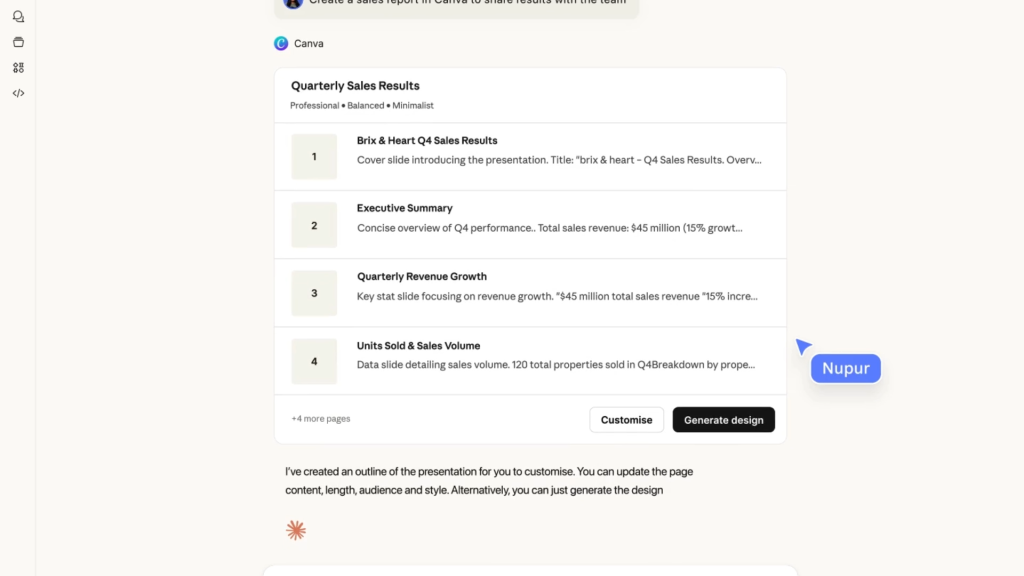
It can build full decks too. Here it’s preparing a sales report through Claude:
Buffer
Best for: small teams that plan and schedule social posts
Buffer’s server lets the AI draft, schedule, and queue social posts. It can also save ideas and pull post metrics for a date range. Most AI tools connect through a Buffer sign-in.
On the Free plan, metrics only reach back 31 days, and rate limits depend on your plan. Posts scheduled by the AI go out like any other, so review the queue before the slot arrives.
- Works with: Most AI tools that support MCP
- Setup: Buffer sign-in
- Can change data: Yes, drafts, schedules, and queues posts
- Cost: Works on the Free plan, with 31 days of metrics
Example prompt: "Schedule this week's three LinkedIn posts at our best-performing times from the last month."
Slack
Best for: sharing reports and alerts with the team
With the Slack MCP server, your AI tool can search messages, files, and channels. It can also read threads, post messages, and create canvases. It follows each person’s Slack permissions, so the AI only sees channels that person can see. Claude, ChatGPT, Cursor, and Perplexity all support it.
Posting is real, so keep alert messages in a dedicated channel while you test.
- Works with: Claude, ChatGPT, Cursor, and Perplexity
- Setup: Slack sign-in, limited to each person’s channels
- Can change data: Yes, posts messages and creates canvases
- Cost: Uses your existing Slack workspace
Example prompt: "Summarize this week's #campaign-launch thread and list open decisions with their owners."
Where marketing MCP servers fall short
Before you roll out a marketing MCP server to your team, check it against these four limits. Any one of them can stop a workflow halfway.
Each vendor server sees one app
The HubSpot MCP server knows your deals but not your ad spend. The Meta Ads server knows nothing about Google Ads. The AI can stitch answers from several servers in one chat, but it picks its own date ranges and metric definitions each time. So two answers to the same question can disagree. Cross-channel questions need the data blended first, which is the job Coupler.io does before your AI sees it.
Write access needs guardrails
Most vendor servers can change things, like creating campaigns or updating contacts. Good ones add safeguards, like Meta creating campaigns paused, or Klaviyo’s read-only mode. Switch on writes only for the people and accounts that need them. The Meta Ads MCP security guide covers how to scope access.
Costs hide in units and credits
The servers themselves are usually free, but calls draw on something you pay for. Ahrefs and Semrush use API units, Firecrawl and Gamma use credits, and Contentsquare caps tool calls per month. Run a few test prompts and check your usage page before you hand a server to the whole team.
How to choose an MCP server for marketing
The best marketing MCPs for your team are the ones that answer the questions you ask every week. You don’t need all of these MCP tools for marketing teams at once. Start with the two or three that match how your team works:
- A B2B team that reports on pipeline can start with Coupler.io for Google Ads, LinkedIn Ads, and HubSpot data in one place. The HubSpot server then handles record updates.
- An ecommerce brand can start with Shopify and Klaviyo, then add Contentsquare to see where checkout visitors drop off.
- An agency can report across client accounts with Coupler.io and its client report AI Skills. Gamma then turns each month’s results into a deck.
- A content and SEO team can start with Ahrefs or Semrush, then use Buffer to schedule posts built from that research.
Whichever you pick, roll it out in four steps:
- Pick one recurring task, like weekly campaign reporting.
- Connect only the servers that task needs.
- Start with read access, and check the answers against the original platforms.
- Turn on write access once you trust the results and the permissions.
Vendor servers and Coupler.io do different jobs, and most teams end up using both. Need one app in your AI tool for a quick question? The native connector may be enough. Need several apps, history, or the same numbers in your reports? That’s Coupler.io. You can try it with a free 7-day trial and connect your first sources from Claude or ChatGPT.
Give every AI tool one set of numbers with Coupler.io
Book a demoFAQ
Do Claude MCP servers for marketing also work in ChatGPT?
Often. Klaviyo, HubSpot, Semrush, Gamma, and Coupler.io all publish setup steps for both. Check the vendor’s setup page for your AI tool.
How many MCP tools for marketers can one AI assistant use at once?
There’s no hard limit, but each server adds its tool descriptions to the AI’s context. Switch on only the servers a task needs, and the AI picks the right tool more often.
What’s the best MCP server for marketing analytics?
For cross-channel reporting, Coupler.io blends ad, analytics, and CRM data into one dataset your AI can query. For on-site behavior, Contentsquare shows where visitors drop off.
Can MCP servers handle large marketing datasets?
Vendor servers often cap rows per request, so long date ranges can get cut off. Coupler.io runs the query on its side and sends the AI only the result. For scheduled reports built in code, an API may suit you better. See MCP vs API.