MeasureCamp is one of my favorite analytics events. No pre-planned sessions, just people writing topics on sticky notes and filling a board on the morning of the event. If your topic gets an audience, you did something right. If it doesn’t, you learn that too. Coupler.io loves this community and keeps coming back because of how it works.
This year’s Dublin edition (only the second one; the first was back in 2019, pre-COVID) took place on May 9 at Google’s European headquarters. The office alone was worth the trip. Around 120 analytics practitioners showed up on a Saturday, which tells you something about this crowd.
Three of us came from Coupler.io: myself, Olexander Paladiy (our Product Director, who celebrated his birthday at the event), and Nika Tamaio Flores (our Product Lead, presenting at MeasureCamp for the first time). Coupler.io was the Gold Sponsor this year, and we had a stand where people could dig deeper into anything from the talks.

The session board filled up fast. Across four rooms and eight time slots, people covered server-side tracking for profit-based optimization, the analyst’s sequencing problem, semantic models, attribution, the psychology of data, pricing, marketing attention measurement, and more. We ran two sessions ourselves, both on AI analytics.
- First – a joint talk with Alex on why LLMs fail at analysis and what to build instead.
- Then Nika’s hands-on walkthrough of context, skills, and versioned reports.
Both sessions are recorded. In this article, I want to pull out the ideas that resonated most with the room and explain why they matter for anyone working with data and AI tools today.
Why LLMs fail at analytics (and what to build instead)
Speakers: Ivan Burban (Head of Marketing) and Olexander Paladiy (Product Director)
Alex opened the session with his engineering perspective. He has 15 years of experience in software development, wrote the first lines of Coupler.io code, and has been watching AI reshape how engineers work for the past two years. I added the marketing side: how the same problems show up when you’re trying to get reliable numbers for campaign performance or funnel analysis.
Engineers are ahead, and analytics can catch up
We started by putting AI adoption in perspective. Software engineering is already deep into AI-assisted workflows. At the biggest tech companies, AI-generated code ranges from roughly 30% (Google, as Sundar Pichai mentioned in April 2025) to close to 100% (Anthropic, per their CPO Mike Krieger in February 2026). The head of Claude Code reportedly hasn’t personally written a line of code in two months. Staff engineers ship pull requests of 2,000–3,000 lines generated entirely by AI.
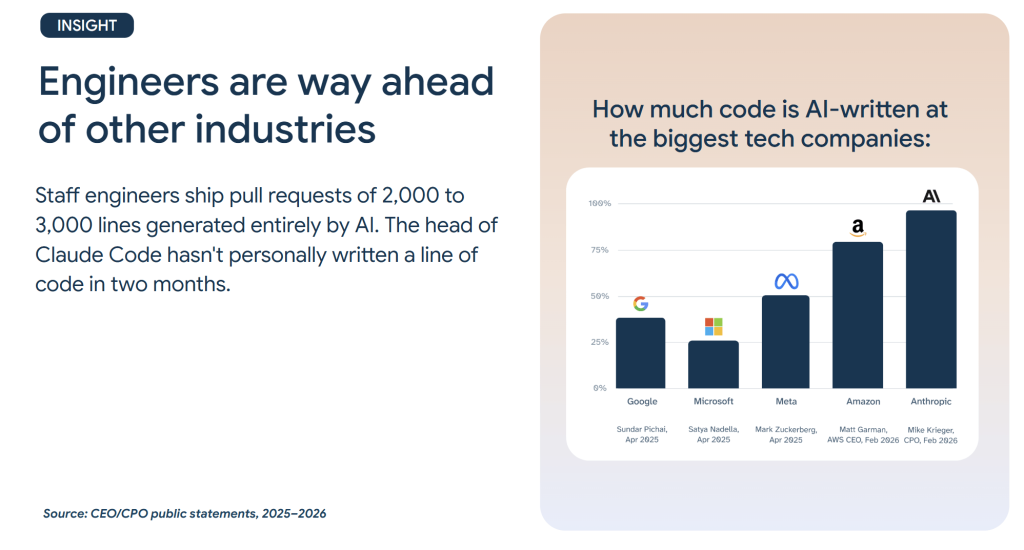
The reason this happened in engineering first is that code is a near-perfect context for AI. It is structured (syntax, types, linting), self-verifying (run it and see if it works), richly contextual (function names, imports, commit history), and well-documented (tests, READMEs, standards). AI context windows grew 250x in three years, from 4,000 tokens to 1 million. That means AI can now read your entire codebase, not just a snippet.
The point Alex was making: these same approaches work for any structured process, be it analytics, marketing, e-commerce, finance, etc. The bottleneck is not the technology. It is the approaches people use.
Stop throwing CSVs at chatbots
Alex asked the room: who has thrown a CSV file at ChatGPT? Almost every hand went up. Who was happy with the results? Almost every hand went down.
This is the starting point most people are stuck at. You upload a spreadsheet, ask a question, and the AI gives you a confident answer with specific numbers. The problem is that those numbers are often wrong. Totals don’t add up. Trends are fabricated. In one example Alex showed, the AI invented a Japan market expansion story based on data that had no Japan column at all.
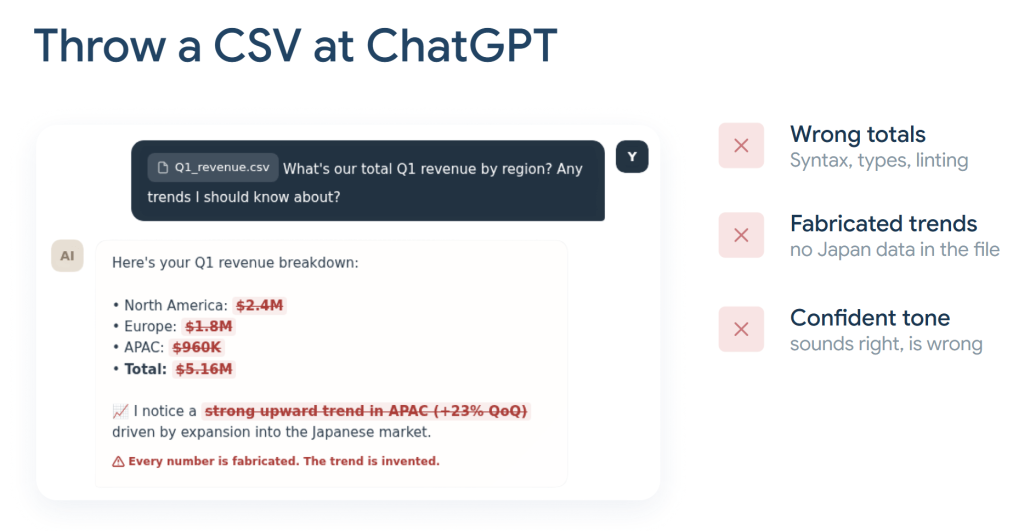
The reason is fundamental: LLMs don’t compute. They predict the next token. An LLM can predict that 1 + 1 = 2 because there’s plenty of training data on basic arithmetic, but once you hand it a real dataset with thousands of rows, it is guessing. And guessing confidently.
The fix: give AI tools, not spreadsheets. Instead of dumping raw data into a chat window, connect data sources through MCP (Model Context Protocol) and let a proper query engine handle the calculations. Here is the flow Alex walked through:
- AI reads the schema. It sees column names, data types, and table structure, not the raw data itself.
- AI writes SQL. Based on your question, it generates a query.
- MCP executes the query. The warehouse or query engine runs the SQL, handles the math, and returns pre-aggregated results.
- AI interprets the results. The LLM receives a small, already-calculated result set and does what it does well: explains it in plain language.
The critical difference: the LLM never touches the raw numbers. It never adds, averages, or counts anything. Calculations happen in the warehouse. Interpretation happens in the LLM.
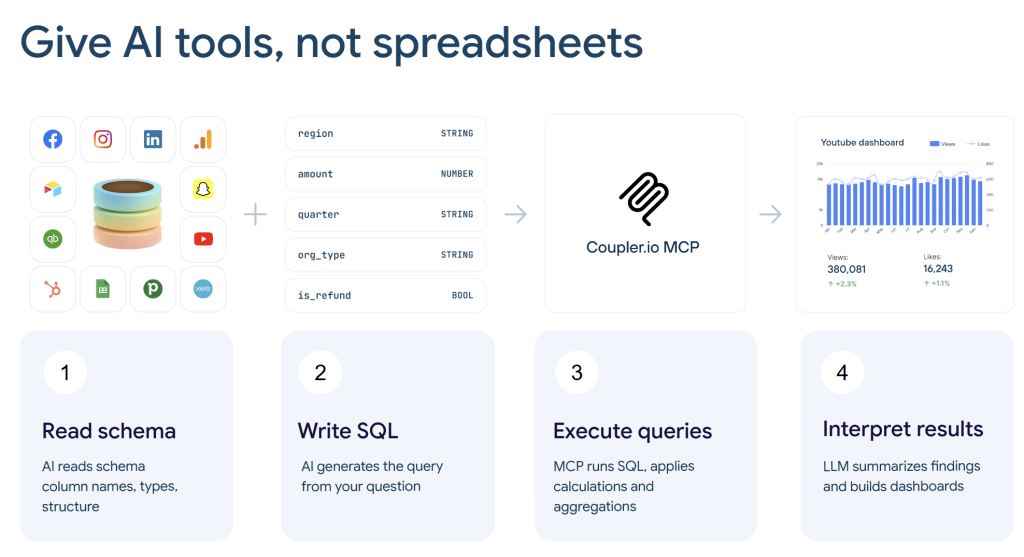
This is where Coupler.io fits naturally. Coupler.io MCP connects 400+ data sources (ad platforms, CRMs, analytics tools, accounting software) and exposes the data to AI tools like Claude, ChatGPT, Gemini, Cursor, and others. It was one of the first connectors released on the Claude marketplace and is currently among the top-ranked.

Connect business data from 400+ sources for AI analytics
Try Coupler.io for freeContext is the missing piece
Even with the calculation problem solved, there is still a gap. AI can now give you accurate numbers, but it still doesn’t know what those numbers mean for your business.
Alex shared a real example from Coupler.io. We changed our lead scoring form, intentionally, to filter for higher-quality prospects. The expected result was fewer scheduled sales calls, which is exactly what happened. But when the AI analyzed the funnel data, it flagged a “massive acquisition problem” because the number of calls was dropping.
The AI wasn’t wrong about the data. It was wrong about the interpretation, because it didn’t know about the scoring change. And here’s the part that stuck with me: our SEO manager, checking the same data in a dashboard, made the exact same wrong assumption. The problem isn’t unique to AI. It is a context problem that affects humans and machines equally.
The fix: document all business context in one place where both humans and AI can access it. Nika’s session later in the day went deep on how to do this in practice. I’ll cover that below.
What if the system runs itself
When you combine connected data, documented context, and codified commands, you get a system that can produce traceable reports. Every number links to a query, and every query links to a documented dataset. (Nika showed the full architecture in her session, which I cover below.)
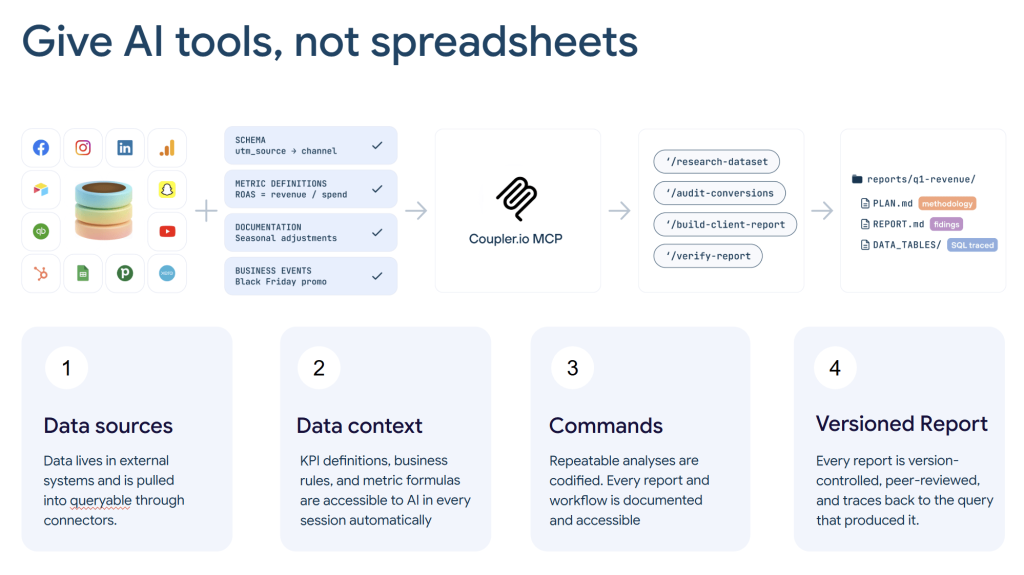
Alex took this one step further. He showed how Claude Code’s agent architecture lets you assign specialized roles: data analyst, SEO analyst, PPC analyst, sales analyst, audit specialist. Each agent operates independently within its own context, then they compile findings into a single report. An audit agent re-checks every number before the report ships.
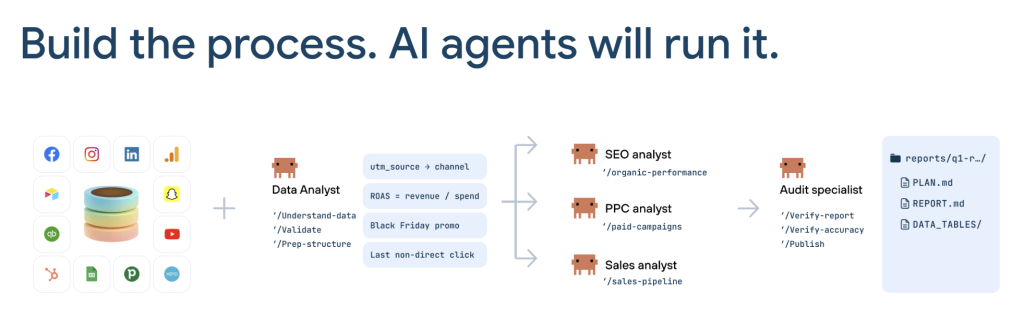
This is the same pattern that works in software engineering, where you might have a Product Manager agent write a brief, Designer and Developer agents build the solution, and a QA agent test it.
I want to be honest about where we are with this. One morning, Alex messaged me that he’d built a “CMO agent” (an automated analytics assistant), and it told him I was doing things wrong. The insights it produced were confidently stated and mostly incorrect because the agent lacked business context. Once we fed it proper documentation, the quality jumped. More usable insights started coming from the team. The AI didn’t replace anyone’s thinking; it eliminated the routine work of querying dashboards and cross-referencing numbers.
We actually hired more people after this, not fewer. There was simply more useful work to do once the routine friction disappeared.
Three things to start now
Alex closed with three recommendations. They sound basic, but the room’s reaction confirmed that most teams haven’t started:
- Document your metrics and context. You don’t need to write everything at once. Start with your top three KPIs, how you calculate them, and what to exclude. Add one new fact after every investigation where the AI got something wrong. The quality improves with every addition.
- Connect tools for integrity. Stop recreating the same report from scratch every week. Connect your data sources, codify your analysis commands, and let the system run them consistently.
- Start now. Analysts who build this infrastructure today will be significantly ahead within a year. The role isn’t disappearing. It is shifting from doing routine work to designing how the work gets done.
The plumbing: context, skills, and versioned reports
Speaker: Nika Tamaio Flores (Product Lead)
Nika’s session picked up where ours left off. While Alex and I talked about the architecture and the “why,” Nika went hands-on. She builds and uses these workflows daily as a product manager at Coupler.io. So, she walked the room through the three components that make the system work in practice: context, skills, and versioned reports.
The session also included a live demo, refreshing a live artifact backed by Coupler.io MCP data, on stage, on conference Wi-Fi. I’ll let you guess how that went on the first try. (It did work on the third attempt.)
Business data context: what AI needs to know about your company
Nika started with a framing I liked:
AI can write SQL and build dashboards, but it cannot remember that you launched lead scoring last quarter. Unless you tell it.
Business data context is everything an analyst would tell a new hire on day one: how metrics are calculated, naming conventions for campaigns, attribution rules, and so on.
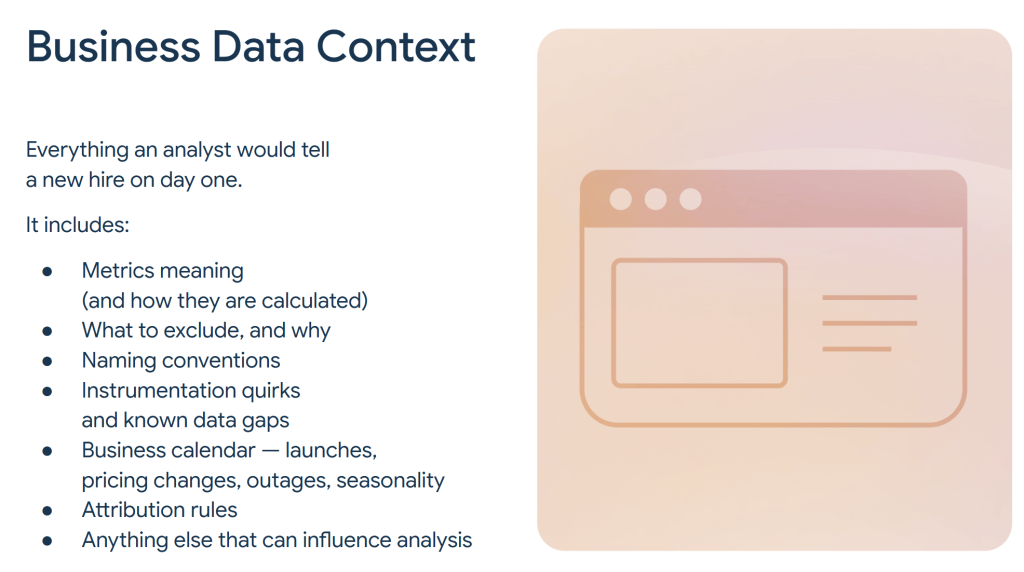
The challenge is that most of this knowledge has historically lived in people’s heads. Nika described the evolution in three stages:
🗣️ Tribal era. Context lived in standups, Slack DMs, and Confluence pages nobody could find. It was lossy by nature. When someone left the company, the context left with them.
📂 Repo era. Technical teams started documenting context in GitHub repositories. Markdown files, version control, PRs. Reliable and reviewable, but it excluded anyone who doesn’t do git pull. That’s most of the people who actually need this context.
🔗 Hybrid era. Less technical teams started using Google Docs, or tools like Coupler.io’s built-in data set context feature. The idea is the same as a repo (documented, centralized context) but without the engineering tax. Anyone can add to it, and both human colleagues and AI agents can read it.
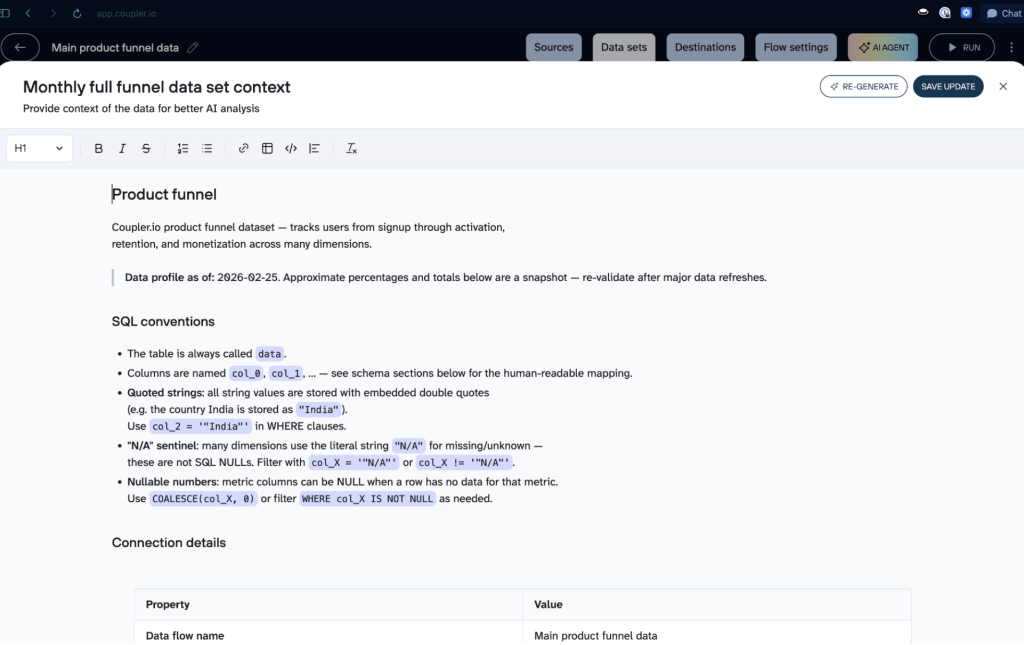
Nika showed the Coupler.io context editor on screen: a structured document attached directly to a data set, with sections for SQL conventions, connection details, column semantics, and known data issues. When an AI agent connects to that data set through MCP, it reads the context first.
Skills: teaching AI to follow your workflows
The second building block is skills. These are structured instruction files that tell AI when to activate and how to execute a specific workflow. Nika explained the anatomy of a good skill:
- Name
- Description (this is what the AI reads to decide whether to invoke the skill)
- Role and tone definition
- Detailed steps
- Inputs (can include specific MCP tools the skill should call)
- Expected output format.
One insight from her talk that stuck with me: the LLM decides on its own when to invoke a skill, based on the description. So writing a clear, specific description matters as much as writing good steps. If the description is vague, the skill won’t trigger when you need it.
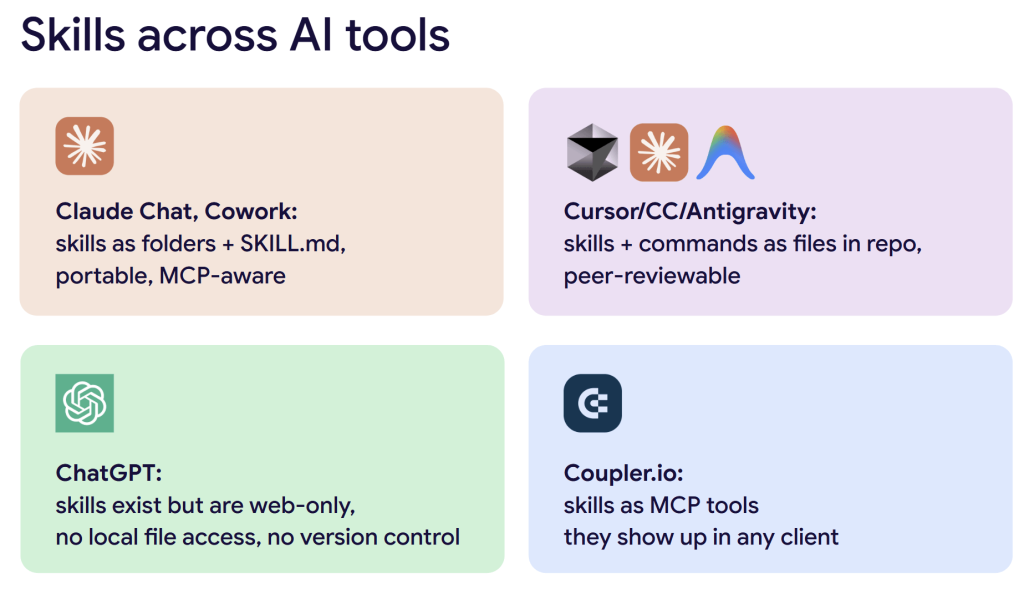
Different AI tools handle skills differently:
- Claude Chat and Cowork store skills as folders with a SKILL.md file. They are portable and MCP-aware.
- Cursor, Claude Code, and Antigravity store skills and commands as files in a repo, which means they can be peer-reviewed through normal engineering workflows.
- ChatGPT has skills, but they only work in the web interface, have no local file access, and (in Nika’s experience) ChatGPT is worse at figuring out when to use them automatically.
- Coupler.io is building skills as MCP tools, which means they show up in any AI client that connects through Coupler.io MCP, whether the user is in Claude, Cursor, or ChatGPT.
For finding and borrowing existing skills, Nika pointed to skills.sh (an open skills ecosystem with over 90,000 skills) and the coupler-io/skills GitHub repo, which also works as a Claude Code plugin marketplace.
One more practical detail: Nika builds her skills to self-improve. She includes an instruction that says, roughly, every time I give you feedback, log it in a reference file called feedback. The skill evolves with use, getting better at the specific analysis she needs. You don’t carve a skill in stone. It is a working file that improves over time.
Reports: from scheduled tasks to live artifacts
The third component is the output layer: reports. Nika described three levels of maturity:
Scheduled tasks in Cowork. Same prompt, same time, every day. Nika’s daily setup: a task triggers at 10:30 AM during her standing meeting, so a fresh product funnel briefing is waiting when she looks at her screen. The drawback: your laptop needs to be on, or you need a machine running remotely.
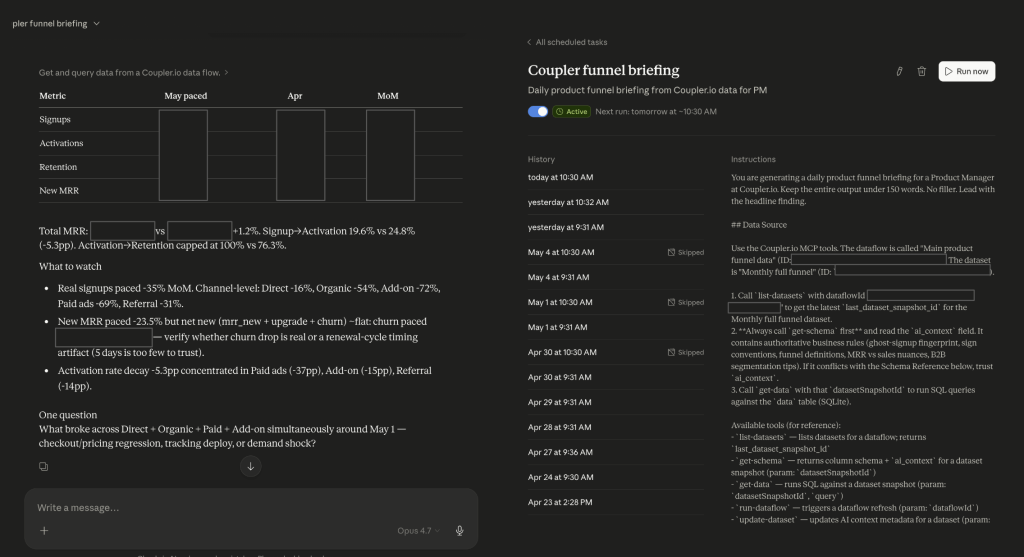
Versioned reports. Each time you run a report, you save it with a date or version number. Over time, you can compare versions to see whether your skills and context are actually improving. This is how Nika tracks quality. Not by subjective feel, but by diffing reports against each other.
Live artifacts. Persistent HTML pages backed by MCP queries. Click Refresh data, and the artifact pulls fresh numbers from Coupler.io. This is the most recent capability and still has rough edges (as the live demo confirmed), but it is the direction things are heading.
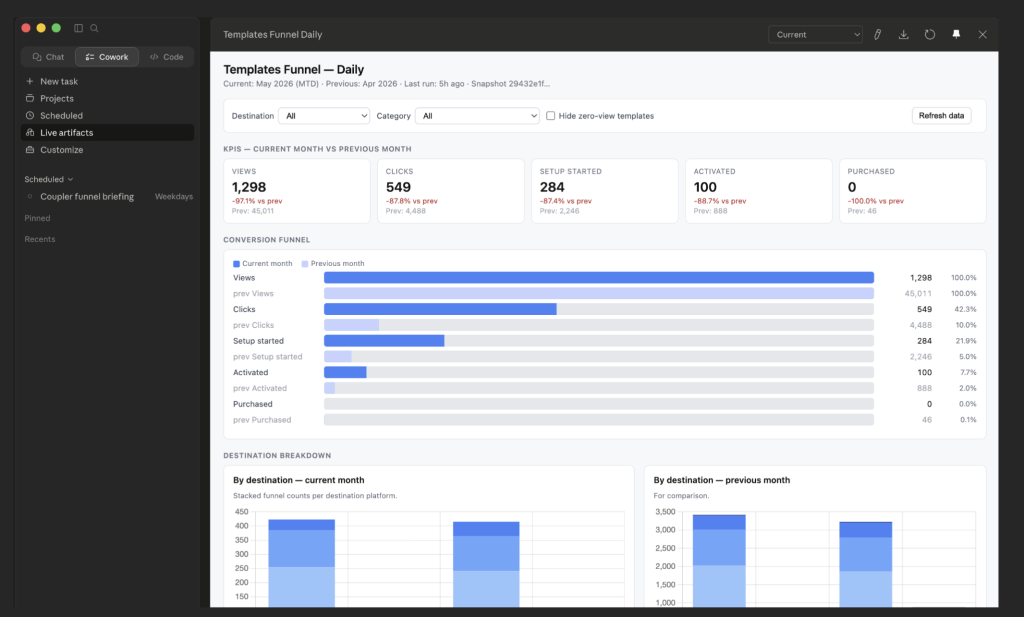
Behind the reports sits a report generation skill with two phases.
- Phase 1 drafts the report: executive summary, key metrics, context, recommendations.
- Phase 2 validates it.
The validation checks whether arithmetic is correct (do the channel totals actually add up to the reported total?). Next, it verifies that all claims trace back to data the AI actually queried. The check also flags internal contradictions where the LLM says one thing in the summary and something different in the details. And it catches period mismatches and selection bias, like drawing a conclusion from three data points and calling it the most important trend.
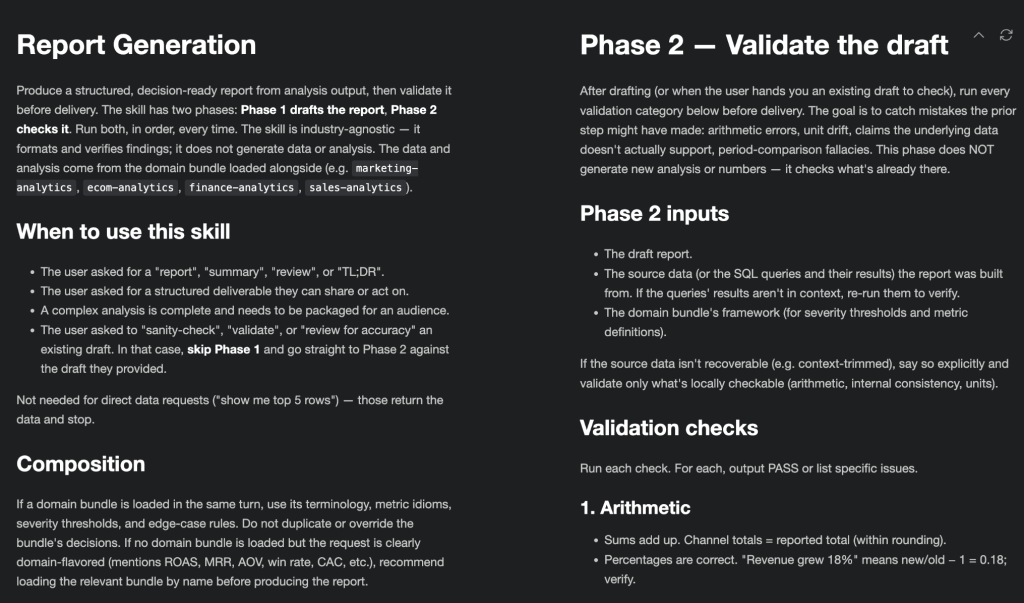
That validation phase is the part most people skip, and it is the part that turns an AI-generated summary into something you’d actually present to your team.
The ghost signups case
Nika closed with a real case that demonstrated why context matters. Coupler.io’s monthly funnel data showed signups growing while the signup-to-activation rate was falling. If you gave only this data to an LLM, it would tell you there is a critical activation problem. Activation dropped roughly 5 percentage points over several months.
But the data team had discovered something they called “ghost signups.” These registrations simultaneously matched four conditions: source listed as Google, no country or IP data, no GA4 channel attribution, and “N/A” in the onboarding recommendation field. Real users physically cannot select “N/A” in that form.
Once they excluded ghost signups with a SQL filter, the activation rate was stable all along. Signups were “growing” only because of bot traffic. The real signups hadn’t changed much.
This finding became a permanent entry in the data set context. Now every report automatically accounts for ghost signups, whether it’s generated by Nika’s scheduled tasks, another team member’s ad hoc query, or an AI agent running on its own. Without that context, every funnel analysis would start with a false alarm.
What the audience asked (and what it tells us)
The Q&A after Nika’s session surfaced a few questions that I think reflect where most teams are right now.
We work with huge PDF reports in retail media. Almost nothing reads tables from PDFs correctly.
Nika’s answer was direct: don’t try to read from PDFs directly with AI. Create an intermediary layer. Use something that can parse the PDF and load the data into a Google Sheet, a BigQuery table, a PostgreSQL database, whatever your stack supports. Then let AI read from there. Prepare data for AI the same way you would prepare it for a human analyst, because AI was trained on what people do. Nobody reads 10,000 rows with their eyes. Neither should your AI.
I’ll probably have to build skills in Copilot Studio. Any advice?
Nika’s general advice applies across tools: be detailed in your steps and descriptions. If your data schema changes frequently, don’t hardcode SQL queries in the skill. Put the schema there instead, so the AI can adapt. Always build validation into the output, either within the same skill or as a separate check. And set your expectations: the first two versions of any skill are usually not great. Version three is when it starts being useful.
Is there any way around needing the laptop open for scheduled tasks?
A few options came up: Claude Code routines can run in the cloud, you can keep a desktop machine running Cowork in the office, or you can trigger tasks manually. Mobile access also works. Your phone can connect to your desktop running Cowork, so you can check results on the go even if you’re not at your computer.
What you should take away
If there is one message from both sessions, it is this:
The gap between “AI can do analytics” and “AI does useful analytics” is not a technology gap. It is a documentation gap.
Here is what’s worth doing now.
Stop throwing files at chatbots
Connect your data sources through MCP so a proper query engine handles the math and the AI only interprets results. This is the single biggest improvement you can make. Coupler.io MCP connects 400+ sources to Claude, ChatGPT, Gemini, Cursor, and other AI tools.
Document your business context
Start with three things: how you calculate your most important metrics, what data to exclude and why, and what changed in your business last quarter. Write it down. Store it where your AI tools can read it. Every fact you add makes every future analysis more accurate.
Build skills, not one-off prompts
A prompt dies when the chat session ends. A skill file lives across sessions, improves with feedback, and runs the same analysis consistently. It also lets teammates (and AI agents) use the same workflow without re-explaining it every time.
Version your reports
Save dated snapshots of your AI-generated reports. This is how you prove the system is getting better, and how colleagues can review and trust AI-generated analysis before acting on it.
The analyst role is not going away. But the analysts who build this infrastructure now (context, skills, versioned reports, connected data) will be operating at a completely different level by next year.
If you want to start, connect your data to AI tools through Coupler.io. The MCP setup takes a few minutes, and you can start asking questions about your live business data right away.