
Your Google Ads account holds answers to questions like “Which campaigns are wasting budget?” and “Where should I shift ad spend for better ROI?” The problem is, getting those answers usually means exporting data to spreadsheets, building pivot tables, and spending hours on manual analysis.
AI assistants like Claude, ChatGPT, and Perplexity can analyze your campaign data and surface insights in seconds. However, this requires you to get your Google Ads data into them.
Ways to analyze Google Ads with AI
Until recently, Google Ads AI analytics could only be possible through constant CSV uploads. Now you have three realistic options:
- Google Ads MCP – the official technical solution that gives you direct API access but requires developer skills
- Coupler.io’s AI Integrations – syncs your Google Ads data into Claude, ChatGPT, Perplexity, Gemini, or Cursor automatically
- Coupler.io’s AI Agent – lets you chat with your Google Ads data without leaving Coupler.io
Each option works, but the experience and the setup time vary dramatically. Before diving into the details, here’s how these approaches compare:
| Approach | Best for | Setup time | Technical skills required |
| Coupler.io AI Integrations | Teams already using Claude, ChatGPT, Perplexity, etc. | 5-10 minutes | None |
| Coupler.io AI Agent | Teams wanting an all-in-one analytics workspace | Up to 5 minutes(AI Agent is available immediately inside any existing data flow) | None |
| Google Ads MCP Server | Developer teams needing full API control and customization | 2-4 hours initial setup, ongoing maintenance | Python, Docker, API knowledge |
The official Google Ads MCP server requires significant technical preparation to get started. Coupler.io offers the no-code path to AI-powered Google Ads analysis. Let’s see how it works in practice, then we’ll cover the technical alternative for teams with dedicated developer resources.
Google Ads AI analytics with AI using Coupler.io’s AI integrations
Coupler.io is a data integration platform that enables you to analyze your Google Ads with the AI tool you already use. No local setup, no terminal commands, just a browser-based flow.
This is where the story shifts from “how do we run this thing?” to “how quickly can we start getting useful answers?”
What AI Integrations are
AI integrations in Coupler.io allow AI tools such as Claude and ChatGPT to query your up-to-date Google Ads campaigns performance data through natural language. So, you do not need to export CSVs from Google Ads and upload files to AI anymore. oupler.io acts as a middleman between your Google Ads account and AI tools.
Here’s how it works: Coupler.io syncs your Google Ads data on a schedule and stores it in its analytical engine. When you ask a question in your AI tool, it sends an SQL query to Coupler.io, which executes the query and returns verified results to the AI. Claude, ChatGPT, or another tool you use interprets the received data and gives you an answer.
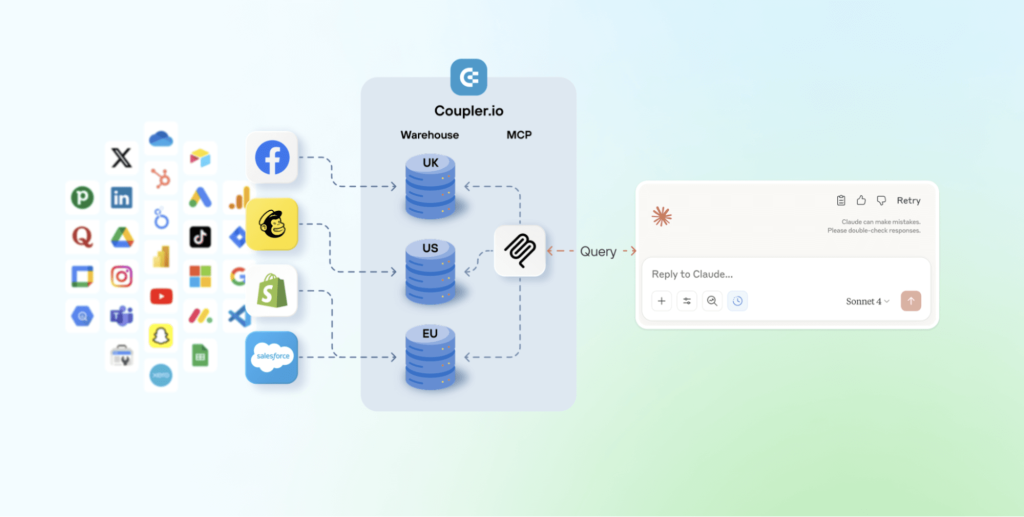
For the guide, I’ll use Claude as the destination, but AI Integrations also support ChatGPT, Perplexity, Gemini, and Cursor. This means that teams use whichever AI environment they prefer without rebuilding their data pipeline.
Under the hood, Coupler.io runs its own MCP server that handles the technical complexity, but you never interact with that infrastructure directly. From your perspective, it enables you to analyze Google Ads data with AI.
How the setup works
The setup is straightforward:
- Log into Coupler.io and create a new data flow by choosing Google Ads as your source and connecting it via OAuth (no JSON files, no CLI).
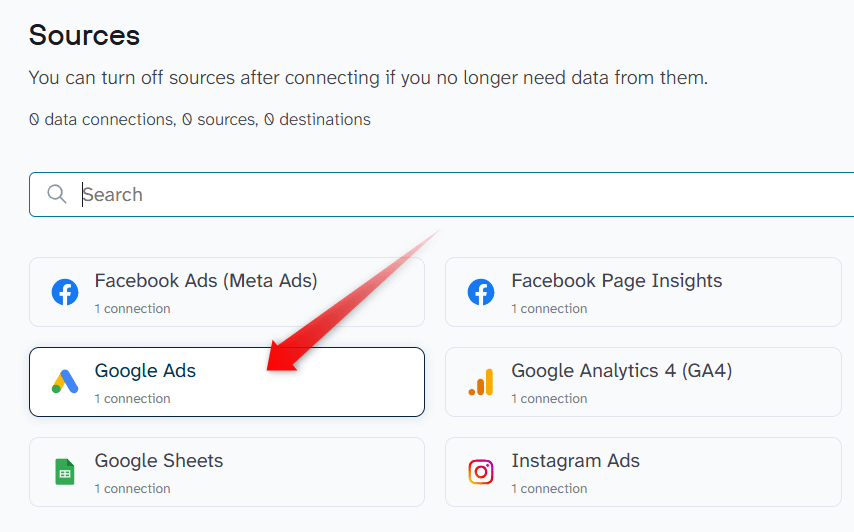
If you already know which AI tool you’re going to use, then simply select it in the dropdown below and click Proceed. This will create a Google Ads data flow to the chosen AI tool once you sign up for Coupler.io for free (no credit card required).
- Select which Google Ads performance metrics and dimensions you want to sync. Optionally, you can organize your data set by using filters, aggregations, hiding columns, etc.
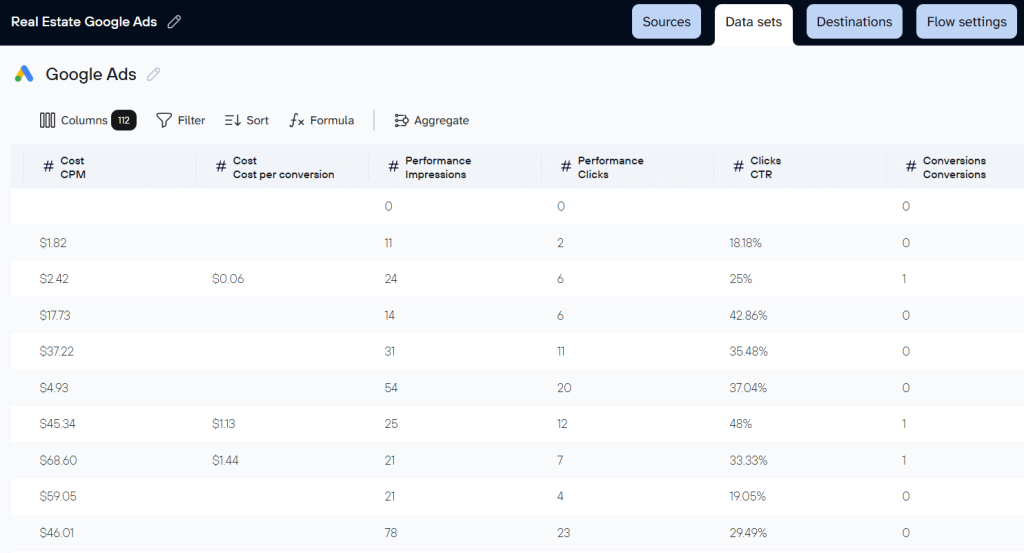
- Choose your AI destination: Claude, ChatGPT, Perplexity, Gemini, etc.
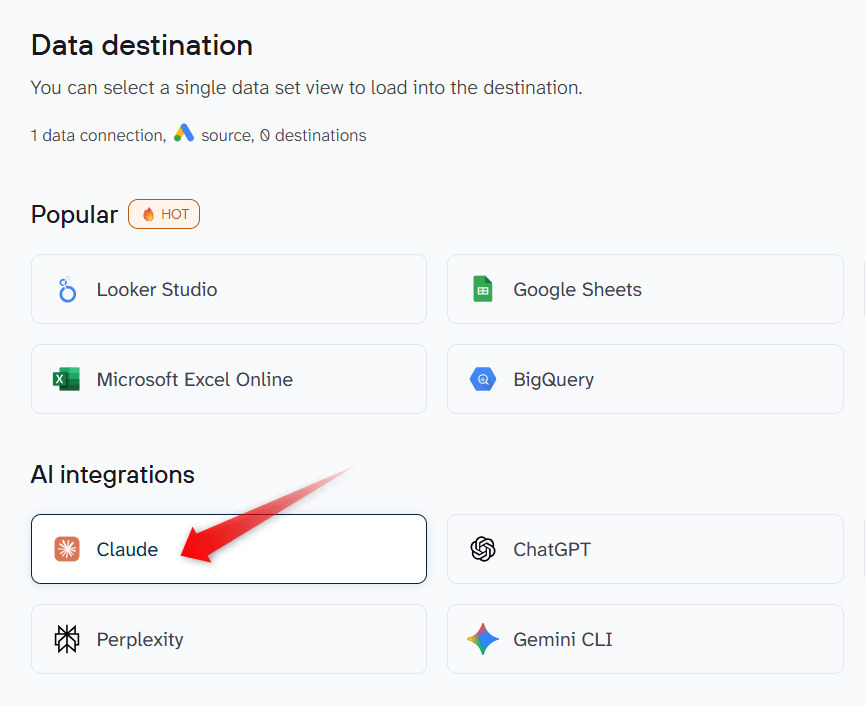
- Save and run the data flow
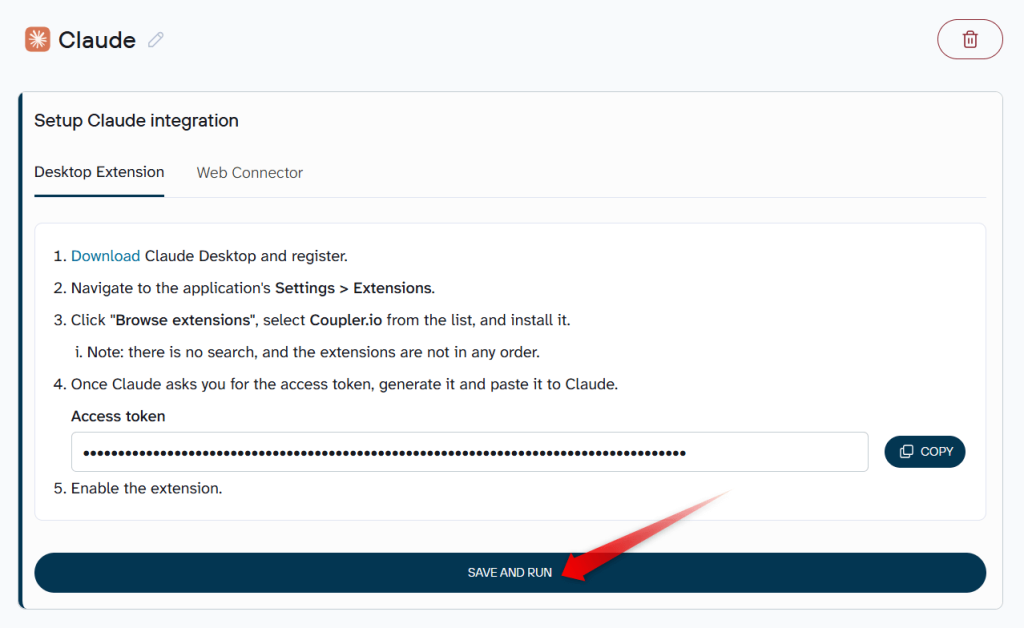
Then you can go to the AI tools and start your conversation.
That’s it. No Docker. No servers. No local hosting. Just a workflow that non-technical users can maintain.
Let’s see this in action.
To start, I asked Claude to fetch my Coupler.io data flow by name: the “Real estate Google Ads” flow.
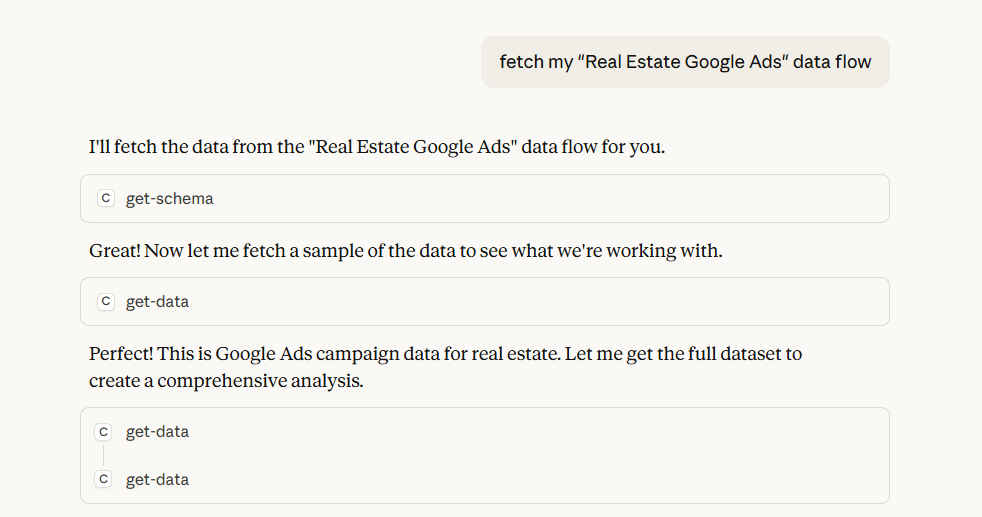
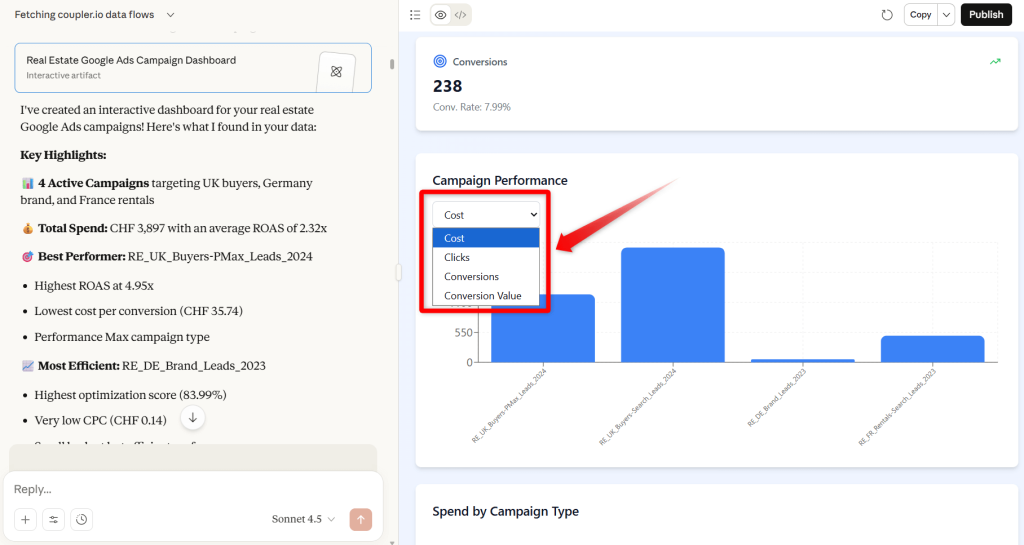
Claude automatically analyzed the dataset and generated an interactive dashboard without any additional prompt.
The dashboard allowed me to switch between performance PPC metrics like CPA, ROAS, and conversions via a dropdown.
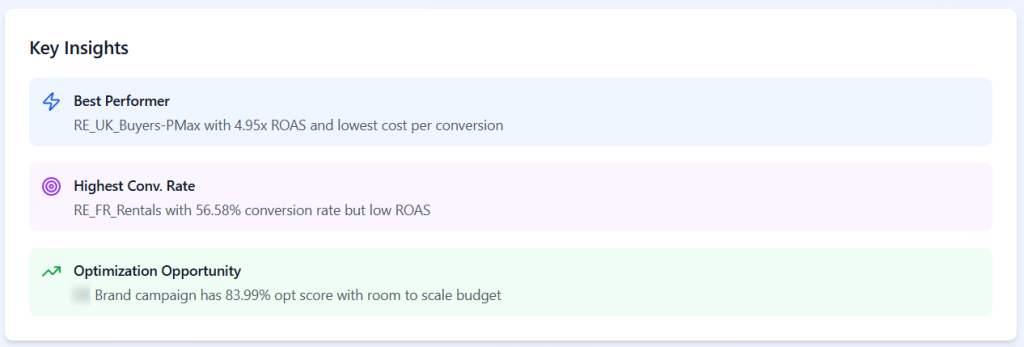
Even before I asked for anything very specific, it surfaced useful highlights about best performing ads, higher conversion rates, and optimization opportunities:
Then I asked a more structured analysis prompt:
Analyse this Google Ads dataset and return:

 1) A table of campaigns with spend, conversions, CPA, CPC and CTR (last 30 days, ranked by spend)
 2) Trends you notice (improving vs declining)
 3) Low-performing campaigns + waste sources
 4) Budget reallocation and optimisation recommendations with reasoning
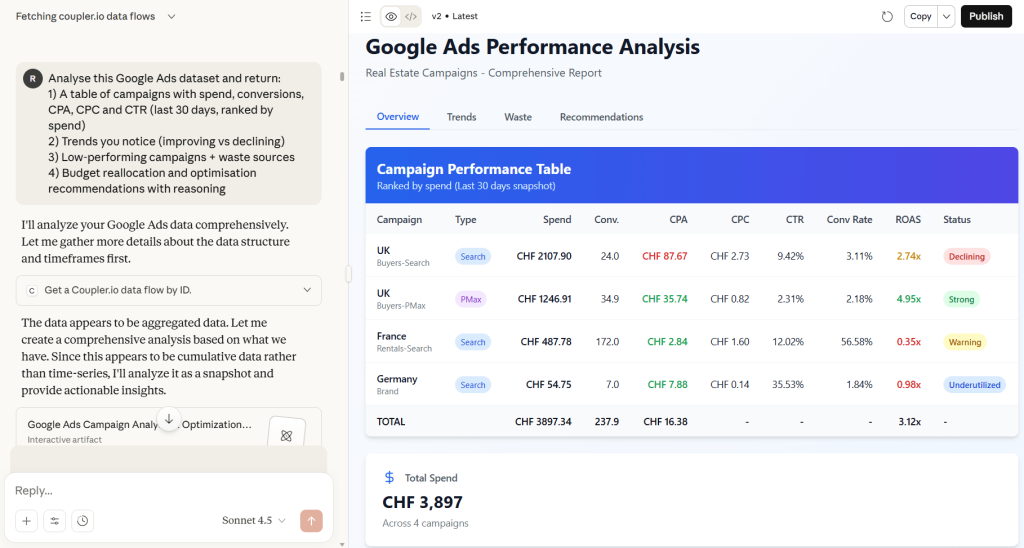
Claude returned:
- A campaign table ranked by ad spend (with spend, conversion, click-through rates, CPA, CPC, and return on investment)
- A clear breakdown of “strong performers” vs “problem areas”
- A quantified estimate of wasted spend per campaign
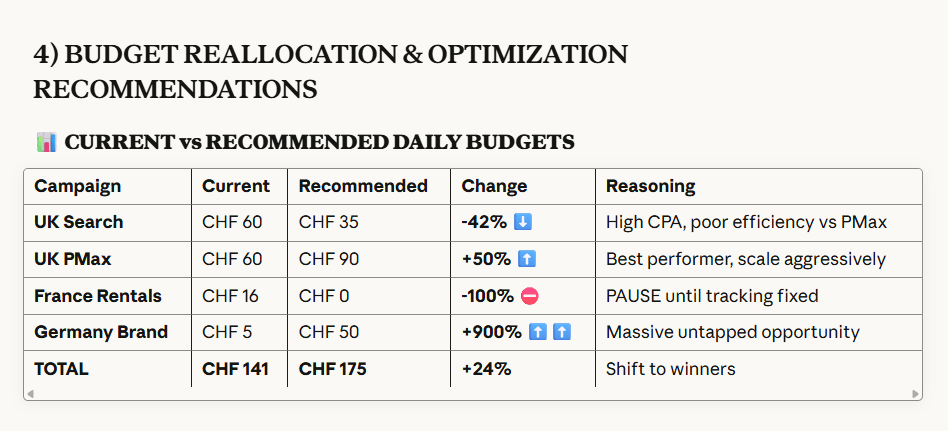
- A budget reallocation table with “current vs recommended” daily budgets and explanations
The most useful part was that the budget reallocation wasn’t just “spend more here, less there”.
It came with reasoning: why Performance Max should be scaled, why Search Ads should be reduced, why certain campaigns should be paused until conversion tracking is fixed, and what impact to expect in the next 30 days.
Instead of hiring engineers to help you analyze Google Ads with AI, your marketing or analytics team can own the whole setup themselves.
With the high-level picture in place, the next step was to hunt down wasted spend. I asked the AI to pull search terms that spent > CHF 7 without a single conversion in the past 30 days (2,050 search terms across several campaigns).
The results:
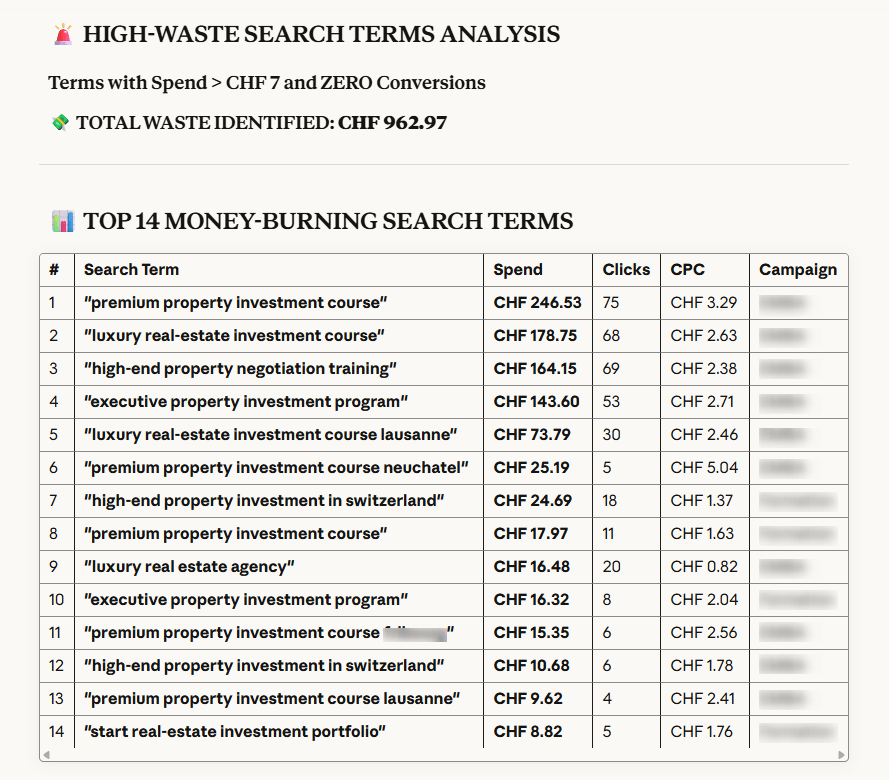
Claude pulled from the synced search term dataset and:
- Calculated the total spend on non-converting queries (almost CHF 1,000 of pure waste in this case)
- Returned a table of the top 14 “money-burning” search terms with spend, clicks, CPC and campaign
It then grouped the waste into clear patterns and generated ready-to-use negative keyword lists at three levels:
- Broad negatives
- Phrase match negatives
- Exact match negatives
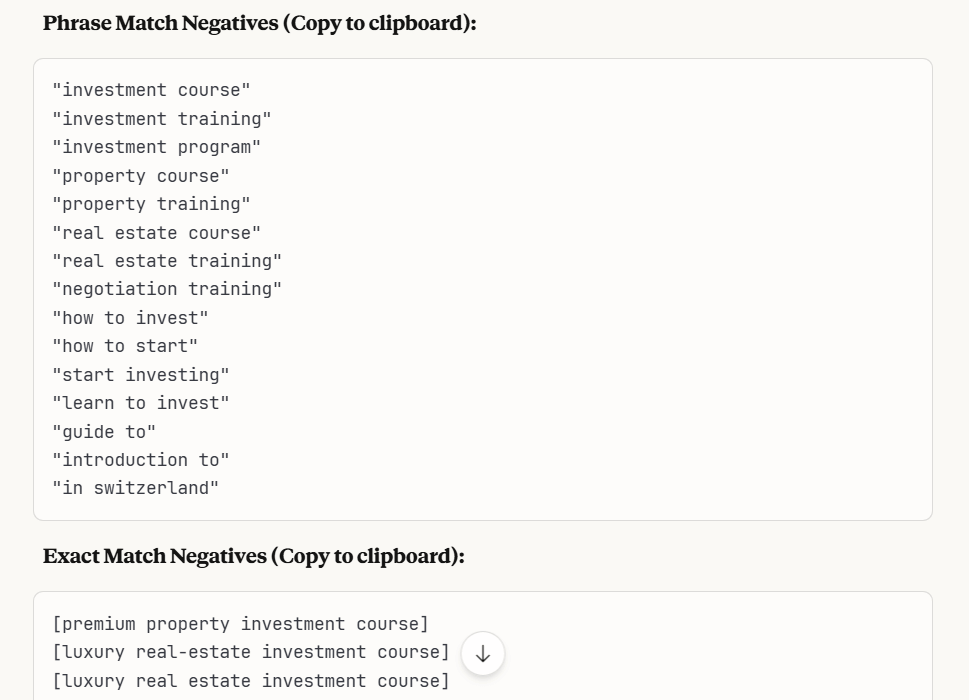
What would normally require exporting to Sheets, building filters, manually scanning hundreds of rows, and adding negative within their right match types, took under a minute.
I got a prioritized negative keyword plan I could paste directly into Google Ads.
What this gives you in day-to-day work
Once this is configured:
- Your Google Ads data is kept fresh on an automatic schedule.
- The AI assistant always sees structured, analysis-ready data.
- You can reuse the same flow and prompt across multiple accounts and markets.
This setup makes it trivial to analyze Google Ads data with AI in the tools your team already uses.
And because Coupler.io supports over 400 data sources (from Google Analytics and Facebook Ads to CRMs and finance tools), you can blend Google Ads performance with other business data in the same AI workspace.
When to choose AI Integrations
Use AI Integrations if:
- You already spend a lot of time in Claude, ChatGPT, or similar tools
- You want to keep the AI interface you’re used to
- You want clean, up-to-date Google Ads data automatically flowing into that AI
- You don’t want to manage any infrastructure
Coupler.io’s AI Integrations give you a no-code, production-ready way for Google Ads AI analytics using the same AI tools you already rely on, without ever touching Docker or the command line.
Integrate Google Ads with AI tools for conversational analytics
Try Coupler.io for freeUse Coupler.io AI Agent for instant Google Ads analysis
The AI Agent is an AI assistant built directly into Coupler.io. Instead of opening another AI conversational analytics tool, you stay inside Coupler.io and talk to your Google Ads data there.
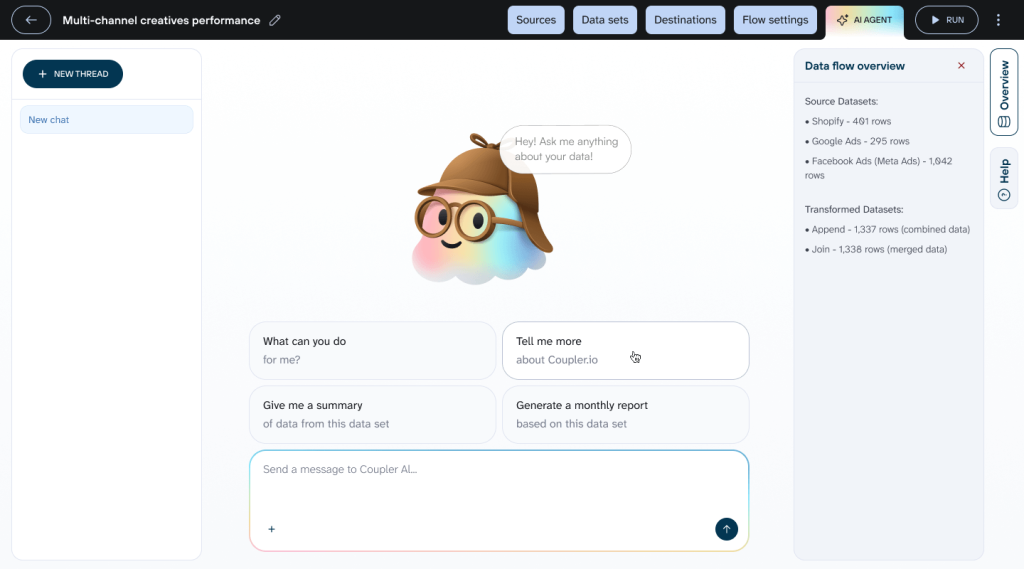
You still rely on the same synced flows from Google Ads, but instead of opening Claude or ChatGPT, you simply open the AI Agent and start asking your questions.
Let’s walk through three concrete examples of what the AI Agent can do:
- An account-level audit
- Finding budget wasters
- Building a budget-neutral reallocation plan.
Example 1 – Account-level audit and data-aware “trend” check
To keep things consistent with the AI Integrations section, I used the same real estate Google Ads account and asked the Agent:
“Look at the last 30 days of this Google Ads account and identify key trends, low-performing campaigns, and optimisation opportunities.”
The Coupler.io AI Agent did not just jump into generic advice. First, it checked the structure of the data flow and then switched intelligently to a full account audit based on the cumulative data.
It identified the star-performing campaign, with a strong ROAS and solid conversion volume, and contrasted it with weaker or more problematic campaigns in the same account.
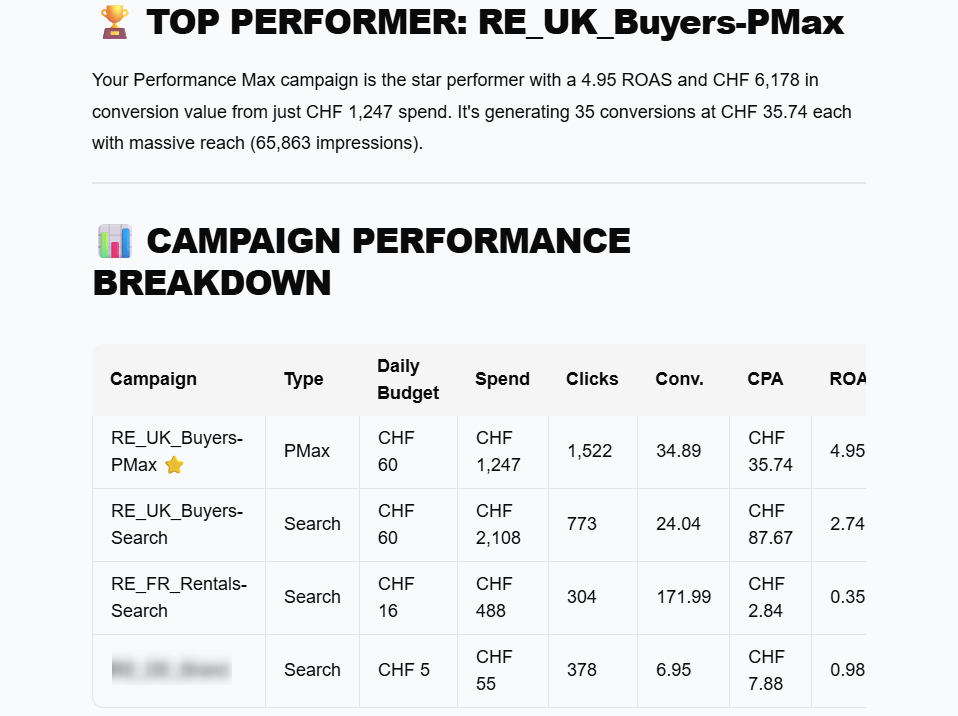
The Agent is not inventing a theory. It is reading actual campaign metrics and surfacing where things are strong, where they are weak, and what deserves a closer look.
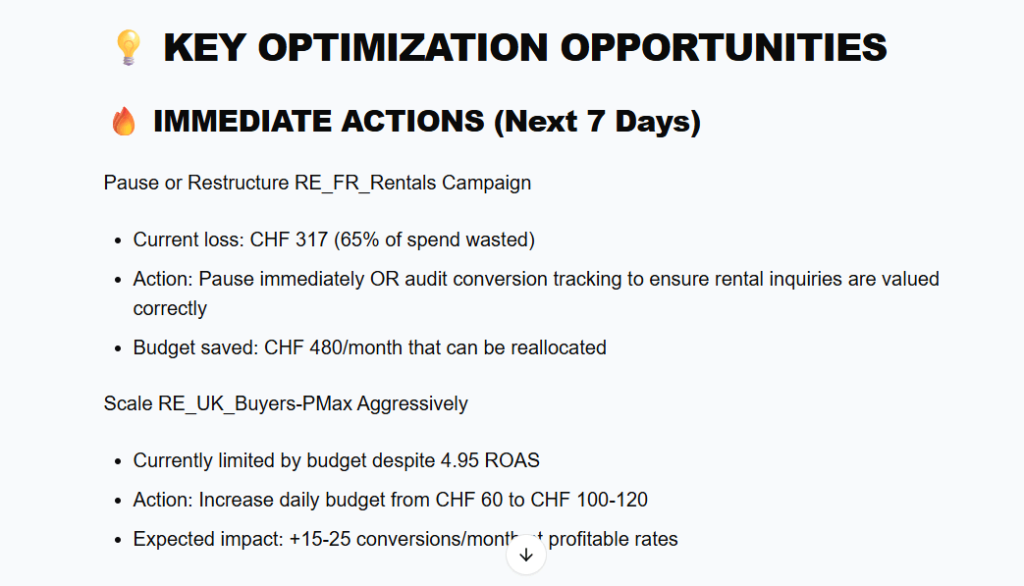
Beyond the audit, it also outlined immediate actions for the next 7 days, turning the analysis into a measurable, step-by-step plan I could actually implement in the account.
Example 2 – Finding the real budget wasters
Next, I asked a more pointed question:
“Which campaigns are wasting the most budget with little or no conversions?”
Here, the Agent focused on identifying money sinks rather than just low CTR or high CPC.
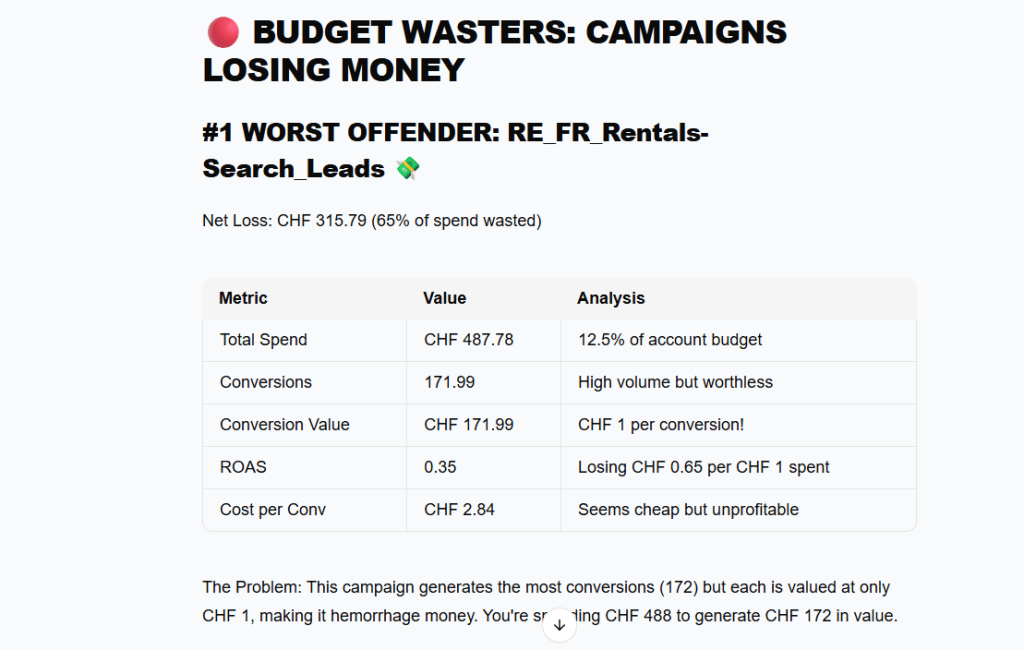
It immediately flagged the worst offender by looking at the spend, conversions and conversion value.
The resulting ROAS is about 0.35, which means the loss was roughly CHF 0.65 for every CHF 1 spent. The Agent also quantified the net loss and described why this is happening, pointing to issues like low conversion values or low-quality leads.
Example 3 – Budget-neutral reallocation plan
Finally, I asked the Agent:
“If I keep the same total budget, where should I reallocate spend?”
Instead of giving generic advice like “spend more on campaigns with good ROAS,” it produced a concrete, budget-neutral reallocation plan based on the current daily budget.
The plan was to increase the budget for the top-performing PMax campaign, reduce spend for the more expensive campaign, scale up the efficient Brand campaign, and drop the unprofitable French Rentals campaign to zero. Each row in the plan showed the current budget, new budget, percentage of total budget, and a short rationale. This is all you need to make data-driven decisions.
The end result is exactly what you would expect to see in a practical optimisation proposal: a clear suggestion of how to reshuffle the same budget across campaigns to get better results.
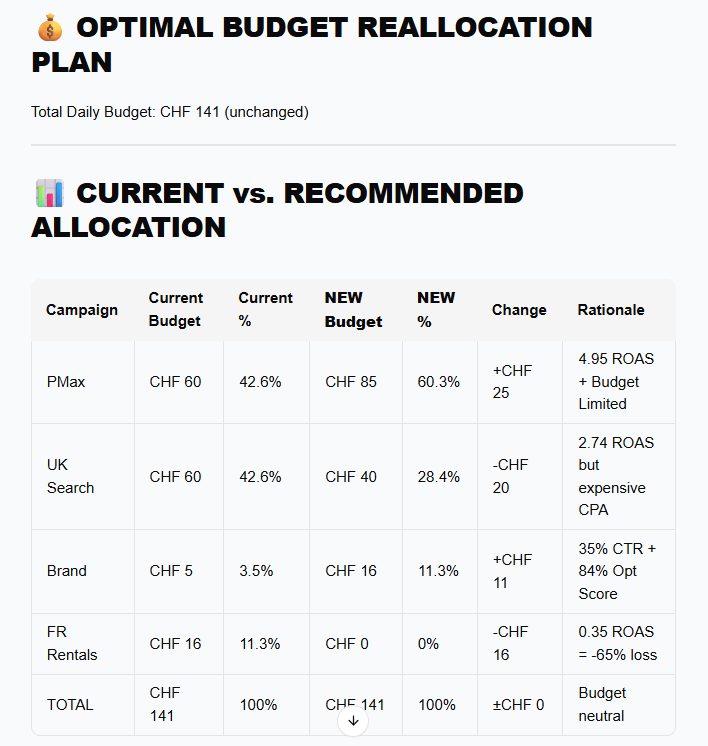
What matters is not only that AI Agent changes numbers. It ties each change to performance. More money goes to the PMax campaign because it has the best ROAS and is budget-limited, less to UK Search because it is profitable but expensive, more to Brand because its CTR and optimisation score justify scale, and nothing to Rentals because its ROAS is unsustainably low.
What AI Agent delivers
From the data analysis point of view, the AI Agent does three important things:
- Keeps everything in context. Its answers are grounded in your synced Google Ads dataset, not on a one-off export or a static CSV.
- Shows quantified insights. Spend, clicks, CTR, CPC, ROAS and CPA are all calculated and interpreted for you, so you spend less time aggregating numbers and more time deciding what to do.
- Supports iterative exploration. You can move naturally from “What’s going on?” to “Where is the waste?” to “How should we reallocate budget?” without rebuilding queries or exports every time.
You still need to sanity-check its recommendations, but you are starting from a much higher-quality business outcomes analysis than a generic “tips for improving Google Ads” answer.
AI Agent vs AI Integrations
At a high level, the trade-off looks like this:
| AI Agent | AI Integrations | |
|---|---|---|
| Where you chat | Inside Coupler.io | In your chosen AI tool (Claude, ChatGPT, Perplexity, Gemini, Cursor, etc.) |
| Setup | No extra setup beyond your data flows | Requires creating a data flow from Coupler.io to an external AI destination |
| Tool-hopping | None | You’ll switch between Coupler.io and the AI interface |
| Best for | Teams that want one central workspace | Teams that already live in a specific AI tool and want to keep using it |
It’s genuinely up to you which one to use:
- If you prefer not switching tools, pick the AI Agent.
- If you have a preferred AI environment, use AI Integrations.
When the AI Agent makes the most sense
Choose the AI Agent if:
- You want a single place to manage syncs, transformations, and analysis
- You prefer not juggling multiple tabs and tools
- You want colleagues to be able to jump in and get insights without separate AI accounts
- You see Coupler.io as a central analytics hub, not just a connector
The AI Agent is the best fit when you want conversational analysis on top of your Google Ads data without leaving Coupler.io.
Add the AI power to your Google Ads analytics with Coupler.io
Get started for freeAnalyze Google Ads with AI in a hard way: Google’s official MCP server
If you have engineering resources and want full control over the integration, Google’s official MCP server is an option. Unlike Coupler.io’s browser-based setup that takes 10-15 minutes, this approach requires significant technical investment upfront and ongoing maintenance. Here’s what’s involved and how it compares.
What the MCP approach delivers
To understand what AI-driven Google Ads analysis delivers through MCP, I tested it using live-account performance queries.
Before any analysis begins, the MCP workflow enforces strict scoping. When you connect to Google Ads, it first shows a list of accessible customer IDs, including individual accounts and the MCC (manager) account, and requires the user to explicitly select which account to work in. No data is queried until this step is completed.
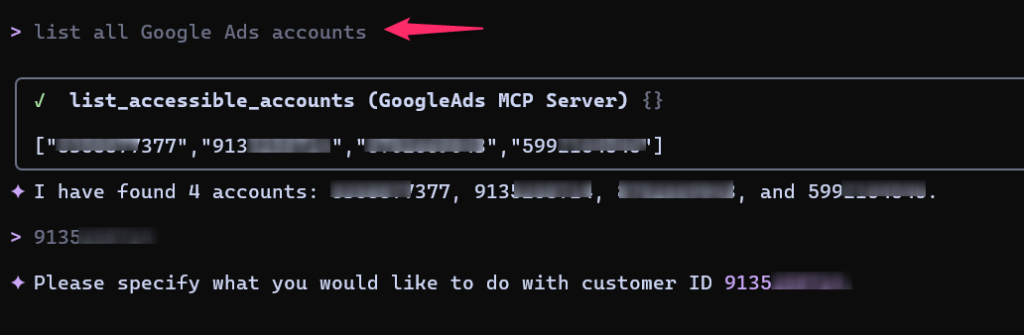
After selecting an account, the system pauses again and asks for clarification, for example:
“What would you like to do with customer ID XXXXX?”
This makes it clear that analysis is intent-driven, not automatic. Queries are not inferred or executed without explicit instruction.
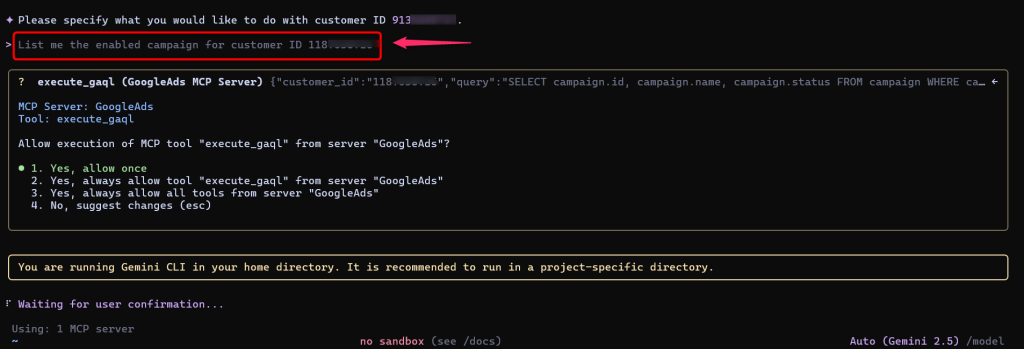
Contrast with Coupler.io: In AI Integrations or the AI Agent, you configure which accounts and metrics to sync once during setup. After that, your AI can immediately access the data without repeated account selection steps.
What kind of analysis and reports can you get with Google’s MCP?
I tested with queries like:
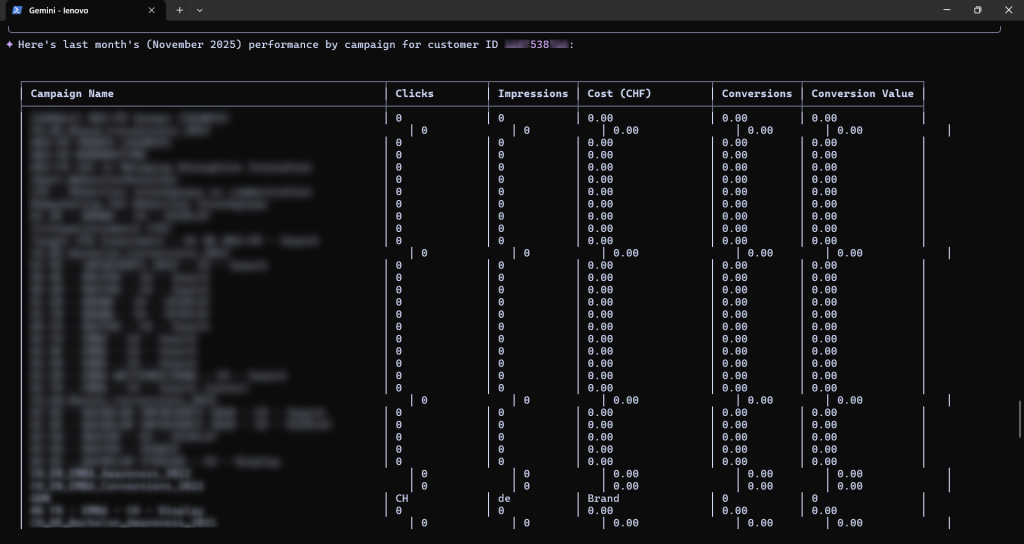
“Show me last month’s performance by campaign.”
This type of query evaluates whether the system can correctly aggregate and summarize core Google Ads metrics. The response returned structured, campaign-level data grounded in the Google Ads API rather than generic commentary.
To move beyond descriptive reporting, I then asked:
“Which ad groups have the worst CTR?”
This diagnostic question tests whether the analysis layer can rank entities and surface potential performance issues.
The response was accurate in terms of raw metrics, making it useful as a way to quickly identify areas that may require closer inspection.
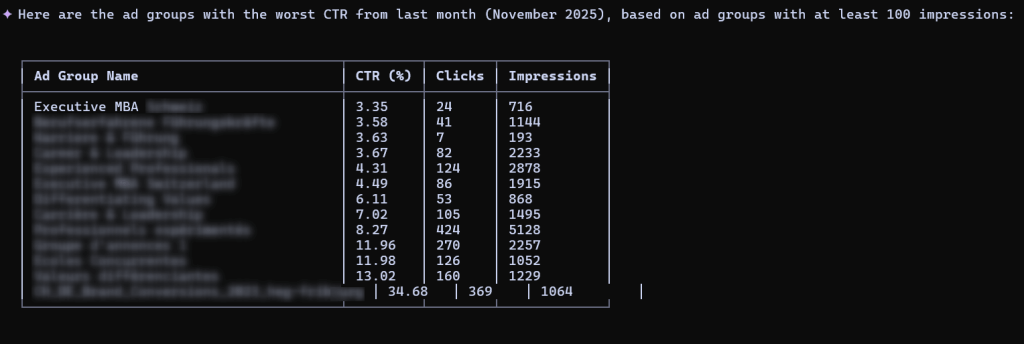
Together, these examples show that the AI can support:
- Baseline performance reporting
- Diagnostic analysis (identifying weak areas)
- Comparative analysis across segments
However, the outputs are best understood as analytical query results, not polished reports.
Comparison with Coupler.io: The analysis capabilities are similar as both options can surface campaign performance, identify low-CTR ad groups, and rank entities. The difference is in presentation and workflow. Coupler.io’s AI Agent and Integrations often return insights with visual elements, tables, and actionable recommendations, whereas MCP responses tend toward command-line-style structured text.
What it’s really like to analyze Google Ads using Google’s MCP
Overall, the responses were accurate and matched what you’d expect to see in the Google Ads interface. Metrics lined up correctly, campaign and ad group relationships made sense, and there were no obvious signs of data hallucination.
The usability gap: The main limitation was usability. Results are returned in a command-line–style, structured format that’s precise, but harder to scan than the visual tables and charts most advertisers are used to in the Google Ads UI.
Model availability issues: Another limitation was model availability. At peak times, analysis sessions were occasionally interrupted by capacity limits, showing messages like “We are currently experiencing high demand” and requiring a retry before results could be retrieved.
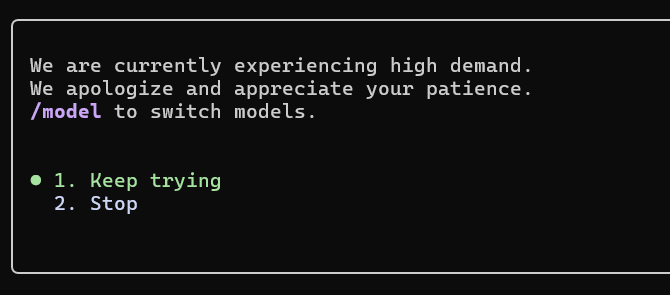
This does not affect data accuracy, but it does impact workflow continuity. With Coupler.io’s cached, synced data approach, you don’t hit API rate limits or capacity issues during analysis. The data is already available.
Configuration fragility: During testing, some tools required manual configuration through local files and offered little feedback when something went wrong. Small misconfigurations could prevent MCP from working altogether, making setup fragile and recovery harder than it should be.
In practice, this means the overall experience depends as much on the AI client’s MCP support as on the MCP server itself. Coupler.io eliminates this variability by managing the entire integration layer.
Which AI tools can be connected to Google Ads MCP?
The Google Ads MCP server is built on the Model Context Protocol, which allows AI tools to query external data sources through a standard interface. In Google’s documentation, this is demonstrated using Gemini CLI, where the MCP server is configured locally and queried from the command line.
While MCP is designed to be reusable across AI clients, the repository only shows this setup with Gemini. Other tools can connect, but there are no documented examples beyond Gemini, and doing so would likely require additional setup work on your part.
Coupler.io’s AI tool support: By contrast, Coupler.io provides documented, tested integrations for Claude, ChatGPT, Perplexity, Gemini, and Cursor. You choose your destination during setup, and the connection works immediately.
What you need to set up the official Google Ads MCP
Without turning this into a developer tutorial, here’s roughly what it takes to get the official MCP server running:
- Install Python 3.10+ and pipx
- Enable the Google Ads API and obtain a developer token
- Authenticate using Google Ads API credentials (Application Default Credentials or
google-ads.yaml) - Configure environment variables and Gemini MCP settings (
settings.json) - Run the MCP server locally through the Gemini tooling
- Maintain credentials, API access, and updates over time
Each individual step is reasonable for an engineer. For a marketing team without dedicated engineering support, this is where the process typically stalls.
Time investment comparison: Where Coupler.io’s setup takes 10-15 minutes through a browser interface, expect to spend 2-4 hours on initial MCP configuration. And that’s if you’re familiar with Python, Docker, and OAuth flows. First-time setup without prior API experience can take significantly longer.
Why it’s tedious in practice
The complexity isn’t just during setup. It continues after:
- Rate limits and quota management: The MCP server queries the Google Ads API directly, which means you’re subject to API rate limits. Run too many queries too quickly, and you’ll hit 429 errors that stop your AI assistant from getting data until the limit resets.
- Infrastructure maintenance: If your Docker container stops, the MCP server goes down and your AI loses access to Google Ads data. If your OAuth tokens expire (which they do periodically), authentication breaks and needs manual renewal.
- Version updates: When Google updates the Ads API or the MCP server package gets updated, you need to manually upgrade and test that everything still works.
- Environment fragility: Something as simple as a Python version change or a system update can silently break your configuration, leaving you troubleshooting cryptic error messages.
Who this approach is really for
The official Google MCP path makes sense if:
- You have engineers or technical analysts on your team who can own this as an ongoing responsibility
- You want full control over hosting, configuration, and query patterns
- You’re comfortable treating this as a small internal service with maintenance overhead
- You’re already invested in highly customized AI infrastructure
- You need direct API access via GAQL for specialized reporting requirements that pre-built connectors don’t support
- You want to minimize dependencies on third-party services for data security or compliance reasons
If that’s not your situation, the ongoing effort required to maintain MCP infrastructure typically outweighs the benefits for most marketing teams.
The core trade-off: Google MCP gives you maximum control and customization, but requires you to become the infrastructure team. Coupler.io trades some low-level control for a service that marketing teams can operate independently, without engineers in the loop for routine analysis.
Google Ads MCP vs Coupler.io: Side-by-side comparison
To help you understand how these approaches differ in practice, the table below compares Google Ads MCP with Coupler.io’s fully managed alternative. This makes it easy to see where Coupler.io simplifies the setup, hosting, and day-to-day use.
| Google Ads MCP | Coupler.io (AI Integrations + AI Agent) | |
|---|---|---|
| Setup | Command-line tools, Python 3.10+, Docker, Google Cloud API enablement, manual JSON credential files, YAML configuration | Browser-based setup with guided OAuth flows for Google Ads and other sources; no command line or local configuration required. |
| Hosting | Self-hosted on your own machine or a server you manage (uptime, security, scaling are your responsibility) | Fully managed cloud infrastructure by Coupler.io with nothing to install or host on your side. |
| Users | Developers and technical analysts comfortable with CLI, containers, and API concepts | Marketing teams, analysts, and business users; no coding skills required. |
| Data freshness | Real-time API queries, subject to Google Ads API rate limits and quotas | Frequent scheduled syncs (for example, every 15 minutes) with cached datasets for instant responses in AI tools. |
| AI tools supported | Primarily designed for Google’s Gemini ecosystem; community guides required to wire it into other AI clients | Pre-configured integrations for Claude, ChatGPT, Perplexity, Cursor and more, with step-by-step guides. |
| Customization level | Direct access to the Google Ads API via GAQL; powerful but requires API knowledge | Predefined fields and structured datasets with natural-language querying. No GAQL or SQL needed. |
| Data sources | One MCP implementation per API you want to expose; additional work for other marketing or business platforms | Over 390 data sources supported through one platform (Google Ads, GA4, Meta Ads, CRMs, finance tools, and more) that can all be exposed to AI through the same mechanism. |
| Customer support | Community support via GitHub issues, forums, and documentation | Dedicated customer support plus documentation, templates, and examples from Coupler.io’s team. |
Why Coupler.io simplifies Google Ads-to-AI workflows
The core difference comes down to who manages the infrastructure. With Google’s MCP, you own the setup and maintenance. With Coupler.io, that layer is handled for you. In practice, this means:
- Reduced technical barriers – Marketing teams can connect Google Ads without involving developers. The OAuth flow and data selection happen through a standard web interface rather than configuration files.
- Maintained infrastructure – When Google updates its Ads API, or when rate limits need handling, or when OAuth tokens expire, Coupler.io manages those changes rather than requiring manual intervention on your side.
- Faster iteration – You can test different prompt strategies, adjust which metrics to sync, or connect additional data sources without rebuilding local configurations.
- Beyond Google Ads – For teams analyzing multiple platforms, Coupler.io supports over 400 data sources. This matters when your analysis needs to combine Google Ads performance with GA4 behavior data, CRM pipeline metrics, or finance systems – all queryable through the same AI interface without managing separate MCP implementations.
Which approach to choose for Google Ads AI analytics
With the rising AI impact on PPC, the choice of the proper AI insights approach depends less on how “advanced” you want your setup to be, and more on who you expect to own it and how fast you need answers.
Choose the official Google Ads MCP if:
- You have the engineering capacity to own setup and ongoing maintenance
- You need direct API access for custom queries or specialized reporting
- You’re building a broader AI infrastructure where full control over data access matters
- You want to minimize dependencies on third-party services
- You’re comfortable with command-line tools and managing server processes
The MCP approach makes sense when you’re already invested in self-hosted infrastructure or when your use case requires API-level customization that managed solutions don’t provide.
Choose Coupler.io AI Integrations if:
- Your team already works primarily in Claude, ChatGPT, Perplexity, or similar artificial intelligence tools
- You want Google Ads data available in those environments without managing sync infrastructure
- Multiple team members need access without a separate technical setup
- You’re analyzing Google Ads alongside other data sources (GA4, CRM, finance tools)
- You prefer to avoid managing credentials, rate limits, and API updates yourself
This works best when you want AI-powered analysis in the tools you already use, without adding infrastructure overhead.
Choose Coupler.io’s AI Agent if:
- You prefer a single workspace for data sync and analysis
- You want to avoid switching between multiple tools and tabs
- Your team benefits from a shared analysis environment without requiring individual AI accounts
- You value having data transformation and AI queries in one place
The AI Agent suits teams that want centralized analytics rather than distributed AI access points.
All three approaches can technically get you to AI-driven insights:
- The official Google Ads MCP server gives you control and direct access but demands significant technical investment.
- Coupler.io’s AI Integrations let you plug Google Ads into Claude, ChatGPT, Perplexity, Gemini, and more with a no-code flow.
- Coupler.io’s AI Agent lets you chat with your synced Google Ads data directly inside Coupler.io, without switching tools.
If you’re a marketer, analyst, or business stakeholder who wants fast, reliable, and low-friction AI insights, starting with Coupler.io will usually give you the best balance of power and simplicity.
👉 Next step:
Sign up for a free trial of Coupler.io, set up a Google Ads connection, and try the prompt:
“Analyse Google Ads data and identify trends, low-performing campaigns, and optimisation opportunities.”
Then decide for yourself whether you prefer working through AI Integrations in your favourite AI app, or through the AI Agent inside Coupler.io.
The good news is that you don’t need servers, scripts, or an engineering team to find out.