
How to Build Client Reports with AI: Reports Your Clients Trust, Built in Half the Time

Every Monday morning: five platform exports, three spreadsheets, two hours reconciling numbers that should already match. Then you write the narrative, format it, send it, and do the whole thing again for the next client on the list. Multiply that across your roster, and reporting alone eats a full day.
AI client reporting absorbs the repetitive parts. Connect your data sources once through Coupler.io and describe the report you need in plain language. The AI aggregates cross-platform metrics, drafts the narrative, and flags what changed. You review, add the context only you know, and send.
By the end of this article, you’ll learn how to build client reports with AI in practice; what the setup looks like, what you get when it’s running, and how to connect it to the AI tools your team already uses.
AI client reporting: what it is and where it fits
Most agencies rely on one of two approaches to deliver client reports, and both have a gap.
- Live dashboards (Data Studio, Power BI, Tableau) are self-serve and refreshed, but most clients don’t log in. And when they do, they see numbers without narrative. For example, a dashboard shows that ROAS dropped 18%. It doesn’t explain that you deliberately shifted budget to a brand awareness campaign with a longer conversion cycle. The client sees a problem where there isn’t one.
- Analyst-built BI reports solve the narrative problem, but they’re slow. A custom cross-platform report can take days to build, and updating it next month means going back through the same steps. For agencies managing ten or twenty clients, it simply doesn’t scale.
AI-powered client reporting fills the gap. Your connected performance data stays on a scheduled refresh. The AI layer drafts the commentary, flags anomalies, and surfaces trends. The client gets a narrative that explains the numbers before they drill into a dashboard, not a spreadsheet they have to interpret themselves.
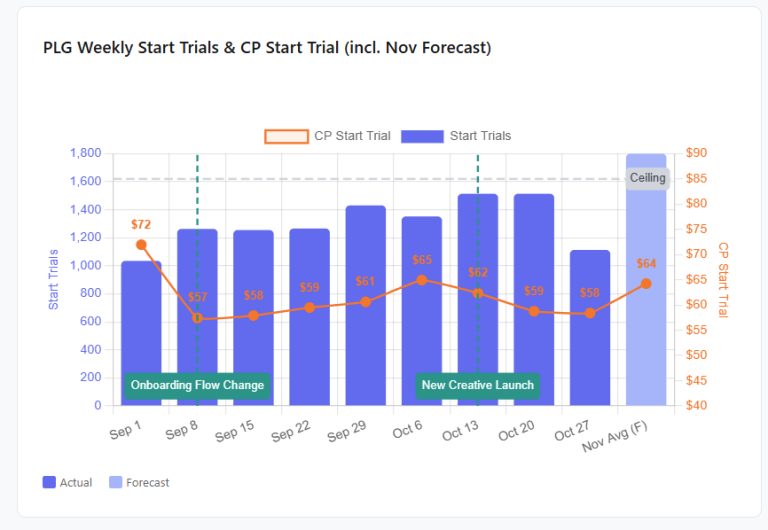
What AI reporting looks like in practice: 60% less time on $1M+ monthly ad spend
Gabriel Solberg at Right Percent manages $1M+ in monthly Meta ad spend across 50+ live ads through Coupler.io and Claude.
He cut reporting time by 60% and brought daily campaign reviews under 10 minutes. His workflow:
- Produces stakeholder-ready reports from saved Claude artifacts
- Catches creative fatigue days before Meta’s algorithm would flag it (preventing $5,000+ in wasted daily spend per declining ad)
- Answers ad hoc client questions with data-backed responses during live calls.
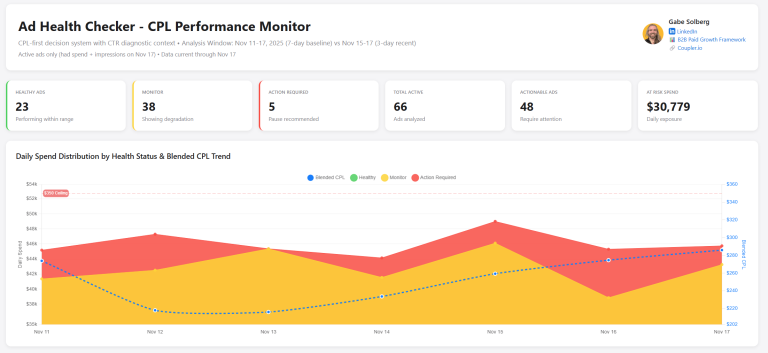
Every analysis he builds is reusable: the same artifact reruns on fresh data next week without rebuilding anything.
He calls this “vibe reporting”: trusted answers fast enough that reporting time goes toward strategy instead of spreadsheets. It’s AI client reporting at its most practical: set up once, reuse every week.
What AI client reporting can and can’t do
AI is good at aggregating metrics across platforms, spotting trends and running anomaly detection, drafting commentary in natural language, and formatting results for a report.
AI can’t know that your client just lost a key supplier. It can’t set a strategy. It can’t calibrate tone for a client who panics at any dip. And it can’t catch broken tracking that feeds bad data into good math.
| 💡 The ideal split: AI handles data assembly, calculations, and the first draft. You handle the strategic context, the client relationship, and the final call on what goes out. |
Coupler.io is built around that split: it connects your data, runs the calculations, and feeds AI tools the results so you can focus on the parts that need a human.

Automate your client reporting across every ad platform with Coupler.io
Get started for freeHow to set up AI client reporting that holds up
Here’s what AI-powered client reporting gives you when you set it up in Coupler.io, whether you work inside Coupler.io’s AI Agent or through Claude, ChatGPT, or Gemini.
Connect data sources: one data flow, not five platform exports
The old way: log into five platforms, export CSVs, paste into a spreadsheet, reconcile column names. Every month. For every client.
With Coupler.io, you describe what you need to the AI Agent:
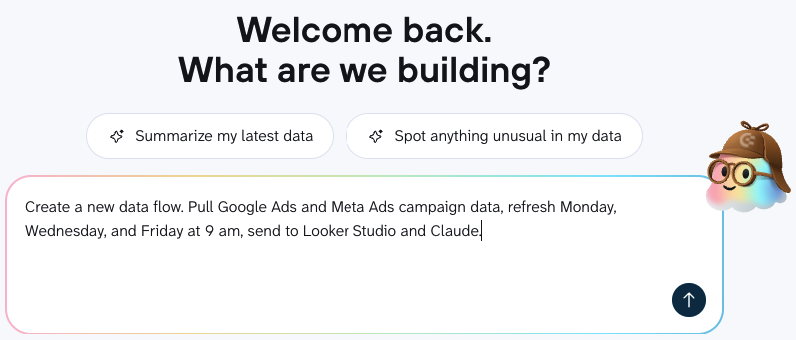
Coupler AI sets up the connection, and the data starts syncing on the schedule you defined.
If a client runs campaigns across several sources, you can feed them all into one data flow and send to several destinations. You set this up once per client. Next month, the up-to-date data is already there.
Coupler.io supports 400+ sources with scheduled refreshes up to every 15 minutes.
Organize data into reusable datasets, not one-off spreadsheets
Raw platform data rarely arrives in the shape a report needs. Field names differ across sources, schemas don’t match, and the metrics a client cares about often need to be calculated from other fields.
Coupler.io handles this before the data reaches any destination: filter irrelevant columns, rename fields so they make sense in a report, add calculated fields, and aggregate rows. For heavier work like joining ad spend from one source with revenue from another, Coupler.io supports SQL-based transformations. You don’t write SQL yourself. Describe what you want to the AI Agent, review the query, and the transformation runs automatically with every refresh.
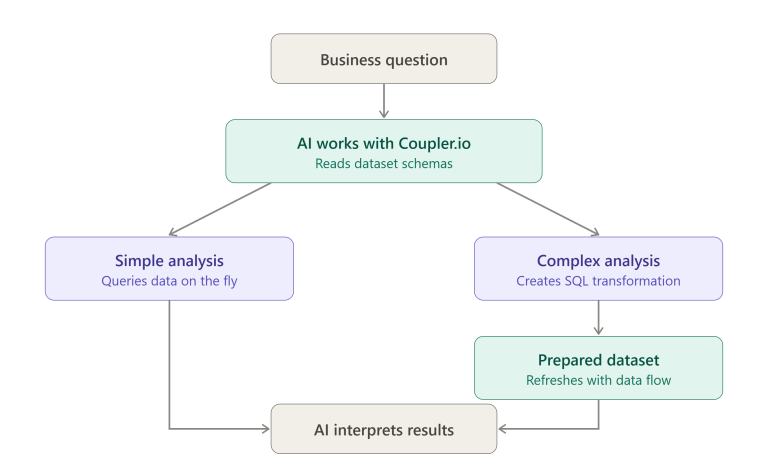
💡 The result: one prepared dataset that feeds your AI conversations, your dashboards, and your spreadsheets. The numbers match everywhere, and you never reconcile across tabs again.
Add business context so AI doesn’t misread your numbers
Without context, AI produces confident answers that are wrong.
Say your client deliberately narrowed their Meta Ads targeting to attract higher-quality leads. CPL rises 30%. A model without context flags this as underperformance and recommends lowering bids. The reasoning is logical. The recommendation is wrong.
AI Context in Coupler.io lets you document business rules, metric definitions, and strategic notes at the dataset level. That context travels with every query, so the AI starts from your business logic instead of guessing.

AI Agent Skills for reporting add repeatability on top of that context. Each Skill defines what data to use, the analytical steps to follow, and validation checks. Instead of writing analysis prompts from scratch every week, the same workflow runs against refreshed data.
Coupler.io offers pre-built Skills including Facebook Ads Audience analysis, Google Ads Keyword and Quality Score analysis, TikTok Ads Performance review, and LinkedIn Ads client report, and more (full Skills library).
Skills work inside Coupler.io’s AI Agent and through connected AI tools like Claude and ChatGPT.
Get calculations you trust, not AI guesses
If you paste a CSV into ChatGPT or Claude, the model tries to calculate and interpret at the same time. But LLMs aren’t built for arithmetic. They can produce a number with complete confidence that doesn’t match the source data. That’s a problem when the number ends up in a client report.
Coupler.io’s Analytical Engine keeps the math outside the language model entirely. When you ask a question, the AI translates it into a query. The Analytical Engine runs that query against your full dataset and computes the result. The AI receives the answer and does what it’s actually good at: explaining it, identifying patterns, and surfacing what changed.
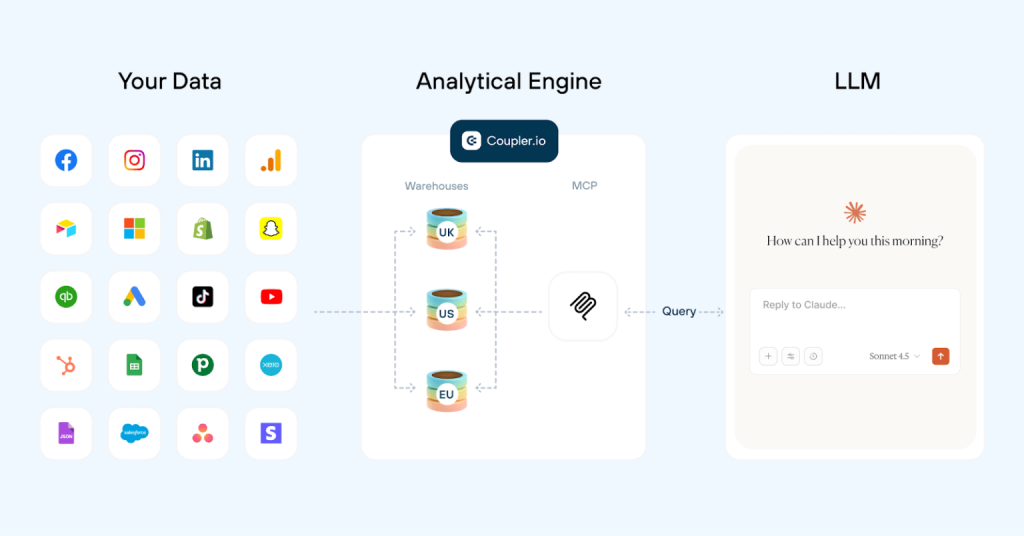
The Analytical Engine calculates. The AI interprets. The numbers in your client report come from executed queries, not from the model’s estimate.
Generate AI client reports with numbers you can trust using Coupler.io
Try for freeBuild templates once, white-label client reports across your roster
A good template means the next client doesn’t start from zero. Set up the layout once (executive summary, paid media, organic performance, next steps), decide what stays fixed and what flexes per client, and reuse it across your roster.
If your agency delivers white-label client reports, branding gets handled at the template level. Coupler.io’s template library has 150+ options across PPC, social media, marketing, SEO, finance, and sales analytics. Pick one, customize, and present under your brand. Next month, you update the data, not the template. White-label client reports save the most time when the template handles the branding and the data handles itself.
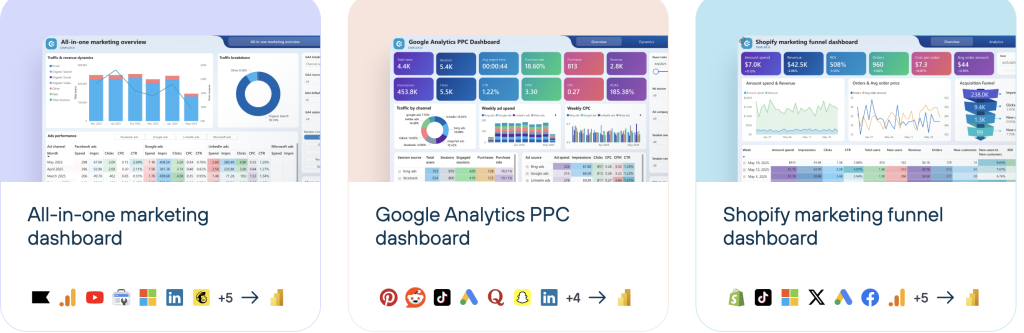
💡 One practical rule: keep data and formatting in separate layers. If charts and layout sit in the same sheet as the raw data feed, a refresh can overwrite formatting or break references.
Review and personalize reports before sending
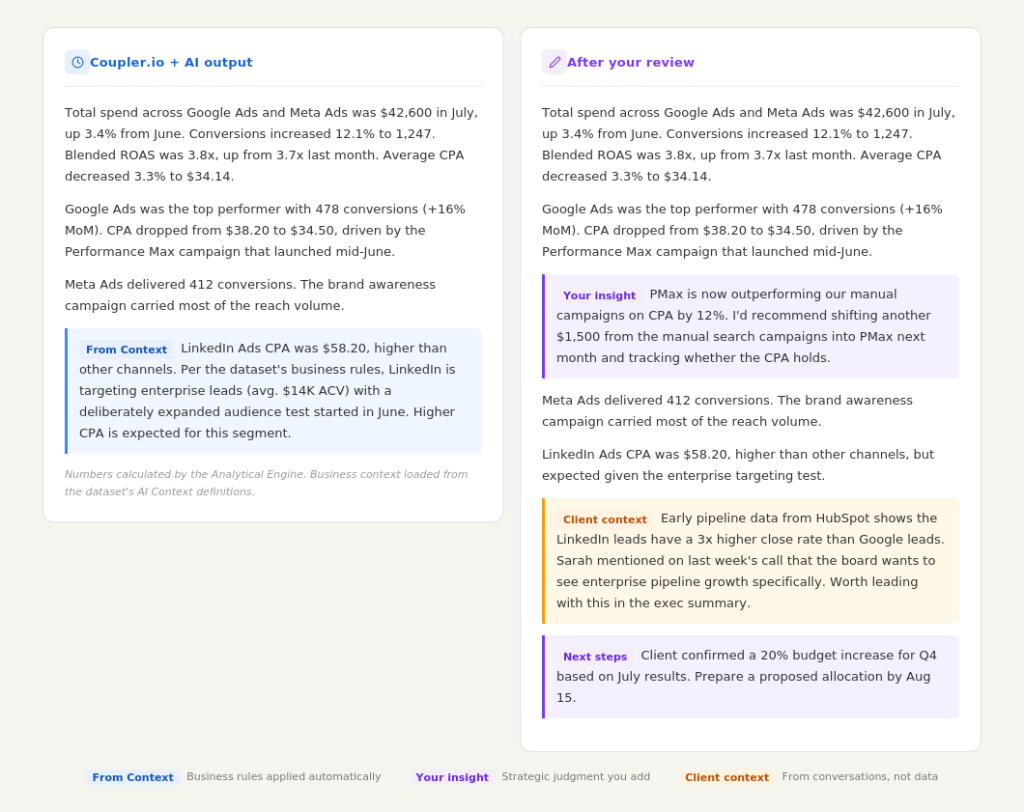
The review pass isn’t about fixing the AI’s math. If your Context and data preparation are set up properly, the numbers and the interpretation should already be solid. The review is about adding the things no data setup can capture.
When you review AI-generated reports, check for these things:
- Strategic recommendations. The AI summarizes what happened. You decide what to do about it. Add specific next steps: “
Shift $1,500 from manual search into PMax next month,” “Prepare a Q4 budget proposal by Aug 15.“ These turn a performance summary into a specific plan. - Client context from conversations. The client mentioned on last week’s call that their board wants to see enterprise pipeline growth. Their CEO is skeptical about LinkedIn spend. They’re planning a product launch in September. None of this lives in the data, but it changes how you frame everything in the report.
- Tone and framing. Some clients want the headline number first and details second. Others want to see every campaign broken down. One client might need the LinkedIn CPA framed around close rates and ACV; another might just want to know if they’re on budget. Adjust the narrative to match how this client reads and reacts.
- A quick sanity check. A broken tracking pixel, a misconfigured conversion event, or a sudden GA4 data gap will produce accurate calculations from inaccurate inputs. A 30-second scan of the headline numbers against what you know from managing the account catches these before the client does.
Below, you can see the example of the AI narrative before and after a review:
Set up automated report delivery in the format each client wants
Set your data refresh on a recurring cadence and destinations update automatically. Dashboards, spreadsheets, and warehouse tables stay current without anyone touching them.
The AI narrative runs on your schedule: open the AI Agent or Claude, run your prompt (or let a Skill handle it), review, and send. For most agencies, that’s Monday mornings for weeklies and the first business day of the month for monthlies. Once this is running, each cycle is review-and-send, not build-from-scratch. Automated report delivery turns a multi-hour build process into a 15-minute review.
Coupler.io’s dashboards and templates give you a starting point for each format so you’re not designing layouts from scratch.
How the report reaches the client depends on what they prefer:
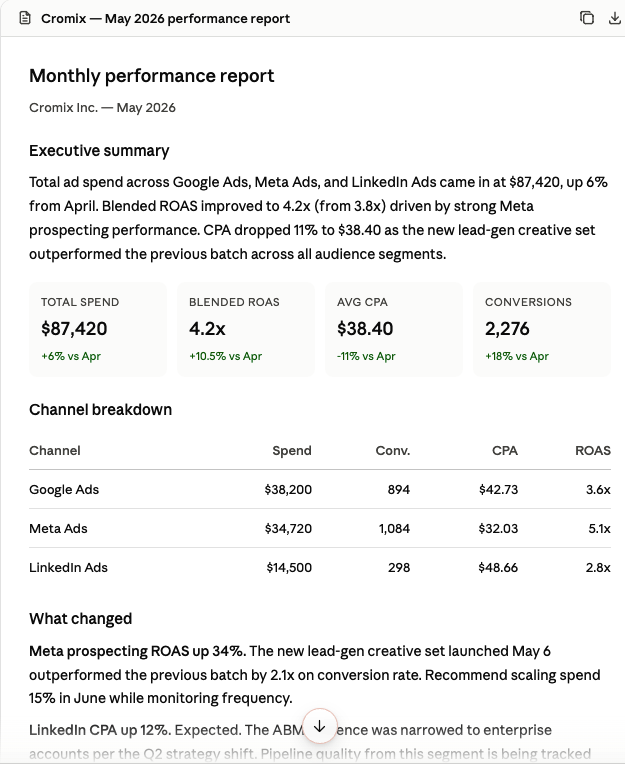
- Claude artifacts for performance summaries and visual tables you can save, iterate on, and reuse next cycle. This is how Solberg builds his weekly stakeholder updates.
- Data Studio or Power BI for clients who want interactive dashboards with filtering.
- Google Sheets for clients who want to explore the numbers themselves.
- PDF for the client who forwards everything to their CFO.
- PowerPoint or Google Slides for teams that run on slide decks.
- Custom client-facing dashboards for clients who want their own live board rather than a weekly report.
Freelance paid media specialist Palmer Krehel builds one custom dashboard per client using Coupler.io’s JSON destination with Claude and Cloudflare, with zero manually written code. Feedback from a client turns into a live change in seconds, instead of a rebuild scheduled for next week.
⚠️ Important note: Watch for broken OAuth tokens. Automated reporting breaks when a platform connection expires. Check your data flows before each cycle, or set up alerts so you’re not sending a report built on stale data.
AI reporting workflow: Claude, ChatGPT, and Gemini
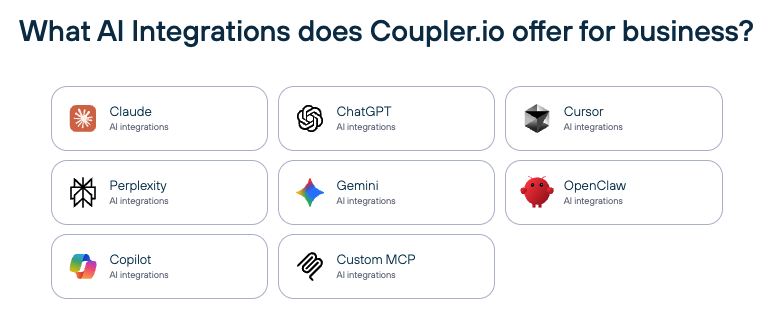
If you need to integrate data with LLM, Coupler.io’s AI integrations include Claude, ChatGPT, Gemini, and other AI tools so you can generate the narrative layer wherever your team already works. The data, the Analytical Engine, and the Context layer are the same regardless of where you ask. Here’s what each tool brings to client reporting specifically.
Claude for client reporting
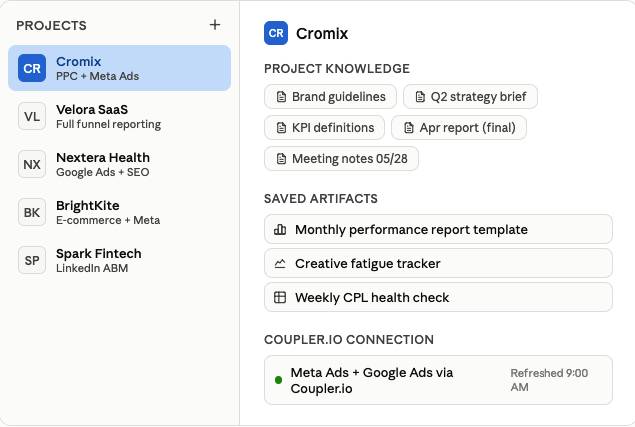
Claude Projects separate client contexts. Each Project is an independent workspace, so analysis for Client A doesn’t bleed into Client B. It’s also where you load everything Claude needs to report well for that client: brand guidelines, past reports, strategic notes, metric definitions, meeting summaries.
The more context a Project has, the less you correct in review. If you manage ten clients, you set up ten Projects, each carrying the full picture of that account.
Claude Artifacts let you generate tables, charts, and visual summaries directly in the conversation, then save and reuse them. This is exactly how Solberg builds his weekly stakeholder reports: a saved artifact template, refreshed with new data, updated with strategic context, and ready to share. The artifact becomes the report.
Coupler.io Skills work inside Claude, so the same pre-built analytical workflows (Facebook Ads performance, Google Ads keyword analysis) run against your refreshed data without writing a new prompt each time.
Coupler.io’s schema feature teaches Claude your dataset structure (column names, data types, sample values) before analysis starts, which reduces misinterpretation when metric names overlap across platforms.
That’s what makes Claude for client reporting reliable at scale: the AI works from structured, contextualized data rather than raw exports.
ChatGPT for client reporting
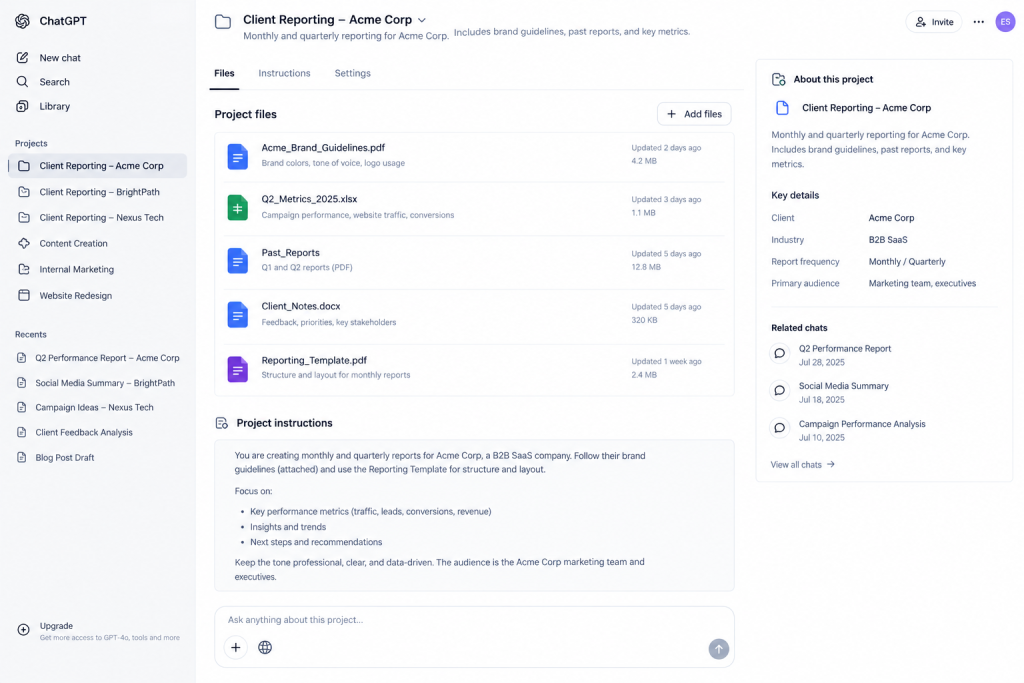
ChatGPT Projects work similarly to Claude Projects: a dedicated workspace per client where you store instructions, past reports, brand guidelines, and reference documents. Everything in the Project informs ChatGPT’s responses, so the AI already knows how this client’s reporting should look before you ask.
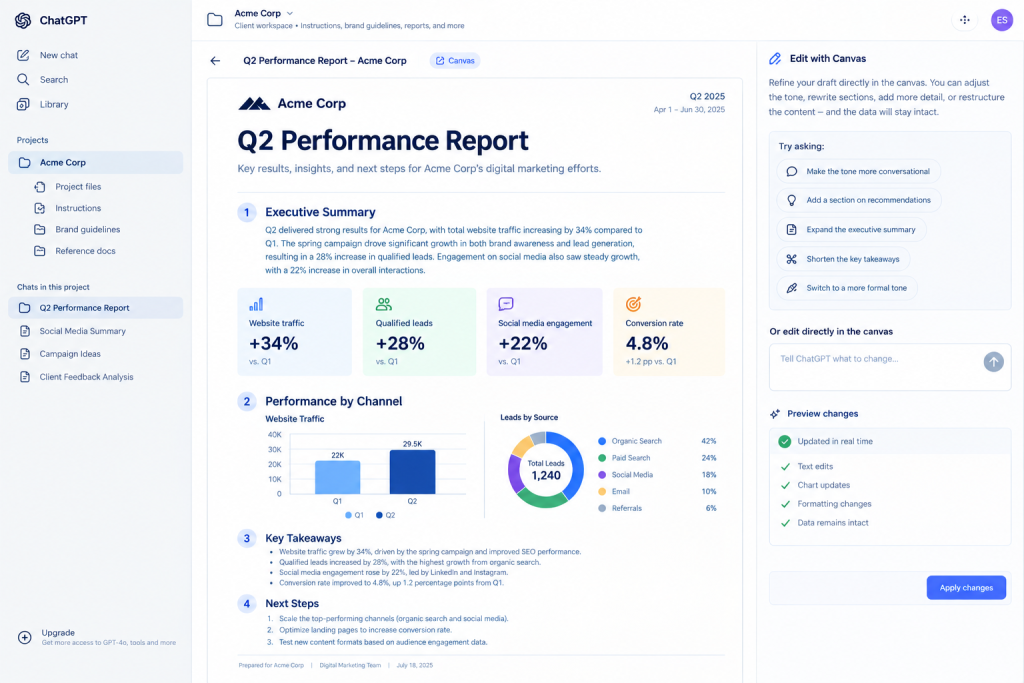
ChatGPT Canvas lets you edit and iterate on the narrative in a side panel. Generate the draft, refine the wording, adjust tone, or restructure sections without losing the data context.
ChatGPT for client reporting is a good fit for agencies that want hands-on control over how the final narrative reads before it goes to a client.
Gemini for client reporting
Gemini for client reporting is the strongest option if your agency already lives in the Google ecosystem.
Coupler.io connects to Gemini through MCP. Gemini doesn’t have project workspaces or saved artifacts like Claude, so you won’t get the same client separation or reusable report templates inside the tool itself.
But if your agency already lives in the Google ecosystem, it has a different advantage: Gemini works natively with Sheets, Slides, Gmail, and Data Studio. You can ask Gemini to summarize a client’s monthly performance from your Coupler.io data, then push that summary straight into a Google Slides deck or draft it as a client email in Gmail without leaving the ecosystem.
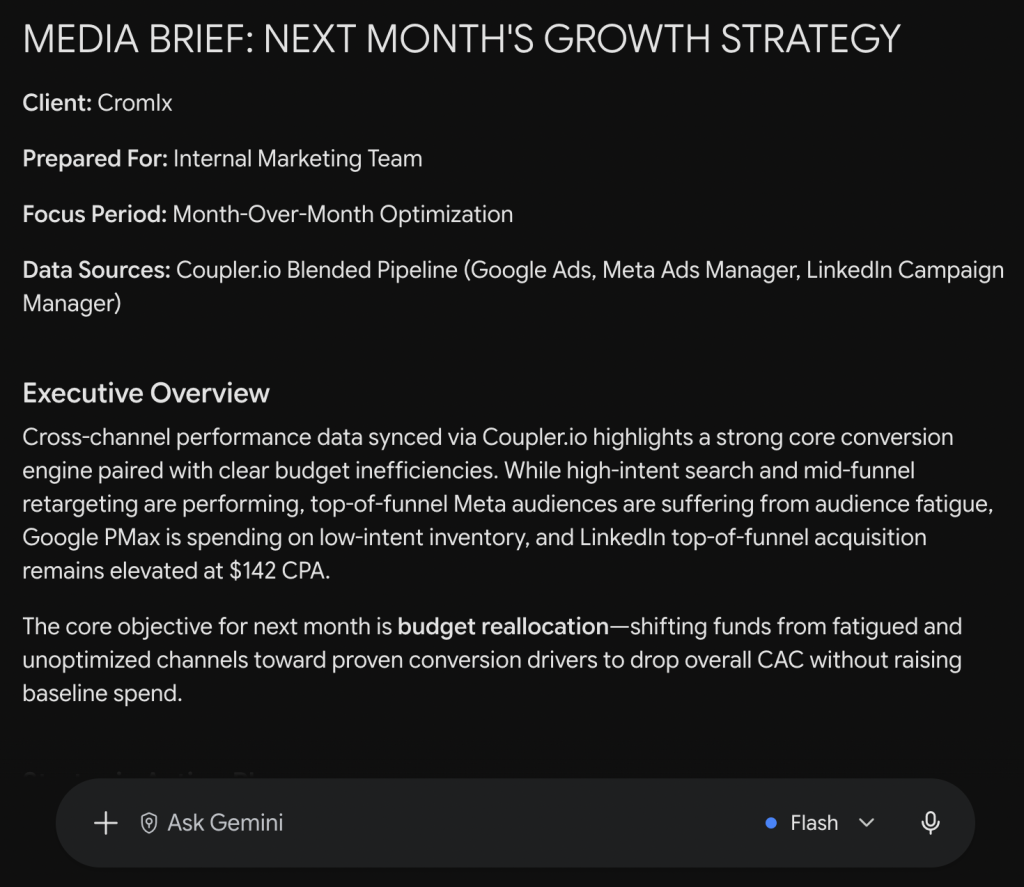
If your reports already land in Data Studio, Gemini adds the narrative layer without switching tools.
Build your AI client reporting workflow in Coupler.io, Claude, or ChatGPT
Get started for freeCommon mistakes in AI reporting for agencies
The setup is straightforward, but a few recurring mistakes can undermine the whole workflow. Here’s what to watch for.
Treating automated client reporting as fully hands-off
The most common mistake in automated client reporting is treating “automated” as “done.” Even with accurate numbers and solid interpretation from Coupler.io, the AI can’t add what it doesn’t have: your recommendations, the context from last week’s client call, or the framing that matches how this specific client reads a report.
The review pass I covered above is about adding the strategic layer that makes the report yours, not just a generated document. AI reporting for agencies works best when the automation handles data assembly and the human handles everything that sits outside the data.
Always review AI-generated reports. Always add the human layer. It’s not optional.
Technical traps: broken tokens, stale data, one-size-fits-all templates
- Broken OAuth tokens. Platform tokens expire. When they do, your data flow stops syncing, and the next automated report goes out with last month’s numbers (or zeros) labeled as current. Set up alerts for failed syncs or check manually before generating each report.
- No refresh schedule. If you connected data sources but forgot to set a refresh schedule, the client sees stale data dressed up as current. For weekly reports, refresh at least daily. For anything client-facing, Coupler.io’s refresh intervals (up to every 15 minutes) keep automated client reporting current when the AI generates the narrative.
- One template for every client. A SaaS client and an e-commerce client need different key performance indicators (KPIs), different sections, and different framing. Using the same template without tailoring the metric definitions and section structure per business model produces reports that feel generic. This is where client retention shows up in the details: clients stay when the report reflects their business, not a template. Automated report delivery only helps if the report it delivers actually fits the audience. Our guide to agency reporting for marketing breaks down what that tailoring looks like across channels and client types.
Build your first AI client report today
AI client reporting won’t eliminate the judgment, context, and relationship building that make agency reporting valuable. AI reporting for agencies eliminates the hours of exporting, formatting, reconciling, and writing first drafts that eat into time you could spend on strategy.
Once you know how to build client reports with AI, the workflow is straightforward:
- Connect data sources to Coupler.io
- Build a reusable template
- Let AI generate the narrative and run anomaly detection
- Review and add your context
- Set up automated report delivery
Do it once, refine it, and reuse it across your client roster.
How to build client reports with AI starts with getting your data into one place. Coupler.io handles the integration, the calculations, and the AI layer so the numbers your clients see are the numbers you trust.
All-in-one reporting platforms bundle some of this into a single tool, but you trade flexibility and predictable cost for convenience. The modular route covered here scales without per-client pricing surprises.
Set up automated client reporting for your entire roster with Coupler.io
Get started for free


