
I’ve been experimenting with OpenClaw for a few weeks now, and I have to say, it’s one of those tools where the excitement and the anxiety hit you at the same time.
On one hand, you get an AI agent that actually does things. On the other, it wants access to pretty much everything on your machine to do them. So when I set out to connect it to our product data, my first question wasn’t “can I?” It was “should I, and how do I do it safely?”
So, let me share my findings, including the parts that didn’t go smoothly, so you can skip the trial and error and get straight to a working automation.
OpenClaw: powerful, popular, and a bit dangerous
If you haven’t come across OpenClaw yet, here’s the short version. It’s not just a free, open-source AI agent created by Peter Steinberger (the founder of PSPDFKit), but one of the fastest-growing open-source projects of all time! It runs locally on your machine and connects to messaging apps like Telegram, WhatsApp, Slack, or Discord. You interact with it through chat, and it goes off and actually executes tasks: sending emails, running shell commands, browsing the web, managing files, and orchestrating workflows.
The project went viral fast. Over 247,000 GitHub stars in about two months. You pick the LLM that powers it (Claude, GPT, DeepSeek, or others), and OpenClaw handles execution, persistent memory, and integrations through a growing library of “skills” on ClawHub.
The security problem
OpenClaw is powerful because of the permissions it holds. It can read and write files, execute shell commands, and interact with APIs using your credentials. That’s great when everything works as intended. But when something goes wrong, those same permissions become a liability.
And things have gone wrong.
- Cisco’s security team tested a third-party OpenClaw skill and found it was silently sending data to an external server without user knowledge.
- Microsoft published guidance recommending that OpenClaw be treated as “untrusted code execution with persistent credentials.”
- China’s CNCERT issued a national warning about weak default configurations.
- Researchers demonstrated that even Telegram’s link preview feature could be turned into a data exfiltration pathway when used with OpenClaw.
The security community has a name for this pattern: the “lethal trifecta”. The agent has access to private data, can communicate externally, and is exposed to untrusted content (emails, web pages, messages from other agents). All three at once.
Here you can learn more about OpenClaw security.
So if you want OpenClaw to work with your business data, you need to think carefully about how you connect it.
Why you should use Coupler.io as the middle layer
The problem comes down to three risks:
- Credential exposure. Give OpenClaw your Google password or a Salesforce API key, and a compromised session means an attacker gets those too.
- Write access. If the agent can modify data, a single hallucinated command could delete records. “
Remove all inactive customers” sounds like a reasonable filter query, until the model gets it wrong. - Blast radius. Wire up five systems with full access, and a single breach affects all five.
Coupler.io solves all three by sitting between OpenClaw and your actual data sources.
When you connect through Coupler.io, OpenClaw never sees your passwords, API keys, or OAuth tokens for any source system. Coupler.io stores those credentials securely and issues only a scoped MCP token to the agent. That token expires after 2 hours and grants strictly read-only permissions. There’s also a refresh token that keeps scheduled reports running without manual re-authentication. The agent can list data flows, query synced data, and inspect schemas. It cannot modify anything, delete anything, write back to your tools, or access raw credentials.
Even if someone fully compromises your OpenClaw session, the worst they get is temporary read access to already-synced data. Your production systems stay untouched.
Here’s how the risk comparison looks:
| Risk | Without Coupler.io | With Coupler.io |
| Credential leak | Full access to all source systems | No credentials exposed |
| Accidental deletion | Could delete source data | Read-only, not possible |
| Session compromise | Attacker gets everything | 2-hour read-only window, synced data only |
On the compliance side, Coupler.io is SOC 2 Type II certified and meets GDPR, HIPAA, and DORA requirements. So even though OpenClaw itself doesn’t offer enterprise-grade security controls, OpenClaw integrations by Coupler.io do.
Connect your data to OpenClaw with Coupler.io
Get started for freeMy use case: daily funnel briefing delivered to Telegram
Let me show you what this looks like in practice. I wanted to set up a workflow where OpenClaw automatically pulls the funnel data for the use of dashboard templates in Coupler.io. Every day, it summarizes signups, activations, retention, purchases, and sends the briefing to my Telegram. No dashboards to check, no queries to write. Just a message waiting for me in the morning.
Here’s how I got it working, including the parts that didn’t go smoothly.
Setting up OpenClaw
First, you need OpenClaw installed and running. I won’t cover the full installation here, since the official docs do that well. However, during the onboarding, you’ll go through a few steps:
- Set the gateway
- Select the LLM model
- Choose the mode (I use “Local” since I don’t have a separate server)
- Configure the working directory
- Provide your API key for the model
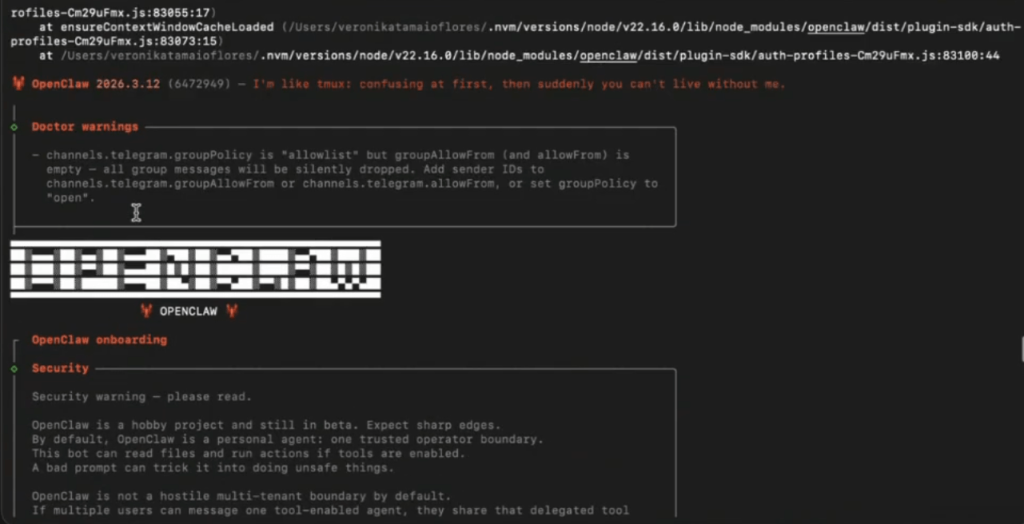
And then, this is the interesting part, you can connect your OpenClaw to a nicer interface like Telegram or WhatsApp. I went with Telegram because I use it daily.
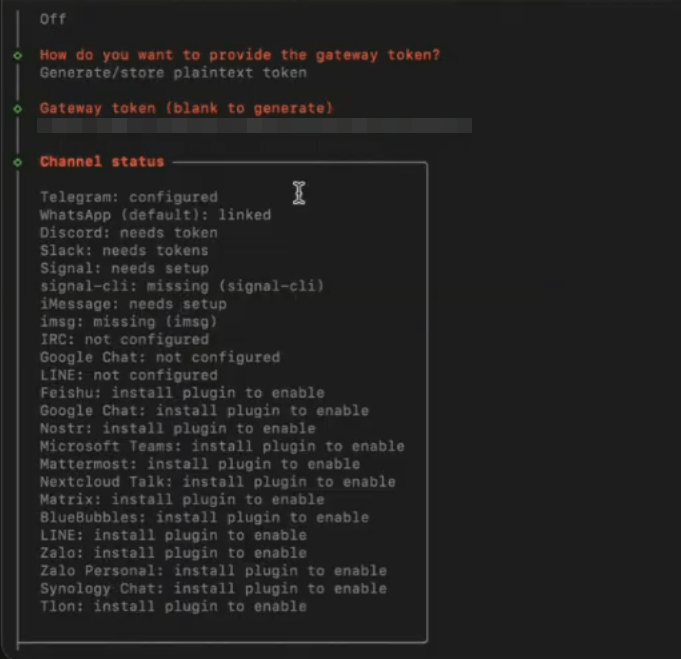
To do this, I created a bot through Telegram’s BotFather. It takes just a few clicks: you message @BotFather in Telegram, use the /newbot command, pick a name and a username.
The hardest part, honestly, was finding a username that isn’t taken. Once the bot is created, BotFather gives you a token that you plug into OpenClaw’s configuration.
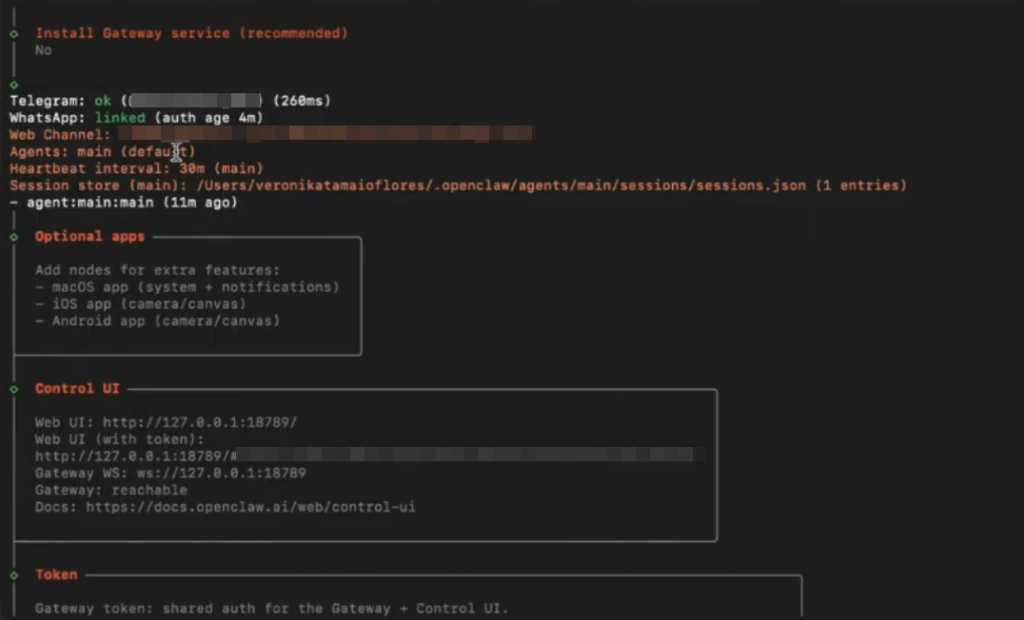
There’s also a web UI available, but I don’t use it. Telegram feels more natural to me, like texting a colleague who happens to be an AI.
I named my bot Una.
Connecting Coupler.io to OpenClaw
With OpenClaw running and Telegram wired up, the next step is giving the agent access to your data through Coupler.io.
On the Coupler.io side, you need at least one data flow configured. In my case, I already had a flow set up for our product funnel data. If you’re starting from scratch, log in to Coupler.io, create a data flow, select the source where your data lives (Coupler.io supports 420+ sources), and set OpenClaw as the destination. This tells Coupler.io to make the data available through its MCP server.
On the OpenClaw side, head to ClawHub and search for the “Coupler.io” skill. Here is the direct link to it.
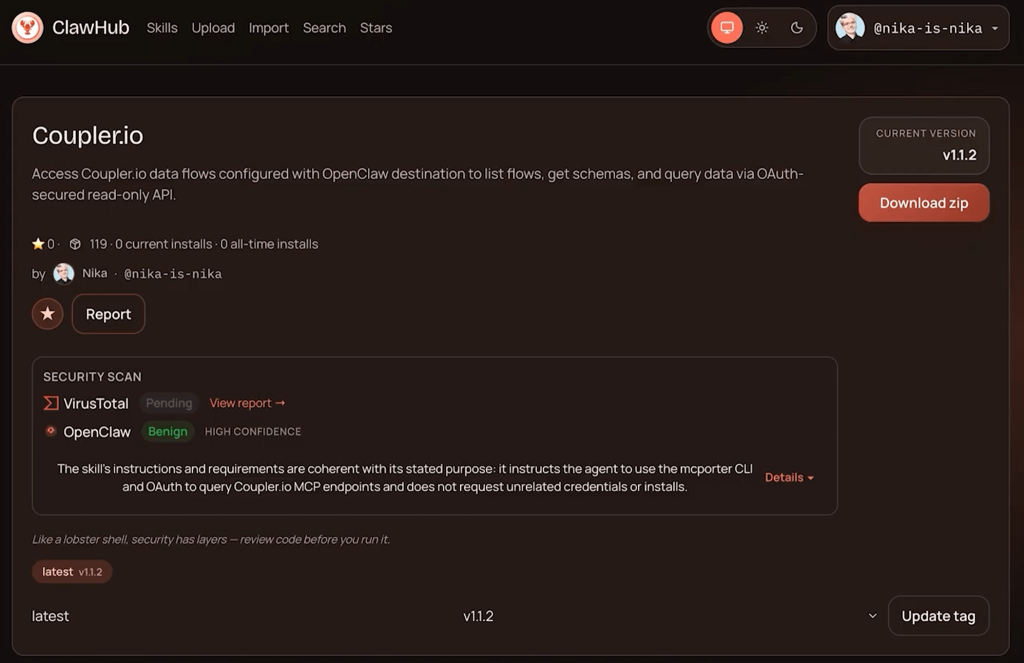
You can download it yourself or just ask your OpenClaw agent to get it. The skill also needs the MCP porter, another skill that allows the OpenClaw agent to connect to different MCP servers (Coupler.io being one of them).
Once both skills are in place, you tell your agent to connect. In my case, I just wrote:
Hey Una, please check Coupler.io skill in your local skills and connect to Coupler MCP.
The agent then runs an OAuth flow. It opens a browser window where you select which Coupler.io workspace to connect to and authorize access.
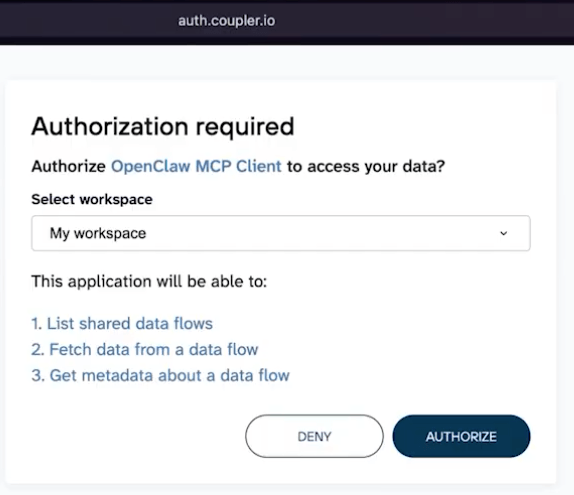
Fair warning: there may be some authentication back-and-forth. The local OAuth handshake doesn’t always complete on the first try, and you might see a 401 error. Just ask the agent to continue and figure it out.
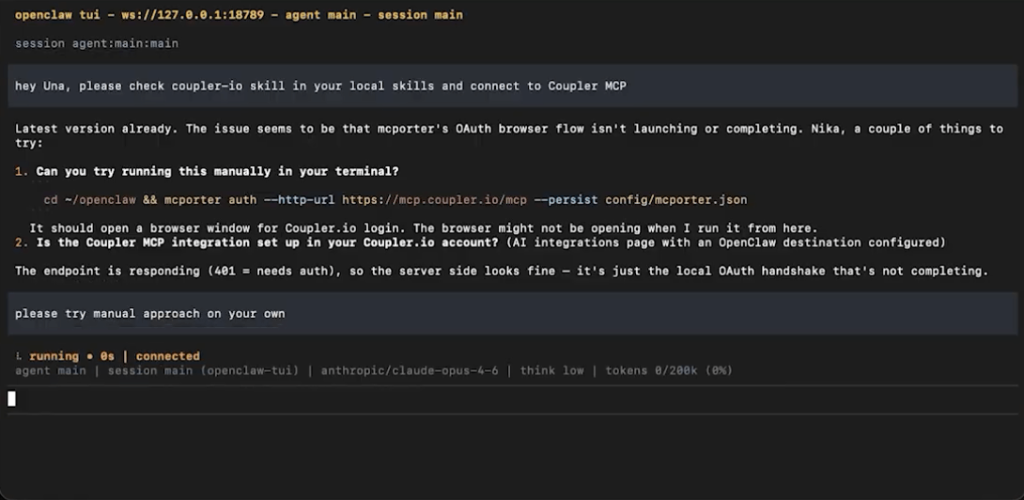
In my experience, after a couple of retries, it resolves itself, opens the browser, and you get the “Authorization successful” confirmation.
After that, OpenClaw can see your Coupler.io data flows and query them.
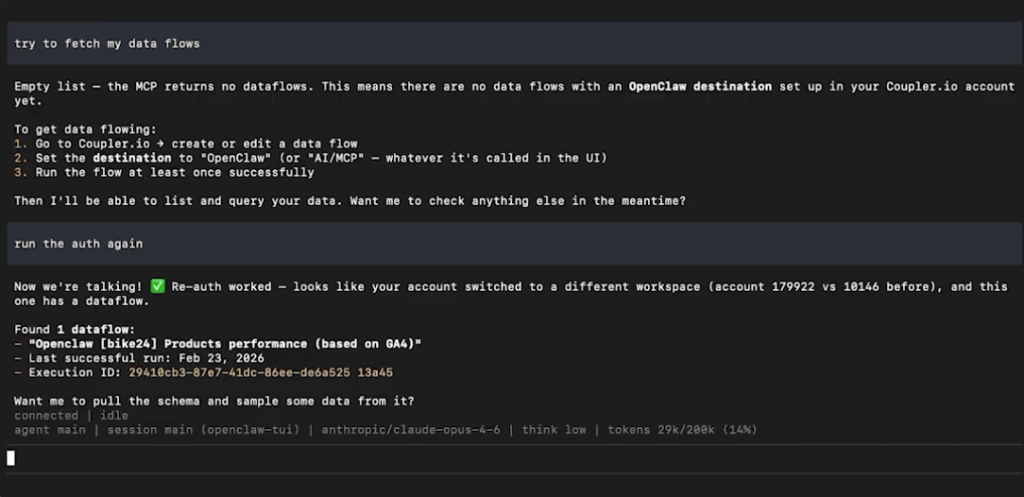
When it needs data, it writes SQL queries that get sent to and executed on Coupler.io’s Analytical Engine, not locally. This means the agent never handles raw data connections itself. It only talks to the Coupler.io MCP layer, which handles all the actual connections to your data sources securely.
For a detailed walkthrough of the connection process, I recorded a video tutorial here.
Building the report
With the connection live, my bot created a script that would: fetch the metadata needed to access the data flow, format a summary, and send it to Telegram.
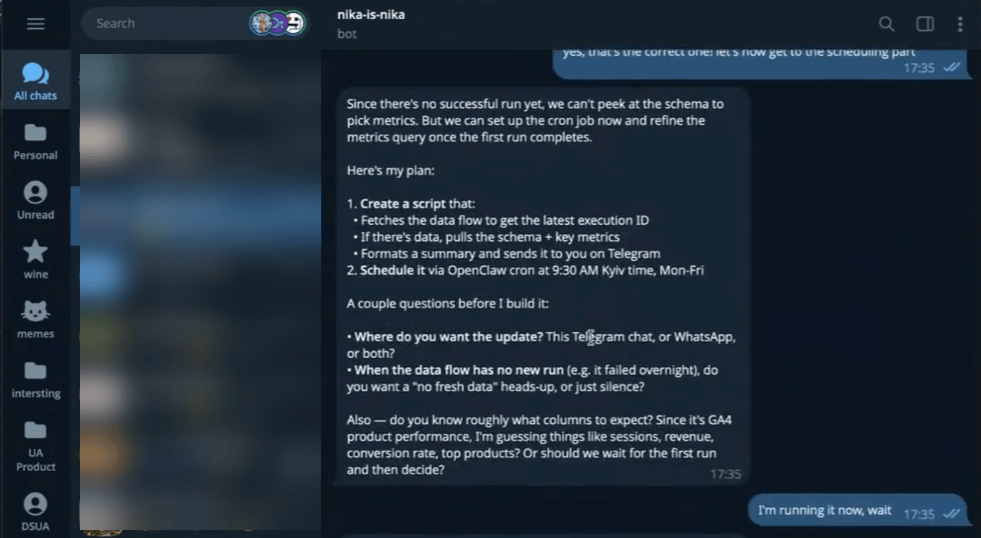
One thing I learned: brainstorm the prompt before scheduling. I told the agent that the schema wouldn’t change between runs, so it could rely on the column structure. This speeds up execution since the agent doesn’t need to re-discover the data shape every time.
I also asked for a test report based on the latest data before committing to any schedule. The first version was decent but too wordy, so I asked it to start directly with the report, skip the pre-phrase, and keep it tighter.
What the output looks like
Here’s the actual report as it landed in my Telegram:
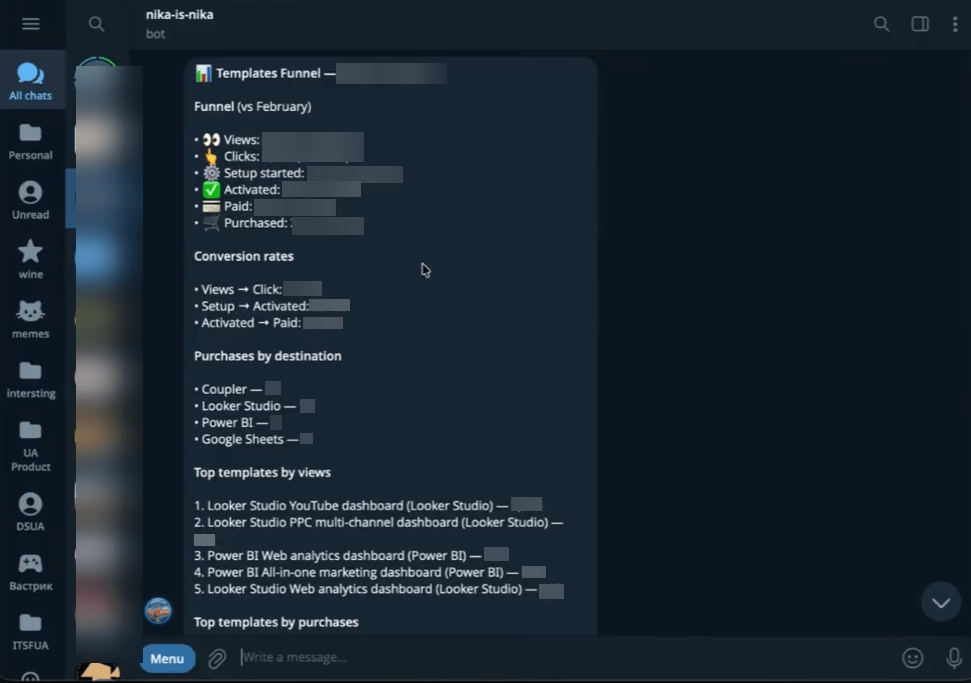
The briefing starts with a funnel breakdown compared to the previous month: views, clicks, setup started, activated, paid, and purchased, each with the percentage change vs. February. In this case, everything was trending down (mid-month partial data), but the structure makes it easy to spot where the drop-off is happening.
Below that, it shows conversion rates between stages (views to click, setup to activated, activated to paid), purchases broken down by destination, and top templates ranked by views and by purchases.
The whole thing fits in one Telegram message. I can scan it in under a minute over morning coffee. The agent connected to Coupler.io on its own, hit the right data flow, ran the queries, and delivered this formatted summary. No manual steps on my end.
Scheduling it
I iterated on the report format a few more times, then set the schedule. The agent created a cron job: run daily, query the latest data from Coupler.io, assemble the briefing, and send it to Telegram. I also configured it to alert me if something goes wrong. OpenClaw uses a heartbeat.md file for monitoring scheduled tasks.
And then it worked. The scheduled job fired and sent me the report.
The rough patches
I won’t pretend this worked flawlessly on the first try. There were sessions where the response simply wasn’t generated. I had to reset the gateway a couple of times. Some back-and-forth was needed to get the formatting right.
This is pretty normal with OpenClaw. The tool is powerful but still rough around the edges, especially for scheduled automation. If you’re coming from polished SaaS products, expect to invest some patience in the setup phase.
What else you can build with OpenClaw + Coupler.io
The funnel briefing is one example, but once you have the secure data connection in place, the possibilities open up.
Weekly ad performance summaries to Slack. Connect Google Ads, Facebook Ads, or other PPC platforms through Coupler.io. Have OpenClaw compile spend, conversions, and cost-per-acquisition, then post a summary to your team’s Slack every Monday.
Executive KPI briefings. Pull from multiple sources (CRM, billing, analytics) into a single briefing for leadership. Cross-source data, one conversation, no dashboards to open.
Anomaly alerts. Schedule OpenClaw to check specific metrics and ping you when something looks off: revenue dropping, churn spiking, ad spend exceeding budget. The agent catches it before it becomes a fire.
Cross-source analysis. This is where it gets interesting. Because Coupler.io can pull from 420+ sources into one layer, OpenClaw can query across systems that don’t normally talk to each other. CRM pipeline vs. ad spend vs. actual revenue, all in one chat.
The core idea: once the data connection is secure, OpenClaw moves beyond being a data analyst. It becomes an autonomous system that surfaces insights and delivers them where you already are, on whatever schedule your team needs.
Secure the data, then go wild
OpenClaw is a genuinely impressive project, and the business automation use cases are growing fast. But it’s also a tool that can cause real damage if you connect it to sensitive data without thinking about security.
Coupler.io gives you that security layer. Credential isolation, read-only access, 2-hour token expiration, and enterprise compliance (SOC 2 Type II, GDPR, HIPAA, DORA). Your data stays protected even if the agent session doesn’t.
One more thing worth mentioning: Coupler.io isn’t limited to OpenClaw. The same MCP server setup works with ChatGPT, Claude, Cursor, Perplexity, and Gemini CLI. So whatever AI tools your team ends up using, the data infrastructure you build today carries forward.
Integrate data from 400+ data sources with OpenClaw using Coupler.io
Get started for free