Meta Ads MCP Security: How to Give AI Campaign Data, Not Your Ad Account

You approved a marketer’s access to your Meta Ads account, but not the AI tool they connected to it that same afternoon. When an AI integration is authorized through someone’s Meta Ads login, it may receive whatever that authorization and the exposed tools allow. The access was meant for a person, and now software is riding on top of it.
That’s the real Meta Ads MCP security question. Not whether AI should touch campaign data, but how much access it actually needs to be useful. And it’s worth being precise about the mechanism: MCP, the Model Context Protocol, is the wiring that lets an AI tool talk to another system. The security question isn’t the protocol itself. It’s what an MCP server exposes, what the connected account permits, and what the AI can actually invoke. For campaign management and analysis, the honest answer is: far less than a live account. An AI tool needs prepared data, clear metric definitions, and accurate math. It does not need the ability to change your campaigns.
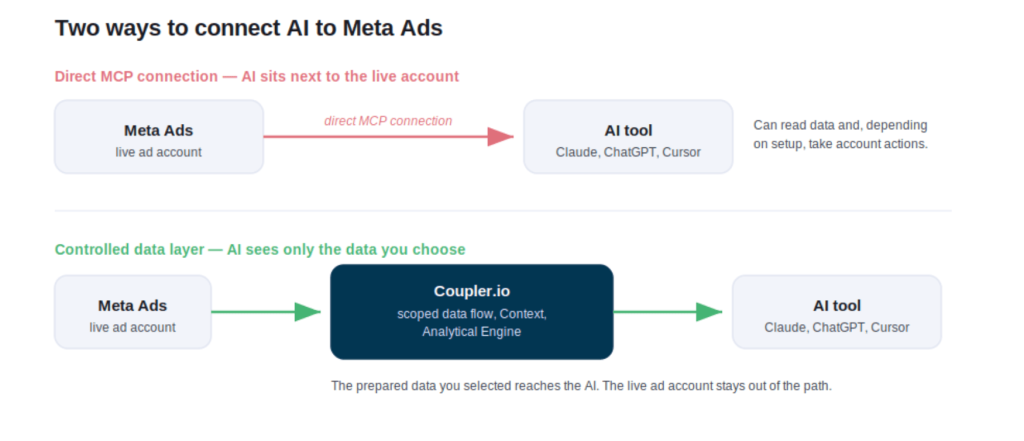
Coupler.io is a more controlled way to use AI for campaign analysis. In brief, it’s the AI layer you control: it sits between Meta Ads and your AI tool, so you decide exactly what data is in scope. You’ll discover where a direct MCP connection to Meta Ads goes wrong, and how to get campaign insights without giving AI access to your account.
Meta Ads MCP security concerns: what a direct connection can expose
Connecting AI to your Meta Ads account directly puts the AI client right next to the live account, usually authorized with an OAuth login or an access token tied to one person. From there, the real Meta Ads MCP security concerns come down to what credentials, scopes, and tools sit within reach. Three matter most here.
- One login can reach several accounts
If the authorized Meta account can access several client ad accounts, a broad AI connection may expose more client data than a single analysis needs. Route the analysis through a scoped data flow instead, and a review of Client A draws only on Client A’s data. Nothing else comes along with it.
- Nobody clearly owns the connection
Employee access is usually governed by roles and offboarding processes. An AI tool connected on top of that access may have a different owner and review process. Who authorized it? What can it reach? Who can revoke it? Does anyone else know it exists? This is really a question of Meta Ads MCP permissions: which ones the connection holds, and who controls them. When the AI connects to Coupler.io rather than to the account, the connection lives in one place, managed separately from Meta Ads, where you can see it and change it.
- Reading data and changing campaigns sit side by side
To answer a question like “which campaigns pushed spend up while cost per purchase got worse?”, an AI tool only needs to read performance data. Direct Meta MCP access can expose action tools alongside data-reading ones, depending on the integration and the permissions granted: creating campaigns, editing budgets, changing status, deleting ad sets, and other campaign management or account management actions. This is where the real risk of MCP for Meta Ads lies. If an analysis doesn’t need write access, removing that capability adds a clear guardrail and reduces the attack surface. A data layer can expose the prepared data needed for analysis without giving the AI access to the controls you use in Ads Manager to run the account.

Analyze Meta Ads campaigns, not your ad account
Start free with Coupler.ioAI campaign analysis without ad account access: a more controlled model
Answering a performance question well comes back to those same three things: the data, your definitions, and the maths. None of them needs a live account connection or the ability to change a campaign. A language model is good at spotting patterns and explaining them in plain words. It is much weaker at arithmetic on raw rows, which is exactly where confidently wrong answers come from. That’s what makes AI campaign analysis without ad account access possible: the data, definitions, and maths all live outside the account.
Here is what changes for you with Coupler.io’s Meta Ads AI Integrations, which sit between Meta Ads and your AI tool.
You choose which Meta Ads fields the AI can see. The data flow you build carries only the fields a question needs, so a stray prompt or a shared chat can’t reach spend history, custom audiences, or anything you left out. This is where Meta Ads MCP client data security becomes an explicit access boundary: you decide which data the AI can analyze.
The AI can’t change a Meta Ads campaign through this workflow. It connects to Coupler.io, not to your ad account, so there is no budget to move and no ad to pause on the other end of the conversation. You can also limit AI access per ad account by giving each Meta ad account its own data flow.
With Coupler AI’s Context layer, you define what a conversion means and how cost per purchase and ROAS are calculated for this account. Those definitions travel with every question, so AI works from your business rules rather than raw field names.
You can see how the number was calculated. The model works from the shape of your data, the schema, the data types, and a small sample, not the full dataset, and turns your question into a query. Coupler.io’s Analytical Engine runs the calculation against the prepared data, and you can open the query behind any figure. So, for example, “cost per purchase rose 30%” is computed from your real data.
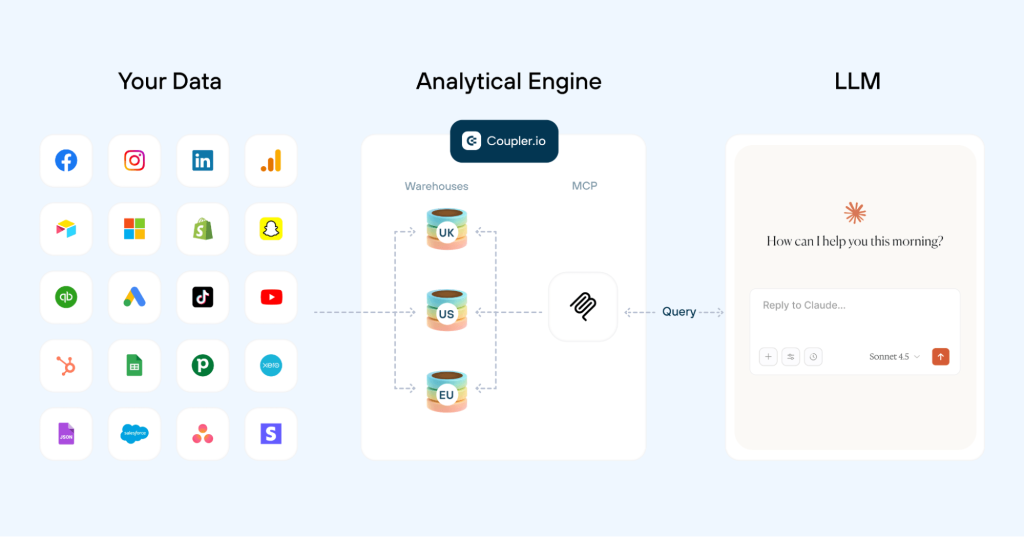
The weekly review runs the same way every time. You save the workflow and definitions once as a Skill, or select a relevant pre-built Skill from the library so the team doesn’t have to rebuild the analytical instructions or re-explain the metrics every week. The same controlled model works for any ad platform you connect, from Google Ads to LinkedIn Ads and Reddit Ads, not just Meta. It’s part of Coupler.io’s broader business data integration with AI.
But aren’t you just moving the risk to Coupler.io?
A brief answer is “No”. You are still adding another system to the data path, but the main change is what the AI can reach. First, you narrow what’s reachable. Only the fields you include in the dataset are made available to the AI, and the AI doesn’t connect directly to the Meta Ads account through this workflow.
Second, the layer is managed as a separate platform, not as a personal login. The data flow and the AI connection are managed in one place, apart from your ad account, on infrastructure that is SOC 2 Type II certified and GDPR, HIPAA, and DORA compliant, with AES-256 encryption for stored credentials and TLS in transit. A direct connection puts AI next to one person’s broad access. The data layer gives it a defined access boundary instead.
How it works in practice: read-only access to Meta Ads data
Take a real question: Which campaigns increased spend but worsened cost per purchase over the last 7 days?
With Coupler.io, you delegate the setup to AI using plain language. Ask Claude or ChatGPT to build a dedicated Meta Ads data flow that includes only the fields the question above needs: date, campaign, ad set, spend, clicks, conversions, cost per purchase, and ROAS. You can add impressions, CTR, CPM, or CPA to the same flow whenever a question needs them.
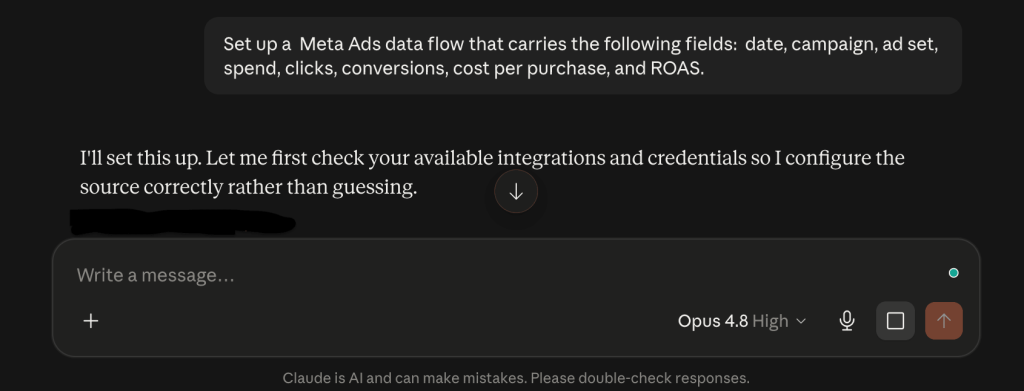
You define what a conversion counts as, how cost per purchase and ROAS are calculated for this account, and any other business rules that are crucial for data analysis and reporting.
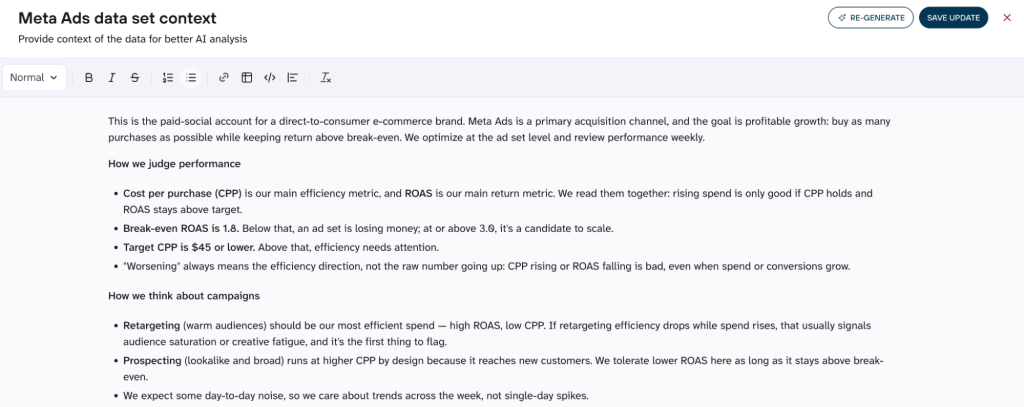
Your AI tool, whether that’s Claude, ChatGPT, or Cursor, sets up the data flow in Coupler.io and prompts you to authorize the Meta Ads connection once. After that, it can configure the flow from your instructions: selects fields you indicated and adds the calculated ones when needed (like ROAS).
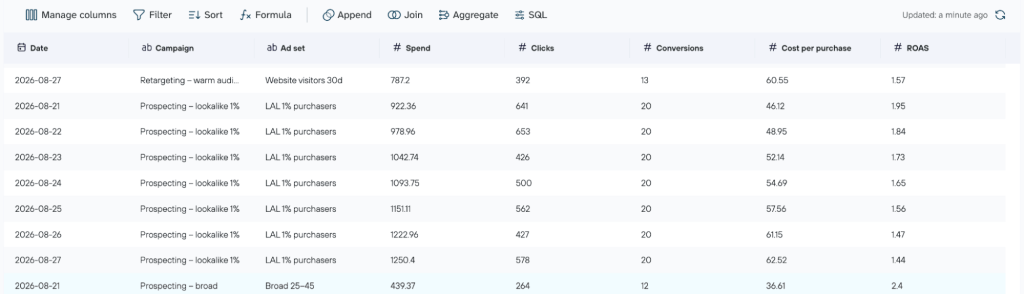
You authorize the Meta Ads connection before Coupler.io can access its data. And it never leaves you stuck. If a login is missing or the account doesn’t have the data you asked for, AI tells you, hands you the link to fix it, and suggests what to do next.
Your AI tool sets up the MCP connection to Meta Ads through Coupler.io, then pulls only the fields you selected into a prepared data flow. When you ask a question, it turns that into a query, and Coupler.io runs the calculation against the prepared data. Once the result is returned, the AI explains which campaigns fit. Throughout, the AI never connects to the live Meta Ads account and can’t change a campaign.
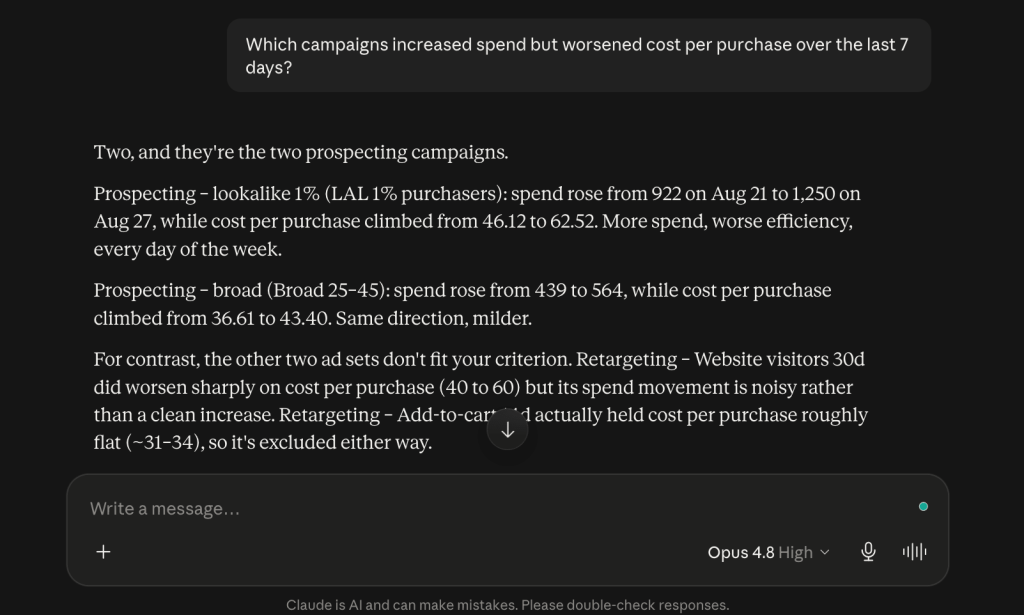
The same setup can surface creative fatigue early too, when CTR slides while spend holds steady, so you catch a tiring ad before it drains the budget. One clarification about read-only access to Meta Ads data: Coupler.io doesn’t write changes back to your connected Meta Ads account, so the AI can’t modify a live campaign this way. It isn’t a read-only MCP in the strict sense, because the AI can still create or update objects within Coupler.io. But those actions don’t modify the connected ad account.
The same setup gets stronger for an agency. Each client gets its own data flow, so a weekly review of Client A draws on Client A’s data, and Client B’s numbers aren’t part of the dataset available to that analysis. Save the review as a weekly efficiency-review Skill, and the comparison period and the output stay consistent from one week to the next, without rebuilding the workflow.
Set up isolated Meta Ads flows for every client
Book a demo with Coupler.ioMeta Ads AI connectors: direct connection or controlled data layer?
A direct Meta Ads MCP connection isn’t wrong for every case. It can be reasonable when the scope is narrow, you control the account yourself, and the integration exposes only what you actually need. As soon as you’re handling several accounts, multiple teammates, or a review that repeats every week, a controlled data layer becomes more valuable. Here is how the two types of Meta Ads AI connectors compare.
| Situation | Direct MCP connection | Controlled data layer (Coupler.io) |
| Solo marketer, own account, ad-hoc read-only | May be enough if properly scoped | Optional for a single user |
| Multiple client accounts | Scope depends on permissions and the integration | Separate flows isolate each client’s dataset |
| Multiple teammates sharing access | Governance depends on how the connection is managed | Defined data and AI access boundaries |
| Recurring reviews | You manage the connection and rebuild the workflow | Repeatable flows and Skills |
| Security or compliance review | You have to show exactly what the AI can access | Clearer separation between source data and AI |
| You want AI to make campaign changes | May support actions, depending on the integration | Not the purpose of this model |
Connect 400+ sources to AI, safely, with Coupler.io
Get started for freeGive AI the data, not the account
Meta Ads MCP security comes down to a single choice: how much access an AI tool needs to do its job. For analysis, that’s the data and the definitions behind your metrics, not the controls that spend your budget. Give AI the prepared data it needs through Coupler.io, and the account that runs your campaigns stays out of that path.
Build a scoped Meta Ads data flow, connect your AI tool to it, and ask your next campaign question, without putting the live ad account in the AI workflow.