AI tools like Claude, ChatGPT, or custom agents can already query your datasets and perform simple data preparation when connected to Coupler.io. But for complex analysis, doing it dynamically every time can become slower and more expensive.
SQL transformations help when the analysis requires joining large datasets, normalizing schemas across platforms, computing multi-step calculations, etc. This feature lets you (or AI on your behalf) define that complex preparation as a single, persistent query. The result is a ready-to-use dataset that refreshes automatically with the data flow. So, AI starts each analysis from prepared data instead of repeating the same work.
Why SQL transformations matter for AI-assisted analysis
Coupler.io supports point-and-click transformations like formulas, joins, appends, and aggregations. SQL transformations extend the data set preparation with a much broader range of operations using standard DuckDB syntax. That means all join types (not just left join), pivot, window functions, set operations like UNION and INTERSECT, conditional logic, deduplication, and advanced aggregation. Check out the syntax it accepts.
All these would require chaining multiple separate transformations or building complex spreadsheet formulas.
AI does not need a SQL-transformed dataset for every question. For simpler tasks like running a basic aggregation, it can query your data and combine results without creating a new table.
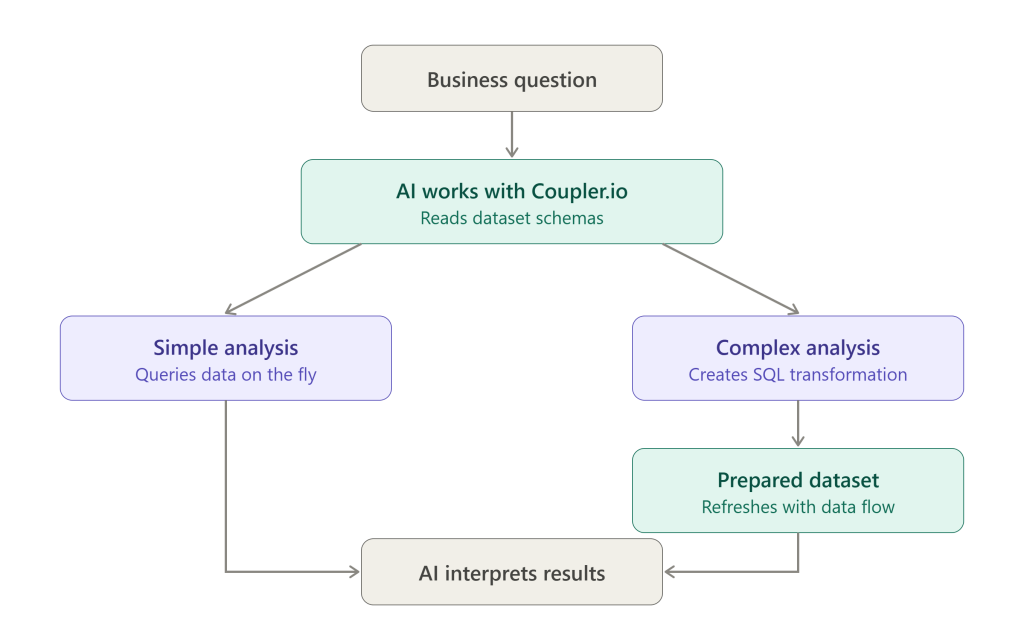
A SQL-transformed dataset becomes useful when the analysis requires joining several large datasets or computing rolling metrics across thousands of rows. And it has three advantages:
Faster and more efficient. The dataset is pre-computed when the data flow runs. AI doesn’t need to make multiple calls to retrieve and assemble the same data during every analysis. This reduces processing time and can lower cost.
More consistent. A saved SQL transformation applies the same joins, pivots, and calculations every time. If AI takes a different approach between sessions, the on-the-fly manipulation can produce slightly different results.
Reusable. The transformed dataset refreshes automatically with the data flow. Next week’s analysis uses the same logic with up-to-date numbers. Other team members, tools, or dashboards can use the same prepared dataset.
When a persistent transformed dataset is useful, AI can create it for you. Describe the result you need in plain language, and Coupler AI will inspect the data set schemas, generate the SQL, and save it as a transformation.
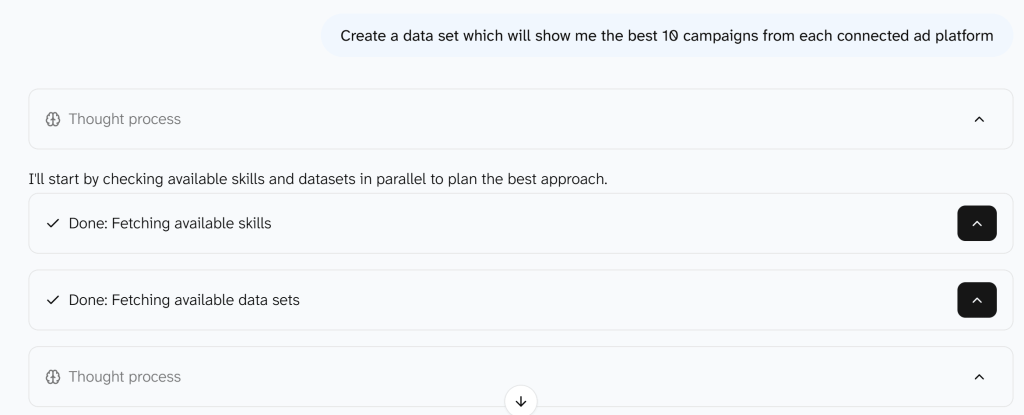
The query is always visible, so you can review the logic and edit it in the Custom SQL field, or hand it to a colleague.
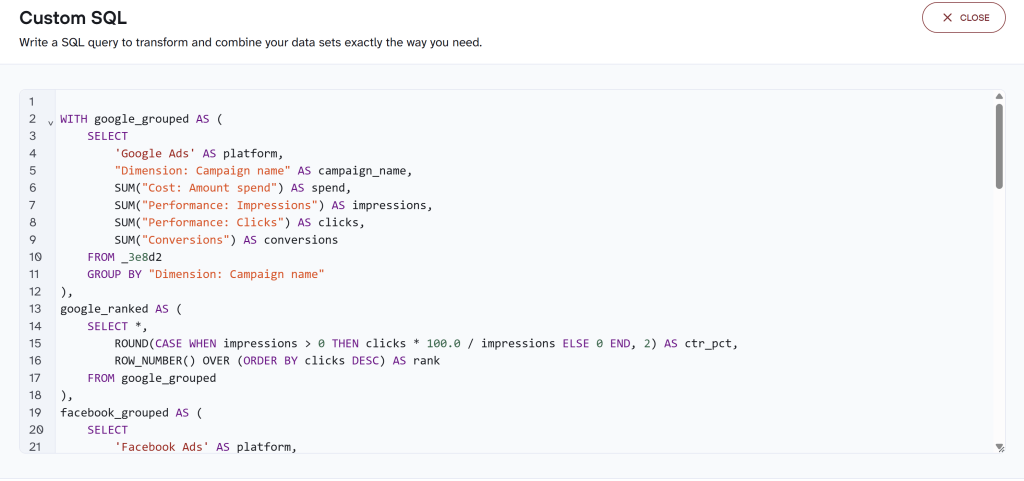
SQL transformations are also useful when the desired output is the analysis itself. You might need a cross-channel performance table, an AR aging report, a cohort retention matrix, or a sales benchmark comparison. Instead of building complex formulas or pivot tables, describe the purpose to AI and let it create the transformed dataset. The table is the deliverable.

See how AI and SQL work together in Coupler.io
Book a demoWhat to delegate to AI in SQL-based data analysis
In this workflow, AI is most useful for three parts of the analysis.
Translating questions into analytical logic. You say “which campaigns are getting worse?” AI can translate that into a concrete analytical plan: define two time periods, calculate CPA for each, compare them, and rank the change. You still need to review metric definitions and business assumptions.
Generating SQL. AI can generate joins, window functions, pivots, and date calculations from a plain-language request. For complex transformations, a persistent SQL dataset is more efficient than rebuilding the preparation during each analysis. Also, executing the query against the actual data exposes syntax and schema errors immediately. The SQL remains visible for review.
Interpreting the results. Once the data is prepared, AI can query the resulting dataset to surface patterns, compare segments, investigate anomalies, and answer follow-up questions. It can show which cohort had the highest retention, which rep closed the most revenue, or which campaign’s CPA doubled in a week. Those are findings that come from the dataset.
AI is less reliable at explaining why. CPA increased because of audience fatigue is a hypothesis the data alone can’t confirm. Treat AI’s explanations as starting points for investigation, not conclusions.
Six analyses you can build with AI and SQL transformations
I’ve collected 6 examples of data analysis for SQL-transformed datasets. They involve large datasets, repeated calculations, schema normalization, or several preparation steps. For smaller datasets or simpler versions of the same analysis, a persistent transformed dataset may not be necessary.
| Analysis | Coupler.io sources | SQL techniques | AI’s role |
| 1. Cross-channel ad performance | Google Ads, Facebook Ads, LinkedIn Ads, TikTok Ads | UNION ALL, field normalization, calculated metrics | Map platform schemas, interpret efficiency |
| 2. Campaign deterioration detection | Google Ads, Facebook Ads, LinkedIn Ads, TikTok Ads | Window functions, rolling aggregation, period comparison | Show performance changes and possible hypotheses |
| 3. Customer purchase cohorts | Shopify | CTEs, date math, conditional aggregation, maturity check | Identify retention patterns across cohorts |
| 4. Accounts receivable aging | QuickBooks, Xero | CASE bucketing, date calculations, aggregation | Prioritize collection risk by customer |
| 5. Keyword cannibalization | Google Search Console | GROUP BY, HAVING, impression-weighted position | Prioritize potential cannibalization for review |
| 6. Sales rep benchmarking | HubSpot, Pipedrive, GoHighLevel | CTEs, CROSS JOIN, closed-deal denominators | Identify performance patterns by rep |
1. Compare advertising performance across channels
What you can analyze: How do CPA, CTR, and spend efficiency compare across Google Ads, Facebook Ads, LinkedIn Ads, and TikTok Ads when the metrics are calculated consistently?
Data sources: Google Ads, Facebook Ads, LinkedIn Ads, TikTok Ads
Why an SQL transformation helps here: AI could reconcile a small amount of advertising data during an analysis. But with four large datasets, it has to deal with different schemas and several calculated metrics. Repeating that preparation with every data refresh becomes inefficient. An SQL-transformed dataset standardizes fields and conversion definitions once. This gives AI a ready-to-query cross-channel table whenever the data refreshes.
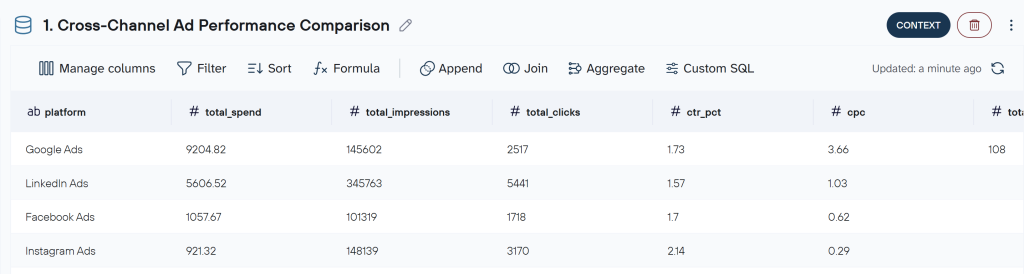
What to check: Make sure conversion events are comparable across platforms. Also check currency and attribution settings, since differences in either can distort cross-channel efficiency metrics.
2. Detect campaigns whose performance is deteriorating
What you can analyze: Has CPA increased significantly for any campaigns over the last 7 days compared with the previous period?
Data sources: Google Ads, Facebook Ads, LinkedIn Ads, TikTok Ads
Why an SQL transformation helps here: A rolling comparison requires calculating 7-day CPA for every campaign. After that, it needs to be compared with an earlier period. Window functions handle this well, but AI will repeat a lot of work each time to run the full calculation across a large daily dataset. A pre-computed transformation applies the same logic across the entire dataset as new daily records arrive.
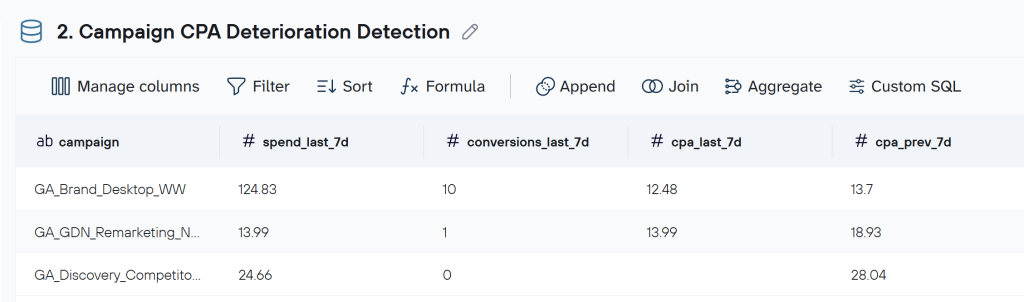
What to check: Percentage changes can look dramatic when conversion volume is low. Review the number of conversions behind the change before treating a higher CPA as a meaningful performance decline.
Get cross-channel ad insights with Coupler.io
Get started for free3. Build customer purchase cohorts
What you can analyze: How does repeat-purchase behavior differ between Shopify customer cohorts over the first six months after acquisition?
Data source: Shopify
Why an SQL transformation helps here: AI needs to perform the following preparation steps for the cohort analysis:
- Identify every customer’s first purchase
- Assign a cohort month
- Measure subsequent purchases relative to that date
- Calculate retention percentages only for periods that have fully elapsed.
Each step depends on the previous one. Running all of this at once is possible, but it requires reconstructing several dependent steps during each analysis. A SQL transformation performs the full sequence in one query and produces a retention matrix for AI to query or use as a report.
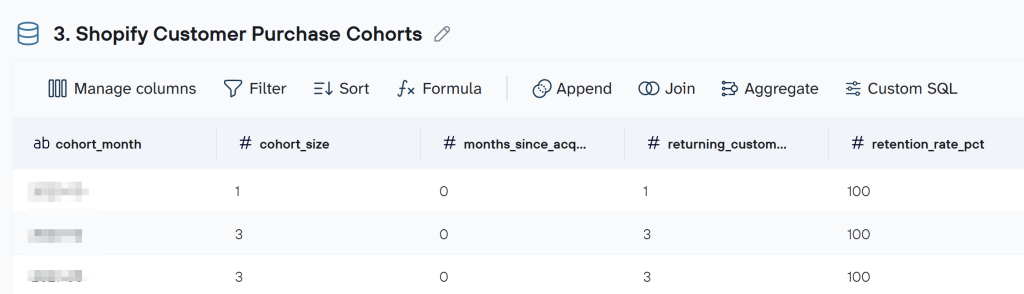
What to check: Define how guest checkouts and customer identifiers should be handled and exclude test orders. Also, make sure the selected order status matches your definition of a completed purchase.
CTA: Run finance analysis on live QuickBooks or Xero data
4. Analyze accounts receivable aging
What you can analyze: How is the outstanding balance distributed across customers and overdue periods?
Data sources: QuickBooks or Xero
Why an SQL transformation helps here: Conditional logic can place open invoices into not-yet-due, 1–30, 31–60, 61–90, and 90+ day buckets. Then those balances need to be aggregated by customer. The resulting aging table is useful both for AI analysis and as a standalone report. The transformation updates whenever the accounting data refreshes. And you don’t need to rebuild the aging buckets manually each month.
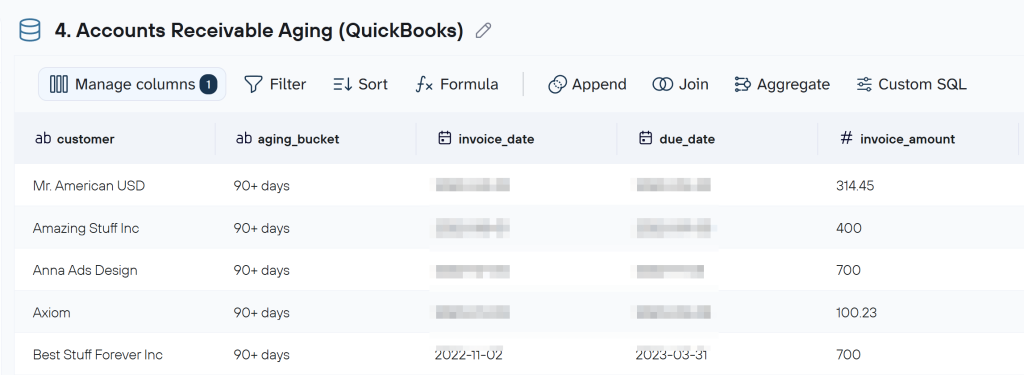
What to check: Confirm that the due-date and outstanding-balance fields reflect how your accounting system represents unpaid invoices and payment terms. QuickBooks and Xero use different schemas, so the actual fields will depend on the source.
5. Identify potential keyword cannibalization
What you can analyze: Are multiple pages from your site receiving impressions for the same search queries, and which overlaps deserve closer review?
Data source: Google Search Console
Why an SQL transformation helps here: Raw Search Console data can contain hundreds of thousands of query-URL combinations. A SQL transformation reduces that to a focused table of queries where multiple URLs compete, with clicks, impressions, CTR, and average position for each. That smaller, pre-filtered dataset is faster for AI to analyze and easier for a human to review.

What to check: Multiple URLs appearing for the same query do not automatically indicate a problem. Some pages may legitimately serve different search intents, formats, or stages of the customer journey.
6. Benchmark sales reps against team performance
What you can analyze: How does each sales rep compare with the team on win rate, average deal size, sales cycle, and won revenue?
Data sources: HubSpot, Pipedrive, or GoHighLevel
Why an SQL transformation helps here: AI needs to calculate rep-level metrics and team-wide benchmarks from the same CRM dataset using consistent definitions. These include win rate from closed deals, average deal size, sales cycle from won deals, etc. An SQL transformation handles both calculations and returns them side by side. You can then ask follow-up questions such as ‘Which reps improved this quarter?’ without rebuilding the benchmark first.
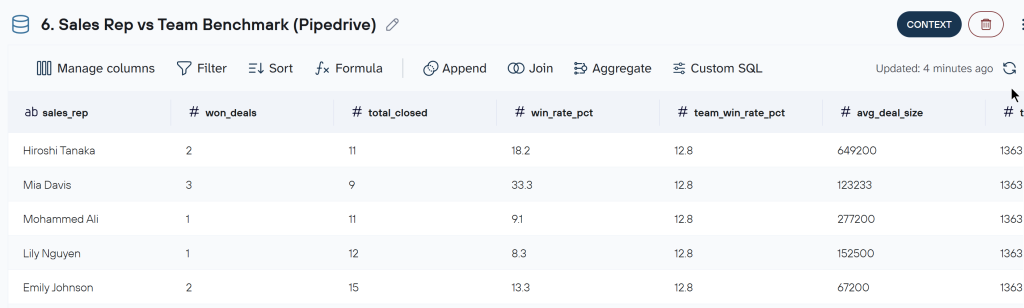
What to check: Decide which deals belong in the benchmark. For example, you may exclude renewals or expansions when evaluating new-business performance. Also confirm that the deal owner represents the salesperson you actually want to assess.
Build multi-source reports with Coupler.io
Book a demoHow to make AI data analysis more reliable
SQL transformations make the calculation logic visible and reusable. However, reliable AI analysis also depends on the data, context, and assumptions behind that logic.
Use connected data for recurring analysis. Uploaded files work well for one-off questions. For weekly or monthly analysis, connected sources ensure the same transformation runs when fresh data arrives.
Give AI enough data and business context. Define what important fields and metrics mean, especially when names are ambiguous or differ between sources. Add business rules that cannot be inferred from the dataset itself. Examples include how your team defines a conversion, known data gaps, seasonal patterns, launches, or pricing changes. This reduces the risk of AI applying the right calculation to the wrong interpretation.
Save repeatable analyses as AI Skills. If the same question comes up regularly, save the workflow as a Skill so the analysis follows the same instructions, context, and guardrails each time. Coupler.io’s Skills library includes pre-built skills for marketing, ecommerce, finance, and sales.
Inspect the SQL when it matters. A query can execute successfully and still use the wrong join, filter, denominator, or business rule. Review important transformations before using the results for budget, forecasting, finance, or other consequential decisions. Coupler.io keeps the SQL visible and editable, so you can verify the logic before sharing results.
Separate findings from explanations. When AI says Campaign X has the highest CPA, that is supported by the calculated dataset. CPA increased because of audience fatigue is a hypothesis. Ask AI what additional data would confirm or reject an explanation before acting on it.
Where to start
Pick one analysis from the examples above that matches a question your team already asks. Connect the data source in Coupler.io and ask Coupler AI Agent, ChatGPT, or Claude the question in plain language. If the preparation is simple, AI can work directly with the existing datasets. For more complex or reusable preparation, it can create a SQL transformation that persists in your data flow and refreshes automatically.
Source data and transformation logic define the numbers. Context tells AI what those numbers mean. You decide what to do about them.