Claude Marketing Skills: How to Build an Automated Reasoning Engine for Your Data

You’ve already used Claude to write ad copy or analyze marketing campaigns. Each time, though, you had to start over: re-explaining your brand’s tone of voice, your product’s target audience, and what the task was. The output was quite good, but it felt like working with an exceptionally capable teammate who forgets everything between conversations.
This challenge arises because you are using Claude as a general-purpose chat. To turn Claude into a specialist, you need Skills. Pair them with access to your business data via Coupler.io, and the same Skill that analyzed last week’s campaign performance can run again this week on fresh numbers without any extra setup. Learn how marketing Skills work, see three practical workflows, and find out how to install or build your own.
What are Claude marketing skills?
A Claude marketing skill marks the transition from ad-hoc prompting to a reproducible, specialized workflow. Every Skill is a folder with one required file — SKILL.md. It contains the instructions Claude follows whenever that Skill is active. The file can include role definitions, analysis frameworks, output formatting rules, validation steps, and anything else the workflow needs to stay consistent across runs.
Skills are stored as .md files, so they persist between sessions. The instructions are there every time you open a new chat, and Claude follows them without you having to re-explain the task. That makes workflows much more consistent.
Coupler.io AI agent Skills for marketing and PPC analytics are built into the Coupler.io connector for Claude. You only need to install the connector to get access to all the Skills available in Coupler.io MCP.
Most marketing Skills only need the SKILL.md file itself, but a Skill can also include supporting files:
scripts/directory with executable code that automates parts of the workflowreferences/directory with documentation or guides Claude loads when neededassets/directory with templates or sample files.
Don’t confuse Skills with Projects.
A Claude Project is a workspace that holds chats, custom instructions, reference materials, etc. You might upload a brand voice guide or a strategy document to a Project so Claude has that context during your conversations.
A Skill is a portable, reusable instruction package that you install once and invoke across any chat. You can use Skills inside a Project (e.g., run a marketing analytics Skill against the data context stored in your Project), but creating a Project is not the same as creating a Skill.
The value of AI agent skills
With skills, Claude becomes your marketing operator. Now your marketing team can shift its focus from routine content generation to strategic management.
Marketing skills are important for repeatability because they ensure:
- Permanent context: You add your brand assets to a Project’s knowledge base, and this eliminates the need to re-explain the basics. Claude remembers your strategy across every chat in that Project.
- Consistency: You get the same high-quality results whether the task was set by a marketing director or a trainee.
- Scalability: You can create one skill (e.g., Competitor analysis) and use it for hundreds of different products without rewriting instructions.
- Grounded outputs: A skill is anchored in your uploaded files, so Claude’s responses are grounded in your actual data.

Analyze marketing performance in Claude with built-in skills
Try Coupler.io for freeCore marketing skill categories
Claude skills for marketing have been developed as digital assistants for specific job roles. They help specialists fulfill their responsibilities more efficiently, but shouldn’t be treated as replacements for team members. It’s important to keep in mind that any AI output should always be checked and verified before using it.
Marketing skills fall into the following core categories:
| Category | Description | Best for |
|---|---|---|
| Content & copywriting skills | Handle creating briefs, conducting topic research, writing first drafts (e.g., a landing page), proofreading, etc., and ensure the texts are strictly aligned with the brand’s tone of voice. | Content strategists and copywriters |
| SEO & keyword research skills | Eliminate hours of routine analysis; automate SERP summaries, conduct fast content gap analysis and cluster mapping, and more. | SEO specialists |
| Campaign analysis & PPC skills | Become the key analytics tool for ad budget control. Now, spending audits, initial CPA diagnostics, or data preparation for budget reallocation can be taken off the manager’s shoulders. | Performance manager |
| Email marketing skills | Help build long-lasting customer relationships through email. They use segmentation logic to create automatic email sequences, with dozens of subject line options (including follow-up sequences). Claude understands who needs a shoe discount and who’ll prefer an article on the healthcare routine, so that those emails don’t end up in spam. | CRM/retention manager |
| Competitive intelligence skills | Speed up market data collecting and processing. They handle battlecard preparation, conduct basic competitor messaging analysis, and help you identify positioning gaps (that your competitors fail to cover). | Market analysts |
| Reporting & data summarization skills | Help specialists present their results to the management in the best possible way. They draft weekly summaries, craft CM-ready narratives, and help specialists turn dry numbers into clear, concise texts to quickly demonstrate their business value. | Marketing managers |
Examples of marketing workflows with Claude skills
Let’s explore how this works in practice. A marketing skill provides Claude with the specialized playbook to conduct deep analysis, but it needs live data to execute the play. Coupler.io, a data integration platform with AI analytics, acts as the bridge and feeds live metrics from 400+ data sources directly into the skill so Claude can perform expert research on your actual performance. Here are three common scenarios where these AI-powered skills can really save the day for marketing specialists.
#1: Campaign performance summary for reporting
Challenge: The most complicated part of campaign performance reporting is properly combining numbers from different sources (e.g., Facebook Ads/Google Ads/LinkedIn Ads, etc.) with spend and actual purchases in Shopify or CRM. Without automation, the process requires manually downloading CSVs from multiple sources or juggling fragmented connectors, which turns data consolidation into a significant time sink for marketing managers.
Skill: Marketing analytics skill enables Claude to pull live performance data to generate precise, SQL-backed campaign reports. It automates the extraction of key metrics like ROI and CPA across multiple channels and translates raw data into structured summaries & actionable growth recommendations.
For deeper platform-level analysis, the Paid Ads Performance Analysis (PPC) Skill traces each ad platform’s funnel from impression to conversion separately.
The Report generation Skill turns the findings into a structured, stakeholder-ready report with validated figures.
Solution: To create a performance report, start by connecting your essential data sources. The most efficient way is to consolidate multiple channels into a single stream. Use Coupler.io to add sources (e.g., Facebook Ads, Google Ads, and Salesforce) and combine them into a single chart by exact field (e.g., Account ID). Here, you can also create new fields with necessary formulas and hide unnecessary technical details to keep the context clean for Claude.
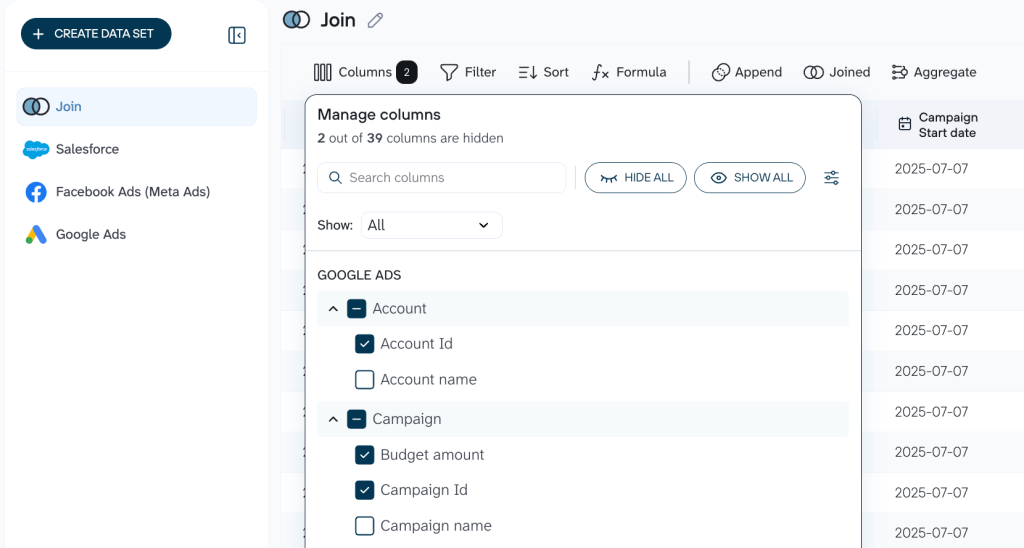
Use the no-code Claude integrations and ask it to conduct the necessary analysis using the exact skill.
Alternatively, you can connect your app data to Claude and ask it to perform the necessary data transformations. Claude will send a request to Coupler.io, whose Analytical Engine will perform the requested calculations or other changes, and the output will be displayed in your conversation with Claude.
Prompt: Analyze the Marketing Report data flow in Coupler.io using the Marketing analytics skill.
Result: Claude thoroughly studies the clean data set you’ve provided, follows the instructions in the Marketing analytics skill, and provides a detailed marketing report that outlines the status quo + anomalies & alerts, and recommendations to follow.
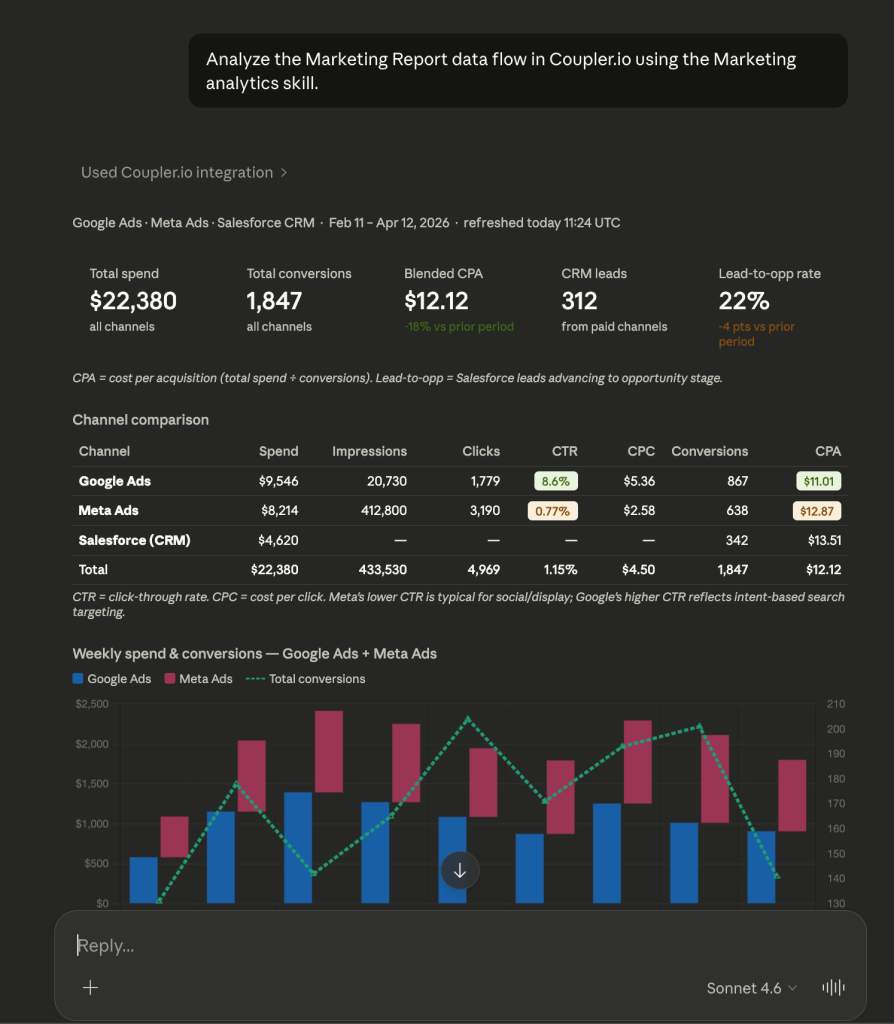
Connect your marketing data to Claude with Coupler.io
Get started for free#2: Google Ads waste and scale audit
Challenge: Anyone who’s ever worked with contextual ads has been through this: you set up the campaign, and the budget drains, but the number of purchases is far from satisfactory. It will take hours, or even days, to manually review thousands of search queries for “rubbish”.
Skill: The Google Ads Waste And Scale Skill finds budget leaks at the search-term and keyword level, flags non-converting queries, and recommends negatives. The output nets recovered waste against absorbable headroom so the recommendation stays budget-neutral.
Solution: To set up the audit, connect your Ads accounts and schedule a daily export of your Search Terms Reports. With Coupler.io, you can filter for terms with zero conversions and sort them by cost to highlight exactly where your budget disappears.

Finally, you connect Claude as a data destination within a few clicks. As a result, instead of some 30,000 rows, the Ads waste auditor skill receives a clean, filtered table of the most problematic search queries for analysis. And if you don’t want to conduct all these data transformations manually, simply ask Claude to do it, and it will fulfill your request with the help of Coupler.io’s Analytical Engine.
Prompt: Analyze my Google Ads data flow in Coupler.io using the Google Ads Waste And Scale skill.
Result: Claude audits the account and returns a waste-and-scale breakdown: which keywords and search terms to cut, which negatives to add, and which campaigns have headroom to absorb the recovered budget. Every item considered and kept gets documented with the reason, so whoever approves the changes can see what was protected and why.
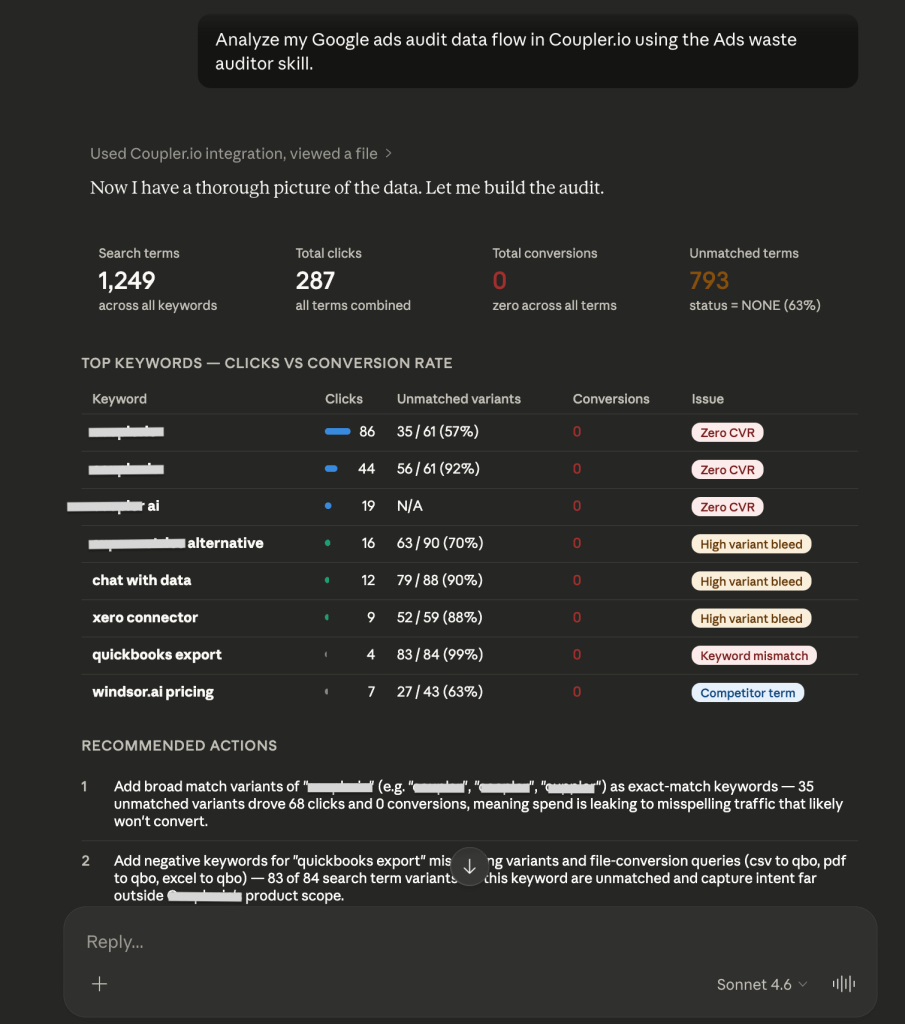
Once you’ve reallocated the budget, use the Google Ads Budget Pacing Skill to track whether the adjusted campaigns are spending on plan or drifting off target mid-month.
#3: Segment preparation for LTV modeling
Challenge: Many companies send identical offers to their entire customer database, which often end up in spam. The result is a high level of unsubscribed users + low CTR. It is hard for marketers to manually identify former profitable customers (who aren’t profitable anymore) because CRM data is often raw and unstructured to analyze in real time.
Skill: Marketing analytics skill organizes raw CRM and ad data into structured customer segments, pulls live records to calculate cohort-specific metrics, and identifies high-value users to provide a clean data foundation for LTV modeling.
Before the analysis runs, the Generate dataset context Skill documents the dataset’s structure and field meanings. You can specify which column is gross versus net revenue, how deal stages map, what each status value represents, and more. This way, the Marketing analytics Skill interprets the CRM data correctly.
Solution: To prepare your segments, you need to connect your CRM and schedule a recurring data import. Apply filters within the data flow to isolate “Won” deals and specific cohorts (such as customers active for over 60 days) to ensure your LTV model runs on relevant, high-quality data. You can either do it manually in Coupler.io or ask Claude (once it’s connected), and with the help of Coupler.io’s Analytical Engine, it will perform the necessary transformations instead of you.
Prompt: Use the Marketing analytics skill to analyze the list of VIP customers from the Segment Preparation data flow in Coupler.io and suggest a win-back strategy based on their purchase history.
Result: Claude contacts the clean chart with your CRM data in Coupler.io and provides the requested output: segment overview, purchase history patterns, and a detailed step-by-step win-back strategy.
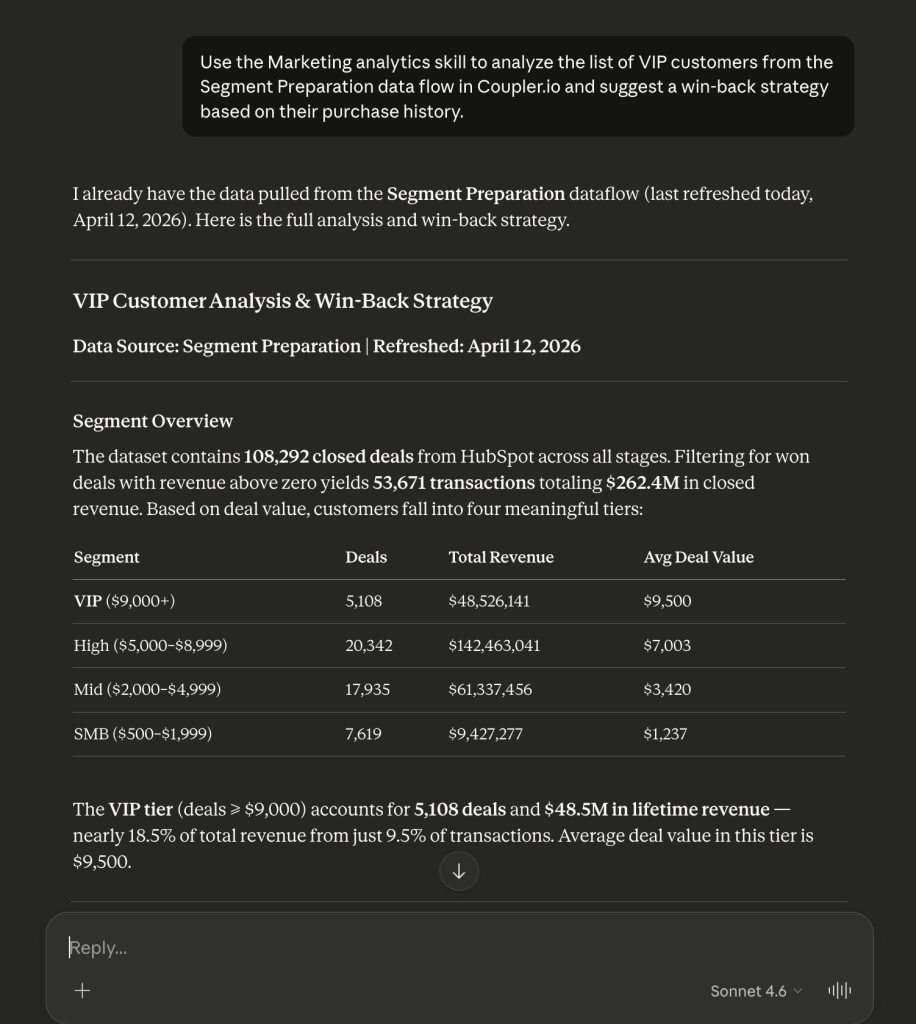
Build a reliable data foundation for Claude's skills
Start your free trialWhat else you can do with marketing Skills for AI
The workflows above cover performance reporting, budget optimization, and customer segmentation. Coupler.io’s Skills library includes dozens more for recurring marketing tasks, with a dedicated roundup of the top Claude skills for digital agencies for teams running multiple client accounts.
Analyze creative performance. The Facebook Ads Creative Analysis and TikTok Ads Creative Analysis Skills identify which ads, hooks, and formats produce the strongest results…and which creatives are approaching fatigue before your CPMs tell you the hard way. For a dedicated fatigue check, Facebook Ads Creative Fatigue runs the rolling comparison on its own.
Validate conversion data. The Google Ads Conversion Tracking Audit, Facebook Ads Pixel and Attribution Audit, and TikTok Ads Pixel and Attribution Audit Skills detect tracking gaps, double-counted conversions, and spend running without reliable attribution. Run one before making budget decisions based on numbers you haven’t verified.
Prepare client reports. The platform-specific Client Report Skills for Google Ads, Facebook Ads, and TikTok Ads turn monthly performance data into a client-ready narrative that explains which targets were hit or missed and why.
Diagnose account health. Facebook Ads Settings Audit and Facebook Ads Structure and Learning Review catch misconfigured Advantage+ toggles and ad sets stuck in learning. TikTok Ads Structure and Learning Review does the same for ad groups that won’t exit learning or accounts inherited from a previous manager.
Catch budget leaks before they compound. Facebook Ads Waste and Scale and TikTok Ads Waste and Scale flag underperforming ad sets and ad groups. Facebook Ads Budget Pacing and TikTok Ads Budget Pacing track whether spend is on target mid-month.
Track performance and audience fit. Facebook Ads Performance Review and TikTok Ads Performance Review turn a weekly account check into a five-minute read. Facebook Ads Audience Analysis and TikTok Ads Audience Analysis show which segments are actually converting versus draining budget.
Audit TikTok Shop campaigns. TikTok Ads GMV Max and Shop Review skill checks whether GMV Max is cannibalizing your other campaigns and which products are actually driving TikTok Shop revenue.
The full library covers dozens more specialized tasks across every major ad platform. Browse it at coupler.io/ai-agent-skills or in the GitHub open-source repository.
How to use and build Claude skills for marketing
There are two paths to working with Claude Skills: install a pre-built Skill from a library, or create your own from scratch. Most marketing teams start with pre-built Skills and customize later.
Install a pre-built Skill
Coupler.io Skills (all not just those covered in this article) are built into the Coupler.io connector for Claude. They don’t require manual installation. Connect Coupler.io to Claude, ChatGPT, or any other AI tool that supports MCP, and the Skills are available automatically.
At the same time, you can also download them and add them to Claude as any third-party and community Skills:
- Log in to your Claude account and select Customize from the left sidebar.
- Click Skills => Add button.
- Select Upload a skill and drop the entire ZIP file or a single .md file with Skill instructions.
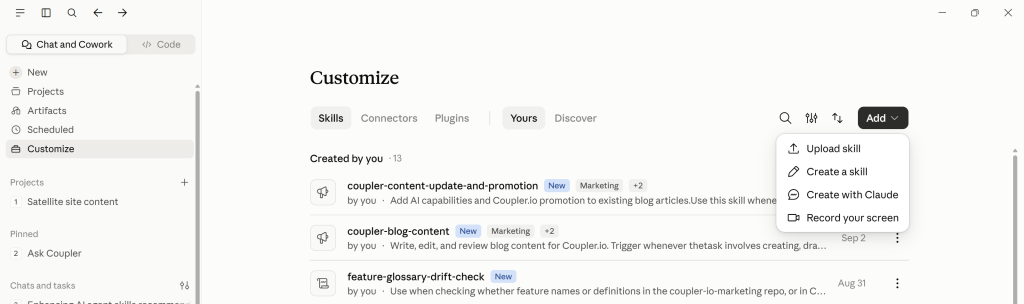
The Skill appears in your personal Skills list, and Claude loads it whenever it’s relevant to your request, or when you explicitly invoke it.
You can also browse Skills that are already available. In the same Skills section, use the Discover tab to search Anthropic’s official Skills.
If you’re a part of an organization, any Skills your organization has already added can be found in the Yours tab.
Create your own Skill
If no existing Skill fits your workflow, you can build one from scratch. In the Skills section, click Create skill. You have two options:
- Create with Claude — describe what you want the Skill to do, and Claude drafts the instruction file for you. This is the fastest way to start, but always review and edit the output. Claude-generated Skills tend to be too verbose, which can reduce consistency and increase token usage.
- Write Skill instructions — write or paste your own SKILL.md content directly. This gives you full control over the structure and wording.
Skill design tip: Keep Skills concise and focused. A single “do-everything” Skill usually performs worse than smaller, modular Skills that each handle one type of analysis. Test every Skill with realistic prompts before relying on it for production work.
For example, a marketing analytics Skill might define Claude’s role as a performance analyst, list the metrics it should prioritize, specify the output format (executive summary, anomalies, recommendations), and include validation rules for checking figures before presenting them.
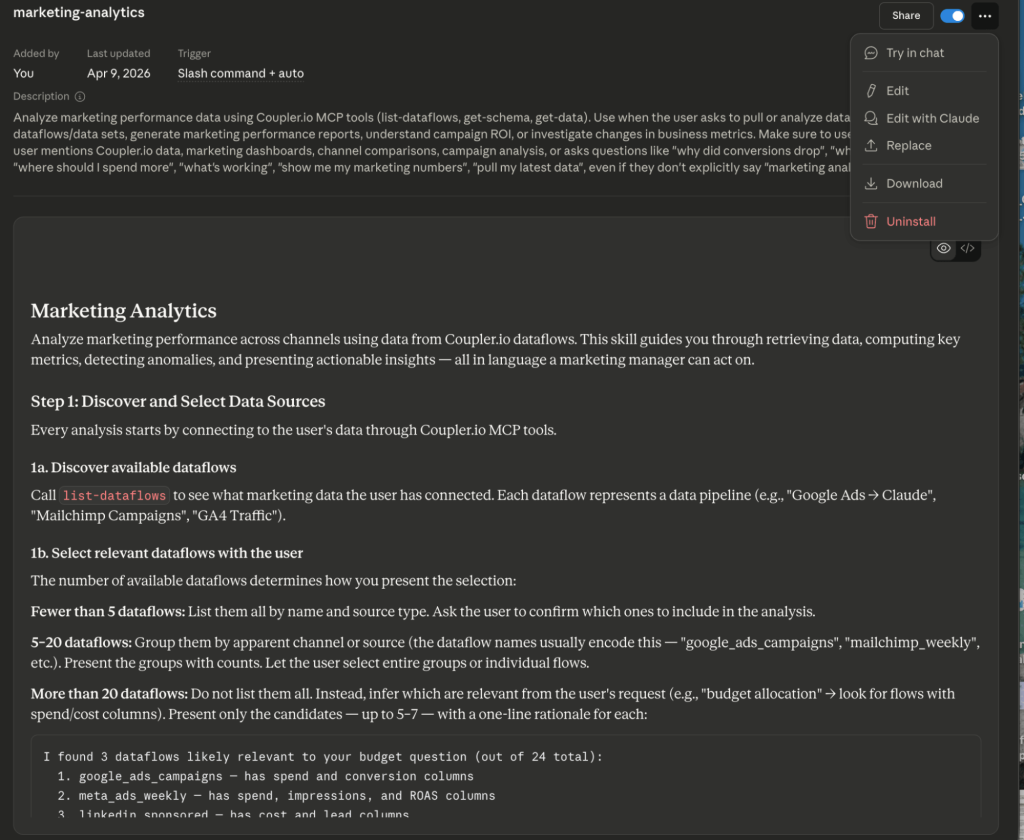
Once a Skill is saved, you don’t need to write detailed prompts anymore. Ask Claude to complete the task using the Skill by name, add the necessary specifics (which data source, which time period, which format), and the Skill handles the rest.
Performance & context management tip
Skills use progressive disclosure (YAML → main body → linked files). Don’t overload the main SKILL.md file (keep it under ~500 lines when possible so Claude loads only what’s needed). Too many active Skills can lead to Claude ignoring some of them, so periodically review which ones you actually need.
Claude Code for marketing skills: do you need it?
If we compare Claude Chat/Cowork and Claude Code, the former is your smart assistant, while the latter is more of a marketing engineer. It’s a tool for those who have already outgrown the chatbot format and want to integrate AI tools directly into their business processes through a terminal. Is it worth your time? If you are looking for 100% automation, yes.
Who is it for?
Claude Code is a solution for technical marketers and marketing engineers who want to eliminate the connecting link (human) from data collection and processing workflows. Instead of uploading files to the interface repeatedly, you create scripts and delegate these processes to them.
What you get with marketing skills for Claude Code
Though there are plenty of examples for marketing workflow optimization with Claude Code, let’s focus on some of the most popular ones:
- Scheduled automation: With Claude Code, you can write a script that will, for example, automatically launch the cmo_reporting skill every Monday at 9 a.m.
- Performance-based triggers: You can set up a “watchman”. For example, the script checks CPL every 4 hours. If the CPL exceeds $20, Claude automatically analyzes the reason (with the cpa_diagnostics skill) and sends you a notification with recommended actions (e.g., “Stop the ad group X, because it burns your budget”).
- Autonomous technical SEO audit: Unlike Claude Chat, Claude Code can scan your local website copy and identify pages with missing alt tags, duplicate meta descriptions, or schema.org layout errors. Moreover, you can ask Claude Code, “Fix these errors in all .html files in the /blog folder”, and it will automatically fix them.
If you are a tech-savvy user and your goal is to build a marketing machine that actually interacts with your website and server, Claude Code will serve as the instrument that connects the model’s intelligence to your technical infrastructure.
Limitations to keep in mind
Even the most powerful Claude skill is not a magic button. It’s a complex tool, which is why marketing specialists need to understand its fundamental limitations, not to get disappointed with results.
1. No “live” data without connectors
It’s important to understand that Claude Code skills for marketing on their own don’t have real-time access to your ad accounts. The result of your analysis will be as fresh as the data you provide it with. Without tools like Coupler.io, Claude will analyze yesterday’s or last week’s report. Data flow automation is critical for the skill to deliver actionable insights, not outdated stats.
2. Human-in-the-loop
Though Claude is highly professional at analyzing numbers, it still needs oversight, especially in creative tasks. It’s highly important for:
- Customer-facing content: LLM can create a technically correct, yet “cold/soulless” text, especially for social media posts, where tone and personality matter much more than accuracy alone.
- Compliance: In industries such as medicine or finance, each piece of AI-generated advice must necessarily be verified for legal compliance by a relevant specialist.
3. Knowledge cutoff
Claude’s knowledge base has a cutoff date. It means that the model might be unaware of:
- New viral trends that appeared yesterday
- The latest Google ranking algorithm changes (Core Updates)
- The most recent changes in your competitors’ pricing models
Use Claude for data processing, but always add up-to-date market context via integrations to ensure your skill works in today’s reality.
Power your Claude Skills with live data from Coupler.io
Get started for freeSecurity recommendations
Marketing skills for Claude are a great helping hand, but there are several important cautions to keep in mind to ensure your data workflows are secure, fast, and efficient:
- Install skills only from trusted sources. Skills can contain executable scripts that run in Claude’s environment (especially in Claude Code). Malicious skills could potentially access files, run unauthorized code, or even leak data. Also, review the full content of a skill (especially SKILL.md and any scripts in the scripts/ folder) before enabling it.
- Limit project-level file access. When you add a skill to a Project or use it in an environment like Claude Code, the model can read any file within that scope. Do not place sensitive credentials, .env files, or private keys in the same directory as the skill to prevent accidental data exposure.
- Audit external tool calls. Some skills require Model Context Protocol (MCP) or specific API connectors to function. This is also worth covering during team onboarding because new members should understand what data each connector can access and where it goes before they start building skills. Verify exactly what docs (and data) these tools can access and where they send it, as a compromised skill could theoretically use an authorized connection to export data to an untrusted server.