How to Export Data from ChatGPT Ads: CSV, API, and Automation

Ads Manager lets you download ChatGPT Ads export data as a CSV from the three-dot menu. For a one-time check, that’s enough. For a weekly report, it means a fresh download every time, and your ChatGPT Ads numbers still sit apart from Google Ads and Meta Ads.
Connect ChatGPT Ads to Coupler.io, a reporting automation platform for business teams, and the download step goes away. Your campaign data lands in Google Sheets, a BI tool, or an AI tool and refreshes on a schedule. Read on for the setup and for the cases where a CSV or the API is still the better pick. You’ll also see why two exports of the same campaign can show different conversion totals.
Key takeaways
- Your ChatGPT Ads export data can refresh on its own, as often as every 15 minutes depending on your plan, once you connect it to Coupler.io. It goes to Google Sheets, Excel, Power BI, BigQuery, or AI tools like Claude and ChatGPT.
- Ads Manager exports CSV files with impressions, clicks, spend, CTR, avg CPC, avg CPM, and conversions. You get them at the campaign, ad group, and ad level.
- CSV downloads are manual. Every report update means another download.
- The ChatGPT Ads API returns the same core metrics plus CPA and ROAS. ROAS counts only attributed purchase (order_created) events. The API needs code and a separate API key for each ad account.
- Conversion totals depend on your view-through window. Check the setting before you compare reports.
What ChatGPT Ads export data includes
ChatGPT Ads Manager reports seven core metrics at three levels: campaign, ad group, and ad.
| Metric | What it shows |
|---|---|
| Impressions | How many times your ads were shown |
| Clicks | How many times people clicked your ads |
| Spend | How much you spent |
| CTR | Clicks divided by impressions |
| Avg CPC | Average cost per click |
| Avg CPM | Average cost per 1,000 impressions |
| Conversions | Tracked actions, shown only if conversion measurement is set up |
Ads Manager also shows Order Created Sales and Order Created ROAS. Both count only attributed order_created (purchase) events, so leads and sign-ups don’t add to them. The API adds CPA, which is spend divided by conversions. For product feed campaigns, it returns product-level impressions, clicks, spend, and CTR as well.
Data doesn’t arrive all at once. Impressions, clicks, and CTR can show up within minutes. Spend, CPC, and CPM can lag by about 7–8 hours. Conversions can take 24–48 hours to appear in Ads Manager, and totals may change as recent events are processed. That’s why I’d never judge ChatGPT Ads performance on a same-day export.
What ChatGPT Ads conversion tracking adds
The Conversions column fills in only after you set up ChatGPT Ads conversion tracking. You have two options. The measurement pixel runs on your website. The Conversions API (CAPI) sends events from your server.
Many advertisers use both. If you do, send the same event ID from each source so OpenAI can remove duplicates. Setting up the ChatGPT Ads conversion API takes developer time, since the events come from your backend.
Without ChatGPT Ads tracking in place, conversions stay at zero. They can also read zero when the event type you configured doesn’t match the event you send.
Attribution windows matter too. In Ads Manager, go to Conversion Events > Attribution windows and choose a 7-, 14-, or 30-day click window and a 0- or 1-day view window. The API defaults to 30 days after a click and 1 day after an impression.
Now the tricky part. When the view window is set to 1 Day, the Conversions total includes click-through and view-through conversions. At 0 Day, it counts clicks only. The setting changes reporting only. Bidding and billing stay the same. Note the window next to every export, or two exports of the same campaign won’t match.
Which ChatGPT Ads export method fits your team?
For a one-time check, a CSV download from Ads Manager works. For anything recurring, you need a connection that refreshes on its own: Coupler.io without code, or the API with a developer. Here’s how the three compare:
| Method | Best for | How data updates |
|---|---|---|
| Coupler.io | Recurring reports and dashboards | Scheduled refresh, no code |
| CSV download | One-off checks | Manual download each time |
| ChatGPT Ads API | Teams with developers | Custom scripts you maintain |
For recurring reports, I’d start with Coupler.io.

Keep ChatGPT Ads reports fresh with Coupler.io
Get started for freeHow to automate ChatGPT Ads reporting with Coupler.io
Coupler.io automatically collects and blends data from 400+ apps, like ChatGPT Ads, Google Ads, Meta Ads, or HubSpot, and keeps it up to date for your reports and AI. Set it up once, and your ChatGPT Ads numbers land in your report on a schedule.
1. Sign up for a free Coupler.io account and create a data flow with ChatGPT Ads as the source. Connect your ad account.
2. Pick a report type. There are seven: ad account, campaign, and ad group performance, ad performance, campaign performance by country, campaign conversions, and campaign performance by conversion event. The two conversion reports show click-through and view-through conversions in separate columns.
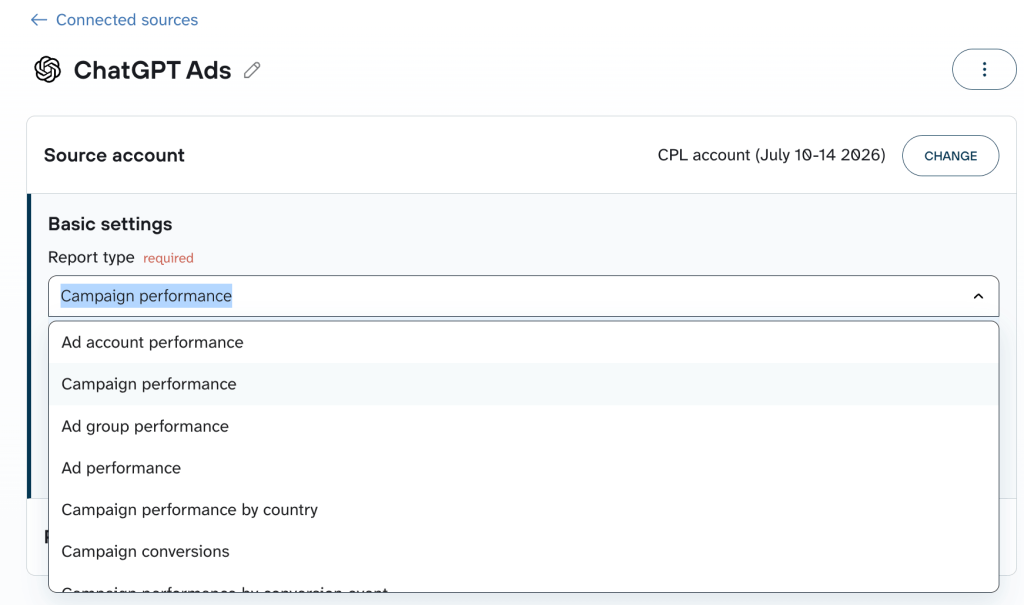
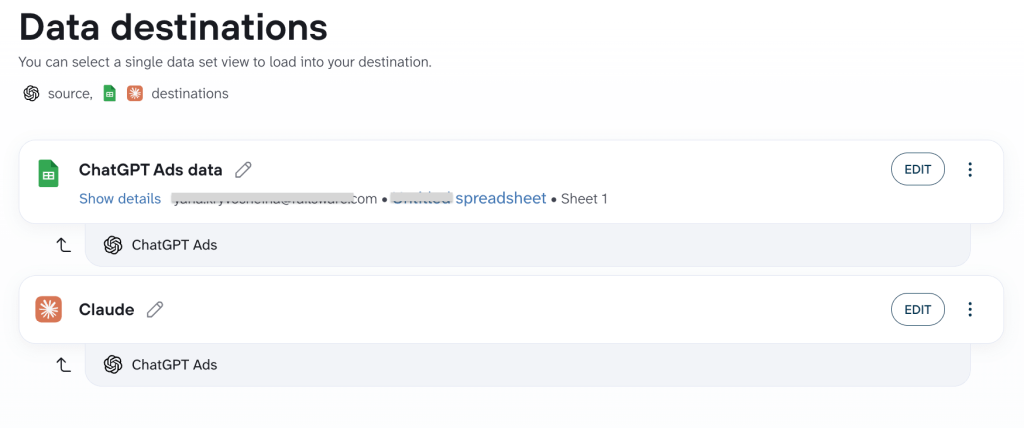
3. Choose a destination. Options include Google Sheets, Excel, Data Studio, Power BI, Tableau, BigQuery, Snowflake, and AI tools like Claude and ChatGPT.
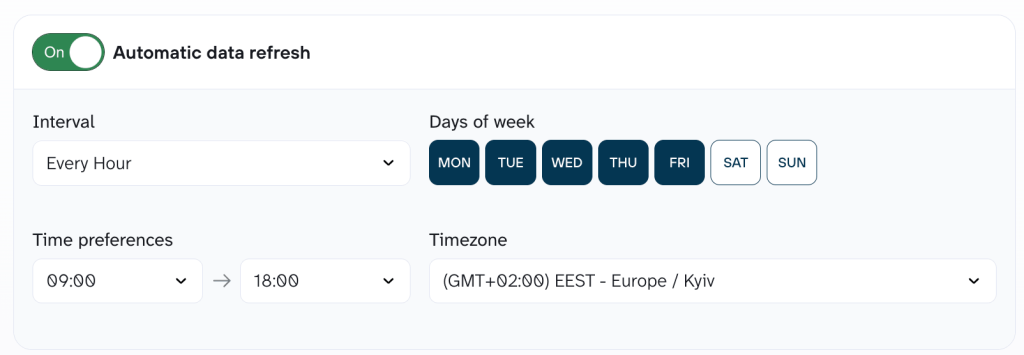
4. Set the refresh schedule, from monthly down to every 15 minutes, depending on your plan. Then save and run the flow.
Note: Campaign performance by conversion event lists every attributed event, including ones that aren’t conversion goals. Its totals won’t match the Campaign conversions report.
Add your other sources to the same report, and they refresh together. If your marketing team needs a ChatGPT Ads reporting tool they can run without code, this is the route I’d pick.
See ChatGPT Ads results for every client account with Coupler.io
Book a demoHow to export ChatGPT Ads data to CSV
If you only need numbers once, the built-in CSV export works fine. Log in to the ads manager ChatGPT advertisers use at ads.openai.com, then open the reporting table.
For totals of the whole table:
- Set the date range you need.
- Click the three-dot menu.
- Select Export → Export current table view.
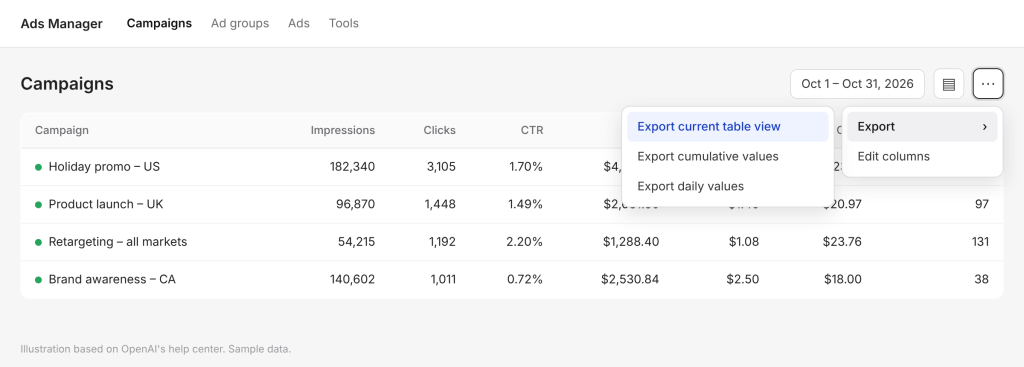
For specific rows, select them first, then choose Export → Export cumulative values. For a day-by-day breakdown, choose Export → Export daily values. View-through conversions can be included in the CSV when they’re available. The file opens in Excel or Google Sheets.
Problems start when you report every week. Each update means another download and another copy-paste into your report. OpenAI’s help center doesn’t describe a scheduled export, so someone has to remember to do it. If you also run Google Ads and Meta Ads, you merge three different file layouts by hand. That’s the work the Coupler.io setup above removes.
How to pull data with the ChatGPT Ads API
The third option is for developers. They can pull the same numbers through OpenAI’s Advertiser API at api.ads.openai.com. The basic flow looks like this:
- Create an Advertiser API key on the Settings page in Ads Manager. Each key works for one ad account, so an agency with ten clients needs ten keys.
- Send each request with the key as a Bearer token.
- Call the insights endpoint for the level you need: ad account, campaign, ad group, or ad.
- Choose hourly, daily, or monthly buckets. You can add one segment, such as country or device.
Know the limits before you build. A conversion report can cover up to 365 days. Hourly data is kept for about 30 days. Non-hourly data covers the most recent 365 days, except product reports, which are kept for about 30 days. Conversion reports fail if they exceed 2,000 rows, and you get no partial result.
The ChatGPT Ads API gives you full control if you have engineers. If you don’t, it becomes a project to maintain. Someone has to write the script, store the keys, fix errors, and load results into a sheet or Snowflake. With Coupler.io, you skip the script and the upkeep.
Build a ChatGPT Ads dashboard for cross-channel reporting
Once your data updates on a schedule, the next step is a dashboard. A CSV answers one question, while a ChatGPT Ads dashboard answers the same questions every week without extra work.
The built-in ChatGPT Ads Manager dashboard has insight charts for impressions, clicks, and spend. It doesn’t combine ChatGPT Ads data with your other ad platforms.
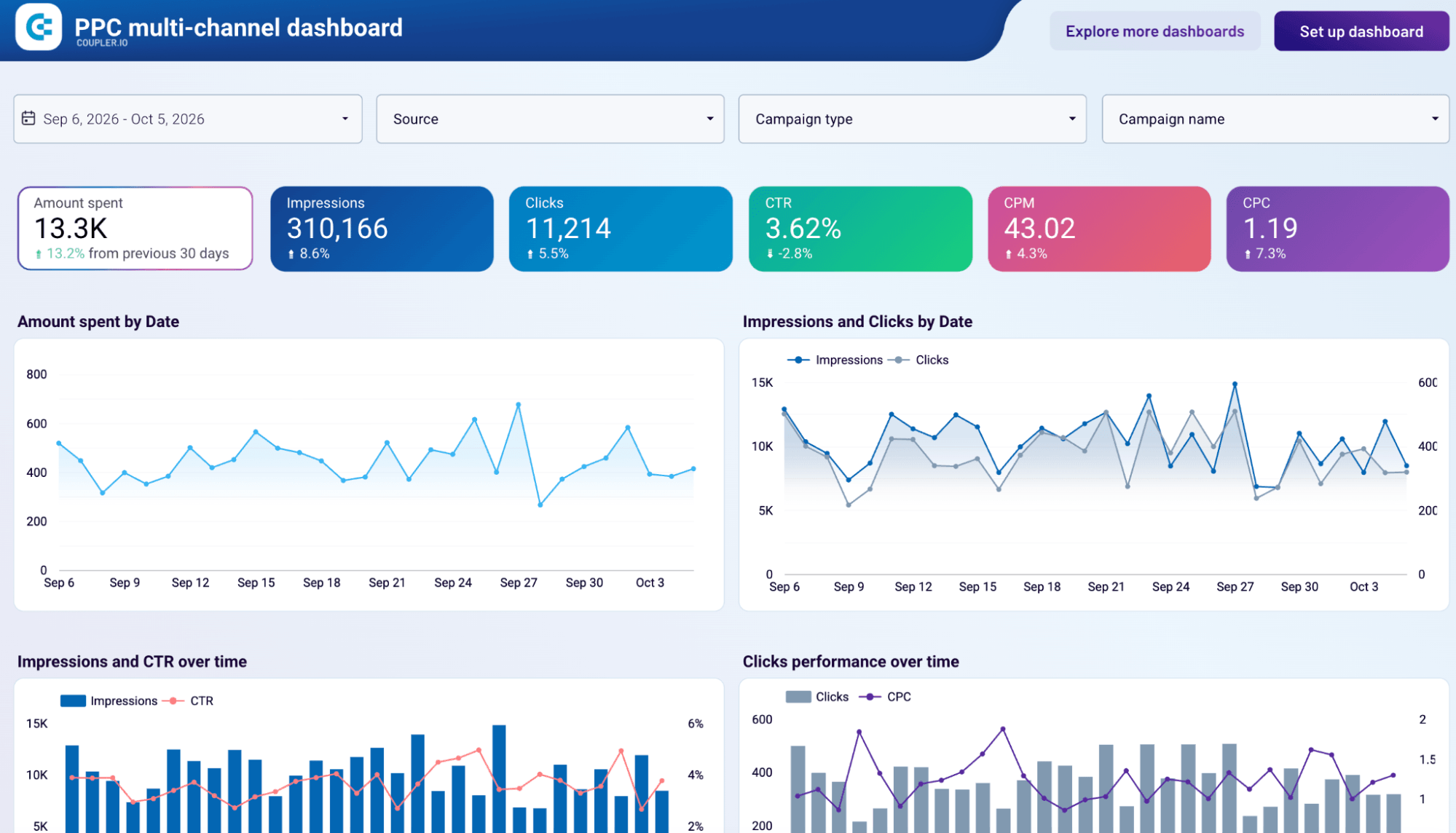
For ChatGPT Ads analytics across channels, load the data into a BI tool next to Google Ads and Meta Ads. Coupler.io has multi-channel dashboard templates, like the PPC multi-channel dashboard and the All-in-one marketing dashboard, that include ChatGPT Ads as a source. Pick a template, connect your accounts, and the charts fill in.
Two tips before you share it:
- Add UTM parameters to your landing page URLs so your analytics tool can separate ChatGPT ad clicks from other traffic. Ads Manager supports macros like {campaign_id}, {ad_group_id}, and {ad_id}, and fills them in when the ad is shown. Set them under Landing page query parameters at the campaign, ad group, or ad level.
- Use the same date range and time zone when you compare ChatGPT Ads numbers with your analytics tool.
Send the same data to Claude through Coupler.io, or to ChatGPT, and ask questions in plain language. Coupler.io’s Analytical Engine runs the calculations, so the AI works from calculated results and focuses on explaining them. Access is read-only. Ask something like “Which ad group had the highest CPC last week?” to check ChatGPT Ads performance before you build a single chart.
Track ChatGPT Ads beside Google Ads and Meta Ads
Try Coupler.io for freeAutomate your first ChatGPT Ads report
For weekly ChatGPT Ads reporting that updates without anyone touching it, automate your ChatGPT Ads export data with Coupler.io. Keep the CSV download for one-off checks and the API for custom builds by your developers.
My advice: start with the report you rebuild most often. Connect it once, set the schedule, and let it run.
FAQ
Can you automate ChatGPT Ads exports?
Yes. Coupler.io connects to ChatGPT Ads and refreshes the data on a schedule, as often as every 15 minutes depending on your plan.
Can you schedule exports in ChatGPT Ads Manager?
OpenAI’s help center describes only manual CSV exports from the three-dot menu. To get the same data on a schedule, connect ChatGPT Ads to Coupler.io and set the refresh frequency.
How do I send ChatGPT Ads data to Google Sheets?
Create a data flow in Coupler.io with ChatGPT Ads as the source and Google Sheets as the destination. Pick a report type and set a schedule, and the sheet updates on its own.
Can I analyze ChatGPT Ads data with AI?
Yes. Coupler.io sends ChatGPT Ads data to Claude, ChatGPT, Gemini, and other AI tools with read-only access. You can then ask questions about your campaigns in plain language.
How do I build a ChatGPT Ads dashboard?
Connect ChatGPT Ads to Coupler.io and pick a multi-channel dashboard template, like the PPC multi-channel dashboard. The charts fill in with your data and refresh on your schedule.
What metrics can you export from ChatGPT Ads Manager?
You can export impressions, clicks, spend, CTR, avg CPC, avg CPM, and conversions at the campaign, ad group, and ad level. Coupler.io also exports seven report types, including campaign conversions split into click-through and view-through.
Does ChatGPT Ads have an API?
Yes. OpenAI’s Advertiser API returns performance data at the ad account, campaign, ad group, and ad level. It needs a separate API key for each ad account. If you’d rather skip the code, Coupler.io pulls the same data without scripts.