
Ask Claude why your cost per conversion jumped last week, and it can only answer if it can reach your Google Ads account. A Google Ads MCP server gives it that access. Picking one is the hard part. Some servers only read data and others edit live campaigns. Google’s own server also changed what it can do in November 2026.
Coupler.io takes the reporting route. It blends Google Ads with your other marketing apps on a schedule and calculates the numbers your AI explains. You’ll see the best Google Ads MCP servers side by side on access level, setup and pricing model, with a clear pick for each type of team.
Key takeaways
- Coupler.io is the best pick for reporting. Your AI asks about Google Ads together with Meta Ads, GA4 or your CRM, and Coupler.io computes the answer from one blended dataset.
- Google’s official server is free and open source. Since version 0.0.6 it can create assets and manage labels, but it still can’t change campaigns, budgets or bids.
- Pipeboard, Markifact, AdKit, Ryze AI, Adspirer, GoMarble and Windsor.ai can edit campaigns. Most put an approval step, a draft or a paused status between your AI and a live change.
- Google retired developer tokens on September 9, 2026. API access now follows your Google Cloud project, and older setup guides that ask for a token are out of date.
- Choose by the job: answers across channels point to Coupler.io, hands-on campaign edits point to a write-enabled server.
What is a Google Ads MCP server?
The Model Context Protocol (MCP) is an open standard that lets AI tools call outside systems. A Google Ads MCP server sits between your AI tool and the Google Ads API. It exposes tools like “list accounts” or “run a query”, and the AI agent decides when to call them.
In practice, you ask Claude or ChatGPT a question in plain English. The AI picks a tool, the server sends the request to Google Ads, and the result comes back for the AI to explain. Most servers fetch data with GAQL queries. GAQL stands for Google Ads Query Language, the SQL-like language of the Google Ads API.
Servers come in two shapes. A self-hosted server runs on your computer over stdio or on your own cloud project. A remote MCP server is hosted by the vendor: you paste its URL into your AI client, sign in with OAuth and start asking.
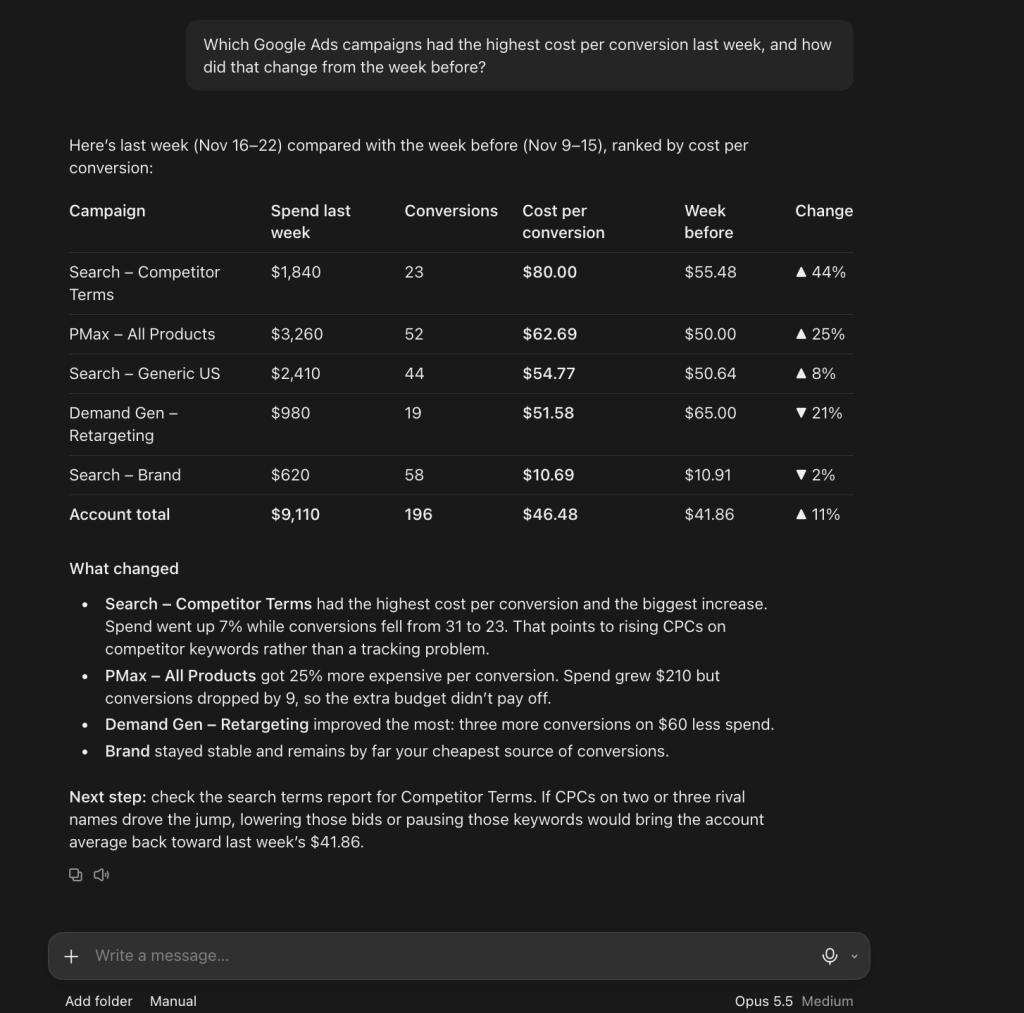
Google Ads MCP vs API: which one your team needs
The Google Ads API sits under every server on this list. The real choice between MCP and the API is about who writes the queries.
With the API, a developer writes the code. That covers authentication, GAQL, error handling and updates when Google releases new API versions. You get full control and the same output on every run. It suits scheduled scripts and internal tools.
With MCP, the AI writes the query at the moment you ask. Nobody on your team needs to know GAQL, and a new question doesn’t need new code. The trade-off is consistency: two people who phrase the same question differently can get two different queries. Coupler.io narrows that gap with data context: your metric names and definitions are saved with the data. Every query then uses the same ones.
Use the API when you need a fixed output and have engineers to maintain it. Use MCP when marketers bring new questions every week. The MCP vs API guide covers this split in more detail.
The 10 options at a glance
| Server | Type | What it can do in Google Ads | Safety on changes | Pricing model |
|---|---|---|---|---|
| Coupler.io | Hosted, multi-app reporting | Reads Google Ads and blends it with other apps | You choose which data your AI works with. | Account-based, from $24/month billed annually; free 7-day trial |
| Google Ads MCP server (official) | Open source, self-hosted | Reads data with GAQL; creates assets and manages labels | Propose-and-confirm for writes; optional read-only mode | Free and open source |
| Pipeboard | Hosted | Creates and edits campaigns, keywords and bids | New campaigns created paused | Free plan; paid per connected ad account |
| Markifact | Hosted | 60+ Google Ads tools, read and write | Every write waits for approval | Credits; trial credits to start |
| AdKit | Hosted | Creates and edits campaigns, ad groups, keywords and ads | Changes saved as drafts until you approve | Monthly plans; 7-day trial |
| Ryze AI | Hosted | 14 tools: 8 read, 6 write | Approval-gated writes | Included in every Ryze AI plan; 7-day trial |
| Adspirer | Hosted | Reads and writes across Search, PMax, YouTube and Demand Gen | New campaigns paused; deletes need confirmation | Free tier plus paid usage |
| GoMarble | Hosted and open source | Hosted: read and change access. Open source: reads and keyword research | Hosted changes are proposed, then approved | Hosted: GoMarble workspace plan. Open source: free (MIT) |
| Windsor.ai | Hosted | Reads 350+ sources; pauses campaigns, changes budgets, adds negative keywords | New campaigns, ad groups and ads created paused | MCP in every plan, including a free one |
| Zapier MCP | Hosted, general automation | A short list of actions, including campaign status | No approval step documented | 2 Zapier tasks per tool call |
The best MCP servers for Google Ads in 2026
1. Coupler.io: best for Google Ads reporting and cross-channel analysis
Most questions about Google Ads don’t stay inside Google Ads. “Which campaigns brought qualified leads?” needs HubSpot. “What’s our blended ROAS?” needs Meta Ads and Shopify. A Google Ads-only server leaves your AI to stitch those answers together one app at a time.
Coupler.io is a reporting automation platform for business teams. It automatically collects and blends data from 400+ apps and keeps it up to date for your reports and AI.
Here’s how it works with Google Ads:
- Create a data flow with Google Ads as the source. Then add Meta Ads, GA4, HubSpot or any other app you report on, and blend them into one dataset. Or describe it to Coupler.io’s AI Agent, and it sets up the source, destination and schedule for you.
- Add your AI tool as a destination. Coupler.io works with Claude, ChatGPT, Gemini, Perplexity, Cursor, Copilot and OpenClaw, plus Custom MCP for any other MCP-compatible tool. There’s nothing to install and no API keys to manage.
- Ask your question. The AI writes the query. Coupler.io runs it on your prepared data and returns the computed result, which the AI then explains. You can open the query behind any figure before you touch a bid or budget.
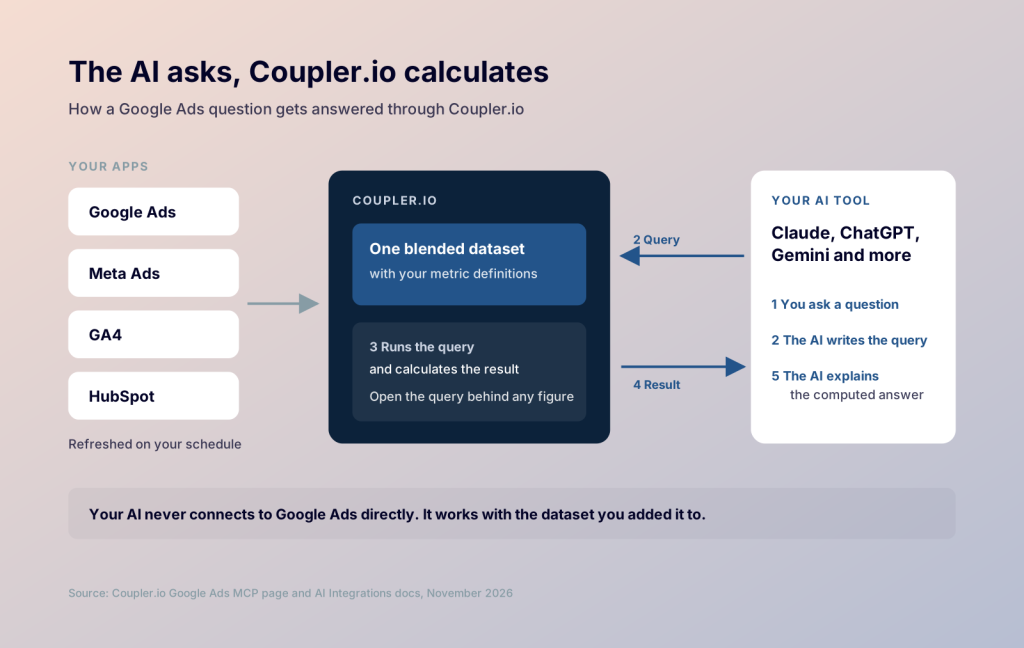
The AI asks, Coupler.io calculates. With ad data, that split matters. A model doing the math itself can easily get totals and ratios wrong across thousands of rows. The same data flow also feeds a Google Sheets report or a Data Studio dashboard. Your AI and your reports then work from one set of numbers.
Right Percent’s Gabriel Solberg uses this setup with Claude. It cut his PPC analysis and reporting time by 60%: “I’m not getting AI’s best guess. Coupler.io does the actual math.”
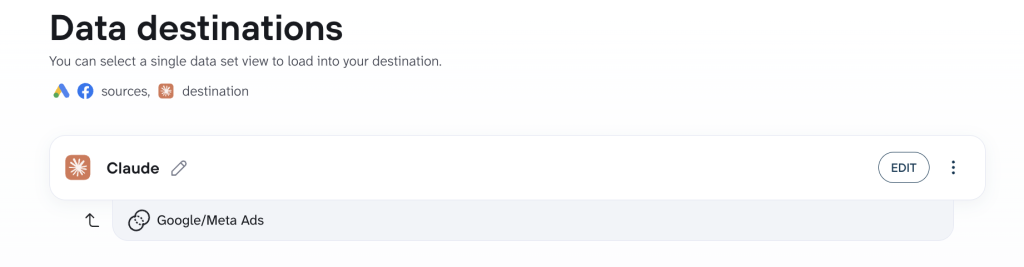
If you want a Google Ads MCP for Claude that also answers questions about your other apps, start here. The Google Ads to Claude guide walks through the setup with example questions.
You control what Coupler.io can do in your apps. Your AI never connects to them directly. It only sees datasets from data flows where you added it as a destination. You can also hide fields you don’t want it to see. Coupler.io is SOC 2 and GDPR compliant and trusted by 200K+ users.
Campaign management through MCP is in the works at Coupler.io. Until it ships, edits happen in Google Ads or through one of the write-enabled tools below.
Billing is account-based. Plans start at $24/month with annual billing, and every account starts with a free 7-day trial. See pricing and the full connector list.
Best for: in-house marketing teams and agencies that report on Google Ads alongside other channels.
Limits: no campaign edits yet, and refresh runs on a schedule set by your plan.

Blend Google Ads, Meta Ads and CRM data for your AI
Book a demo with Coupler.io2. Official Google Ads MCP server: best free option for developers
The official Google Ads MCP server comes from Google’s Ads API team. It launched as an open-source, read-only project in October 2025. Version 0.0.6, released on November 2, 2026, added the first tools that write to an account.
Its tools:
- list_accessible_customers returns the accounts your login can reach
- search runs GAQL queries
- get_resource_metadata lists the fields you can query for a resource such as “campaign”
- create_asset, upload_video_asset, manage_labels and manage_label_associations handle assets and labels
Writes go through a two-step propose-and-confirm workflow, and you can switch the server to a read-only mode. Google’s guide is clear about the limits: it “cannot create, modify, pause, or enable campaigns, ad groups, ads, budgets, or bids.”
Setup is technical. You need Python 3.10 or later, and you run the server locally over stdio or deploy it to Cloud Run with streamable HTTP. It authenticates with OAuth or a service account, and Google’s guide includes configuration examples for Gemini CLI and Claude. Older tutorials are out of date on one point: Google retired developer tokens on September 9, 2026, and API access levels now belong to your Google Cloud project.
Looking for a Google Ads MCP server free to use? This is the one: the server costs nothing, though you run and maintain it yourself.
Best for: developers who want first-party access and are comfortable maintaining their own setup.
Limits: Google Ads only. No campaign, budget or bid changes. Hands-on setup.
3. Pipeboard: best for campaign edits across many ad platforms
Pipeboard connects 11 ad platforms plus GA4 and Merchant Center in one hosted connection. Its Google Ads MCP creates and edits campaigns, keywords and bids, runs raw GAQL, and handles Search, Performance Max and Shopping campaigns. Pipeboard also runs a Meta Ads MCP.
New campaigns are created paused by default, which gives you a chance to review them before they spend. Pipeboard’s guide doesn’t describe an approval step for edits to live campaigns. Keep tool approval switched on in your AI client for those.
Authentication runs through your Pipeboard session, and the server works with ChatGPT, Cursor, n8n and other MCP clients. Pipeboard has a free plan, then charges per connected ad account with unlimited AI commands.
Best for: media buyers who manage Google Ads and Meta Ads side by side and want one connection for both.
4. Markifact: best for approval on every change
Markifact exposes 60+ Google Ads tools through MCP. The coverage starts with reporting, raw GAQL and Keyword Planner research. It extends to campaign and ad group creation, responsive search ads, Performance Max asset groups and Demand Gen creatives. Keywords, negatives, budgets and bidding are covered too.
Its safety rule is simple: every write operation waits for your approval before it goes live. Markifact also covers other ad platforms, analytics tools and workspace apps, and runs its own Meta Ads MCP. One conversation moves from Google Ads to Meta or GA4.
It works with ChatGPT, Codex, Cursor, Gemini CLI and other MCP clients. Usage is metered in credits, you start with trial credits, and MCP is listed on the Pro and Team plans.
Best for: agencies managing many client accounts that want a human check on each change.
5. AdKit: best for draft-first campaign building
AdKit takes a different approach to safety. Your agent never edits the live account directly. Each change is saved as a draft in AdKit, you review it in the dashboard, and nothing reaches Google Ads until you publish it.
The Google Ads MCP covers Search, Display, Performance Max and Demand Gen. The same connection runs eight more ad platforms, including Meta, TikTok, LinkedIn and Microsoft. You sign in with Google, with no Cloud project, developer token or OAuth credentials to create.
AdKit also offers a CLI for agents like Claude Code and Codex. It sells monthly plans with a 7-day trial.
Best for: teams that want AI to build campaigns but prefer to review everything in one place before launch.
6. Ryze AI: best small, approval-gated tool set
Ryze AI keeps its Google Ads server compact: 14 tools, 8 for reading and 6 for writing. Read tools run on their own. Write tools need approval per call, and deletes run only on a list you approve item by item.
The server is hosted, runs over streamable HTTP and uses Google sign-in. It works with Claude Code, ChatGPT, Cursor, Windsurf, VS Code, Gemini CLI and other clients. Approval-gated writes make it a reasonable step up for teams moving from reporting to small, supervised changes. Ryze AI includes the connector in every plan and offers a 7-day trial.
Best for: in-house marketers who want a short list of well-defined actions they can review.
7. Adspirer: best for launching new campaign types from chat
Adspirer focuses on building and running campaigns. Its Google Ads tools create Search, Performance Max, YouTube and Demand Gen campaigns, research keywords, and add or remove negative keywords. The same connection covers Meta, Amazon, LinkedIn, TikTok and ChatGPT Ads.
New campaigns are created paused, and pausing a live campaign needs explicit confirmation. Destructive tools sit behind a confirm_delete flag. Adspirer documents setup for ChatGPT, Cursor and other MCP clients. Pricing combines a free tier with paid plans for higher usage.
Best for: advertisers who launch new campaigns often and want the AI to draft the full structure.
8. GoMarble: best for open-source reads or approved changes
GoMarble has two products, and they suit different people.
The open-source server is MIT-licensed and built on FastMCP. It has three tools: list_accounts, run_gaql and run_keyword_planner. It only reads data, and campaign tools are listed on its roadmap. You set up your own Google Cloud project and OAuth credentials, then add the server to your Claude Desktop config or another local client. GoMarble also publishes an open-source Facebook Ads MCP.
The hosted GoMarble MCP goes further. Read access covers every connected platform, and change access is available for Google Ads and Meta Ads once you switch the connection to Write. Tools that change campaigns have “propose” in their name. The AI prepares the change, and it reaches the ad platform only after you confirm it. It works with ChatGPT, Codex, Cursor and other MCP clients. The open-source server is free, and the hosted MCP runs on your GoMarble workspace plan.
Best for: developers who want a free starting point, or paid media teams already using GoMarble.
9. Windsor.ai: best for reporting plus quick edits from one connector
Windsor.ai connects 350+ sources to AI tools, and its MCP gives read and write access to Google Ads. You can ask about spend, ROAS, search terms and Quality Score, then pause campaigns, change budgets or push negative keywords from the same chat.
New campaigns, ad groups and ads are created paused. Windsor’s Google Ads MCP page doesn’t describe a separate confirmation step for other changes. Check your AI client’s approval settings before you allow writes. It works with Claude, ChatGPT, Gemini Enterprise and Microsoft Copilot.
MCP comes with every Windsor.ai plan, including a free plan limited to one source, one account and the last 30 days of data.
Best for: marketers who want one connector for reading many sources and making simple account changes.
10. Zapier MCP: best when Google Ads is one step in a bigger automation
Zapier MCP turns Zapier actions into tools your AI can call. For Google Ads, the list is short. It covers customer lists, offline conversions, reports and campaign status.
It’s a fit when Google Ads is one link in a chain, like adding new CRM leads to a Customer Match list. For deeper campaign analysis, pair it with another server. Each MCP tool call uses 2 tasks from your Zapier plan.
Best for: operations teams that already run their workflows in Zapier.
Other options: Composio and Flyweel
Composio offers a hosted Google Ads MCP with managed Google OAuth. It’s aimed at developers building agents in frameworks like LangChain, CrewAI or the Vercel AI SDK. Flyweel connects Google Ads and Meta Ads to Claude Desktop, Cursor and other MCP clients, and its docs describe it as read-only.
Analyze Google Ads and Meta Ads in Claude
Try Coupler.io free for 7 daysHow to choose a Google Ads MCP server
Start with the job you want the AI to do. Three questions narrow the list fast.
Read-only Google Ads MCP server or write access?
A read-only Google Ads MCP server can answer questions but can’t change your account. That makes it the safe default for reporting and audits. Your options include the official server in read-only mode, GoMarble’s open-source server and Flyweel.
With Coupler.io, your AI queries a prepared dataset that also brings in your other apps, and you choose which data it works with.
Write access is where the vendors differ most. Look at how each one stops a bad change:
- Approval on each change: Markifact, Ryze AI and GoMarble’s hosted MCP
- Drafts you publish: AdKit
- Paused by default: Pipeboard, Adspirer and Windsor.ai for new campaigns
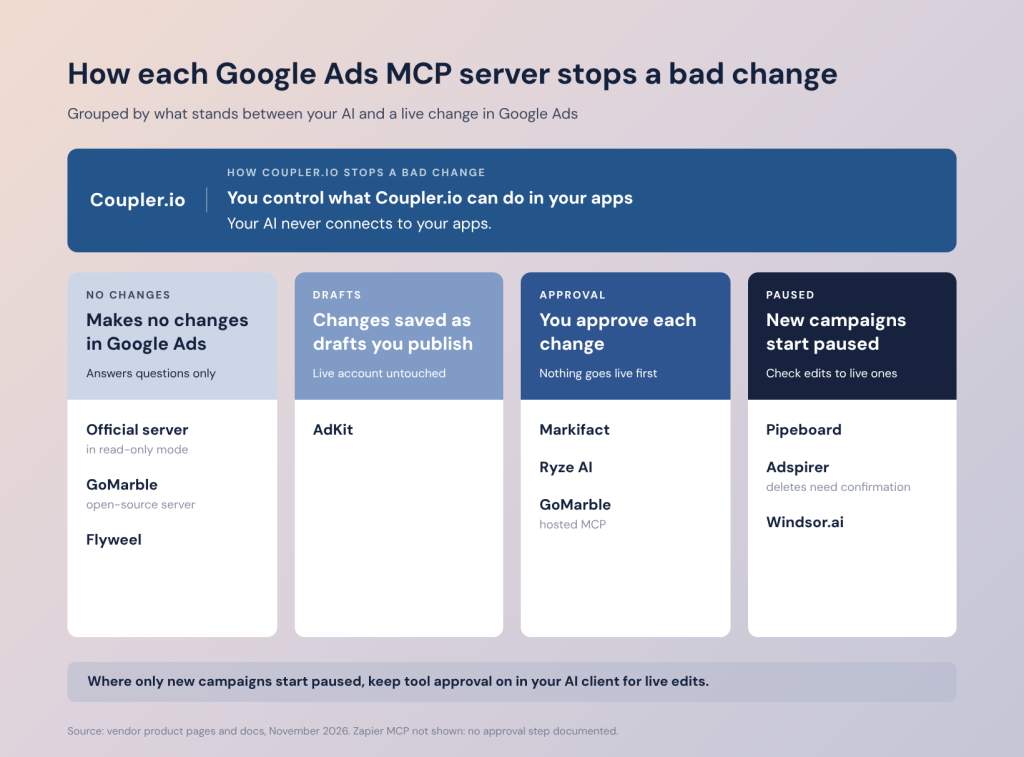
If you’re new to this, start with read access. Turn on writes for one account and run an account audit with the AI. Approve changes before you trust it with budgets.
Hosted or self-hosted?
This is the official vs third-party Google Ads MCP decision for most teams. The official server is free and maintained by Google, but you install Python, handle OAuth or a service account, and keep it running. Most third-party servers on this list are hosted: you paste a URL into Claude, ChatGPT or Cursor and sign in.
Hosted servers handle sign-in for you, but your data passes through the vendor. Read its security page and the permissions it requests before you connect.
Google Ads only or the whole paid media stack?
The best MCP for Google Ads depends on how many channels you run. If Google Ads is your only channel, a single-platform server covers you. If you also run Meta Ads or track deals in a CRM, look wider. Pipeboard, Markifact and AdKit each offer a Meta Ads MCP next to their Google Ads server.
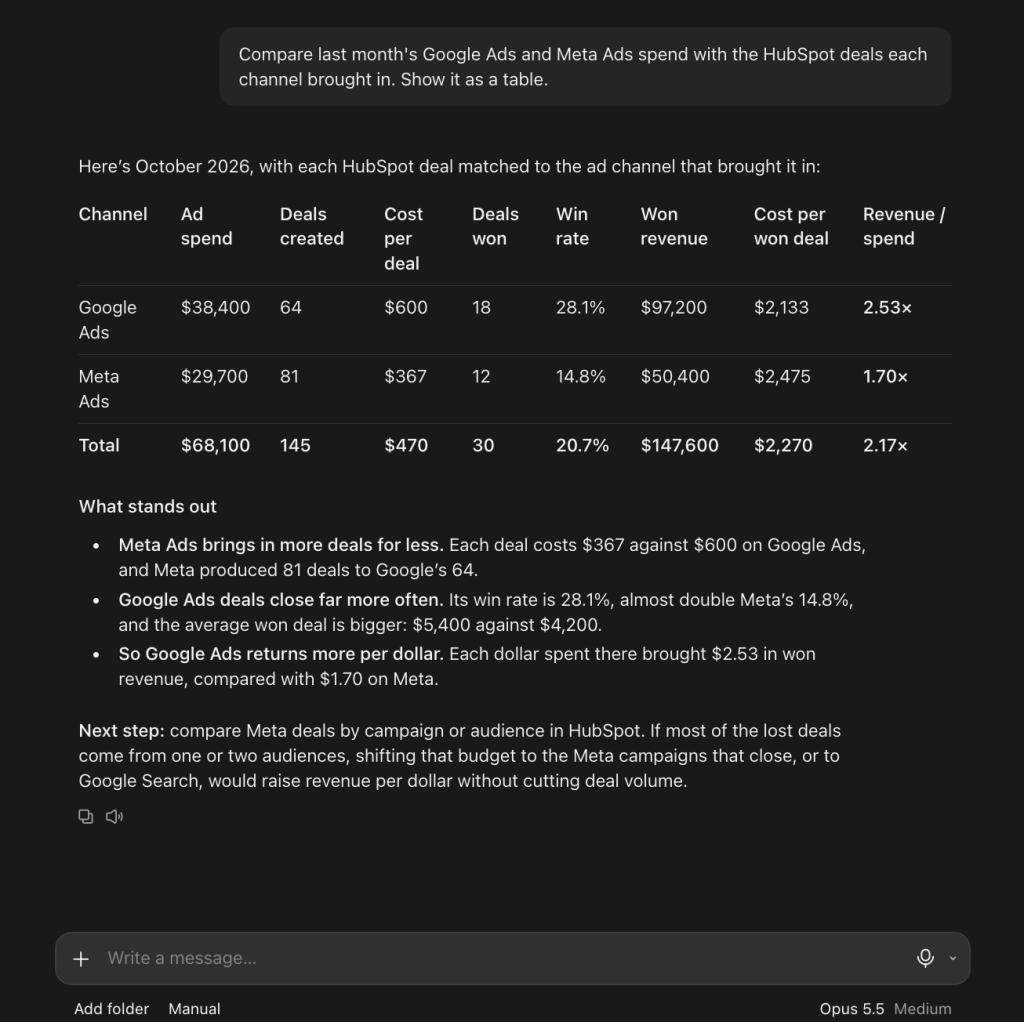
For that setup, the best MCP servers for Google Ads and paid media are the ones that cover several platforms in one connection. Most hosted servers here, including Adspirer, GoMarble and Windsor.ai, cover several ad platforms too. Coupler.io goes beyond ad platforms. It blends ad spend with CRM, e-commerce and finance data for cross-channel reporting, then calculates the answer before the AI explains it.
Get matching numbers in reports and AI with Coupler.io
Start your free 7-day trialPick the server that matches the job
If your goal is answers, choose a server built for reading and calculation. Coupler.io gives Claude, ChatGPT and other AI tools Google Ads data blended with your other apps, and the same numbers show up in your reports. If your goal is hands-on campaign management, pick a write-enabled server whose safety model fits how your team reviews changes.
Need one Google Ads account in your AI tool for a quick question? A Google Ads-only server may be enough. Need several apps, history, or the same numbers in your reports? That’s Coupler.io.
You can also run both: Coupler.io for reporting and analysis, and a write-enabled server for the changes that analysis points to. Start your free 7-day trial of Coupler.io, connect Google Ads, and ask your AI the first question you’d normally answer with a spreadsheet.