
Claude Cowork for Marketing: What Marketers Are Actually Building With It

Cowork is Anthropic’s desktop agent for knowledge work and tasks. It reads your files, connects to the tools you already use, and handles multi-step tasks on its own. You describe what you need. It delivers the output.
While Claude code enables agentic workflows, Cowork (launched in January 2026) makes these accessible for marketers without having to use the terminal.
In this article, I’ve collected the best examples of using Claude Cowork for marketing. Explore what they build, what data they connect, and more, so you can train Cowork to handle your tasks from day-to-day workload.
The difference between Claude Code and Claude Cowork for marketers
Claude Code and Cowork run on the same model and the same agentic architecture. Both can read files, connect to external tools through MCP, and execute multi-step tasks without you managing each step.
Claude Cowork for marketers is the more practical option. It produces files (spreadsheets, decks, reports, docs) or writes outputs directly into your connected tools. It supports scheduled recurring tasks and keeps project memory across sessions.
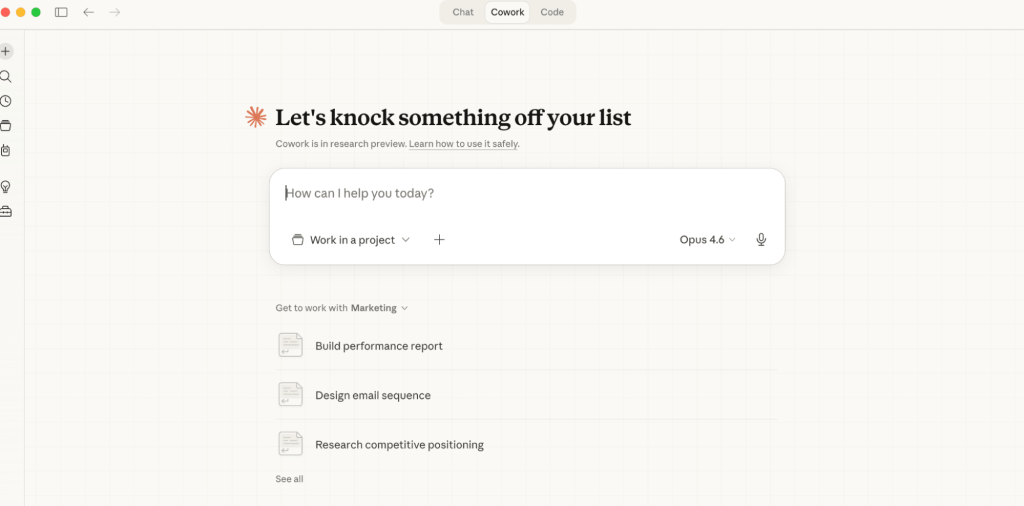
Quick decision rule: If the work is high-effort but not technically complex (organizing files, synthesizing research, pulling reports together), that’s Cowork.
If it requires running code, touching a codebase, or interacting with dev toolchains across complex tasks, that’s Claude Code. Nika Tamaio Flores blogged about Claude Code for marketing separately.
Code gives you more programmatic control and agent team orchestration, which matters if you’re comfortable in a terminal.
Here’s a quick comparison:
| Cowork | Claude Code | |
|---|---|---|
| Built for | Ops, marketing, finance, legal, analysts | Software engineers and technical teams |
| Use when | The task is time-consuming but not technically complex | The task requires code execution, codebase context, or dev toolchain access |
| Interface | Desktop app (Cowork tab), chat-like GUI | Terminal CLI, Desktop app (Code tab), VS Code extension, web and mobile apps |
| Outputs | Documents, spreadsheets, presentations, reports, dashboards, emails | Code, APIs, tests, Git commits, deployable software |
| Automates | Business workflows: file org, research synthesis, data extraction, recurring reports | Dev workflows: refactoring, debugging, test writing, PRs, CI/CD |
| Integrations | Connectors: Slack, Notion, Google Drive, HubSpot, Salesforce, Jira, Chrome | MCP servers: GitHub, databases, cloud infra, custom APIs |
| File access | Only folders you explicitly grant | Full system access via your terminal user permissions |
| Scheduled tasks | Yes: recurring tasks on a cadence (e.g. weekly metric pulls) | Yes: /loop command for recurring dev tasks |
Where Cowork fits in the Claude ecosystem
If you’re already using Claude Chat, Cowork is the next step when chat stops being enough.
- Chat is for brainstorming, quick questions, and one-off drafts. No file access, no multi-step execution. It has access to skills and projects, but it’s designed for conversational tasks (brainstorming, data analysis, planning, etc)
- Cowork is for work that produces a deliverable: reports, decks, briefs, audits, and so on. Anything that involves local files, runs on a schedule, or pulls data through connectors.
- Claude Code is for terminal users who need programmatic control, git integration, or multi-agent orchestration.
Skills and connectors work across all three. A skill you build in Cowork works in Chat and Code. A connector you set up once is available everywhere. That matters because you’re not locked into one product as your needs evolve.
How to use Claude Cowork for marketing
The use cases in this article are specific workflows from specific practitioners. But Cowork’s applications go well beyond these examples. Here are the main categories of Claude Cowork for marketing implementation:
- Reporting: Connect a data source, build a skill that defines the report structure, and schedule it. Daily snapshots, weekly performance overviews, monthly deep-dives. Each runs on the same skill but adapts to the latest data.
- Presentations: Add your performance data, a brand guidelines file, and a template to the folder. Cowork can produce decks or HTML presentations with charts, trends, and narrative.
- Competitive intelligence: Run parallel research across multiple competitors using sub-agents. Each agent investigates one company. Cowork synthesizes the findings into a battle card or briefing document.
- Data processing: Point Cowork at messy spreadsheets. It cleans, merges, deduplicates, and drops a structured file back into your folder. No Excel required.
- SEO and AEO audits: Pull data through connectors, add instructions and brand positioning docs, competitors overviews, and create full audits and recommendations without the manual effort.
The common thread: any task you do recurrently that follows the same structure can become a Cowork workflow. You create a skill that defines the method, connect the data source, add a template and examples to set the quality bar, and either run it on demand or schedule it.
Build blocks you can use in Claude Cowork for marketing
While some building blocks were already available in Chat, Cowork introduced a set of concepts that might be new if you’re coming from Chat or other AI tools. Here’s a recap of all the terms you’ll come across when using Cowork.
- Skills: Reusable instruction sets stored as markdown files. They tell Cowork how to handle a specific task type: a reporting format, a brand voice, a content planning methodology. Build once, reuse across sessions. Check out the top Claude skills to see what’s available.
- Plugins: Bundles that package multiple skills, connectors, and sub-agents into one installable unit. Anthropic has a marketplace with ready-made options. You can also build your own.
- Commands: Slash shortcuts like /schedule and /report that trigger specific skills or actions.
- File system folder context: Everything in your project folder: strategy docs, brand guidelines, ICP definitions, past briefs. Cowork reads it all automatically at the start of each task.
- Connectors and MCP servers – Claude integrations that bring live data from external tools into Cowork. Without them, you export CSVs manually. With them, Cowork queries your CRM, analytics, or ad platforms directly. Coupler.io’s MCP connector covers 400+ sources, including GA4, Google Ads, HubSpot, Meta, and Salesforce.
- Projects in Cowork: Persistent workspaces that keep your folder, instructions, skills, and full task history in place between sessions. Launched in late March 2026. Before this, every session started fresh.
The short version of how they connect: skills define how Cowork works. Folders give it context. Connectors give it data. Projects give it memory.
These building blocks show up in every use case below, so recognizing them makes the examples easier to follow.
Claude Cowork marketing use cases
With so many use cases out there, I want to focus on four specific examples that showcase the full capabilities of Claude Cowork for marketers:
| Who | What they built | Key tools | Key Cowork feature |
|---|---|---|---|
| Nika Tamaio Flores, Coupler.io | Daily funnel briefings | Coupler.io MCP + Marketing Analytics skill | Scheduled tasks |
| Patrick Schaber | Marketing/sales OS | Folder structure + CLAUDE.md + custom skills | Folder-based onboarding |
| Adina Timar, Weflow | BOFU content plan generation | AirOps MCP + Coupler.io connector + custom skill | Skill + connector chaining |
| Robert Gillespie | Client performance reporting | Report template + project memory | Projects (compounding output) |
Scheduled reporting that writes itself
To be completely honest, this case is not an example of Claude Cowork for marketers per se. Nika Tamaio Flores is a Product Lead at Coupler.io, and she uses Cowork to generate a daily funnel briefing for product managers. At the same time, her case can inspire marketing teams and their leads to optimize daily reporting.
The task pulls live funnel data, computes conversion rates, flags segments that need attention, and delivers a formatted summary every weekday morning.
No one opens a dashboard or runs an export.
| Who | Nika Tamaio Flores, Product Lead at Coupler.io |
| Files and folders | Growth strategy docs, ICP research |
| Connectors | Coupler.io (live funnel data: signups, activations, retention, sales) |
| Skills | Marketing Analytics (auto-detected by Cowork) |
| Commands | /schedule |
| Tasks | Pull funnel metrics → compute conversion rates → detect anomalies → assemble briefing |
| Output | Daily one-page funnel brief, stored in the project folder |
| Schedule | Weekdays, 10:30 AM |
She set this up in a single Cowork session. The project folder already had growth strategy docs and ICP research, so Cowork had business context from the start. She connected to Claude using the Coupler.io connector to a funnel dataflow tracking signups, activations, retention, and sales by month. Then she used Cowork itself to explore the data schema, shape the prompt, and iterate on the output format until it was right.
The first draft came back too long. She asked to cut the segment deep-dives. Cowork condensed to three sections. That version stuck. Nika scheduled it with /schedule, weekdays at 10:30 AM, and the first test ran 20 minutes later.
This is one of the strengths of Cowork: you can use it to build and refine the skill, test the output, and then schedule the final version to run on its own. The setup process and the execution process happen in the same place.
What makes this work:
The data is always fresh. Coupler.io allows Nika to connect data to Claude, which keeps the funnel data flow updated on its own schedule. So, when Cowork’s task fires at 10:30 AM, it’s analyzing this morning’s numbers. The same pattern applies to using Claude for data analytics: weekly channel summaries, daily ad spend alerts, monthly cohort breakdowns, etc. The skill stays the same. The data refreshes automatically.

Connect your data to Claude with Coupler.io
Get started for freeFull marketing operating system in one folder
Patrick Schaber builds Claude-based marketing and sales operating systems for small and mid-sized go-to-market teams.
How he uses Cowork is a good example of how granular skills and folder context work together to create something that behaves like a brain: it knows what to use and when, depending on the task.
| Who | Patrick Schaber (Approachable AI) |
| Files and folders | CLAUDE.md (orchestrator), brand.md, market-analysis.md, product-marketing.md |
| Skills | Content Creator, Prospect Researcher (generated during onboarding) |
| Commands | “Let’s get started” triggers onboarding |
| Tasks | Foundation building → skill generation → content and sales execution |
| Output | Blog posts, social media content, prospect research briefs |
The system relies on three foundation files he creates with every client through a guided conversation in Cowork:
- brand (voice, tone, personality, visual identity)
- market analysis (competitors, differentiators, positioning)
- product marketing (value proposition, target audience, key messaging).
The CLAUDE.md file in the folder acts as the orchestrator.
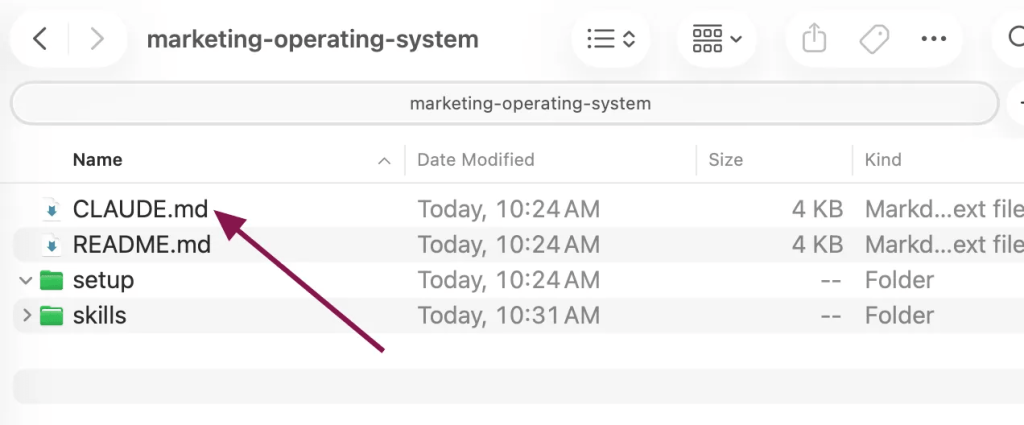
You open the folder in Cowork, type “Let’s get started”, and the onboarding begins.
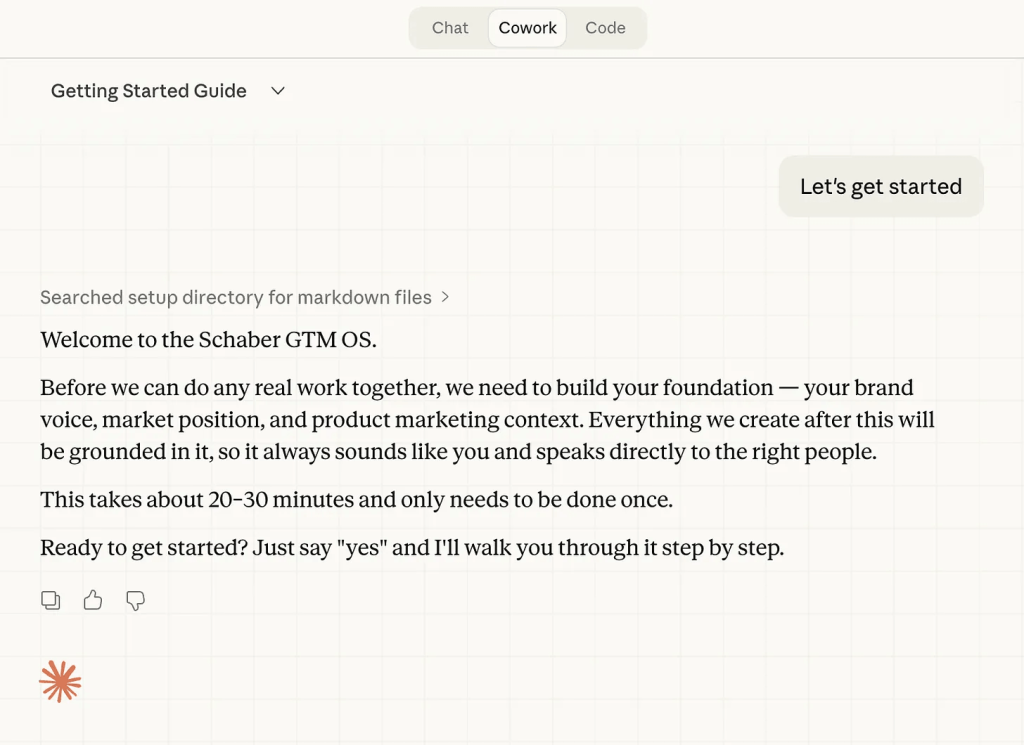
Once the foundation is in place, the system generates specialized skills: a Content Creator for blog posts and social media, a Prospect Researcher for sales outreach that can be used to complete specific tasks.
Each skill reads from the foundation files, so every output is aligned with the brand, the market position, and the messaging.
What makes this work:
Everything is interconnected. The skills reference the foundation files. The foundation files shape every output. When something changes (new positioning, a new competitor, updated ICP), you update one file and every skill in the system picks it up. No one needs to be re-briefed.
How to take it further:
The system Patrick describes works entirely on static files. That’s intentional for brand and positioning content, which doesn’t change daily. But for the skills that depend on performance data, such as Claude skills for marketing (prospect research, channel-specific content briefs, competitive analysis), that static foundation has a gap: it doesn’t know what’s actually happening in the market right now.
Coupler.io allows you to connect your data living in Search Console, HubSpot, ad platforms, and other places to Claude Cowork with a few clicks. The Content Creator and Prospect Researcher skills will work from up-to-date numbers, not last quarter’s snapshot.
Claude connector that supports 400+ data sources
Try Coupler.io for freeBOFU content plan generation on auto pilot
Adina Timar, Head of AEO at Weflow, uses Cowork to generate bottom-of-funnel content plans.
The shift she made was to move from manually analyzing keywords and building long content calendars every quarter or month, towards a repeated data-grounded approach where the plan is a living pipeline built from what the data actually shows, that adapts every week.
Instead of exporting data and uploading static files, she used Coupler.io and AirOps connectors for Claude.
| Who | Adina Timar, Head of AEO at Weflow |
| Connectors | Coupler.io MCP (GSC data) + AirOps MCP (prompts, content grids) |
| Skills | Custom BOFU content planning skill |
| Tasks | Pull GSC data → pull AirOps prompts → check what ranks/gets cited → check inventory → suggest create or refresh → write to AirOps grids |
| Output | BOFU content plan with page-level recommendations, stored in AirOps grids |
| Schedule | Weekly |
With Cowork, the process runs on live data through two connectors: Coupler.io for Google Search Console and GA4 data, and AirOps for prompt data and content inventory. The core task is specific: “Build a BOFU content plan for [competitor].”
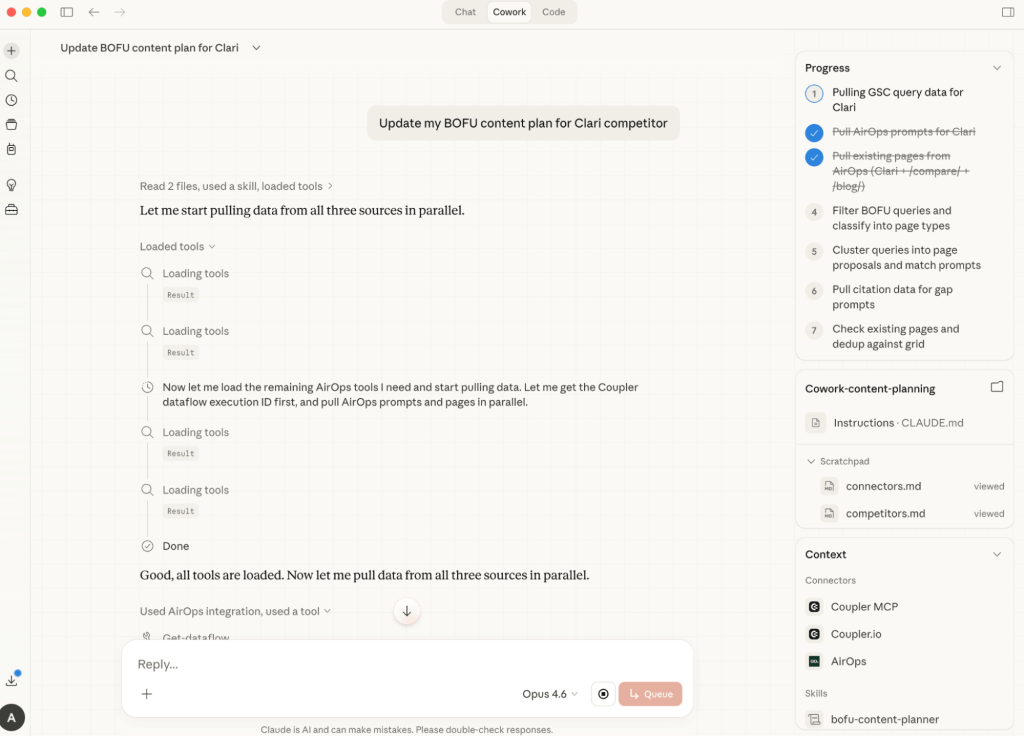
The skill chains multiple calls. It pulls GSC data through Coupler.io (keyword performance, query clusters, page-level metrics), then pulls AirOps data (AEO prompt libraries, existing content plans, page inventory).
From there, it cross-references everything: which queries to target based on the task filters, what currently ranks and gets cited, what LLMs say about the topic (via AirOps), and what pages already exist in the content inventory. The output is a set of recommendations for which pages to create and which to refresh, written directly into AirOps grids.
What makes this work:
Connector chaining: two live data sources feeding one skill that produces a plan that couldn’t be built as fast by hand. The weekly schedule means the pipeline stays fresh without re-running the analysis manually.
How to take it further:
The Coupler.io connector here pulls and structures data from Google Search Console. It’s crucial since raw GSC exports would require cleanup before Claude can reason over them reliably. Coupler.io prepares the data schema so the skill can query keyword clusters, page-level metrics, and conversion signals without hallucinating numbers. If you’re running a similar BOFU workflow on raw CSV exports, that’s where inaccuracies tend to creep in. Setting up a scheduled Coupler.io dataflow for GSC and GA4 takes the data preparation problem off the table entirely.
Connect marketing apps to AI with Coupler.io
Get started for freeClient performance reporting
Robert Gillespie, who writes the Marketing with AI newsletter, uses a Cowork project for recurring client performance reports. His project folder contains a report template, two or three strong example reports that set the quality bar, and the client brief.
| Who | Robert Gillespie (Marketing with AI) |
| Files and folders | Report template, example reports, client brief |
| Tasks | Read CSV data → match against template → generate charts, trends, recommendations |
| Output | Multi-tab .docx report in the project outputs folder |
The workflow: drop CSV exports from ad platforms or a CRM into the folder. Cowork reads them against the template and past examples, generates a multi-tab report with charts, trends, and recommendations, and puts a formatted .docx in the outputs folder.
What makes this work:
What stands out here is the compounding effect of Projects. By the third or fourth report, Cowork has learned the formatting preferences and the level of detail the client expects. Each run builds on what was approved before.
Here’s how Robert visualizes this:
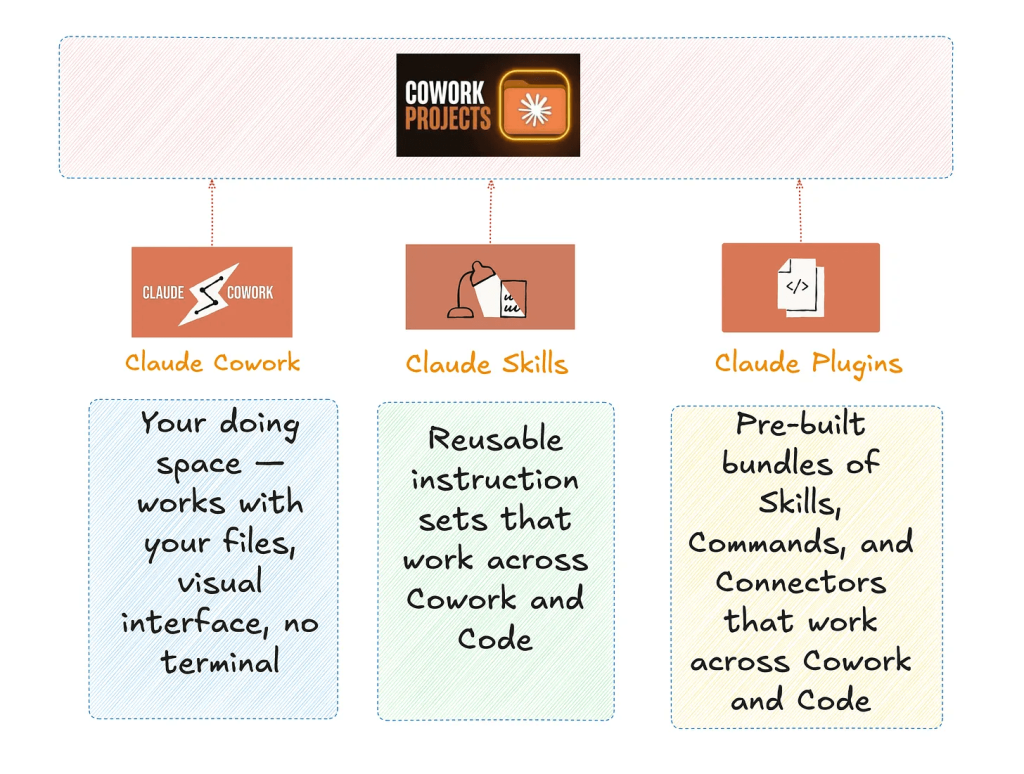
Reports that used to take three or four hours come back in minutes. The natural next step: replace the manual CSV drops with the Coupler.io connector to ensure Claude can always use the fresh data for your reporting.
Tips for enhancing your Claude Cowork outputs
Across the practitioners who are using Claude Cowork for marketing, a few patterns keep coming up that make the outputs better and the workflows more efficient:
- Create skills from successful runs: When Cowork produces something you’re happy with, tell it “
Create a skill to remember this.” One Reddit user did this after a banner upload workflow and has reused the skill multiple times since. No re-explaining the process each time. - Keep scheduled task prompts short, put the logic in the skill: The scheduled prompt triggers the skill. The skill contains the method. Updating a skill is simple. Rewriting a scheduled task is not.
- Chain skills together: A competitive research skill produces input for a battle card skill, which produces input for a content brief skill. Improving one link improves the whole chain.
- Connect live data so skills stay up-to-date: A reporting skill running on last week’s CSV export helps once. The same skill connected to Coupler.io’s MCP, with the most recent data, is a system that runs every week on its own.
Bonus: Use Dispatch to operate Claude Cowork for marketing from your phone
Dispatch is a new capability Anthropic introduced in late March 2026 that makes Cowork accessible from your phone.
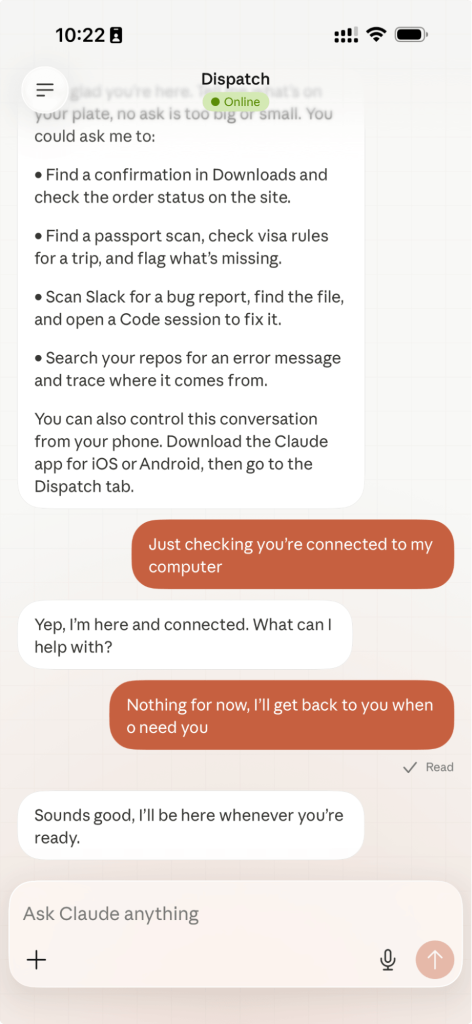
It works like a remote control. You type a task, and Cowork picks it up on your desktop. It runs against your project folder and connectors while you’re away from your computer. You come back to finished files.
It’s still in research preview, but the direction is clear for marketing teams: you’re on the way to a meeting and realize you need a performance summary.
You type it on your phone. Cowork runs it. The summary is in your folder when you sit down.
FAQs
Does Cowork work on Windows?
Yes. Cowork is available on both macOS and Windows through the Claude Desktop app. You can download it from claude.com/download.
How much does Claude Cowork cost?
Cowork is included in Claude’s Pro ($20/month) and Max ($100-200/month) plans. It’s worth noting that Cowork tasks use more capacity than regular chat because they coordinate sub-agents and tool calls. If you’re running frequent scheduled tasks or complex multi-step workflows, the Max plan gives you significantly more headroom.
Can Cowork access my CRM/analytics directly?
It depends on the Claude connector you use. For example, the Coupler.io connector does not give Cowork direct access to 400+ data sources. However, it allows it to query data flows from these sources under your control. This means you can decide which data Claude can see and work with.
Other connectors through Anthropic’s connector marketplace in the Desktop app mostly provide direct access to your data in Slack, Notion, Gmail, and others.
Do I need to know how to code to use Claude Cowork for marketing?
No. Cowork is built for non-technical users. You describe the task in plain language, and Cowork handles the planning and execution. The skills, connectors, and commands covered in this article all work without writing a single line of code.
What’s the difference between skills and plugins?
Skills are individual instruction files. One skill handles one task type (for example, a brand voice skill or a reporting template skill). Plugins bundle multiple skills, connectors, and sub-agents into a single installable package that you can add from Anthropic’s marketplace. A skill is one recipe. A plugin is a full cookbook for a specific role.
Is my data safe if I use Claude Cowork?
Cowork conversation history is stored locally on your device, not on Anthropic’s servers. Enterprise features like audit logs and compliance API don’t currently capture Cowork activity. Admins on Team and Enterprise plans can toggle Cowork on or off for their organization. As a general rule, avoid granting Cowork access to folders containing sensitive financial or personal data.



