
How to Analyze GA4 Data with AI: 3 Practical Approaches Compared

Getting GA4 data has never been the real problem. Interpreting it has. Most teams are struggling because GA4’s event-based model turned what used to be straightforward analysis into a puzzle of fragmented reports, unclear metric definitions, and scattered insights.
The biggest problem with GA4 is the complexity of the tool itself, and that there is no single view inside the tool that can actually answer all your questions. We’ve all seen this play out: key metrics split across Acquisition, Engagement, and Monetization reports. The same question requires data from three different reports.
AI promised a way out: one natural language prompt instead of building custom reports, automated insights instead of manual cross-referencing, and getting answers in seconds instead of hours.
In July 2025, Google introduced the Google Analytics MCP Server, which allows models like Gemini, Claude (Anthropic), or ChatGPT(OpenAI) to run direct queries on your GA4 data.
It sounds perfect!
So, I decided to test several approaches and compare the official Google Analytics MCP against Coupler.io’s AI Integrations and AI Agent features. The goal is to answer the question: how to analyse GA4 data with AI efficiently, accurately, and securely?
This is what I found.
AI tools for Google Analytics: 5 key takeaways from our test
I ran the same prompts across all three approaches and compared setup complexity, speed, stability, cost efficiency, and insights. You’ll be able to see for yourself how usable the outputs were for digital marketing, SEO, and product analytics teams. Here is what I’ve learned after my test of GA4 data analytics with AI:
- Setup complexity: Google Analytics MCP requires 60+ minutes, command-line skills, and Admin access. Coupler.io takes 5 minutes to connect Google Analytics to ChatGPT, Claude, or any other LLM with simple OAuth—no technical expertise needed.
- Stability: Google MCP exposes the raw GA4 API, leading to rate limits and errors. Coupler.io provides a cached, stable dataset, which produced significantly more consistent insights.
- Accuracy: The official Google tool reported a 35% increase in traffic when the actual trend was a 60% decrease. It analyzed the wrong year and hit sampling limits without any warning. Coupler.io matched the real GA4 dashboard numbers exactly.
- Cost efficiency: Google Analytics MCP consumed an entire Claude Pro monthly usage limit in a single query. Coupler.io’s approach handled multiple deep analyses without hitting any limits—making it far more practical for ongoing work.
- Insight quality depends on architecture: Google Analytics MCP returned raw data dumps with minimal analysis. Coupler.io’s Analytical Engine performs calculations and returns verified results. This allows the AI to deliver actual insights, such as identifying that traffic drops were from low-quality sources while high-intent traffic converted better.
Bonus finding: The fastest path from question to answer was Coupler.io’s AI Agent. It did not require setting up a connection with an external AI tool or switching between applications.

Explore your Google Analytics data in AI with Coupler.io
Get started for freeThe same Prompts across all tests
To ensure a fair comparison of AI for Google Analytics, I used the same structured prompts across Google MCP and Coupler.io solutions – AI Integrations and AI Agent:
PROMPT 1 – Multi-period comparison with source attribution to test accuracy across time ranges and traffic sources:
Analyze my GA4 data and identify all AI-related traffic sources (e.g., Perplexity, ChatGPT, Claude, Gemini, AI browsers, AI assistants). Compare October 2025 vs. November 2025 and report:
AI-driven traffic volumetop AI referrerspages receiving the most AI trafficany notable changes in behavior
Keep the answer concise.
PROMPT 2 – Landing page performance analysis to test the ability to correlate sources with conversion behavior:
From my GA4 data, identify which pages received the most traffic from AI sources (ChatGPT, Perplexity, Claude, Gemini, Copilot, AI browsers) in October vs November 2025.
Report:
top AI-driven landing pagesbreakdown by AI sourcenotable behavior patterns
Keep the answer short.
Why “keep the answer concise”? I specifically asked for brief responses to test each tool’s ability to synthesize insights rather than dump raw data tables. In real-world use, marketers need analysis, not spreadsheets.
For the purpose of this test comparison, I used Claude Sonnet 4.5 as our AI tool model across all three approaches. While Coupler.io supports multiple AI tools (Claude, ChatGPT, Perplexity, Gemini, etc.), using a single model ensured any differences in results came from the connection method, not the AI itself.
I tested three specific approaches:
- Coupler.io AI Integrations – A feature that allows connecting your business apps data with AI tools such as ChatGPT, Claude, Gemini, Perplexity, Cursor, etc.
- Coupler.io AI Agent – Built-in conversational analytics tool inside Coupler.io to analyze data flows (no external AI tool needed)
- Google Analytics MCP – Google’s official Model Context Protocol server enabling AI models to query GA4 data directly
Coupler.io provides an MCP server that enables AI Integrations and AI Agent functionality, ensuring a stable connection without the technical headache.
Approach 1: Coupler.io AI Integrations for Google Analytics
I wanted to showcase the native Google Analytics MCP first, but it took that long to set it up. So I decided to start with the faster approach. Take a look at how to use AI for Google Analytics using Coupler.io.
This data integration and AI analytics platform takes a fundamentally different approach. Instead of forcing the AI to query the raw, messy GA4 API live (which caused the errors above), Coupler.io uses a specialized analytical engine that sits between your data and the AI model. It handles all the heavy computational lifting. The AI tools like Claude, ChatGPT, Perplexity, and Gemini can focus on what they do best: deliver insights, not guess at numbers.
Think of it as a division of labor:
- Coupler.io: The mathematician (prepares data, executes queries, performs calculations, returns verified results)
- AI (Claude/ChatGPT) = The storyteller (interpretation, insights, communication)
This critical difference from the Google Analytics MCP is based on the 4-step process:
Step 1: Schema and sample data preparation. Coupler.io provides the AI with your data structure (column names, data types) and the first 20 rows as examples, not massive raw datasets that overwhelm the AI. The AI understands what’s available without processing millions of rows.
Step 2: User question processing. When you ask a question in natural language, the AI translates it into a structured SQL query and sends it to Coupler.io’s Analytical Engine for execution.
Step 3: Data aggregation and calculation. This is where Coupler.io’s Analytical Engine does the heavy lifting:
- Queries your dataset using the SQL query
- Performs calculations, aggregations, and joins
- Validates the results
- Returns only the verified, processed results to the AI
Step 4: AI interpretation. The AI receives accurate, pre-calculated numbers and focuses on what it does best: interpretation, insights, and communication.
This architecture eliminates GA4’s rate limits, sampling issues, quota constraints, and, most critically, hallucinations and mathematical errors.
How to connect GA4 data to Claude using Coupler.io
Time required: ~5 minutes.
There are two approaches to set up your Claude integrations:
Connect the Coupler.io connector for Claude (you’ll need to sign up for free first) and ask Claude to set up data flows and other things in Coupler.io. Such AI experience is the easiest way to get started since you simply describe what you need directly in the AI conversation. Tell Claude something like “connect my Google Analytics account, pull traffic by source and landing page for the last two months, and analyze it”. Coupler.io builds the data flow from that description and asks you to authorize your GA4 account once.
If you prefer to keep your hands on the steering wheel, configure data flows manually through the Coupler.io interface like this:
- Create a data flow in Coupler.io
- Connect your GA4 account as your data source
- Select your AI tool as the destination and connect Coupler.io to it
- Save and run the data flow
Try it yourself right away in the form below. I’ve preselected Google Analytics as a source app and Claude.ai as a destination. Just click Proceed to create a data flow. You’ll be offered to get started with Coupler.io for free with no credit card required.
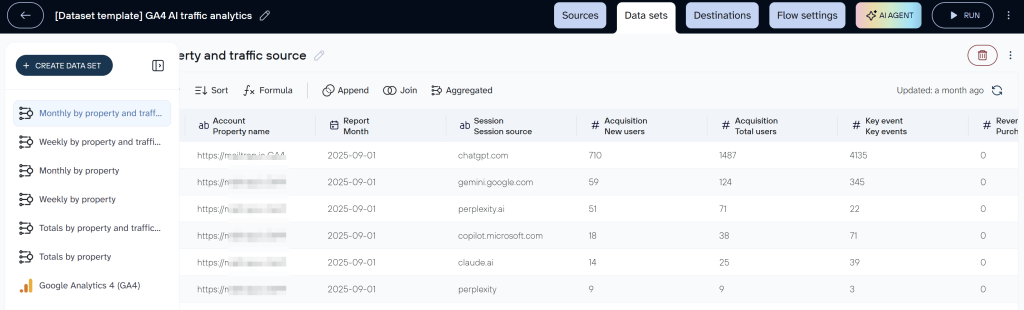
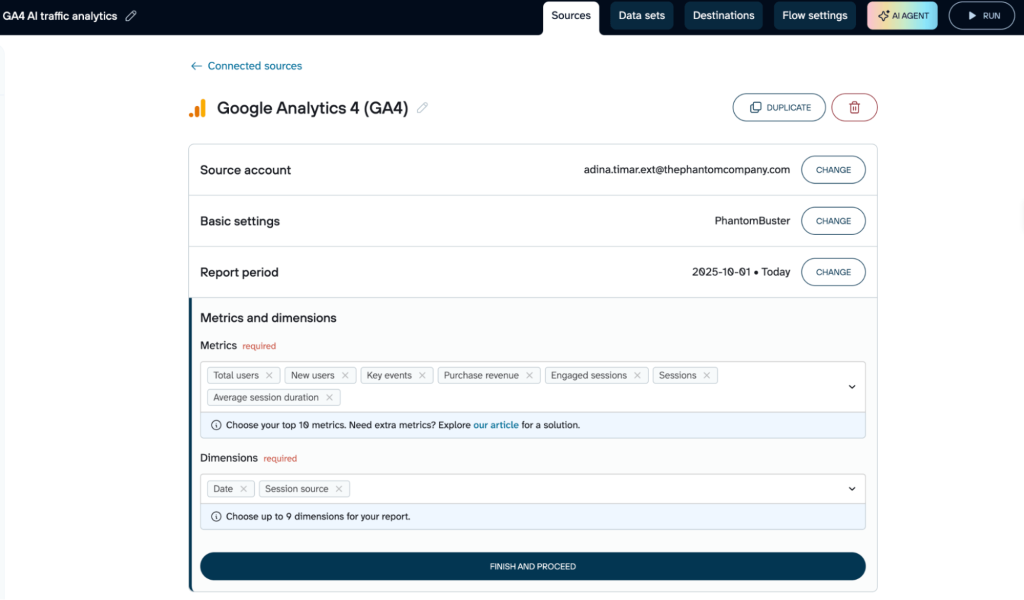
The process: Since Coupler.io connects specific data to Claude, I had to set up 2 data flows to give the AI tool access to the right GA4 metrics and dimensions that I needed for my analysis.
Flow A (AI Traffic Overview)
- Dimensions: Date, Session Source
- Metrics: Users, Sessions, Engaged Sessions, Key events, etc.
Flow B (AI Landing Pages)
- Dimensions: Date, Landing page, Session source
- Metrics: Users, Sessions, and Key Event count for Purchase and Signup.
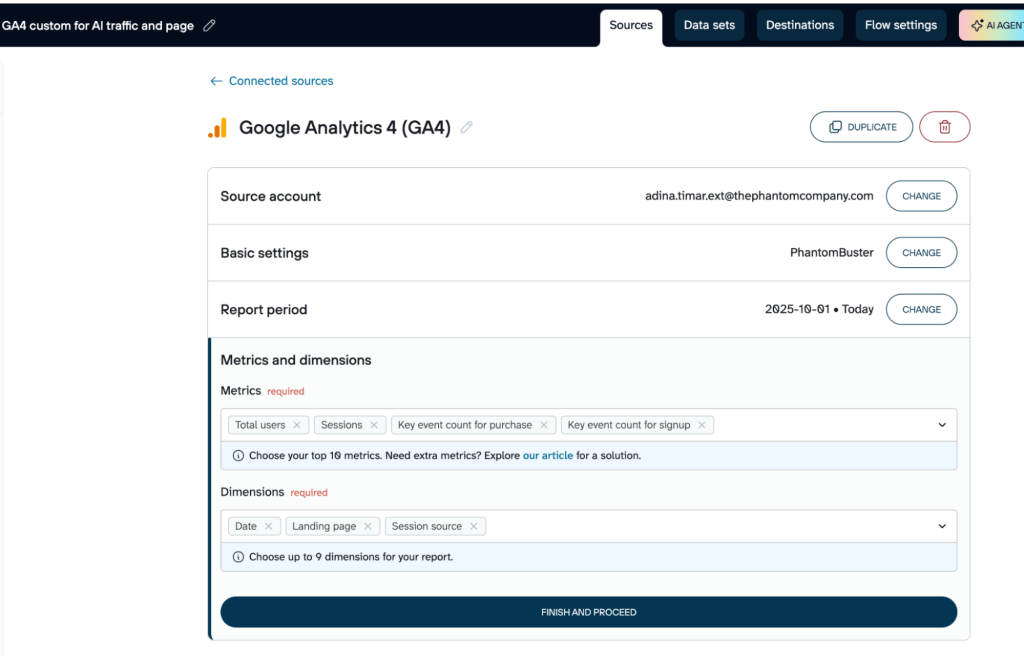
While this required a few minutes of configuration, it meant the data was perfectly structured before the AI ever saw it. We set these flows once, and Coupler.io keeps them updated automatically.
One thing worth doing at this stage: add business context to your data flows. Coupler.io lets you describe what your columns and metrics actually mean in your specific setup, for example, which events you count as key events, how your UTM tagging conventions work, or what a session source like “coupler” or “partner_newsletter” represents. This context travels with the data to the AI tool, so instead of guessing at column meanings, Claude or ChatGPT interprets your data the way your team already thinks about it.
Results of analysing data using Coupler.io connector and Claude
As you recall, I ran the exact same prompts across Google MCP and Coupler.io. The difference was night and day.
1. Accurate insights
Because the data was pre-synced, cached, cleaned, and calculated by Coupler.io, Claude didn’t have to guess the dates or hit row limits.
The Coupler.io output:
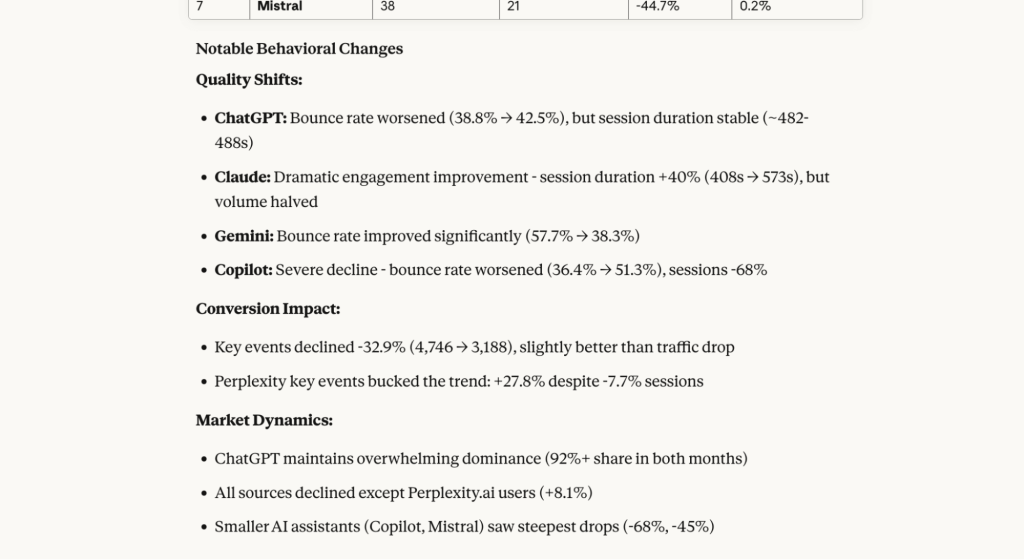
- October: 18,639 sessions
- November: 12,382 sessions
- Trend: “Change: -33.6% decrease in sessions, -34% for ChatGPT alone”
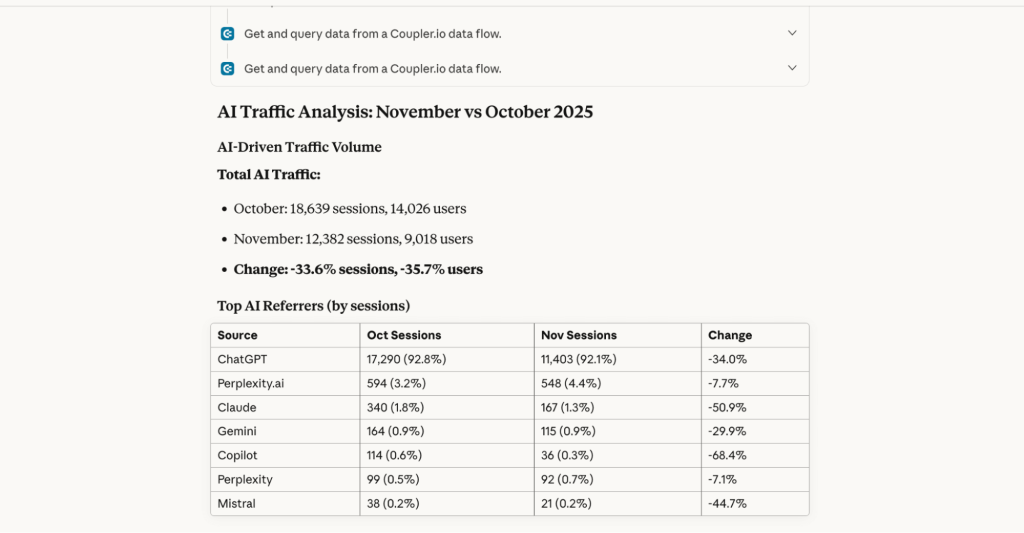
The numbers matched our GA4 dashboard. No hallucinations. No wrong years. No sampling limits.
The AI insights were only a bit more nuanced, adding commentary instead of just listing numbers. The general observation was that Google Analytics MCP was more about the numbers, while Coupler.io added small interpretations and comments.
2. Multiple prompts worked without errors
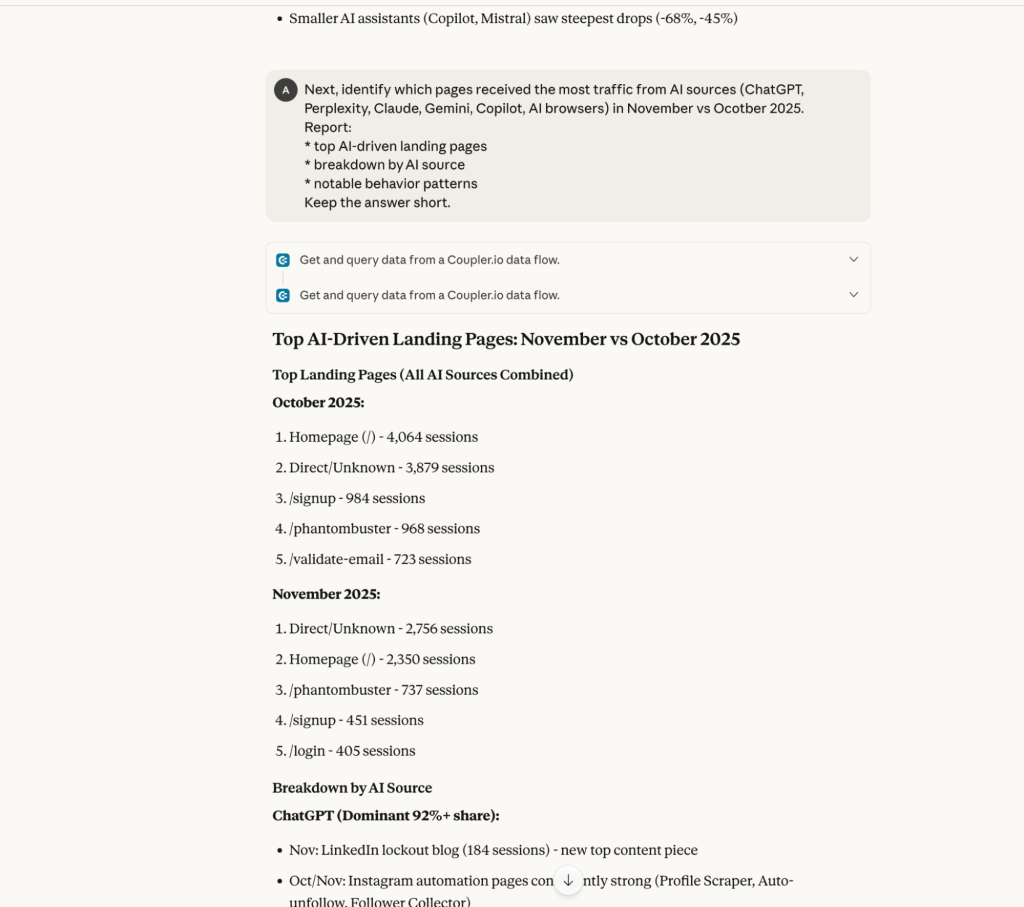
Unlike Google MCP, which crashed after the first prompt, I could ask follow-up questions without hitting my Pro plan limits.
All within the same conversation.
3. Insights were cleaner and more actionable
Coupler.io’s analytical engine allowed Claude to focus on AI-powered analysis rather than struggling with data processing.
The Insight: While overall traffic dropped 35%, traffic to one specific blog post (“How to contact LinkedIn when locked out”) actually grew 53%.
However, and this is critical, Claude noted that this page had a 0.5% conversion rate (purely informational users seeking support).
The Conclusion: The traffic drop wasn’t a failure of marketing; it was a shedding of low-quality, informational traffic. The high-intent traffic (product pages like /pricing and /signup) was actually converting significantly better (up to 26% conversion rate).
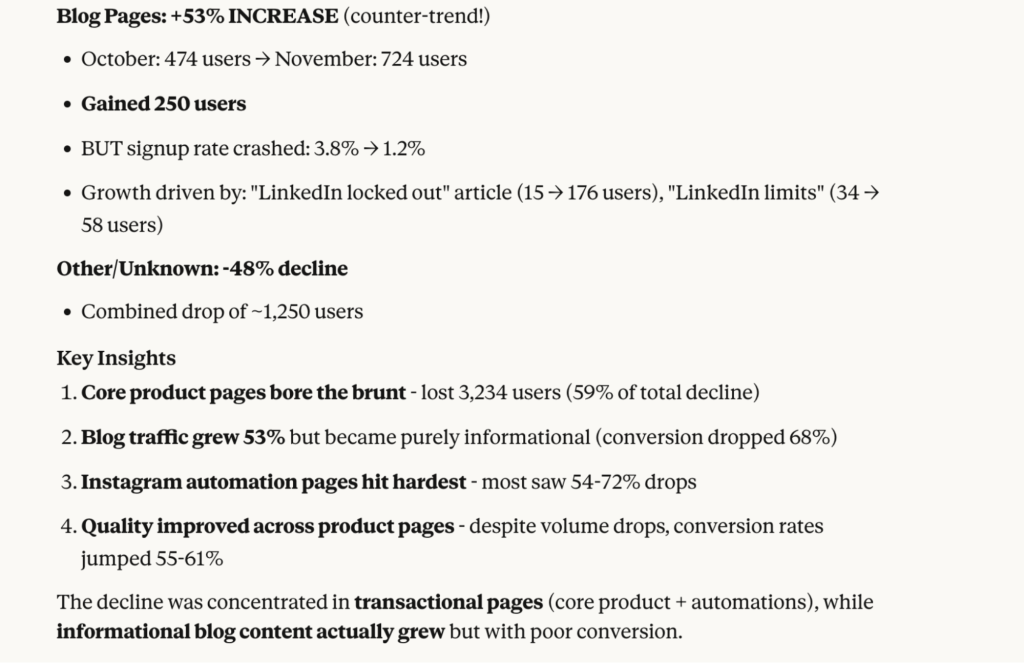
This is the power of accurate GA4 data analytics with AI: finding the story behind the numbers.
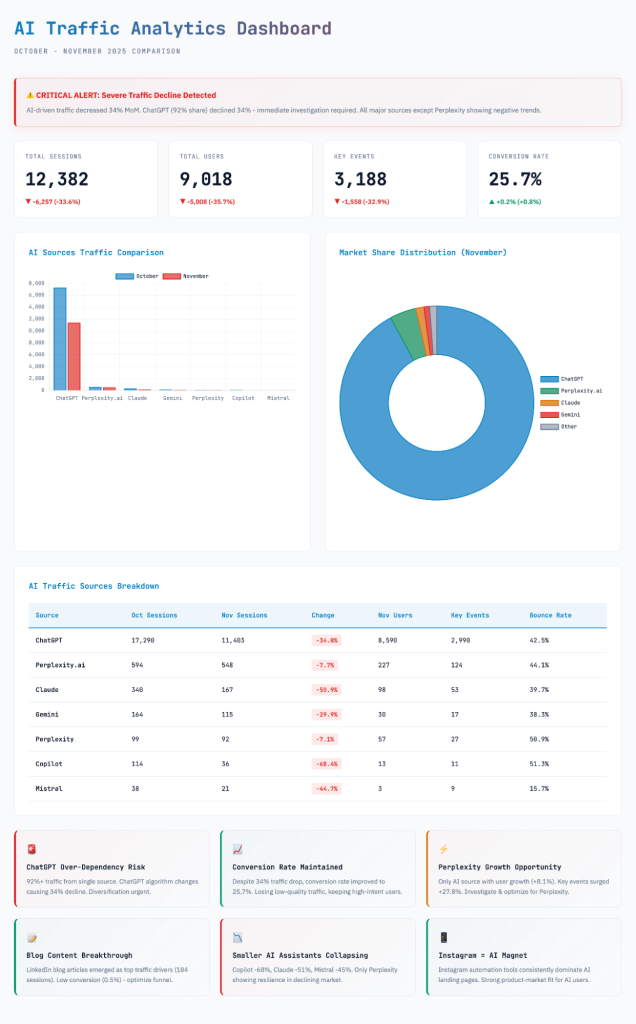
I even went one step further and generated an interactive dashboard to visually organize the custom insights I got.
It summarized the entire conversation in charts and notes in an easy-to-follow visual way.
Verdict on analysing GA4 data using Coupler.io connector and Claude
After testing the same prompts against Google MCP, the Google Analytics connector by Coupler.io proved superior across every dimension that matters:
✅ Setup: 5 minutes vs. 60 minutes. Works with Viewer access vs. requiring Admin rights.
✅ Accuracy: Matched GA4 dashboard numbers exactly. No hallucinations, no wrong time periods, no hidden sampling.
✅ Stability: Handled multiple follow-up questions without crashes, context loss, or quota exhaustion.
✅ Resource efficiency: Token-efficient data structure allowed deep analysis without burning through AI plan limits.
✅ Insight quality: Delivered actual analysis (conversion context, traffic quality assessment) rather than raw number dumps.
✅ Conversational flow: Maintained context across the entire session, enabling true analytical dialogue.
For digital marketing teams, SEO analysts, and product managers who need reliable, conversational analytics without developer support, this is the clear choice.
The only consideration: You need to configure your data flows upfront. But this takes minutes and ensures your AI always works with clean, relevant data—not GA4’s raw chaos.
Get verified GA4 insights in AI with Coupler.io
Get started for freeApproach 2: Coupler.io AI Agent (Built-in AI-powered conversational analytics)
Coupler.io’s AI Agent takes the idea further: instead of switching tools, you can “chat” with your synced GA4 dataset directly inside the Coupler.io interface. It uses the same Analytical Engine but removes the need to connect to an external AI tool.
If you are looking for the absolute fastest way to get answers, or if you don’t have a paid subscription to Claude or ChatGPT, this is the solution. Moreover, the AI agent lets you analyze Google Analytics 4 data flows connected to other destinations like spreadsheets or even dashboards.
How to use AI for Google Analytics inside Coupler.io
Time required: ~2 minutes
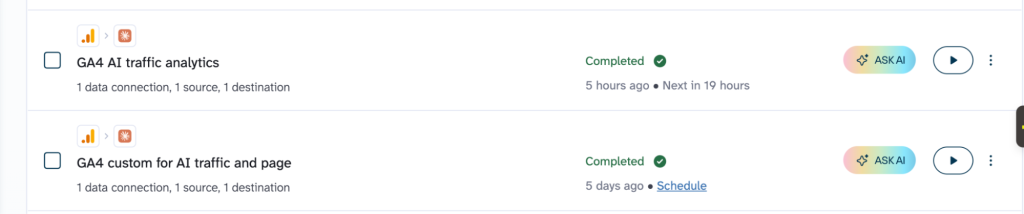
Required setup: Create data flows with Google Analytics 4 as a source and organize the data as needed. In my case, I did not have to do anything else since I’ve already created data flows for Approach 2. So, I could either click the Ask AI button from the data flows page.
Or use the AI Agent tab inside my data flows
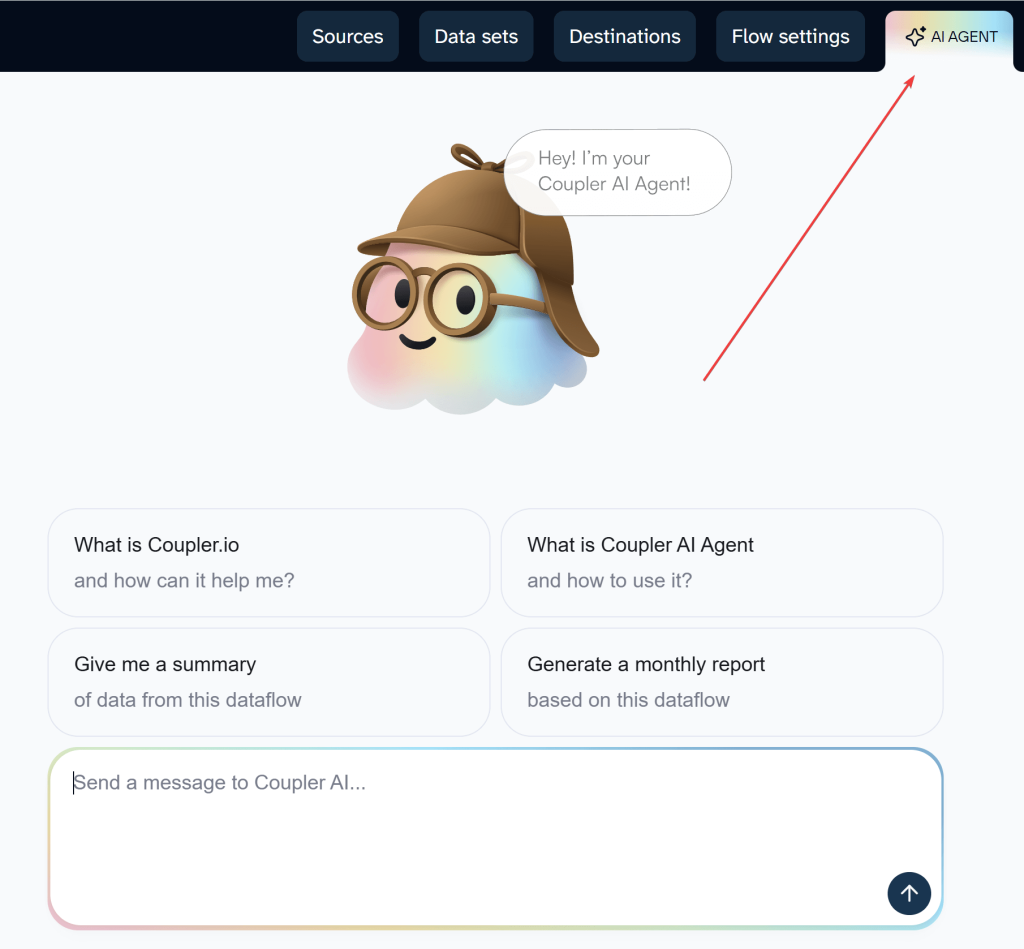
That’s it. No OAuth. No external tools. No MCP configuration. The Agent is already connected to your synced data and ready to answer questions.
If you don’t have data flows yet, you don’t need to build them manually. Just describe what GA4 data you need in the AI conversation and the Coupler.io AI agent creates the flow for you.
Results of analysing data using Coupler.io AI agent
I tested the AI Agent with the same two prompts I used for Google MCP and Coupler.io AI Integrations. Here are the results.
Consistent data accuracy
I ran the first prompt asking for AI traffic analysis comparing October vs. November 2025.
It queried the dataset and gave me the exact accurate numbers as the Claude Integration (35.4% drop in users). This makes sense since it uses the same tables but it was still a good sign to see it didn’t hallucinate numbers.
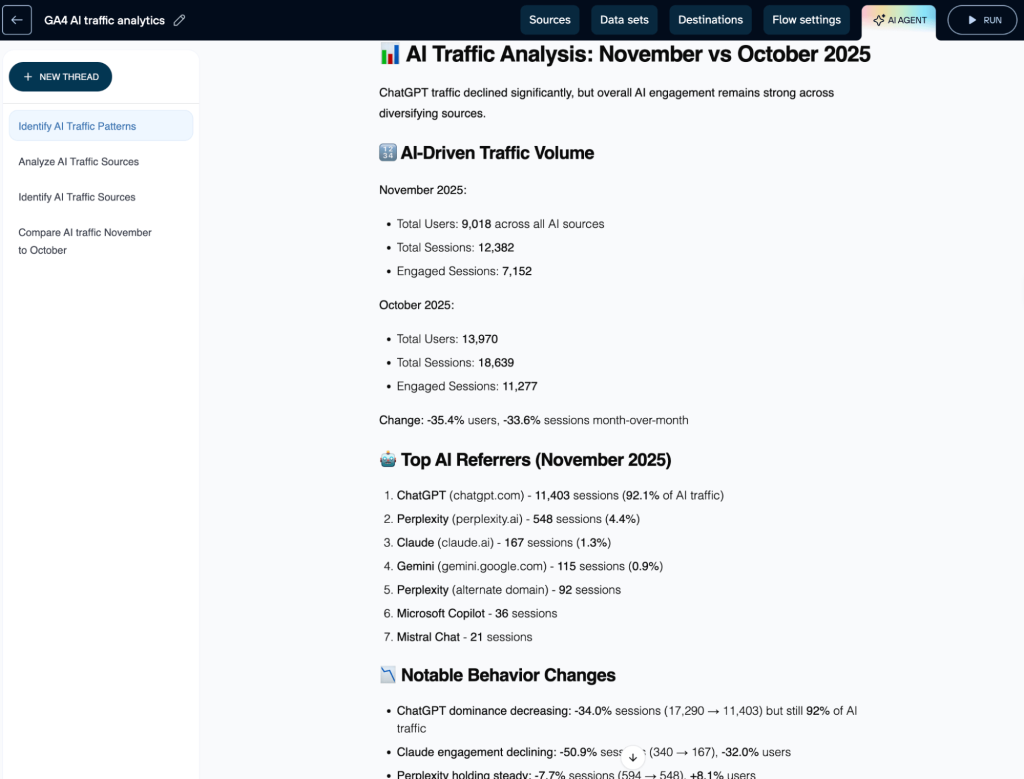
The same business context you add to your data flows (column definitions, metric meanings, UTM conventions) also improves the AI Agent’s answers, since it reads from the same structured dataset.
The data limit (honesty vs. hallucination)
I asked the second prompt: “Identify which pages received the most traffic.“
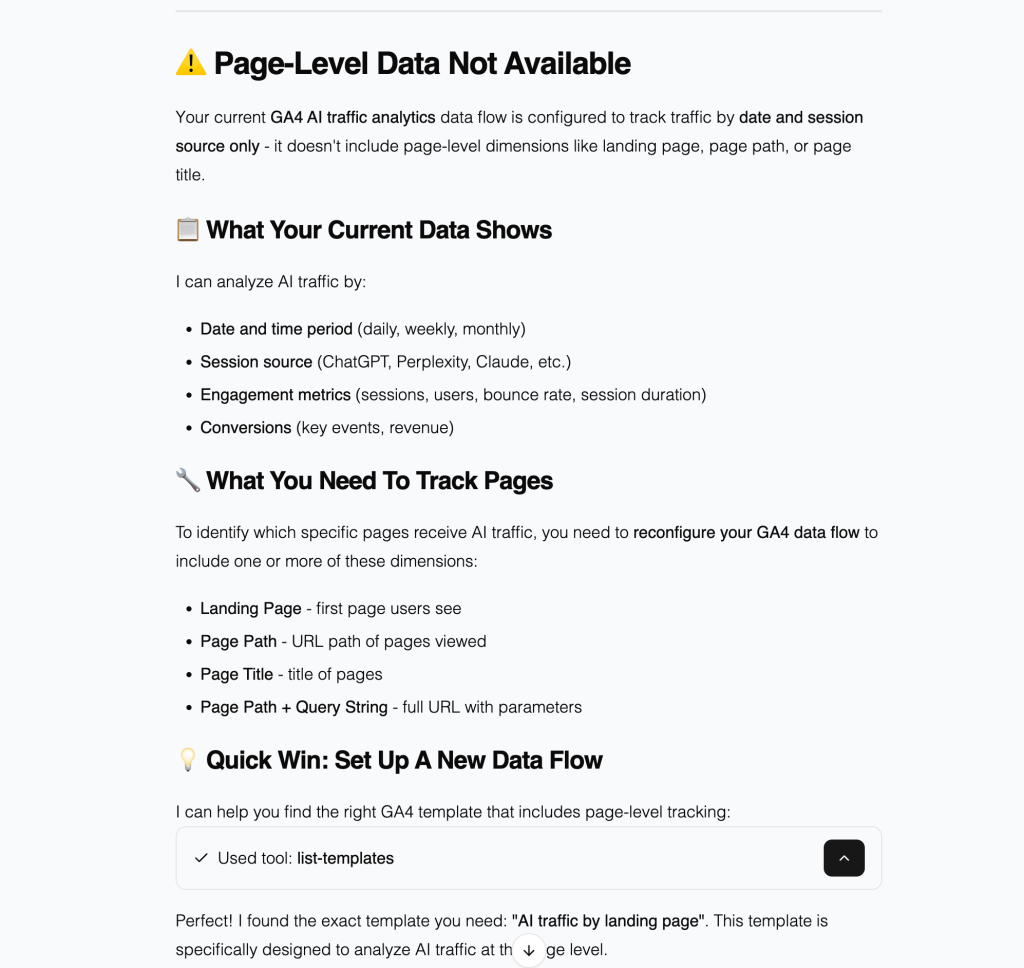
Here is where things got interesting. The data flow I was using for the overview didn’t include the “Landing Page” dimension. Here’s where the AI Agent’s behavior differed dramatically from Google MCP:
- Google MCP: When it lacked data, it hallucinated numbers or sampled wildly.
- Coupler AI Agent: It checked the schema and replied: “
Page-Level Data Not Available.“
AI Agent explicitly told me: “Your current data flow is configured to track traffic by date and session source only.“ It didn’t guess, it was honest about what was missing and offered to help me set up a new flow with the right metrics. This kind of “transparency” is critical for trust.
Visualization limitations
I also tried replicating the visual aspect, so I asked the AI Agent to “build me a visual dashboard code” (just like I did with Claude).
- Result: It declined.
- The Response: “
I'm not able to generate visual dashboards or create HTML/CSS code.“
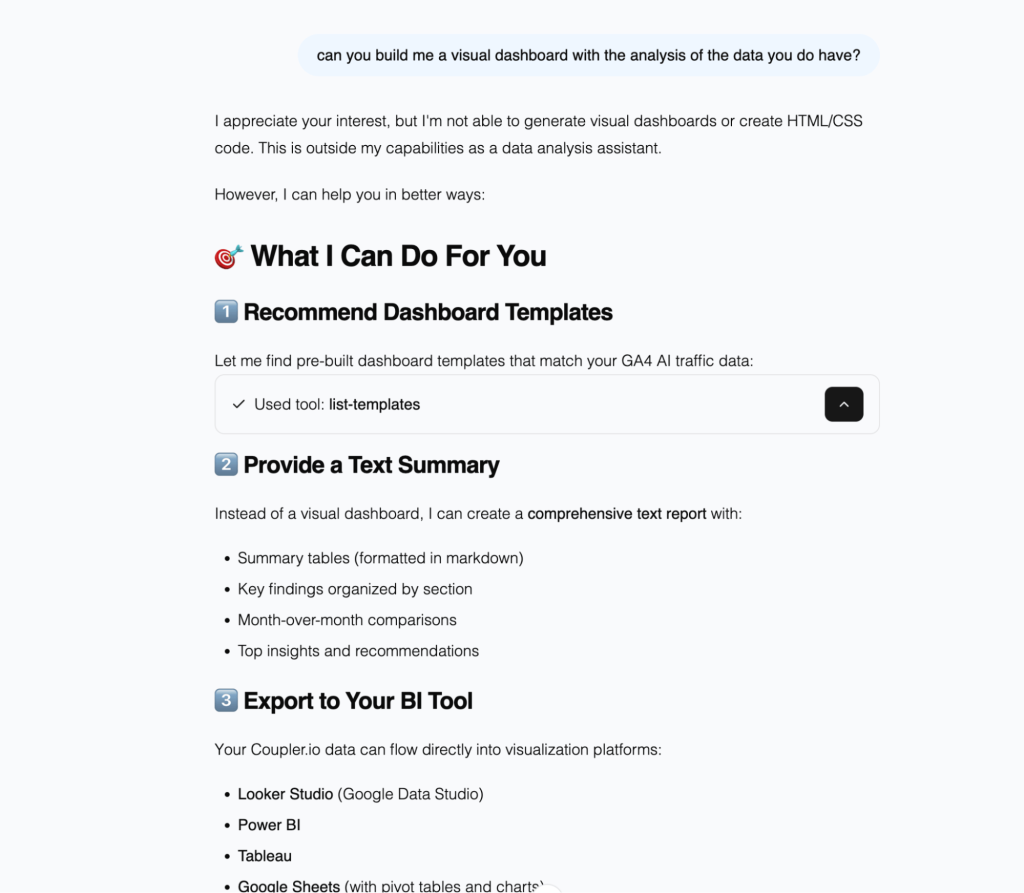
Unlike Claude, which can create artifacts and generate interactive visualizations, the AI Agent is purely conversational. It answers questions about your data but doesn’t write code or create visual outputs.
Verdict on Coupler.io AI Agent
The AI Agent is an on-demand data analytics assistant embedded directly in Coupler.io. It provides immediate access to accurate insights using existing data flows, with no setup or external subscriptions required. The agent is transparent about data availability, clearly reflecting the current schema and explicitly indicating when information is missing.
Its strengths are speed, trust, and focus on analytics: it delivers fast, reliable answers within the context of the data flow you’re viewing, without context switching or additional tools. The scope is intentionally centered on data analysis, operating within a single data flow and prioritizing clarity and accuracy over broader, general-purpose AI capabilities.
✅ Immediate Access: Zero setup if data flows already exist. Fastest time from question to answer.
✅ Data Accuracy: Identical accuracy to AI Integrations approach. Matches GA4 dashboard perfectly.
✅ High Trust: Explicitly admits when data is missing rather than hallucinating. Shows exactly what’s in your schema.
✅ Zero Context Switching: Lives right inside Coupler.io, next to your data configuration.
✅ No External Subscriptions Needed: Don’t need Claude Pro, ChatGPT Plus, or any external AI service.
✅ AI Skills Library: Coupler.io’s AI Skills include pre-built analytical workflows that already know what to ask about your data. The marketing-analytics skill handles GA4-specific breakdowns (traffic sources, engagement patterns, conversion analysis) without writing prompts from scratch. The report-generation skill formats the results into stakeholder-ready summaries. Both skills also work in external AI tools via MCP.
❌ Limited Scope: Cannot generate code, create visualizations, or analyze dimensions not in your current data flow.
❌ Less Flexible: Tied to the specific data flow you’re viewing—can’t synthesize across multiple flows simultaneously.
❌ No Advanced Features: No artifacts, no dashboard generation, no complex multi-step reasoning.
Analyze GA4 data with Coupler.io AI agent
Get started for freeApproach 3: How to connect AI to Google Analytics with the native MCP Server
Google’s MCP Server is an official way to expose your GA4 property to an AI model. It gives AI tools like Gemini, Claude, or ChatGPT structured access to your analytics data through direct API queries.
Set up the Google Analytics 4 integration with Claude
Time required: ~60 minutes.
The process: This isn’t a “log in with Google” experience. Google’s MCP requires creating what’s called a “Service Account”. Essentially, it’s a robot user that acts on your behalf.
I followed Google’s official developer guide. The documentation assumed significant technical knowledge, so I used Google’s own AI (Gemini) to guide me through the installation step-by-step.
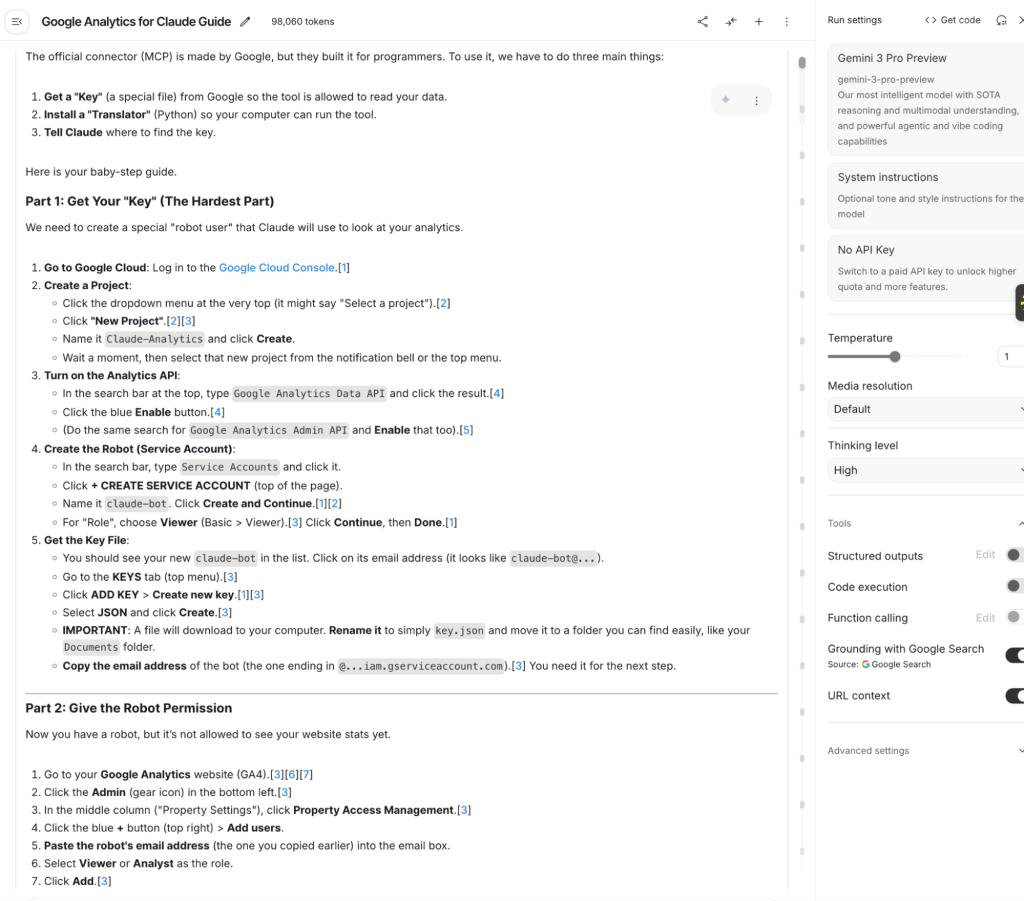
Even with an AI co-pilot, the setup was not “plug and play.” It took nearly 60 minutes to get the server running.
What’s required:
- Access to Google Cloud Console
- Create a new project and enable the Analytics Data API
- Create a Service Account and download a sensitive JSON credential file
- Crucially: You must have Administrator rights on the GA4 property to invite that robot email (something like
claude-bot@your-project.iam.gserviceaccount.com) as a user.
That last requirement is the dealbreaker for most teams. If you’re a consultant, agency partner, or marketer at a large company, you likely only have “Viewer” or “Analyst” access. You physically cannot complete this setup without submitting an IT ticket and waiting for admin approval.
During installation, I hit repeated errors that we had to debug using AI.
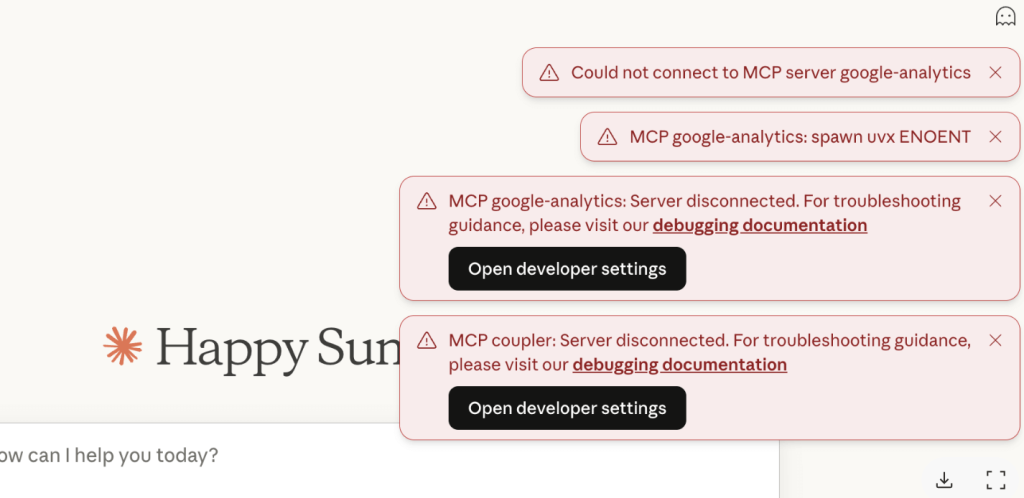
Bottom line: If you’re not comfortable with command-line tools and Google Cloud APIs, this approach for GA4 data analytics with AI isn’t accessible. And even if you are, budget an hour for setup, assuming nothing goes wrong.
Results of analysing data using GA4 MCP server
Once I’ve connected GA4 to Claude, I ran my two test prompts. I discovered the tool had three critical flaws that would make it unreliable for production use.
Problem 1. It’s extremely resource-intensive
I asked my first prompt and got an initial answer.
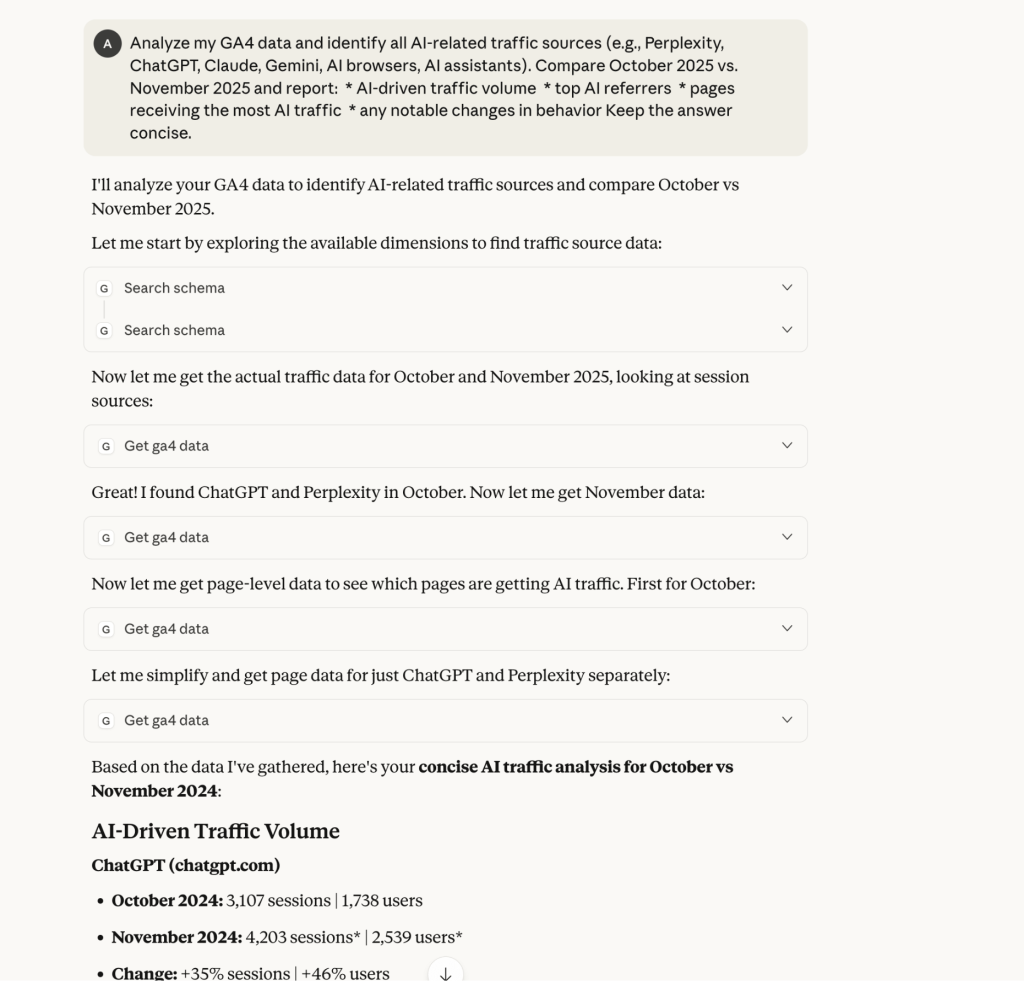
There was extensive data querying, and the response consisted purely of number listings with very little actual AI-driven insights. It felt like reading a dashboard with only numbers.
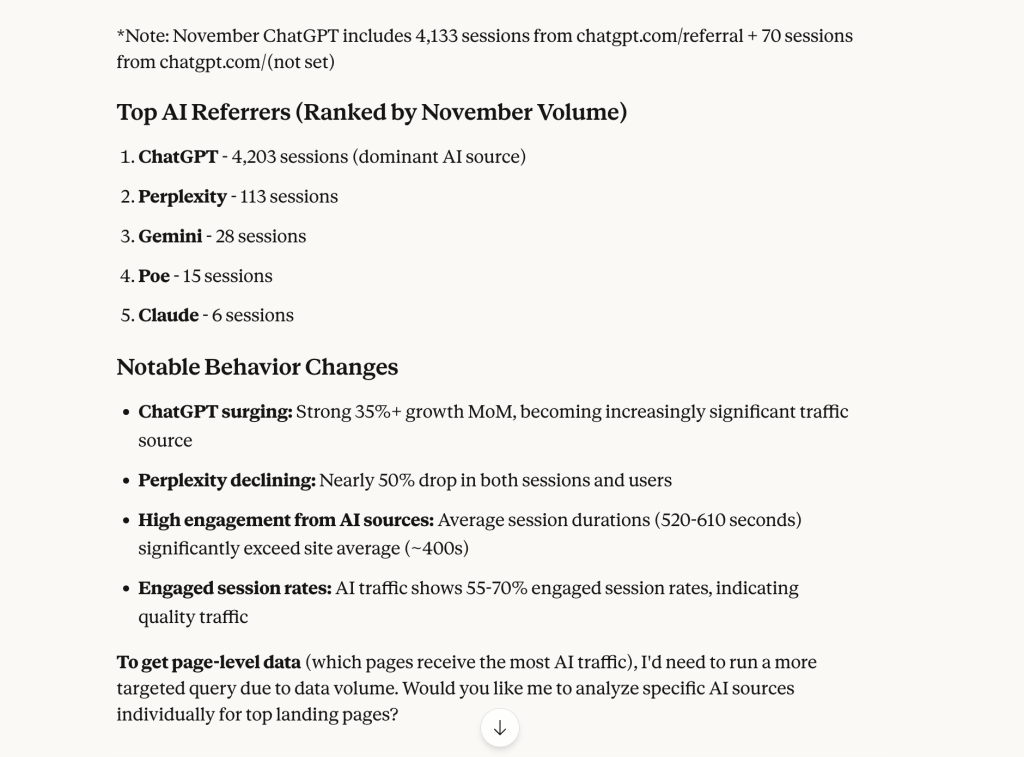
But when I asked the follow-up prompt to analyze the landing pages, the connection snapped.
At first, I ran a single MCP query using Claude Opus 4.1 – it exhausted an entire Pro plan quota. Large schemas, repeated tool calls that lead to maxing out available resources. Switching to Sonnet 4.5 helped.
For teams running multiple analyses per day, this makes Google MCP financially impractical unless you’re on an Enterprise AI plan.
Problem 2. Conversational workflows break after one question
Google’s MCP isn’t designed for back-and-forth dialogue with AI for Google Analytics. It expects one request → one response.
Even when using more efficient Sonnet 4.5 for follow-up prompts, Claude tried to compact the conversation first, then resulted in an error.
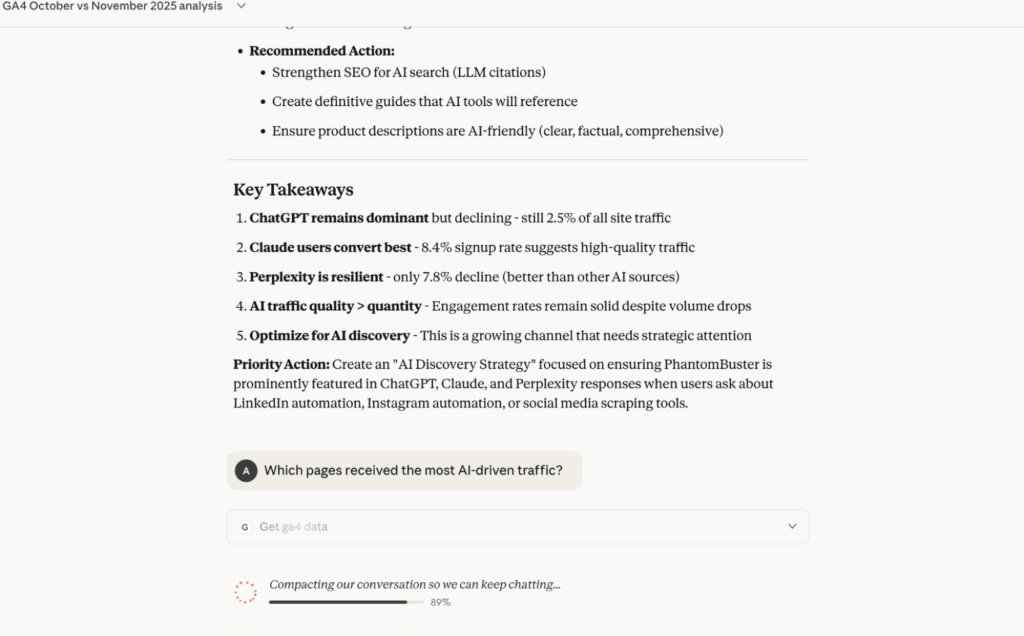
The only way to run the second prompt was by starting a new chat, losing all the context of the previous analysis.
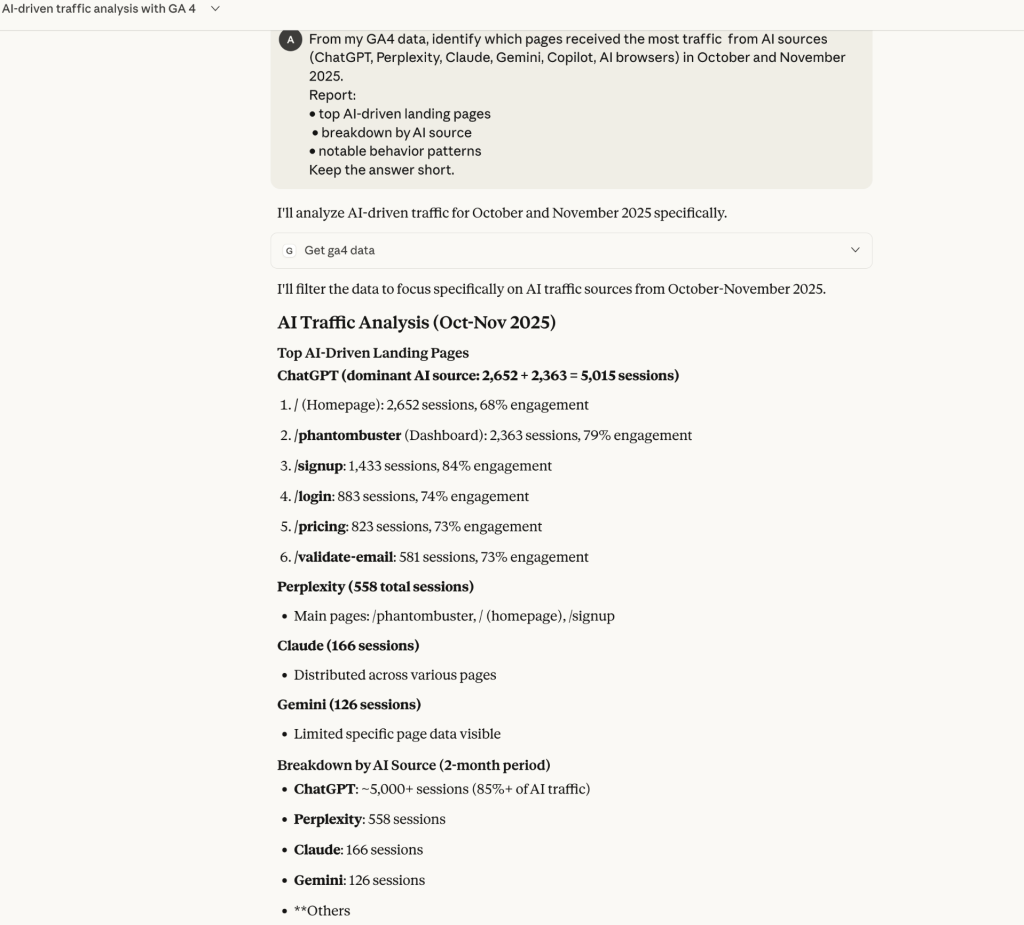
Follow-up questions triggered this loop almost every time:
- “Please wait while I compact the conversation…”
- Compaction fails
- Chat resets
- All context is lost
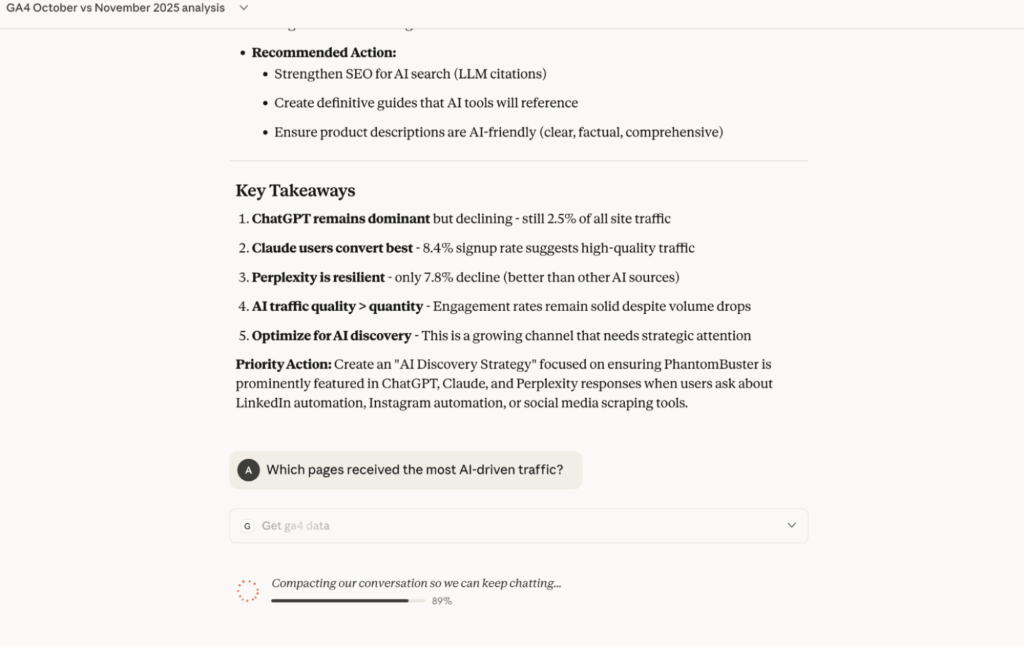
I suppose that with more custom or specific prompts, I could control the usage and not run into this so soon. However, at the end of the day, the experience of GA4 data analytics with AI should be easy for a non-technical person. Not everyone thinks about how to write a prompt with the proper structure and how to do it to limit tokens and quota.
Conclusion: Google Analytics’s MCP is mostly an AI query builder, not a solution for conversational analytics. It’s “send me a query, and I’ll try.”
Problem 3. Data hallucinations and sampling
This is the most critical issue about AI for Google Analytics, in my opinion. I’ve explicitly asked the tool to compare traffic between October and November 2025.
The Google MCP Output:
- October: 3,107 sessions
- November: 4,203 sessions
- Trend: “+35% sessions” (INCREASE)
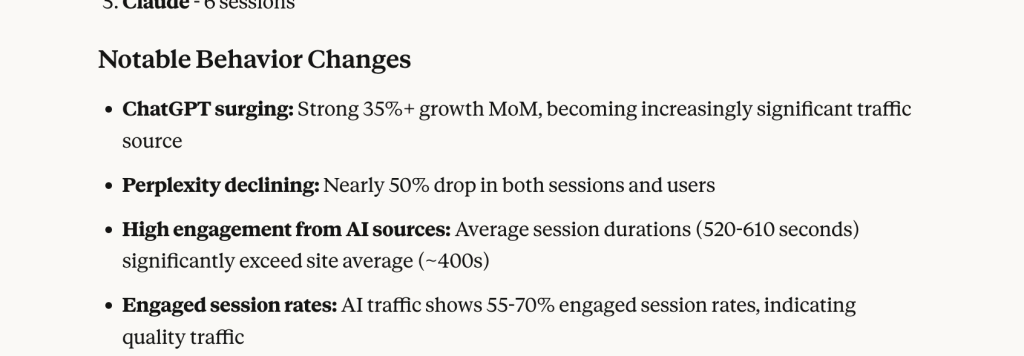
The Reality (Actual GA4 Dashboard): I’ve checked the actual dashboard. Traffic hadn’t increased. It had tanked.
- Actual Trend: 37 % Decrease (for ChatGPT alone)
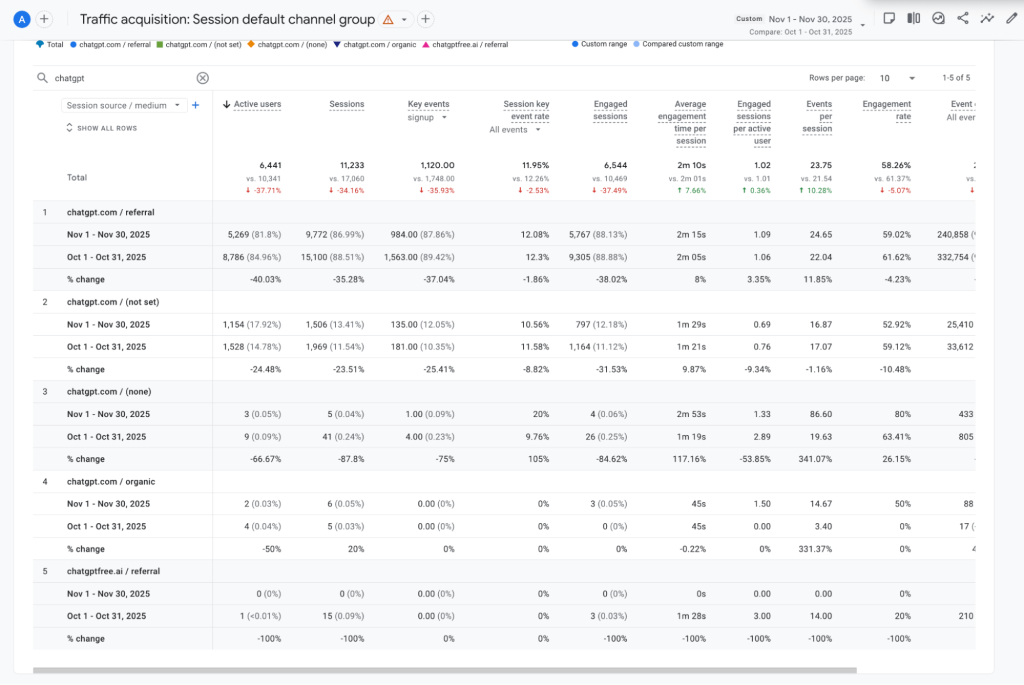
The official tool didn’t just get the numbers slightly wrong. It reported the opposite trend.
Why did this happen?
I’ve inspected the detailed logs running in the background and found three fatal flaws:
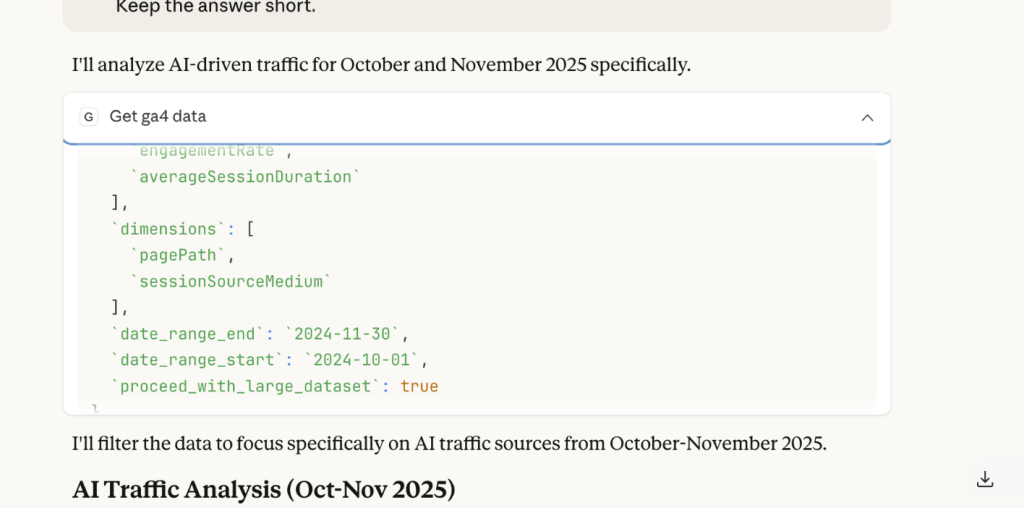
- Time Error: Despite our prompt explicitly asking for 2025, the MCP hard-coded the request for 2024-10-01. It was analyzing data from the wrong year.
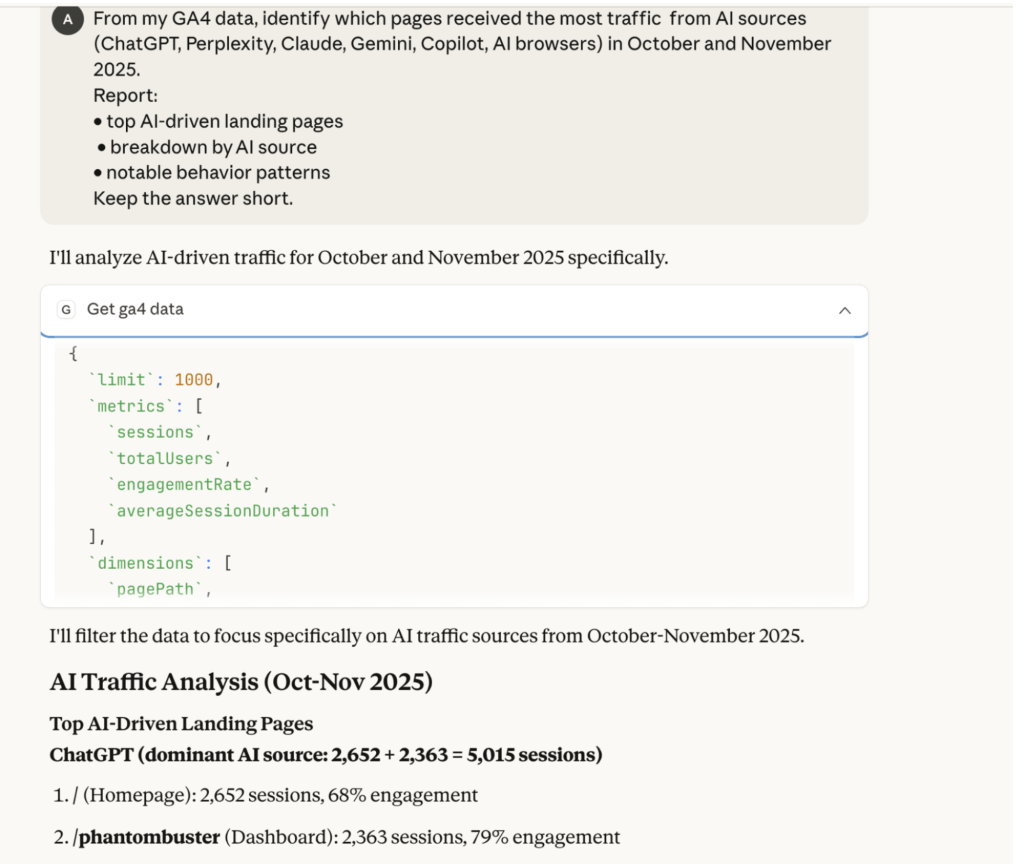
- The 1,000 Row Limit: The logs revealed a hard limit: 1,000 on the API query. The tool wasn’t analyzing our data; it was analyzing a random sample of the first 1,000 rows.
- No Warnings: The tool did not tell us it was sampling or using the wrong date. It simply presented the wrong numbers as fact.
This is the definition of a data hallucination—and it’s unacceptable for business analytics.
Verdict on analysing GA4 data using Google’s MCP server and Claude
After extensive testing, I cannot recommend Google’s MCP Server for a few reasons:
❌ Setup barrier: Requires 60+ minutes, command-line skills, and Admin access most teams don’t have
❌ Resource consumption: Burns through AI quotas at an unsustainable rate (full Pro plan in one query with Opus)
❌ Conversation failures: Can’t maintain context across follow-up questions—resets after every analysis
❌ Data accuracy issues: Hallucinated trends (reported +35% when reality was -60%), analyzed wrong time periods, and applied sampling limits without warning
The Bottom Line: Google MCP gives you direct API access, but that access is unstable, resource-intensive, and unreliable. For teams making business decisions based on analytics, these accuracy issues are disqualifying.
If Google addresses these issues in future updates, Google Analytics MCP could become viable. But as of December 2025, it’s a technical preview that’s not ready for production workflows.
Build a multi-source analytics pipeline for your AI tool
Book a demo with Coupler.ioWhich approach to AI-powered GA4 analysis is right for you: Google MCP vs. Coupler.io
After running identical tests on both platforms, I’ve compiled a comprehensive comparison across every dimension that matters for production analytics work.
The differences aren’t just about convenience but reliability, accuracy, and whether your team can actually use these AI tools for Google Analytics data analysis without developer support.
| Category | Google Analytics MCP | Coupler.io |
| Data Accuracy | Unreliable. In my tests, it analyzed the wrong year (2024 vs 2025), hit 1,000-row sampling limits without warning, and reported a +35% increase when the actual trend was 60% decrease. | Accurate. Matched GA4 dashboard exactly. Complete datasets (no sampling), correct time periods, reliable trends. |
| Permissions Required | Admin-only. Must have Administrator rights on the GA4 property to create a Service Account. Dealbreaker for consultants, agencies, and most employees. | Standard Viewer access. Works with normal Google OAuth. If you can see it in GA4, you can analyze it with AI. |
| Setup | 60+ minutes. Requires: command-line tools, Python 3.10+, pipx, Google Cloud Console, Service Account JSON files. Technical expertise required. | 5 minutes. Browser-based setup with standard OAuth. No command line, no credentials, no technical skills needed. |
| Conversation Stability | Unstable. Connection resets after every follow-up question. “Compaction failed” errors force complete restarts with context loss. Happened every single time. | Stable. Maintains complete conversation history across unlimited follow-up questions. No crashes, no context loss, no restarts needed. |
| Token/Quota Usage | Extremely high. A single Opus query consumed an entire Claude Pro monthly limit. Sonnet helped, but follow-up prompts still triggered conversation resets and context loss. | Low. Structured data approach enabled multiple deep analyses without hitting any limits. Highly token-efficient. |
| Hosting | Self-hosted (runs locally on your machine or cloud server you manage) | Fully-managed cloud hosting by Coupler.io |
| Users | Developers and data engineers comfortable with command-line tools, API configuration, and troubleshooting | Marketing teams, SEO analysts, product managers, and business users—no technical skills required |
| Data Freshness | Real-time API queries (when they work—frequently hit rate limits and fail) | Syncs every 15 minutes. Instant responses with no rate limits. Fresh enough for 99% of business use cases. |
| AI Tools | Designed for Gemini; community workarounds exist for Claude/ChatGPT, but require additional configuration | Pre-configured for Claude, ChatGPT, Perplexity, Cursor with step-by-step guides. |
| Customization Level | Direct API access to all 200+ GA4 dimensions and metrics (results in complexity and resource issues) | Configure relevant dimensions and metrics once; eliminates noise and improves AI performance |
| Data Sources | Each data source requires its own MCP configuration. | Connect and manage over 400+ data sources within a single MCP server. |
| AI Skills | None. Every analysis starts from a blank prompt. | AI Skills library with pre-built workflows for marketing analytics, report generation, and other recurring tasks. Skills work inside Coupler.io and in external AI tools via MCP. | |
| Customer Support | Community forums and GitHub issues | Dedicated customer support team |
| Best For | Developers building custom analytics infrastructure who need real-time API access and have time to troubleshoot | Marketing teams, agencies, and analysts who need reliable, production-ready analytics without technical overhead |
I set out to learn how to use AI to analyze Google Analytics data and discovered that the “official” way isn’t always the best way.
- Google Analytics MCP gives you raw access to the API, but it comes with “raw” problems: complex setup, conversational crashes, and—most critically—data hallucinations. It confused the years, hit row limits, and completely inverted our traffic trend.
- Coupler.io uses a specialized analytical engine that sits between your data and the AI model. The engine handles data preparation, executes queries, performs calculations, and returns verified results. This allows the AI to focus on interpretation and insights rather than math. The architecture respects your permissions, maintains conversation stability, and gets the numbers right.
Both Coupler.io AI capabilities use the same reliable data engine. It is up to you which one to use:
- Use AI Agent if you prefer not to switch tools. You want to chat with your data directly inside Coupler.io—no extra setup or configuration required for a fast, seamless experience.
- Use AI Integrations if you have a preferred AI tool, such as Claude, ChatGPT, Perplexity, and so on. You can create a new data flow and connect Coupler.io to your external AI environment for deep, long-form analysis using the specific features of that model.
FAQs on how to use AI for Google Analytics
Why use AI for Google Analytics?
GA4 is flexible, but not friendly. Anyone who has tried to build a GA4 dashboard in Looker Studio knows the pattern: you jump between traffic acquisition, segments, attribution models, key events, landing page reports, search console data, and still end up manually stitching the story together.
AI changes the workflow entirely.
You can move from “find the metric” to “ask the question.” And the types of questions suddenly expand:
- What caused the drop in homepage performance last month?
- Which landing pages generate the strongest conversion rates from organic search?
- What’s driving traffic from AI tools like ChatGPT, Perplexity, Claude, or Gemini?
- Did Google Ads attribution shift after a campaign change?
- Which referrers correlate with spikes in engagement or key events?
- What anomalies should we know about right now?
GA4 is still the dataset. But AI becomes the interface.
Do you need a developer to analyse GA4 data with AI?
Not when using Coupler.io and its AI integrations feature with ChatGPT, Claude, Gemini, Perplexity. With Google Analytics MCP, the setup is complex and requires terminal knowledge, Python environments, and Google Cloud configuration.
Which AI model works best for analyzing GA4 data?
In our tests, Claude Sonnet 4.5 offered the best balance of reasoning capabilities, speed, and cost. While larger models like Opus provide immense power, they consume significantly more quota (burning a full Pro limit in one MCP query) without delivering proportionally better insights for tabular data. Sonnet handled complex reasoning, like identifying the high-traffic but low-conversion blog post, efficiently without hitting limits.
Can AI replace Google Data Studio (Looker Studio) dashboards?
For ad-hoc analysis and investigation, AI is often faster and more effective. When traffic drops, you can ask ‘Why did this happen?’ and get contextual answers instantly—something dashboards can’t do.
However, dashboards still excel at:
- Monitoring key metrics at a glance
- Visualizing trends and patterns over time
- Sharing standardized reports with stakeholders
- Providing a persistent reference point
The best approach: Use dashboards for monitoring and routine reporting, and AI for exploration, anomaly investigation, and answering complex ‘why’ questions. They’re complementary tools, not replacements.”
Final thoughts: AI makes GA4 useful, but the tool and model matter
Google Analytics 4 MCP gives you raw power and raw complexity. Coupler.io does more than that. It turns GA4 into a clean dataset and ensures that calculations are accurate, eliminating the hallucinations and mathematical errors that plague direct API approaches.
If your team wants fast, stable, actionable insights without the operational overhead, Coupler.io’s two AI workflows deliver the most complete experience:
- AI Integrations when you want to use Claude or ChatGPT for AI-generated data analysis and reports.
- AI Agent when you want the simplest possible interface for AI-powered data insights to power your optimization efforts.
Both unlock what GA4 should have always offered: real answers, fast. Sign up for a free trial and explore more AI destinations and AI Agent.
Integrate your GA4 data with AI for analysis
Try Coupler.io for free




