Every time you want Claude’s take on your Instagram Ads performance, you export a file from Meta Ads Manager first, upload it, and then ask your question. By the time you get an answer, the numbers are already a day old, and you’re doing the whole thing over again.
For up-to-date AI-driven PPC analysis, connect Instagram Ads to Claude, starting with Coupler.io’s no-code integration, which keeps the data fresh and the math accurate.
Use Coupler.io’s Instagram Ads integration with Claude
Coupler.io is a no-code data integration platform and AI analytics solution that brings business records from 400+ source apps to Claude through an MCP (model context protocol) server. It lets you sync Instagram Ads data with Claude on the schedule you set and routes calculations through its Analytical Engine. So Claude explains processed results instead of trying to compute large datasets on its own.
In addition to Claude, Coupler.io supports other AI integrations, including ChatGPT, Gemini, Perplexity, and more.
That matters with Instagram Ads because things like Reels’ or carousels’ performance decline within days. So by the time you’ve saved a CSV, cleaned it up, and pasted it into a chat, the creative you’re analyzing may already be stale. But when you sync Instagram data with Claude using Coupler.io, you’re working from the same numbers sitting in your Meta Ads account right now.
For example, Gabriel Solberg manages more than $1 million in monthly Meta Ads spend across Facebook and Instagram. Stitching together reports by hand meant he often caught a fatiguing ad only after it had already burned through budget. After connecting Meta Ads to Claude through Coupler.io, his daily performance reviews dropped to under 10 minutes, and he reduced PPC reporting time by 60%.
To connect Instagram Ads to Claude AI, follow the three steps below.
Step 1: Create a data flow for Instagram Ads data
Start creating a data flow with Instagram Ads as the source and Claude as the destination by clicking Proceed in the form below:
Sign up for a free Coupler.io account (no credit card is required). Then authorize Coupler.io to access your Instagram Ads account.
Choose the ad accounts you want to pull numbers from, and pick a data entity:
- List of ads
- List of campaigns
- List of ad sets
- Reports and insights
If you choose Reports and insights, you’ll also need to set the metrics as well as the start and end date for your report.
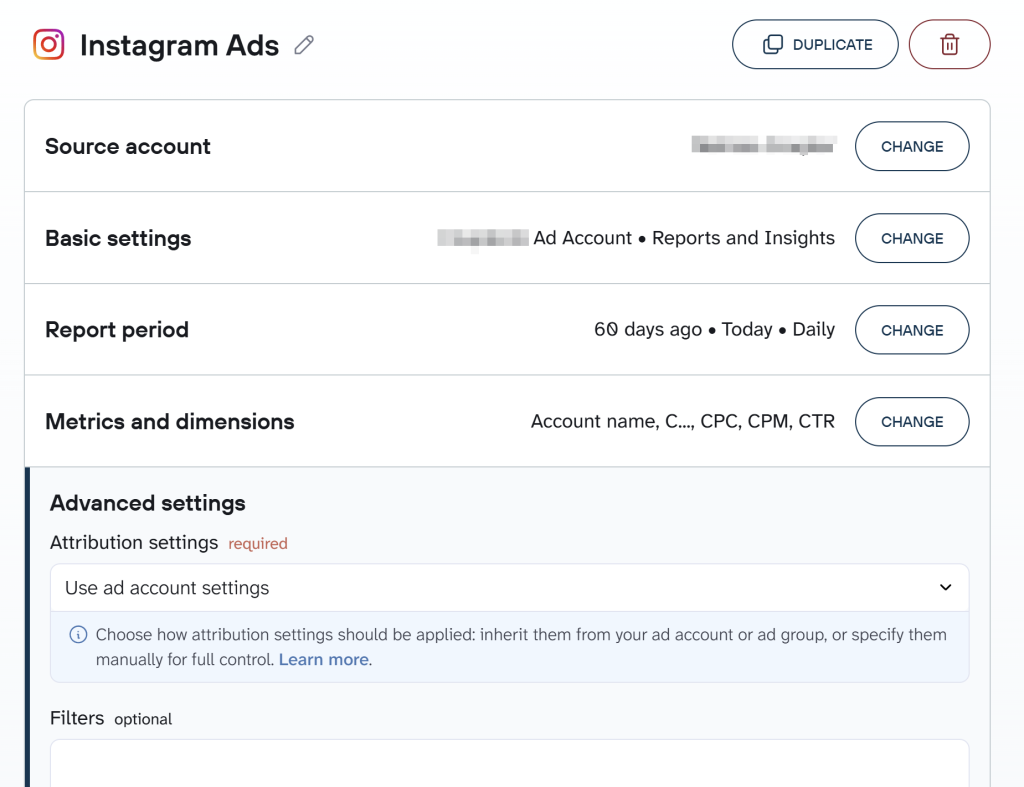
Before you reach the next step, you can add more data entities or accounts from Instagram Ads to the same data flow, or blend in other ad platforms and apps for cross-channel analysis. So you end up with one unified dataset instead of several separate ones.
Coupler.io also lets you attach business context to the dataset, so Claude gets the background it needs instead of raw numbers it can’t interpret on its own. For example, you can specify that a Reels campaign objective always targets discovery while a Feed retargeting campaign always targets existing customers. As a result, you don’t need to re-explain that distinction every time you ask Claude to compare the two.
This step is similar to what you do when connecting Facebook Ads to Claude.
Step 2: Connect Claude
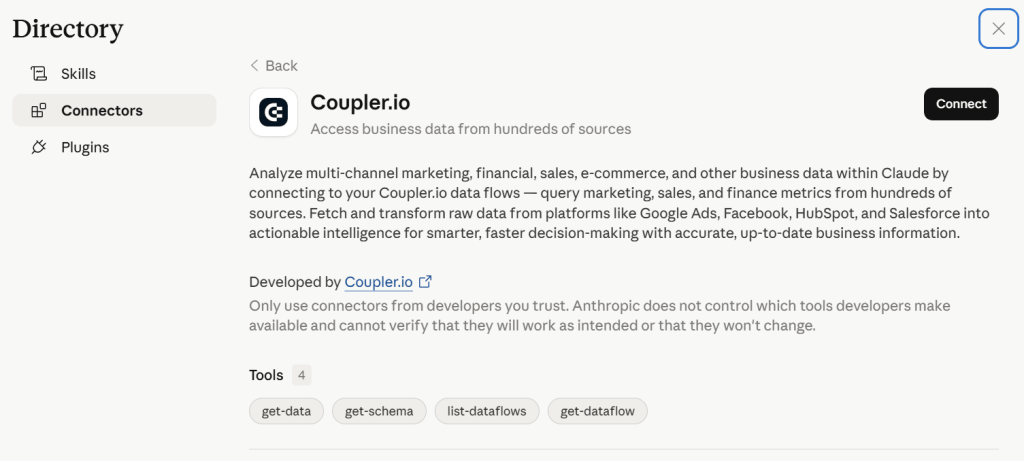
Once your data is set up, click Get connector. This takes you to the Coupler.io connector page inside the Claude app. Follow the instructions there, then return to Coupler.io and run the data flow from Instagram Ads to Claude.
Next, turn on Automatic data refresh and pick an interval. With Coupler.io, updates are possible as often as every 15 minutes. Click Save and run to activate your scheduled data flow.
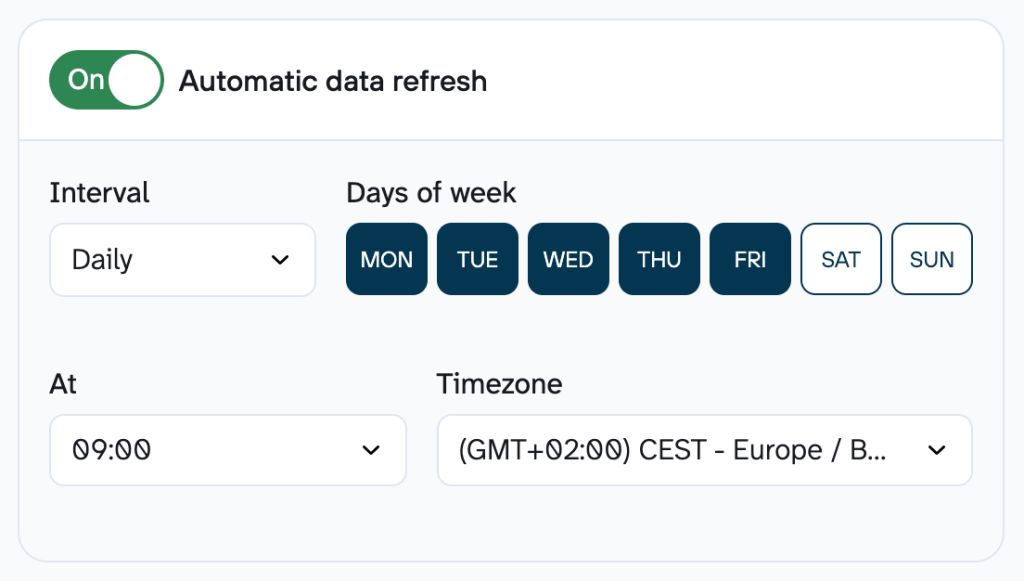
With automatic refresh on, Coupler.io pulls information from your dataset at whatever frequency you choose. To ensure Claude is working from the latest possible Instagram Ads figures, ask it to re-fetch the data mid-conversation, or start a new chat. If you’re tracking multiple ad accounts, set up a separate Claude Project for each so Claude won’t mix KPIs or business logic. This works whether you use Claude on the web or in the desktop app.
Coupler.io also teaches Claude the structure of your dataset before analysis starts, which prevents misreading any column.
Using Coupler.io, you can also integrate data with Claude from Facebook Ads and non-Meta ad platforms. Check out the dedicated blog posts:
Step 3: Start a conversation with Claude about Instagram Ads data
Once the dataflow is running, open Claude and allow it to connect to the Coupler.io MCP server when prompted. From there, you can analyze Instagram ad performance with Claude through plain-language questions.
Now, suppose you’re a marketer who needs to check whether your Instagram Ads spend is on pace to stay within a $15,000 monthly budget. Your prompt could look like this:
Using my Instagram Ads “Reports and Insights” data flow, calculatemonth-to-date spend against a $15,000 monthly budget. Show me thedaily pace needed for the rest of the month to land within budget,and flag any campaign that’s outspending its share.
Claude returns a short table with month-to-date spend, remaining budget, and the daily pace required to hit the target. Next comes a plain-language flag on which campaign is running hottest and by how much.
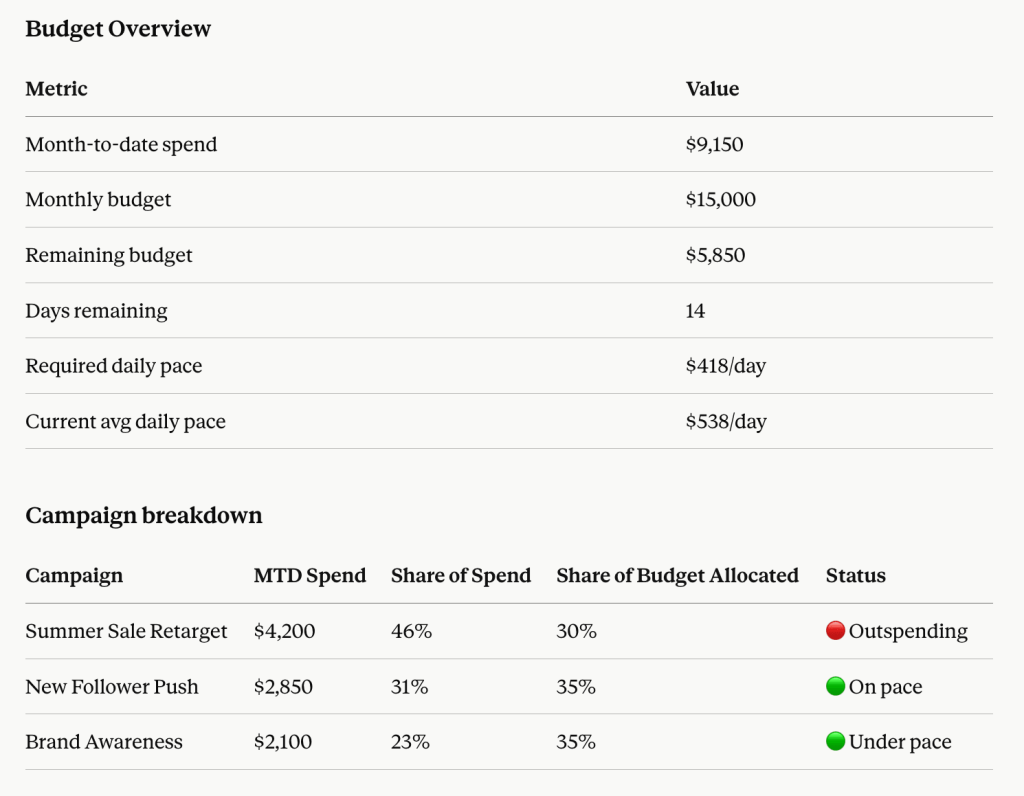
From there, you can ask a follow-up, like whether to pause that campaign or just cap its daily budget, and Claude answers from the same live dataset.

Connect Instagram to Claude with Coupler.io
Get started for freeThings to consider when you connect Instagram Ads to Claude
First, beware of wrong metrics, or the right metrics at the wrong level, so as not to waste time before you’ve even asked Claude a question. Coupler.io lets you pull four distinct data entities from Instagram Ads, so you can choose the relevant ones for your analysis or reporting needs. For example, if you’re deciding whether to kill an underperforming ad set or swap its creative, fetch the List of ad sets and the List of ads in the same data flow. That lets Claude identify whether the problem is at the ad set or ad level.
But raw numbers don’t tell Claude how your team defines things. Without that context, during every Instagram campaign data analysis, Claude guesses and provides generic recommendations. Coupler.io lets you attach business context to the dataset once, and Claude gets it with every question afterward.
Claude reads numbers well, but makes mistakes computing averages, weighted totals, or ratios directly across a large Instagram Ads dataset. Coupler.io’s Analytical Engine runs that math and hands Claude the verified result to explain.
Week to week, the same Instagram Ads review gets repetitive, and you don’t want to rebuild the prompt from memory every time. So it’s better to prepare ready-to-use skills – saved analysis workflows that cover common patterns for a given data type. As a result, Claude will follow the same methodology every time.
Imagine your team needs Instagram Ads data in Claude only for the deeper questions, while checking it in a Google Data Studio dashboard each morning for a quick visual read. With Coupler.io, the same flow can push to Google Sheets, Looker Studio, Power BI, BigQuery, and other destinations at once.
Examples of Instagram campaign data analysis in Claude
When you connect Instagram Ads to AI using Coupler.io, the quality of the answer depends heavily on the quality of the data and the context around it. I tested prompts that reflect actual Instagram Ads decisions, so check out the examples of using Claude for data analytics of advertising data.
Note: For all the examples above, I’ve used the marketing-analytics skill from Coupler.io’s library of AI agent skills. They’re available when you connect data to Claude via the Coupler.io connector, so you won’t need to additionally install them to Claude.
Diagnose creative fatigue and audience saturation
Instagram creative goes stale faster than many paid channels, especially when the same audience keeps seeing the same video, carousel, or static image over a short period. The problem is that an underperforming week in the account doesn’t tell you whether the issue is creative, audience, bid pressure, or simple seasonality. You need the trend at the ad level, plus a way to tie it back to exposure.
Analyze my Instagram Ads account to identify signs of creative fatigue and audience saturation. Focus on trends in CTR, CPM, frequency, saves, shares, and engagement rate over time at the ad level. Highlight which creatives show declining performance after repeated exposure, and correlate this with frequency thresholds. Identify audiences where ad fatigue appears fastest, and recommend specific actions (e.g., creative refresh cadence, audience expansion, or exclusions). Include visual Instagram insights if available (e.g., static vs video vs carousel fatigue rates).
Claude’s output appeared as a ranked table with each ad, the trend direction of CTR, CPM, and frequency, and a short action note for each audience-creative combination. Under that, I found a pattern summary that separates static, video, and carousel behavior, followed by a recommendation on refresh cadence and exclusions.
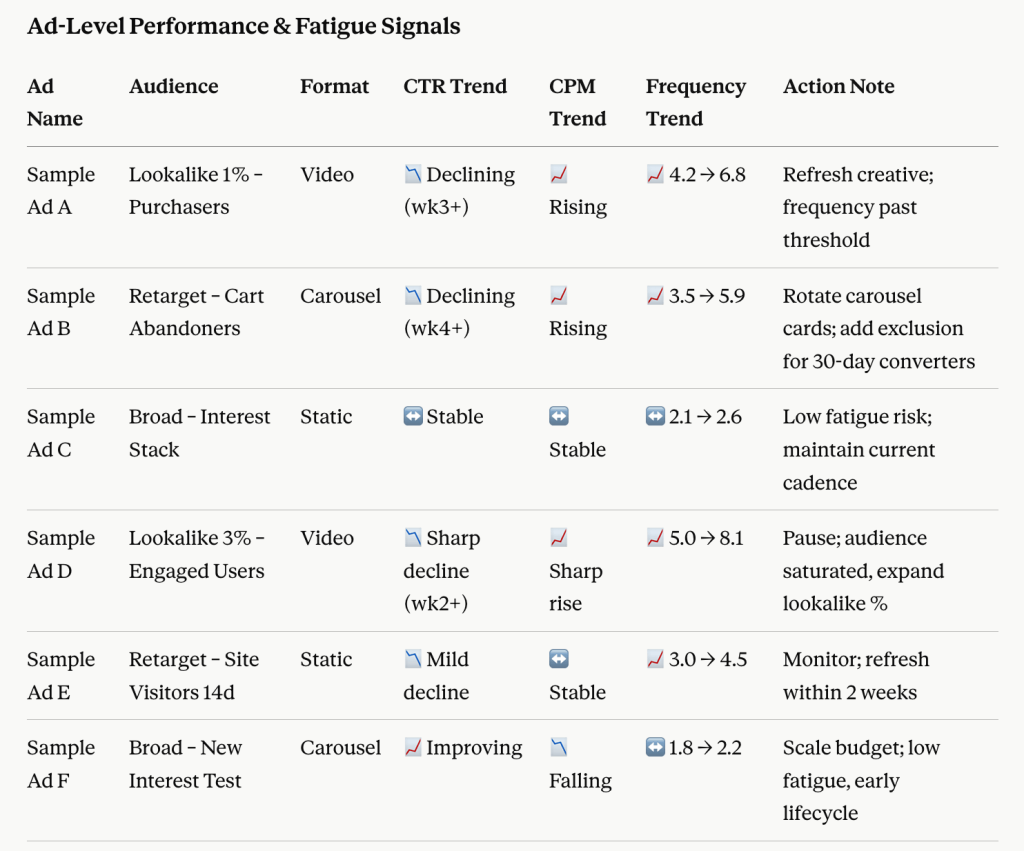
Here’s what it recommended in the takeaways block:
- Watch for frequency bands where CTR starts dropping consistently, rather than looking for one universal fatigue number.
- Compare saves and shares with CTR, because some creatives still signal interest even when click performance softens.
- Refresh the creative first when the audience is still looking healthy, but exposure keeps climbing, and engagement is fading.
Evaluate reel vs feed vs story placement performance
Placement reports inside Meta are easy to scan and hard to interpret. Cheap clicks from one placement don’t guarantee better business results, and Instagram formats behave differently enough that one creative style rarely wins everywhere.
Break down performance across Instagram media types (Reels, Feed, Stories, and Explore) at both campaign and ad level. Compare key metrics such as CPC, CPA, CTR, watch time (for video), and conversion rate. Identify which placements drive the highest-quality traffic and conversions, not just the cheapest clicks. Provide recommendations on budget reallocation and creative format optimization tailored to each placement (e.g., short-form vertical video for Reels vs static for Feed).
The useful part of Claude’s answer here is not just the ranking. It is the placement-by-placement explanation of trade-offs. For example, Stories produced low CPC but a weaker conversion rate, while Reels delivered longer watch time and better post-click quality if the creative matched the format.
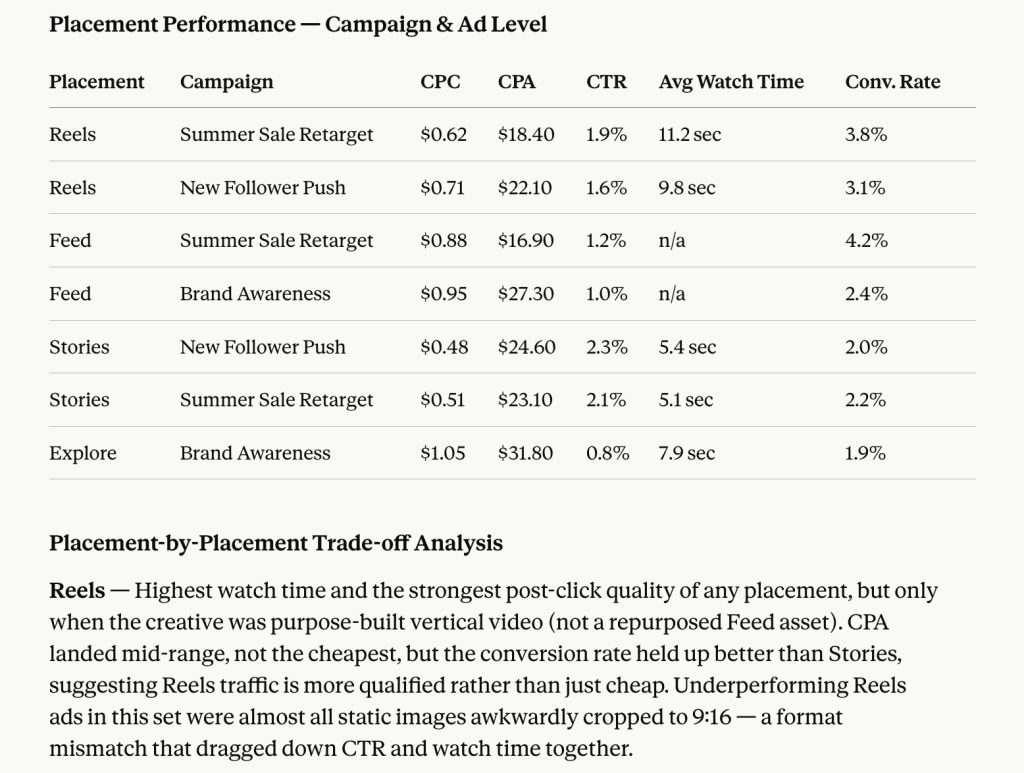
That response ended with a direct reallocation decision. If Reels shows a stronger conversion rate and watch time while Feed drives cheap but low-quality clicks, the next step is “move X% of spend and rebuild creative for the winning placement.”
Identify scroll-stopping creative patterns
Analyze top-performing Instagram ads to identify common creative elements that drive high engagement and conversions. Focus on hook timing (first 1-3 seconds), visual composition, captions, use of text overlays, color schemes, and presence of human faces or motion. Compare winning creatives against underperforming ones to isolate statistically meaningful differences. Provide specific recommendations for future creative production tailored specifically to Instagram user behavior.
Claude returned a comparison between top and bottom performers, then turned those differences into production guidance instead of staying at the level of observation.
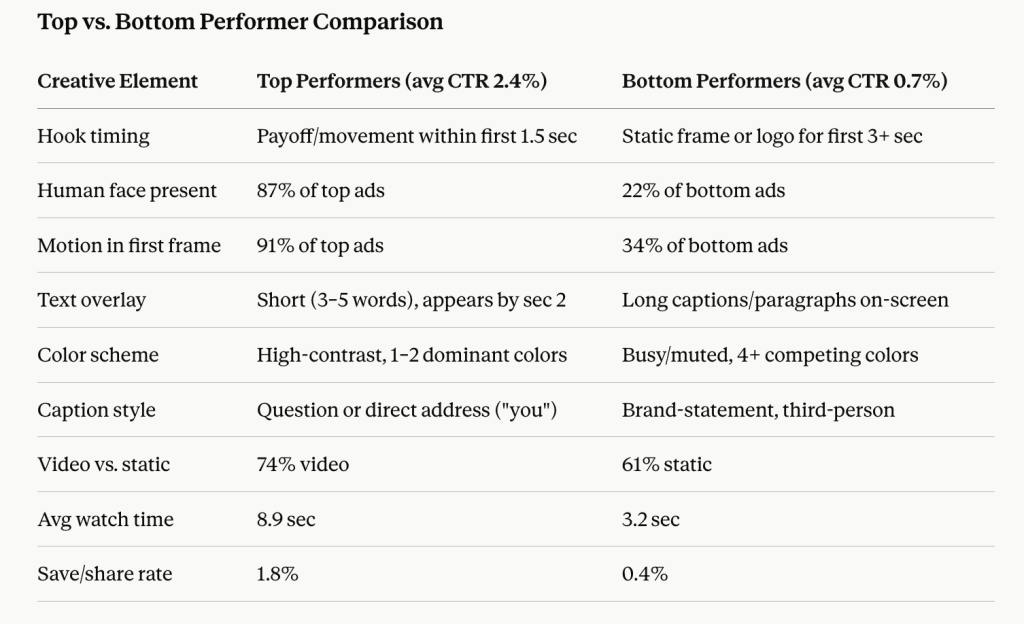
In the output, I got answers to whether early hooks outperformed slower openings, whether face-led videos beat product-only shots, and whether text overlay helped or hurt the format.
Optimize hashtag and caption strategy for paid ads
Captions and hashtags matter differently in paid Instagram than in organic social, which is why this question is hard to answer manually. You have to separate what looks engaging from what actually supports reach, saves, profile visits, or conversions in an ad context.
Evaluate the impact of captions and hashtags used in my Instagram ads on engagement and conversion metrics. Analyze whether certain hashtags correlate with higher reach, saves, or profile visits, and whether caption length or tone affects performance. Identify patterns in successful caption structures (e.g., CTA placement, emoji use, storytelling vs direct selling). Recommend optimized caption and hashtag strategies specifically for paid ads, not organic posts.
Claude responded with a breakdown of caption structures, hashtag clusters, and their relationship to paid performance outcomes.
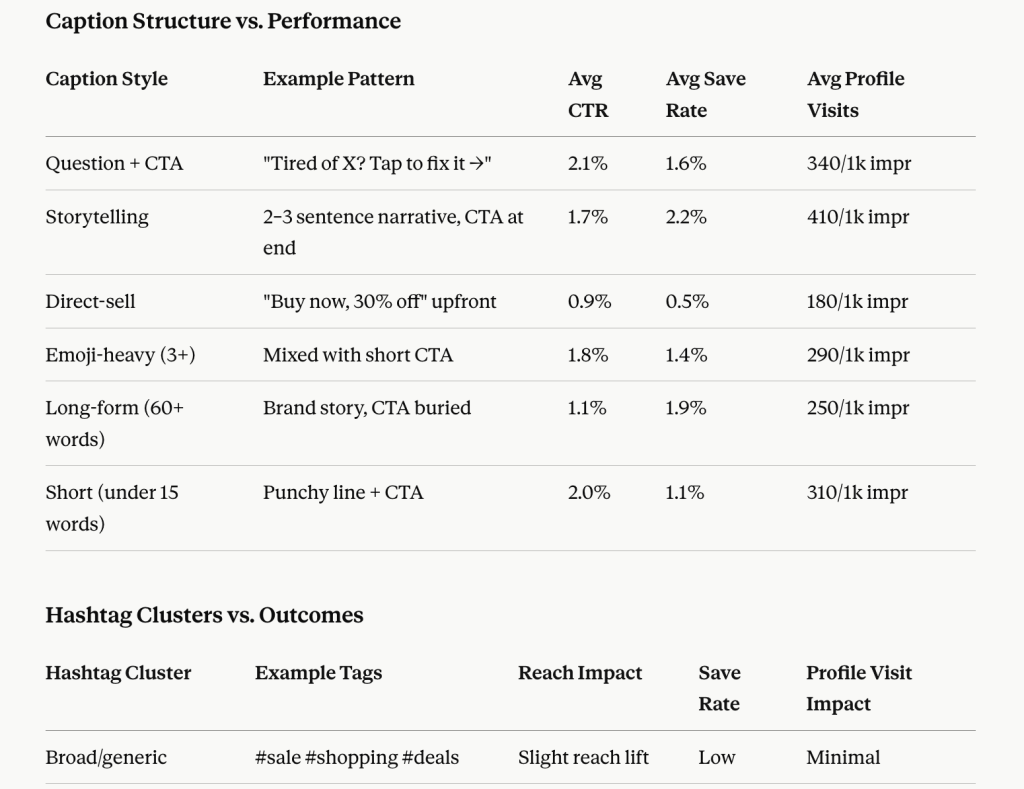
The next move is clear in one sentence: keep the caption patterns that support saves, profile visits, or conversion rate, and cut the ones that only add text without moving paid outcomes.
Build a multi-source analytical system in Claude
Book a demo with Coupler.ioClaude prompts for Instagram Ads analysis
Copy any of these into Claude once your Instagram Ads data flow is connected. Each one covers a different angle from the use cases above. So you can adapt them to your own data without duplicating the analysis you’ve already run.
Conversion funnel drop-off:
Using my Instagram Ads “Reports and insights” data, build a funnel from impressions to link clicks to purchases for each activecampaign. Identify where the steepest drop-off happens and whetherit differs by campaign objective. Recommend one specific fix forthe campaign with the weakest step of the funnel.
Lookalike vs interest-based audience efficiency:
Compare CPA and ROAS across my lookalike audience ad sets versus my broad and interest-based ad sets over the last 30 days. Tell me whether the lookalike audiences are outperforming enough to justify shifting more budget toward them, and by how much.
Campaign objective cost efficiency:
Group my campaigns by objective (traffic, conversions, awareness) and compare cost per result and spend share for each group. Flag any objective where the spend share is growing, but the cost per result is also rising, and suggest whether to rebalance.
Weekly stakeholder summary:
Summarize this week’s Instagram Ads performance in plain language for a non-technical stakeholder: total spend, top 3 campaigns by ROAS, and one thing that changed from last week. Keep it to one paragraph plus a short table.
Ad sets to pause or adjust:
Rank all active ad sets by CPA over the last 14 days. Flag any ad set with a CPA more than 50% above the account average and at least $200 in spend. Recommend whether to pause, adjust the budget, or leave it running.
Follower demographics efficiency check:
Break down conversions and cost per conversion by age group and gender for my Instagram Ads account over the last 30 days. Identify the two segments driving the most efficient results and the two driving the least, and suggest a targeting adjustment.
For prompts that apply across PPC platforms more broadly, not just Instagram, see how to analyze PPC campaign performance in Claude.
Other ways to get data from Instagram Ads to Claude
The Coupler.io Instagram Ads data connector above covers the way to link Instagram Ads account to Claude AI for recurring analysis without engineering work. But I also researched what options are available for other needs and where each one makes sense, which you’ll find below.
Manual export
Instagram Ads runs through Meta Ads Manager, the same interface Facebook Ads uses. Inside Ads Manager, you pick your reporting level, set your date range, add a placement breakdown to isolate Instagram results from Facebook, and save a CSV or Excel file.
I’d reach for manual export when I need a one-off answer and don’t want to set anything up. For anything recurring, it turns into the download-upload cycle every time a new question comes up. Coupler.io’s scheduled integration replaces that cycle: Instagram Ads data lands in Claude at your set interval, so there’s no export step to repeat.
Native Meta MCP server
The official Meta Ads MCP server was shipped in 2026, which gives Claude direct, live access to connected ad accounts. Claude can analyze performance and, where supported by your account and permissions, create campaigns and update items such as budgets or status.
But this MCP falls short the moment you want to blend Instagram Ads with GA4 or CRM data, since it only speaks to Meta. So it works if Instagram Ads and the rest of your Meta Ads account are the only data sources you need. There’s also no scheduling behind it, as Claude queries your Meta Ads account on demand through the connector rather than analyzing a continuously refreshed copy of your data.
Coupler.io’s integration is also MCP-based, but it’s available as a ready-to-use Claude connector. There’s no server to build or maintain, you blend Instagram Ads with other sources in the same data flow, and Coupler.io refreshes data on the schedule you set.
Custom MCP server
A custom MCP means building your wrapper around the Meta Marketing API that exposes specific tools, such as get_ad_set_performance or list_fatigued_creatives, that Claude can call during a conversation.
This is worth building if you’re creating an internal analytics tool where multiple analysts query marketing data through natural language. Or if you need to combine Instagram Ads with proprietary systems that no off-the-shelf connector touches, such as an internal attribution model or a custom CRM.
However, you’re responsible for development, hosting, and ongoing maintenance, including keeping up with Meta’s API versioning and rate limits. Coupler.io’s integration gets you a live, queryable Instagram Ads dataset inside Claude without that build-and-maintain overhead.
API scripts and function calling
API scripts and function calling are both code-based approaches, but they solve different problems.
A direct API script pulls Instagram Ads data from the Meta Marketing API on a schedule or trigger and pipes it straight to Claude’s API, with no browser or manual export involved. This fits fully automated pipelines: a nightly job that pulls spend and conversion data, formats it, and sends a summary to Claude for interpretation before landing the output in Slack or a database. It requires proficiency with both the Meta Marketing API and Claude’s API, plus ongoing maintenance as Meta’s API versions and token requirements change.
Function calling flips that flow. Instead of pre-loading all the data, you define functions such as get_ad_set_performance(date_range, account_id) and describe them to Claude. Then Claude decides mid-conversation which function to call and with what parameters. This fits chat-based Instagram Ads assistants, where marketers ask ad hoc questions about campaign performance.
Both require real engineering work: someone has to build the integration, handle authentication and pagination, and keep it running as Meta’s API evolves. But with Coupler.io, an up-to-date Instagram Ads dataset in Claude comes from an automated integration, no writing or maintaining API code required.
See our guide on how to connect data to Claude, which applies beyond Instagram.
Frequently asked questions
Is it safe to connect Instagram Ads to Claude?
Yes. You choose exactly which Instagram Ads dataset connects to Claude, which gets read-only access to it. Coupler.io sits between your Instagram Ads account and Claude, and it’s SOC 2 Type II certified, GDPR-compliant, and HIPAA-compliant. Data transmitted for analysis is not retained by Anthropic for model training.
Will Claude be able to modify my Instagram Ads campaigns?
No, not through this setup. Claude can view and analyze the Instagram Ads data Coupler.io syncs, but it can’t modify your source campaigns, budgets, or targeting.
What happens to historical data if I disconnect Instagram Ads?
Disconnecting stops new data from syncing, but it doesn’t erase what’s already there. Anything you’ve already sent to a destination, whether that’s a Google Sheets tab, a BigQuery table, or a past Claude conversation, stays where it is. Claude just won’t have anything fresh to query going forward until you reconnect.
Get analysis-ready data to build performance reports
Sign up for free