Klaviyo data export on a schedule makes sense when you need it outside of Klaviyo’s own interface. You may load data to a data warehouse for cross-channel analysis, a spreadsheet for reporting, or connect Klaviyo to an AI tool for conversational analysis of campaign performance. You won’t have to manually export records every time you need fresh data. Coupler.io, a data integration platform and AI analytics, allows you to automate exports of Klaviyo data to any destination. Learn how to connect Klaviyo to spreadsheets, BI tools, data warehouses, and AI tools without coding.

Automate Klaviyo data export with Coupler.io
Get started for freeHow to set up an automated export of Klaviyo data on a schedule
To automate data exports from Klaviyo on a custom schedule, you need to get Klaviyo API credentials first.
Step 0. Generate a Klaviyo API key
Go to your Klaviyo.com dashboard and follow the following steps:
- Navigate to the Setting at the left bottom corner drop-down with your profile name. You can see the API keys option under the Account tab. Here, you’ll find the public API key. However, you need to create a private API key to authenticate and access your Klaviyo account’s data securely. Click on Create Private API Key
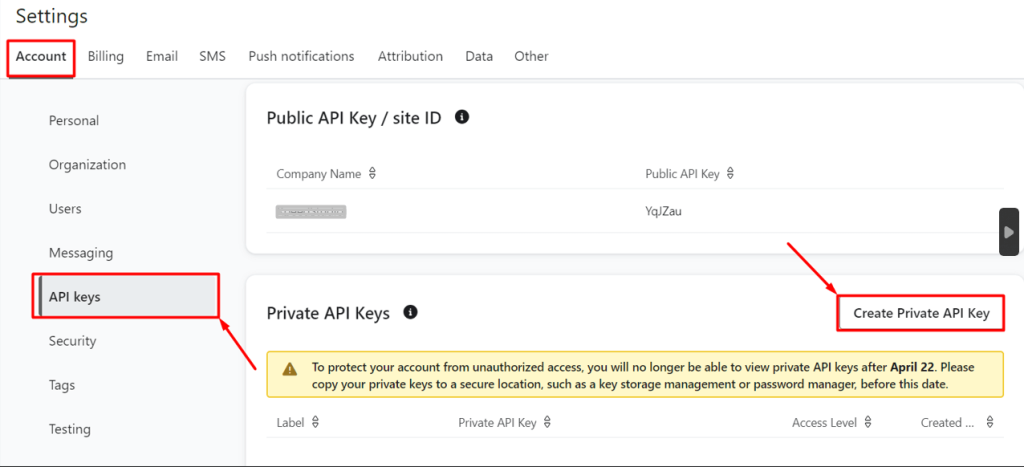
Here, you can see the associate options.
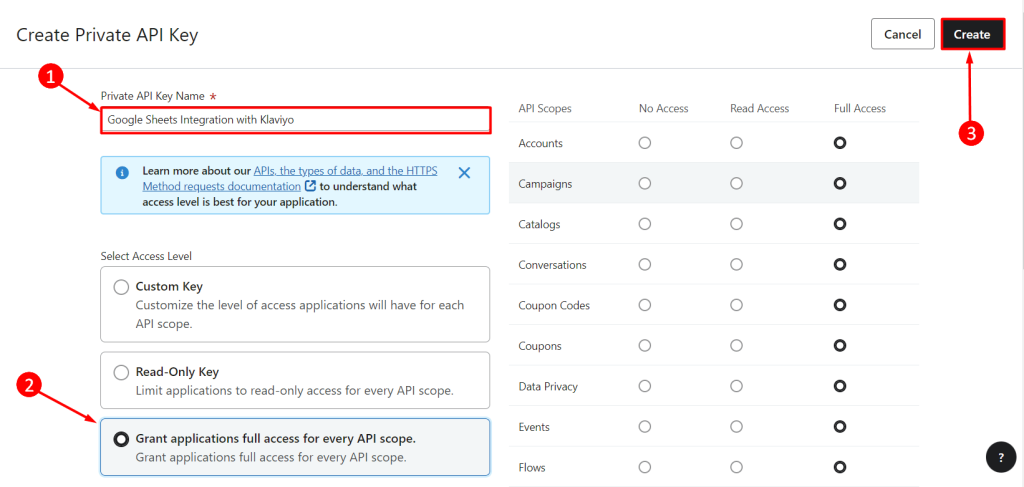
- Write the private API key name, e.g., Google Sheets Integration with Klaviyo.
- Next, select the access level, such as custom key, read-only, or full access. In our case, we choose the Grand applications full access for every API scope option.
- Finally, click on Create. It will create the private API key against your Klaviyo account.
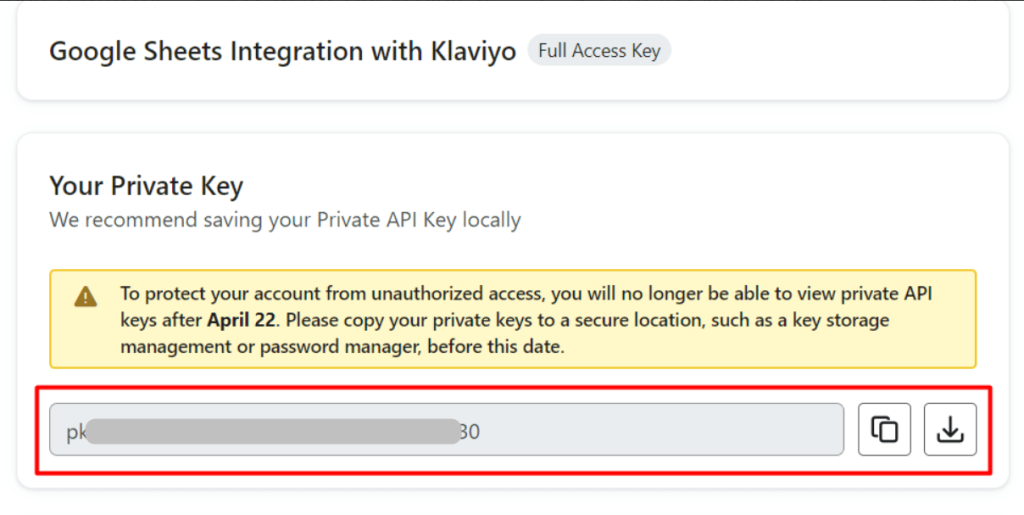
- Copy the private API key and download it to integrate with the Klaviyo account or any other third-party apps if needed in future.
Step 1: Connect Klaviyo data
Now you’re ready to create a data flow in Coupler.io. You can get started right away for free with this interactive form. Just select the destination tool from the dropdown and click Proceed.
Start by creating a Coupler.io account for free with no credit card required. After that, you can access the interface to connect to your Klaviyo account using the API key. Then select a data entity to export. You’ll find a list of supported data entities such as Campain List, Profile List, and Report. Select one of them and proceed to the next step.
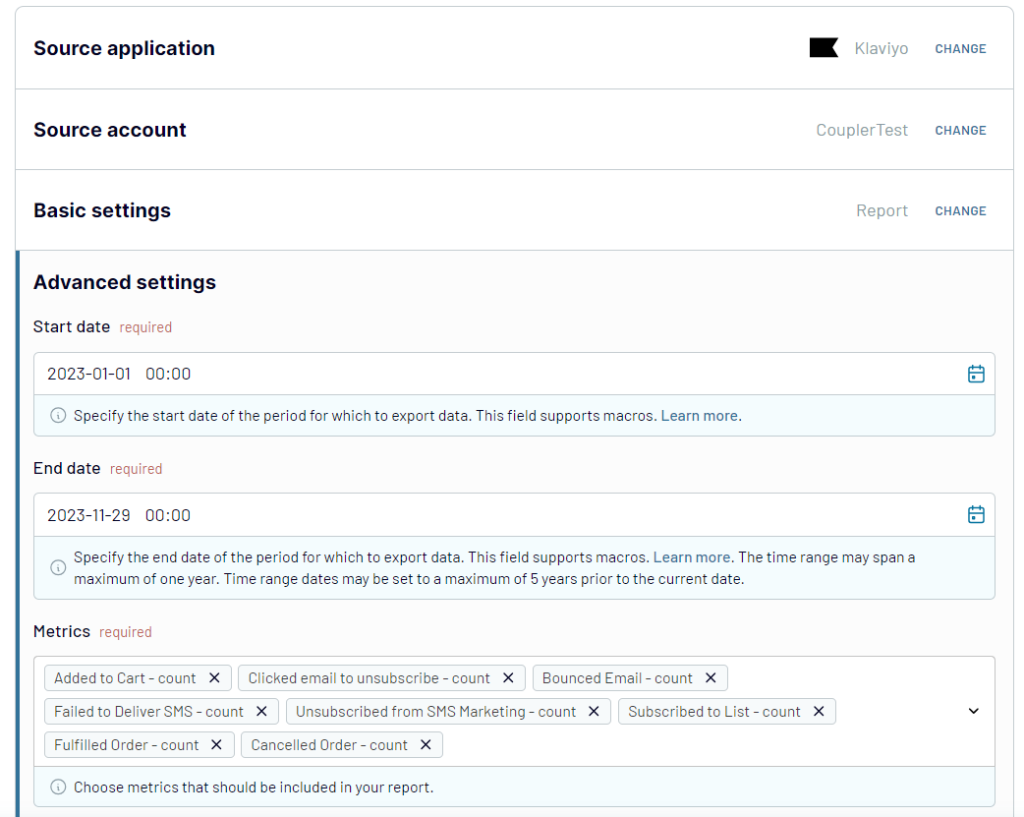
Coupler.io also allows you to add multiple sources to your data flow. This is useful if you want to combine multiple data entities/reports from Klaviyo or enrich your Klaviyo data with information from other sources.
Step 2: Organize your data set
Now, you can transform and organize your Klaviyo data to make it analysis-ready:
- Manage columns: hide, rename them, change order, etc.
- Filter and sort data
- Add new columns using formulas’
- Aggregate data and blend data from multiple sources connected
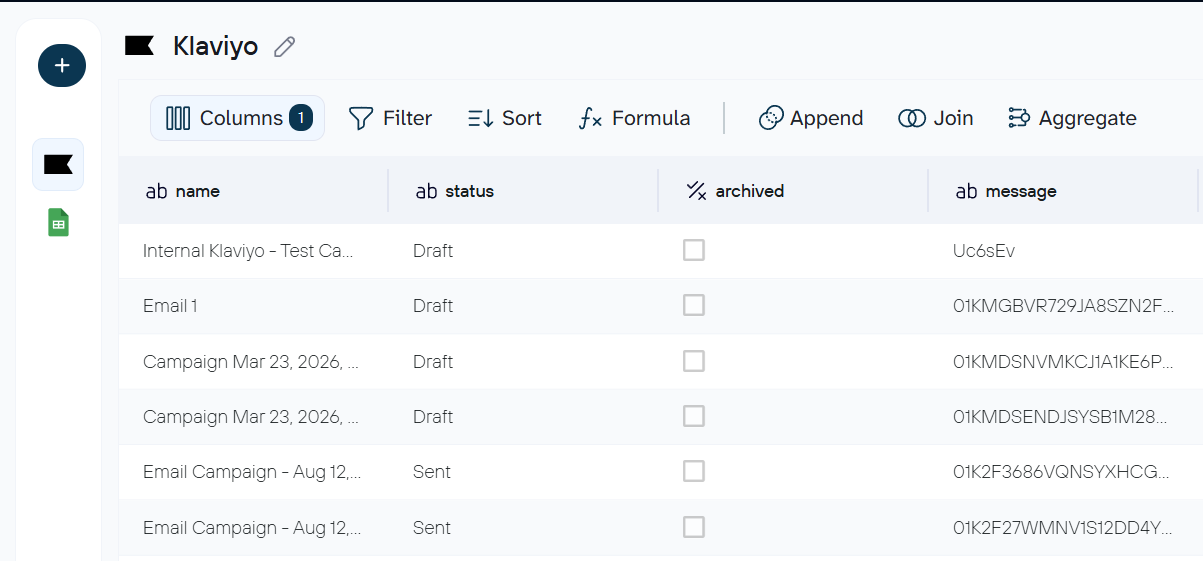
Step 3: Load data and schedule automatic updates
Choose your destinations and follow the instructions to connect them. Each destination will have its own set of settings. For instance, if you select Google Sheets as your destination, you need to connect your Google account and specify a spreadsheet and a sheet for your Klaviyo data.
Destinations is not a typo since Coupler.io allows you to connect Klaviyo data to a few destinations within one data flow. One Klaviyo connection can feed Google Sheets, Data Studio, BigQuery, Claude, etc. at the same time. You won’t need to set up separate exports for each destination.
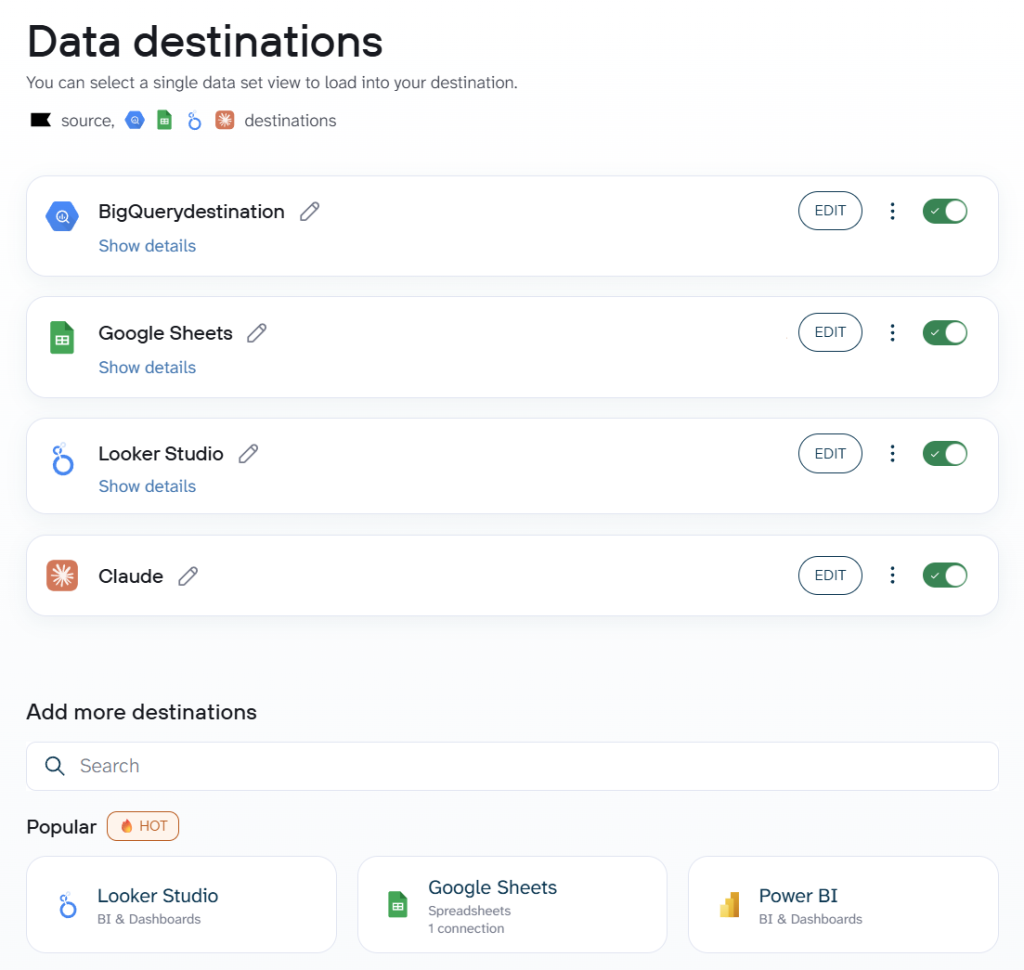
Explore how to connect Klaviyo to Claude.
Once your connection is saved, turn on the Automatic data refresh option and configure the schedule to export the Klaviyo data automatically.
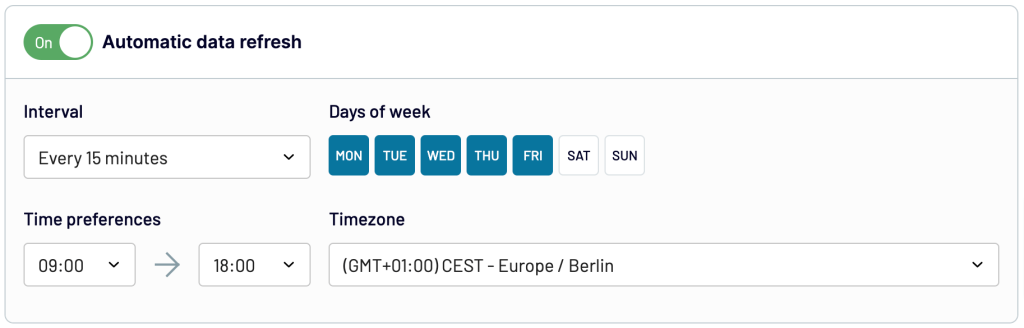
Save the configuration and load data to your destination. Coupler.io will seamlessly handle the data refresh for you. So, your data stays up to date in your report or data warehouse.
Bonus: Analyze Klaviyo data with AI Agent
Coupler.io integrates with AI tools such as ChatGPT and Claude to explore Klaviyo data through natural-language questions. However, the platform also includes its own AI Agent, so you can talk to your data in your current data flows.
Just type in questions like “Which campaigns had the highest click-to-order rate last month?” or “What day of the week produces the best open rates?” and receive immediate answers based on your Klaviyo dataset.
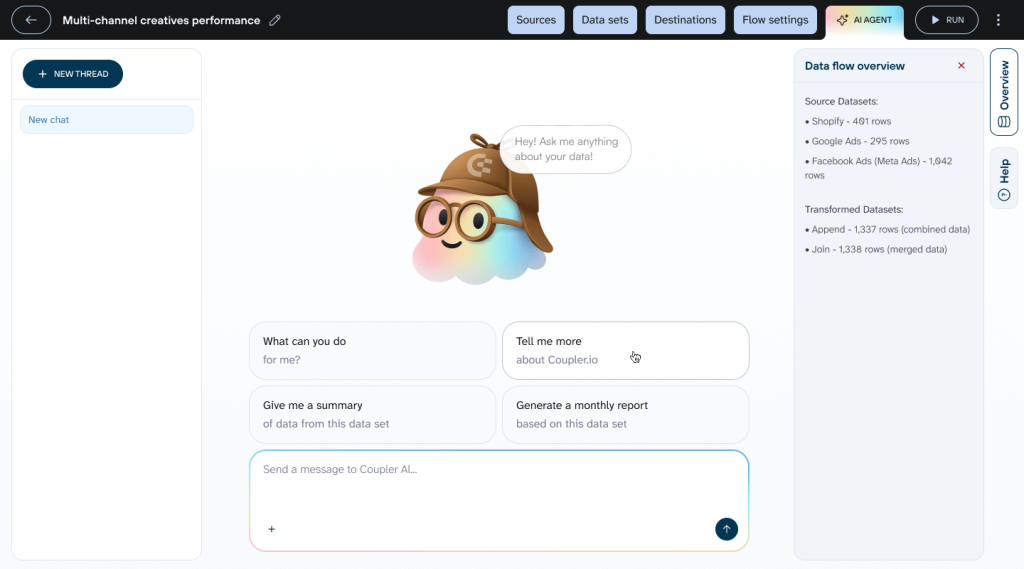
The AI Agent relies on an internal analytics engine that queries the data, performs calculations, and produces validated results. No SQL required on your side.
Automate Klaviyo data export and Ai analytics with Coupler.io
Get started for freeWhat data can be exported by Coupler.io from Klaviyo?
With Coupler.io, you can export two groups of data from Klaviyo: reports (aggregated performance data over a date range) and core entities (raw records you can filter and transform).
Klaviyo reports
| Name | Description |
|---|---|
| Metrics analytics | Account-wide event data (counts, sums, unique users) for standard and custom events like “Placed Order,” “Opened Email,” or “Clicked SMS.” Useful for tracking growth trends over time. |
| Campaign performance report | Delivery, opens, clicks, conversions, and revenue per campaign over a selected date range. Good for side-by-side campaign comparison. |
| Segment performance report | Member counts, additions, removals, and net changes per segment with hourly, daily, weekly, or monthly breakdowns. |
| Flow performance report | Delivery, opens, clicks, and conversions per automated flow over a selected date range. |
| Forms performance report | Views, submits, submit rate, and closures per sign-up form with the same time-interval options as other reports. |
Klaviyo core entities
| Name | Description |
|---|---|
| Campaigns | Details of email campaigns sent through Klaviyo — message content, recipient estimates, send status, channel settings, etc. |
| Profiles | Subscriber data like email addresses, names, predictive analytics (churn risk), consent history, push tokens, and segment membership. |
| Flows | Automated journey configurations — welcome series, abandoned carts, post-purchase sequences — including automation logic and individual messages. |
| Segments | Dynamic audience groups with their defining conditions and targeting rules. |
| Forms | Sign-up form configurations, targeting rules, and submission data. |
What are the supported destinations to import Klaviyo data?
You can use Coupler.io as a bridge in your data ecosystem since it allows you to connect Klaviyo to different destinations:
📋Spreadsheets
Coupler.io offers 2 options to import Klaviyo data into spreadsheets: Google Sheets or Microsoft Excel.
- Google Sheets: Enables easy collaboration and real-time updates. It also provides seamless teamwork and accessibility to data insights.
- Microsoft Excel: Provides robust functionality for data analysis and visualization, including powerful formulas and pivot tables.
Check out how to set up a Klaviyo Google Sheets integration.
📊BI tools
If you need advanced data modeling, interactive visualization, and insightful reporting, you can go for the following BI tools as your Klaviyo data destination.
- Power BI: Offers interactive dashboards and analytics for comprehensive data visualization and sharing.
- Tableau: Provides dynamic presentation for in-depth insights and creating compelling narratives.
- Qlik: Delivers associative analytics for deeper insights and informed decision-making.
- Looker Studio: Facilitates intuitive data exploration, charts, and dashboards for actionable insights.
Check out how to connect Klaviyo to Power BI or link Klaviyo to Looker Studio.
🏢Data warehouses
Data warehouse tools provide scalability and optimized performance for handling large volumes of Klaviyo data. With Coupler.io, you can export in the following data warehouse tools:
- BigQuery: Enables high-speed analytics and scalability for processing massive datasets.
- PostgreSQL: Provides reliability and advanced features for complex data analysis.
- Redshift: Ensures fast query performance and scalability in managed analytics environments.
- Snowflake: Handles large-scale analytics workloads with flexible scaling and native support for semi-structured data.
Check out how to automate data exports from Klaviyo to BigQuery.
🤖 AI tools
You can export Klaviyo data to AI platforms for deeper analysis and natural-language querying.
- ChatGPT: Ask questions about your campaign performance, subscriber behavior, and engagement trends in plain language.
- Claude: Analyze email marketing patterns, generate reports, and get recommendations based on your Klaviyo data.
- Gemini: Query your Klaviyo data conversationally and use Google’s AI to surface patterns across campaigns and subscribers.
- OpenClaw: Connect your Klaviyo data for AI-powered analysis and reporting.
- Perplexity: Research and analyze your email marketing performance with AI-assisted answers grounded in your Klaviyo data.
- Cursor: Use Klaviyo data within your development workflow to build custom analytics and automations.
📦Other destinations
- JSON: Import Klaviyo data directly into JSON format to integrate with various systems and custom data processing.
- monday.com: Enhance team collaboration and project management task tracking and workflow automation.
How to visualize data from Klaviyo with free dashboard templates
With good and straightforward visualization of Klaviyo’s key metrics (open rates, click-through rates, revenue, and so on) in the form of a dashboard, you can gain valuable insights into your marketing performance. Coupler.io simplifies this by integrating Klaviyo data with data visualization platforms. You can easily connect and display your data in Looker Studio, PowerBI, and other BI tools.
Additionally, Coupler.io’s ready-to-use dashboard templates are available in Looker Studio. They allow you to turn Klaviyo data into insights about your email campaign performance. Let’s review them next.
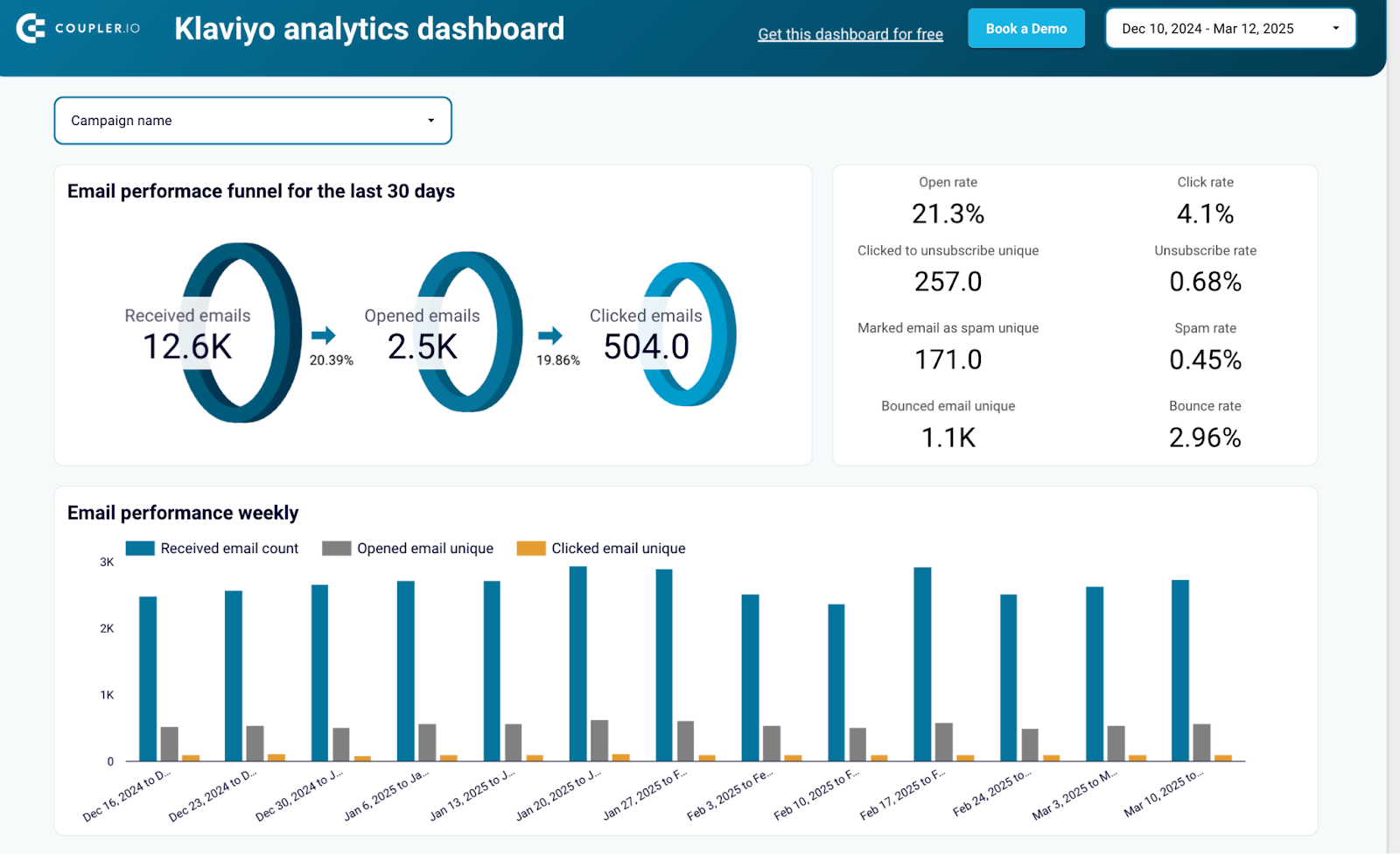
Klaviyo analytics dashboard
This dashboard shows your 30-day email funnel (received → opened → clicked) and breaks down performance by campaign, so you can compare results without pulling separate reports.
What insights you can get
- Email performance funnel for the last 30 days: Track how recipients move through your funnel from receiving emails to clicking and engaging
- Key campaign metrics overview: Monitor essential metrics like open rates, click rates, and unsubscribe rates at a glance
- Weekly email performance tracking: Analyze performance trends to identify patterns and optimize sending schedules
- Campaign comparison table: Evaluate all campaigns side-by-side to identify top performers and areas for improvement
- Subscriber profile overview: Understand your audience demographics and engagement levels
How to use this dashboard
This is a Data Studio template with a built-in Coupler.io connector. Connect your Klaviyo account, and the dashboard populates with your data.
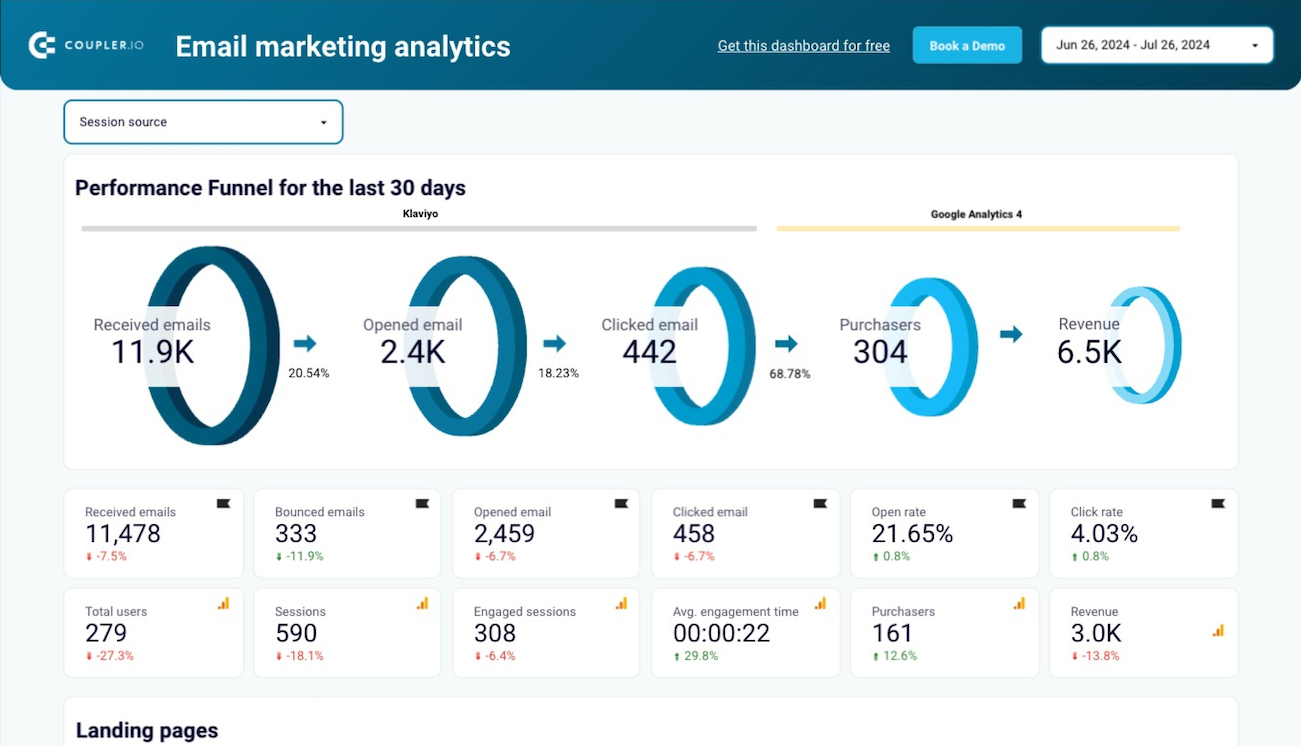
Email marketing analytics dashboard for Klaviyo
This dashboard combines Klaviyo email data with Google Analytics 4 website data. You see the email funnel on one side and what those recipients do on your site on the other, including page views, sessions, revenue, etc.
Klaviyo email marketing analytics dashboard
 Preview dashboard
Klaviyo email marketing analytics dashboard
Preview dashboardWhat insights you can get
- Email performance funnel: Visualize how many emails were sent, delivered, opened, and clicked, with conversion tracking
- Performance metrics overview: See key metrics from both Klaviyo and GA4 clearly labeled by source
- Landing pages performance: Identify which landing pages perform best by traffic, engagement, and revenue metrics
- Email campaign traffic performance: Analyze how each campaign drives website traffic and engagement
- Email campaign engagement metrics: Understand open rates, click rates, and other key engagement indicators by campaign
How to use this dashboard
This dashboard template is designed in Data Studio. You’ll need to connect both your Klaviyo and GA4 accounts through the built-in Coupler.io connector. The dashboard starts pulling data from both platforms on your refresh schedule.
Klaviyo email campaign performance dashboard for Shopify/WooCommerce store
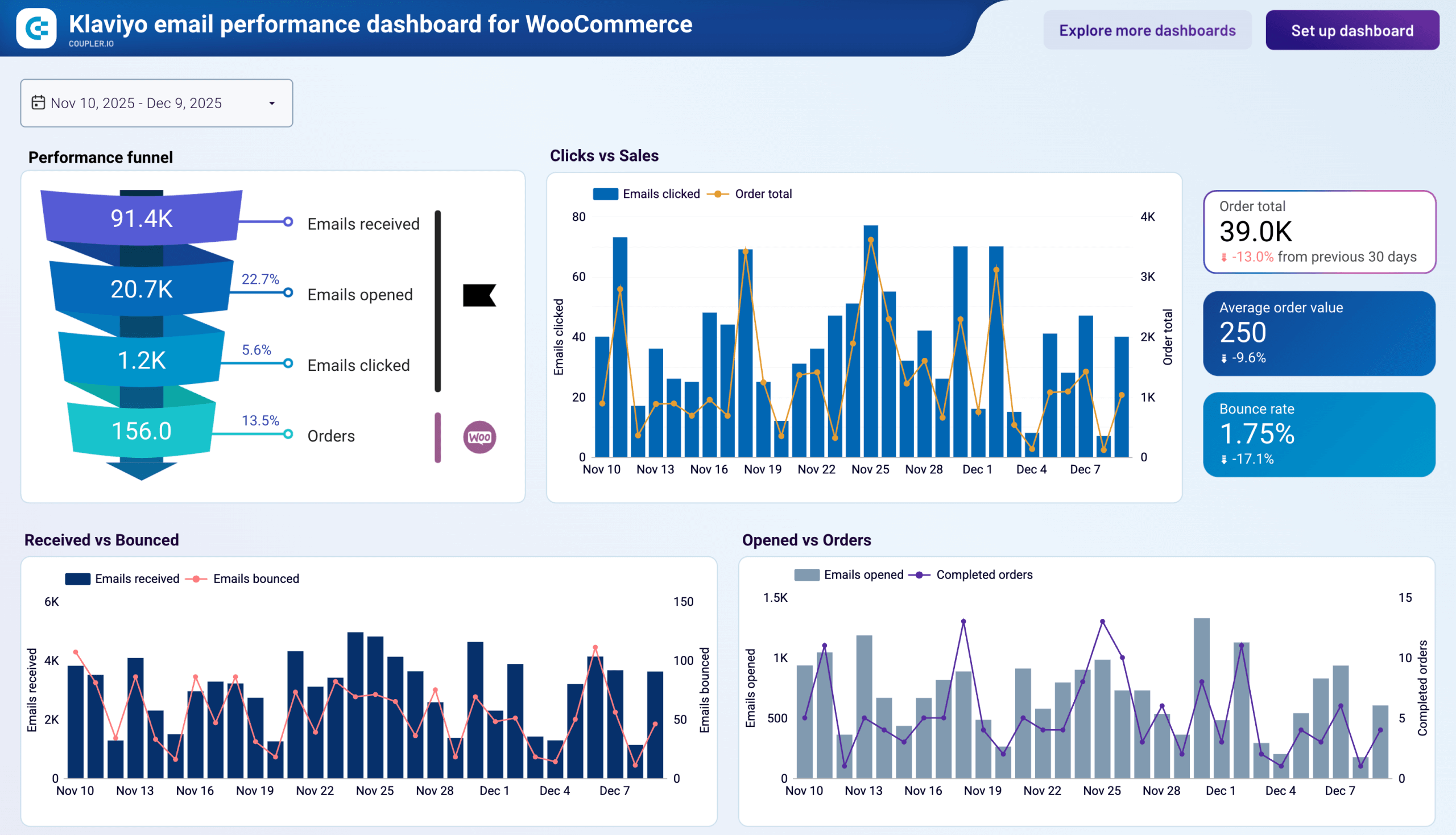
E-commerce teams running Klaviyo campaigns often struggle to answer one question: which emails actually drive orders? Coupler.io offers a Klaviyo email performance dashboard for both Shopify and WooCommerce that pairs email engagement data with store order data in a single view.
Klaviyo email performance dashboard for WooCommerce
 Preview dashboard
Klaviyo email performance dashboard for WooCommerce
Preview dashboardWhat insights you can get
- Full email-to-order funnel: Track volume and conversion rates at each stage from delivery to purchase, so you know whether the problem is opens, clicks, or checkout
- Daily click and revenue correlation: See whether high-click days translate into same-day sales or lag behind, which helps you set accurate attribution windows in Klaviyo
- Bounce rate trends over time: Spot list health deterioration early by monitoring daily bounce volume against delivery counts
- Best-performing send days: Compare open rates by day of the week to schedule campaigns on days your audience responds to most
- Top revenue-generating campaigns: Identify which emails produce the most order revenue, not just the most clicks
How to use this dashboard
Both versions are Data Studio templates with a built-in Coupler.io connector. Connect your Klaviyo account and your store platform (Shopify or WooCommerce), and the dashboard populates with your data automatically. Follow the in-template setup instructions to get started.


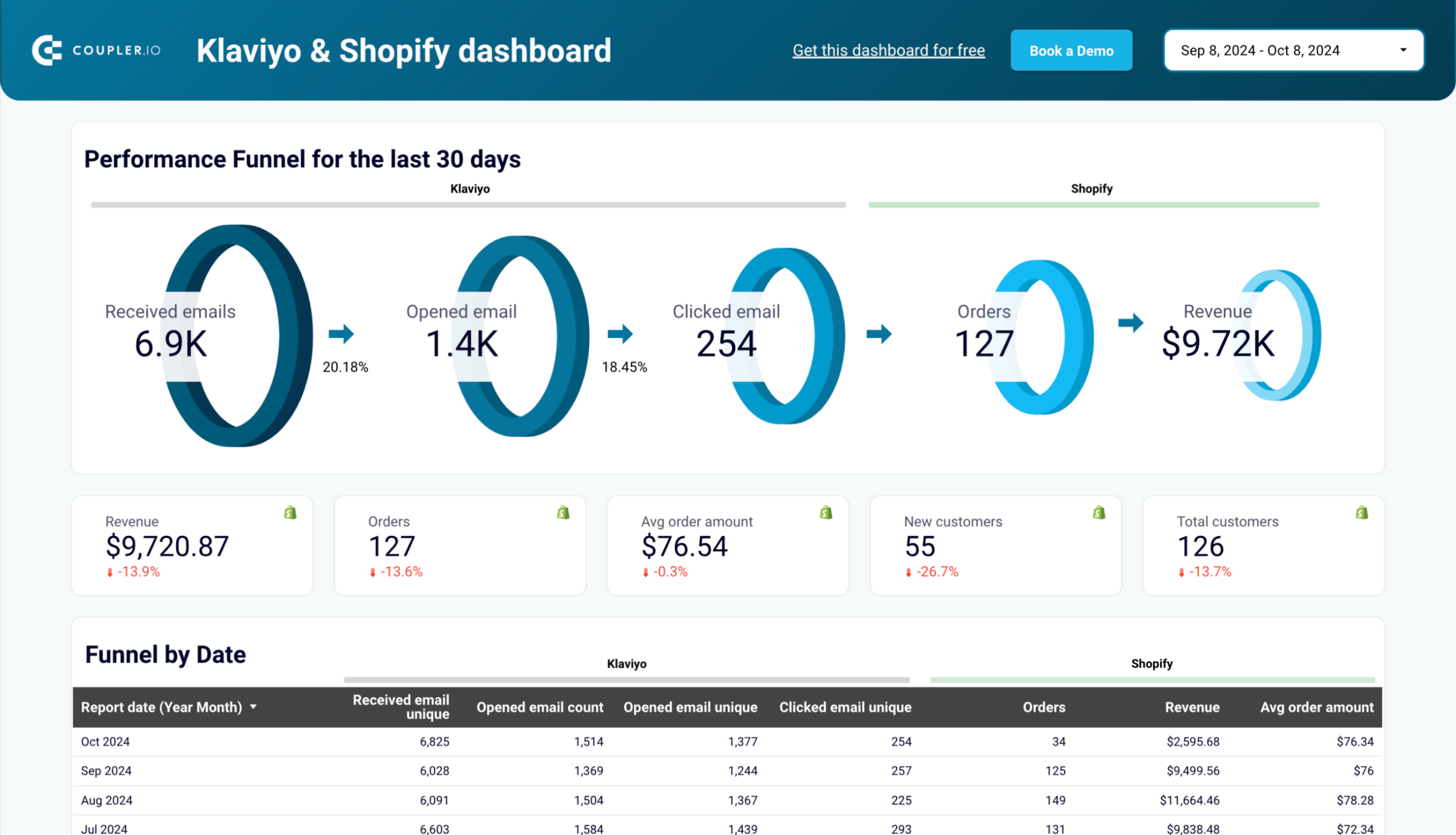

Also, check out our white-label dashboard templates to help you analyze and interpret your business data effectively.
Other methods to export Klaviyo data
In addition to Coupler.io, which lets you automate exports of Klaviyo data and over 400 sources, there are other ways to get data out of your Klaviyo account.
Manual export via Klaviyo Dashboard
The easiest method to export data from Klaviyo is manual. You need to navigate to the relevant data section (e.g., lists, segments, metrics). Afterward, apply any desired filters or date ranges to initiate the export process. Klaviyo supports exporting data in a few formats, including CSV, Excel, and JSON.
This method is not efficient since you have to export it manually each time you need to refresh data in the destination.
API integration
Integrating Klaviyo’s API is another way to schedule data exports. Klaviyo’s API allows you to access metrics, lists, segments, and campaigns programmatically.
To get data from Klaviyo and load it to the necessary destination, you need to create a custom script. Although this method can offer high customization, you must have technical skills to code connections to the APIs of both Klaviyo and your destination app.
Automating the export is the first step. After that, you can build dashboards on top of the data, dig into it in a spreadsheet, or ask AI Agent about your campaign performance. Coupler.io refreshes the data on your schedule, so the reports stay current without manual work.