Connecting company data to an AI assistant takes a few clicks. But did the answer use the right math and business rules? Reliable analysis needs approved data, clear definitions, and calculations you can check.
Coupler.io provides this foundation. I’ll use it to prepare Google Ads and Meta Ads data and define the metrics. Claude connects through MCP, a protocol for calling external tools. Coupler.io’s Analytical Engine runs the calculations; Claude helps explain the results.
The goal is a weekly campaign review you can check and repeat. Clear business rules establish the context floor in marketing analytics. The lessons from MeasureCamp Dublin reinforce the need for a sound system behind each answer.
Key takeaways
- Start your AI analytics implementation with one recurring decision and a measurable baseline.
- Check how the engine calculates results. MCP connects the tools but does not guarantee accuracy.
- Document metric definitions, exclusions, and business changes before asking questions.
- Test the full workflow, from prepared data to an answer a person has checked.
- Expand when results are reliable and the time saved outweighs the work to check and maintain them.
What is AI data analytics, and how does it differ from traditional BI?
AI data analytics uses AI to find patterns in data, explain results, or predict outcomes. The task determines which AI method to use.
What sets it apart is what the system actually does with your data. For example:
- Traditional BI: dashboards and reports track agreed metrics, so teams can review performance over time.
- Conversational Analysis: ask questions in plain language and explore the answers through follow-up questions.
- Automated Insights: a system checks data for changes and sends summaries or alerts.
- Predictive Modeling: a model uses past data to estimate demand, churn, or another outcome. Test its accuracy before relying on it.
With conversational analytics, chat is the interface. The answers still depend on reliable sources, clear business rules, and the right access controls. A fluent response does not prove the analysis is sound.
These methods can work together. A dashboard shows weekly totals, AI helps explore changes, and an analyst checks the findings.
For repeatable AI data analytics, here’s how a CSV upload compares with Coupler AI:
| CSV upload to an AI tool | Coupler AI |
|---|---|
| Data freshness: analysis uses the exported snapshot; new data requires another upload. | Data freshness: queries use the connected dataset after its latest refresh. |
| Business definitions: metric rules may need to be supplied again with the file or prompt. | Business definitions: saved Context keeps metric meanings and rules with the dataset. |

Replace CSV uploads with a connected AI analytics flow
Get a demo with Coupler.ioWhy integrate AI with data analytics?
Start with a question your team answers often but spends too long on.
Take a Monday review of paid campaigns. Someone exports two reports, aligns the dates, works out what changed, and writes a summary.
Then someone asks, “Is that increase coming from one campaign or the whole account?” That starts another round of work.
Prepared data saves repeat exports and cleanup. An AI assistant can then help your team explore both account totals and individual campaigns using the same metric definitions.
For fixed monthly totals, a dashboard may be enough. A simple alert can flag spend above a set limit.
Add AI when your team needs to explore changes, explain results, or ask follow-up questions.
Benefits of AI analytics: what should improve?
AI data analytics should improve the work in ways you can measure. Look for these benefits:
- Less preparation: fewer exports, spreadsheet edits, and repeated calculations.
- Faster investigation: less time spent finding which campaigns or segments drove a change.
- More consistent reviews: the same definitions and checks in each reporting cycle.
- More accessible analysis: colleagues can explore data through questions, with an analyst checking the results.
Gabriel Solberg at Right Percent uses this workflow for daily PPC reviews, with Coupler.io connecting Meta Ads and Google Ads data to Claude. He reports a 60% cut in time spent on PPC analysis and reporting, with daily reviews now under 10 minutes. Coupler.io runs the calculations; he still reviews source totals and refines the Context each week. Your own results will depend on the data, setup, and how often you review.
First, time the current task, including checks and corrections. Use this as your baseline. Suppose a two-hour task takes AI 20 minutes, but checking its output takes another 90. You have saved only 10 minutes.
Use this baseline again when measuring the pilot.
Is your company ready? Assess data readiness for AI analytics
Data readiness for AI analytics depends on the question you want to answer. You can test one workflow without changing every system.
For a weekly campaign review, check the following:
- Coverage: both ad accounts have data for the full periods you plan to compare.
- Consistency: check date formats, currencies, and campaign IDs. Confirm which actions count as conversions on each platform.
- Quality: totals match the source reports when you use the same filters and settings.
- Meaning: someone can explain the metrics, exclusions, and known tracking limitations.
- Access: the company has approved which data and tools to use, and who can access them.
- Ownership: a named person maintains the data flow and business context.
Match the data to the question. A weekly comparison needs two complete weeks with matching settings. A forecast needs enough past data to test seasonal patterns.
Run an AI readiness assessment
An AI readiness assessment assigns clear roles. Decide who will fix data issues, approve tools, maintain connections, and review results.
A small team may rely on an analyst to prepare and check the data, with a department lead making the decision. Budget for their time as well as the software.
Pause the pilot if data access lacks approval. If conversion definitions are unclear, flag that limit and hold off on decisions that rely on them.
Define your AI analytics strategy
Start with the decision you want to improve.
“Use AI in marketing” is too broad to guide an AI strategy or roadmap. A question such as “Which paid campaigns need investigation before the budget meeting?” gives the work a clear purpose.
Choose a question worth answering with the data and time you have. Consider the cost of a wrong answer, and have a person review the analysis before acting.
The paid media lead makes the decision; the analyst prepares and checks the data. Aim for a faster review that the team can repeat, with any differences in the figures explained.
Set up a multi-source paid media review in Claude
Book a demoHow to implement AI analytics in my company step by step
These steps to implement AI analytics use a weekly Google Ads and Meta Ads review. AI flags campaigns to investigate. The marketing team checks the findings and decides whether to act.
Coupler.io prepares and refreshes the data, stores Context, and runs calculations. Claude connects through MCP to query the data.
1. Build an AI analytics implementation roadmap
Set these goals for your AI analytics implementation before choosing tools:
- Scope: one business, two ad platforms, campaign-level reporting, and one agreed reporting currency.
- Output: weekly spend, the chosen conversion metric from each platform, and cost per conversion. Show week-to-week changes and list campaigns to check.
- Responsibilities: an analyst maintains the flow. The paid media lead reviews findings and approves actions.
- Acceptance: totals match the source reports, exclusions work, and gaps are clear. The review takes less time than the baseline.
Test several past reporting periods, including one with a campaign pause or another unusual event. Check both the calculations and how AI explains the change.
Get approval to share the selected data before connecting accounts.
2. Choose AI analytics tools for the use case
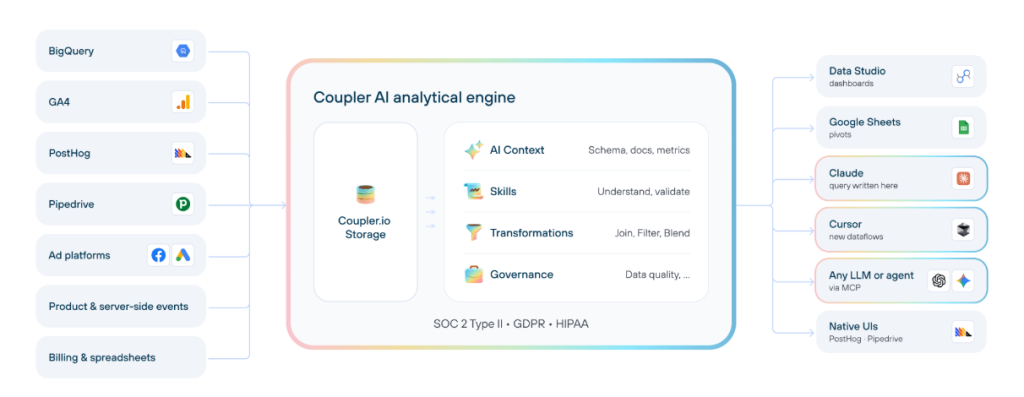
Coupler AI brings together three capabilities:
- AI Agent for a conversational experience inside Coupler.io
- AI Integrations for querying prepared data from external tools like Claude or ChatGPT
- Skills for packaging recurring analyses into repeatable workflows.
Transformation, Context, the Analytical Engine, and MCP are the mechanisms behind them: Transformation shapes the data, Context stores the business rules, the Analytical Engine runs the calculations, and MCP connects external AI tools.
For this walkthrough, I recommend Coupler.io with Claude AI Integrations for the connection, with the Analytical Engine handling the math. To keep the whole workflow inside Coupler.io instead, use the AI Agent to set up flows and ask questions about your data.
Let Coupler AI do the data work for you
Tell Coupler AI what you need to know, from which source, and how often. It connects your account, sets up the data flow, keeps it refreshed, and lets you analyze the results inside Coupler.io or another AI tool.
Try for free
If your team already uses BI tools with agreed metrics and access rules, check their AI features first. Compare AI tools for data analysis to see which fits your setup.
Choose the implementation route according to the infrastructure you already have:
| Route | Best fit | What to verify | Cost and effort |
|---|---|---|---|
| Coupler.io + Claude via MCP | Recommended for this pilot; no mature BI stack required. | Prepared data, Context, engine calculations, approved connector access. | Integration and AI subscriptions; flow setup and review time. |
| AI within existing BI | Teams with maintained BI models and permissions. | Metric definitions, supported sources, traceable queries, access inheritance. | Existing licenses plus AI requirements and model maintenance. |
| Custom solution | Specialist models or requirements the other routes cannot meet. | Query validation, context, permissions, integrations, monitoring. | Engineering, infrastructure, usage, and ongoing support. |
Include subscriptions, usage, setup, and maintenance in the cost comparison. Custom connections also require ownership of authentication, API changes, and failures. Coupler.io vs Google Ads MCP explains the build-versus-buy decision.
3. Connect and prepare the data
Create a Coupler.io flow named Weekly Paid Media Review. Add Google Ads and authorize access. Choose Campaign performance. Set Start date to 2026-09-21 and End date to 2026-10-04. Under Split data by periods, choose Date.
Add Facebook Ads (Meta Ads) and select Reports and Insights. Use the same dates and choose Daily. Include campaign identifiers, Amount spend, and Conversions: Purchases (FB pixel). Leave Breakdowns empty.
Remove any extra metrics you do not need from the prepared dataset.
Use Coupler.io’s Transformation features to prepare the data. In Manage columns, rename fields to Account name, Date, Campaign name, Campaign ID, Spend, and Conversions. For Meta, map Date start to Date and Conversions: Purchases (FB pixel) – Total to Conversions. For Google, use the daily date and conversions fields.
Add a Platform column with the formula “Google Ads” or “Meta Ads” for each source. Append the datasets by matching column names. Name the result “Weekly campaign performance”. Each row should represent one campaign on one date.
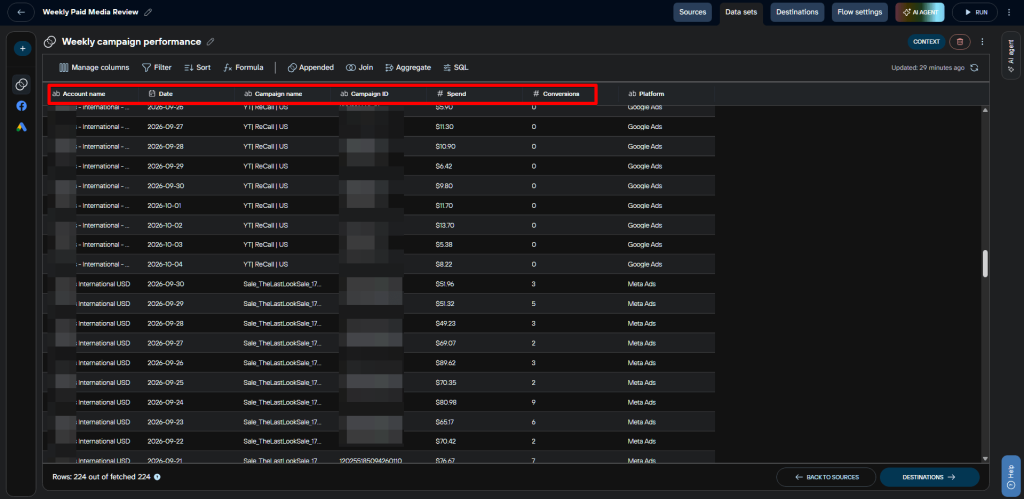
Check for duplicates using Platform + Account name + Campaign ID + Date. This example has 224 rows. A missing campaign-date row does not mean zero activity.
Both accounts report in USD, but their reporting time zones still need checking. Review each platform separately until you confirm they align. If accounts use different currencies, document how to convert them before adding spend together.
Document business rules in Coupler.io Context. A semantic layer alone cannot supply all the business context AI needs. Open the combined dataset’s Context and choose ADD MANUALLY. Enter the rules, then select SAVE UPDATE. This example records:
- Period: compare 21–27 September with 28 September–4 October 2026. These dates stay fixed.
- Conversions: confirm which actions Google counts before calling them purchases. Keep fractional values. Meta uses attributed website purchases. Keep each platform’s totals separate.
- Calculations: divide weekly total Spend by total Conversions for each platform and campaign. Never average daily ratios. With zero conversions, the ratio is undefined. With blanks, it is incomplete. Do not replace blanks with zeros.
- Checks: check date coverage and duplicate rows. Flag campaigns with fewer than 10 conversions in a week as limited evidence. This cutoff is not a test of statistical significance.
- Exclusions and interpretation: no exclusions are specified. Do not infer them from campaign names. Separate observations from possible explanations, and check source reports before acting.
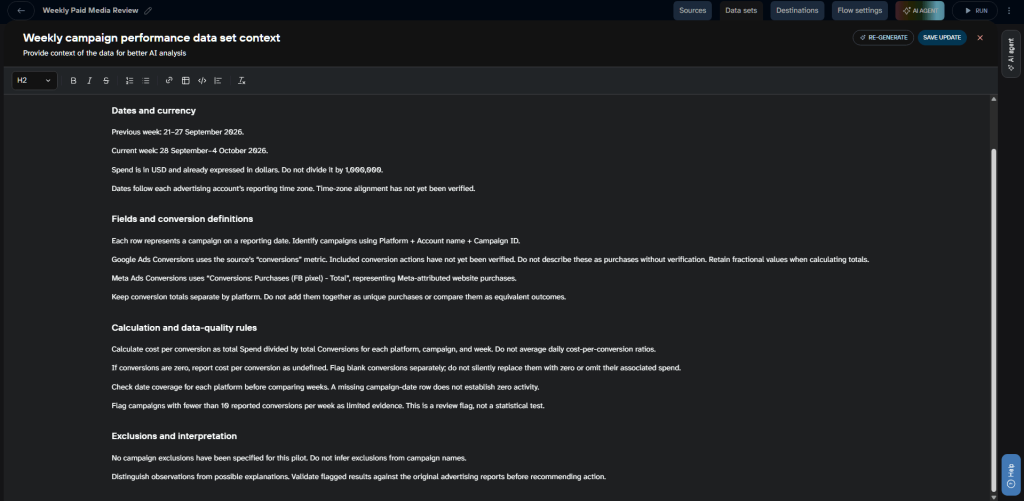
This shows how business context improves AI analysis. If a conversion’s meaning is unclear, AI should flag the gap rather than call it a purchase. Assign someone to keep these rules current and record confirmed campaign changes.
In Flow settings, turn Automatic data refresh On. This example uses Daily, MON through SUN, at 09:00 in Europe / London. Choose the time zone that suits your team. Allow time for reporting delays before the review.
This schedule controls when the data refreshes. It does not change the accounts’ reporting time zones or the selected dates. For ongoing reviews, update both source date ranges and Context. You can also set and test relative dates.
Automate your reporting with Coupler.io
Get started for free4. Implement AI analytics in a working pilot
This walkthrough uses Coupler.io’s AI Integrations to connect prepared data to an external AI tool through MCP.
Under Destinations, select Claude, choose Chat and Cowork, and share Weekly campaign performance. Use SAVE AND RUN; after a successful run, select GET CONNECTOR and authorize Coupler.io in Claude.
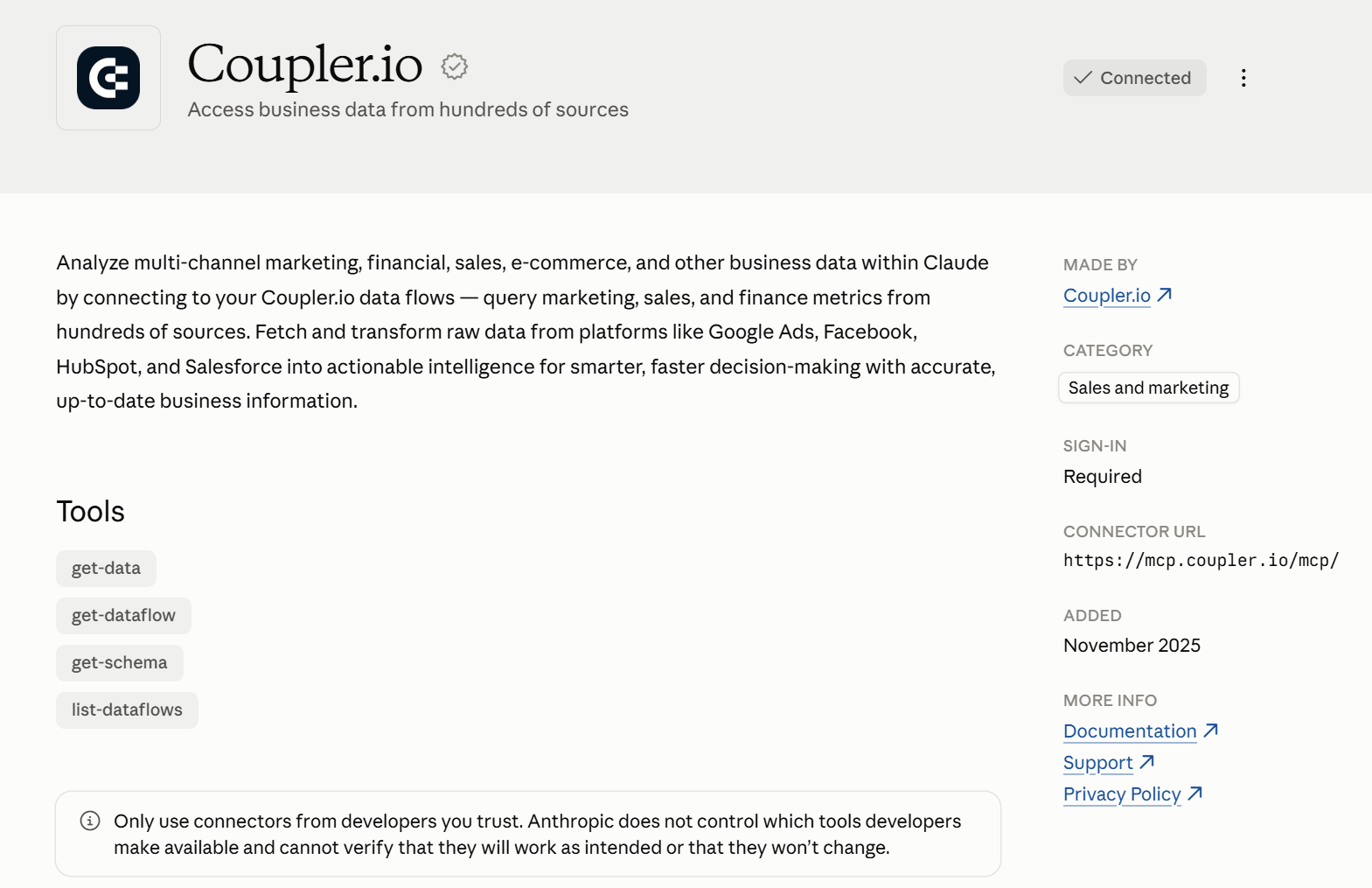
A Connected badge alone does not confirm dataset access. Ask Claude to find Weekly Paid Media Review and read its schema and saved Context. Before analysis, have it check when the data last refreshed and which dates it covers. For setup help, see the guides to Google Ads analysis with AI and connecting Facebook Ads to Claude.
Use this prompt with the prepared dataset (remember to switch out the time periods for your own):
Find the “Weekly Paid Media Review” flow in Coupler.io. Analyze its “Weekly campaign performance” dataset using the saved business Context.
Compare 28 September-4 October 2026 with 21-27 September 2026.
First, check campaign-level date coverage, duplicate campaign-date rows, and blank conversions. Flag limitations before interpreting results.
Use Coupler.io’s Analytical Engine for the calculations. For each platform, campaign, and week, report total spend, reported conversions, and cost per conversion. Calculate ratios from totals, retain fractional conversions, and keep platform conversion totals separate.
Show a compact comparison table with both weeks and percentage changes. Mark changes from a zero baseline as undefined. Flag zero conversions and fewer than 10 conversions per week. Where conversions are blank, flag cost per conversion as incomplete.
Identify up to three campaigns worth investigating. Separate observations from possible explanations and recommend specific checks. Do not change budgets or campaign settings.
State the dataset, dates, currency, calculation method, and data-quality limitations used. If the Analytical Engine is unavailable, tell me rather than estimating the calculations.
State the dataset, dates, currency, calculation method, and data-quality limitations used. If the Analytical Engine is unavailable, tell me rather than estimating the calculations.
The Analytical Engine handles calculations, while Claude explains the results. Claude sends its query to the engine through MCP. Check both the tool output and Claude’s explanation. The assistant may ask for the wrong calculation or make claims the data does not support.
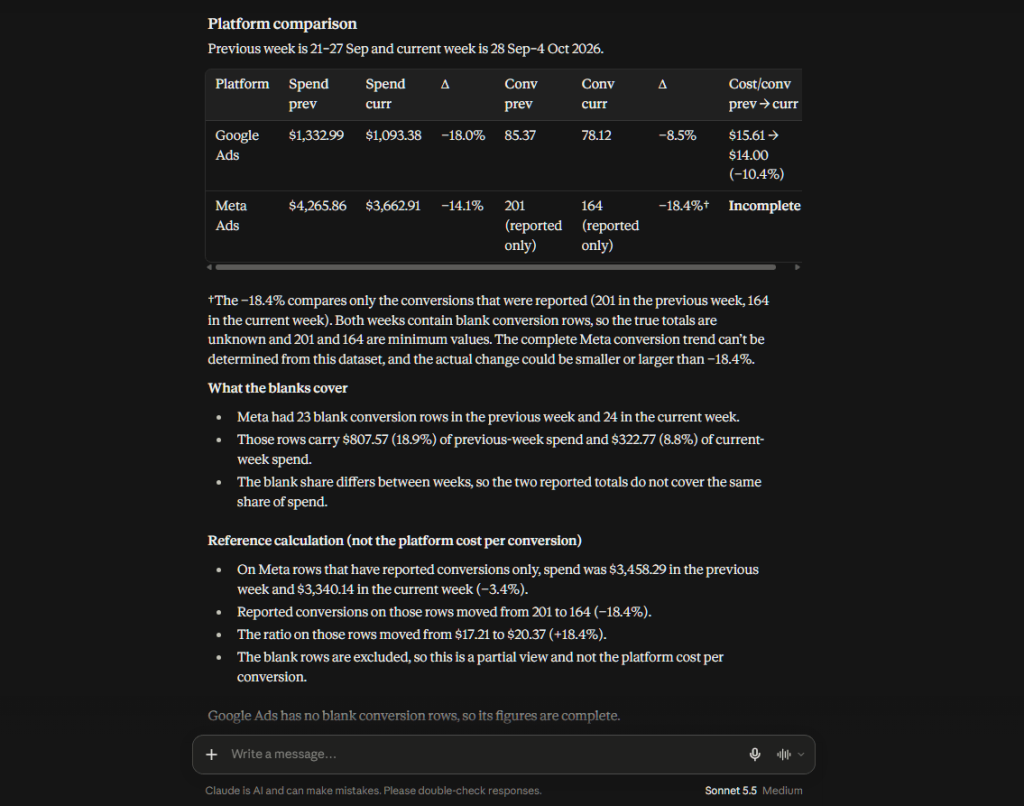
In the captured response, Google’s cost per conversion moves from $15.61 to $14.00. Meta’s platform ratio is marked incomplete because conversion rows are blank. Its 201 versus 164 reported conversions do not establish the complete conversion trend.
5. Validate the AI analytics implementation
Check your AI analytics implementation against source reports. Use the same accounts, dates, filters, conversion metrics, and attribution settings. Start with one campaign, then reconcile platform totals.
For 21–27 September, the selected Meta campaign shows $1,457.50 spent and 81 website purchases in Ads Manager. That is $17.99 per purchase.
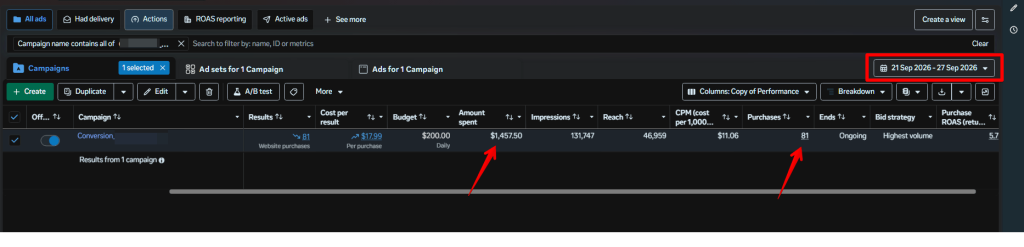
For 28 September – 4 October, it shows $1,403.03 spent and 54 website purchases: $25.98 per purchase. These match the campaign figures returned by Claude.
That confirms this campaign’s displayed figures, not every result in the dataset. Find out why purchases fell before changing budgets. These screenshots do not show the cause.
Where relevant, test how the workflow handles missing dates and blank or low conversion counts. Check that it handles division by zero. This pilot has no exclusions. If you add any, check that they remove only the intended rows.
Ask the same question in different words, using the same data snapshot and definitions. Check why any figures differ.
The analyst’s role as a human validator includes checking interpretations. Confirm what Google counts as a conversion and whether the account time zones align. Resolve both before making broader comparisons or decisions. Record the checked period, finding, unresolved limits, action, and owner.
6. Train the team, measure value, and expand
Train colleagues with real examples: a useful review, an unclear question, and an answer they should reject. Save the prompt, definitions, and review checklist.
For a regular weekly review, save its instructions and definitions as a Skill. Claude can then reuse that workflow each week. Start with the Skills library and adapt a workflow to your review. Keep dataset definitions in Context and update them when the business rules change.
Help the team adopt AI by running the first reviews together. Use rejected answers to improve the instructions, and name someone to handle questions and corrections.
A refreshed dataset does not by itself mean a fresh report has been generated or delivered. If you automate the analysis later, set when it runs and where the report goes. Decide how to handle failures and who will review the output.
Measure the time spent preparing, generating, checking, and correcting each report. Track unanswered questions, recurring errors, adoption, and actions taken. Use your baseline to set a pilot target. For example, aim to halve review time while keeping all agreed checks.
Reducing a weekly task from two hours to 45 minutes saves five hours across four runs. At $40 an hour, those five hours are worth $200 before software and maintenance costs. This frees up staff time; cash savings depend on spending less.
To control AI analytics costs, prepare and summarize the data before asking AI to explain it. Reuse instructions and keep queries focused.
Track AI usage, license costs, and the time spent maintaining the workflow. Expand only after several useful reporting cycles and once a named owner is in place to maintain the flow, context, and prompts. Reported outcomes from other teams are a reference point, not a forecast. Your numbers depend on your data, your definitions, and the time you spend checking the output.
Extend AI analytics to finance, sales, and marketing
Talk to Coupler.ioAI analytics use cases across the company
Start AI data analytics with a question your team asks often and records it already checks. Finance teams can review budgets, while sales teams can review deal histories. Campaign and client reports help teams spot results that need attention. Teams can also reuse code for analysis if an analyst checks it before others use it.
| Use case | Business question | Required data | Output and action |
|---|---|---|---|
| Finance: AI for CFO | Which costs exceeded plan? | Actuals, budget, account mapping, reporting period. | Variance breakdown; finance reviews the largest drivers. |
| Sales: AI-driven sales insights | Where are deals getting stuck? | Stage history, deal age, value, owner. | Stalled-deal list; managers prioritize follow-up. |
| Campaigns: AI for marketing agencies | Which creatives need investigation? | Creative-level delivery and outcomes, launch dates. | Performance changes; marketers inspect fatigue or audience shifts. |
| Reporting: a data-driven marketing agency | Which accounts need attention? | Client-specific metrics, targets, refresh status. | Exception report; account owners investigate. |
| Advanced workflows: Claude Code for marketing | Can a recurring analysis be reproduced? | Approved datasets, documented rules, existing analysis logic. | Reviewable analytical code and report; analyst checks before reuse. |
Lance Johnson at Clear Performance Ads runs the agency version of this pattern. Coupler.io feeds Google Ads, Meta Ads, and Amazon Ads data into client dashboards, and client reporting takes him about 15 minutes a week. The time savings come from dashboard automation today; AI analytics layered on top is the next step his agency is testing. The sequence is useful on its own — get the data flow and reporting reliable first, then add AI once the baseline is trustworthy.
Start with a report of what changed, where it changed, and what needs checking. Ranking stalled deals does not tell you how likely each one is to close.
Where AI analytics for business needs a different approach
To use AI-backed analytics for business predictions, you need more than a new prompt.
To score churn risk, define what counts as churn and supply past examples. Test forecasts on periods the model has not seen during training.
AWS’s Amazon SageMaker Canvas shows how to forecast from dated sales records and inputs such as price. Its guidance warns that zero sales may reflect a stockout, not a lack of demand.
Compare predictions with a simple baseline and check results for each relevant group. Train the model only on information available at the time of prediction. A forecast should include uncertainty and a process for monitoring deterioration.
For automated decisions, set clear limits on what the system can change. Recommending a campaign review and automatically reallocating its budget have different consequences. Before allowing actions, set approval rules and limits. Make sure you can reverse changes.
In an agentic AI workflow, agents choose which tool or step to use next. An agent might spot a cost increase, ask for a breakdown, then draft a recommendation. Limit permissions to the task. Anthropic’s guidance on building effective agents recommends adding complexity only when needed.
Challenges of implementing AI analytics and how to address them
Most analytical problems trace to one of three stages: data, context, or interpretation. Check for missing rows in the data, unclear metric definitions in the context, and claims the results do not support. Find which stage failed before changing tools. High costs or low adoption may mean the workflow needs a clearer purpose.
| Problem | How to recognize it | Response |
|---|---|---|
| Inconsistent metrics | The same label produces different totals. | Reconcile filters and definitions; update Context. |
| Unsupported answers | A claim has no source figures or uses an unavailable field. | Request evidence; withhold the finding until verified. |
| Stale data | Latest successful refresh misses the review period. | Fix the flow; rerun before distributing results. |
| Broken integration | Authorization failures, missing fields, or unexpected row counts. | Check access and schema changes; alert the data owner. |
| Rising costs | More queries and review time without better decisions. | Narrow tasks, reuse instructions, and track cost per reviewed output. |
| Low adoption | Reports are generated but do not inform actions. | Work with the decision owner on the question, timing, and format. |
To check why AI gives different answers, repeat the question with the same data snapshot, dates, filters, and definitions. Distinguish legitimate data updates from inconsistent interpretation.
Secure AI analytics with company-wide data controls
Schedule a demo with Coupler.ioData governance for AI analytics: security and accountability
Data governance for AI analytics starts before the connection is even approved.
List the datasets and fields the workflow needs. Define who can access them and what data each provider receives.
Look for personal data you do not need in the main dataset. Also check schema descriptions, sample rows, query results, saved chats, and reports.
A smaller payload is not automatically anonymous or safe. For AI data security and privacy, check what you share and who receives it. Share only what the task needs and company policy allows.
Review the provider’s access controls, security measures, and agreements. Check how it uses, stores, and deletes data, including the settings you can change. Test to make sure that one client’s authorized analyst cannot retrieve another client’s data. Hiding a field in a report does not remove underlying access.
Where GDPR applies, follow data minimisation: use only the personal data needed for the analysis. For a campaign revenue comparison, use totals for each campaign. Leave out customer names and email addresses. If personal data remains, confirm the lawful basis, allowed purpose, and how long you can keep it. Removing names alone does not ensure compliance.
If the CCPA covers your business, check for copies of customer data in analytics datasets. Deleting a CRM record may leave those copies behind. Record where copies go and which service providers hold them. Use that record to pass on verified deletion requests, allowing for any applicable exceptions. The California Attorney General’s CCPA guidance explains these obligations.
Set review, monitoring, and escalation rules
The data owner handles failed refreshes, schema changes, and context updates. The business owner approves actions.
- Before each review: check that you have the right dataset and reporting period. Confirm the last successful refresh and check unresolved warnings.
- After a change: rerun the benchmark if you change fields, calculations, or conversion definitions. Do the same after changes to Context or the AI workflow.
- Before an action: get approval before changing spend, contacting customers, or making other changes that affect the business.
- When checks fail: stop using the affected output and use the established source report. Assign someone to resolve the mismatch.
Before resuming, record the issue and its fix. This tells the next reviewer which results they can trust.
Start with one recurring business question. Use Coupler.io to prepare data and run calculations, then Claude to help explain the results. Build these steps into a review your team can repeat.
Expand once findings match the source reports and the workflow saves time, including checks and maintenance.
And if starting itself seems like a Herculean task, start with something small and simple like one question and one data source. The flow becomes clear once you see the first useful result.