Most companies don’t have a data shortage problem. They have a “data everywhere, disconnected” problem. Marketing reports don’t match finance numbers, dashboards show conflicting metrics, and teams spend more time validating data than using it.
When you bring AI technologies into that fragmented environment, the stakes only get higher.
AI and big data analytics turn raw data into insights, but only if you feed them up-to-date and consistent data. Effective AI data management starts before the AI layer, in how you collect and prepare the data that goes into it.
I’ll walk through what this looks like in practice and how to make big data and AI work together using Coupler.io.

Connect clean data to AI with Coupler.io
Get started for freeWhat counts as “big data” in a business context
Most people hear “big data” and think scale: petabytes, data lakes, enterprise data warehouses, Fortune 500 infrastructure. That’s not what makes data hard to manage.
A marketing team pulling from Google Ads, HubSpot, GA4, and three spreadsheets already has a big data problem, even if none of those datasets are large on their own. The complexity isn’t in the volume or data storage. It’s that each source updates on a different schedule, uses different naming conventions, and defines the same metrics differently. Cost per lead in HubSpot and cost per lead in Google Ads are rarely the same number.
That’s what ‘big’ actually means in a business context: scattered across tools, changing constantly, and difficult to reconcile without manual effort.
This is the real challenge at the intersection of big data and artificial intelligence: more data doesn’t automatically produce better answers. AI needs structured input that tells a consistent story. Feed it three versions of the same metric from three different sources, and AI will find a pattern. It just won’t be the right one.

From 6 scattered systems to one AI-ready source of truth
Fable Food, a global mushroom-ingredient manufacturer, ran on inventory, finance, CRM, Xero, HubSpot, and internal spreadsheets that all lived in separate systems. Basic questions about stock or shipments meant tracking down whoever owned that system, which could take up to 24 hours across six time zones. The company used Coupler.io to consolidate everything into a single BigQuery warehouse — a consistent, AI-ready data source that the whole team can now query in plain language.
Read the case studyHow AI helps manage big data (and where it falls short)
The benefits of using AI in big data management come down to three things:
- Faster data analysis
- Pattern detection humans would miss
- Making data accessible to non-technical teams
Here’s what I found, and where each breaks down.
Faster analysis
Give a data analyst a marketing campaign dataset and ask for insights or reports, and you’ll usually get them in a couple of days to a week. Do the same thing with AI, and data processing that took days returns a full campaign performance analysis within a few minutes.
But the reliability of AI results depends on the input data quality. If the inputs are outdated or inconsistent, the output will be just as flawed. You will only get the wrong answer faster.
Explore more about how to use AI for data analysis.
Pattern and anomaly detection
A revenue dip might not show up in overall numbers but could be isolated to a specific region or customer segment. AI catches that quickly. What it won’t catch is a data gap. If a sales rep hasn’t logged deals in the CRM for three weeks, AI still finds a pattern in outdated data and presents it confidently. Outdated data actively misleads rather than simply being incomplete.
Accessible to non-technical teams
A CMO shouldn’t have to wait two days for a data analyst to write SQL just to find out which campaigns drove qualified pipeline last quarter. With natural language processing, they ask the question directly and get an answer in plain language.
Dynamic questioning
With an AI layer, you ask any question against live data and get a response. Then you ask for a follow-up. Then another. It works like a conversation with a colleague who knows your data inside out.
The constraint is the freshness of the data underneath. If the data pipeline isn’t refreshed on the right cadence, you’re having a real-time conversation about last week’s reality.
There’s one thing common across all these scenarios. AI can handle large datasets with AI-grade speed, but only when the underlying data is high-quality and ready for it, which is why a routine data quality assessment is recommended before any AI analysis.
AI and big data in practice: three use cases
Before walking through the step-by-step setup, here are three examples that show how big data and AI work together in real business workflows.
Marketing: cross-channel campaign briefing
A marketing team manages campaigns across Google Ads, Meta, GA4, and HubSpot. Every week, they analyze performance and decide where to shift the budget. But pulling data from four platforms into a spreadsheet eats a full day before any real thinking happens.
Coupler.io brings that down to minutes. Create a data flow in Coupler.io and connect your sources, Google Ads, Meta, GA4, and HubSpot in this case. Inside the data flow, set up an automated ingestion schedule so new data is always available for your weekly analysis.
Then connect the data flow to your AI tool of choice. Coupler.io provides MCP-based connectors for Claude, ChatGPT, Gemini, Perplexity, Cursor, and OpenClaw. Moreover, if your AI tool is not on the list, use the custom MCP server to flow your data into whichever AI solution or agent your team uses.
From there, ask: “Where are we spending the most budget with the lowest return?“
The AI platform runs the queries through Coupler.io Analytical Engine, reads its output, and returns the key findings:
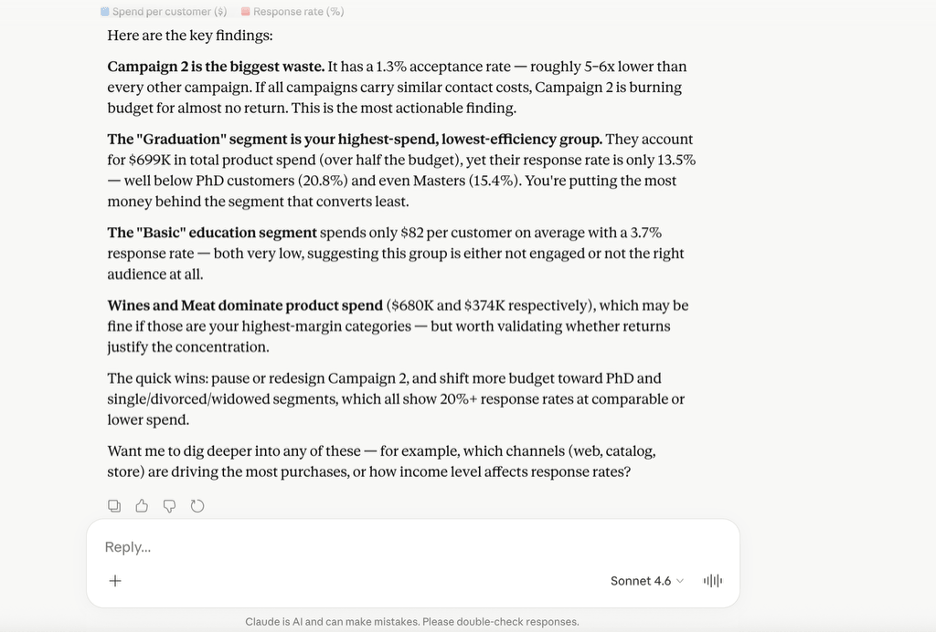
You can continue to ask follow-up questions: “Based on these insights, how should we optimize the spend?”
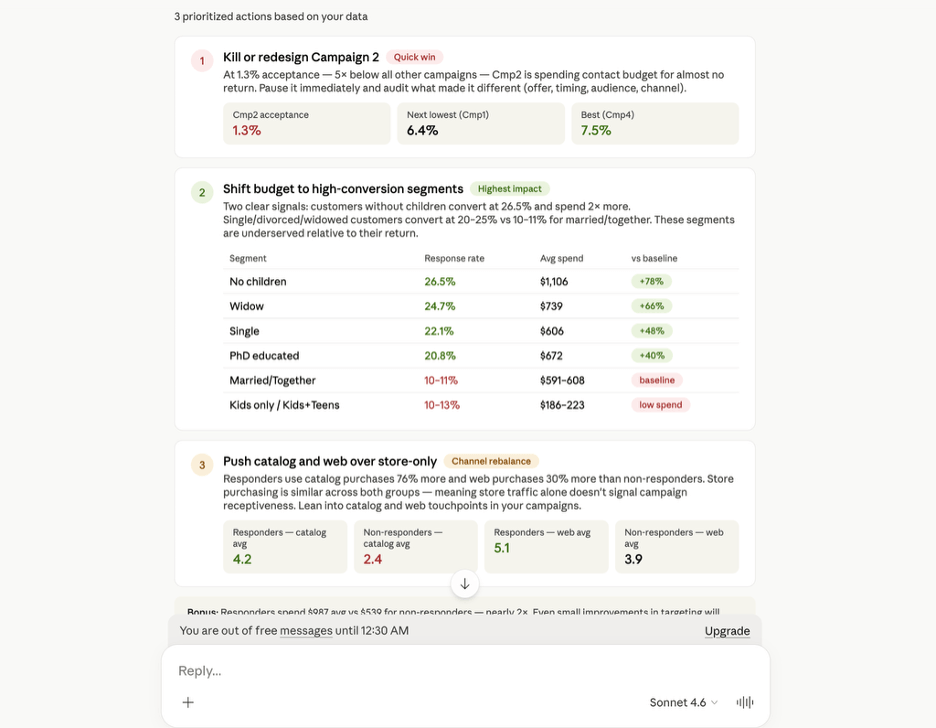
The recommendations come back clear: pause low-performing campaigns, double down on customer segments with higher ROI potential, and invest in catalog and web touchpoints. If you want to manage big data with AI in a way that actually produces reliable answers, start with a free Coupler.io.
Connect your data sources to AI
Get started for freeFinance: invoice reconciliation
Invoices often live in Xero, while closed deals and conversions live in Salesforce. When you bring them together, you flag incorrect invoices, unbilled deals, payment mismatches, and set up fraud detection workflows.
The challenge is that the data isn’t consistent across sources. The same client might be listed as “Johnson & Sons” in Xero and “Johnson & Sons Ltd” in Salesforce. You might close a deal in USD in Salesforce but bill it in your local currency in Xero. Sync both sources to Coupler.io, then standardize client names, convert currencies, and remove duplicates — all inside the UI.
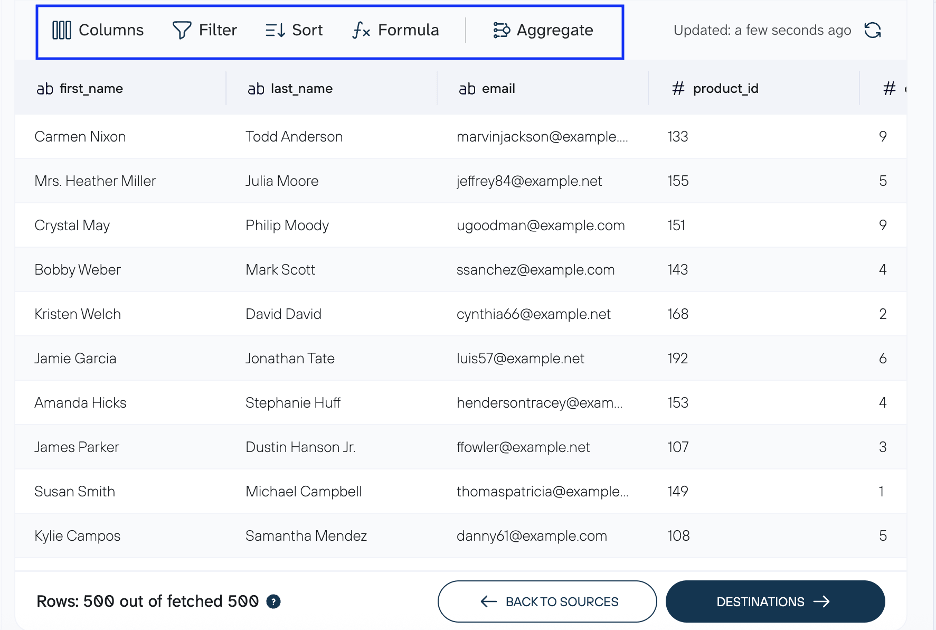
From there, connect to an external AI tool or open a chat directly with the Coupler AI agent.
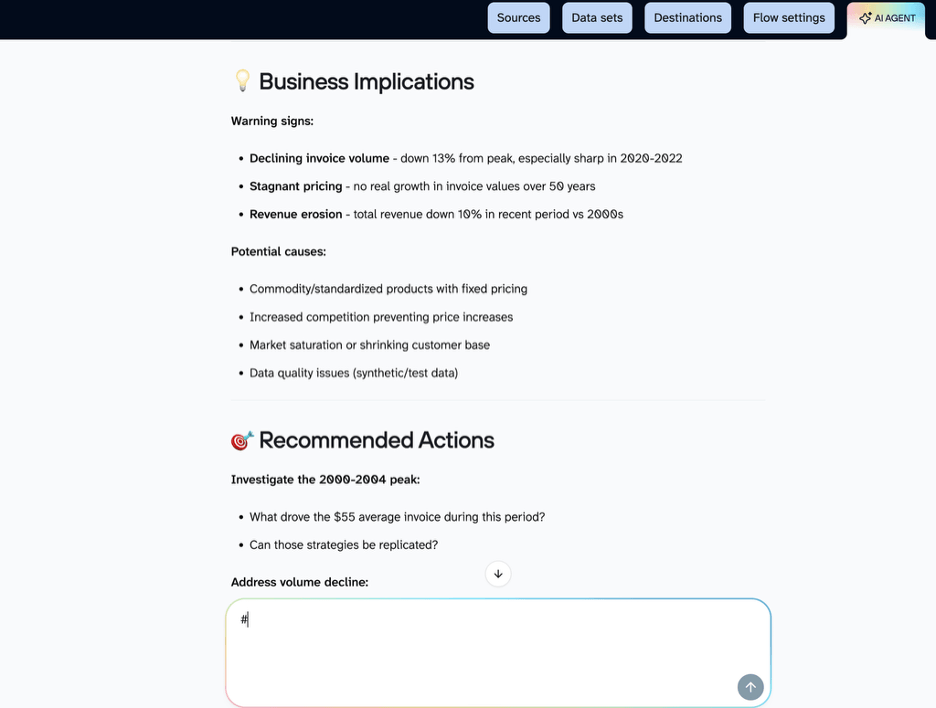
Now when you ask the AI “How is the invoice amount trend”, it responds this way:
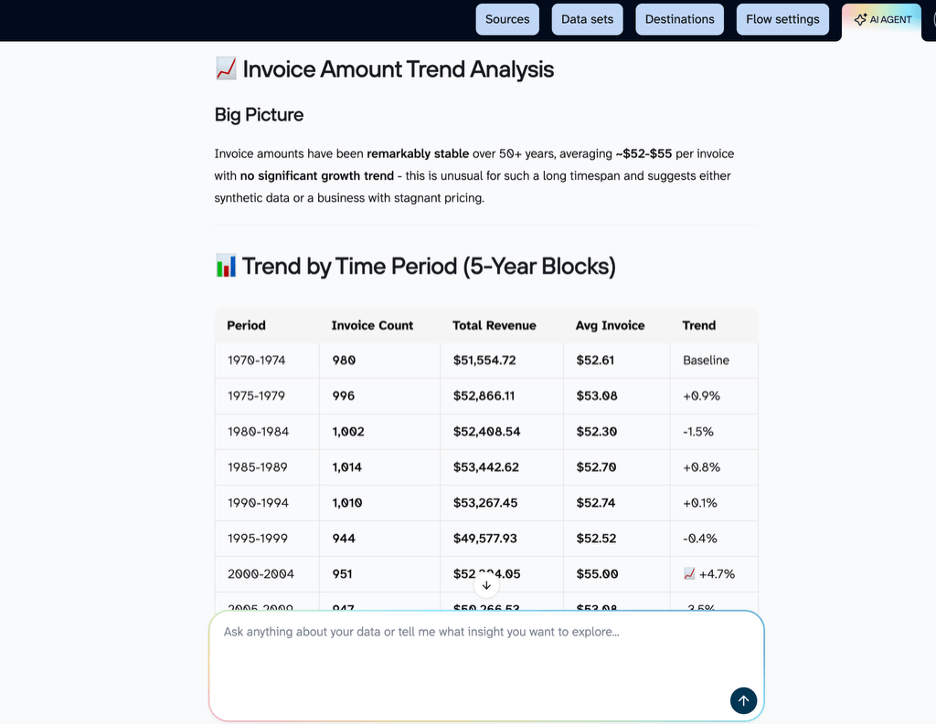
The AI flags warning signs like declining invoice volume and revenue erosion, and shows which periods or clients are driving the pattern. From there, you decide what to investigate first.
Sales: pipeline health check
Salesforce has the most updated information on deals. But leaders still scroll through dashboards and visualization tools to track conversions, pipeline movement, and pending deals. With static reports, they often see deals still in progress even after the deals have closed, simply because the underlying data is outdated.
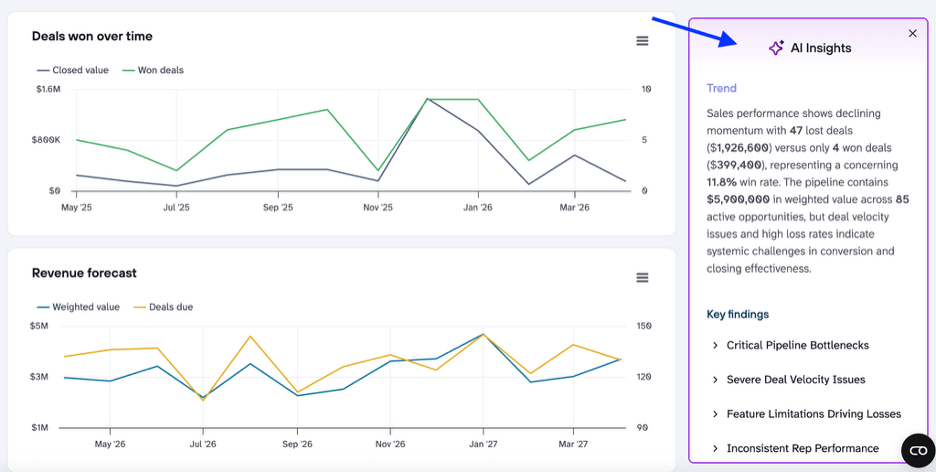
When you connect Salesforce to Coupler.io and build a dashboard, it pulls in the latest information through scheduled refreshes. The dashboard’s AI insights automatically show trends like stalled deals or drops in win rates, replacing time-consuming manual digging through reports.
I also asked the AI tool: “Which deals are most likely to stall or slip this quarter?” It returned top and medium risk deals with scores from its predictive analytics model. The feature also flagged patterns such as deals stuck in the same stage for too long, no recent activity, or passed close dates.
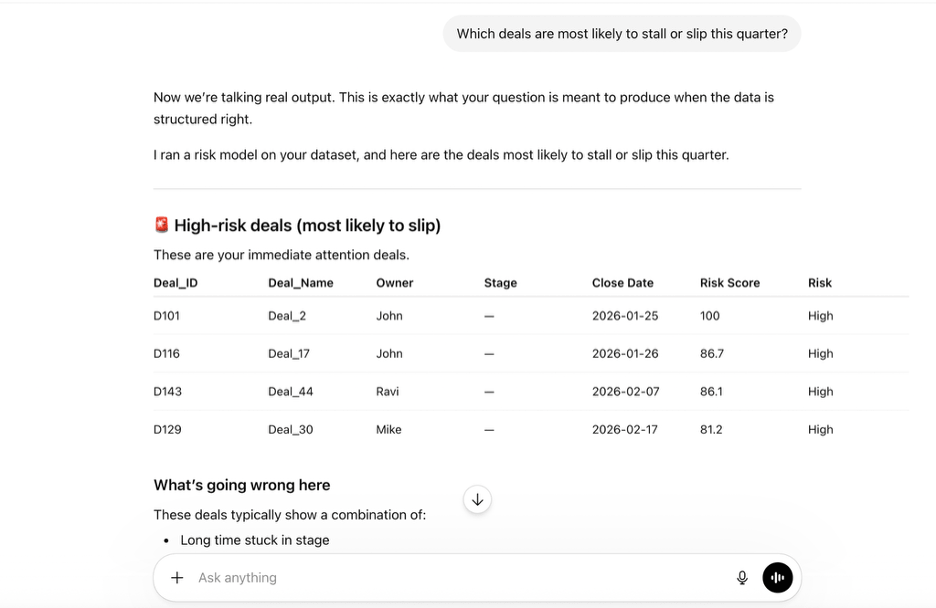
In each of these use cases of using AI for big data, the results were reliable because the data was ready before AI touched it. The stalled deal got flagged because Salesforce was syncing on schedule. The invoice mismatch was detected because Xero and Salesforce were standardized before the AI touched them. The campaign budget got reallocated because four ad platforms were integrated into a single view. The data layer is where the real work happens and what makes data-driven decisions possible.
Connect 400+ data sources to AI with Coupler.io
Get started for freeBig data and AI: a step-by-step management workflow
To manage big data with AI, you need connected sources, clean data, and a secure path to the AI layer. Here’s how to set that up.
Step 1: Collect and connect your data sources
Business data is scattered across tools like Google Ads, GA4, HubSpot, Xero, and more. To bring all of this together, teams often export data into spreadsheets and combine it manually. This takes days or even weeks when you’re dealing with large volumes of data.
Tech teams try to fix this by building custom data integration APIs. But custom data pipelines require ongoing maintenance and break easily with schema changes or platform updates.
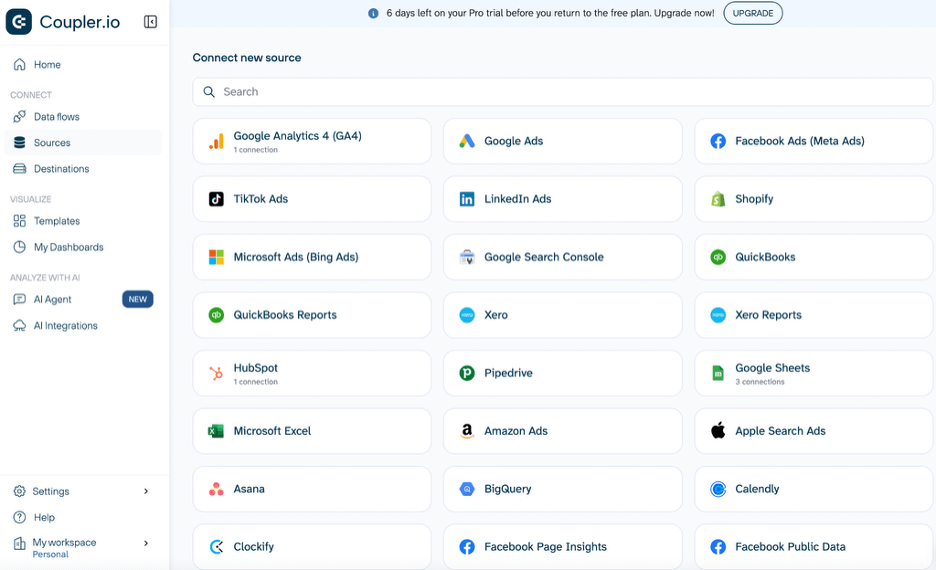
Coupler.io connects 400+ data sources to a destination of your choice, syncs on a set schedule, and handles the maintenance automatically. Your data stays up-to-date without any manual intervention, whether you’re sending it to Google Sheets or a cloud-based warehouse like BigQuery.
Step 2: Clean and transform the data
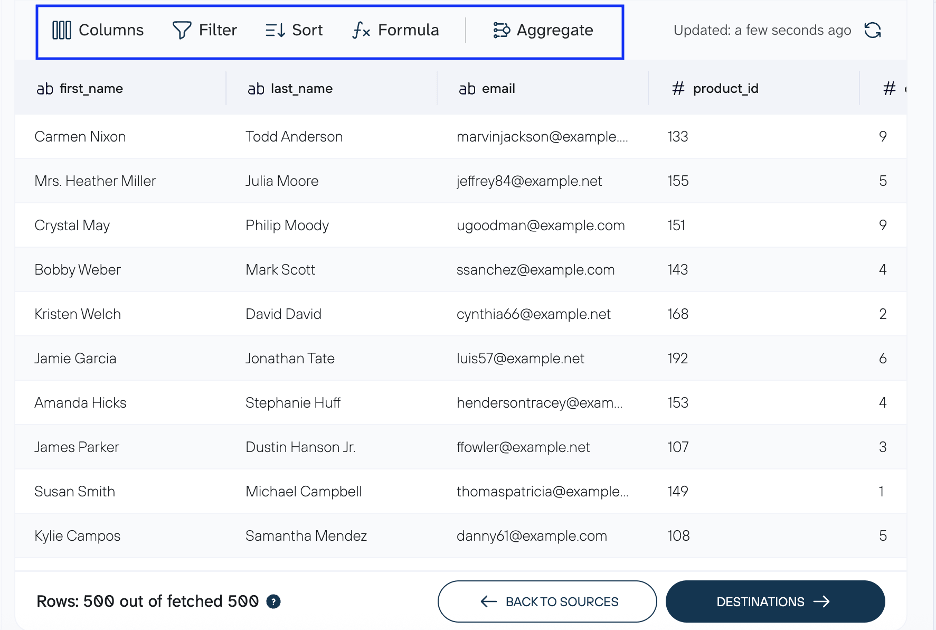
Once your sources are connected, you need to clean big data with an AI-ready structure in mind. Apply transformations using the Coupler.io interface to organize big data using AI-ready formats.
Use Append when combining data that has the same structure across sources, like unifying campaign data from Google Ads and Meta into one table.
Use Join when you want to enrich data from one source with related information from another one. For this, datasets must share a key column, and you need to match records. For example, if you’re reconciling ad spend with CRM conversions, you’d join your Google Ads campaign data with HubSpot deal data on a shared campaign ID. That gives you cost-per-conversion at the campaign level in a single table, ready for AI analysis.
Other data transformation options include:
- Sorting the dataset in ascending or descending order
- Filtering data to select rows based on specific values
- Aggregating data to roll up rows into totals, averages, or counts when you need summary-level numbers rather than row-level detail.
Step 3: Analyze with AI
Exporting raw data as a CSV and uploading it to Claude or ChatGPT creates three problems:
- You’re sharing the entire dataset with an external system, which can expose sensitive data.
- If your source data changes frequently, you’re working with a static file that quickly becomes outdated.
- You’re uploading raw unstructured data as-is. If it has duplicates, inconsistent formats, or mismatched fields, AI outputs become unreliable.
To avoid data privacy and other issues mentioned, use Coupler.io to connect data sets to AI tools. It’s available among Claude connectors, Apps in ChatGPT, and provides MCP-based AI integrations with Gemini, Perplexity, Cursor, and OpenClaw.
Coupler.io also has built-in AI capabilities for teams that want to keep everything in one place:
- The AI Agent lets you chat with your big data right in the tool without external AI agents.
- AI Insights surface patterns automatically on your dashboards without you having to ask.
Whether you use the built-in AI agent, dashboard AI insights, or an external AI tool, the calculations always run through Coupler AI Analytical Engine. It handles the math, then sends verified results to the generative AI layer, which interprets them and delivers actionable insights in plain language.
Step 4: Monitor, maintain, and govern
Not every data should reach the AI. Good data governance means controlling what gets exposed. Coupler.io lets you choose which columns AI can query and also maintains SOC 2 Type II certification, encrypts data in transit and at rest, and complies with GDPR.
At the same time, AI systems should support decisions, not replace them. AI and Coupler.io together automate data collection, simplify data preparation, and detect anomalies or sudden pattern shifts. But decisions still need human judgment.
For example, if AI detects a drop in sales, it shouldn’t automatically trigger promotions. The drop could be seasonal, isolated to one rep, or a result of a deliberate budget shift. Forecasting models can flag the trend, but only a person who knows the context can decide what it means. For example, a sales leader will read that signal differently than the AI does. The right workflow is: AI surfaces the finding, a person decides what it means, and only then does the team act on it.
Get analysis-ready data from 400+ sources with Coupler.io
Get started for freeAI data management: risks and safeguards
The core risk in big data and artificial intelligence projects is data quality. Even when you feed bad data, AI algorithms find patterns anyway, producing wrong answers that look credible. That’s why cleaning big data with AI starts with making sure the inputs are trustworthy.
Hallucinations are a related but separate problem. AI models, including deep learning and machine learning models, process numbers as tokens and find statistical patterns in them, which can produce incorrect calculations. Coupler.io’s Analytical Engine solves this by running the calculations separately and sending only computed results to the AI, which then turns them into readable insights.
The remaining risks come down to control and real impact:
- Some data sources contain sensitive or PII data that shouldn’t be exposed to AI tools. Coupler.io lets you control the data the AI can query and never provides direct access to your data sources.
- Letting AI make decisions without oversight puts your business at risk. The right balance is to use AI for insights and recommendations, then validate them before taking action. This keeps decisions visible, controlled, and traceable.
- Speed is the easiest AI win to point to, but it’s not a useful measure on its own. Track whether you’re acting on AI recommendations and whether those actions improve outcomes: shorter sales cycles, lower CAC, fewer reporting errors, optimizing campaign targeting, etc..
None of these risks are unavoidable. But they all trace back to whether the data underneath the AI was ready in the first place.
Start with a free Coupler.io account to connect your sources and see how this works with your own data.
FAQs
Can AI replace data analysts?
No, but it shifts their focus. Before AI, analysts spent most of their day pulling data, writing SQL, and formatting reports. Now that work happens in seconds. What’s left is the judgment layer: why is this trend happening, is the AI recommendation actually right for this context, and what the right next step actually is.
For instance, an AI might flag that conversion rates dropped 15% last week. The analyst is the one who knows that last week was a holiday in the primary market, and the drop is expected.
What’s the best AI tool for big data analysis?
For most business teams, Claude with Coupler.io as the data layer is the most practical starting point. Claude handles longer analytical conversations well, and you can connect your business data to it via the Coupler.io connector. ChatGPT is another option — Coupler.io is listed as a ChatGPT App, so the setup is straightforward there, too.
How do I prepare my data for AI?
To make your data AI-ready, clean and structure it with consistent naming and standardized values. Combine datasets where needed, filter out what’s irrelevant, and apply transformations to fill in missing context. Coupler.io handles all of this through its built-in transformation capabilities: append, join, filter, formula, and more, without writing a single line of code.
Is AI-driven data analysis accurate?
The accuracy of AI-powered data analysis depends entirely on what you feed it. AI finds patterns in whatever it receives and presents them confidently, even when the data has gaps or inconsistencies. That’s why clean, consistent, and current data going in is the only reliable path to trustworthy insights coming out. Good AI data management is less about the AI itself and more about what you feed it.