Marketing reporting tools pull data from ad platforms, analytics, and CRMs, and turn it into reports you can actually show the team on Monday morning. The right choice depends on who sits around that table.
Marketing teams running recurring reports across channels usually land on Coupler.io: 400+ sources into a dashboard, a spreadsheet, or an AI assistant like Claude or ChatGPT, on a schedule you set. The same setup also serves finance, sales and leadership, which matters if the whole business wants one reporting tool instead of a stack per department.
Agencies managing client lists reach for a dashboard-first platform with white-label and client portals. AgencyAnalytics and DashThis are the two most common picks.
Teams starting with no budget begin with Data Studio and add a data integration layer once they outgrow the native connectors.
Below are 10 tools worth shortlisting in 2026, grouped by what they’re built for, with pricing and real limitations in the open.
Key takeaways
- Marketing reporting tools fall into three types: data integration (Coupler.io, Supermetrics, Funnel.io, Windsor.ai, Adverity), ready-made dashboards (AgencyAnalytics, Whatagraph, DashThis), and BI (Data Studio, Power BI). Pick the type before the tool.
- In-house marketing teams usually land on a data integration tool. Coupler.io covers 400+ sources from $24/month, and the same setup also serves finance, sales, and leadership, so one tool runs reporting across the business.
- Agencies managing client lists tend to pick a dashboard-first platform with white-label and client portals. AgencyAnalytics starts at $20 per client per month.
- BI tools are strong on visuals but limited on native marketing connectors, so most teams pair them with a data integration tool to feed the data.
- Every tool in this list now connects to Claude or ChatGPT through a native connector or MCP server. The quality of the AI answer depends on whether the tool runs the math outside the model (Coupler.io’s Analytical Engine) or hands the model raw data to calculate.
- Starting prices range from $19/mo (Windsor.ai Basic) to four-figure monthly plans for enterprise tools (Funnel.io, Adverity, Whatagraph).
Marketing reporting tools compared
| Tool | Best for | Data sources | Where reports go | Data preparation | Starting price |
|---|---|---|---|---|---|
| Coupler.io | Business teams running marketing reports (and finance, sales, ops on the same setup) | 400+ | Sheets, Excel, Data Studio, Power BI, Supabase, BigQuery, Snowflake, Claude, ChatGPT, Gemini, Copilot | No-code data transformation (join, append, aggregate, filter, formulas) plus custom SQL. | $24/mo (annual) |
| Supermetrics | Marketing teams working in Google Sheets or Data Studio | 170+ | Studio, Sheets, Excel, Data Studio, Power BI, BigQuery, Snowflake | No-code transformations on Enterprise (joins, business rules, name harmonization) | $44/mo (annual, Starter US) |
| Funnel.io | Mid-market and enterprise teams with high ad spend | 640 total, 117 on Starter | Data Studio, Power BI, Tableau, Sheets, BigQuery, Snowflake, Claude, ChatGPT | Full: semantic layer, Funnel AI custom fields and metrics | From $300/mo (annual) |
| Windsor.ai | Teams needing specific channel-to-destination feeds | 350+ | Data Studio, Power BI, Tableau, Sheets, BigQuery, Snowflake, Claude, ChatGPT, Copilot | Custom fields and calculated metrics, cross-source blending, custom queries; advanced modeling can be handled downstream (SQL, dbt, LookML, DAX) | $19/mo (annual, Basic) |
| Adverity | Enterprise marketing teams with governance needs | 600+ | Power BI, Tableau, Data Studio, BigQuery, Snowflake, Atlas AI layer, Claude via MCP | Full: 7 no-code tools, 80+ Python functions, dbt, Transformation Copilot | Custom quote |
| AgencyAnalytics | Agencies managing many clients on one platform | 85+ | Native dashboards, white-label portal, PDF, Claude, ChatGPT | Limited: custom metrics inside dashboards | $20/client/mo (annual) |
| Whatagraph | Agencies that want polished client reports | 68 native plus agent-built “Smart sources” | Native reports, Data Studio (Prime), BigQuery (Prime add-on), Claude, ChatGPT | No-code engine with AI-assisted transformations, source blends, calculated metrics | From $812/mo (annual, Max US) |
| DashThis | Small agencies and freelance marketers | 30+ | Native dashboards, PDF, Claude, ChatGPT | Limited: calculated widgets inside a dashboard, no joins or SQL | $44/mo (Individual, annual) |
| Data Studio | Teams working in Google’s data stack | 20+ built-in plus partner connectors | Native dashboards only | In-tool data blends; conversational analytics in preview for all users; Pro adds Gemini formulas and Slides | Free; Pro $9/user/mo |
| Power BI | Microsoft-stack enterprises | 100+ | Native dashboards, Power BI service | Full: Power Query and DAX; Copilot requires Fabric F2+ or Premium capacity | Pro $14/user/mo |

Run cross-channel marketing reports in Coupler.io
Book a demoWhat is a marketing reporting tool?
A marketing reporting tool pulls data from ad platforms, analytics, CRMs and other marketing sources, and turns it into a recurring report your team can read. The focus is on scheduled, shareable output (a weekly PPC summary, a monthly client report), not real-time exploration or data engineering.
That makes it a cousin of three categories people often conflate it with:
- Analytics tools like GA4 or Mixpanel collect behavior data. A reporting tool reads from them, it doesn’t replace them.
- BI tools like Power BI, Tableau or Looker support open-ended exploration and modeling. Reporting tools are built around a fixed set of views that refresh on a schedule.
- Data integration tools like Coupler.io, Fivetran or Stitch move data from one system to another. Many marketing reporting setups use one of these to feed the reporting layer.
Modern marketing reporting tools often cover more than one role. The distinction matters when you’re deciding which type of tool you actually need.
Three types of marketing reporting tools
Three broad types of tool compete under the “marketing reporting” label. Picking the wrong type is where most teams waste the first month.
Reporting automation and data integration tools (Coupler.io, Supermetrics, Funnel.io, Windsor.ai, Adverity) connect sources, prepare the data and send it to the surface you report in: a spreadsheet, a BI tool, a warehouse, or an AI assistant. They let you keep the dashboard tool you already use (or add one later) and don’t lock you into one visual style. Best fit: in-house teams and marketing teams at agencies that need freedom in how reports look and where they land.
Ready-made reporting dashboards (AgencyAnalytics, Whatagraph, DashThis) combine the connectors and the dashboard in one platform. You pick a client, pick a template, and ship a branded report with less setup. Best fit: agencies that charge per report and want the full chain in one tool, with white-label and client portals built in.
BI and visualization tools (Data Studio, Power BI, Tableau, Looker) are built for broader analytics work. They’re excellent at visuals and modeling, but their native marketing connectors are limited, which is why most marketing teams pair them with a data integration tool. Best fit: enterprises that already run their analytics stack on one of these and want marketing to join it.
The 10 best marketing reporting tools in 2026

1. Coupler.io — best for business teams running marketing (and cross-functional) reports
Coupler.io is a reporting automation tool for business teams, including marketing. It pulls data from 400+ sources on a schedule, blends it, and delivers it to a spreadsheet, a BI tool, a warehouse, or an AI assistant — whichever surface the team actually reports in. The same setup that runs the weekly PPC report also runs the finance team’s revenue roll-up and the sales team’s pipeline view, which matters when the whole org wants one tool instead of a separate stack per department.
Best for: Marketing teams running recurring reports across multiple channels, with the same setup extending to finance, sales, and leadership.
Key features
- 400+ data sources on every paid plan, with no “Premium” tier gating what you can connect.
- No-code transformation in the Data Sets section (available on Active and up) for joining, appending, aggregating, filtering, renaming columns and adding formulas before data leaves Coupler.io. Advanced users can run DuckDB SQL on the same prepared dataset for the kind of work that would otherwise take a nested spreadsheet formula. Context sits on top as the business-meaning layer (metric formulas, column descriptions) so AI assistants read columns the way the team does.
- 230+ dashboard templates for marketing, finance, sales and leadership, hooked to the data flows so the dashboard refreshes when the flow does.
- Hourly refresh on the Pro plan, up to every 15 minutes on Custom.
- Account-based pricing: one Google Ads account can power unlimited data flows and dashboards without an upcharge.
Integrations
Source categories include PPC (Google Ads, Meta Ads, LinkedIn Ads, TikTok Ads, Microsoft Ads), analytics (GA4, Mixpanel), SEO (Ahrefs, Semrush, Serpstat), social media, email, ecommerce (Shopify, WooCommerce), CRM (HubSpot, Salesforce, Pipedrive), finance and project management.
Destinations include Google Sheets, Microsoft Excel, Data Studio, Power BI, Tableau, Qlik, monday.com, BigQuery, Snowflake, PostgreSQL, Supabase, Redshift, plus Claude, ChatGPT, Gemini, Microsoft Copilot, Perplexity, Cursor, OpenClaw and a Custom MCP endpoint for anything else.
AI capabilities
Coupler.io is one of the few tools in this roundup where AI assistants are a first-class destination, not a feature bolted on top of a dashboard. Three capabilities sit under Coupler AI.
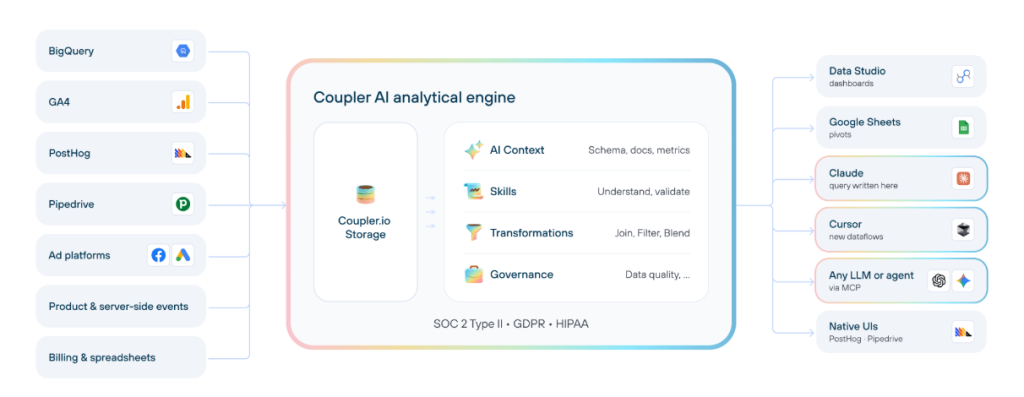
AI Agent is a conversational analytics assistant inside Coupler.io. You can ask questions about your data, build and adjust data flows through chat (“add LinkedIn Ads to the weekly marketing report”), and prepare data for a downstream report.
AI Integrations send the same prepared data into Claude, ChatGPT, Gemini, Copilot, Perplexity, Cursor, and OpenClaw. Coupler.io is listed as a ChatGPT App approved by OpenAI, and as a Claude connector in the Claude directory.
Skills are pre-built analytical workflows (marketing performance across channels, ecommerce metrics, financial metrics, sales pipeline) that run the same analysis the same way every time. You can create and share your own.
The piece that matters: Coupler.io’s Analytical Engine runs the SQL and computes the numbers against your dataset, then hands the result to the AI model to interpret. The model doesn’t do the math, which is where AI assistants usually hallucinate when you paste a CSV at them. In practice, this means a question like “which campaigns beat last month’s CPA target?” comes back with the actual numbers, not the model’s best guess at them.
Pricing
Coupler.io bills by connected accounts and destinations, not by data flow. Connect one Google Ads account and build five dashboards from it, and you still pay for one account.
Paid plans start at $24/month (Starter, billed annually), which covers data flows, 230+ dashboard templates and daily refresh but not Transformation. The Active plan ($99/mo annual) adds Transformation and advanced dashboards. Pro ($199/mo annual) moves refresh to hourly and adds team workspaces, and Custom moves refresh to every 15 minutes. See the full Coupler.io pricing page for all tiers and add-ons. A Free plan exists for one-off tests but has no AI features and only manual refresh, so treat it as a trial surface rather than a tier to build on.
Limitations
- Native dashboards are templated. Teams that need heavy custom branding usually keep Coupler.io for the data layer and build the final visual in Data Studio or Power BI.
- The 7-day trial is shorter than most of the dashboard-first tools in this list (14+ days). Enough to validate a workflow, but worth planning the first week.
More useful information about Coupler.io
Replace your marketing reporting stack with Coupler.io
Book a demo
2. Supermetrics — best for marketing teams working in Google Sheets or Data Studio
Supermetrics is a marketing intelligence platform founded in Helsinki in 2013. The core product pulls ad and analytics data into spreadsheets, Data Studio, BI tools, and warehouses. In November 2025, the company launched a new AI layer (Supermetrics AI) with agents, an MCP server, and Enterprise APIs.
Best for: Marketing teams who already live in Google Sheets or Data Studio and want to turn one weekly spreadsheet into a client-ready report.
Check out the comparison of Coupler.io vs Supermetrics.
Key features
- 170+ marketing data connectors
- Choose 3 (Starter) or 6 (Growth) data sources per plan; all sources on Enterprise. Starter allows 3 accounts per source
- Supermetrics Studio for prompt-based native dashboards
- No-code data transformations (joins, business rules, naming harmonization, currency conversion, custom metrics) are an Enterprise feature
- Studio AI credits included per plan (4,000/mo Starter, 12,000/mo Growth)
Integrations
170+ sources across PPC, social, SEO, email, CRM and ecommerce. Destinations include Supermetrics Studio, Google Sheets, Excel, Data Studio, Power BI, and warehouses (BigQuery, Snowflake) on Enterprise.
AI capabilities
The Supermetrics AI launch introduced three agents: Dashboard Agent for natural-language dashboard building, Insights Agent for pattern discovery and recommendations, and Connector Agent for guided no-code connector building. The MCP Server exposes marketing data to Claude, ChatGPT, Gemini and n8n. Supermetrics is also listed as a Claude connector and ships a Marketing Intelligence Agent inside Google Gemini Enterprise.
Pricing
Starter $44/mo (US annual), Growth $177/mo (US annual, “Recommended”), Enterprise custom. Supermetrics pricing scales by destinations, sources, users and accounts; AI credits are the only metered item. 14-day free trial, no card. No free plan (the Pro plan was discontinued).
Limitations
- Starter is tight: 1 destination, 3 sources, 3 accounts per source
- US and EU pricing are not currency conversions; included limits differ (Starter sources 3 vs 2, Growth sources 6 vs 7)
- Warehouse destinations (BigQuery, Snowflake) are Enterprise-only
- Advertised support hours conflict across pages (24/7 on pricing, 24/5 on Enterprise)
More useful information about Supermetrics

3. Funnel.io — best for mid-market and enterprise teams with heavy ad spend
Funnel.io is a marketing data hub founded in 2014. The platform centers on a semantic layer that applies budgets, targets and naming conventions to marketing data before it reaches a report or an AI tool. In 2026 Funnel moved to a Flexpoints usage model (effective 4 February 2026 for new customers and anyone renewing or switching plan).
Best for: Mid-market and enterprise marketing teams whose ad spend is big enough to care about governed data before analysis.
Check out the comparison of Coupler.io vs Funnel.io.
Key features
- 640 connectors in the catalog (117 on Starter, 579 on Business, 600+ on Enterprise)
- Semantic layer with naming conventions, budgets, targets and goals
- Funnel AI for plain-language questions, custom fields/dimensions/metrics, scheduled analyses to email or Slack
- Funnel MCP exposing data plus business definitions to AI tools
- Funnel Measure add-on for MMM, MTA, incrementality (from an estimated $2,250/mo at the $500K–$1M monthly ad-spend range)
Integrations
640 connectors in the catalog. Destinations include Data Studio, Power BI, Tableau, Google Sheets, Excel, BigQuery (Business+), Snowflake (Enterprise), S3, conversion uploads (LinkedIn, Meta, Google Ads, Microsoft Ads, TikTok), and MCP for Claude, ChatGPT and other MCP-compatible tools.
AI capabilities
Funnel AI handles natural-language questions, no-code creation of custom fields and metrics, dashboard creation, and scheduled analyses pushed to email or Slack. Funnel MCP sends data plus business definitions (budgets, targets, metric names, Measure results) to Claude, ChatGPT, Cursor, Gemini, Codex and any MCP-compatible client. Funnel is listed as an official connector in the Claude directory and as a ChatGPT App.
Pricing
Starter from $300/mo (annual), Business from $600/mo, Enterprise custom. Funnel.io pricing uses Flexpoints: each plan has a Flexpoints allowance; capacity is added in 100-point increments with a 400 FP minimum. Per-item cost (same across plans): connector 50 FP, account 5 FP, visualization destination 150 FP, warehouse destination 300 FP. Per-block price is not published and varies by tier. Three trial offers: 30-day Data Hub, 14-day Starter, 7-day data integration (one per subscription).
Limitations
- Flexpoints are contracted capacity rather than usage credits, so your bill changes when you buy more capacity. The hard part is estimating up front how much capacity you’ll need, since the per-block price isn’t published and varies by plan tier
- Export frequency maxes at every 2 hours on Business and Enterprise; no hourly or sub-hourly option published
- Business and Enterprise cancellations go through Support with a 30-day notice before renewal
- Pricing page shows “$” with no currency code; EU pricing not published
More useful information about Funnel.io

4. Windsor.ai — best for teams needing specific channel-to-destination feeds
Windsor.ai is a Swiss no-code data pipe founded in 2017. It pulls data from 350+ sources into BI tools, spreadsheets, warehouses and AI chat assistants. Windsor is positioned as a pipe rather than a prep-and-analytics platform. Advanced transformations happen downstream in SQL, dbt, LookML, DAX, or the connected BI tool.
Best for: Marketing teams who need a reliable feed from a specific channel into a specific destination and already have a BI tool or warehouse for the rest.
Check out the comparison of Coupler.io vs Windsor.ai.
Key features
- 350+ data sources on every plan (plan limits are on concurrent source count, not source type)
- No row-based metering: plans are tiered by sources, accounts, destination tasks and refresh cadence
- Native MCP integration with Claude, ChatGPT, Copilot, Perplexity, Gemini and Cursor
- Pre-built data model kits for Facebook Ads CPA, Google Ads Quality Score, cross-channel ad-spend + GA4 joins
- 15-minute refresh on the Professional plan
Integrations
350+ sources on every plan. Destinations include Data Studio, Power BI, Tableau, Google Sheets, Excel, BigQuery, Snowflake, Redshift, Databricks, Microsoft Fabric, Azure SQL, PostgreSQL, MySQL, Supabase, S3, Azure Blob, Python, plus MCP for Claude, ChatGPT, Copilot, Perplexity, Gemini, Cursor and Lovable.
AI capabilities
Windsor MCP exposes connected data to any MCP-compatible AI agent for natural-language queries. One notable differentiator: Windsor MCP can trigger campaign actions directly from chat (pause or enable Google Ads and Facebook Ads campaigns).
Pricing
Free (1 source, 1 account), Basic $19/mo (annual), Standard $99/mo, Plus $249/mo, Professional $499/mo, Enterprise custom. 30-day free trial for new accounts.
Limitations
- Native data preparation covers custom fields, calculated metrics, cross-source blending and custom queries; advanced modeling moves downstream to SQL, dbt, LookML or DAX
- Windsor doesn’t host dashboards itself, so you need Data Studio, Power BI, Tableau, Sheets or Excel to visualize
- 15-minute refresh is Professional only (daily on Basic/Free, hourly on Standard/Plus)
- Vendor cites 20 destinations in body text but lists 24 on the same page
More useful information about Windsor.ai

5. Adverity — best for enterprise marketing teams with data governance needs
Adverity is an enterprise marketing data integration and governance platform founded in Vienna in 2015. It positions itself as the layer “where marketing data becomes something AI can trust.” The product splits into Adverity Connect (the data platform) and Adverity Atlas (an AI knowledge layer that sits on top of your warehouse).
Best for: Enterprise marketing teams and large agencies that need to govern how AI reads marketing data before any question is asked.
Check out the comparison of Coupler.io vs Adverity.
Key features
- 600+ pre-built connectors across 24 source categories; Universal Connect for anything not pre-built
- Seven no-code transformation tools, 80+ Python functions, dbt integration
- Transformation Copilot generates transformation scripts from plain English
- Adverity Atlas: a marketing knowledge layer on top of Snowflake, BigQuery, Databricks or Redshift
- Native dashboards (Explore + Present) as an optional add-on
- Refresh as often as every 15 minutes, or any interval via API
Integrations
600+ connectors; destinations include Snowflake, BigQuery, Redshift, Azure Synapse, Databricks, SQL Server, Power BI, Tableau, Data Studio, Microsoft Fabric, DOMO, Qlik, Adobe Experience Platform. Audience activation to Meta, Google Ads, LinkedIn, Snapchat.
AI capabilities
Adverity Atlas is a bring-your-own-LLM AI layer (OpenAI, Anthropic, Azure OpenAI, Google Gemini) that gives the model governed context: your glossary, schema, metric definitions. Transformation Copilot writes transformation scripts from plain English. Ask Your Dashboards sends only metadata to the model, not raw data. The AI Insights Widget runs four preset modes (Summarize, What changed?, What’s off?, What should we do?). Atlas offers an MCP server compatible with Claude Desktop and VS Code.
Pricing
Adverity pricing is a custom quote via sales. No published plans and no free plan. Personalized demos aren’t available to students.
Limitations
- No published pricing; getting a quote means a demo and a sales conversation
- Adverity Connect and Adverity Atlas are separate products, and mixing them up is easy
- The platform is sized for enterprise, so small teams tend to find it heavier than they need
- Dashboards are an optional add-on, not core. Most customers visualize in Power BI, Tableau or Data Studio
- HIPAA BAA signed “when required” (plan gating not stated)
More useful information about Adverity

6. AgencyAnalytics — best for agencies managing many clients on one platform
AgencyAnalytics is an agency-focused client reporting and dashboard platform founded in 2010. It’s based in Toronto and employee-owned. The pricing model (per client, not per user or source) is built for the agency workflow.
Best for: Agencies that charge clients per report and want data, dashboards, reports and a white-label portal in one place.
Key features
- 85+ marketing platform integrations (database integrations are an add-on)
- Priced per client, with unlimited users, dashboards, reports and integrations
- White-label everything: logo, colors, custom domain, custom email
- Smart Dashboards auto-built from connected platforms
- AgencyAI with Skills, Scheduled Prompts and Client Context (up to 20 files per client)
- MCP Server for Claude and ChatGPT, included in the plan
Integrations
85+ marketing platforms (SEO, social, PPC, email, ecommerce, call tracking, analytics, local). API access, Google Sheets integration and custom metrics are included; database integrations like Redshift are a separate add-on. AgencyAnalytics is a destination rather than an ETL layer, and no external data warehouse export is documented.
AI capabilities
AgencyAI answers questions about client performance from the same data behind reports, with citations back to the dashboard or report. Skills (account-level and client-level, built-in or custom) run repeat analyses the same way. Scheduled Prompts run daily, weekly or monthly and save results to client history. MCP Server exposes client data to Claude or ChatGPT with per-client isolation. AI Tracker (Beta, $20.83/mo per 250 credits) monitors AI search visibility.
Pricing
AgencyAnalytics pricing starts at Core, $20 per client per month, billed annually. Volume pricing for 25+ clients includes discounted per-client rates, database connectors, priority support and dedicated onboarding. 14-day free trial, no card. Add-ons: AI Tracker (Beta), Rank Tracker.
Limitations
- No external data destinations documented in vendor materials, so data lives inside AgencyAnalytics
- Not HIPAA compliant per the vendor’s own FAQ (no BAA)
- SOC 2 and ISO 27001 not documented on fetched pages
- Refresh frequency not published per plan (only per-integration examples)
- Integration count conflict: “85+” on the homepage, 92 on the integrations page
More useful information about AgencyAnalytics

7. Whatagraph — best for agencies that want polished, white-labeled client reports
Whatagraph is a marketing reporting platform aimed at agencies. The current product (Whatagraph 3.0, launched September 2025) wraps native integrations, AI-assisted transformations, white-labeled reports and IQ Agents in one platform.
Best for: Agencies that need consistent, polished client reports and are willing to pay for the top end of the market.
Key features
- 68 native integrations plus “Smart sources” (agents build connectors from a description)
- No-code transformation engine with AI-assisted transformations
- Source blends, custom metrics, custom dimensions, reusable data-modeling templates
- 54 dashboard templates
- White-label with logos, hex colors, themes, header/footer text, branded domain, password protection
- EU data center included on both plans
- IQ Agents build reports from a prompt, draft commentary, bulk-edit client reports, and send Slack/email alerts for budget pacing
Integrations
68 native connectors plus the Smart sources agent for anything missing. Destinations: Whatagraph’s own reports and dashboards, Data Studio (Prime), and BigQuery (Prime add-on).
AI capabilities
Whatagraph IQ and IQ Agents build reports and dashboards from a prompt, draft commentary, run bulk edits across client reports, and monitor budget pacing with Slack/email alerts. IQ Chat answers plain-language questions over dashboards. IQ+ (Prime only) handles custom prompts and prompt-based dimension creation. Whatagraph MCP connects to Claude, ChatGPT, Cursor and other MCP-compatible tools (read access shipped; write marked coming soon).
Pricing
Max from $812/month (US annual), Prime custom. Credit-based: one credit equals one connected data account. Max starts with 50 credits; Prime is custom. Extra credits can be bought up to the next plan threshold. Both plans are annual-only on the current pricing page.
Limitations
- Entry price is on the high end of this list. Max starts at $812/mo (US annual)
- Data Studio export is Prime-only; BigQuery transfer is a Prime add-on
- Monthly billing not published on the pricing page
- SOC 2 not claimed by Whatagraph itself (only its cloud providers’ audits are cited)
More useful information about Whatagraph

8. DashThis — best for small agencies and freelance marketers
DashThis is a Canadian marketing reporting and dashboard platform owned by Moment Zero inc. The product is dashboard-first: data from 30+ native integrations flows into white-labeled dashboards you share with clients by link, PDF or email.
Best for: Small agencies and freelance marketers who need white-labeled dashboards without an agency-sized budget.
Key features
- 30+ native integrations plus CSV upload and Google Sheets
- Priced by dashboards and connected source accounts, with unlimited users and integrations on every plan
- White-label on every plan (logo, custom domain, custom themes, send from your own email)
- 50+ dashboard templates and 1,000+ widget templates
- AI Insights with four preset analyses (summary, opportunities, wins, issues) included on every plan; AI chat and dashboard context available through the paid AI Insights PRO add-on
- MCP Connector for Claude and ChatGPT included on every plan
Integrations
30+ native marketing platforms plus CSV and Google Sheets. No external data destinations, since DashThis is a dashboard tool, not a data pipeline.
AI capabilities
AI Insights produces four preset summaries (summary, opportunities, wins, issues) and lets you chat with a dashboard. AI Insights PRO is a $19/mo (or $15/mo annual) paid add-on. The MCP Connector lets Claude and ChatGPT read dashboards natively; it’s included in every plan, data is isolated per client, and no API keys are needed. AI Insights uses OpenAI under Zero Data Retention per DashThis’s privacy policy.
Pricing
Individual $44/mo (annual; 3 dashboards, 15 sources), Professional $139/mo (annual; 10 dashboards, 40 sources), Business $279/mo (annual; 25 dashboards, 100 sources, most popular), Standard $429/mo (annual; 50–1,500+ dashboards). Monthly billing adds $10 and up per plan. 14-day free trial. No free plan. Nonprofits get 30% off.
Limitations
- No external destinations: no BI tool export, no warehouse
- Transformations are limited to calculated widgets inside a dashboard; no SQL or joins
- Daily refresh across all plans; no sub-daily option documented
- Security specifics (SOC 2, ISO, SSO, encryption) not documented on fetched pages
- Data processed and stored in Canada; no regional residency option
More useful information about DashThis

9. Data Studio — best for teams working in Google’s data stack
Data Studio (formerly Looker Studio) is Google’s free data visualization and dashboard tool. The Pro tier adds team workspaces, Google Cloud Customer Care support, Gemini AI and customer-managed encryption keys.
Best for: Teams working in Google’s data stack (BigQuery, Google Ads, GA4, Google Sheets) that want to start without spending anything.
Coupler.io is one of the partner connectors that extends Data Studio to marketing platforms. See the Coupler.io Looker Studio connector.
Key features
- Free to use, with Pro at $9/user/month
- 20+ built-in Google connectors plus third-party partner connectors (Coupler.io, Supermetrics, Windsor.ai, Funnel.io and others)
- Data blending inside the tool across up to 5 sources per visualization
- Conversational analytics in preview, available to all users
- Pro adds organization-owned reports, team workspaces, up to 20 scheduled report deliveries per report, Gemini-assisted calculated fields and Google Slides generation, and customer-managed encryption keys
- 30-day Pro trial with no user limit
Integrations
20+ built-in native connectors (Google Analytics, Google Ads, BigQuery, Google Sheets, Search Console, YouTube and a handful of common third-party sources). The partner connector catalog is wide but most marketing-platform partners charge extra.
AI capabilities
Data Studio offers conversational analytics in preview to all users (not Pro-only). Data Studio Pro also provides Gemini-assisted calculated fields and presentation creation. Gemini can write formulas for calculated fields and generate Google Slides decks from charts, tables and scorecards (requires the Looker Studio add-in from Google Workspace Marketplace). Conversational analytics works with data from Looker, BigQuery, Google Sheets or uploaded CSV.
Pricing
Free forever. Pro at $9/user/month, billed per license (not per active user). Requires a Google Cloud project and a Google Workspace or Cloud Identity account. 30-day free trial on Pro.
Limitations
- Built-in connectors are limited; most marketing platforms require a partner connector, which often costs extra
- No external destinations, since Data Studio is a dashboard tool, not a data pipeline
- Pro requires a Google Workspace or Cloud Identity account (no personal Gmail)
- Pricing is per license, not per active user, so unused licenses still cost
More useful information about Data Studio

10. Power BI — best for Microsoft-stack enterprises
Power BI is Microsoft’s BI platform, built for enterprises on the Microsoft stack. It covers data preparation (Power Query), modeling (DAX), visualization and distribution, with the AI story tied to Microsoft Fabric.
Best for: Enterprises already on Microsoft 365, Azure or Fabric that want the same tool for marketing dashboards and the rest of the business.
Pull marketing data into Power BI with the Coupler.io Power BI connector.
Key features
- 100+ data connectors across SaaS, databases, files and services
- Power Query for data preparation and DAX for calculated measures
- Three licensing tiers: Pro, Premium Per User (PPU), Fabric capacity
- Copilot available on eligible paid Fabric capacity (F2 and up) or Power BI Premium capacity; not available with Pro or PPU alone
- Row-level security, workspace governance, and the full Microsoft governance stack (Microsoft Purview, Entra ID)
- Native integration with the rest of Microsoft 365, Azure and Fabric
Integrations
100+ data connectors to databases (SQL Server, PostgreSQL, Oracle), SaaS (Salesforce, Dynamics 365), files (Excel, CSV, SharePoint), warehouses (BigQuery, Snowflake, Redshift, Databricks) and web services. Marketing-specific connectors for Google Ads, Meta Ads and similar are limited to what the ecosystem publishes, often third-party or custom.
AI capabilities
Copilot in Power BI requires eligible paid Fabric capacity (F2 or higher) or Power BI Premium capacity. A Pro or Premium Per User license alone does not enable it. Once the capacity requirement is met, Copilot generates measures and visuals from natural language, writes DAX, creates report pages, and summarizes dashboards.
Pricing
Power BI Pro $14/user/month (billed yearly, US list). Premium Per User $24/user/month. Microsoft Fabric capacity from F2 at $263/month up to F2048 at $268,221/month (US list prices; regional pricing and enterprise agreements vary). F64 (around $5,003/month US) is the inflection point where free read-only viewing kicks in for shared Power BI content.
Limitations
- Power BI feels heavier if your business runs outside the Microsoft stack
- Copilot requires eligible paid Fabric capacity (F2 or higher, from around $263/month US) or Power BI Premium capacity, so a Pro or PPU license alone isn’t enough
- Below Fabric F64, every viewer needs a Pro license to see shared content
- Marketing data connectors are the responsibility of the ecosystem; getting Google Ads or Meta Ads in cleanly usually means Coupler.io, Supermetrics, Funnel.io or similar
- Power BI Desktop is Windows-only; Mac users work in the service
More useful information about Power BI
Marketing reporting tools for agencies vs in-house teams
The headline question is almost always “agency or in-house?” The answer isn’t the same across the three types above.
| Tool type | In-house marketing team | Agency |
|---|---|---|
| Data integration (Coupler.io, Supermetrics, Funnel.io, Windsor.ai, Adverity) | Strong fit. You choose where reports land, and the same setup serves finance, sales and other teams | Workable. Pair with a BI tool or spreadsheet for client-facing visuals |
| Ready-made reporting dashboards (AgencyAnalytics, Whatagraph, DashThis) | Overkill. You’re paying for client portals and white-label features you won’t use | Strong fit. Per-client pricing, branded portals and scheduled client reports built in |
| BI and visualization (Data Studio, Power BI) | Good as the visual layer. Most teams pair with a data integration tool to feed the data | Workable. Some agencies use Data Studio for client dashboards, usually with a data integration tool behind it |
A rough rule of thumb: an in-house team starts with a data integration tool and adds a BI tool when the stakeholders change. An agency starts with a dashboard-first tool and adds a data integration tool when a client wants data in their own warehouse.
Automate marketing performance reports with Coupler.io
Book a demoHow to choose a marketing reporting tool
Six questions to work through before you pick one.
1. Which sources do you actually need? List the ad platforms, analytics tools and CRMs you report on today, plus the two or three you’ll add in the next six months. A tool that covers your current list but misses one upcoming source will cost you a migration later.
2. Can you blend data across channels? Most useful marketing reports combine two or more sources, like ad spend plus GA4 conversions, or Facebook plus Google for cross-channel CPA. Dashboard-only tools often support this at the widget level; data integration tools do it at the dataset level, which is cleaner for recurring reports.
3. How often does the data need to refresh? Daily is enough for weekly reports. Hourly matters for teams actively adjusting campaigns. Every 15 minutes is enterprise territory. Match the plan to the use case, because most tools charge for faster refresh.
4. Where do reports land? This is where tools diverge most. A spreadsheet, a BI tool, a native dashboard, a warehouse, or an AI assistant like Claude or ChatGPT: each tool supports a different subset. Pick the surface your team actually reports in before picking the tool.
5. Do you need white-label and client portals? Agencies and freelancers usually do. If you’re an in-house team paying for white-label, you’re paying for a feature you’ll never use.
6. What does it cost at your scale? The sticker price is for the smallest plan. Add sources, destinations, users, refresh frequency and (sometimes) rows to get the real number. Many of the tools above price differently from the one next to them, so the shortlist for a team with 6 sources looks nothing like the shortlist for one with 20.
For a broader comparison of automation approaches that includes scripting and ETL options, see the best automated reporting tools.
What it costs: two worked scenarios
Pricing pages are rarely comparable at a glance. Two realistic scenarios, with monthly totals at US list prices (annual billing):
Scenario A: In-house marketing team with 6 sources
You’re a team of 2–3 marketers reporting on Google Ads, Meta Ads, LinkedIn Ads, GA4, HubSpot and Shopify. You need daily refresh and want reports to land in Google Sheets, a dashboard tool and a shared Claude workspace.
| Tool | Monthly cost | Notes |
|---|---|---|
| Coupler.io Active | $99 | Covers all 6 sources, Transformation, 3 destinations (Sheets + Data Studio + Claude), daily refresh |
| Windsor.ai Standard | $99 | 7 source quota, hourly refresh available; data preparation moves downstream |
| Supermetrics Growth | $177 base | 6 US sources, 1 destination included; extra destinations are $149/mo each |
| Funnel.io Starter | $300+ | Covers 117 connectors; destination capacity governed by Flexpoints |
For this scale, a data integration tool is cheaper than a dashboard-first tool with 6 clients’ worth of integrations.
Scenario B: Agency with 10 clients
You manage 10 clients, each with 3–5 marketing sources, and send a monthly PDF plus a live dashboard per client.
| Tool | Monthly cost | Notes |
|---|---|---|
| Coupler.io Pro + Data Studio | $199 + $0 | Pro covers 50 accounts and hourly refresh; dashboards built in Data Studio |
| AgencyAnalytics Core | $200 | $20 per client × 10; unlimited integrations, white-label, client portals |
| DashThis Business | $279 | 25 dashboards, 100 sources; the most popular tier for agencies at this scale |
| Whatagraph Max | $812+ | Includes IQ Agents and advanced integrations; starts with 50 credits |
Dashboard-first tools come out cheaper for teams that need branded client reports with less setup. Agencies willing to build dashboards in Data Studio can save money by going with a data integration tool and the free Google layer.
For an agency-focused deep dive, see our top client reporting tools comparison.
Walk through Coupler.io for every team's reporting
Get a demoFAQ
What is a marketing reporting tool?
A marketing reporting tool pulls data from ad platforms, analytics, CRMs and other sources and turns it into a recurring report your team can read. The focus is on scheduled, shareable output rather than real-time exploration.
Reporting tool vs BI tool: what’s the difference?
A BI tool like Power BI or Tableau is built for open-ended data exploration and modeling. A marketing reporting tool is built around a fixed set of views that refresh on a schedule. Most marketing teams end up with both: a data integration tool to pull the data, and a BI tool to visualize it. The reporting tool category sits between those two.
Are there free marketing reporting tools?
Yes, with trade-offs. Data Studio is free and connects to Google products out of the box. Partner connectors for ad platforms and CRMs are usually paid. Most data integration tools offer a free trial, and a few (Windsor.ai, Coupler.io) keep a limited free plan after the trial ends.
Can I build marketing reports in ChatGPT or Claude?
Yes, if you connect your marketing data first. Coupler.io, Supermetrics, Funnel.io, Windsor.ai, AgencyAnalytics, Whatagraph and DashThis all offer a native connector or MCP server for Claude and ChatGPT. The quality of the answer depends on whether the tool handles the math outside the AI model (which Coupler.io does through its Analytical Engine) or passes raw data to the model to calculate.
How much does a marketing reporting tool cost?
Starting prices range from $19/mo (Windsor.ai Basic) and $24/mo (Coupler.io Starter) at the low end, through $100–$300/mo mid-range, up to four-figure monthly plans for enterprise tools like Funnel.io, Adverity and Whatagraph. Agency tools often price per client (AgencyAnalytics at $20/client) or per dashboard count (DashThis at $44–$429/mo).
How do I automate marketing reports?
Three ingredients: a data integration tool that pulls data on a schedule, a destination that displays it (a dashboard, a spreadsheet, or an AI assistant), and a delivery step that sends it to the people who need to see it (automated email, Slack, or a shared live link). The data integration tool is the piece that makes the whole thing recurring instead of manual.
For a step-by-step walkthrough, see our guide to marketing reporting.