
How to Analyze PPC Campaign Performance in Claude (With Prompts You Can Copy)

Dashboards tell you what happened. CPA up 30%. CTR down. Great. But finding the why behind these metrics means spending hours with spreadsheets, cross-referencing campaigns, and drawing your own conclusions. Use Claude AI for PPC analysis and that same investigation takes a few seconds.
In this guide, I show how to run PPC campaign analysis using Claude AI, with specific prompts for the six most common PPC marketing use cases.
Why analyze PPC data with Claude AI?
Traditionally, PPC analysis involves exporting performance data from platforms like Google Ads, Meta Ads, or Amazon Ads and reviewing it in spreadsheets or dashboards. The problem is that dashboards just show metrics and they rarely tell you why something happened.
For example, imagine your daily ad spend normally hovers around $350-$400, and then you see two spikes to $627 and $622 on May 1 and May 20. Your PPC multi-channel dashboard by Coupler.io will show the spikes clearly.
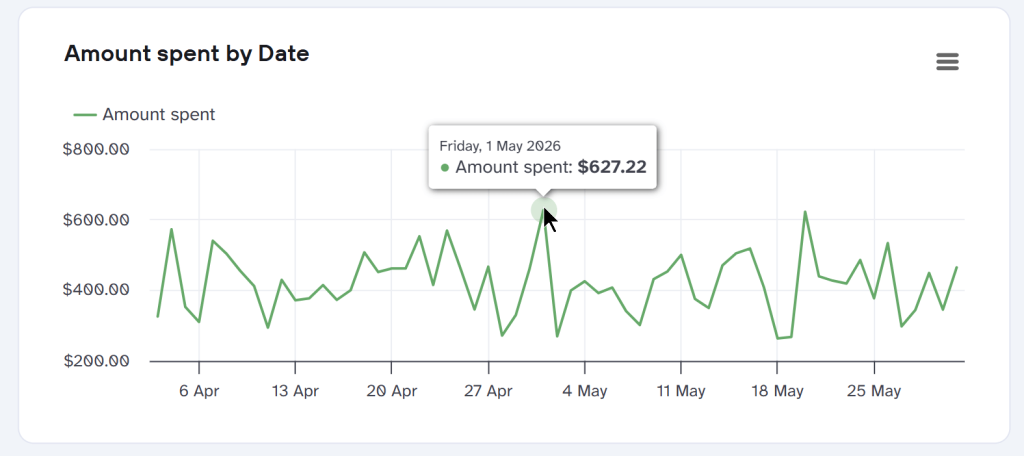
However, to understand the cause, you’ll need to investigate which campaigns drove the extra spend on those days, compare conversion performance across the spike dates, and more.
With Claude, you skip the spreadsheet entirely. Ask what’s driving your CPA spike and get a specific answer in seconds. This way, you can significantly cut your reporting time. Gabe Solberg, a performance marketer at Right Percent, achieved a 60% reduction in reporting time. He simply connected ad data to Claude through Coupler.io and created AI artifacts like this.
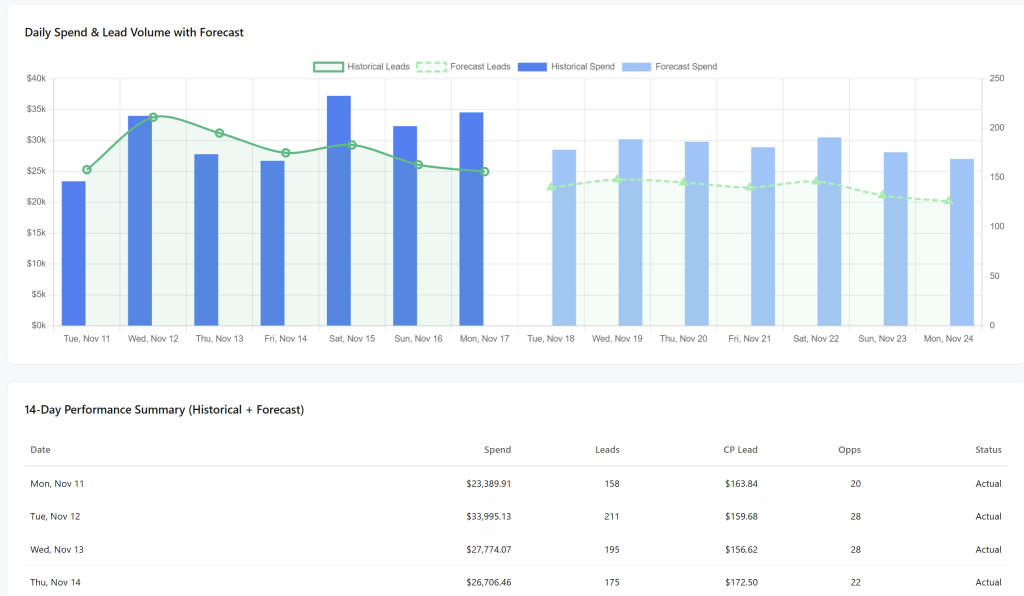
Daily reviews that used to mean stitching exports across platforms now take under 10 minutes.
Of course, the quality of the analysis depends on the quality of the data you connect to Claude. When Claude has access to accurate, detailed, and up-to-date PPC data, it generates insights that go far beyond what static reports can surface.
In this regard, Coupler.io provides a secure middle layer between your PPC data and AI tools, including Claude, ChatGPT, Gemini, and others. The best part of using this connector is that Claude does not do math; hence, the hallucinations are minimized. Once you ask your question, Claude sends a query to Coupler.io MCP, where the query is executed using the Analytical Engine. After that, Claude processes the results and provides you with insights and recommendations.

Connect data from 400+ data sources to Claude with Coupler.io
Get started for freeThat’s what makes Claude AI for paid ads performance analysis a practical option, not a novelty.
Your toolkit in Claude for PPC campaign performance analysis
Before jumping into specific prompts, it helps to understand the tools you’ll be working with. Some are native to Claude, others come from Coupler.io, and the real value shows up when you combine them.
Claude Artifacts: When you prompt Claude, it can create shareable apps, dashboards, or code snippets as Artifacts. Claude generates these in a split-side window of the screen, rather than burying them in a standard chat, and updates them as you continue the conversation.
Let’s say you create a PPC performance dashboard as a Claude Artifact. You can share that dashboard with your team, and they can use Claude to analyze it, ask follow-up questions, or build on top of it. This becomes your reusable, shareable analysis rather than a one-time chat.
Claude Skills: If you run the same PPC analysis every week, Claude Skills saves you a lot of time. A Skill is essentially a saved workflow. You can store your analysis instructions, prompts, and methodology in a single Markdown (.md) file and save it inside Claude. Whenever you run the skill, Claude follows the same instructions and generates the analysis. Here are some pre-made Skills you can directly use for popular business use cases.

The already mentioned Gabe Solberg uses this approach to run weekly client reports. He built a Skill that includes his analytical logic, specific metric definitions, and guardrails (such as which day his reporting week starts), and refines it over time as edge cases arise. The result is a repeatable performance review in Claude that he calls “vibe reporting” – a workflow where you explore data conversationally, push the output to an Artifact, and then save the whole thing as a reusable Skill. Gabe demonstrated this workflow live during Coupler.io’s Conversational Analytics as a System, Not a Hype Train webinar.
Coupler.io AI integrations: Coupler.io lets you integrate data with Claude from advertising platforms through an MCP connection. You manage everything through a simple interface while Coupler handles the secure data transfer in the background. Once the connection is set up, you can schedule automatic data refreshes inside Coupler.
Combined with Claude Skills, Coupler.io automates recurring PPC analysis. Say you review ads performance every Monday.
Create a Markdown (.md) file containing all the instructions Claude should follow when reviewing your PPC data. Or use the ready-to-go marketing-analytics skill by Coupler.io. Then, connect your PPC data to Claude with automatic data refresh every Monday. When Monday arrives, you simply open Claude and run the saved Skill. Claude analyzes the latest data and generates an updated report.
Coupler.io Analytical Engine: When you provide a raw CSV to Claude and ask it to analyze the numbers, Claude treats those numbers as tokens and identifies patterns based on its training data. It can sometimes (quite frequently, to be honest) be inaccurate because Claude isn’t actually running the underlying calculations. This is one of the biggest differences between using Claude as a standalone AI tool versus pairing it with a proper data layer.
The Analytical Engine by Coupler.io handles the math. It runs real SQL queries on your data and sends the computed results back to Claude.
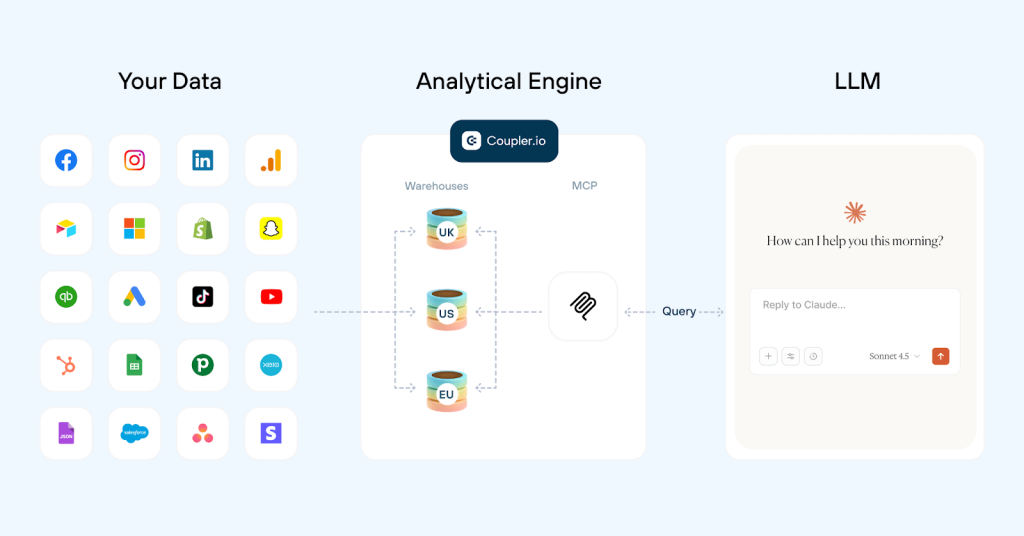
Claude then interprets those results and presents the findings in plain language. Think of it as a mathematician working alongside a storyteller: the Analytical Engine calculates, Claude explains.
Coupler.io dashboards: Dashboards are a great way to track recurring PPC metrics. But the downside is that they only show the numbers. You still need to identify the patterns, trends, and reasons behind those numbers yourself. So where is Claude here?
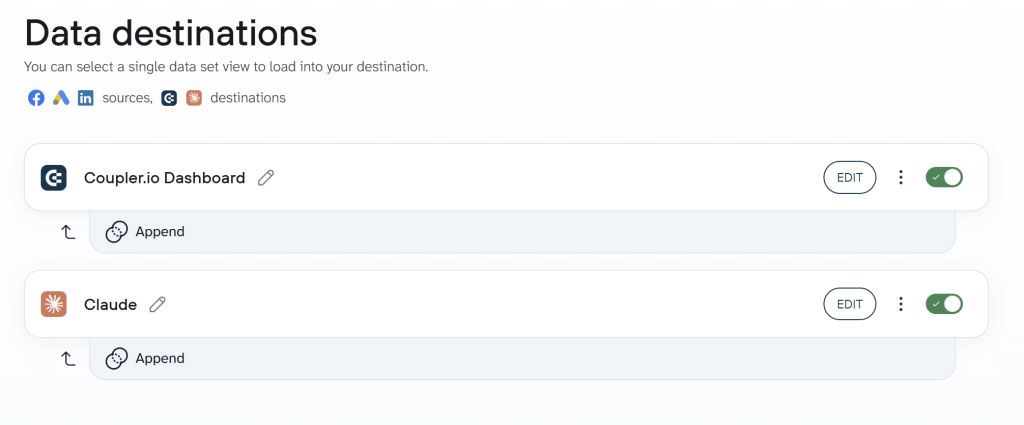
Coupler.io supports multiple destinations for the data flows you create. This means that the same add data can be used for a dashboard and conversational analysis in Claude. For example, you set up a PPC dashboard using Coupler.io’s pre-built templates and add Claude as an additional destination. As a result, Claude has access to the same data set that powers your dashboard. Ask Claude to analyze the dashboard, and it explains what’s happening. It uncovers trends, identifies anomalies, and surfaces insights directly from the data behind those dashboards.
How to connect PPC data for performance analysis in Claude
There are two ways to get your ad data into Claude through Coupler.io. The right choice depends on how much control you want over the data before Claude sees it.
Option 1: Connect Coupler.io directly in Claude
This is the fastest path. You add Coupler.io connector for Claude (Settings > Connectors), log in to your Coupler.io account, and you’re connected. From there, you ask Claude what you want to analyze and Claude requests Coupler.io to create the data flows it needs. You’ll only need to authorize access to your ad accounts (Google Ads, Meta Ads, etc.) when Coupler.io prompts you during the data flow setup. After that, Claude handles the rest.
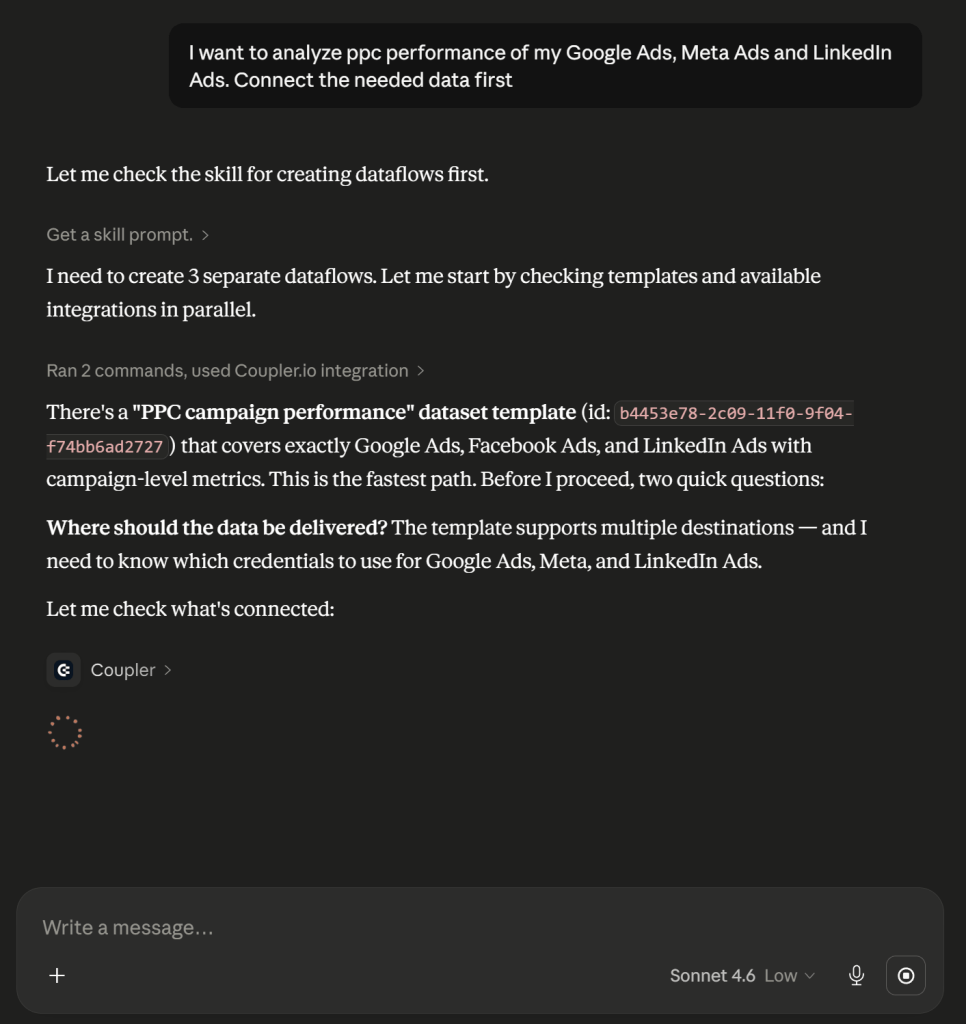
This works well when you want to start asking questions immediately and don’t need to transform or filter the data beforehand.
Option 2: Build the data flow in Coupler.io first, then connect to Claude
This route gives you more control over your AI integrations. You set up the data flow manually in Coupler.io, choose exactly which data to pull, apply transformations, and add business context before Claude ever sees the dataset. Choose this path when you want to combine multiple ad platforms into a single dataset, create custom metrics like blended ROAS, or exclude data that would skew the analysis.
Here’s how it works:
Step 1. Create a data flow.
Open Coupler.io, create a new data flow, and select your PPC data source. For example, you can work with Google Ads data in Claude or any other advertising platform. To try it right away, select your source from the form below and click Proceed to sign up for free. No credit card is required.
Next, connect your advertising account and configure the data you want to send to Claude. For example, with Google Ads, you’ll need to:
- Enter the email associated with your Google Ads account
- Select the ad account you want to analyze
- Choose a report type, which determines the category of data to export
- Set the reporting period, or the timeframe you want Claude to analyze
You’re not limited to a single data source. Coupler.io lets you combine data from multiple advertising platforms and send it to Claude as a unified dataset. For example, combine Instagram Ads and Google Ads data, then ask Claude to compare performance, identify which platform drives more conversions, or determine where you’re getting the most efficient ad spend.
Step 2: Clean your data set and add context
Coupler.io loads a preview of your dataset. where you can apply transformations: filtering, sorting, aggregating columns, or creating custom metrics using formulas (like a cost-per-lead adjusted for region).
Before running any analysis, add business context to the data flow. Coupler.io has a built-in context feature where you can document which regions matter most, whether some campaigns focus on brand awareness rather than conversions, which audience segments are the highest value, and any attribution rules specific to your setup.
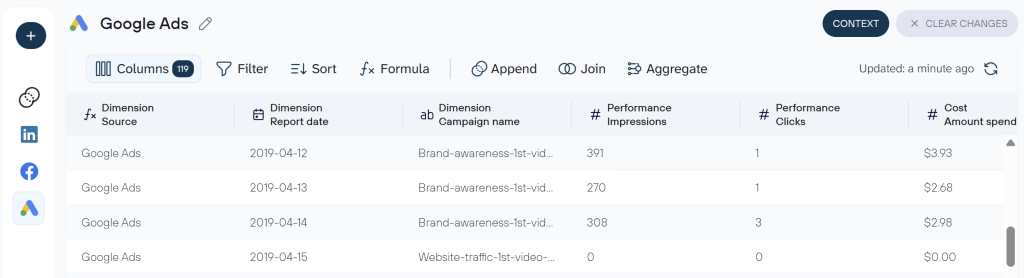
The more context Claude has, the less generic its recommendations will be. This is the same principle that makes a good PPC management workflow: make sure the AI assistant knows what a human analyst would know on day one.
Step 3: Connect to Claude
Once your data is ready, set Claude as the destination and click Get connector.
Coupler.io redirects you to Claude to complete authentication. After you authenticate, return to Coupler.io and click Save and Run to send your first PPC dataset to Claude.
Now set up automatic data refreshes in Coupler. Choose any schedule that fits your workflow, whether that’s daily, weekly, or monthly. You can even specify the exact time to update Claude with fresh data. This ensures Claude always works with the latest PPC data, so you don’t have to upload or refresh datasets manually before every analysis.
Analyze your PPC data in Claude
Try Coupler.io for freeExamples of PPC analytics with Claude.ai?
Now that the data is flowing into Claude, the next question is: what can Claude analyze in PPC campaign performance? Below are some practical examples of how I used Claude to analyze PPC campaigns, identify issues, and uncover opportunities to improve performance. Each use case doubles as a PPC performance review in Claude that you can adapt to your own accounts.
1. Answer on-the-spot questions
As a marketer, you often run into questions all day that need quick answers. Traditionally, that means asking an analyst for help or digging through dashboards yourself. A dashboard shows your CPA suddenly increases, but finding the reason requires digging through multiple reports, checking campaign performance, looking for signs of ad fatigue, evaluating audience changes, reviewing landing page performance, and more.
Claude changes that. Type the question you’d normally ask an analyst and get a specific answer back in seconds. For example, I saw my CPA suddenly spiked, so I asked Claude:
“My CPA increased suddenly over the last 7 days compared to the prior 7 days. Walk me through the most likely causes in order of probability.
For each cause:
Identify which campaign or ad group is most responsibleTell me whether this looks like a bid/auction issue, a creative issue, an audience issue, or a tracking/attribution issue
End with the single most likely root cause and one specific action to take today.”
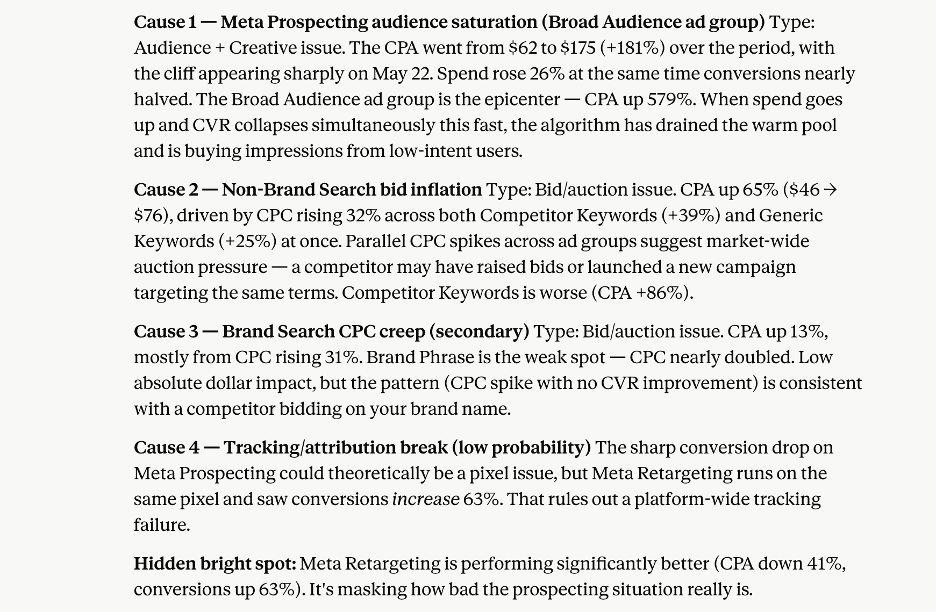
Claude analyzed the data and identified that the “Broad Audience” ad group within the “Meta Prospecting” campaign was the primary driver behind the increase. It found that on May 22, Meta’s algorithm started serving ads to a much larger but significantly less engaged audience. As a result, the campaign paid more per click while generating fewer conversions.
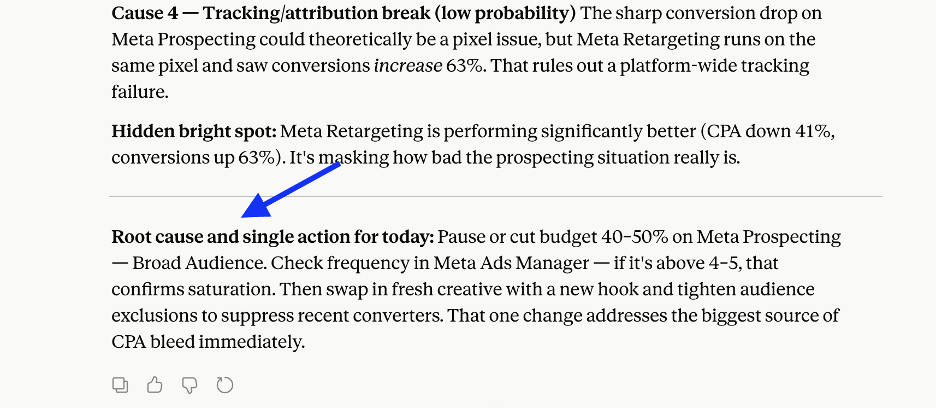
More importantly, Claude didn’t stop at identifying the issue. It also recommended the next action to take, as marked in the below image:
2. Segmentation analysis
On static dashboards, the analysis level is predefined, and you cannot explore dimensions beyond that. For example, if the filter allows only audience level insights, you cannot filter by geography or device.
However, root causes or issues are hidden inside aggregate metrics. For example, a campaign with a 3.2% average CVR might have a 6.1% CVR on mobile and a 1.8% CVR on desktop.
Claude breaks down these aggregate metrics across any dimension, including device, channel, audience segment, geography, placement, or ad schedule. You can also ask Claude to compare multiple dimensions at once and surface only the segments worth acting on. That’s exactly what I wanted, so I prompted Claude:
“Segment my campaign performance for the last 60 days across three dimensions: device (mobile / desktop / tablet) and geography (top 10 regions by spend).
For each dimension:
Identify the best and worst performing segmentCalculate the performance gap (ROAS difference between best and worst)Tell me whether the gap is large enough to justify separate bid adjustments or separate campaignsFlag any combination where two dimensions intersect to create an unusually strong or weak result (e.g., mobile in the Northeast on weekends).”
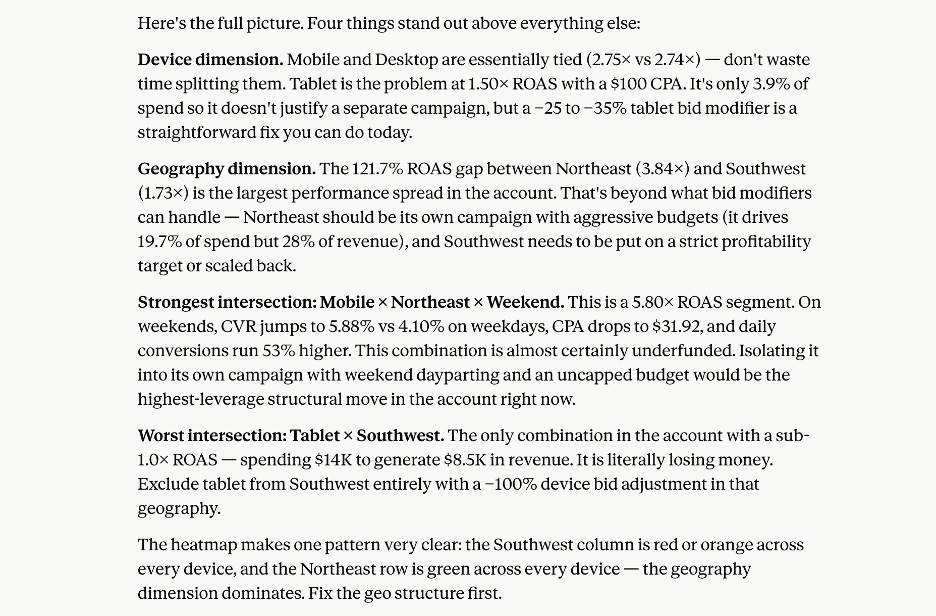
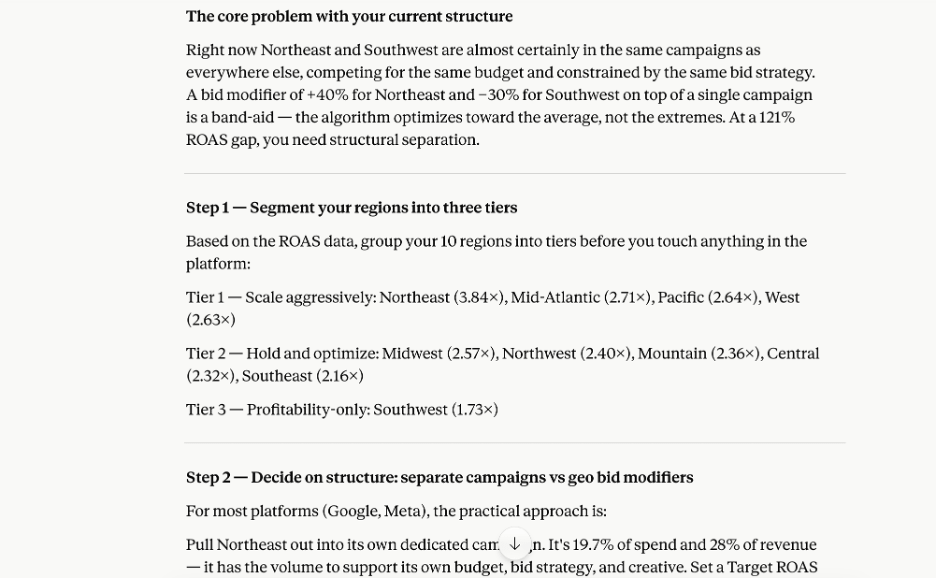
As a quick fix, Claude suggests creating a dedicated campaign for the mobile, Northeast, and weekend combination because that segment delivers the highest ROAS. It also recommends removing ads for tablets in the Southwest because it does not generate enough return. Then it says in the end: “Fix the geo structure first.”
So I continued asking “how to Fix the geo structure” and it responded with a full step-by-step plan, as shown in the image below:
3. Keyword Performance Analysis
Keywords and search terms largely determine who sees your ads. In most PPC campaigns, performance improves when you allocate more budget to high-converting keywords and refine or eliminate underperforming ones. Claude takes a few seconds to run this analysis and shows exactly where you’re wasting spend. I ran the same analysis on my own account with this prompt:
“Review my search term report for the last 30 days.
1. Identify the top 10 search terms by spend that have zero or below-average conversions and flag which ones should become negative keywords vs. which might just need bid reduction.
2. Find any search terms that are triggering the wrong ad group based on intent mismatch.
3. List the 5 best-performing search terms I am not yet targeting as exact match keywords.
Present results as a prioritized action list.”
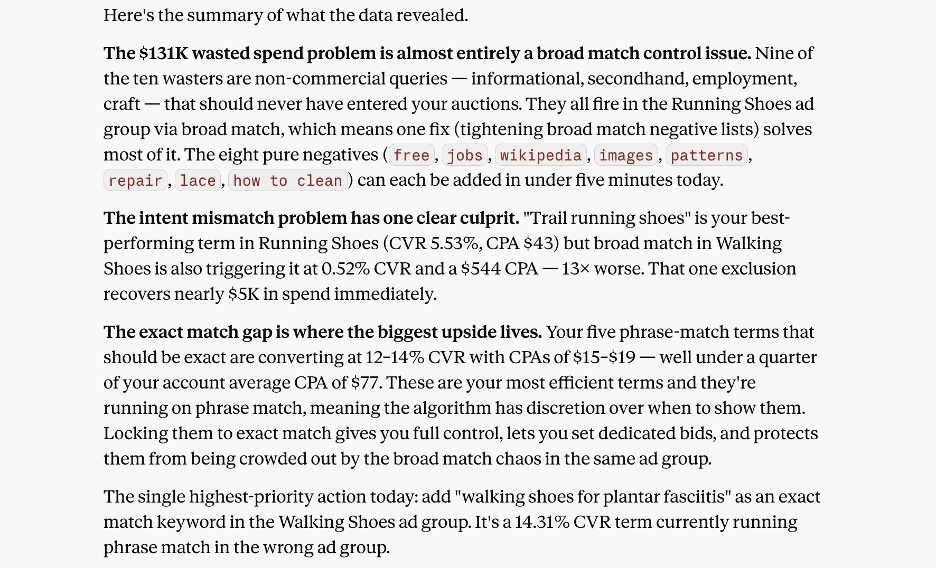
Here are the Claude insights:
Nine of the top ten search terms wasting your budget come from people looking for information or something unrelated to your product, such as "how to clean," "repair," "free," "jobs," and "Wikipedia." Your ads appear for these searches because of broad-match targeting. Claude recommends blocking these types of terms from triggering your ads to reduce wasted ad spend.High-performing terms such as "trail running shoes" are triggering ads from the wrong ad groups. As a result, the algorithm serves running shoe ads to users searching for hiking and walking products, and vice versa.Some of the highest-converting queries, such as "walking shoes for plantar fasciitis," still run on phrase match instead of exact match, which limits control over when those ads appear.
4. Budget optimization
Most digital marketing teams work within a fixed monthly, quarterly, or annual budget. So the goal is to spend it where it generates the highest return. ROAS (return on ad spend) is an important metric that measures how much revenue you generate for every dollar spent on advertising. To find budget reallocation opportunities, I asked Claude to:
“1. Calculate ROAS for each campaign and rank from highest to lowest
2. For the bottom 3 by ROAS, diagnose the reasons for the underperformance. Whether it is
Genuine inefficiency (wrong audience, poor creative, irrelevant keywords)Budget constraints limiting the campaign before it optimizesA structural issue like broad match eating spend on unqualified queries
3. Recommend specific budget reallocation: which campaigns get more, which get less, and by how much, with projected ROAS impact for next quarter.”
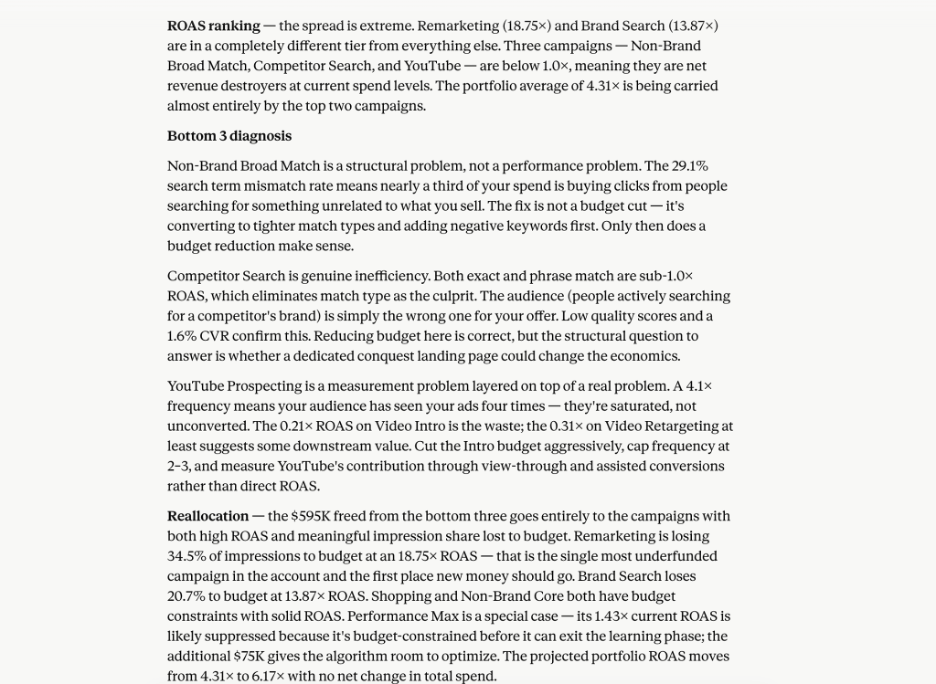
As shown in the screenshot above, Claude identified the three biggest issues affecting performance and provided specific budget reallocation recommendations.
In this case, it recommends shifting budget away from the underperforming campaigns and investing more in higher-return campaigns such as Remarketing, Brand Search, Shopping, and Non-Brand Core campaigns.
5. Anomaly detection
Sometimes a campaign performs normally for weeks and then suddenly drops off. Other times, ad spend spikes unexpectedly without producing additional conversions. Finding these issues manually takes hours, especially when you’re managing multiple campaigns. Claude quickly identifies these anomalies and helps explain what caused them.
Gabe Solberg built a dedicated Skill for this, which he walked through in detail during the aforementioned Coupler.io webinar. His creative fatigue detection workflow stacks the last 3-day running average against the 7-day and 30-day averages, then compares all three to the account baseline. This prevents both false alarms from single-day fluctuations and missed signals hidden by weekly smoothing. On an account spending $40,000+ per day across 50+ live ads, catching a fatigued ad before it burns through the morning budget is the difference between a good day and an expensive mistake.
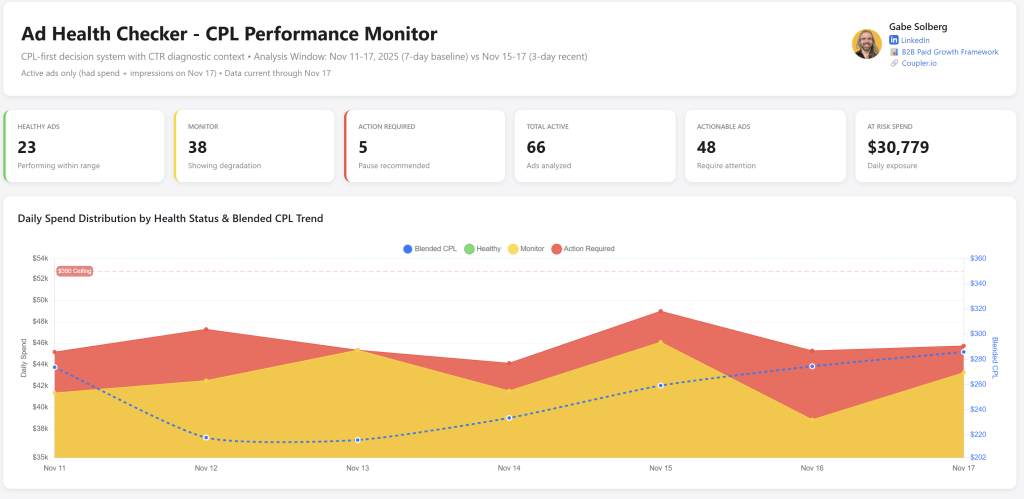
Here’s a simpler version of the same concept you can use Claude to scale PPC reporting with:
“Review my campaign performance for the last 7 days. Compare each campaign's key metrics (CTR, CPC, conversion rate, CPA) against its 30-day average. Flag any campaign where a metric has moved more than 25% in either direction. For each flagged item, suggest the most likely explanation and whether I should investigate further.”
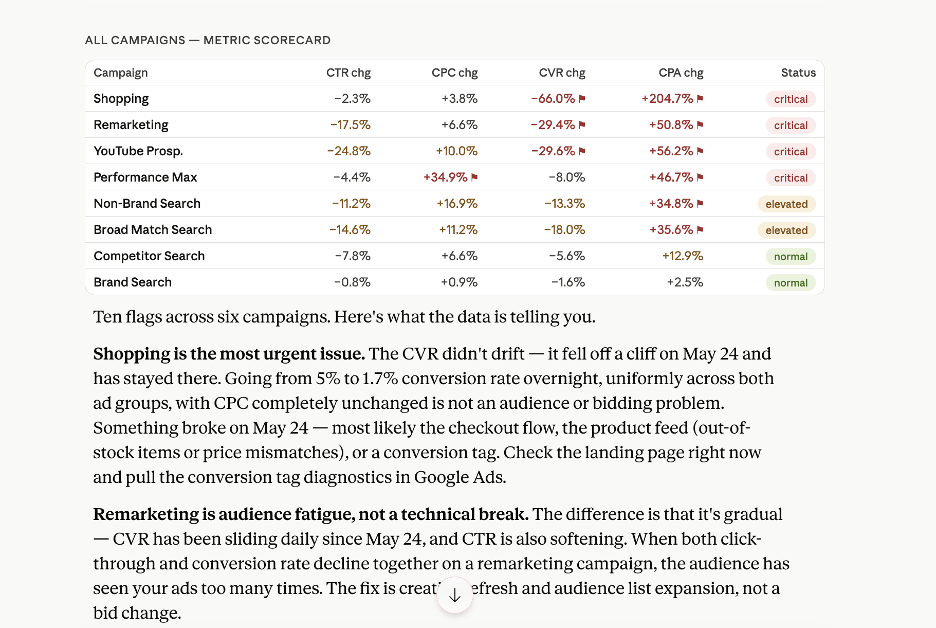
This reveals that Shopping collapsed 66% overnight on May 24 with no CPC change. The sudden drop suggests the issue is unlikely to be auction-related and may instead point to a problem with the checkout experience, product feed, or conversion tracking setup.
It also identifies Remarketing performance has been deteriorating gradually over time. Both CTR and conversion rate have declined steadily, which is a strong indicator of audience saturation and creative fatigue.
6. Interpret A/B test results
At a high level, you see which variant performs better in your A/B tests. For example, you may know “Variant B had higher CTR over A.” But Claude goes deeper and checks whether that CTR difference is statistically significant, whether the higher CTR also leads to better downstream conversions, and whether the test ran long enough to trust the result.
Since Claude can hallucinate math, Coupler’s Analytical Engine handles the calculations. When you ask Claude to check statistical differences in a test, Claude turns that request into executable queries. Coupler’s Analytical Engine runs those queries, calculates the p-values, confidence intervals, and benchmarks, and sends the processed results back to Claude. Claude then explains the findings in plain language.
Example prompt: “I ran an A/B test on two ad variants in the same ad group for 21 days. Both variants received a similar number of impressions. Analyze the results in this order:
1. Statistical significance: Is the CTR difference meaningful, or within normal variance? (The Analytical Engine has already calculated p-value and confidence interval — use those results)
2. Downstream impact: Did the higher CTR variant also win on conversion rate and CPA, or did the click lift not carry through to revenue?
3. Test validity: Did this test run long enough? A test shorter than 14 days misses weekly performance cycles — flag this if it applies
4. Decision: Scale the winner, run a follow-up test, or treat as inconclusive?”
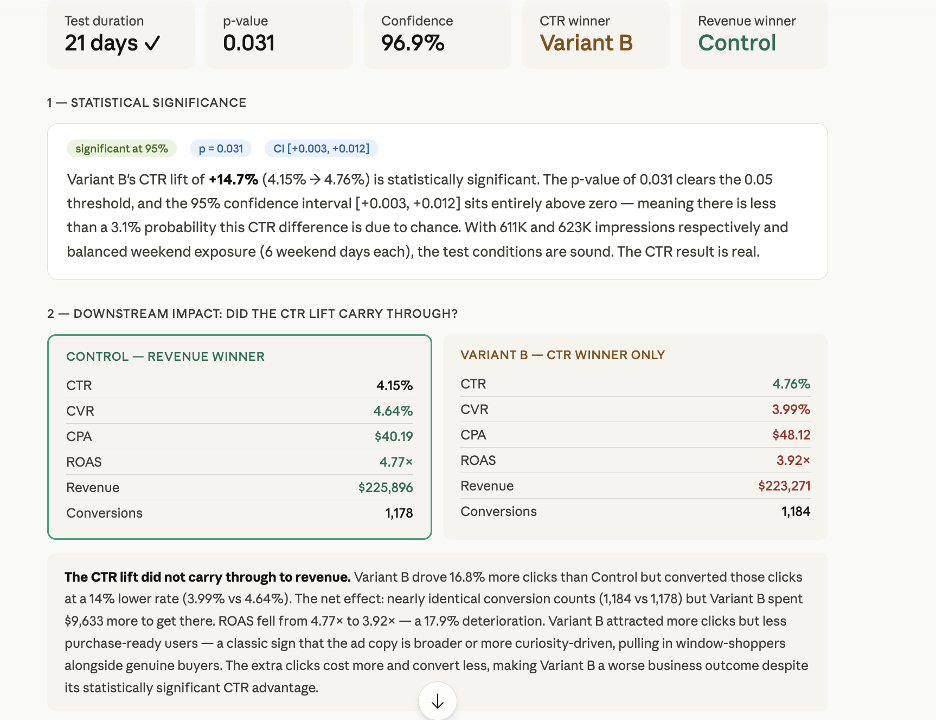
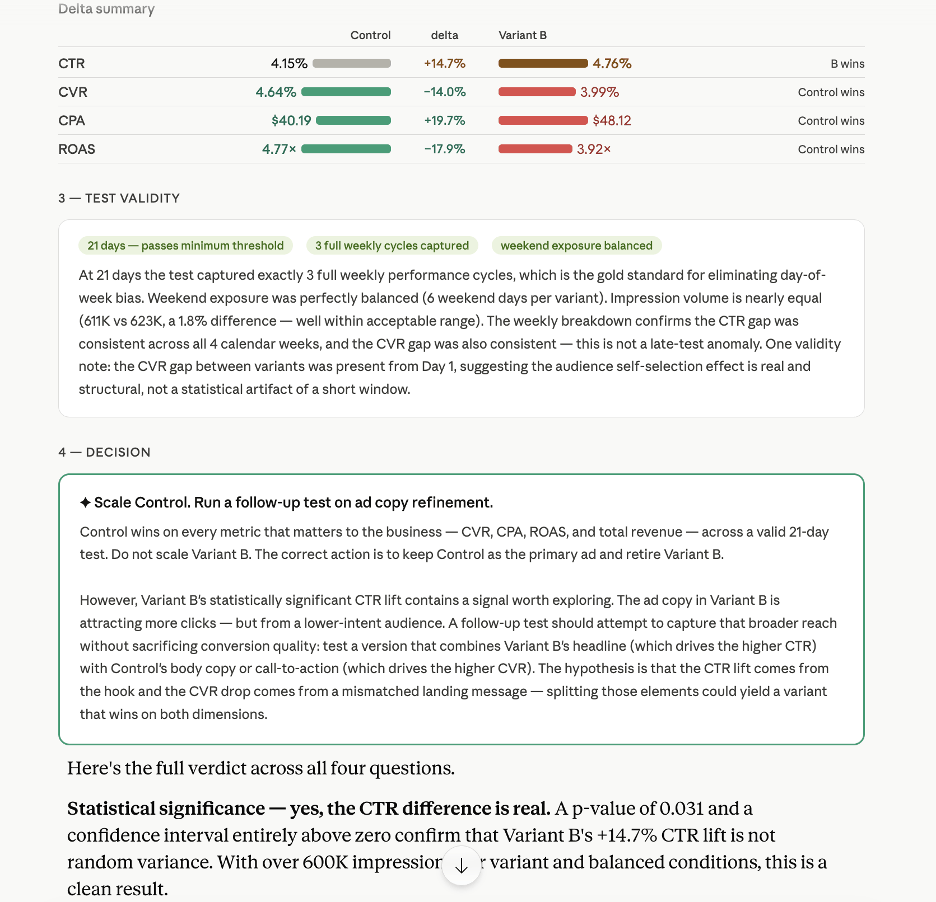
Control is the clear winner and should remain the primary ad. However, Variant B’s higher CTR reveals that its headline or hook is more compelling. The next test should combine Variant B’s headline with Control’s body copy and CTA for broader reach without sacrificing conversion quality.
What to do next
With a single Coupler.io data flow connecting your ad platforms to Claude, you can run the same analysis that used to take hours of spreadsheet work. Whether it’s diagnosing a CPA spike, finding wasted spend in your search terms, or validating an A/B test, using Claude to optimize ad campaigns takes minutes instead of hours. Coupler.io keeps the data fresh and the calculations accurate.
Create a Coupler.io data flow to Claude and start analyzing your campaigns today.
Integrate PPC data with AI using Coupler.io
Get started for freeFAQs
Can I use this workflow with smaller ad accounts, or does it require a minimum spend or data volume to be useful?
You can use this workflow with both small and large ad accounts. Accounts with more campaigns, clicks, and conversions typically produce more reliable trend analysis and optimization recommendations. However, even smaller accounts benefit from answering performance questions, identifying underperforming keywords, and monitoring campaign health.
Is my ad account data safe when using Claude?
Coupler.io acts as the data middleware layer. Your ad platform credentials stay inside Coupler and are never exposed directly to Claude. Claude only receives the structured and filtered dataset that Coupler sends, not your login credentials or direct access to your ad accounts. Coupler.io is SOC 2 Type II certified, GDPR, HIPAA, and DORA compliant. Anthropic, the company behind Claude, does not retain data transmitted through MCP for model training.
What PPC platforms can Claude analyze?
Claude analyzes data from any PPC platform as long as you provide accurate and structured data. Coupler.io supports all major advertising platforms. You can analyze Meta Ads data in Claude and blend it with Google Ads, Instagram Ads, Amazon Ads, and many others. For Meta’s paid social side, see how to connect Instagram Ads to Claude. Through Coupler’s connector, you can send data from any platform to Claude for analysis and combine data from multiple platforms into a single dataset before it reaches Claude, which is especially useful for cross-channel performance marketing analysis.
How is Claude analysis different from Google Ads’ built-in recommendations?
Google’s recommendations are generated by Google’s algorithm, which has an incentive to increase your spend. Claude analyzes your data without that constraint. It will tell you to cut a campaign if the numbers justify it, not increase its budget. Claude also works across platforms simultaneously, so it can compare Meta and Google’s ads performance in the same analysis and pull combined outcomes. Unlike built-in platform tools, Claude can also factor in bid strategy context and suggest changes that a platform’s own AI-powered recommendations would never surface because they conflict with the platform’s revenue model.
How is this different from using ChatGPT or other AI tools for PPC analysis?
The prompts in this guide work in Claude, but the underlying principle applies to any AI tool: the quality of the analysis depends on the data layer. What Coupler.io adds is the Analytical Engine (verified calculations instead of AI-generated math), scheduled data refreshes, and the ability to add business context so the AI tool does not misinterpret your metrics. Coupler.io also connects to ChatGPT as a ChatGPT App and to other AI tools through its MCP server, so you can use the same data pipeline regardless of which AI tool you prefer. The underlying workflow is the same regardless of the tool: connect your data through Coupler.io and analyze and optimize PPC campaigns with Claude AI, ChatGPT, or whichever model fits your setup. Unlike SEO or organic traffic analysis, PPC data changes in near real-time, so having a live data connection rather than static file uploads makes a real difference in how current your analysis is.




