A year ago, most of the AI talk I heard at analytics events was about speeding up individual tasks, like drafting copy or summarizing notes. This year, the question I hear most is different: what happens when AI works with the data behind those tasks?
To find out, our team looked at 12 months of usage patterns from agencies and SMBs that use Coupler.io to connect their business data to AI tools and dashboards. We also drew on our surveys and on what people told us at industry events over the past year.
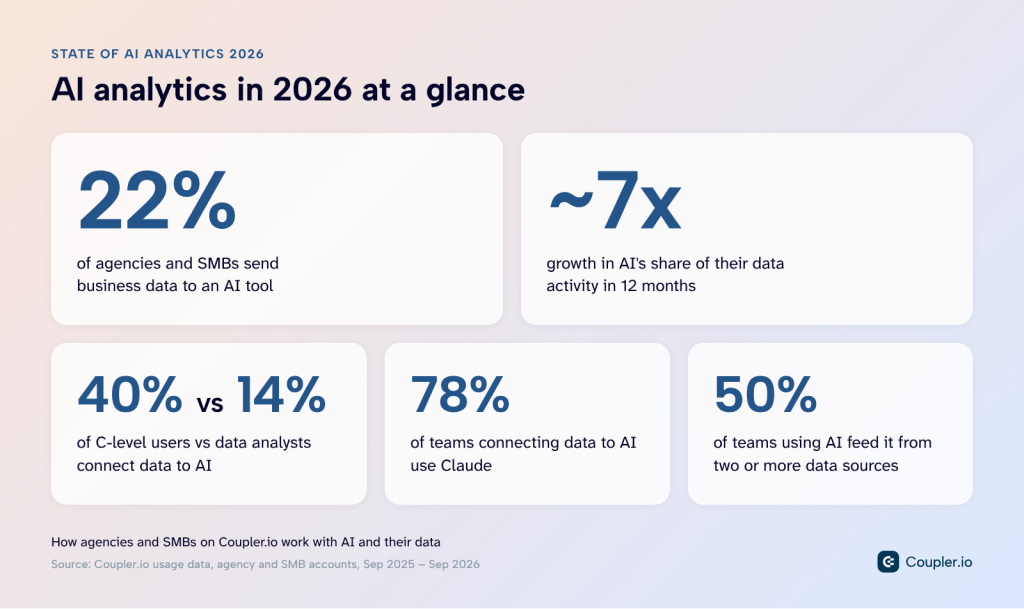
The short answer: AI now plays a much bigger part in their data work than a year ago, mostly alongside the reports they already use. What’s more surprising is who is leading the shift, and where it still goes wrong. I’ll walk through both, along with what’s likely to come next. A few key takeaways:
What AI analytics means in 2026
In 2025, when I asked professionals at MeasureCamp how they used AI at work, most answers were about writing: SQL, formulas, emails. A year later, at another session, most of the room (62%) said AI helped them most with exploring data and generating hypotheses. Only 8% said it still created more work than value.
AI analysis used to mean pasting a CSV into a chat. Now AI can work with business data directly. Integrations connect it to tools like Claude, BI dashboards have it built in, and some setups run it on a schedule. It can also take actions, like adding a new social media account to a client report.
Put simply, AI analytics means an AI model working with your business data to answer questions or complete tasks. It usually takes one of four forms:
- Conversational AI analytics: You ask a question in plain language. The AI queries connected data and explains the result.
- Agentic analytics: The AI takes actions too. It finds datasets, builds or edits data flows, runs refreshes, and prepares reports.
- AI assistants in BI tools: AI built into a dashboard or BI tool explains charts, answers follow-ups, or builds visuals from a prompt.
- Automated AI summaries: The AI writes findings on a schedule, with no prompt needed.
Note: Our usage data covers the first two directly. The other two run inside BI tools and scheduled jobs, so we see the data going in but not the questions asked of it.
In practice, the different forms of AI analytics often blend into one workflow. Here’s an agency example:
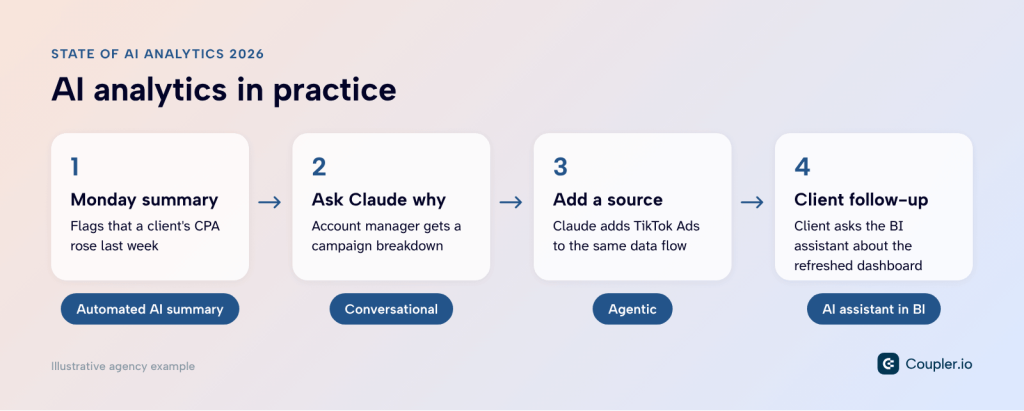
The whole loop runs without waiting on a data specialist, which is what makes it workable for a team that doesn’t have one. A year ago that would have sounded ambitious. Our data shows how quickly it became ordinary, and that the people who got there first rarely have “analyst” in their job title.
AI in analytics adoption
Today, 22% of agencies and SMBs using Coupler.io send business data to an AI tool. Here’s how fast that changed, who leads, and which data and AI tools they use most.
Note on the data: we looked at anonymized, account-level usage from agency and SMB accounts on Coupler.io, September 2025 to September 2026. All figures are shares of accounts; one team with five users counts once.
Active AI adopters
AI went from a side connection to a regular part of the data stack in 12 months. In September 2025, AI tools accounted for 4% of our users’ ongoing data activity. By August 2026, that share was 28%, about seven times higher.
New users also reach AI sooner than a year ago. Teams that signed up in late 2025 typically took about two months to first use AI. Spring 2026 sign-ups usually started in their first month.
That matters because AI is no longer an ‘add-on’ teams get to once their reporting is set up. For teams that adopt it, asking AI about their data is now one of the first things they do.
Which AI tools teams use
Claude is the number one AI destination among the agencies and SMBs in our data, used by 78% of teams that connect data to AI. ChatGPT comes in second at 23%.
Claude’s lead is wider still once you count how often each tool is actually used. In 2026 it handled 82% of AI data activity, up from about half in late 2025, while ChatGPT’s share fell to 15%.
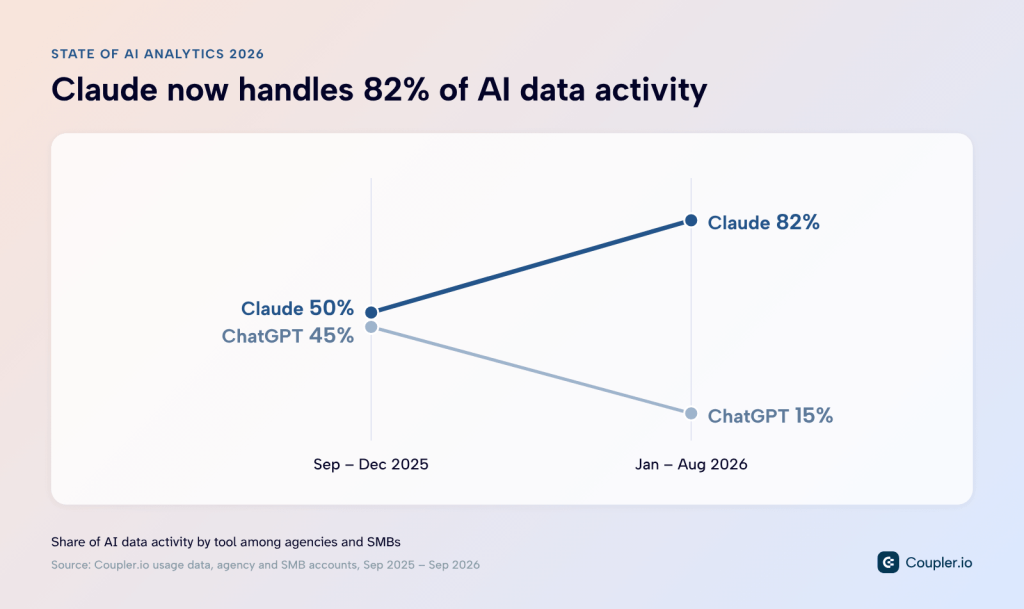
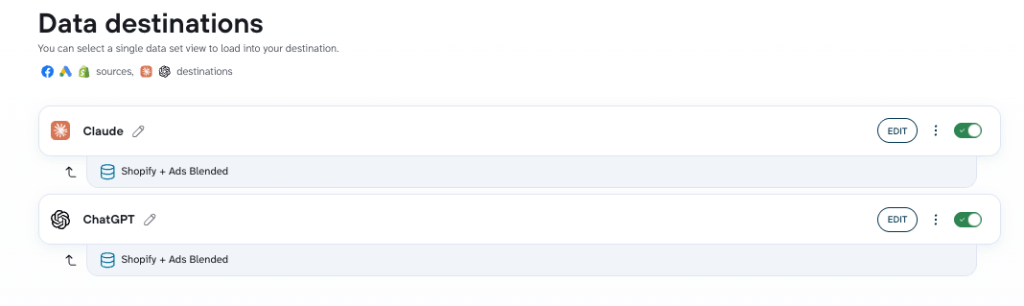
This is a reason not to lock into one AI tool. Your team might work in Claude while a client, a manager, or another department prefers ChatGPT, and preferences can shift quickly, as this one did. In Coupler.io, one data flow can send the same data to multiple destinations, so adding or switching an AI tool doesn’t mean rebuilding anything.

Connect 400+ sources to any AI tool with Coupler.io
Book a demoWho uses AI in analytics
Here’s how adoption breaks down by role, company size, industry, and region.
By role
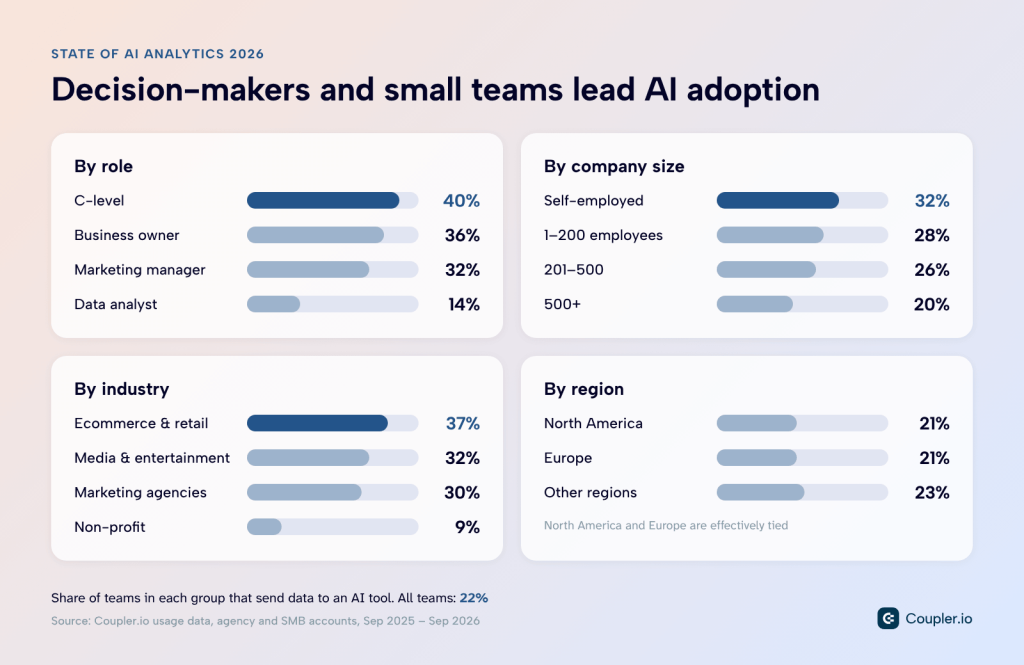
The people closest to business decisions lead adoption. C-level users (40%) and business owners (36%) send data to AI most often, with marketing managers (32%) close behind. Data analysts sit at 14%, the lowest of the main roles.
That doesn’t mean analysts avoid AI. Many may use it outside Coupler.io, with their own scripts or tools. The gap shows who is building AI into recurring reporting workflows: marketers, founders, and managers who need answers without waiting for a data request.
By company size
Enterprise research usually finds large companies ahead on AI, as in McKinsey’s State of AI. Among agencies and SMBs on Coupler.io, the pattern flips: the smaller the team, the more likely it is to send data to AI. Self-employed professionals lead at 32%, while companies with 500+ employees trail at about 20%.
Among agencies specifically, self-employed operators lead at 39%. The agency samples are small, so treat differences between agency sizes as directional.
By industry
Ecommerce and retail teams lead at 37%, followed by media and entertainment (32%) and marketing and creative agencies (30%). Most other commercial industries sit between 20% and 30%.
That’s the exact opposite of the wider picture. In the US Census Bureau’s business survey, retail sat well below the national average in spring 2026, at about 14% against 19.8% overall. The difference likely comes down to data quality: online stores already have structured ecommerce data to connect, meaning AI has something to work with from day one.
By region
North America (21%) and Europe (21%) are effectively tied, which lines up with major surveys. Eurostat found that 20% of EU businesses with 10+ employees used AI in 2025, up from 13.5% a year earlier, and the US Census Bureau puts US businesses at 17–20% in spring 2026.
Ultimately, where a team is based says little about whether it uses AI with its data. Its size and who’s asking the questions say much more.
Popular pairs: data sources and AI tools
A pair is one data source connected to one AI tool, like Google Ads data sent to Claude. Pairs show which data teams actually analyze with AI, and marketing and web data make up the most common ones:
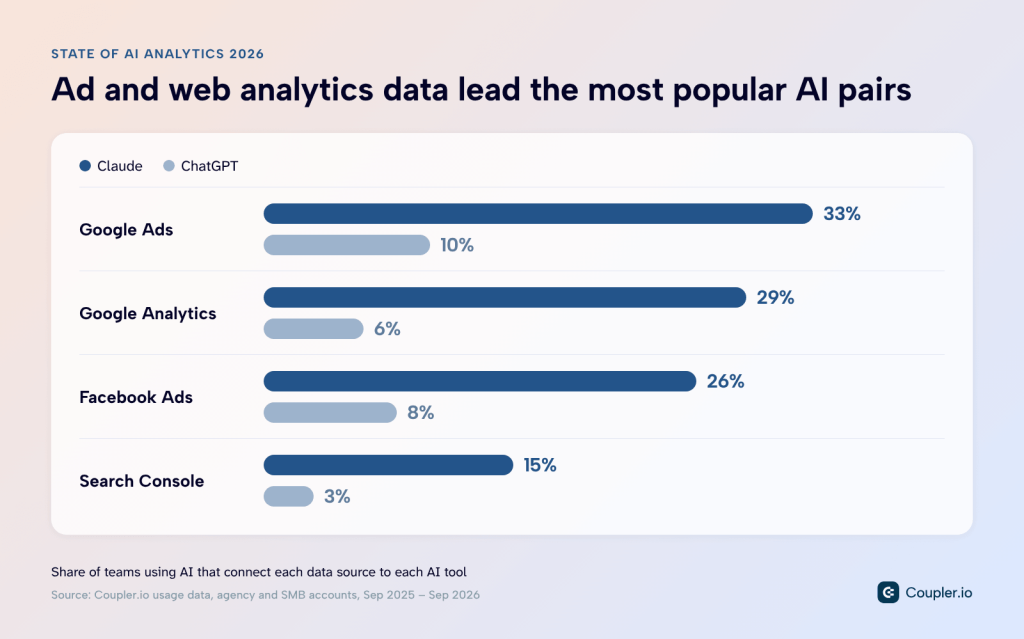
These are the sources behind most weekly performance reports: paid ads, web analytics, and search. Whichever AI tool a team picks, the data it connects tends to be the same.
Further down the list, business data is starting to show up: Shopify (7%), QuickBooks (6%), Salesforce (4%), and HubSpot (3%) connected to Claude. Marketing data still leads, but ecommerce, finance, and sales data are starting to reach AI too.
How teams actually use AI data analytics
Connecting data to AI is the easy part. Usage data shows what agencies and SMBs connect and what they ask AI to do with it, and our surveys fill in the questions behind it.
What agencies and SMBs analyze with AI
The data a team connects to AI hints at the questions it wants answered. For agencies and SMBs, advertising data leads by a wide margin. Here’s the share of teams using AI to connect each data type:
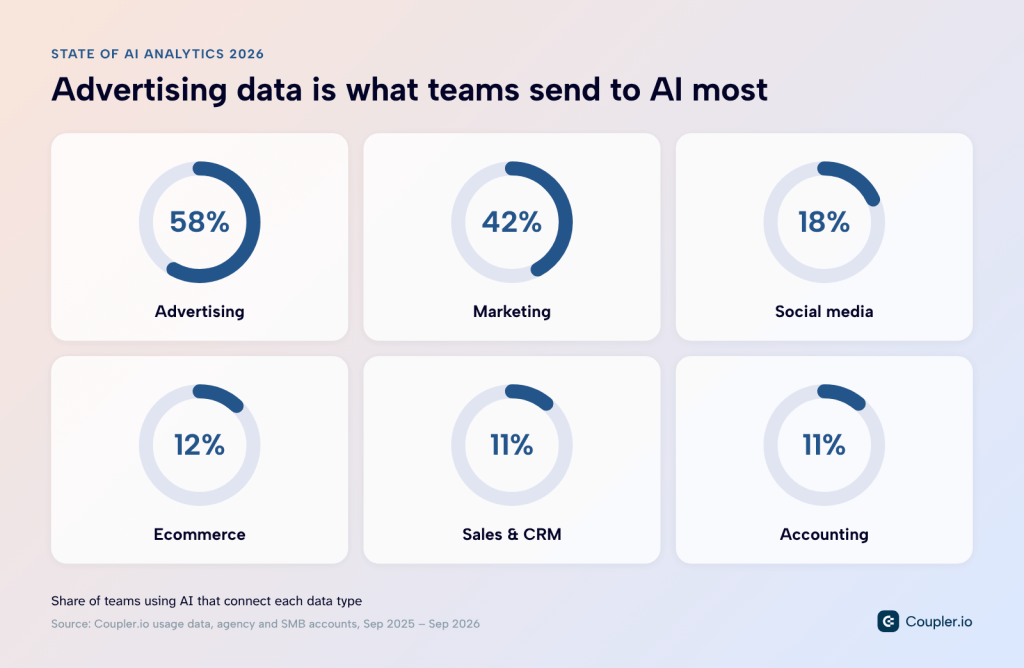
Many setups also draw on more than one source. Half of these teams (50%) have connected two or more sources to AI, and 42% connect different types of data, such as advertising and ecommerce.
That means AI analytics is rarely a one-connector experiment. Teams give the AI a wider view of the business, like ad spend next to store orders, because that’s where client questions sit: did the campaign bring in revenue, or only clicks?
Getting those answers means joining data that comes in different shapes, like ad spend by campaign and orders by product. For simple questions, Coupler AI can combine the datasets right in the conversation. When the analysis joins large datasets or comes back every week, it can save the logic as a SQL transformation (a prepared dataset that refreshes with the data flow).
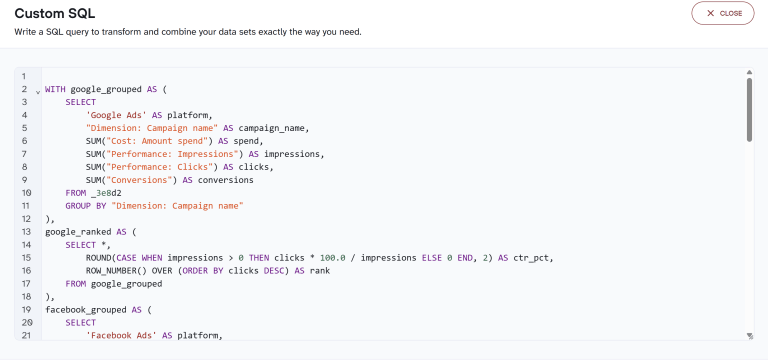
Each week’s analysis then uses the same logic on up-to-date data.
The type of tasks teams give to AI
Answering questions is only part of the work. Over a recent month, teams using Coupler AI used AI to:
- read and analyze their data (79%)
- look through their datasets and data flows (68%)
- create, change, or run data pipelines (35%)
- load a pre-built Skill to guide the analysis (33%)
Reading and browsing data are what you’d expect AI to do. Building pipelines is less obvious, and a third of teams already let AI do it. For an agency, this is the setup that eats time when a new client signs or an existing one starts running TikTok ads: adding the source, picking the right accounts, etc.
In Coupler.io, that setup starts as a request. Ask Coupler AI for a “weekly Google Ads report for our new client,” and it helps you set up the data flow, then answers follow-up questions on the refreshed data.
Let Coupler AI do the data work for you
Tell Coupler AI what you need to know, from which source, and how often. It connects your account, sets up the data flow, keeps it refreshed, and lets you analyze the results inside Coupler.io or another AI tool.
Try for free
What teams ask AI about their data
Usage data shows what the AI does, but not what people ask it to do. For that, I turned to our earlier pieces on AI-driven marketing strategy and How AI is changing data analytics. Most questions fall into four groups:
Find what broke. Teams compare tracking, GA4, advertising, and CRM data to catch sudden drops and conversion mismatches.
Example: “Why did GA4 purchases stop matching Shopify orders last week?“
Explain what’s driving results. Teams use multiple data sources to investigate attribution gaps and see which customer cohorts are most profitable.
Example: “Which channels bring customers who buy again within 90 days?“
Plan ahead. Business owners use AI to run pricing scenarios, forecast inventory, and flag customers who may be at risk of churning.
Example: “Which regular customers haven't ordered in 60 days?“
Act during a campaign. Marketers spot creatives that beat the average in a campaign’s first week, then shift budget to them before the next report.
Example: “Which creatives are closing leads above average this week?“
Questions like these come back every week, and that’s what Coupler.io’s pre-built Skills are for. A Skill is a ready-made analysis workflow. It sets the steps and checks, so the AI follows the same method every time instead of improvising from a prompt. As we saw, 33% of teams using AI through Coupler.io already load one.
Skills are available in the Coupler.io app, and they apply automatically when the AI connects to a matching source.
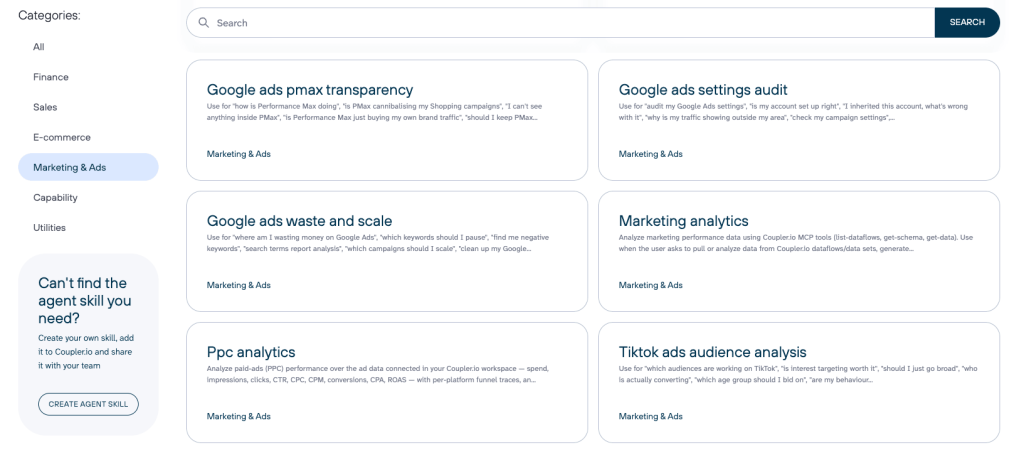
The PPC analytics Skill, for example, ranks campaigns on CPA and ROAS and checks budget pacing and ad fatigue on each platform. For an agency, that means every account manager runs the weekly ad review the same way, with the same numbers.
Challenges of AI-driven data analytics for small businesses
Adoption is growing faster than the practices around it. Here’s where small teams run into trouble most often, and what we’ve seen work.
AI outputs aren’t always accurate
AI answers about business data can be wrong in ways that are hard to spot. A plausible number with a confident explanation can reach a client report or a budget decision before anyone notices it’s wrong. In my team’s experience, most of these errors come from the setup, not the model.
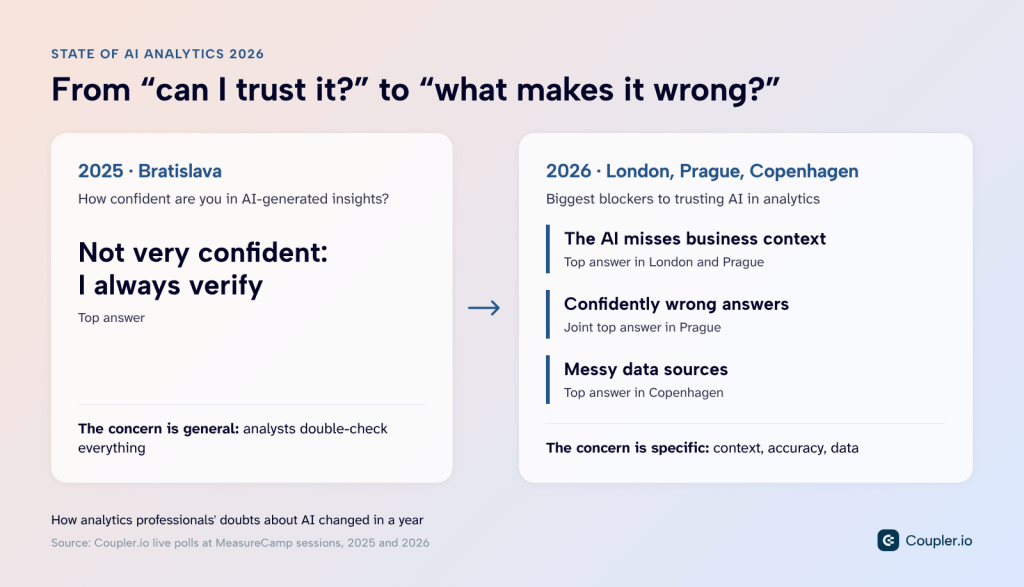
The most common cause is missing business context. It was the top blocker to trusting AI at our London and Prague sessions, and 37% of professionals in our earlier survey named it too. We saw it ourselves: after our team changed a lead-scoring form, the AI flagged the expected drop in sales calls as an acquisition problem because nobody had told it about the change.
Yet not many users implement business and data context properly. Some likely keep it in their AI tool, in a prompt or project instructions. That helps the person who wrote it, but a colleague asking the same question next week starts without it.
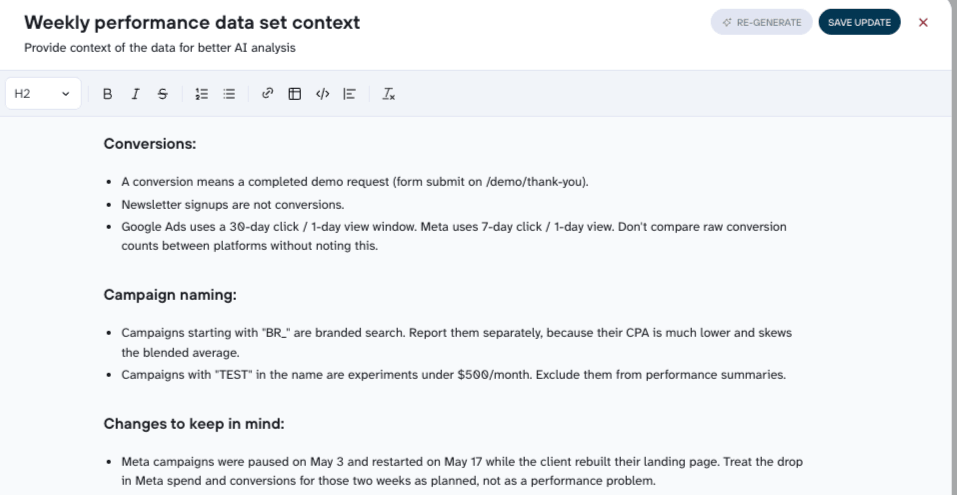
In Coupler.io, context is saved to the dataset itself, and every AI session reads it, whoever is asking. It doesn’t need to be long: a note like “paused Meta campaigns on May 3” can be enough to prevent a wrong conclusion. Our guide on why AI context matters covers what to write down. As an example:
The second problem is traceability: 35% in the same survey said they can’t see how an AI answer was reached. Tools like ChatGPT and Claude can run code in a sandbox to crunch numbers, and most of the time they get the math right. Checking the answer means reading that code, which rules out most of the people asking the question.
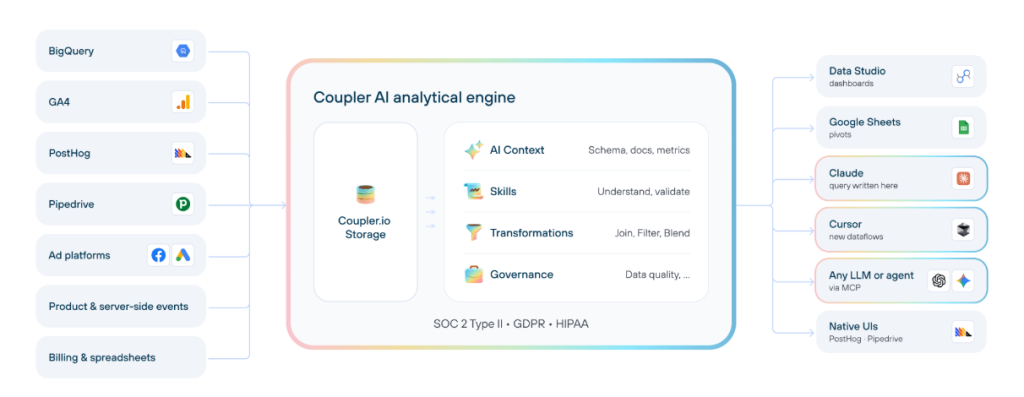
Coupler AI works differently. You ask a question, and it turns that question into an SQL query against your prepared data. The Analytical Engine runs the query against your full data, using the schema and the context saved with it. The query (your question in SQL) is one short line, readable even if you’ve never written one. It reads your data and never changes it.
Messy source data makes both problems worse. When the AI has to reconcile different platforms mid-conversation, it’s guessing. That same engine cleans and joins data from 400+ sources before the AI sees it.
Here’s how it all fits together, from your sources to the tools you work in:
Feed clean data and context to AI with Coupler.io
Book a demoBI or AI? The pressure to pick one
Once AI can answer questions about the data, it’s fair to ask whether dashboards still earn their place. Our data says they do. Teams using AI are about four times more likely to pair it with a BI tool (27%) than with a second AI tool (7%). In practice, the dashboard is where a change gets noticed, and AI is where it gets explained.
| Dashboards | AI conversations | |
| Best for | KPIs the client checks every week | Follow-up questions a fixed report can’t answer |
| Typical question | “How did ROAS trend this month?“ | “Which campaigns drove the ROAS drop, and since when?“ |
| Strength | Consistent, shared view of performance | Speed and depth on one-off questions |
The slow part is building that weekly dashboard in the first place, whether it’s for a client or your own business. Coupler.io’s 250+ dashboard templates cover common reports, like PPC performance across ad platforms and sales funnel tracking.
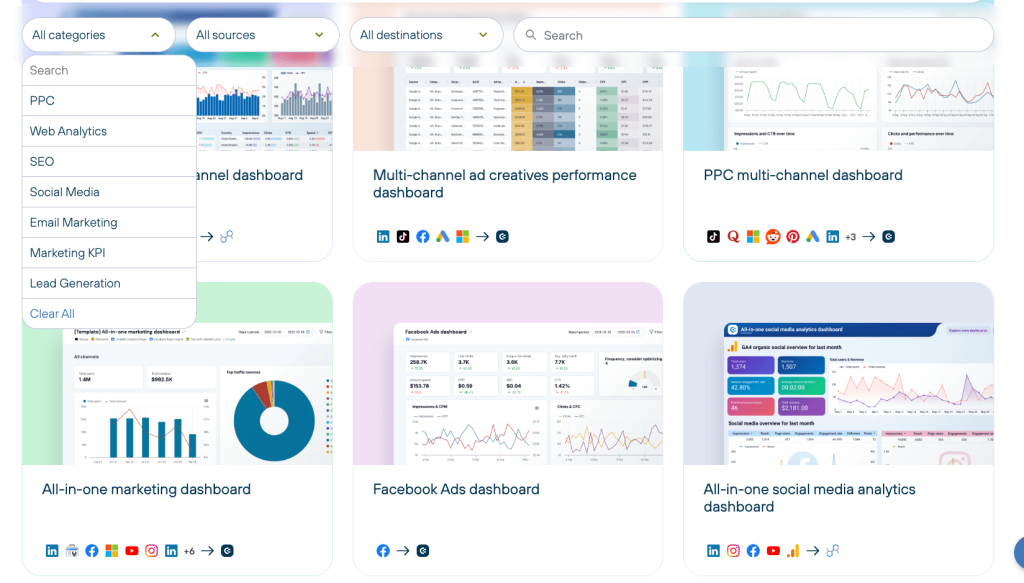
You connect your accounts, and the dashboard is ready to use in Data Studio, Power BI, Tableau, or Google Sheets. Follow-up questions go to an AI tool, or to the BI tool’s own assistant if it has one. Either way they work from the same refreshed data, so the numbers match what’s on the dashboard.
Read why BI and AI should share one data flow, and what goes wrong for agencies when dashboards and AI tools run on separate pipelines.
Teams haven’t decided who’s responsible for AI analysis
The people adopting AI analytics fastest are rarely the ones trained in data. As the role data showed, C-level users and business owners run well ahead of data analysts, and most small teams don’t have an analyst at all.
The questions now come from people who know the business well but haven’t worked with metric definitions or attribution settings. In our survey of business leaders, the same concerns came up:
- 21% named overreliance on AI as the biggest mistake
- 17% pointed to weak oversight and training
- 11% said teams treat AI as a replacement for human decisions
Software teams solved a similar problem with code review. AI analytics rarely has an equivalent step, as our Product Director Olexander Paladiy put it in his piece on analysts and AI doubt:
“A bad pull request gets caught in review. A bad number in a board deck becomes a decision, and that decision moves through a business long before anyone traces it back to a hallucinated total.”
My view is that the fix is ownership, not technical training. Two decisions cover most of it:
- Name one owner for the data setup: the person who keeps definitions and context current, even if it only takes a few hours a month.
- Agree on what gets a second look: for example, any number that goes to a client or into a budget decision is checked by someone other than the person who asked.
Coupler.io helps that owner’s work reach the whole team. Pre-built Skills carry an analyst’s method: a marketer running the weekly ad review follows the same steps and checks an expert would. For larger setups, agencies on a custom plan also get a dedicated agency partner who handles migration and heavier configuration.
All of that assumes a team. Self-employed operators, who lead adoption in our data, work alone. The substitute for a reviewer is a rule you set once: every number that reaches a client gets checked against your dashboard first.
What to expect from AI analytics in the near future
Based on the trends above and what we heard at this year’s events, here’s where I think AI analytics for agencies and SMBs is heading.
1. Agents take over more of the pipeline
More than a third of teams already ask AI to create, change, or run data pipelines. In 2027, I expect agents to handle most routine setup and maintenance, with people reviewing the result. Oversight is still the open question: Gartner predicts that over 40% of agentic AI projects will be canceled by the end of 2027, with inadequate risk controls among the reasons.
I asked John Su, Forward Deployed Engineer at PostHog, which agentic setups he expects to last:
“The projects that survive will use LLMs for the fuzzy work, like interpreting ambiguous questions or summarising messy inputs, and keep deterministic logic wherever the output needs to be consistent every time.”
2. Multi-source questions become the default
Half of AI adopters already connect two or more sources. Next, I expect teams to ask one question across all of them, such as how ad spend relates to store revenue and CRM deals. Attribution is the likely first win: in our 2025 survey, only 15% of marketers said AI helps them see which channels drive conversions.
3. The small-team lead grows
Self-employed pros and small teams already use AI analytics more often than companies with 500+ employees. With lower setup effort and fewer approval layers, I expect that gap to widen. At Superweek 2026, Doug Hall argued that an agency’s structure shapes how fast it moves, and puts the sweet spot at around 25 people. Our data points the same way.
Team size is only part of the picture. Su expects the bigger change in what one role can cover:
“AI has removed the ceiling on what a single person can deliver, so the most valuable people in 2027 will be individual contributors who work across data, strategy and execution and connect the pieces.”
I expect shared Skills to replace the prompt folder on someone’s laptop. When the steps and checks are fixed, two people asking the same question get the same numbers, which matters most when the answer goes into a client report.
Where to start with AI analytics
If your team hasn’t connected its data to AI yet, three steps keep the first try small:
1. Start with a report you already run. Pick the one you build every week, like Google Ads performance for a client, and describe it to Coupler AI. It helps you set up the data flow and send it to Claude, ChatGPT, or both.
2. Add context before the first question. A few lines on what counts as a conversion, or what changed on the client’s side, prevent most wrong answers.
3. Make the recurring questions repeatable. Once the same question comes back every week, use a pre-built Skill so the method stays the same no matter who asks.
Then ask the question your client asks most often, and check the answer against the report you already trust.
Get AI answers and dashboards from one Coupler.io flow
Start for free