Why are companies moving to AI reporting?
Every business or startup founder knows the headache of manual reporting: hours spent building dashboards, waiting days or even weeks for insights, and decisions made reactively rather than proactively. Even data specialists can’t avoid it. In Alteryx’s 2025 survey of 1,400 data analysts, 76% said they still prepare data by hand in spreadsheets.
Consider the real-world impact at digital agency SellThru. Before using Coupler.io, they spent an hour every day manually mapping data across ad platforms and setting up client dashboards. By automating these workflows, they reclaimed 20+ hours per month, while also achieving 95%+ tracking reliability, all without sacrificing accuracy.
The competitive reality is harsh: Companies still relying on manual reporting are making strategic decisions with week-old data, while their AI-enabled competitors adjust as the numbers change. In McKinsey’s 2026 State of AI survey, half of respondents say AI helps them make better decisions. Over the long term, McKinsey sizes the productivity potential of AI across corporate use cases at $4.4 trillion.
Companies aren’t just moving toward AI reporting because it’s innovative. They’re adopting it because the cost of not adopting it – lost opportunities, delayed insights, and competitive disadvantage – far exceeds the investment required to implement it.
What is AI reporting?
AI reporting is the next evolution in how businesses handle data. It moves beyond dashboards and spreadsheets to systems that think, learn, and respond. At its core, AI reporting uses AI technologies like machine learning, natural language processing, and predictive analytics to turn raw data into timely, decision-ready insights.
These core technologies are what set AI reporting apart from traditional or even automated tools.
Machine learning algorithms continuously analyze patterns across large datasets to identify trends, forecast outcomes with increasing accuracy. Unlike static reports that show what happened, ML models predict what’s likely to happen next and suggest optimal actions.
Natural Language Processing (NLP) allows users to interact with data conversationally. Instead of learning SQL or navigating complex dashboards, teams can ask questions like “Which campaign had the highest ROAS last quarter?” or “Show me customers at risk of churning,” and receive clear, contextual answers. No SQL or technical expertise is required.
Meanwhile, predictive analytics goes beyond historical reporting to anticipate future results based on pattern recognition. This means sales teams can identify slowing pipeline velocity before deals stall, marketers can spot campaign fatigue before budgets are wasted, and finance teams can forecast cash flow with unprecedented accuracy.
To understand where AI for reporting fits in, take a look at how reporting has evolved. It started with manual processes like exporting CSVs, updating spreadsheets, and chasing down numbers across tools. Then came automation, which brought efficiency through scheduled reports and data connectors, but still relied on traditional business intelligence tools with static dashboards and predefined KPIs. Now, with AI-powered reporting, we’re seeing a shift toward systems that are not only faster but also smarter. These tools can surface hidden insights, proactively alert users to changes, and guide day-to-day decision-making.
The evolution of reporting: manual => automated => AI-powered
| MANUAL ERA (2000-2010) | AUTOMATION ERA (2010-2020) | AI-POWERED ERA (2020-Present) |
| – CSV exports and spreadsheet updates – Hours of copy-pasting data – High error rates, delayed insights – Analyst-dependent workflows | – Scheduled reports and data connectors – Static dashboards with predefined KPIs – Reduced manual work but limited flexibility – Still reactive, not predictive | – Conversational data interaction – Predictive and prescriptive insights – Self-improving accuracy – Proactive alerts and recommendations |
The business impact is transformative. Where traditional reporting tells you what happened after the fact, AI reporting helps you understand what’s happening now and guides what you should do next. It’s the difference between driving while looking in the rearview mirror versus having a GPS that warns you about traffic ahead and suggests the fastest alternate route.
Why it’s not just “fancy automation”: Automation executes predefined tasks efficiently. AI adapts and learns. When your conversion rates drop, automation will dutifully report the decline. AI will identify the root cause, predict the impact on monthly targets, and recommend specific actions to recover performance. That’s the fundamental difference – automation runs the playbook, AI rewrites it.
AI reporting vs traditional reporting
To better understand the difference between these two, let’s take a look at a simple scenario.
Imagine two e-commerce companies experiencing the same critical business crisis.
Company A relies on traditional reporting. Their revenue suddenly drops 15% week-over-week – a devastating decline for any growing business. The marketing manager notices the drop in their Monday morning dashboard review and immediately starts investigating. She spends the next two days manually pulling data from Shopify analytics, Google Analytics, Facebook Ads Manager, and their email marketing platform.
Each data export requires careful formatting, cross-referencing timestamps, and checking for inconsistencies. The analyst builds pivot tables, creates correlation charts, and runs multiple hypothesis tests. Finally, after 48 hours of detective work, they discover the culprit: a checkout page bug introduced during last week’s website update that’s causing 35% of mobile users to abandon their purchases.
By the time they identify and fix the issue, $47,000 in sales have been lost, and dozens of frustrated customers have likely switched to competitors. The damage extends beyond immediate revenue – customer trust is shaken, and recovery will take weeks.
Company B uses Coupler AI for reporting. Its Shopify, Google Analytics, and Facebook Ads data refreshes on a schedule. When the marketing manager spots the same 15% drop on Monday morning, she asks Coupler AI what’s causing it.
For example, to a question like “What’s causing our revenue drop?” the AI responds: “Revenue decline correlates 94% with mobile checkout abandonment spike starting July 18th, 2:30 PM – coinciding with website deployment. Mobile users experiencing 23-second load delay at payment step. Recommend immediate rollback of checkout module update.”
The technical team implements the fix within 4 hours of the initial alert. Result: $42,300 in potential sales recovered, customer experience preserved, and competitive advantage maintained through rapid response.
The impact difference: $47,000 lost versus $4,700 lost. Recovery time: 48 hours versus 4 hours. Customer trust: damaged versus preserved.
This is the difference in speed, clarity, and impact.
Traditional reporting delivers a post-mortem while AI for reporting delivers a diagnosis and a treatment, before the problem escalates. With traditional tools, you’re reacting. With AI, you’re responding while there’s still time to act.
Accuracy is another gap. In the traditional setup, reports are vulnerable to broken formulas, missed rows, and misaligned filters. A small error can throw off the entire forecast. The same shift is happening in QA, where automated test reporting turns raw test runs into summaries teams can act on without digging through logs. AI systems, by contrast, apply the same logic every time, detect anomalies automatically, and even warn you when something doesn’t look right, without needing to be told.
And let’s talk accessibility. Traditional reporting is still largely the domain of analysts and spreadsheet pros. Business leaders often wait for reports or struggle to interpret dashboards. AI reporting levels the playing field: anyone on the team can ask questions in natural language and get clear, visual answers.
In short, traditional reporting tells you what happened after the fact. AI for reporting and analytics helps you understand what’s happening now and what you should do next.
| Criteria | Traditional reporting | AI reporting |
|---|---|---|
| Data collection | Manual exports, copy-pasting, error-prone pipelines | Automated, continuous sync from multiple data sources |
| Time & Cost efficiency | Hours or days to prepare reports; requires analyst involvement | Instant insights; significant time and labor cost reduction |
| Report creation | Static dashboards, limited flexibility, requires technical skills | Conversational queries, dynamic reports, accessible to all teams |
| Accuracy | High risk of human error, outdated formulas | Consistent logic, anomaly detection, and self-improving models |
| Data freshness | Delayed snapshots; periodic refreshes | Live data streams, real-time alerts and updates |
| Scalability | Time-consuming to replicate or customize reports | Easily scales across teams, departments, and use cases |
| Insight delivery | Descriptive (what happened) | Predictive and prescriptive (what’s likely to happen + suggestions) |
| User experience | Analyst-dependent, limited access for non-technical users | Natural language queries, intuitive interface |

Fable Food's employees stopped waiting on a single person for answers
A global mushroom-ingredient manufacturer used Coupler.io to consolidate six source systems into BigQuery, then connected an internal AI agent to answer questions in Slack. Wait times for basic operational questions dropped from up to 24 hours to about a minute, and every employee can now query the data directly.
Read the case studyAI for reporting and analytics: How does it impact your business?
For most companies, reporting isn’t just about tracking metrics; it’s about making sense of performance fast enough to act on it. But that’s hard to do when reporting depends on spreadsheets, manual exports, and delayed dashboards.
This is where AI transforms everything:
1. Automated report generation
In traditional workflows, teams spend hours every week compiling reports. AI eliminates that. Using an AI report generator, reports are automatically created based on pre-configured templates, always up to date, and ready to share. More importantly, AI can tailor these reports to exactly what your team needs, whether it’s a weekly marketing recap, a pipeline health overview, or a churn risk alert. These AI-generated reports don’t just summarize; they highlight trends and recommend next actions. For agencies managing multiple accounts, AI client reports take this further, combining cross-platform data with AI-drafted narratives in a reusable workflow.
2. Automated data sync and monitoring
When AI works with regularly refreshed data, you’re no longer looking at outdated snapshots. Advanced data processing allows AI tools to monitor performance continuously and surface insight. If something starts trending in the wrong direction, like a sudden drop in revenue or spike in support tickets, you get notified instantly, and you can ask follow-up questions without digging into a dashboard.
3. Predictive and prescriptive analytics
One of the most valuable shifts AI brings is forward-looking insight. Instead of just reporting on past performance, AI tools can forecast trends across various timeframes and suggest actions based on pattern recognition.
This is where Coupler AI helps most. Once your business data is connected through Coupler.io, you can ask complex business questions inside Coupler.io or in Claude, ChatGPT, and other AI tools, and get data-backed answers:
"Which products will likely exceed Q3 targets based on current velocity?"
"Show me customers at highest churn risk and recommended retention strategies."
"What budget adjustments will optimize our ROAS for the next 30 days?"
This is real prescriptive analytics in action: you ask strategic questions, AI handles the data analysis, delivers the insight, and even suggests what to do next.
4. Anomaly detection and error prevention
AI doesn’t need you to manually scan for outliers. It constantly looks for patterns and breaks in those patterns. If there’s an unexpected drop in website traffic, a misfire in your ad campaigns, or a data integrity issue in your CRM export, the system alerts you and often explains the root cause. Issues that previously went undetected for days or weeks are now caught within minutes.
Examples of AI-powered anomaly detection:
"Why did conversion rates drop suddenly last week?"
"List anomalies in ad performance across platforms this month."
With Coupler AI, you can ask for a specific diagnosis of a performance issue and get the likely root cause along with prioritized next steps, based on your up-to-date data.
5. Improved data quality and consistency
Juggling complex datasets across tools like CRMs, ad platforms, and financial apps is prone to error. AI reporting platforms like Coupler.io standardize and clean data automatically, ensuring reliable, consistent metrics across teams. You can also ask Coupler AI to combine sources and check the result for inconsistencies:
"Clean and consolidate campaign performance data from Google Ads and Facebook Ads into one table."
"Highlight inconsistent values in revenue reporting for Q1."
No more wondering if you’re all looking at the same numbers. AI ensures cross-department alignment from the ground up.
6. Increased speed, reduced cost
The compounding effect of faster reports, smarter insights, and fewer errors results in a major productivity gain. AI reporting software democratizes access to valuable insights, reduces analyst workload, and allows decision-makers to act immediately.
Simply ask AI:
"Summarize this week's key business insights for the leadership team in bullet points."
"Create a financial report with visualizations for revenue, expenses, and profit margins YTD."
With Coupler AI, what used to take days of work becomes a short conversation with your data. Coupler.io also helps you cut AI usage costs by preparing and calculating the data before the AI tool sees it, so you spend fewer tokens per query.
AI reporting tools that are changing the game
In the AI reporting space, not all tools are built the same. Some focus on advanced visualizations, others on embedded analytics, and a few, like Coupler.io, prioritize natural language interaction and cross-platform flexibility. Here’s a breakdown of the top AI reporting tools in 2026, what makes each unique, and how they actually work under the hood.
1. Coupler.io
How it works:
Coupler.io is a data integration and AI analytics platform that connects to 400+ sources, including CRMs, ad platforms, financial tools, databases, and spreadsheets. With Coupler AI, you describe the data you need and what you want to learn from it. Coupler AI then sets up the connection, keeps the data refreshed, and answers your questions inside Coupler.io or in your AI tool.
The approach:
Take a request like:
“Connect our Google Ads and Meta Ads accounts, pull spend and conversion data, and compare the two channels.”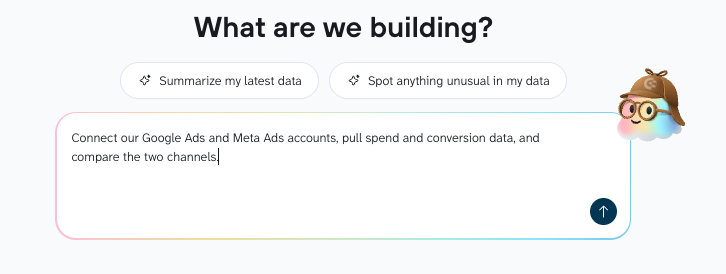
Coupler AI guides you through the next steps:
1. Connect your accounts and pick a starting point: Sign in to Google Ads and Meta Ads and approve access when prompted, a one-time step. If Coupler.io has a ready-made template for your request, such as one for comparing these two channels, Coupler AI builds on it.
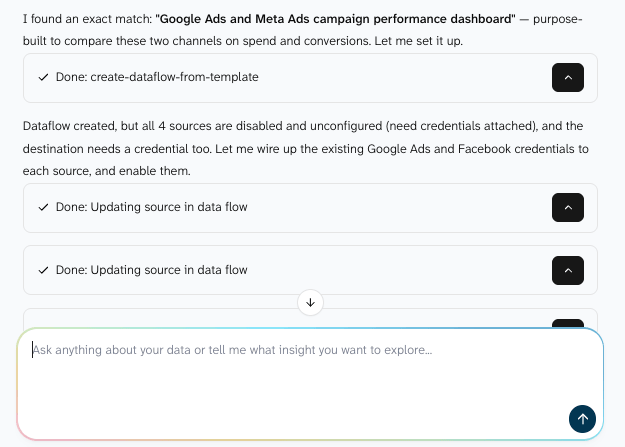
2. Refine your data for the report: In the same conversation, you can leave out campaigns you don’t need, merge both channels into one table, add a calculated column like cost per conversion, or have it draft metric definitions for you to review. Nothing runs until you confirm.
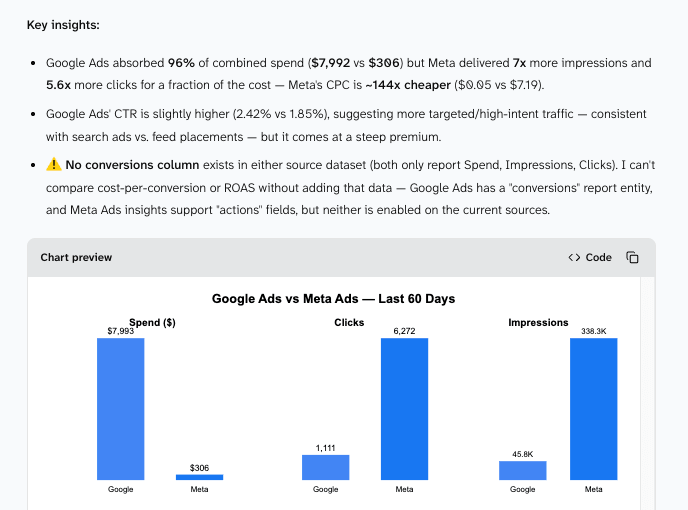
3. Get a detailed analysis and recommendations: Coupler.io performs the calculation against your data, and the AI explains the result. From there, you can drill into a single campaign or a shorter time period, in Coupler.io or in Claude, ChatGPT, and other AI tools. The data refreshes on the schedule you set (daily, weekly, etc) so you always work with updated figures.
Pricing: Free plan available. Paid plans start at $24/month billed annually, with a 7-day free trial.
Great for: Marketing agencies, SaaS startups, small businesses, non-technical users
Standout feature: AI analysis in multiple destinations that draws fresh, verified business data across 400+ sources
2. Microsoft Power BI + Copilot
How it works:
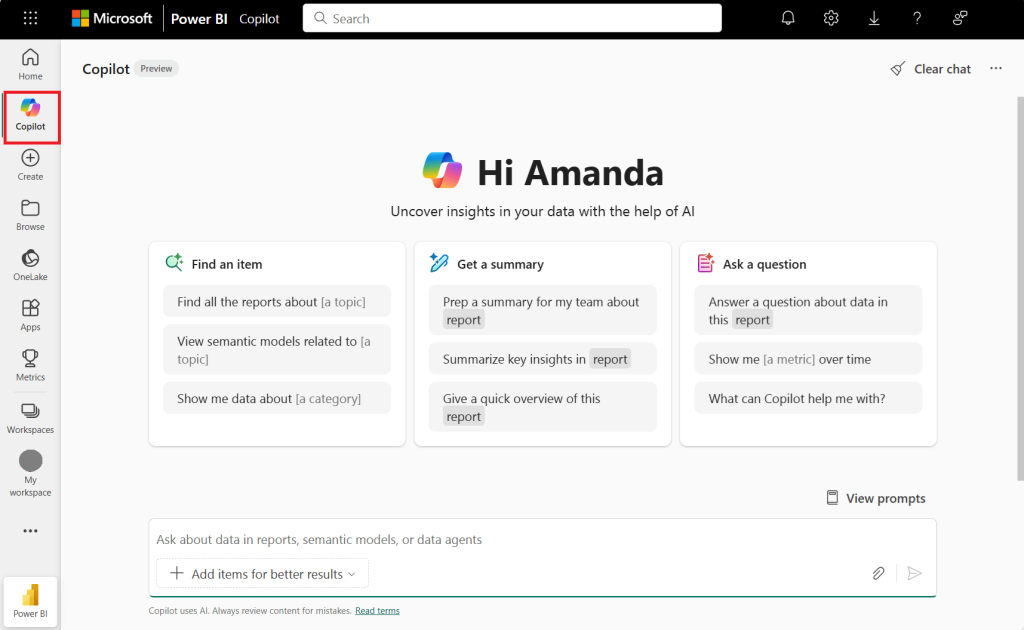
Power BI integrates with the Microsoft ecosystem, including Excel, SQL Server, Dynamics, and Azure, allowing users to build detailed, interactive dashboards using drag-and-drop tools and DAX formulas. With Copilot, users can now ask questions in natural language and receive summaries, visuals, or full reports generated from their datasets.
The approach:
Copilot enhances traditional BI workflows by simplfying report creation and enabling conversational exploration of data. It doesn’t replace dashboards—it supercharges them with AI assistance, making it easier for non-technical users to uncover insights faster.
Pricing starts:
From $14/month (Power BI Pro); Copilot requires a paid Fabric capacity (F2 or higher) or Power BI Premium (P1 or higher). A Pro license alone isn’t enough.
Great for: Companies already using Microsoft 365 or Azure
Standout feature: AI-powered summaries and visual generation inside the familiar Power BI interface
3. Tableau + Tableau Agent
How it works:
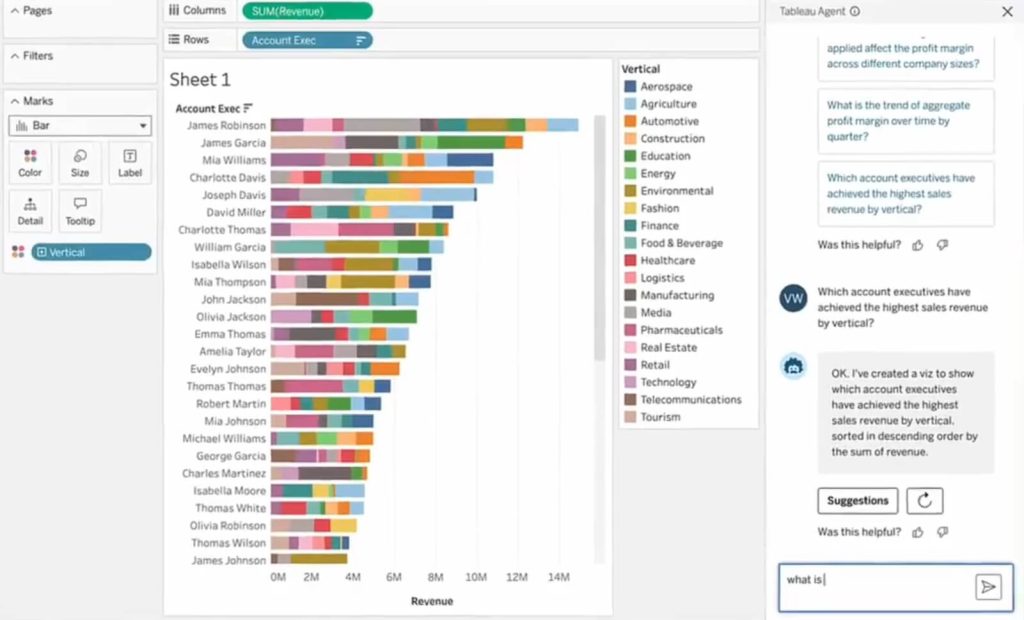
Tableau is a visual-first BI tool that connects to multiple data sources (both cloud and on-premise). Dashboards are built using intuitive drag-and-drop tools, with deep customization available through calculated fields and filters. The new Tableau Agent introduces an AI assistant that interprets natural language inputs—so instead of clicking through filters, you can simply ask, “Show me monthly revenue trends for Q1.”
The approach:
The AI translates your request into underlying queries, finds the relevant data, and returns visual insights right inside Tableau. While it doesn’t remove the dashboard layer entirely, it makes exploring and interacting with data far more intuitive.
Pricing starts:
Tableau Cloud starts at $75 per user per month (Creator, Standard edition, billed annually). Tableau Agent is included only in Tableau Cloud+ and the Tableau+ bundle, which are priced through sales.
Great for: Data teams focused on visual storytelling
Standout feature: Combines best-in-class visualization with voice/text AI interaction
4. Data Studio + Gemini
How it works:
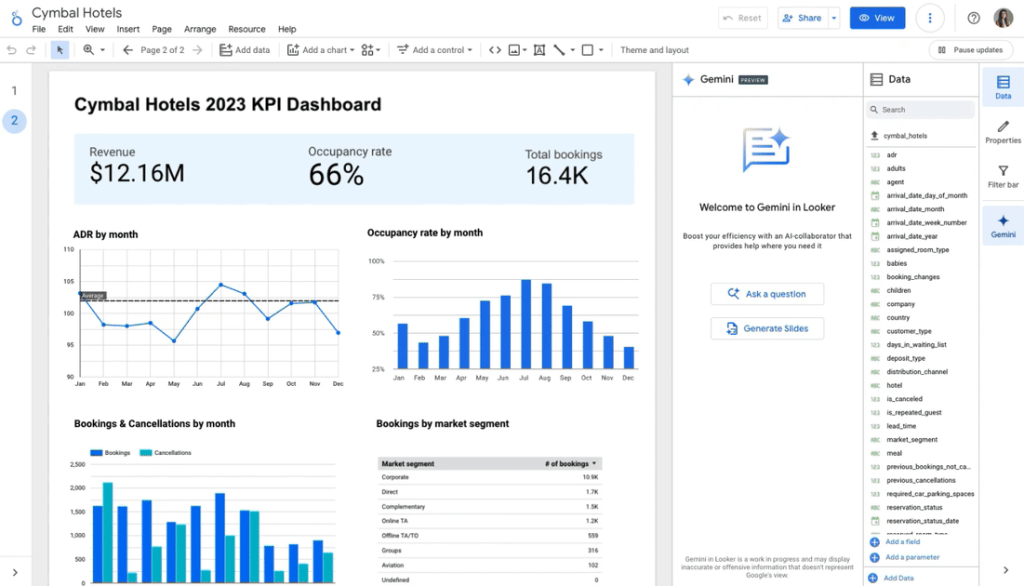
Data Studio (formerly Looker Studio) is Google’s free reporting tool. It connects directly to Google Ads, Google Analytics, BigQuery, and Google Sheets, plus more than 1,400 community connectors. You build interactive reports and dashboards with drag-and-drop and share them like any Google file.
The approach:
Google offers two kinds of AI help here:
- Gemini in Data Studio: create calculated fields by describing them in plain language, and add report charts to Google Slides with generated summaries.
- Conversational Analytics: ask questions in plain language and get answers with charts. Data teams can set up data agents in BigQuery, add context and instructions, and share them so business users get consistent answers. In the current version, questions run against BigQuery data agents, so your data needs to be in BigQuery first.
Pricing starts:
Data Studio is free. Data Studio Pro starts at $9 per user per project per month. Gemini in Data Studio requires Pro, and its features are currently in Preview at no extra cost.
Great for: Teams that work mostly with Google data and want free, shareable reports
Standout feature: Free reporting with natural-language questions on BigQuery data
5. Zoho Analytics + Zia AI
How it works:
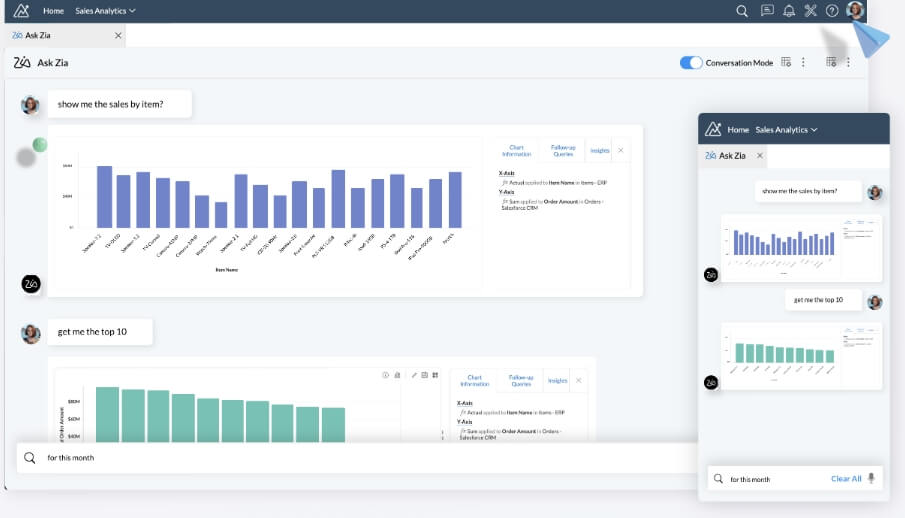
Zoho Analytics connects to over 50 data sources like spreadsheets, cloud services, and tools. Once your data is imported, the platform automatically structures and cleans it. Zia, the built-in AI assistant, lets users ask questions in natural language (“Who are our top 5 customers by revenue?” or “Predict sales for next quarter”) and delivers answers instantly.
The approach:
Zia not only answers direct questions but also runs background analysis to uncover trends, anomalies, and suggestions. It can recommend visualizations, highlight outliers, and help teams perform what-if scenarios without complex setup.
Pricing: from €30/month
Great for: SMBs and early-stage SaaS teams
Standout feature: AI assistant that proactively finds insights and builds visualizations
Each of these tools represents a different approach to AI-powered reporting:
- Choose Coupler.io if:
You want to set up your data and ask questions about it in plain language, without code. A good fit for non-technical teams that need answers from data spread across several tools. - Choose Power BI if:
You’re already embedded in the Microsoft ecosystem and want a familiar interface enhanced with AI-powered summaries and visuals through Copilot. - Choose Tableau if:
Your team is focused on visual storytelling and prefers drag-and-drop dashboards, but wants to make interactions smarter with voice/text AI inputs via Tableau Agent. - Choose Data Studio if:
Your data lives mainly in Google tools and you want free, shareable reports, with conversational questions available once your data is in BigQuery. - Choose Zoho Analytics if:
You’re an SMB or early-stage SaaS company looking for a cost-effective way to get proactive, AI-driven insights and visualizations without deep technical expertise.
Real use cases: How teams use AI reporting
AI reporting can be used by every team in your company. Anyone from marketing to the financial department can benefit from timely, accurate insights. Here’s how AI reporting can help each department:
Marketing
Modern marketing requires immediate insights, not yesterday’s data. For example, Coupler.io PPC multi-channel dashboard consolidates your campaigns across multiple advertising platforms, such as Google Ads, LinkedIn Ads, Twitter Ads, and more, into a single, actionable view.
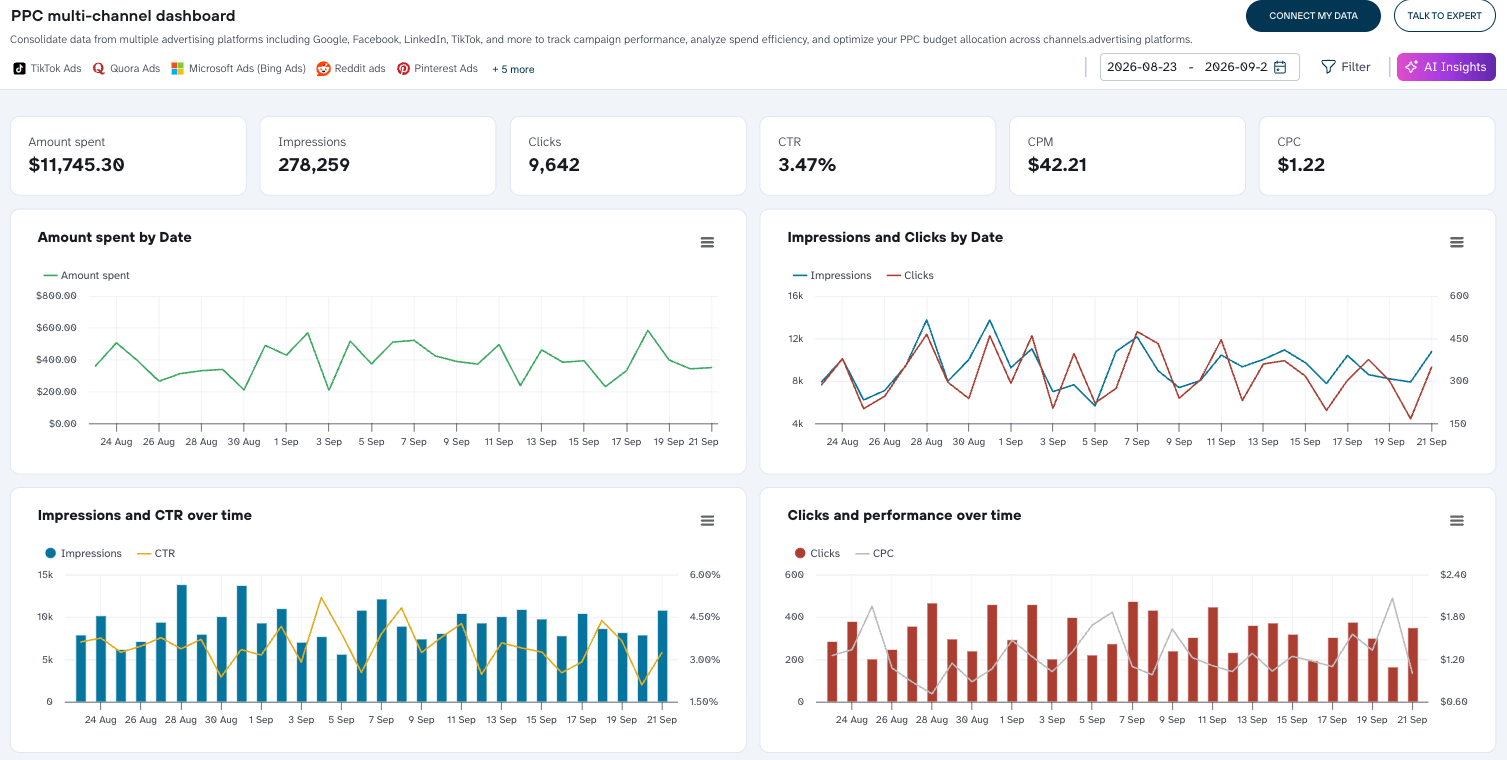
Here’s how marketing teams leverage this Coupler.io dashboard:
- Instant performance tracking:
Quickly view critical campaign performance metrics such as CTR, CPC, and CPM. The dashboard clearly shows you where budgets are spent, helping you optimize campaign investments. - Cross-channel optimization:
Using the “Amount Spent by Date and Source” chart, marketers immediately see budget allocation by ad platforms (e.g., Google Ads vs. LinkedIn Ads). This helps reallocate spend from underperforming platforms toward high-ROI channels. For a deeper look at how this plays out with Meta Ads specifically, see our Coupler.io vs Meta Ads MCP comparison. - Follow-up questions with Coupler AI: Ask about the same campaign data to decide where budget should go next. For example:
“Which Google Ads campaigns have lower ROAS than our Bing Ads campaigns this month?"
“Which LinkedIn campaigns beat Facebook and Instagram on CTR and CPC?”
“Which TikTok video ads have the lowest engagement, and how much did they spend?”
Sales
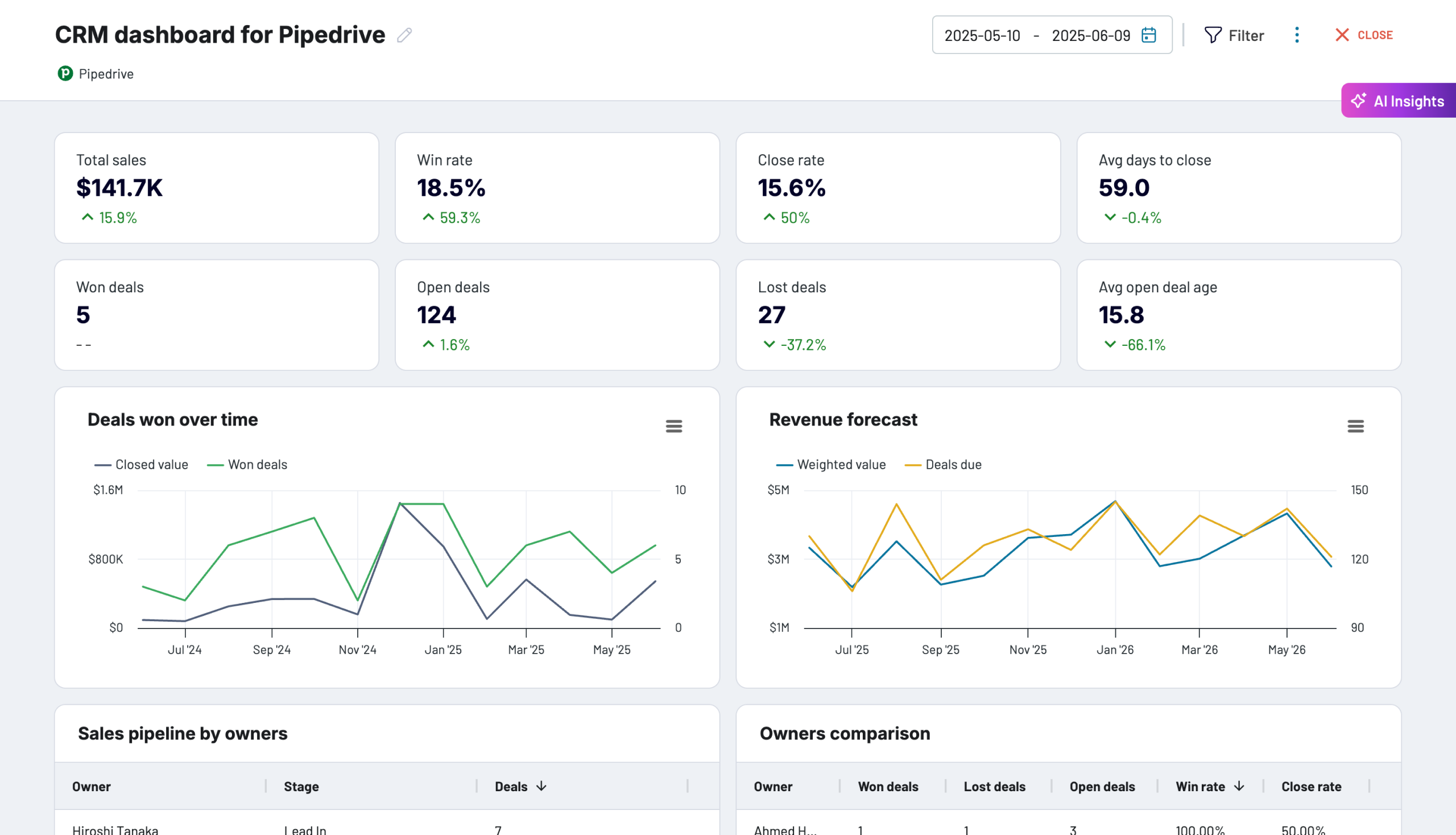
In sales, speed and accuracy of insights directly impact revenue. For example, if you want to gain immediate visibility into pipeline health, deal velocity, and individual performance, you can use the Coupler.io Pipedrive CRM dashboard.
What can you uncover?
- Revenue forecasting and pipeline health:
Instantly see weighted pipeline value and upcoming deal closures with the revenue forecast feature, allowing managers to better plan resources and accurately predict revenue. - Performance monitoring:
Quickly compare sales reps by deal status (won, lost, open), identifying star performers and those who may need extra support or coaching. - Deal questions for Coupler AI: Ask where the pipeline is stuck. For example:
“Is our average time to close rising above normal levels?”
“Which reps have a high ratio of lost to won deals this quarter?”
“Which high-value open deals need attention this month?”
Finance
For finance teams, clarity, accuracy, and agility are critical. But gathering and analyzing financial data often means juggling spreadsheets, disconnected tools, and delayed insights. Coupler AI changes that. Finance teams can ask questions about refreshed data from their accounting tools and get answers in minutes.
Here’s how finance teams can use Coupler AI in practice:
- Instant profitability checks and trend breakdowns
Instead of generating static reports manually, finance leaders can simply prompt their AI assistant with:
“What’s our month-over-month operating margin trend?” or “Compare revenue vs. expenses for Q1 vs. Q2.”
The AI pulls the numbers, highlights trends, and explains significant variances, so weeks of analysis fit into a short conversation.
- Cash flow monitoring and forecasting
Rather than waiting for accounting teams to prepare reports, managers can ask:
“What are our projected cash flow levels for the next 3 months?” or
“Which expense categories have increased the most in the last quarter?”
Coupler AI works with data from QuickBooks, Xero, and other accounting tools and adds forward-looking commentary to help leaders stay ahead of liquidity challenges.
- Balance sheet health and risk detection
Finance professionals can dig deeper with natural prompts like:
“Are there any red flags on our balance sheet this month?” or “Summarize key shifts in liabilities and receivables.”
It looks for irregularities and calls out areas of concern, supporting faster financial decisions.
With Coupler.io AI, finance teams go beyond dashboards. They engage with financial data conversationally, reducing delays, improving visibility, and empowering faster, data-driven decisions.
Customer success
For Customer Success teams, data is everything, whether it’s reducing churn, improving customer satisfaction, or driving deeper product adoption. Traditionally, CS managers rely on manual data pulls, complicated spreadsheets, or delayed reports from BI teams to understand customer health. Coupler AI changes that. CS managers can ask questions about refreshed data from support, NPS, and product usage tools, and get answers without waiting on a BI request.
Here’s what thaqt looks like in practice:
- Instant health checks and churn prediction
Instead of manually gathering data from support tickets, NPS scores, and usage analytics, CS managers can simply ask their AI assistant:
"Which customers have reduced usage significantly this month?"
"Show me the top reasons for churn risk right now."
The answers are based on actual usage data, so teams can act before customers leave.
- Rapid NPS reporting and actionable insights
Analyzing NPS results manually often means delayed action and missed opportunities. CS teams can also get NPS summaries quickly. A prompt as simple as:
"What's driving this month's NPS decline and how can we address it?" yields actionable insights—listing specific problems customers face and suggested solutions, ready to be shared with product, sales, or support teams immediately.
- Creating shareable insights for cross-team alignment
CS leaders often struggle to effectively share data insights across teams. Coupler AI can turn the same data into a summary that’s ready to share:
"Generate a summary table showing churned accounts and their reasons this quarter."
This simple prompt transforms complex data into an instantly shareable report, promoting team alignment and quicker actions.
Getting started: Your path to AI for reporting
Bringing AI reporting into your business might feel like a big leap, but the reality is much simpler. You don’t have to restructure your entire organization, and you don’t need an army of data scientists. Getting started with AI reporting is straightforward and achievable for teams of any size.
1. Set clear objectives
First, define what you hope to achieve. Whether your goal is quicker insights, faster decision-making, or reduced manual effort, clearly outlining your objectives makes measuring success straightforward.
Next, connect your existing data sources, such as CRMs, advertising platforms, financial software, or product analytics tools, to an AI-ready platform. This integration should be simple, requiring minimal technical setup or IT involvement.
Take inventory of your current reporting pain points. Are teams waiting too long for insights? Are decisions delayed because data isn’t readily available? Are different teams working with conflicting numbers? These challenges become your implementation priorities.
2. Start with one report
Pick the recurring report that takes the most time today, such as the weekly marketing recap or the monthly pipeline review, and connect only the sources it needs. Before you rely on AI for it, ask questions you already know the answers to and compare the figures with your current report. Once they match, move on to the next report. With Coupler.io, adding a source later is one more request in the same conversation, so you can grow the setup at your own pace.
3. Measure your success
Finally, establish clear metrics to measure your AI reporting ROI. Track meaningful indicators like:
- Time savings: Reduction in hours spent on report preparation and data gathering
- Decision velocity: How quickly teams can move from question to action
- Data consistency: Elimination of conflicting metrics across departments
- Insight discovery: New patterns and opportunities uncovered through AI analysis
Implementing AI reporting it’s about simplicity and clarity. By connecting your data, choosing an accessible AI tool, and setting clear goals, your business can quickly transform data into faster, data-driven decisions. Platforms like Coupler.io are built specifically for this, ensuring your first step into AI reporting is not just easy, but impactful from day one.

Integrate your data with AI using Coupler.io
Get started for free