Exporting data out of the Datadog observability platform shouldn’t be a chore. CSV downloads, brittle scripts, and manual exports are slow, error‑prone, and the opposite of DevOps automation. What if you could set up a scheduled export without writing code, and always have your Datadog data waiting in Google Sheets, BigQuery, or even ChatGPT?
That’s exactly what Coupler.io makes possible. Check out the automated method and compare it with alternatives to choose the best way to export Datadog data on a schedule.
Automate Datadog export data with Coupler.io
Coupler.io is a no‑code data integration and AI analytics platform that connects over 400 sources to spreadsheets, BI tools, data warehouses, and AI platforms like ChatGPT. It allows you to export data from Datadog on a schedule to your favourite tool without writing a single line of code.
Step 1. Connect your Datadog account and configure the data to export
To get started, create a new data flow in Coupler.io with Datadog as the source. You can try it out right away for free using the preset form below. Just select the needed destination from the drop-down and click Proceed.
You’ll be prompted to sign in (free tier available) and provide your Datadog API key, application key, and site URL, which is typically datadoghq.com, or its regional variant. Coupler.io provides step-by-step instructions during setup to help you locate and enter these credentials correctly.
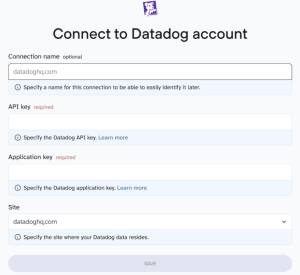
This step gives Coupler.io secure access to your Datadog account without exposing sensitive credentials in scripts. Once connected, Coupler.io shows you a list of supported data entities like users, logs, metrics, incidents, dashboards, and monitors. Select the data entity that fits your use case, then configure the advanced settings to refine what gets exported.
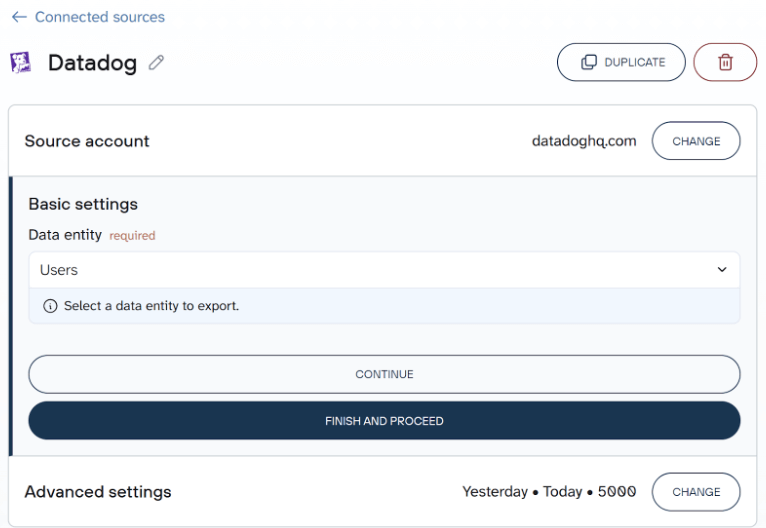
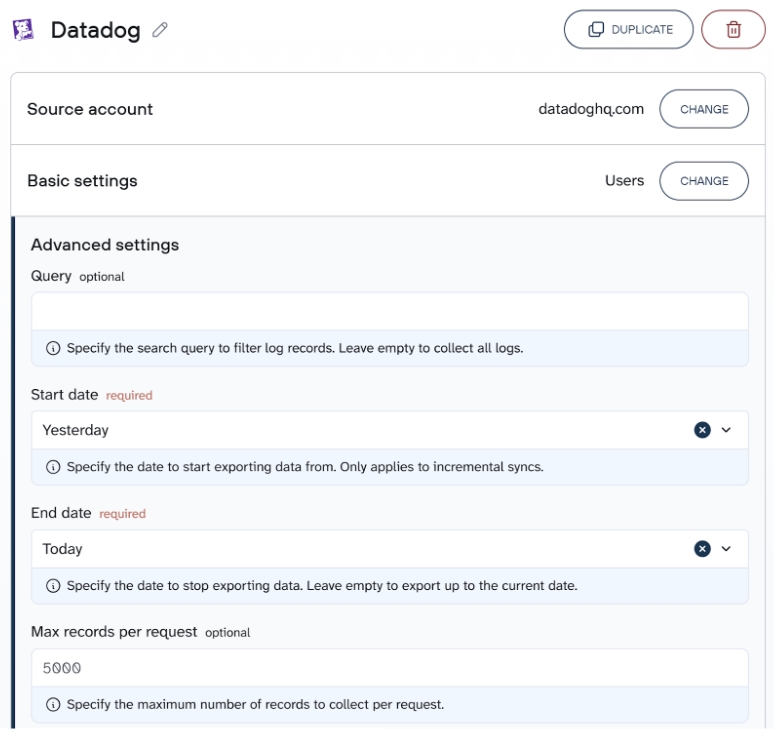
You can:
- Filter logs using a search query
- Define a time range (start and end date)
- Set a max records cap for each request
This lets you extract exactly the data you need, without unnecessary bloat.
Step 2. Organize your dataset for analysis (Optional)
Raw observability data often contains noise or overly detailed fields. Coupler.io lets you clean and shape the dataset before export. Use built-in transformations to:
- Rename or reorder columns
- Filter by status (e.g., exclude debug-level logs)
- Aggregate records (e.g., average CPU by host)
- Calculate fields (e.g., error rate = errors ÷ requests)
You can also join Datadog data with related sources like Salesforce (for customer impact analysis), Jira (to connect incidents with engineering activity), or spreadsheet-based logs to enrich your observability data. These transformations make your logs, metrics, and dashboards more usable downstream.
Step 3. Export and schedule automated refresh
Choose your destination where to export data from Datadog, such as Google Sheets, Excel, Looker Studio, Power BI, BigQuery, and more. Follow the in-app instructions to complete the setup of the Datadog connector. Then set your preferred refresh schedule to keep the exported Datadog data automatically up to date.
Coupler.io supports hourly, daily, or weekly exports across time zones.
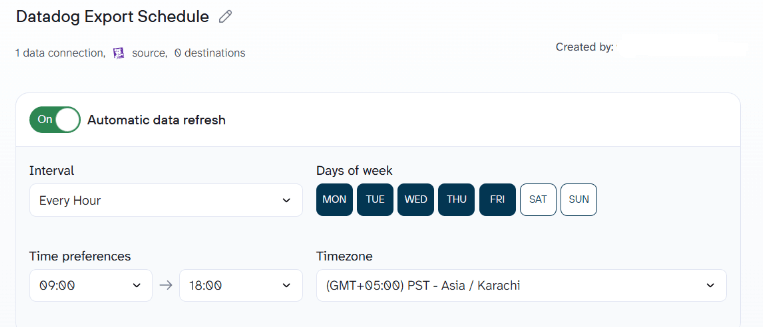
Coupler.io keeps your data pipelines reliable, whether you’re tracking infrastructure, analyzing logs, or feeding metrics into tools like ChatGPT.
Once saved, your dataset will update automatically without the need to write scripts or babysit API queries.
What data you can export from Datadog
Datadog offers a rich catalogue of observability entities. When using Coupler.io, you can choose any combination of the following:
- Logs – structured and unstructured log records for your services, infrastructure, and serverless functions.
- Metrics – time‑series measurements such as CPU usage, request counts, latency, and custom business metrics.
- APM spans – detailed traces and transaction data for application performance monitoring across services.
- Monitors & alerts – configurations of alert conditions (e.g., thresholds, queries) and their history.
- Events – high‑level notifications, deployments, releases, and incident records.
- Dashboards & SLOs – definitions of dashboards, widgets, and service‑level objectives.
- Security findings – vulnerability and misconfiguration data from Datadog’s security platform, including application security and cloud security signals.
- Integrations – metadata about which third‑party services (e.g., Apache, MySQL, Kubernetes) are connected and their status.
These datasets are supported via the Datadog API and are suitable for data observability, infrastructure monitoring, and compliance.
Where you can export Datadog data
Coupler.io lets you choose from a broad range of destinations. Common categories include:
- Spreadsheets – Google Sheets and Excel for lightweight reporting.
- BI tools – Looker Studio, Tableau, Power BI for interactive visualizations and executive dashboards.
- Data warehouses – BigQuery, Snowflake, PostgreSQL, or Redshift for scalable storage and SQL analysis.
- AI tools – ChatGPT, Claude, Gemini, Perplexity, Cursor, and other assistants that can interpret structured data with natural‑language prompts.
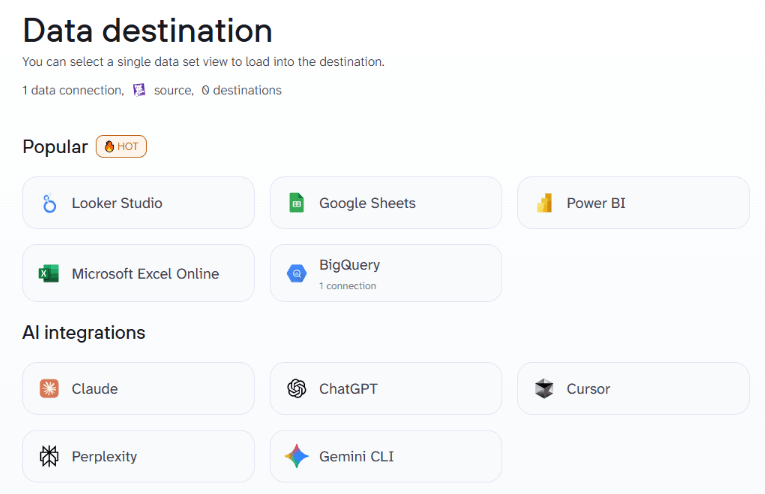
No matter which destination you pick, Coupler.io handles the export and refresh logic so your analyses remain live.
AI-powered analytics with your Datadog data
Once your Datadog exports are flowing into tools like Google Sheets or BigQuery, you can unlock even deeper insights with Coupler.io’s AI features.
Use Coupler.io’s built-in AI Agent to ask natural-language questions about your Datadog data flows, like “Which monitors have triggered the most incidents this month?” or “Summarize CPU usage trends across hosts.” The AI Agent understands your data structure and surfaces insights instantly.
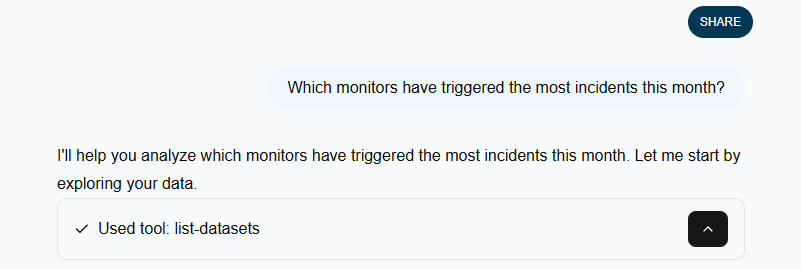
Prefer a custom workflow? Coupler.io AI integrations allow you to query your Datadog data in external AI tools like ChatGPT or Claude. Same logic but with access to visualization features and other capabilities available through AI assistants. With the conversational AI analytics, your team can go beyond raw logs and metrics to discover trends, patterns, and root causes, without writing a single SQL query.

Analyze Datadog data with AI
Try Coupler.io for freeKey challenges for Datadog users – and how Coupler.io solves them
Datadog’s native capabilities are powerful, but exporting data reliably can be tricky. Below are some common pain points along with how Coupler.io addresses them:
- Manual work and brittle scripts: Exporting logs and metrics manually, or maintaining in‑house Python scripts, is time‑consuming and prone to breakage. Coupler.io offers a low‑code workflow that eliminates manual exports and automatically retries failed runs.
- API limits and sampling: Datadog’s API enforces rate limits and sometimes returns sampled data. Coupler.io lets you specify date ranges, filter conditions, and incremental refreshes to stay within limits while still retrieving complete datasets.
- Multi‑source blending: DevOps teams often need to correlate Datadog data with deployment events, customer information, or cost data. Coupler.io’s transformation layer makes it easy to join Datadog datasets with other providers such as Salesforce, Stripe, Jira, or your own databases. This enables unified analysis without writing code.
- Scalability and performance: As your applications grow, data volumes soar. Coupler.io’s destination connectors handle large datasets by streaming to warehouses like BigQuery and Snowflake. You can schedule exports without impacting application performance.
- Cost management: Relying on third‑party ETL services or building your own pipelines can be expensive. Coupler.io’s transparent pricing and pay‑as‑you‑go model allow you to scale exports without surprise costs, and you can always monitor usage from your account.
These solutions make Coupler.io a practical choice for teams that want reliable, automated exports while still keeping control over data governance.
Automate Datadog exports with Coupler.io
Get started for freeOther ways to export data from Datadog
While Coupler.io offers the most streamlined solution for Datadog export data, some teams may explore other options based on specific technical requirements or workflows.
Manual CSV exports
Datadog’s UI lets you download CSV files from dashboards and monitors. This works for a one‑off analysis or to get a quick snapshot of logs or metrics. However, it’s limited to relatively small datasets and doesn’t scale to large logs, and there’s no scheduling. You’ll still have to clean the file and import it into your analysis tool.
API scripts and CLI
You can write Python scripts or use the Datadog CLI to pull logs, metrics, and other data via the REST API. This gives you full control, which entails that you can query time ranges, filter by tags, or call the logs and metrics endpoints. However, you must handle authentication, pagination, sampling, error handling, and storage yourself. For example, you might write a curl command to fetch logs, then store them in a database, then update your dashboard. It’s flexible but requires ongoing maintenance and DevOps expertise.
Datadog pipelines and providers
Datadog offers pipelines and third‑party connectors to send logs to services like Amazon S3, Kafka or Azure Event Hubs. These are useful for streaming data into long‑term storage or real‑time analytics, but they often require you to build a downstream ETL process and don’t include a user‑friendly transformation layer. Some pipelines are offered by external providers and may not support all entities. If you need to join data with CRM records or financial data, you’ll still need another tool.
ETL tools and open‑source alternatives
There are various ETL tools and open source frameworks, such as Airbyte or Singer, that can extract Datadog data and load it into a warehouse. They are flexible and cost‑effective, but you must self‑host them, manage connectors, update them when Datadog changes its API, and handle scaling. Commercial ETL platforms can be pricey and may lack the fine‑grained control you need for partial exports. For teams without dedicated data engineers, the maintenance burden can outweigh the benefits.
Coupler.io fills the gap between these options. It delivers a serverless, no‑code solution that’s easy to set up, supports 400+ integrations, and offers transformations and scheduling out of the box. For most use cases, from log management and security monitoring to cost analysis and SRE dashboards, it provides the quickest path from Datadog to insight.