
Summarize this blog post with:




There are many reasons to look for Skyvia alternatives. Some people might feel dissatisfied with Skyvia, while others need broader functionality or simply a more user-friendly interface and proper notifications.
In this article, you will find an overview of the best alternatives to Skyvia:
- A quick comparison table.
- Detailed exploration of the features.
- Connectors overview.
- Pricing details, and more.
Let’s get started!
What are Skyvia competitors
| Feature | Skyvia | Coupler.io | Integrate.io | Fivetran | Panoply | Workato | Rivery | Jitterbit |
| Starting price/month | $79 | $24 | $1,999 | Custom | $1,558 | Custom | $0.9 per credit (not monthly; usage-based) | Custom |
| Free trial | ✅ | ✅ | ✅ | ✅ | ✅ | ✅ | ✅ | ✅ |
| Total data sources | 200+ | 400+ | 150+ | 700+ | 80+ | 1,200+ | 200+ | 200+ |
| All data sources available in all plans | ✅ | ✅ | ✅ | ✅ | ✅ | N/A | ✅ | ⛔ |
| Data destinations | Databases Storages Cloud apps | BI tools Spreadsheets Databases JSON AI tools, etc. | Databases Cloud storage Cloud services Analytics tools Ad platforms BI tools, etc. | Datalakes Databases Data streaming platforms, etc. | BigQuery Redshift | Amazon S3 Azure Blob Storage Databricks Google BigQuery Redshift Snowflake SQL Serve, etc. | Cloud data warehouses Object storage/data lake storage Relational databases Analytics/query engines, etc. | Databases HTTP/LDAP Local files Salesforce Wave Analytics cloud dataset, etc. |
| Data transformation | Extend Lookup Conditional split, etc. | Column management Filtering Sorting Custom calculations Data aggregation Data blending, etc. | 220+ table, field-level, and advanced transformations | Minimal in-pipe transformations | SQL-based views (post-load) | SQL, DBT, Python, JavaScript, Ruby, and AI-powered transformations | Data cleaning Data normalization Data aggregation Feature engineering | Data cleaning Data enrichment Data formatting |
| Minimum update frequency | every minute | 15 minutes | every minute | every minute | every minute | 5 minutes | 5 minutes | ~5 minutes |
| Dashboard templates | ⛔ | 170+ | Data flow templates available | ⛔ | Data recipes Prebuilt dashboards | Data pipeline recipes Insights dashboard templates | 90+ data workflow templates | 400+ recipes and process templates |
| AI capabilities | AI integration via MCP | AI insights AI agent AI integration via MCP | AI integration via MCP AI Transformation AI Assistant | ⛔ | AI-driven ETL | Workato Copilots AI by Workato Agentic platform | AI data pipelines Ask AI | AI agents AI assistants AI accountability with MCP |
| Analytics services | ⛔ | ✅ | ✅ | ✅ | ⛔ | ⛔ | ⛔ | Agentic AI Services |
| User reviews (Capterra) | 4.8/5 | 4.9/5 | 4.6/5 | 4.4/5 | 4.0/5 | 4.6/5 | 5/5 | 4.4/5 |
Top Skyvia alternative – Coupler.io

Coupler.io is a leading Skyvia alternative for teams that need a no-code data integration platform. Coupler.io enables you to extract data from 400+ sources, transform it inside a single interface, and deliver it to spreadsheets, BI tools, databases, AI tools, and more.
While Skyvia focuses primarily on database-to-database and cloud app synchronization, Coupler.io covers the full analytics lifecycle. It covers everything from data extraction and transformation to visualization, automation, and AI insights. This makes Coupler.io a more flexible and affordable option for modern analytics teams, agencies, and growing companies.
Businesses across various industries trust Coupler.io to achieve tangible results:
- XRay.Tech, a workflow optimization consultancy, automated Airtable → BigQuery pipelines, saving nearly 50 minutes per client on billing.
- Project Alfred, an accounting firm, unified Xero and HubSpot data, which saved 20-40 hours per month on reporting.
- Fable, an enterprise ecommerce company, saved $60,000+ per year by replacing expensive analytics workflows with automated Power BI pipelines.
In addition, Coupler.io provides data analytics services. It’s a good option if you need advanced data visualizations, custom integrations, and more.
Why is Coupler.io better than Skyvia?
No-code data integration and ETL
Coupler.io is designed as a fully no-code solution that lets users build complete reporting and analytics pipelines without SQL or engineering support. You can connect data sources, apply transformations, blend multiple datasets, and export results to a destination.
Skyvia, while powerful for data integration and replication, is primarily optimized for sync and database operations. Its transformation capabilities are more technical and focused on data movement rather than analytics-ready modeling.
All data sources available on every plan
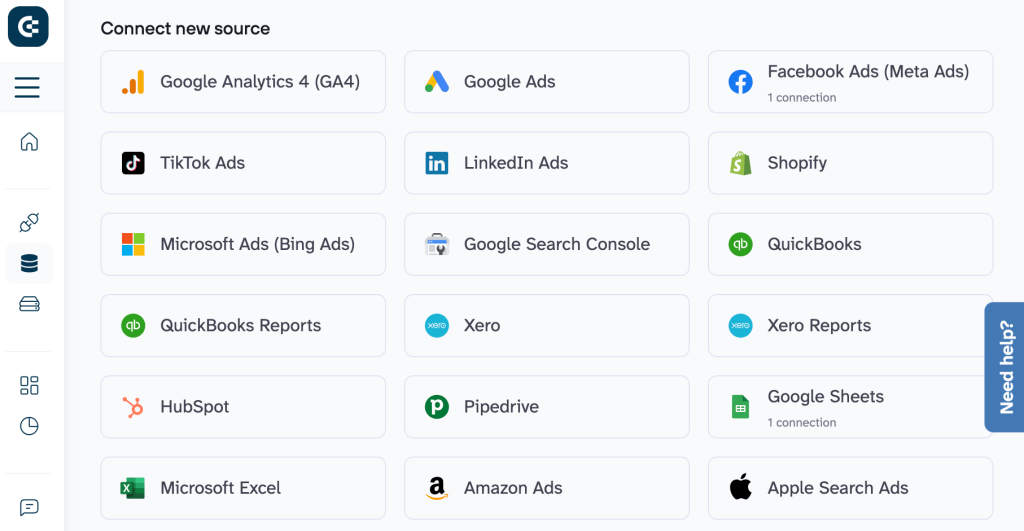
Both platforms provide access to all integrations on every plan, but Coupler.io currently supports 400+ data sources, compared to Skyvia’s 200+. This is particularly important if you work across marketing, finance, sales, product, operations, and customer support data.
Diverse destinations
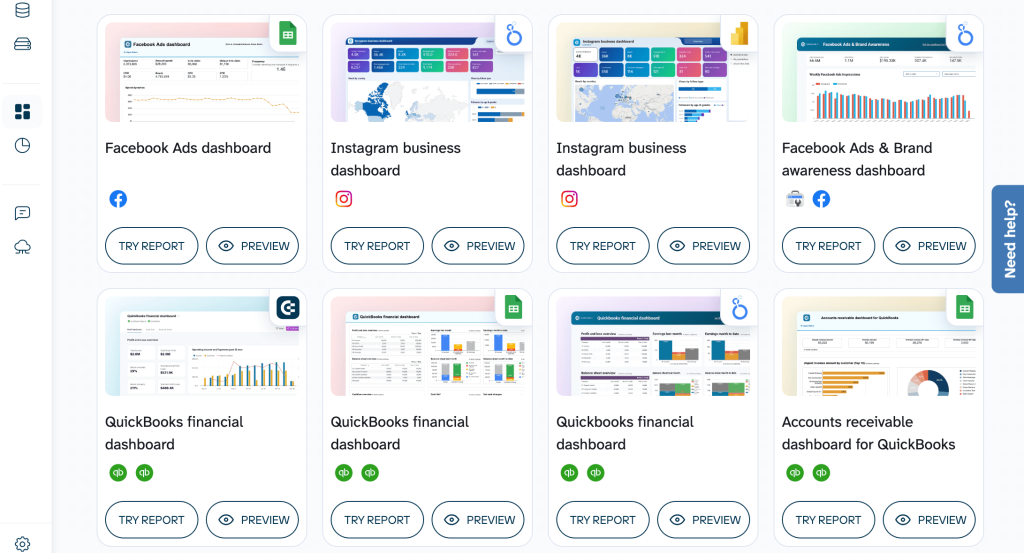
Coupler.io allows you to send data to:
- Spreadsheets: Google Sheets, Excel.
- BI tools: Looker Studio, Power BI, Tableau, Qlik.
- Databases: BigQuery, PostgreSQL, Redshift.
- AI tools: ChatGPT, Claude, Perplexity, Cursor, Gemini.
- monday.com, JSON, CSV.
Skyvia primarily focuses on databases, cloud storage, and cloud apps as destinations. This works well for data engineering workflows. However, it’s limiting for analytics teams that need flexible exports into BI tools and spreadsheets.
User-friendly data transformations
Coupler.io includes a full no-code transformation layer that allows users to:
- Manage columns (hide, rename, reorder).
- Filter and sort data.
- Create custom calculations.
- Aggregate data (sum, average, count, min, max).
- Blend data from multiple sources (append & join).
Skyvia offers advanced transformation logic, such as Extend Lookup and Conditional Split, which are powerful but more technical. At the same time, Coupler.io’s transformations are purpose-built for analysts and business users who require clean, report-ready datasets.
Templates that accelerate reporting
Coupler.io includes:
- 170+ dashboard templates.
- 100+ dataset templates.
They allow teams to launch reporting workflows in minutes instead of days.
Skyvia does not offer dashboard or dataset templates, which means users must design reporting layers separately.
AI-powered analytics
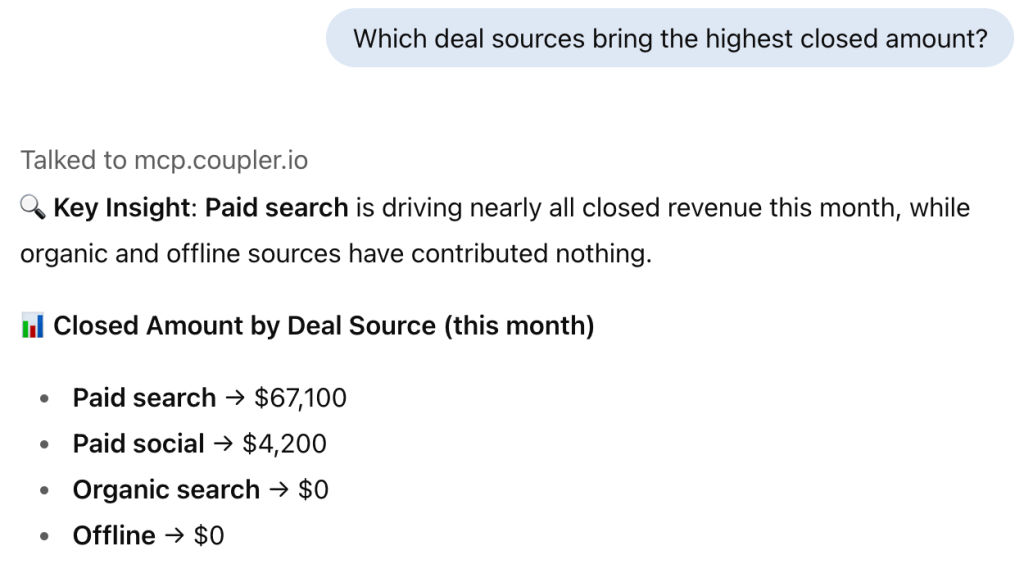
Coupler.io extends beyond ETL with built-in AI capabilities:
- AI tools connected as data destinations.
- AI insights for automatic performance analysis.
- AI agent that enables conversational analytics on live data.
Skyvia supports AI integration via MCP but does not provide native AI insights or AI agents.
Exceptional support quality
User feedback reflects Coupler.io’s strong support culture:
- 4.9/5 on Capterra.
- 95% satisfaction rate.
Skyvia also scores well with 4.8/5, but Coupler.io slightly leads in overall customer satisfaction.
Skyvia vs. Coupler.io – head-to-head comparison
| Feature | Skyvia | Coupler.io |
| Starting price/month | $79 | $24 |
| Free trial | ✅ | ✅ |
| Total data sources | 200+ | 400+ |
| All data sources available in all plans | ✅ | ✅ |
| Data destinations | Databases Storages Cloud apps | BI tools Spreadsheets Databases JSON AI tools, etc. |
| Data transformation | Extend Lookup Conditional split, etc. | Column management Filtering Sorting Custom calculations Data aggregation Data blending, etc. |
| Minimum update frequency | every minute | 15 minutes |
| Dashboard templates | ⛔ | 170+ |
| AI capabilities | AI integration via MCP | AI insights AI agent AI integration via MCP |
| Analytics services | ⛔ | ✅ |
| User reviews (Capterra) | 4.8/5 | 4.9/5 |
Integrations
Skyvia focuses primarily on database-centric workflows. Its destinations are well-suited for data engineering and replication, but it lacks direct integrations with BI and AI tools. This means additional tools are often required to complete analytics workflows.
Coupler.io offers a significantly broader analytics ecosystem. With 400+ sources, you can centralize marketing, finance, sales, ecommerce, and operations data in one place. It also supports a wider range of destinations, including BI tools, spreadsheets, and AI tools.
Data transformation
Skyvia’s transformations are powerful from a technical standpoint, but they are less intuitive for business users and analysts. They are designed for data flow control rather than analytical modeling.
Coupler.io provides a complete analytics-focused transformation layer. You can prepare, enrich, and unify data before it ever reaches its destination. This ensures datasets are analysis-ready without post-processing.
For teams focused on reporting and analytics, Coupler.io’s transformations are more accessible and practical.
Dashboards & templates
Skyvia does not provide dashboards or templates.
Coupler.io includes 170+ dashboard templates and 100+ dataset templates, covering PPC, SEO, finance, ecommerce, sales, and more. These templates dramatically reduce setup time and standardize reporting across teams.
Automatic data refresh
Skyvia supports refresh rates down to one minute, which is valuable for operational systems.
Coupler.io supports refresh every 15 minutes, which aligns with real-time reporting needs for most analytics and BI use cases.
Pricing
Skyvia does not charge fees per source, destination, or user. Pricing starts at $79 per month and scales based on record limits, update intervals, active scheduled integrations, etc.
Coupler.io comes with:
- Paid plans starting at $24/month.
- No per-source or per-destination fees.
- Pricing based on connected accounts rather than exports.
- Zero user limits * – invite the entire team at no extra cost.
- No import size limits. *
* No limits on the Active plan.
To understand how pricing plays out in practice, let’s look at four realistic scenarios.
Scenario 1: Solo marketer or small business owner
| Requirements | Coupler.io | Skyvia | Winner |
| • 1 user. • 2 data sources. • 1 destination. • Daily refresh. | Starter: $24/month | Basic: $79/month | ✅ Coupler.io Cost savings: ~70% |
Scenario 2: Small team with regular reporting
| Requirements | Coupler.io | Skyvia | Winner |
| • 5 users. • 10 data sources. • 3 destinations. • Daily refresh. | Active: $99/month | Standard: $159/month | ✅ Coupler.io Cost savings: ~40% |
Scenario 3: Marketing analyst + team
| Requirements | Coupler.io | Skyvia | Winner |
| • 15 users. • 25 data sources. • 5 destinations. • Hourly refresh. | Pro: $199/month | Professional: $399/month | ✅ Coupler.io Cost savings: ~50% |
Scenario 4: Large organization or enterprise
| Requirements | Coupler.io | Skyvia | Winner |
| • 50+ users. • 50+ data sources. • 6+ destinations. • 15-minute refresh. | Business: Custom | Enterprise: Custom | ✅ Coupler.io Why Coupler.io: More versatile option, with functionality such as custom dashboards and broader AI capabilities |
When to use Coupler.io instead of Skyvia
Choose Coupler.io if:
- You need analytics-ready data, not just synchronization.
- Your workflows include BI tools, spreadsheets, or AI tools.
- You want no-code transformations and dataset blending.
- You value templates and faster reporting setup.
- You’re looking for more affordable pricing and analytics services.
Choose Skyvia if:
- Your primary need is database replication or data synchronization.
- You require a minute-level refresh for operational systems.
- Your workflows are primarily engineering-driven.
In summary: Skyvia is a strong data integration tool for database-centric workflows. However, Coupler.io is a practical alternative for analytics and reporting, combining automation, ease of use, and strong value for money.
Other Skyvia alternatives
1. Integrate.io

With Integrate.io, you can build automated data pipelines using both low-code and no-code functionality, depending on your needs. This makes the platform suitable both for data professionals and for business users with no tech background. Among several other solutions, Integrate.io offers an ELT & CDC platform and an ETL data pipelines solution, which are priced separately.
This functionality allows you to gather data from over a hundred data sources and perform various transformations. The transformed data can be sent to a data warehouse, data lake, or other applications.
Skyvia vs. Coupler.io vs. Integrate.io – comparison
| Feature | Skyvia | Coupler.io | Integrate.io |
| Starting price/month | $79 | $24 | $1,999 |
| Free trial | ✅ | ✅ | ✅ |
| Total data sources | 200+ | 400+ | 150+ |
| All data sources available in all plans | ✅ | ✅ | ✅ |
| Data destinations | Databases Storages Cloud apps | BI tools Spreadsheets Databases JSON AI tools, etc. | Databases Cloud storage Cloud services Analytics tools Ad platforms BI tools, etc. |
| Data transformation | Extend Lookup Conditional split, etc. | Column management Filtering Sorting Custom calculations Data aggregation Data blending, etc. | 220+ table, field-level, and advanced transformations |
| Minimum update frequency | every minute | 15 minutes | every minute |
| Dashboard templates | ⛔ | 170+ | Data flow templates available |
| AI capabilities | AI integration via MCP | AI insights AI agent AI integration via MCP | AI integration via MCP AI Transformation AI Assistant |
| Analytics services | ⛔ | ✅ | ✅ |
| User reviews (Capterra) | 4.8/5 | 4.9/5 | 4.6/5 |
Integrations overview
Integrate.io’s users have access to:
- 150+ data sources.
- 120+ destinations.
- Most popular data integrations with Snowflake, RestAPI, NetSuite, Amazon Redshift, as well as BigCommerce, Shopify, Salesforce, HubSpot, and more.
In particular, Integrate.io provides integrations with various databases and cloud storage, SaaS apps, BI tools, as well as ad and marketing data sources.
Features overview
- ETL, ELT, CDC, and Reverse ETL pipelines.
- Advanced visual and SQL-based transformations.
- High-frequency and near real-time data sync.
- Warehouse-first and cloud-native architecture.
- Enterprise security and governance controls.
Pricing overview
Integrate.io offers a Core plan starting at $1,999 per month. It includes unlimited data volumes, pipelines, and connectors, full platform access, 60-second pipeline frequency, and 30-day onboarding. For advanced needs, custom plans are available with options like GPU support for AI/ML, enterprise security and compliance, access and identity controls, HIPAA readiness, and tailored support.
Pros
- Very powerful transformation engine.
- Supports complex, large-scale data pipelines.
- Flexible for both technical and non-technical users.
- Near real-time data replication.
- Strong warehouse and cloud support.
Cons
- Significantly more expensive than Skyvia.
- Overkill for small teams and simple integrations.
- Requires onboarding time to fully leverage advanced features.
When to use Integrate.io over Skyvia
Choose Integrate.io if you require enterprise-scale data pipelines, advanced transformations, and frequent refreshes across multiple warehouses and cloud platforms. Skyvia is better suited for simpler, cost-sensitive database and cloud-app integrations.
2. Fivetran

Fivetran is an ELT solution that focuses on building automated data pipelines and can easily move large volumes of data. It’s a good option if you need to export data from multiple sources and send it to SaaS apps, data warehouses, or data lakes. As it’s an ELT platform, data transformation can be performed after loading to the destination app. Fivetran is a no-code platform, so it can be used both by data professionals and business users.
Skyvia vs. Coupler.io vs. Fivetran – comparison
| Feature | Skyvia | Coupler.io | Fivetran |
| Starting price/month | $79 | $24 | Custom |
| Free trial | ✅ | ✅ | ✅ |
| Total data sources | 200+ | 400+ | 700+ |
| All data sources available in all plans | ✅ | ✅ | ✅ |
| Data destinations | Databases Storages Cloud apps | BI tools Spreadsheets Databases JSON AI tools, etc. | Datalakes Databases Data streaming platforms, etc. |
| Data transformation | Extend Lookup Conditional split, etc. | Column management Filtering Sorting Custom calculations Data aggregation Data blending, etc. | Minimal in-pipe transformations |
| Minimum update frequency | every minute | 15 minutes | every minute |
| Dashboard templates | ⛔ | 170+ | ⛔ |
| AI capabilities | AI integration via MCP | AI insights AI agent AI integration via MCP | ⛔ |
| Analytics services | ⛔ | ✅ | ✅ |
| User reviews (Capterra) | 4.8/5 | 4.9/5 | 4.4/5 |
Integrations overview
Fivetran offers more than 700 connectors across SaaS applications, databases, event systems, and file sources. Destinations include Snowflake, BigQuery, Redshift, Databricks, and other major cloud data warehouses.
Features overview
- Fully managed ELT pipelines.
- Automatic schema migration.
- Incremental and historical sync.
- dbt-native transformation workflows.
- Strong security and governance.
Pricing overview
The platform follows a usage-based pricing model driven by Monthly Active Rows (MAR), which differs from other Fivetran alternatives. Costs increase with higher data volumes, more frequent syncs, and the type of connector used. Enterprise plans include advanced governance features, quicker refresh intervals, and options for private deployments.
Pros
- Extremely reliable at high volumes.
- Minimal pipeline maintenance.
- Excellent warehouse integrations.
- Strong governance and security.
Cons
- No native reporting or dashboards.
- Limited in-pipeline transformations.
- Pricing can escalate quickly.
When to use Fivetran over Skyvia
Choose Fivetran if your primary goal is warehouse-first analytics ingestion at scale with minimal operational overhead. Skyvia is a better fit for users who need built-in ETL logic and direct database-to-app workflows.
3. Panoply

Panoply is a managed cloud data warehouse with no-code ELT capabilities. It allows you to connect to APIs, databases, and business apps and transfer your data to a managed data warehouse. Panoply provides its users with a private, preconfigured BigQuery or Redshift warehouse. Panoply allows you to create ELT connectors with zero maintenance, schedule data collections, and flexibly manage your data. In addition to this, Panoply offers an SQL workbench to help you visualize your data.
Skyvia vs. Coupler.io vs. Panoply – comparison
| Feature | Skyvia | Coupler.io | Panoply |
| Starting price/month | $79 | $24 | $1,558 |
| Free trial | ✅ | ✅ | ✅ |
| Total data sources | 200+ | 400+ | 80+ |
| All data sources available in all plans | ✅ | ✅ | ✅ |
| Data destinations | Databases Storages Cloud apps | BI tools Spreadsheets Databases JSON AI tools, etc. | BigQuery Redshift |
| Data transformation | Extend Lookup Conditional split, etc. | Column management Filtering Sorting Custom calculations Data aggregation Data blending, etc. | SQL-based views (post-load) |
| Minimum update frequency | every minute | 15 minutes | every minute |
| Dashboard templates | ⛔ | 170+ | Data recipes Prebuilt dashboards |
| AI capabilities | AI integration via MCP | AI insights AI agent AI integration via MCP | AI-driven ETL |
| Analytics services | ⛔ | ✅ | ⛔ |
| User reviews (Capterra) | 4.8/5 | 4.9/5 | 4.0/5 |
Integrations overview
Panoply supports more than 80 data sources, including databases, APIs, and business applications such as Salesforce, HubSpot, Zendesk, Mailchimp, and Shopify. All data is loaded into a single managed BigQuery or Redshift warehouse.
Features overview
- No-code ELT pipelines.
- Automated schema handling.
- SQL workbench for querying and exploration.
- Native BI tool compatibility.
Pricing overview
Panoply pricing starts at $1,558/month and scales based on data volume and storage requirements. Plans include warehouse storage and computing.
Pros
- Fully managed warehouse included.
- No infrastructure maintenance.
- Easy setup for analytics teams.
- Simple SQL-based transformations.
Cons
- Single destination only.
- Limited connector library.
- Less flexible than dedicated ETL tools.
When to use Panoply over Skyvia
Choose Panoply if you want a bundled solution that includes both data pipelines and a managed analytics warehouse. Skyvia is better suited if you need flexible multi-destination integrations without committing to a single warehouse.
4. Workato
This is a global data integration and workflow automation platform. It’s designed for large organizations that need to handle a high workload and deal with scalability challenges. The main focus of the platform is optimizing workflows and automating processes within an organization. Workato uses the trigger-action principle when a specific pre-defined event triggers an automated action or response. For example, you can get automated notifications about certain events, or a report can be updated automatically once something changes. Besides process automation, the platform allows you to integrate data, publish APIs, create custom apps and bots, and more.
Even though data integration and transformation are not the centerpiece of Workato’s functionality, the platform can be used for these purposes as well. It offers both no-code and low-code capabilities. This makes it suitable for a wide range of professionals, from product development to marketing, sales, and support teams.
Skyvia vs. Coupler.io vs. Workato – comparison
| Feature | Skyvia | Coupler.io | Workato |
| Starting price/month | $79 | $24 | Custom |
| Free trial | ✅ | ✅ | ✅ |
| Total data sources | 200+ | 400+ | 1,200+ |
| All data sources available in all plans | ✅ | ✅ | N/A |
| Data destinations | Databases Storages Cloud apps | BI tools Spreadsheets Databases JSON AI tools, etc. | Amazon S3 Azure Blob Storage Databricks Google BigQuery Redshift Snowflake SQL Serve, etc. |
| Data transformation | Extend Lookup Conditional split, etc. | Column management Filtering Sorting Custom calculations Data aggregation Data blending, etc. | SQL, DBT, Python, JavaScript, Ruby, and AI-powered transformations |
| Minimum update frequency | every minute | 15 minutes | 5 minutes |
| Dashboard templates | ⛔ | 170+ | Data pipeline recipesInsights dashboard templates |
| AI capabilities | AI integration via MCP | AI insights AI agent AI integration via MCP | Workato Copilots AI by Workato Agentic platform |
| Analytics services | ⛔ | ✅ | ⛔ |
| User reviews (Capterra) | 4.8/5 | 4.9/5 | 4.6/5 |
Integrations overview
Workato supports over 1,200 connectors across SaaS apps, databases, APIs, and enterprise systems. Destinations include cloud data warehouses like Snowflake and BigQuery, as well as operational tools used by marketing, finance, HR, and IT teams.
Features overview
- Trigger-action workflow automation.
- Data integration and transformation.
- API creation and management.
- AI-assisted recipe building.
- Enterprise governance and monitoring.
Pricing overview
Workato pricing is custom and based on usage and enabled modules. For details, you need to contact sales.
Pros
- Extremely powerful automation engine.
- Very large connector ecosystem.
- Strong AI-assisted workflow building.
- Suitable for complex enterprise processes.
Cons
- Not focused on analytics pipelines.
- Requires technical expertise.
- Pricing lacks transparency.
When to use Workato over Skyvia
Choose Workato if your priority is automating complex business workflows that involve data movement as one component. Skyvia is a better choice for straightforward ETL and database-centric integrations.
5. Rivery

Rivery is a data integration platform that offers both no-code and low-code functionality. It has ETL, Reverse ETL, and CDC capabilities and features an impressive set of 200 ready-to-use connectors. Another thing Rivery can help you with is data orchestration and workflow automation. The platform is suitable for business users and developers.
Skyvia vs. Coupler.io vs. Rivery – comparison
| Feature | Skyvia | Coupler.io | Rivery |
| Starting price/month | $79 | $24 | $0.9 per credit (not monthly; usage-based) |
| Free trial | ✅ | ✅ | ✅ |
| Total data sources | 200+ | 400+ | 200+ |
| All data sources available in all plans | ✅ | ✅ | ✅ |
| Data destinations | Databases Storages Cloud apps | BI tools Spreadsheets Databases JSON AI tools, etc. | Cloud data warehouses Object storage/data lake storage Relational databases Analytics/query engines, etc. |
| Data transformation | Extend Lookup Conditional split, etc. | Column management Filtering Sorting Custom calculations Data aggregation Data blending, etc. | Data cleaning Data normalization Data aggregation Feature engineering |
| Minimum update frequency | every minute | 15 minutes | 5 minutes |
| Dashboard templates | ⛔ | 170+ | 90+ data workflow templates |
| AI capabilities | AI integration via MCP | AI insights AI agent AI integration via MCP | AI data pipelines Ask AI |
| Analytics services | ⛔ | ✅ | ⛔ |
| User reviews (Capterra) | 4.8/5 | 4.9/5 | 5/5 |
Integrations overview
Rivery offers more than 200 data sources, including databases, files, marketing platforms, CRMs, and finance tools. Destinations include Snowflake, BigQuery, Redshift, Azure SQL, and other cloud warehouses.
Features overview
- ETL, Reverse ETL, and CDC.
- Workflow orchestration with branching logic.
- Version control and CI/CD support.
- Developer-friendly APIs and CLI.
- AI-assisted pipeline creation.
Pricing overview
Rivery uses a credit-based pricing model (BDU credits), with costs determined by data volume, sync frequency, and connector type.
Pros
- Very flexible and extensible.
- Strong orchestration capabilities.
- Suitable for engineering teams.
- High-frequency updates.
Cons
- The pricing model can be complex.
- Less intuitive for non-technical users.
- Requires monitoring of usage credits.
When to use Rivery over Skyvia
Choose Rivery if you need advanced workflows, orchestration, and developer tooling. Skyvia is better suited for simpler, budget-friendly integrations.
6. Jitterbit

Jitterbit is a data and app integration and workflow automation platform for businesses. Like most of Jitterbit competitors, it has several separate products, including Harmony Low-Code Integration Platform (iPaaS) and Vinyl Low-Code Application Builder. In general, this is a good fit for enterprises that need to implement automation at scale, develop their own applications, and automate complex workflows.
The platform can be useful for streamlining processes in IT, HR, finance, and marketing. However, as Jitterbit is a low-code solution, an organization would need to have its own engineering capabilities to fully benefit from the offered functionality.
Skyvia vs. Coupler.io vs. Jitterbit – comparison
| Feature | Skyvia | Coupler.io | Jitterbit |
| Starting price/month | $79 | $24 | Custom |
| Free trial | ✅ | ✅ | ✅ |
| Total data sources | 200+ | 400+ | 200+ |
| All data sources available in all plans | ✅ | ✅ | ⛔ |
| Data destinations | Databases Storages Cloud apps | BI tools Spreadsheets Databases JSON AI tools, etc. | Databases HTTP/LDAP Local files Salesforce Wave Analytics cloud dataset, etc. |
| Data transformation | Extend Lookup Conditional split, etc. | Column management Filtering Sorting Custom calculations Data aggregation Data blending, etc. | Data cleaning Data enrichment Data formatting |
| Minimum update frequency | every minute | 15 minutes | ~5 minutes |
| Dashboard templates | ⛔ | 170+ | 400+ recipes and process templates |
| AI capabilities | AI integration via MCP | AI insights AI agent AI integration via MCP | AI agents AI assistants AI accountability with MCP |
| Analytics services | ⛔ | ✅ | Agentic AI Services |
| User reviews (Capterra) | 4.8/5 | 4.9/5 | 4.4/5 |
Integrations overview
Jitterbit provides more than 200 connectors and over 400 integration recipes. It supports SaaS applications, databases, APIs, and on-prem systems, with strong extensibility through custom connectors.
Features overview
- Low-code integration designer.
- Workflow automation.
- API creation and management.
- Centralized monitoring.
- Enterprise security controls.
Pricing overview
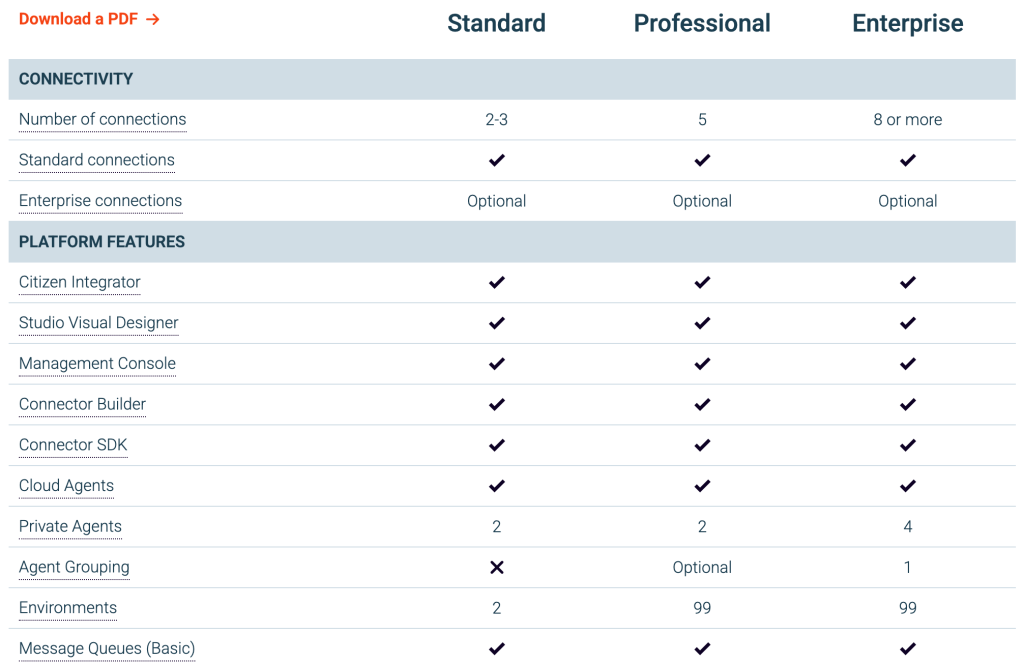
Jitterbit pricing is not publicly disclosed and requires contacting sales for a quote. However, they provide a description of the functionality included in each of their plans.
Pros
- Strong automation and API tools.
- Flexible low-code environment.
- Enterprise-ready scalability.
Cons
- Steep learning curve.
- Not focused on analytics use cases.
- Pricing transparency issues.
When to use Jitterbit over Skyvia
Choose Jitterbit if you need enterprise automation and API-driven integrations. Skyvia remains a better option for straightforward ETL and database synchronization.
Which Skyvia alternative is right for you?
The right data tool depends on how complex your data workflows are, how technical your team is, and how much flexibility and scalability you require. Use the scenarios below to quickly identify which alternative to Skyvia best fits your business needs.
- If you want an affordable, all-in-one data solution that’s easy to use and works for most teams, go with Coupler.io.
It’s the most broadly applicable option, combining data extraction, transformation, scheduling, templates, and AI integrations in one beginner-friendly platform with transparent pricing and all features available from day one.
- If you need an ETL tool focused on databases and cloud apps, go with Skyvia.
Skyvia is a good choice for straightforward data synchronization and ETL tasks, especially when working primarily with databases and SaaS apps and when enterprise-level complexity isn’t required.
- If you manage enterprise-scale data pipelines with advanced transformations and strict requirements, go with Integrate.io.
Integrate.io is best for large organizations that require high-frequency updates, complex transformation logic, and scalable pipelines across cloud warehouses and services.
- If your priority is reliable, warehouse-first data ingestion at scale, go with Fivetran.
Fivetran is designed for data engineering teams that want low-maintenance ELT pipelines and are comfortable handling transformations downstream in tools like dbt.
- If you want a managed data warehouse bundled with simple data ingestion, go with Panoply.
Panoply fits teams that want to avoid infrastructure management and are happy loading all data into a single, preconfigured BigQuery- or Redshift-based warehouse.
- If your main goal is automating complex business workflows rather than pure ETL, go with Workato.
Workato excels at trigger-based automation across departments and systems, with data integration acting as one component of broader process automation.
- If you need advanced orchestration, developer tooling, and flexible ETL/Reverse ETL workflows, go with Rivery.
Rivery is well-suited for technically mature teams that need version control, CI/CD, and sophisticated data workflows beyond basic integrations.
- If you require enterprise-grade app integration, workflow automation, and API management, go with Jitterbit.
Jitterbit is a strong option for organizations focused on low-code automation and API-driven integrations, rather than analytics-first data pipelines.
If you want to see more options, check our articles on Adverity alternative, Databox alternative, Stitchdata alternative, Coupler.io alternative, Windsor.ai alternatives, and Zapier alternatives.
Looking for a Skyvia alternative that balances flexibility, automation, ease of use, and cost? Coupler.io stands out as the most versatile choice for the majority of businesses. It covers a wide range of reporting and analytics use cases without the complexity or pricing overhead of enterprise-only platforms.
Automate data integration and reporting with Coupler.io
Get started for free