What are Claude Skills?
If you find yourself pasting the same instructions into every Claude conversation, you’re probably ready for a Skill. Claude Skills, also called Agent Skills, contain a set of instructions that teach Claude how to approach a specific task.
Say you always want visualization charts in your brand colors with specific business metrics. Instead of pasting those requirements into every prompt when using Claude.ai for data analytics or other things, you define them once in a Skill. Claude then uses them whenever the Skill is relevant, or you explicitly invoke it.
Moreover, Skills are stored as .md files, so you don’t lose them when a session ends. The context is there next time you open a chat, and Claude follows the same instructions every time. That makes your workflows much more consistent.
My collection of top Claude Skills in 2026
As of today, you have official Claude Skills, verified third-party Skills, and thousands of community-maintained Skills. I’ve collected the best Claude Skills that stand out for their quality and grouped them based on the idea of how you can use Claude Skills from the practical cases by professional role.
Claude Skills for marketers
1. Marketing analytics
When you need a single view across all your marketing channels, the Marketing analytics Skill is where to start. I’ve ranked it as one of the top Skills for Claude since it queries data from Google Ads, Meta, Klaviyo, GA4, Search Console, and other sources connected through Coupler.io. You can analyze each channel separately or get the cross-channel view (paid against organic, email against referral, etc.) with accurate results computed via the Analytical Engine. The skill includes guidelines for discovering relevant data sources in Coupler.io and uses SQL transformations to create complex data sets for analysis.
The output covers period-over-period change, trend detection across 4+ periods, channel efficiency comparisons (CPA, ROAS, CPM), and 2–3 critical recommendations. It also includes anomaly detection with severity tagging (informational / warning / critical) so you know how urgently to act on any metric change.
Where it’s available: This skill is part of the Coupler.io connector for Claude, which includes all Coupler.io analytics skills and connects them to your live data. You can also download it from the skills library or the open-source Coupler.io Skills GitHub repository under: marketing/marketing-analytics. To install Claude Skills, open the GitHub repository and download it as a ZIP file or clone the repo using the command git clone <git-repo-URL>.
Marketing analytics skill
Turn your AI tool into a paid media analyst. Connect Google Ads, Meta, LinkedIn, and TikTok, then ask about all the metrics that matter in simple English. The skill runs against your live data, so the numbers are real — not guessed.
Over 200 AI skills for data analytics
Prerequisites for the Skill to run: A Coupler.io account connected to your marketing platforms and the Coupler.io MCP connected to Claude. Follow this guide to understand how to connect business data to Claude using Coupler.io.
2. Paid Ads Performance Analysis (PPC)
The marketing-analytics skill covered above looks at performance across all your channels. This one goes deeper on paid ads specifically. The PPC analytics skill traces each platform’s funnel from impression to conversion and builds an efficiency comparison table across your ad accounts. It also splits brand from non-brand traffic, which matters more than most teams realize. Brand inflates ROAS numbers and hides real acquisition costs.
The weekly PPC review mode is where I get the most value. One question returns what moved and where cost per acquisition shifted across all your ad accounts. Budget pacing for Google Ads, Meta Ads, and TikTok Ads is built in too, so you catch overspend mid-month rather than at the invoice.
Where it’s available: Part of the Coupler.io connector for Claude, which allows you to connect to whichever ad platforms you use. Also available from the skills library or the GitHub open-source repository under: marketing/ppc-analytics.
PPC analytics skill
Analyze paid-ads (PPC) performance over the ad data connected in your Coupler.io workspace — spend, impressions, clicks, CTR, CPC, CPM, conversions, CPA, ROAS — with per-platform funnel traces, an…
Over 200 AI skills for data analytics
Prerequisites for the Skill to run:
- A Coupler.io account with your ad platforms connected as data sources.
- Coupler.io MCP connected to Claude.
Agencies managing ad accounts across platforms can take this a step further with the dedicated client-report skills for Google Ads, Facebook Ads, and TikTok Ads. These turn monthly performance into a client-ready narrative that explains why targets were hit or missed in language a client can act on. If you’re already using the PPC or Marketing analytics skills for the analysis, the client-report skills handle the last mile: getting the story into a format you’d put in front of a stakeholder. They also appear in the broader top Claude skills for digital agencies roundup, grouped with audit and performance picks that cover the earlier stages of agency work.
3. Google Ads Waste And Scale
The PPC skill monitors how your ad accounts are doing. The Google Ads Waste And Scale skill picks up where that leaves off: it shows where you’re wasting money and which campaigns can absorb more budget.
It works at the search-term and keyword level, not just at the campaign level. The skill flags non-converting search queries and recommends negatives. Keywords running above your target cost per acquisition are ranked by spend at stake, so you cut the expensive problems first. The scale side works differently: for campaigns already beating target, the skill checks how much impression share they’re losing to budget and sizes the headroom each one has left.
What I appreciate is the do-not-cut list. Every item considered and rejected gets documented with the reason. As a result, whoever approves the changes can see what was protected and why. The final output nets recovered waste against absorbable headroom. When those numbers roughly match, the whole recommendation is budget-neutral.
Where it’s available: Included in the Coupler.io connector for Claude. You can also download it from the skills library or the GitHub repository under: marketing/google-ads-waste-and-scale.
Google Ads waste and scale skill
Use for "where am I wasting money on Google Ads", "which keywords should I pause", "find me negative keywords", "search terms report analysis", "which campaigns should I scale", "clean up my Google…
Over 200 AI skills for data analytics
Prerequisites for the Skill to run:
- A Coupler.io account with Google Ads connected as a data source.
- Coupler.io MCP connected to Claude.
4. SEO optimization
If your traffic dropped, you lost rankings after a Google update, or you just want to know your site’s SEO performance, the SEO audit Skill runs a structured audit and tells you what to fix and in what order.
It asks upfront about your site type (SaaS, e-commerce, blog, local business) and adjusts its checks accordingly. A SaaS site gets flagged for thin product pages and missing comparison content, while an e-commerce site gets checked for faceted navigation duplicates and duplicate product descriptions.
This SEO skill generally reviews technical SEO, crawlability, indexation, and content quality. Every finding comes back with four fields: what’s wrong, the SEO impact, how it was found, and the exact fix.
If you’re also optimizing for Answer Engine Optimization (AEO), the AI SEO Skill structures your content so it gets cited on AI search tools. It recommends improvements to content structure, entity coverage, and AI-readable formatting.
Where it’s available: Both the SEO audit and SEO Skills are part of Corey Haines’ open-source Marketing Skills repository. You can either download the ZIP file or clone the repository.
Prerequisites for the Skill to run:
- The website or page URL to audit.
- Optional business context, such as your site’s goals, target keywords, or SEO reports.
5. AI citation to revenue funnel
The AI SEO Skill above helps your content get cited by AI engines, but citations alone don’t tell you if that visibility actually turns into customers. That’s the gap the AI citation to revenue funnel skill closes. Sometimes called the GEO skill, it follows the pages ChatGPT, Perplexity, and Gemini cite through to AI-referred sessions in GA4, Search Console clicks, key events, and the orders, deals, or payments behind them.
It stitches together four sources that each know only part of the story: a citation export from Peec AI or a similar tracker, GA4 sessions, Search Console clicks and impressions, and your store, CRM, or billing system. All the math runs on Coupler.io’s side through the Analytical Engine, and the AI only explains the result, so the funnel numbers trace back to your actual data.
What I like is how honest it is about what it can prove. It shows that a page appears in both the citation data and the revenue data over the same period. That a citation caused a visit isn’t something the data layer can prove, and the report says so plainly. For a walkthrough with real numbers from our own site, see AI visibility is a vanity metric until you check this.
Where it’s available: Part of the Coupler.io connector for Claude. You can also download it from the skills library or the GitHub repository under: marketing-and-ads/geo/ai-citation-to-revenue-funnel.
AI citation to revenue funnel skill
Follows the pages AI assistants cite through to traffic, signups and sales, and shows where the chain breaks.
Over 200 AI skills for data analytics
Prerequisites for the Skill to run:
- A Coupler.io account with GA4, Search Console, and your revenue source (store, CRM, or billing system) connected as data sources.
- Coupler.io MCP connected to Claude.
- A citation export from Peec AI or a similar tracker, uploaded or placed in a Coupler.io dataflow.

Connect your SEO and marketing data to Claude with Coupler.io
Get started for free6. Creative ideation
These Skills support the creative side of marketing, from deciding what to market to crafting how you present it. You can build a full Claude Skills workflow by chaining them together in three stages:
Stage 1: Decide your marketing strategy
If you’re starting from scratch or looking for new growth opportunities, use the marketing-ideas Skill. It draws from a library of 139 proven marketing tactics and recommends 3 to 5 strategies based on your product and business goals. For each recommendation, it explains why it fits your situation and provides a full implementation plan.
Stage 2: Make it more persuasive
Once you know your approach, use the marketing-psychology Skill to strengthen your messaging. It contains more than 50 behavioral science frameworks. Based on your product and audience, it recommends the psychological principles that best support your campaign and shows exactly how to apply each one to your copy, pricing, or offer.
Stage 3: Generate ad creatives
When you’re ready to launch, use the ad-creative Skill to generate headlines and descriptions for your advertising campaigns. If you already have campaign performance data, it analyzes what’s working and generates new creative variations based on those insights.
Stage 4: Analyze what’s already working
Once your campaigns have been running, the next round of creative should come from performance data, not another blank-page brainstorm. Coupler.io’s Facebook Ads Creative Analysis and TikTok Ads Creative Analysis skills pull your actual ad data and show you what’s converting and why. They also flag creatives approaching fatigue before your CPMs tell you the hard way. You take those findings back into Stage 2 or 3 and build the next round from evidence.
Both skills are included in the Coupler.io connector for Claude, so they work automatically once it is installed. You can also download them separately from the skills library or GitHub.
Facebook Ads creative analysis skill
Use for "which creative is working on Meta", "which ads should I put money behind", "what should the next round of creative look like", "why is my quality ranking below average", "is my hook…
TikTok Ads creative analysis skill
Use for "which creative is working on TikTok", "which videos should I put money behind", "what should the next round of creative look like", "is my hook working", "which video is holding…
Over 200 AI skills for data analytics
Claude skills for sales teams
7. Sales analytics
Now let’s shift to the Claude top Skills for sales teams, starting with the sales-analytics Skill. It helps you figure out why your pipeline suddenly slows down, win rates start falling, and much more. The Skill connects to your CRM through Coupler.io, one of the best Claude connectors for business, and answers sales questions in plain language. Before running the analysis, it understands how your CRM is structured, including sales stages, lead sources, territories, and segments, so the metrics are interpreted correctly.
From there, the Skill investigates pipeline health, win rates, sales velocity, rep performance, and forecast accuracy. If it detects issues such as stalled deals or a drop in win rates, the Skill identifies whether you’re losing to price, competition, or deals just going dark, and recommends the next steps
Where the Skill is available: This skill ships with the Coupler.io connector for Claude and works alongside your CRM data connection. You can also grab it from the skills library or the Coupler.io Skills open-source GitHub repository under: analytics/sales-analytics.
Sales analytics skill
Connect Salesforce, HubSpot, or Pipedrive and ask about win rates, deal velocity, and rep performance in plain language. Your live CRM data, queried directly — no SQL and exports.
Over 200 AI skills for data analytics
Prerequisites for the Skill to run:
- Coupler.io account with your CRM connected as a data source.
- Coupler.io MCP connected to Claude.
8. Client communication
51% of sales deals are lost due to poor communication. It could be a prospect’s concern you fumble, a follow-up lands flat, or you never built enough trust for them to say yes.
The sales-enablement Skill helps you prepare for those moments. It builds objection responses, demo scripts, and proposal templates matched to your buyer’s role (CTO, CFO, end user) and deal stage. Combine it with building-rapport Skill to establish trust faster. It adjusts your approach based on whether you’re talking to an analytical buyer who wants data upfront or a relationship-focused one who needs personal connection before business.
In the follow-up stage, this follow-up discipline Skill maintains the sales momentum with personalized outreaches.
Where it’s available: These Skills are part of Louis Blythe’s open-source Sales Skills repository. You can clone the repository or download it as a ZIP file. The repository also includes 120 more Skills for other client communication stages like prospecting, cold outreach, pricing conversations, and sales presentations.
Prerequisites for the Skill to run: No additional integrations. These Skills work from the product details, buyer information, and conversation context you provide.
9. Presentations & pitch decks
Anthropic’s official pptx Skill lets Claude create, edit, and read any PowerPoint presentations directly. If you are especially creating a sales deck, pair it with the sales-presentation Skill. It structures your presentation around customer pain points, value proposition, proof points, and common objections instead of treating it like a generic slide deck. The storytelling Skill takes it one step further by helping you turn those slides into a more compelling narrative.
Where it’s available: The pptx Skill is part of Anthropic’s official Skills repository, while the sales-presentation and storytelling Skills are available as open-source GitHub repositories. Anthropic also provides an xlsx Skill for working with spreadsheets, a docx Skill for creating and editing Word documents, and a doc-coauthoring Skill for creating technical documentation. You can check out the full list of available Anthropic Skills here.
Prerequisites for the Skill to run: The PPTX Skill contains Python scripts that generate and edit PowerPoint files, so you need to enable code execution permissions in Claude settings. The sales-presentation and storytelling Skills don’t require additional integrations.
Get sales pipeline insights in Claude with Coupler.io
Get started for freeClaude skills for e-commerce teams
10. E-commerce analytics
The E-commerce analytics Skill analyzes data from Shopify, WooCommerce, BigCommerce, Stripe, GA4, Klaviyo, and other ecommerce platforms connected through Coupler. Based on your question, it investigates the purchase funnel, customer retention, average order value, revenue mix, lifetime value, or any other part of the business that needs attention.
The detail I like most is that it asks upfront whether you want gross, net, or paid revenue since most tools don’t tell you which one they’re showing. It also flags issues that often lead to the wrong conclusions, such as partial-week comparisons, stale data, or revenue drops caused by stockouts rather than lower demand.
Prerequisites for the Skill to run:
- A Coupler.io account connected to your ecommerce data sources.
- Coupler.io MCP (model context protocol) connected to Claude.
Where it’s available: The E-commerce analytics is Coupler.io’s open-source Skill included in the Coupler.io connector for Claude. It’s ready to use once your store data is connected. You can also clone the GitHub repository under analytics/ecom-analytics, or download the skill as a ZIP file from the skills library.
E-commerce analytics skill
Connect Shopify, WooCommerce, or Magento and ask about conversions, top products, and revenue in plain language. Every number traces back to your live store data — not an estimate.
Over 200 AI skills for data analytics
11. Product description & catalog copy
The product-content-enrichment Skill enriches product catalogs at scale. It generates SEO-friendly product descriptions, extracts product attributes, creates image alt text, and suggests product tags.
It also recommends the right enrichment workflow for your e-commerce platform and guides you through bulk content generation and human review before publishing.
Where it’s available: You’ll find this Skill in Finsi Labs’ Awesome E-commerce Skills repository. It also has a collection of Skills for common ecommerce workflows, from catalog management and inventory to fulfillment and merchandising.
Prerequisites for the Skill to run: Input product data such as product names, SKUs, categories, existing descriptions, specifications, or product images.
12. Competitor analysis
Your competitors’ websites tell you a lot if you know where to look. The competitor-profiling Skill does that work for you.
Give it a list of competitor URLs and it pulls SEO and market data to analyze positioning, pricing, features, messaging, and traffic. It uses Firecrawl for web scraping and browser automation, rendering JavaScript-heavy pages to reliably extract competitor data for analysis. Every finding also links back to its source, making the profile easier to verify and compare across competitors.
Where the Skill is available: This Skill lives in Corey Haines’ open-source marketing Skills repository.
Prerequisites for the Skill to run:
- Firecrawl MCP connected to Claude
- DataForSEO MCP connected to Claude.
Explore store performance in Claude with Coupler.io
Get started for freeClaude Skills for finance analytics
13. Finance analytics
Now, meet one of the top Claude Skills for analyzing financial data. You can ask the finance-analytics Skill how revenue is trending, why costs went up, what your cash runway looks like, and more. It will get the answer from your data in QuickBooks, Xero, Stripe, NetSuite, Sage, or whichever system you’ve connected through Coupler.io. Before the Skill builds anything, it validates your accounts, fiscal calendar, currency conventions, and accounting method (cash or accrual) to ensure the analysis uses the correct financial context.
What I like is that it goes beyond the standard P&L. The Skill covers margins, monthly recurring revenue (MRR), annual recurring revenue (ARR), cash runway, cost centers, and subscription health. And if a metric changes unexpectedly, it investigates the underlying entities, customers, or vendors to find the most likely cause.
Prerequisites for the Skill to run:
- A Coupler.io account connected to your finance data.
- Coupler.io’s MCP connected to Claude.
Where it’s available: Included in the Coupler.io connector for Claude, which connects your accounting data and includes this skill out of the box. You can also download it from the skills library or the GitHub repository under: analytics.
Finance analytics skill
Connect QuickBooks, Xero, Stripe, or NetSuite and ask about P&L, margins, MRR/ARR, and cash runway in plain language. Your live financial data, queried directly — no SQL and exports.
Over 200 AI skills for data analytics
14. Financial modeling & forecasting
The financial-data-collector Skill collects and validates financial data for any US publicly traded company from free sources. It gathers historical income statements, balance sheets, cash flow statements, analyst estimates, and WACC inputs, then outputs a standardized JSON file that’s ready to feed into a DCF model or comparable company analysis.
Once you have the data, the financial-analyst Skill helps with financial planning and analysis (FP&A). It analyzes cash flow, compares actuals against budgets, performs variance analysis, and builds revenue forecasts to support budget planning.
Where the Skill is available: Financial Data Collector and Financial Analyst GitHub repositories
Prerequisites for the Skill to run:
- Enable code execution in Claude settings
15. Budget & spend analysis
The budget-variance-analysis Skill explains why actuals differ from budget. It identifies material overspends and underspends, distinguishes between one-time and recurring variances, and assesses the impact on the full-year forecast.
Unlike the regular analytics Skills, this one focuses on communication as much as calculation. It turns the numbers into a business narrative that you can use in board packs or investor updates.
Where it’s available: The budget-variance-analysis Skill is part of the PM Claude Skills open-source repository.
Prerequisites for the Skill to run:
- Claude Code or any agent that supports the Skills
- No external integrations or dependencies required
Monitor revenue and costs in Claude with Coupler.io
Get started for freeBonus: Works across all roles
Not to bore you with role-specific Skills, I’ve also introduced the best Claude Skills for everyone.
16. Generate dataset context
Before any of the analytics skills above can give you accurate results, the AI needs to understand what your data actually means. Column names alone aren’t enough. What the business calls things also matters: which field is gross versus net revenue, how your sales stages map, and so on. The Generate dataset context skill reads your connected dataset and documents its structure alongside the business meaning. It saves that context so analytics skills pick it up automatically. Think of it as giving the AI domain expertise about your specific data.
Run it once per dataset. Every analytics skill you use after that (marketing, sales, finance, ecommerce) pulls from the same context, and that’s what keeps metrics from being misinterpreted. If you’ve ever had an AI confuse gross revenue with net or count duplicated rows as separate transactions, this is the skill that prevents it.
Where it’s available: Part of the Coupler.io connector for Claude. You can also download it from the skills library or the GitHub repository under: capability/generate-data-set-context.
Prerequisites for the Skill to run:
- A Coupler.io account with at least one data source connected.
- Coupler.io MCP connected to Claude.
17. Report generation
You’ve got the analysis. Now you need something you can send to your manager, leadership team, or clients without rewriting everything yourself. That’s what the report-generation Skill does. It takes the completed analysis from your marketing, ecommerce, sales, or finance Skills and turns it into a structured, decision-ready report.
First, it organizes the findings into an executive summary, business metrics, recommendations, and next steps. Then it runs the report through a set of quality gates, checking calculations, units, time periods, and claims against the source data before presenting the final version. This two-step workflow helps catch reporting errors before they’re shared.
Where the Skill is available: Comes with the Coupler.io connector for Claude alongside the domain analytics skills it’s designed to work with. Also available from the skills library or the GitHub repository under: reporting.
Prerequisites for the Skill to run:
- Coupler.io’s MCP connected to Claude.
- A domain analytics Skill loaded alongside (ecom, sales, finance, or marketing).
18. Humanizer
If your writing sounds like it came from an AI, this Skill fixes it. It’s based on Wikipedia’s “Signs of AI Writing” catalog, which identifies 23 common AI writing patterns, then rewrites the text to remove them.
Avoiding AI patterns is only half of it. The Skill also pushes for actual voice: varied rhythm, opinions instead of neutral reporting, first-person when it fits, and specific language over vague fillers.
Where the Skill is available: Coupler.io connector for Claude. You can also download it from the skills library or the GitHub repository under: humanizer.
Prerequisites for the Skill to run: No external integrations required.
19. Skill creator & refine prompt
After you’ve used the best Claude Skills from my list or beyond it, you’ll probably want to build your own. Anthropic’s official skill-creator Skill guides you through drafting a new Skill based on your inputs. It then runs parallel test cases with and without the Skill to measure actual impact and also tracks token usage across iterations.
It also has a description optimizer that tests 20 realistic trigger and non-trigger queries to make sure Claude loads the Skill when it should and skips it when it shouldn’t. Results show up in an interactive browser-based reviewer with pass rates, latency, and token efficiency across iterations.
Most people don’t get great results from analytics skills on the first try because their question was too vague. How's my marketing doing? could mean a dozen different things. The Refine prompt skill fixes that before the analysis runs. You type a rough question, and the skill rewrites it by filling in the missing pieces: time period, specific metrics, which data sources to query, and what to compare against. The refined version goes straight to your analytics skill, and the output is sharper because the input was precise.
Once you’ve gotten comfortable chaining skills together, you might want to build your own.
Where the Skills are available:
- Refine prompt skill is part of the Coupler.io connector for Claude and the skills library.
- Skill creator comes built into Claude Web and is also in Anthropic’s open-source Skills repository.
Prerequisites for the Skill to run: No external requirements. The skill-creator Skill comes built into Claude Web, so you can start using it immediately.
How to install Claude Skills for efficient conversations
Coupler.io skills don’t require manual installation. They’re built into the Coupler.io connector and are available automatically when you connect Coupler.io to Claude, ChatGPT, or any other AI tool that supports MCP. The steps below apply to third-party and community skills that you download separately.
Step 1: Log in to your Claude account and select Customize from the left menu bar.
Step 2: Click the Add button. Select the upload option to add a Skill you downloaded to your machine. Drop the entire ZIP file or a single .md file with Skill instructions
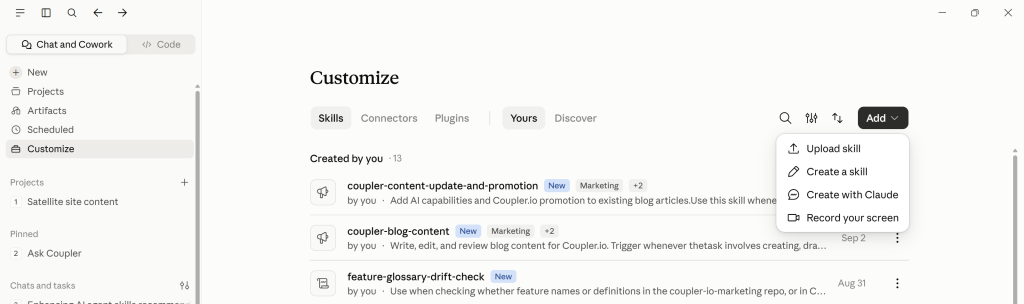
If you want to browse the Skills library, use the Discover tab and add the Claude built-in Skills you need.
Best practices for getting the most out of Claude Skills
These Claude Skills best practices talk about how to connect Skills to live data and combine them into larger workflows.
Pair Skills with live business data
For business use cases like finance, sales, or analytics, Claude needs the latest data to act on. One way to solve this is by connecting Claude to Coupler.io. Coupler.io is a no-code data integration platform and AI analytics that connects more than 400 business data sources to AI tools, dashboards, and data warehouses.
The Coupler.io Claude Skills examples in this list work the same way. Coupler.io continuously syncs data from Google Sheets, HubSpot, Xero, Stripe, Salesforce, Shopify, GA4, and provides hundreds of other Claude integrations. Claude then follows the Skill’s instructions to analyze that data. When Claude gets automatic and updated information, Skills turn from static instruction sets into live business workflows.
When using Coupler, you don’t need to worry about your business data leaking into Claude. Coupler’s analytical engine performs the actual calculations and sends Claude only the filtered data and analysis results it needs. Claude uses those results to explain what happened and build the narrative.
If you want to analyze your own marketing, sales, finance, or ecommerce data with the Skills covered in this guide, create a Coupler.io account and connect your data sources. Coupler.io offers a 7-day free trial and doesn’t require a credit card to sign up.
Combine multiple Skills for complex workflows
A Skill can invoke another Skill, allowing you to build multi-step workflows from smaller, reusable components.
Here is how I use Generate dataset context, marketing-analytics, and report-generation skills to analyze my data connected to Claude via Coupler.io:
- First, Generate dataset context scans your connected marketing data and saves the business context so the AI knows what each field means.
- Then marketing analytics runs the analysis against that context
- Report generation turns the findings into a structured report with an executive summary, recommendations, and next steps.
Keeping analysis and reporting as separate Skills means you can reuse the same reporting workflow with sales, finance, ecommerce, or any other analytics Skill without rebuilding it each time.
Run your Skills on live data with Coupler.io
Get started for freeFAQs
Are Claude Skills free?
Yes. Most of the top Claude Skills covered in this guide are free to use on any Claude plan, including the free tier. The Skill files themselves are also free as almost all are open source, including Anthropic’s official skills and community-built ones. The only cost consideration is that some skills require external API keys to function (such as the competitor-profiling skill which needs Firecrawl and DataForSEO), but the skills themselves have no price tag.
How is a Claude Skill organized?
Every Skill is a folder with one required file, SKILL.md, and a few optional directories. SKILL.md contains the instructions Claude follows whenever it uses that Skill.
Common optional subdirectories include:
scripts/contains executable code that automates parts of a workflow.references/stores documentation, guides, or other large files that Claude loads only when it needs them.assets/stores reusable resources such as templates, sample files, images, and configuration files.
Do Claude Skills work in Claude Web, Claude Code, and Claude Desktop?
Yes, Skills work across all versions of Claude: Claude Web, Claude Desktop, and Claude Code. Claude Web and Claude Desktop work the same way. Download the Skill as a ZIP file, open Settings, and upload Skills.
Claude Code Skills are loaded a little differently. You add the Skill folder to your project directory, and Claude Code loads it whenever it’s relevant or you invoke it with slash commands. Project-wide instructions still belong in CLAUDE.md, while reusable task-specific instructions live in Skills.
Useful materials for all Claude users
What’s the difference between a Claude Skill and a system prompt?
A system prompt is a one-time instruction that disappears when the chat closes. If you want to use those instructions again, you have to copy or rewrite them in another chat.
A Claude Skill is reusable. You write the instructions once, save them as a Skill, and Claude loads them whenever they’re relevant or when you explicitly invoke them. Skills can also include supporting files, executable scripts, and reference documents, something a system prompt can’t do.
Does using Skills slow Claude down?
No. Skills use progressive disclosure, meaning Claude only loads the full skill content when it’s relevant to your request. At all other times, only a short description sits in the background.
The only time you might notice a delay is when a Skill performs extra work, such as querying live data through an MCP server, running Python scripts, or calling another Skill as part of a multi-step workflow. In those cases, the extra time comes from completing those tasks, not from the Skill itself.