
In search of an answer to “Will AI replace data analysts?”, I read every thread on Reddit.
Then I asked people I actually know the same question: data analysts and practitioners at Coupler.io, a no-code data integration and AI analytics platform we use daily, as well as professionals at other companies.
The Reddit take: AI is a super intern; junior roles are at risk; senior roles are safe. The real-world take? More complicated and far more interesting.
What is AI actually capable of in 2026, and where does it still fall short? What tools are analysts using and why? Where is the role heading, and which skills will separate the analysts who thrive from those who don’t? Read on to find out. The answers might surprise you 🙂
What AI can do in 2026 in the data analyst space
Let’s start with the practical reality to define whether AI is better for data analysis. According to Elvira Nassirova, the Lead Analytics Engineer with over 10 years of experience in data analytics (6 of them at Coupler.io):
I wouldn’t say better, but faster.
AI isn’t magically “better” at analysis; it’s faster at a lot of the work that surrounds analysis. That speed matters because it changes what “normal” looks like: how quickly stakeholders expect answers, how many iterations you can run, and how much manual grunt work is worth doing.
Here are the tasks that our data analysts rely on AI and automation for:
Data cleaning & preprocessing
Standardizing formats, catching obvious issues, refreshing datasets, spotting anomalies, and helping with “daily processing” type work.
Maintenance tasks like monitoring if all scripts/queries ran as expected, troubleshooting if there are any errors — if there’s a lot of maintenance, AI can do it much faster than humans.

Give your favourite AI platform secure access to your business data
Try Coupler.io for freeExploratory data analysis (EDA)
Instead of spending hours writing variations of the same query just to understand a new dataset, analysts can use AI to get a fast overview and uncover the obvious dimensions worth exploring. This doesn’t replace proper analysis, but it reduces the time spent on the task.
Recently, I had a dataset about a new product for me. Instead of spending the whole day digging into every possible dimension/metric and basically copy-pasting the same code with a couple of tweaks, I just asked AI (Coupler.io MCP + Claude) to analyze my table. It provided a dashboard that I shared with stakeholders.

This example demonstrates how Claude AI for data analytics can accelerate exploratory work, turning hours of manual querying into minutes of conversational analysis.
Automated reporting and dashboard generation
AI can speed up reporting, especially when data visualization reports are built through code (SQL + scripts) rather than purely point-and-click tools. The consensus from our analysts: AI excels at generating the first version, but humans still need to refine for stakeholder-ready polish, especially in tools like Looker Studio, where fully automated AI-driven dashboard building isn’t straightforward yet.
Pattern detection & anomaly identification
AI excels at scanning large datasets for outliers. This is the kind of work that’s hard for humans to do consistently when the dataset is large and time is limited.
[For example, in digital ads,] AI is significantly more efficient at real-time anomaly detection and predictive bidding across complex datasets. These agents process billions of signals to ensure budgets are automatically allocated to the highest-performing segments in Google, Meta, or TikTok.

As one analyst put it, AI can “flag anomalies in daily reports” and “surface patterns in sales or ad performance faster than a person scanning spreadsheets.” It gives analysts a faster starting point for investigating why something happened.
This is especially evident in paid advertising. If you run Google Ads, see how analysts are already putting this into practice when analyzing Google Ads data in ChatGPT.
Natural language query tools
The shift from writing SQL for every ad-hoc request to saying “Get me users who did X during Y timeframe” allows analysts to move faster on stakeholder questions while still getting structured outputs.
Extracting any data on demand: non-DA user says ‘get me users that did X, registered in XY period, and are from here and there’ and AI exports list within seconds.
The pattern across all these use cases? AI handles the mechanical work: the data wrangling, the repetitive querying, the first-pass pattern detection. This isn’t replacing the analyst; it’s removing the friction that kept them from doing more analysis. The question isn’t whether AI can do these tasks, but whether analysts can leverage it to do more valuable work.
Popular AI tools used in analysis
Generative AI assistants (ChatGPT, Gemini, Claude, Perplexity)
When it comes to using AI tools, analysts don’t use a single “oracle”. They mix and match different AI models based on their strengths.
Our in-house survey revealed clear patterns in how data analysts choose and combine tools:
| Tool | Primary use cases | Why analysts choose it | How to connect |
| ChatGPT | – Writing and reviewing documentation – Simple technical explanations of unfamiliar concepts – Quick answers to straightforward questions | Widely available with fast responses; a reliable go-to for general knowledge and quick clarifications | – ChatGPT integrations by Coupler.io – Native apps – Manual file upload |
| Claude | – Exploratory data analysis with dashboard generation – Analyzing text data (surveys, support tickets) – Complex SQL generation and query debugging | Excels at maintaining context across long analytical conversations and generates reliable code for data workflows | – Claude integrations by Coupler.io – Native connectors – Manual file upload |
| Gemini | – Multi-modal analysis combining text, images, and structured data – Extracting and analyzing data from Google Workspace – Processing multiple data formats simultaneously | Native Google services integration makes it ideal for analysts already working within the Google ecosystem | – Gemini integrations by Coupler.io – Native connectors – Manual file upload |
| Perplexity | – Researching data analysis methodologies – Finding up-to-date technical documentation – Staying current with new analytical techniques | Real-time web search with source citations makes it the best choice for researching best practices and current trends | – Perplexity integrations by Coupler.io – Manual file upload |
| Cursor / GitHub Copilot | – Writing repetitive SQL queries and scripts – Code autocompletion for data pipelines – Building data extraction scripts and navigating inherited projects | IDE-native integration speeds up repetitive analytical work and makes it easier to navigate and contribute to inherited data projects | – Cursor integrations by Coupler.io – Works directly with code files in your IDE; uses .cursorignore to exclude sensitive data |
The typical workflow: one tool for coding assistance, another for explanation and documentation, and a general habit of testing different models to learn strengths and weaknesses, as well as compare results. For instance, analysts might use ChatGPT for data analytics documentation and explanations, while turning to Claude Code for more complex coding tasks.
Just working with different tools on a daily basis, testing their capabilities, knowing which is great for what (e.g., Claude for coding, ChatGPT for documentation, simple explanations).
The meta-skill here isn’t mastering one AI tool, it’s knowing which tool to use for which job and not treating any model as a universal oracle.
Explore our selection of AI marketing tools for campaign analysis and optimization.
AutoML tools
AutoML (Automated Machine Learning) appears more on the edges of analyst workflows rather than at the core. Our analysts use machine learning models for specific, bounded tasks: predictive analytics for forecasting, simulations, or lightweight machine learning that doesn’t require deep data science expertise.
AI can handle basic forecasting and simulation, spotting patterns and anomalies in big data sets.

It’s less about replacing core analysis and more about making “advanced-ish” methods accessible without having to build everything manually.
BI platforms with embedded AI (Power BI, Tableau, Looker Studio)
BI platforms are increasingly embedding AI capabilities directly into their tools. Power BI, Tableau, and Looker Studio now offer features like narrative summaries, automated anomaly detection, and AI-driven insights that can help analysts spot patterns quickly.
These embedded AI features are genuinely useful for surface-level exploration and quick insights. However, our analysts noted there’s still significant room for improvement in how deeply these features integrate into analytical workflows.
Looker Studio dashboards: I would be happy if I could build them through AI because it’s monotonous work, but there is no such way out of the box as far as I know.
The challenge isn’t whether AI features are valuable—they are. It is about making them powerful and flexible enough to handle the full range of analytical tasks. Data integration platforms and AI analytics solutions are pushing this boundary with conversational AI agents. For instance, Coupler.io offers an AI agent to query data naturally and receive structured outputs, bridging the gap between simple automation and sophisticated analysis.
Chat with an AI Agent across all your business data, inside Coupler.io
Get started for freeWhat AI cannot fully replace
AI can automate routine tasks. But the analysts we surveyed were consistent in their view of what remains human: context, judgment, and influence.
Contextual understanding
Business domain knowledge
AI doesn’t live inside your business. It doesn’t remember that tracking broke last quarter, that definitions changed, that the “real” metric is calculated differently depending on context, or that a sudden dip is a known data gap.
Humans understand the business context. They know how certain data is calculated, whether it has duplicates, whether there are gaps in data that one should keep in mind… For example, I know we were not tracking signups in August. AI will see a drop and likely make up theories as to why it happened.
That’s the core limitation: AI sees patterns; analysts know reality.
Translating messy real-world requirements into analytical questions
Stakeholders rarely ask clean questions. They come with problems, not specifications. Analysts take vague requests, identify the real question beneath them, and translate it into something measurable and actionable.
Humans are better at defining context and the right questions to ask, understanding requirements and translating them to technical language.

AI struggles when the requirements are ambiguous or half-formed.
The skill of turning “I think our conversion is bad?” into “Let’s measure checkout abandonment by traffic source and device type, controlling for seasonal patterns” remains deeply human.
The math problem: Generative AI cannot actually do math well
Here’s a problem that even experienced AI users can trip up on: large language models aren’t calculators. They’re pattern-matching prediction engines built to generate plausible text, not perform arithmetic or statistical operations.
That’s fine for explanations and code suggestions, but it’s dangerous for aggregations, statistics, business logic, and anything where correctness matters.
The consensus among our data analysts: Natural language processing models excel at “math errors” and “incorrect conclusions,” often because they confidently guess rather than calculate.
In other words, it can sound right and still be wrong, which is the worst kind of wrong in data analytics.
How Coupler.io removes AI math hallucinations
Coupler.io solves this fundamental problem through architectural design: it doesn’t let the LLM do math at all. The data integration platform uses what it calls an Analytical Engine – essentially a computational layer that sits between your data and the language model. When you ask a question about your data, the AI’s job is to understand what you’re asking and translate it into a proper database query. But it doesn’t touch the numbers.
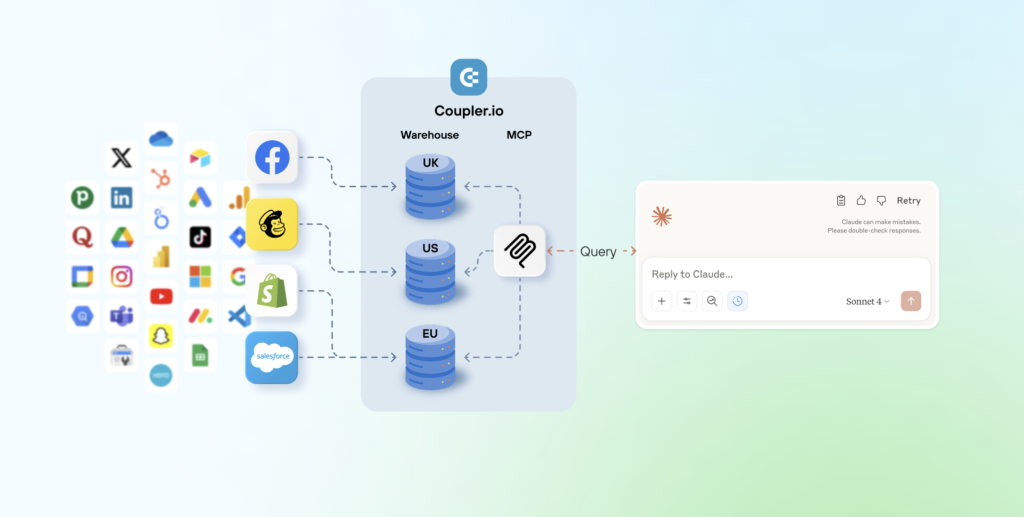
That query goes to the Analytical Engine, which does the actual heavy lifting:
- Executing SQL operations,
- Performing aggregations and joins
- Validating the math
- Returning verified results
Only after those calculations are complete and verified, the AI receives the numbers and does what it actually excels at: explaining what those numbers mean in plain language.
Think of it as specialized roles: the Engine handles computation, the AI handles conversation.
Here’s a concrete example of how AI integrations by Coupler.io play out:
You ask: “What was my revenue growth in Q3?“
- The AI processes your question and generates a SQL query, but doesn’t execute it.
- The Analytical Engine runs that query against your actual dataset, calculates the aggregations, validates the output, and returns something like “$147,293” with the relevant comparison data.
- The AI then receives these verified numbers and explains: “
Your Q3 revenue was $147,293, representing 23% growth over Q2.“
Throughout this process, the AI never sees your full dataset except for the schema and a small sample for context. It works with structured and verified outputs, not raw data that it might misinterpret.
The result: mathematically accurate answers delivered in natural language. No confident hallucinations, no calculation errors. Just reliable numbers with intelligent interpretation.
Connect your data to AI with Coupler.io
Get started for freeHuman-centered decision making
AI can propose options and surface patterns. But humans decide and carry the consequences. The distinction matters because data analysis isn’t just about finding answers — it’s about choosing the right answer when multiple interpretations are possible, and owning the outcome of that choice.
Our analysts consistently pointed to situations where AI’s suggestions would have led them astray without human judgment to intervene. The most common example: AI flagging a performance drop as a “real” decline when an experienced analyst recognizes it as a tracking issue or measurement change.
The pattern that emerges: embedded AI features are nice-to-have conveniences rather than game-changers. The validation habit stays constant regardless of which AI generated the output.
Data analysts need to understand the code the LLM is generating and be able to stop it if it goes rogue. If DAs accept whatever LLM spits out without verifying, it will hurt them sooner than later.
The ideal state isn’t eliminating human oversight—it’s making verification faster and more efficient. As Elvira put it: “I’d love for LLM to do the work that I can just verify. It’s more efficient and faster.”
Here’s what our data analysts see as irreplaceable by AI:
- Interpreting ambiguous results: Data often supports multiple plausible interpretations. Humans choose the one that makes business sense and know when “technically true” is practically misleading. This is where experience becomes a moat.
During a performance review, the data showed a sudden drop in conversions. An AI tool flagged it as poor performance, but human judgment was needed to see that the issue came from a tracking error, not customer behavior. It required context and business knowledge that AI couldn’t provide.

- Considering ethical implications & bias: Bias isn’t just statistical, it’s contextual. Analysts have to think through impacts, fairness, and unintended consequences. AI can repeat common ethical language, but it doesn’t own accountability. Humans do.
- Making recommendations aligned with organizational strategy: Even when AI helps with analysis, someone still needs to decide what to do with the findings. That decision requires understanding company priorities, stakeholder politics, resource constraints, and strategic direction – all things that exist outside the data.
Judgment is always my task, never AI’s.
The pattern is clear: AI accelerates the “what happened” part. Humans own the “so what” and “now what” parts.
Communication & stakeholder management
Analysis doesn’t create value until someone acts on it. That’s where communication becomes critical and where AI remains a limited assistant rather than a replacement.
- Presenting findings to non-technical audiences: Analysts translate findings for executives, product teams, and marketers who think in business outcomes, not statistical significance. The skill involves choosing the right level of detail, anticipating questions, and framing insights in terms that resonate with each audience. AI can help draft explanations, but humans still control the messaging, read the room, and adjust on the fly when something doesn’t land.
- Influencing decisions with storytelling: The best analysts don’t just report results; they create narratives that move decisions forward. They connect data to strategy, anticipate objections, and build cases that shift thinking.
Being proactive, suggesting improvements about the product based on data.
That’s not a dashboard feature or a prompt template. That’s judgment about what matters, empathy for stakeholder concerns, and skill in persuasive communication.
The future of the data analyst role
The anxiety around AI replacing jobs is understandable, but our conversations with working analysts reveal a more nuanced reality. Rather than a simple replacement scenario, the role is evolving in ways that make certain skills more valuable while automating others. Here’s what that transformation actually looks like on the ground.
Augmentation, not replacement
The dominant pattern emerging from our research isn’t replacement but transformation. Analysts are becoming strategic orchestrators of AI capabilities rather than hands-on executors of every task.
Analysts as “AI supervisors”
When it comes to the future of data analysis, our survey suggests a shift in posture: analysts aren’t competing with AI, they’re supervising it.
AI systems handle execution speed while analysts provide direction, validation, and business judgment. One analyst described the ideal state: “I’d love for LLM to do the work that I can just verify. It’s more efficient and faster.”
That’s the core evolution: from hands-on producer to strategic reviewer. This is not near-future predictions, it’s already happening now.
The analyst’s role shifts from writing every query to validating AI-generated queries, from building every dashboard to refining AI-built dashboards, and from manual debugging to directing AI through debugging workflows.
Focusing more on strategy and less on manual tasks
As automation and artificial intelligence can easily handle repetitive tasks, the remaining value concentrates in higher-leverage activities.
Our analysts see this shift clearly: less time on execution mechanics, more time on the thinking that drives business decisions.
The work that matters:
- Asking better questions: Instead of “How many users signed up?” it’s “Which user acquisition channels drive customers who actually stay and generate revenue?”
- Validating outputs: Quickly spotting errors, testing edge cases, and verifying assumptions becomes critical.
- Prioritizing what matters: When you can generate ten analyses in the time it used to take to do one, deciding which analyses to run becomes the task. Strategic thinking about what questions actually move decisions forward separates high-impact analysts from those churning out reports nobody uses.
- Connecting insights to business decisions: True business intelligence is about translating what the data tells you into actionable recommendations. Data storytelling will become a core asset for human data analysts.
Analysts must transition from “data extractors” to “strategic storytellers” and AI curators. The most valuable skills today are data literacy and critical thinking, specifically the ability to ask AI the right questions and translate complex insights into clear business outcomes that drive ROI.
The analyst role becomes more strategic, not less.
Emerging hybrid roles
The AI-powered data analyst job landscape is changing to blend traditional analysis with adjacent hard and soft skills. Think of these new roles as evolutionary paths for analysts looking to position themselves strategically.
These roles share a common pattern: they all require strong analytical fundamentals plus the ability to work effectively with AI as a tool, not a replacement.
| Role type | What it involves | Key skills | How they use AI |
| Analytics Engineer | Building and maintaining data pipelines, modeling layers, and data quality systems | SQL Python Data modeling Pipeline orchestration Testing frameworks | Uses AI to debug faster, optimize queries, and generate tests while retaining full ownership of data infrastructure reliability |
| Data Product Manager | Translating business needs into analytical capabilities and managing analytics as products with real users and features | Product thinking Stakeholder management Technical fluency Prioritization | Uses AI for rapid prototyping and iteration, applying human judgment to decide which capabilities deliver real business value |
| AI-Assisted Analyst | Running several AI tools in tandem to speed up analysis while keeping results reliable | SQL Statistics Prompt engineering Context management Critical validation | Treats AI as a force multiplier: delegates execution, combines tools strategically, and validates every output that matters |
Skills that will become more important
When we asked what matters for staying relevant, one skill dominated: critical thinking. Every other capability builds from that foundation.
- SQL & Python technical skills: Even if AI writes more code, analysts still need to read it, validate it, and understand what it’s actually doing.
You need to understand what’s going on with your data, not just blindly believe AI.
- Prompt Engineering upskilling: This is evolving from “cute hacks” into a real professional skill. It’s about providing clear context, appropriately constraining scope, managing conversation state, and systematically testing outputs.
- Statistical thinking: AI can quickly generate statistical-sounding outputs. That makes statistical literacy more important, not less, because you need to know when something is meaningful versus nonsense. Understanding confidence intervals, statistical significance, sampling bias, and correlation versus causation will help you guard against being fooled by plausible nonsense.
- Communication & business acumen: As execution speeds up, what differentiates analysts is stakeholder communication and domain understanding. The ability to translate insights into action, frame findings for different audiences, and connect data to business priorities becomes the moat.
- Ethical and responsible AI use: Analysts need strong instincts around when AI is safe to use and when it’s risky, especially around privacy, accuracy, and unintended consequences.
Data analysts need to understand the capabilities and limitations of LLMs, understand what powers AI agents should be trusted with and what can quickly backfire.
Job market projections
Despite the anxiety in Reddit threads and industry discourse, data roles aren’t disappearing; they’re evolving.
The logic is straightforward: AI reduces manual effort, but it doesn’t remove the need for decision-making, context, or strategic thinking.
Growth of data-related jobs despite automation
The Reddit consensus captures the nuance: entry-level “ticket-taking” roles face pressure, while senior “Sherlock Holmes” investigative positions remain secure.
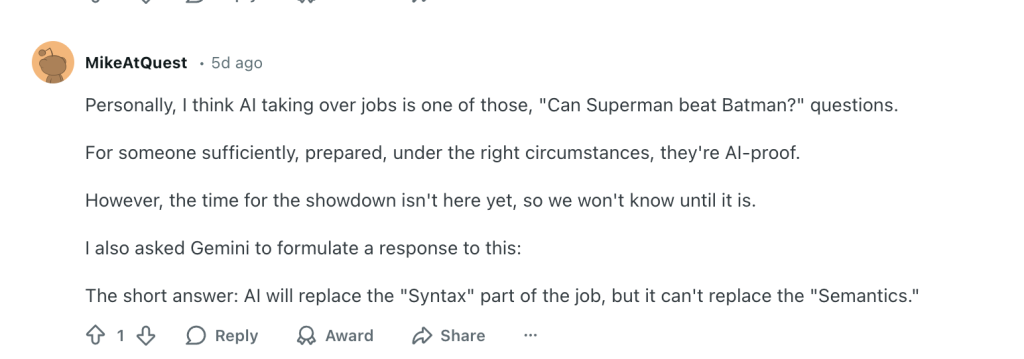
From the r/dataanalysiscareers thread: “AI will replace the syntax part (code writing) but not the semantics part (meaning and context).”
The pattern emerging: companies need fewer people to execute basic queries, but more people who can direct analytical work, validate AI outputs, and translate findings into business strategy.
Surveys & trends showing increased demand for analytical thinking
As AI becomes ubiquitous, a counterintuitive trend is emerging: the value of unique, proprietary data analysis is increasing. Companies competing to be authoritative sources for large language models need analysts who can extract insights from data that AI hasn’t seen.
This creates sustained demand for analysts who can work with messy, context-heavy data that requires human interpretation:
- Survey analysis and qualitative research: Understanding sentiment and identifying themes in open-ended responses requires industry knowledge that AI lacks. As one analyst noted about AI’s limitations with text: “It can say the majority is unhappy with current pricing while it’s just a couple of answers.”
- Customer behavior interpretation: Raw behavioral data tells you what happened. Understanding why it happened and what it means for strategy requires domain expertise about your specific market, product, and user base.
- Contextual anomaly detection: AI can flag statistical outliers, but humans understand which anomalies matter and require business knowledge to distinguish between data bugs, genuine trends, and noise.
The analysts who thrive will be those who combine AI-powered efficiency with deep proprietary knowledge about their company’s data, customers, and market position.
Companies still need human decision makers
AI can accelerate analysis, but it can’t own the outcome. Someone still needs to understand the strategic context, interpret the results, and earn stakeholder trust through clear, explainable decisions.
The analyst’s role is shifting from “person who produces analysis” to “person who ensures analysis drives good decisions.”
Making final decisions — even if you got some call-to-action advice from AI, you should critically analyze it and decide what is best. Better to combine AI-provided info and your own domain knowledge about the product/data.
Risks and challenges
The speed and convenience AI brings to analytics come with real risks. Here’s what analysts need to watch for and how to mitigate these challenges:
Over-reliance on AI outputs
What it looks like: Accepting AI-generated code and analysis without verification. Piotr’s experience: “I let Cursor build the whole project with me just accepting everything, only to find out it missed something in the very beginning. It took quite some time to understand the issue and revert all the damage.”
How to mitigate:
- Verify before acting: Check edge cases, test with different data samples, and run sanity checks.
- Start small: Generate in pieces, verify each step.
- Treat AI as a junior analyst: Would you deploy unreviewed code from a junior? Apply the same standards to AI.
Data privacy & security
What it looks like: Feeding sensitive data into external AI services that may use inputs for training, potentially exposing customer information, financial data, or proprietary metrics to competitors.
How to mitigate:
- Choose secure subscription tiers: Upgrade to business or enterprise plans that exclude your data from training (e.g., ChatGPT Business/Enterprise, Claude Team/Enterprise, Perplexity Enterprise Pro/Max).
- Configure privacy settings properly: Opt out of model training in tool settings, disable memory features that store business information, and use incognito/privacy modes for sensitive queries.
- Use a secure intermediary layer: Instead of exposing your business systems directly to AI platforms, Coupler.io controls exactly what information gets shared. You can filter out sensitive fields (like customer PII, financial details, or proprietary metrics) before data ever reaches the AI. The data integration platform acts as a protective gateway between your data sources and AI tools. It provides granular permissions to decide which datasets are accessible, maintains encrypted connections (SOC 2, GDPR, HIPAA compliant), and ensures AI tools never connect directly to your original data sources.
- Never paste raw sensitive data: Avoid copying customer PII, financial records, or proprietary information directly into AI prompts.
AI hallucinations
What it looks like: Confident but completely wrong analysis. The well-known Google AI Overview suggested putting glue on pizza after misinterpreting sarcastic Reddit comments. In analytics, this means incorrect calculations or a misunderstood business context presented with authority.
How to mitigate:
- Use platforms that prevent math errors: Coupler.io addresses AI hallucinations through architectural design. The platform’s Analytical Engine handles all computational work separately from the LLM. When you ask a question, the AI generates a query, but Coupler.io executes it, performs calculations and aggregations, validates outputs, and returns only verified results. The AI then interprets these clean numbers and delivers insights in plain language.
Skill gap: traditional vs AI-native
What it looks like: Traditional analysts resisting AI lose productivity advantages, while AI-dependent analysts with weak fundamentals can’t catch mistakes.
How to mitigate:
- Build hybrid capability: Maintain strong fundamentals (SQL, Python, statistics) while developing AI fluency. Hybrid analysts with strong fundamentals plus AI fluency move fast while maintaining quality.
- Critical thinking first: As Elvira has already stated, “You need to understand what’s going on with your data, not just blindly believe AI.”
The common thread: AI makes you faster, but only if you maintain the discipline to verify its work. Speed without accuracy creates bigger problems faster.
Is AI a competitor or ally?
The question isn’t really whether AI will take your job. It’s whether you’ll become the person who can use it without getting fooled by it.
Based on what working analysts told us, the honest answer is: AI will reshape the role, but it won’t erase it.
AI is already accelerating real analyst work: generating code, cleaning data, speeding up exploration, and making reporting faster. It’s also already making mistakes — every analyst has experienced that firsthand.
So the future analyst is someone who supervises it, validates, provides business context, and makes decisions with accountability. The job is evolving from doing analysis to driving decisions.