
Custom MCP Destination in Coupler.io: Feed Your Business Data to Any MCP Client

Coupler.io already has dedicated AI integrations for Claude, ChatGPT, and other AI tools. However, the MCP ecosystem is growing faster than any single product team can keep up with. So, new MCP clients pop up every week, if not every day 😃
You shouldn’t have to wait for a named integration every time a new client appears in order to connect your data to it. That’s what the Custom MCP destination is for.
What Custom MCP actually does
Coupler.io’s core loop consists of three main stages:
- Connect data sources (over 400 integrations supported)
- Organize data set (apply transformations, hide PII data, etc.)
- Send the data set to a destination (spreadsheet, BI dashboard, data warehouse, or AI tools)
Custom MCP adds a different kind of destination. Instead of pushing data to a specific tool, it exposes your data flow as an MCP server endpoint. Any MCP client that can connect to a remote server can access that data, read the schema, and run queries against it. Since you automate data refresh on a schedule in Coupler.io, whatever tool connects to your endpoint always works with up-to-date information.
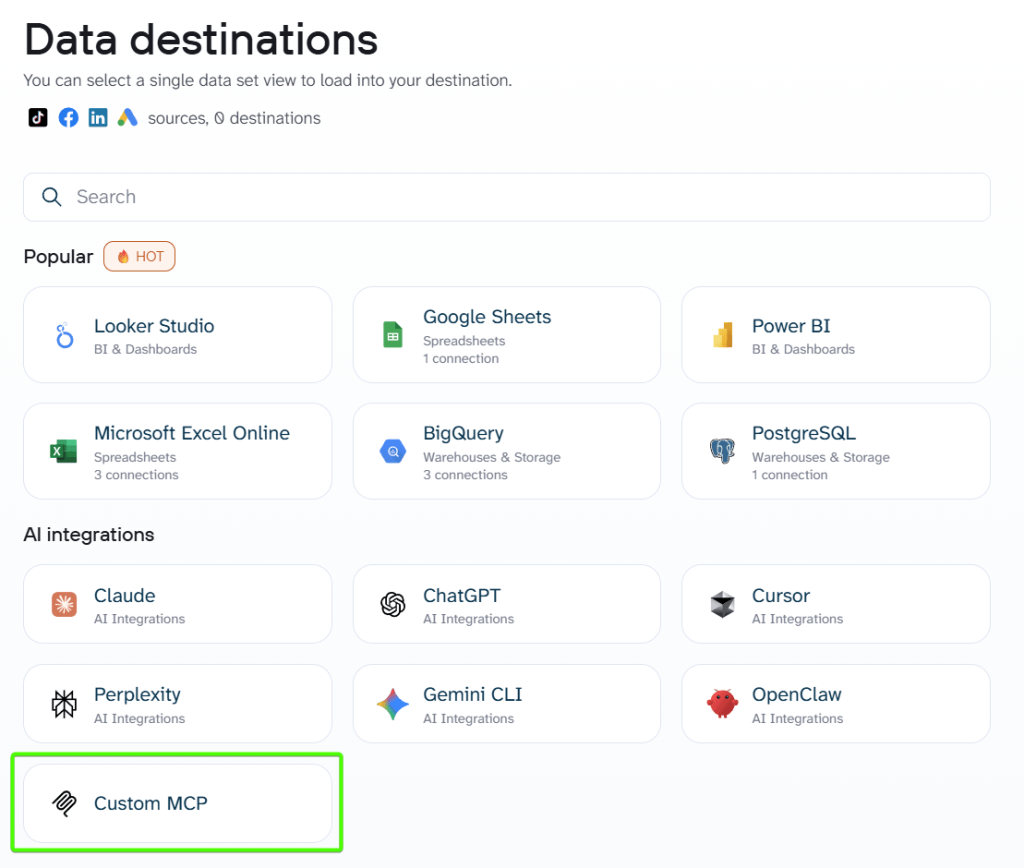
When to use Custom MCP vs. dedicated AI destinations
Coupler.io’s dedicated AI integrations for Claude, ChatGPT, Gemini, and other tools, including the built-in AI agent, are optimized for conversational data analysis. You connect your data, open the AI assistant, and start asking questions in plain language.
If you’re feeding data into an automation workflow, a custom AI agent, or an MCP client that isn’t on Coupler.io’s integration list, Custom MCP is your path.

Connect your data through custom MCP by Coupler.io
Get started for freeExamples of Custom MCP use cases
Feed data into automation workflows (n8n, Make, Zapier)
You already run workflows in n8n, Make, or Zapier. Maybe you trigger Slack notifications when a deal closes, or you sync CRM records to a spreadsheet every morning. These platforms have MCP support (or are actively rolling it out), which means they can connect to any remote MCP server as a data source.
With Custom MCP, your automation platform pulls fresh business data directly from Coupler.io data flows.
Say you run advertising campaigns in Google Ads and Facebook Ads. You create a data flow in Coupler.io that blends data from the ad platforms into a single dataset, which you then integrate via Custom MCP. Your n8n workflow connects to the endpoint, checks CPA daily, and posts an alert to your Slack channel if any campaign crosses a threshold. The data refreshes automatically on a schedule, so the workflow always runs against recent numbers.
Serve multiple clients from one account
When you manage data for several clients, each client’s data typically sits in separate Coupler.io data flows. Custom MCP lets you generate a unique endpoint and token for each one.
- Client A might consume their data through an internal AI assistant.
- Client B has a Make automation that generates weekly reports.
- Client C uses a custom-built dashboard.
Each data flow connects to its own endpoint, and you manage all the data pipelines from one Coupler.io account.
The token-based authentication matters here: every client gets their own credentials, and revoking access is as simple as regenerating a token. Coupler.io’s SOC 2 Type II, GDPR, and HIPAA compliance means you’re not cutting corners on data security even when working with external parties.
Power custom AI agents and internal tools
Your engineering team is building a Slack bot that answers sales questions. Or maybe it’s a custom reporting agent in Python or TypeScript that runs on a schedule.
Whichever tool it is, it needs structured business data. Custom MCP provides them with a standardized endpoint to access it. The dev team doesn’t need to build and maintain their own data pipeline, handle OAuth for each source API, deal with schema changes when a source app updates its API, and so on. Data collection and transformation are carried out by Coupler.io. The custom agent just connects to the MCP endpoint and queries the data.
For teams building with LLMs, this is a practical shortcut. Instead of writing custom functions to fetch and parse data from each source, you point your AI agent at a single MCP endpoint. The agent discovers available data through tool calls, reads the schema, and runs queries. If you’re working in Claude’s ecosystem, the approach is similar to how MCP servers for marketers work, just with your own custom client on the other end. Teams that need to connect AI to PostgreSQL or another database follow the same pattern with a data-specific endpoint.
Connecting new and niche MCP clients without waiting
Every month, we get new open source projects, new AI assistants, or other specialized tools for specific industries. How do you connect data to them? Custom MCP is your answer. It allows you to load your data into a fresh solution if it speaks MCP. This way, you won’t need to wait for Coupler.io to ship a named integration.
Why not build your own MCP server?
If you have skills and resources to build a custom MCP server from scratch, it’s a real option. However, keep in mind that in this case, you’re responsible for:
- Data collection from each source API
- Handling API keys and OAuth for every integration
- Keeping the data fresh on a schedule
- Managing schema changes when source APIs update
- Running the server infrastructure itself
- Other essential moving parts for a team that probably just wants to get data into their AI workflows.
Coupler.io already solves the hard part. It connects to over 400 data sources, transforms and blends the data, schedules automatic refreshes, and runs everything on SOC 2-certified infrastructure. You get a production-ready MCP endpoint without writing or maintaining server code.
If your use case is truly custom and requires server-side logic beyond data delivery (such as triggering actions or writing data back), building your own server still makes sense. But for the common scenario of “I need my business data accessible to an MCP client,” Custom MCP saves weeks of engineering work.
How to get started
The setup takes about two minutes. You create your data flow, select Custom MCP from other destinations, generate an authentication token, and copy the server URL.
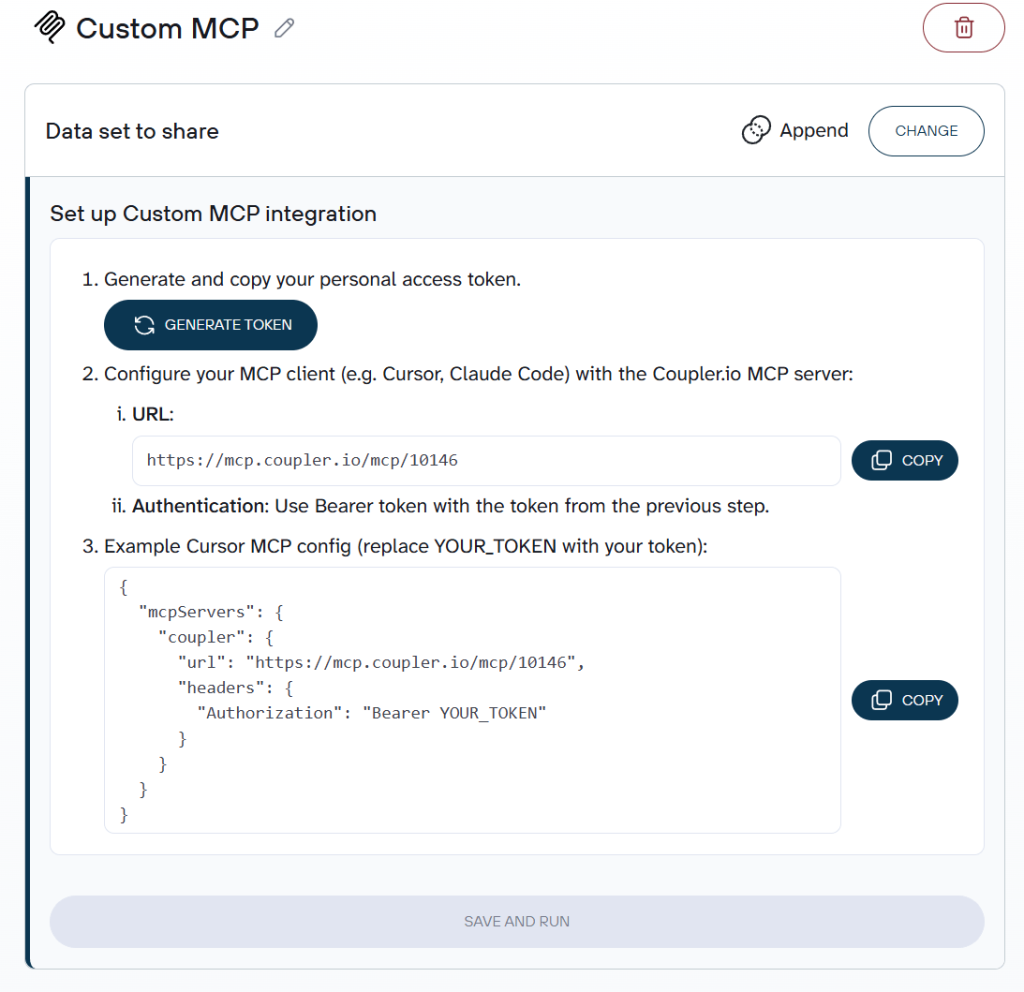
Then you paste the endpoint URL and the token into your MCP client’s JSON config. No SDK, no dependencies, no command-line gymnastics. Just a URL, a token, and a config file.
Set up a custom MCP integration without coding
Try Coupler.io for freeOnce connected, the MCP client can discover available data flows and query them. All the authentication, data collection, transformation, and scheduling happen on Coupler.io’s side. Your MCP client just consumes the result.
If you’re new to Coupler.io’s MCP capabilities, I’d recommend starting with the Coupler.io MCP server overview to understand the broader picture, then coming back here when you need to connect a tool that doesn’t have a dedicated integration.



