A typical situation: you connected data from your ad accounts to Claude or ChatGPT, asked about channel performance over the past quarter, and received the answer. The numbers seem logical, the chart looks decent, and the conclusions are confidently formulated. Ready to send it, you realize the AI treated all conversions equally and missed that half were micro-conversions with five times lower value. Or worse, it ignored an attribution model change in November and compared December to October results incorrectly.
Such AI analytics mistakes are common because, without proper context, the AI sees much less in your data than you assume. And the fix isn’t a better prompt. It’s giving your AI the same background knowledge you carry in your head before it starts analyzing. In this article, I break down why it happens and how Coupler.io helps you address the challenge at the data level.
What AI actually sees when it looks at your data
When a large language model queries your data set, it starts with the lowest level of understanding: column names and data types. This is the core limitation of AI in data analysis: the model sees a table with labels like “campaign_name”, “spend”, “conversions”, “date”, etc. LLM sees “spent” as a number and “campaign_name” as text. It’s the minimum the model starts with.
Then, as a rule, the AI model samples your data to understand what the table is about. It helps, but it’s far from enough. Five rows won’t show seasonal sales patterns, or that the “status” column is set to “pending,” which the team uses to mark test orders. This is the fundamental schema vs meaning in data problem: AI models understand structure, not intent.
That’s where the disconnect happens: Imagine your CRM automatically assigns a default value of $150 to every new deal that hasn’t been reviewed by a sales rep yet (to be able to build a pipeline report so we can forecast). This is just a placeholder and doesn’t reflect any real assessment. Without that context, an AI analyzing your pipeline might see hundreds of “$150 deals” and treat them as legitimate opportunities. It could report inflated pipeline numbers or misidentify $150 as your most common deal size, neither of which is true. The difference between what you know about your data and what AI is able to understand on its own is huge. This is where all the false conclusions are hidden, and exactly why contextual data vs raw data matters so much. Adding context to your data sets before AI touches them changes the quality of every answer you get.
When you connect your data sources to AI tools like Claude and ChatGPT through Coupler.io, you can attach context to each dataset right at the point of connection.

Connect live data from 400+ sources to AI in minutes
Try Coupler.io for freeWhat is context in AI, and which types of context AI can’t figure out on its own
The importance of context in data analysis becomes clear the moment AI misreads something you consider obvious. Context in AI analytics is the background knowledge that helps a generative AI model understand what your data actually means. Column names and sample rows tell AI the structure. Context tells it everything else:
- What the numbers represent (e.g., “conversion” in your account means a completed demo request, not any form submission)
- Which values to trust (e.g., deal_value = 150 is a CRM placeholder, not a real deal value)
- What changed and when (e.g., you switched attribution models in March, so before-and-after comparisons need adjustment)
- How your business works (e.g., your sales cycle is 8-12 weeks, so weekly conversion rates are meaningless).
There are items that AI can easily understand from your data (e.g., column names, data types, general upward or downward trends). But there is a separate layer of knowledge (what practitioners call the semantic layer in analytics) that lives in your head, or your team’s head, and no machine learning model can figure it out from the presented digits alone. No matter what marketing slogans promise you about intelligent analysis, an LLM can’t read your thoughts. It reads rows in the table. Data without context is meaningless to AI, even when it looks perfectly structured.
This is also the core limitation that RAG (Retrieval-Augmented Generation) was designed to address in AI systems: feeding relevant information into the model at query time rather than expecting it to know everything in advance. The same principle applies to your data: you need to supply the context explicitly, because otherwise the model will infer false information.
Here are the AI context categories that you have to provide; otherwise, AI will confidently give out wrong conclusions.
#1 Business logic
Let’s take the above-mentioned example: In your CRM, a deal_value = 150 means the manager hasn’t assessed the deal yet. It’s a default placeholder. Since the AI doesn’t know this, it sees “150”, interprets it as a real amount, and calculates the average check based on hundreds of such “fives.” As a result, you see a decrease in the average check amount and conclude that lead quality has dropped, which is not true. The same principle applies to custom conversions, internal lead classifications, and any value whose meaning is defined by your internal rules, not the data itself. This is a business context in AI that no model can infer on its own.
#2 Historical events
In November, you put the biggest campaign on hold for 2 weeks to change creatives. In December, you relaunched it with new settings. AI sees a drop in November and a rise in December and happily informs that your strategy improved by 40%. But the comparison is not correct: November was not a complete month. Without knowing about the pause, AI compares two weeks with four and provides the insight. Product launches, tracking changes, rebranding, and migration to a new analytics platform. These are exactly the kind of hidden assumptions in data analysis that turn accurate data into misleading conclusions.
#3 Custom metric definitions
What does an “active user” mean in your company? Someone who logged in within the past 30 days? Or someone who made at least one purchase during the quarter? Is a qualified lead a lead after the manager’s first call, or a lead that corresponds to the five scoring criteria? These definitions vary by company. AI works with the column of qualified leads and has no idea what the scoring is. It just counts rows. This leads to inconsistent analytics results across teams using the same dataset with different mental models.
#4 Domain knowledge
You know that in January, CPL in your niche always increases by 20% to 30% because competitors return after the holiday season. AI sees this CPL growth and might advise reducing spending or reviewing the campaign, but in reality, it’s just the usual seasonal dynamics. Industry benchmarks and the target audience’s behavioral patterns are a crucial context that isn’t included in any table column. Without it, why AI insights are wrong often comes down to this: the model simply lacks your industry experience.
Here’s what it looks like in comparison:
| ✅ What AI sees | ❌ What AI misses without context |
| deal_value = 150 | It’s a default CRM value, not the real amount |
| Conversions drop in November | The campaign was put on hold to change creatives |
| “qualified_lead” = TRUE | Your scoring includes 5 criteria that AI is unaware of |
| 25% CPL growth in January | Usual seasonal dynamics for your niche |
| “date” = 2025-03-15 | The date of data collection, not the event date |
When AI works without context, each line in this table becomes an error in the final conclusion. The larger the data set, the more hidden traps like these you’ll face. That’s why Coupler.io lets you add AI context to each data set before AI starts the analysis.
Add context to your data with Coupler.io
Coupler.io is a data integration platform that connects 400+ business apps directly to AI tools like Claude and ChatGPT. Data refreshes automatically, and Coupler.io’s Analytical Engine handles all calculations, so your AI receives verified results. Apart from moving data, Coupler.io keeps your datasets, business rules, metric definitions, and recurring workflows in one place. Your web traffic and paid campaign context, business event rules, team metric glossary, reusable analysis commands, etc, are stored together. So with the help of AI, you can actually chat with your data.
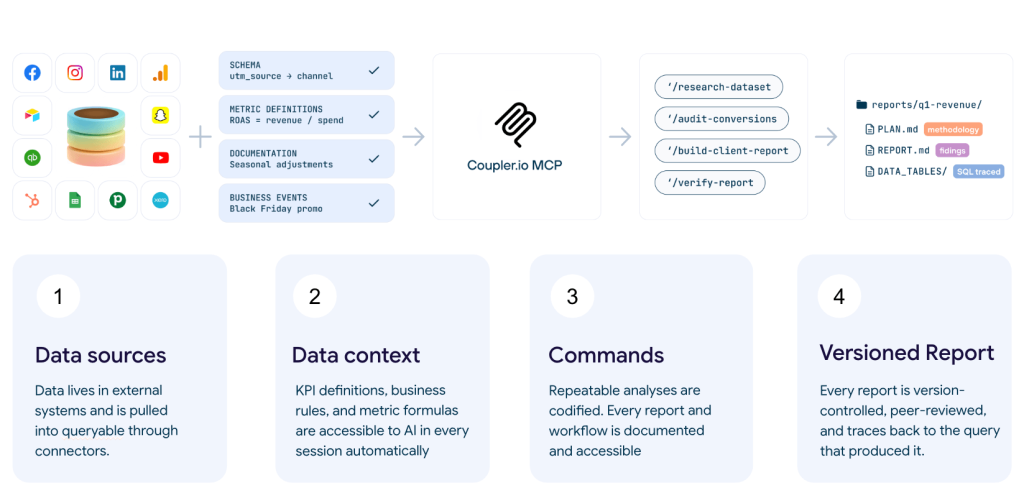
This is what context engineering looks like in practice: Coupler.io lets you describe the business logic, outline historical events, etc., once, and attach persistent context to each dataset. This information is passed to the AI model with every query.
Here’s how to do it:
- Create your first Data flow in Coupler.io.
- Connect the data sources you need for analysis (e.g., GA4, Google Ads, Meta Ads, CRMs, etc.).
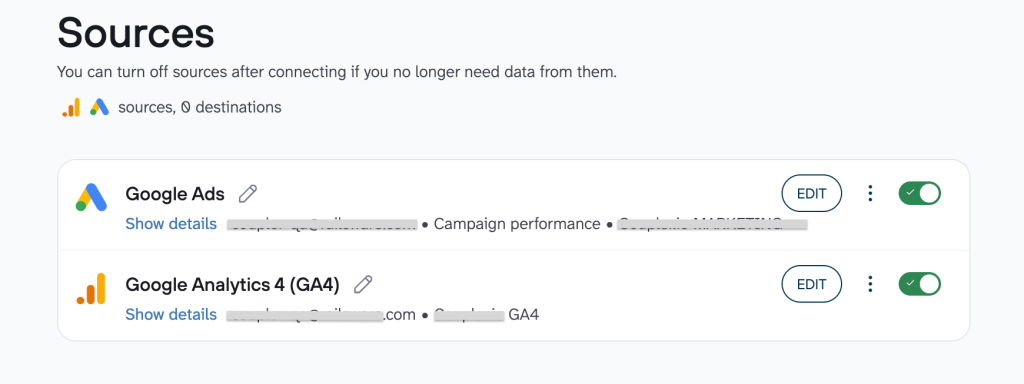
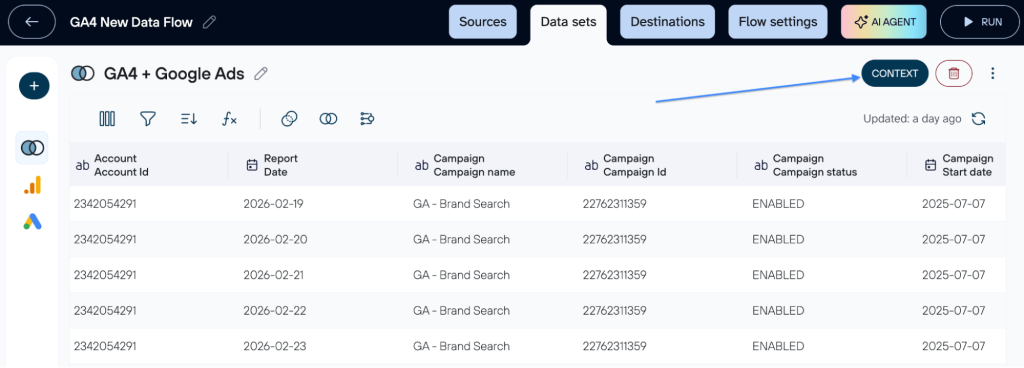
- You can easily add background details to your data through the Context option. Use a single source like Google Ads or a combined dataset; in both cases simply click the Context button to provide the necessary information for more accurate insights.
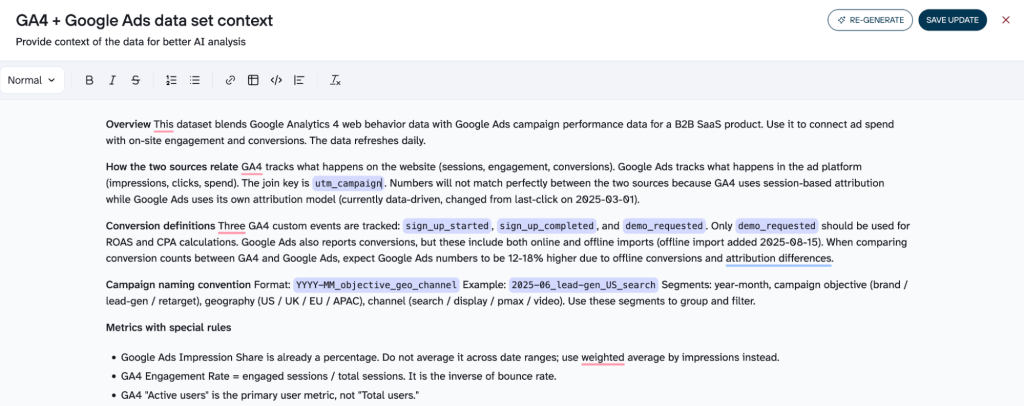
- Enter the context in the Markdown editor and save it.
- It will be automatically passed to the model for each query related to this data set. You describe business logic once, and it works in each session.
Alternatively, you can generate the context with AI. Coupler.io launches its AI Agent that analyzes your full data sets, not just the first five rows, identifies the structure, finds duplicates, describes the logic of connections between records, and generates the first AI context draft. You can then edit it manually in a built-in markdown editor to add your own notes, tables, headings, and more.
- Connect the AI tool you want to use for data analysis from the list of AI integrations.
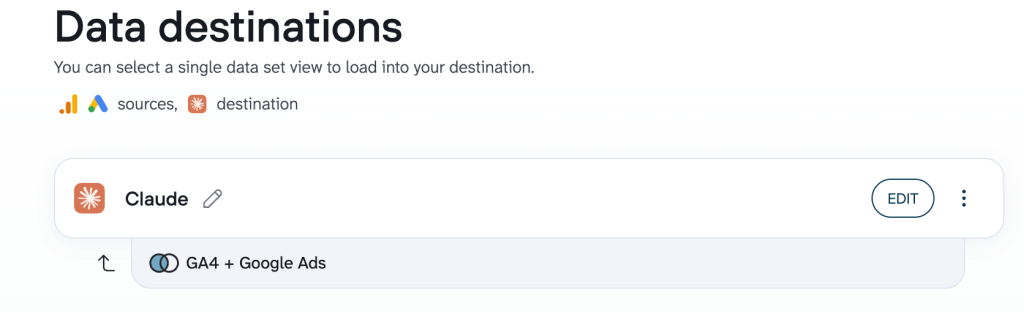
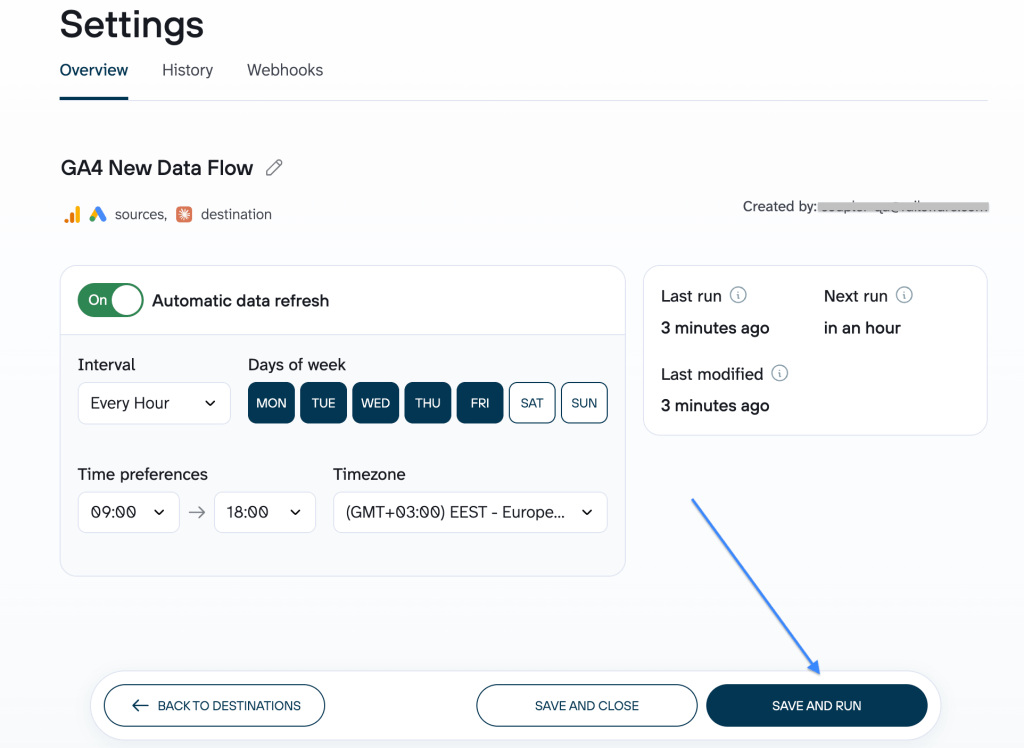
The only thing left is to set how often you want your data to refresh and click Save and Run. From that point, you can analyze your data in the selected AI tool and be sure it is verified, up to date, and interpreted with the right context in place.
Get AI answers you can trust with Coupler.io
Start your free trialOther ways to add context to your data
There are three main ways to give AI the context it needs to analyze your data properly, but here are some key differences to note.
One common approach is AI working with CSV files (uploading a file export and explaining the data manually in chat). It works for quick checks, but the problems with uploading data to AI stack up quickly: stale data, context window limits, and no persistence across sessions. This approach also relies on the model’s working memory (whatever fits in the context window for that session) with no long-term memory of your business logic whatsoever. Another approach is the built-in AI memory, or knowledge base, available in tools like ChatGPT (OpenAI), Claude (Anthropic), and Gemini (Google), which also has its pros and cons.
| Upload CSV + explain in chat | Built-in AI memory and instructions | Connect data through Coupler.io | |
|---|---|---|---|
| Fresh data | Manual re-upload | Still manual upload | Auto-refresh |
| Large datasets | Context window limit | Context window limit | Processed by the Analytical Engine |
| Persistent context | Resets every chat | About you, not data | Tied to the data set |
| Verified calculations | LLM does the math | LLM does the math | Analytical Engine |
| Team sharing | Per-person only | Shared projects only | Automatic for all |
On top of that, Coupler.io handles all calculations on its own MCP (Analytical Engine): when you ask a question, the AI translates it into an SQL query, Coupler.io runs it against your full data set, validates the results, and returns only the verified numbers for the AI to interpret. So the model doesn’t start from scratch, doesn’t guess at anomalies you could explain in ten seconds, and doesn’t do the math itself where it’s weakest. This directly addresses the core AI data ingestion limitations of raw CSV uploads and unstructured data.
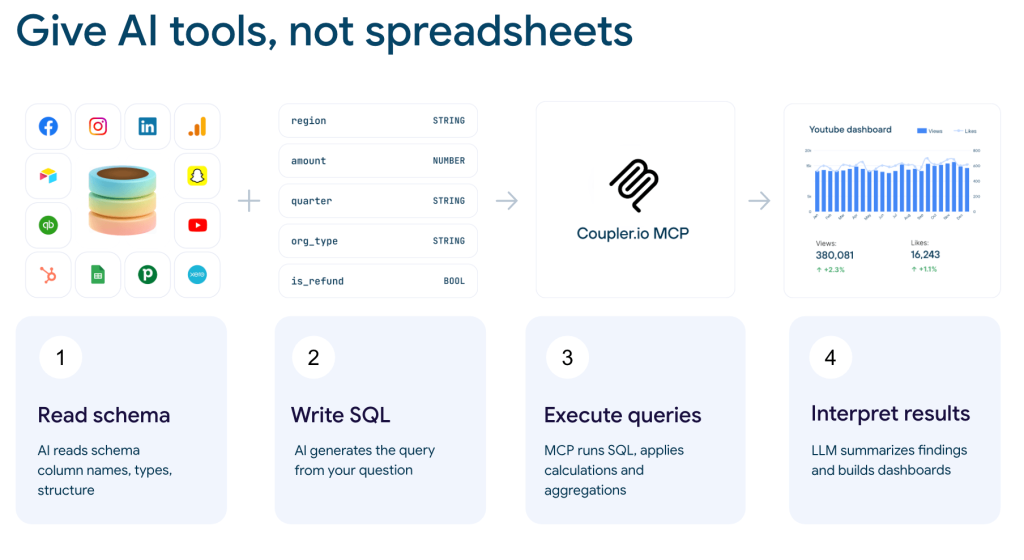
The illustration above shows how this works: your data sources connect through Coupler.io MCP and bring in the context layer (KPI definitions, business rules, metric formulas, and business events). That context is available to AI automatically in every session, not just when you remember to paste it into the chat. The result is a versioned, SQL-traced report where every number can be traced back to the query that produced it.
What a good AI context looks like by data source
The necessary context in AI analysis depends on where your data comes from. A Google Ads data set needs different explanations than a CRM export or a custom spreadsheet. Here’s how to approach how to document datasets for each source. Effective context is specific, concise, and tied to the dataset it describes.
Google Ads / Meta Ads
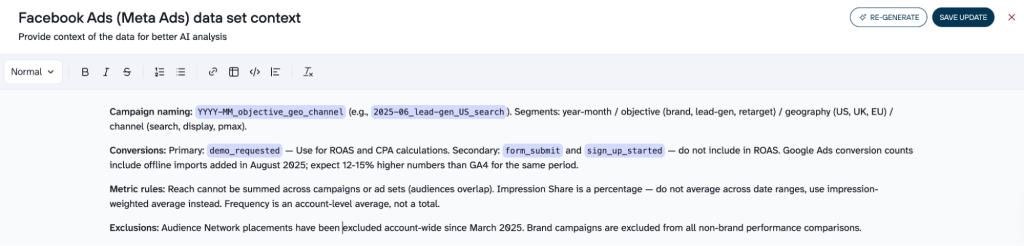
AI knows standard ad metrics, so focus on your account specifics: campaign naming conventions (what each segment in 2025-06_brand_US_search means), which conversions are primary vs secondary for ROAS calculations, and specific metric rules AI won’t guess (e.g., Reach can’t be summed across campaigns and Impression Share shouldn’t be averaged across dates).
CRM data
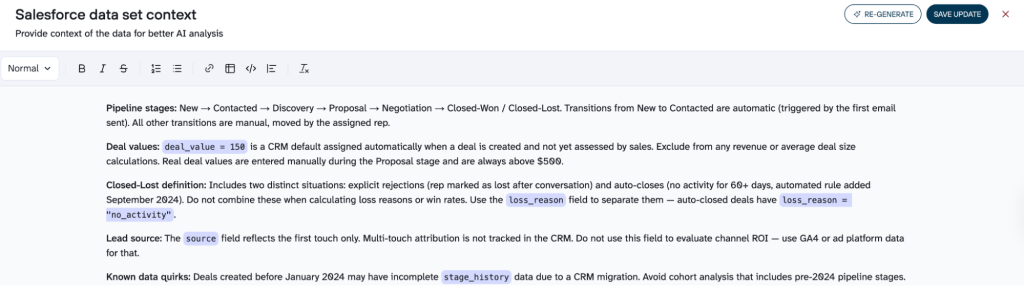
Columns like deal_value and stage may seem obvious, but they mean different things across teams. Document what triggers each pipeline transition, which values are real vs auto-populated placeholders (deal_value = 150 will wreck your average deal size), and what “Closed-Lost” actually includes (explicit rejections and 60-day auto-closes are different situations).
Custom spreadsheets and tools (Google Sheets, Airtable, ClickUp)
These are the hardest use cases where context in AI analysis makes the biggest difference. They need the most context because AI has nothing to lean on. There’s no standard schema, no shared naming conventions. A column called “Score” could mean anything. “Yellow” status could mean “at risk” or “in progress.” Document what each tab contains and how they relate, what status values mean, which columns are legacy, and which are derived from others. These are classic analytics misinterpretation examples waiting to happen in such complex tasks.
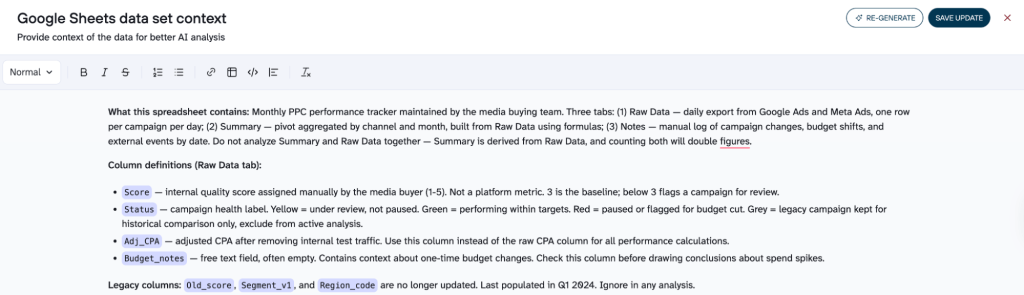
This is exactly where Coupler.io’s auto-generated context helps most. For a well-structured Google Ads export, the schema and five sample rows already tell AI most of what it needs. For a custom Airtable base with 15 columns of internal shorthand, those five rows tell it almost nothing. Coupler.io’s context agent analyzes the full data set, finds patterns (duplications, field relationships, recurring values), and writes a first draft. You then add what only you know: what the status values mean in your workflow, which columns to ignore, and which tabs are summaries. The auto-generated structure plus your manual additions cover both sides.
The generated draft also includes flagged sections (TODOs) where the AI identified gaps it couldn’t fill from the data alone. These act as a checklist that points you directly to what needs your input: a custom metric definition here, a business rule there. Instead of guessing what to add, you start from a structured first draft that already tells you where it needs you.
Turn your business data into AI-ready answers
Try Coupler.io for freeHow missing context in AI leads to business mistakes
AI analysis mistakes rarely look like mistakes. That’s what makes them dangerous. You don’t get an error message or a blank response. You get a confident, well-structured conclusion that looks completely plausible. These are the misleading analytics reports that lead to real decision-making on a foundation that was wrong from the start.
AI hallucinations: logical conclusions from incomplete data
There is a common misconception that hallucinations occur when the model makes something up out of thin air. Sometimes it is true. But when we talk about analytics, this is what happens much more often: AI reaches a logical conclusion based on an incomplete picture.
Say your team deliberately narrowed ad targeting last month to attract higher-quality leads. CPL went up 30%. AI sees the increase, links it to underperformance, and recommends lowering bids. The conclusion includes specific numbers and percentages and looks solid. But it’s built on a foundation that lacks one piece of information: the CPL increase was intentional, and those leads convert three times faster. Technically, this isn’t a hallucination. It’s correct logic applied to incomplete data. This is one of the most common wrong marketing analytics insights teams act on without realizing it.
The snowball effect: one missed detail leads to a chain of mistakes
The worst part is when one bad assumption cascades (a pattern behind many data-driven decisions gone wrong). AI sees an average deal_value of $12, concludes the average check is dropping, identifies which channels bring “cheap” deals, and recommends a price cut. Every step is logical. But hundreds of records had deal_value = 150 as a CRM placeholder. One missed fact, three wrong recommendations.
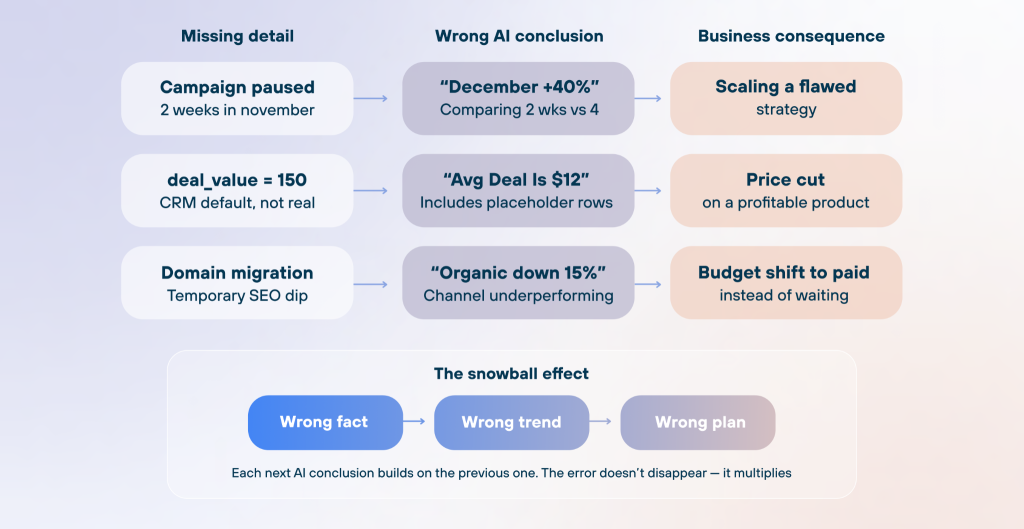
The same pattern plays out with trends. For example, a CEO asks AI about revenue growth. AI reports a healthy 8% month-over-month increase, and everything looks on track. Based on that, it projects next quarter’s targets and suggests the team is ready to scale. But three large one-time contracts are sitting in the data, inflating the numbers. Strip those out, and real growth is closer to 2%. The hiring plan that follows is built on a number that doesn’t exist.
Each of these scenarios has the same root cause: AI was never told what you already know. The context gap in AI is the difference between an answer that sounds right and one that actually is. The fix is adding that knowledge before the analysis starts.
How to write useful AI business context for your data sets: a practical guide
So, it’s clear that the context in AI is necessary. But what to include? Improving AI data accuracy through context is less about writing more and more about writing the right things. If you write too little, AI may continue to draw incorrect conclusions. If you write too much, the model will be overwhelmed by text and start to ignore what’s important. Good context management is about keeping the signal high and the noise low.
What should be included:
| Data type | What it means | Example |
| Matrix definitions | If your team has an internal, particular definition of, e.g., “active user”, indicate it. AI won’t guess your definition correctly even if the column is called “active users”. | An “active user” in this data set is a user who logged in at least once within the past 30 days. |
| Business logic and internal rules | The information that lives in your team’s heads, nowhere else (e.g., deal_value = 150 is used by default). | Don’t use “deal_value = 150” when you calculate an average check, because it’s the default for unassessed deals in our CRM system. |
| Relevant history | Any event that influences the data (e.g., tracking changes, a campaign on hold, a new product launch, a website redesign, an attribution model change). | 2025-03-12: Migrated from Universal Analytics to GA4. Data before this date comes from a different property and should not be compared directly with post-migration data. |
| Seasonal fluctuations and patterns | AI has no access to your experience in this field, so it might interpret unusual seasonal fluctuations as anomalies. | A 30% drop in B2B traffic during the Christmas holiday season is a regular situation for our business. |
On the other hand, what you shouldn’t add in the AI context section is:
- What AI already sees: Data types, column names, and the general structure of the table. The model sees it automatically.
- Sensitive and personal data: The context is stored and transmitted to AI tools with each query. Do not include client names, passwords, or internal financial metrics that must not be disclosed outside the company.
Also, stick to the topic. Keep your AI context focused on what is really necessary for your data set analysis. Copy relevant fragments from your internal documentation, but don’t insert your entire department policy and hope that AI will figure out what to pay attention to.
How much detail is enough for AI context?
A good example is one to two paragraphs for each category above. For simple, well-structured datasets (Meta Ads, Google Ads), less context is needed because standard metrics are straightforward and the structure is predictable. For less-obvious sources like Google Sheets, ClickUp, Airtable, and custom CRMs, context has a much greater effect. Think of it as data documentation best practices applied specifically for AI consumption.
If your AI context exceeds two pages, you most likely included too much. The model will start to blur its focus between what’s important and what’s not. It’s better to keep the most important and add details gradually when you see AI start making mistakes. The goal is short-term memory efficiency: every token in your context window should earn its place.
Tips on how to keep the AI context relevant
Your business evolves, new companies appear, conversion goals update, and your team establishes new processes. Your context for AI analysis must evolve alongside the data. One of the key signals for updates is when Artificial Intelligence gives you a weird or wrong answer. That’s a “why my data analysis is wrong” moment that most people solve incorrectly. If you need to explain something to AI, it’s a sign that something is missing in the context, and you need to update it. This approach to contextualizing data for AI is what separates teams that get consistent, reliable answers from those who re-explain the same business logic every week.
❌ Start correcting AI directly in the chat: “No, your answer is wrong. Here's a detailed explanation.” This can solve the issue, but only for one session. The next time AI will make the same mistake because your corrections were left in yesterday’s chat.
✅ Review the context once a month, or after each significant change in your business, and add records in chronological order.
You don’t always need to go back to the editor. If you’re mid-analysis and realize something is missing, you can tell the AI directly: “update the dataset context: deal_value = 150 is a CRM placeholder, not a real amount“, and it will save that to the context for all future sessions. So you can go from a wrong answer to a fixed context without ever leaving the chat.
Pick a source, link AI, ask a question, get insights.
Start your free trial