
Coupler.io vs Meta Ads MCP: Which Is Better for Reliable AI Reporting

AI can pull your Meta Ads data in seconds. But if the answer is going into a client report or budget decision, speed matters less than whether you can trust the number.
Two options take distinctly different approaches to connecting Meta Ads to AI.
Meta’s official MCP gives tools like Claude direct access to Meta Ads data, including write access for campaign management. Coupler.io takes a reporting-first approach, adding a calculation layer and support for data from 400+ sources.
The right choice depends on your needs. For reporting and cross-channel analysis, Coupler.io is the stronger fit. For managing Meta campaigns directly through AI, Meta’s MCP has the edge.
What is Meta Ads MCP, and why does it matter for reporting?
MCP (Model Context Protocol) lets an AI assistant connect to an external data source instead of relying on manual exports and uploads. With Meta Ads MCP, campaign data can flow from the Meta Marketing API to an AI tool, where you can ask questions about performance in plain language.
Why should anyone care? Because campaign reporting eats hours. You have to pull numbers from Ads Manager, compare them with other platforms, and prepare them for client updates or weekly reviews. An MCP connection shortens that process: ask a question in plain language and get an answer back.
There are several ways to make that connection: Meta’s official MCP server, third-party and open-source servers; and Coupler.io, which routes data through a calculation layer and supports 400+ sources beyond Meta Ads. They differ in where the math happens, what the AI can do with the data, and how much of your ad stack it can see at once.
Meta Ads MCP server: what Meta shipped and what it does
Meta launched its official Meta Ads MCP server in open beta on April 29, 2026. It exposes 29 tools across five areas:
● Performance reporting, including spend, CPA, ROAS, reach, and breakdowns
● Campaign and ad set management
● Catalog management
● Signal diagnostics, such as pixel and Conversions API status
● Account operations
The server uses Meta Business OAuth, so there’s no Developer App, App Review, or developer token to configure. It’s also free during the open beta, although Meta hasn’t announced long-term pricing.
⚠️ Its biggest advantage is read/write access. From an AI tool like Claude, you can create or pause campaigns, update budgets, or adjust targeting. Newly created campaigns, ad sets, and ads start in PAUSED status, but changes to existing campaigns can go live immediately.
For reporting, there’s an important limitation. The tools provide access to Meta’s data, but they don’t add an analytical layer. When a question requires calculations or aggregations, the AI may need to perform that work itself, which brings certain risk. That’s where Meta’s approach starts to differ from Coupler.io.
Meta Ads MCP setup: how long it takes
Setting up Meta’s official server takes a few minutes. In Claude or another MCP client, add the custom connector and authenticate with your Meta Business account. There’s no Meta access token or developer credentials to configure.
Coupler.io takes a similar amount of time. Connect your Meta Ads account, choose an AI destination such as Claude, ChatGPT, Gemini, Perplexity, or Cursor, and start asking questions. Coupler.io handles the connection and schema setup in the background. See the full setup and available data fields on the Coupler.io Meta Ads MCP page.
What is Coupler.io MCP? The no-code option with a calculation layer
*Disclaimer: Coupler.io isn’t an MCP server in the way Meta’s is. It’s a data integration and AI analytics platform that connects to tools (including through MCP) and adds a calculation layer between your data and the AI model.
| Coupler.io’s AI capabilities sit under one umbrella called Coupler AI, which includes the AI Agent, AI Integrations, MCP, Skills, and the Analytical Engine. |
Coupler.io takes a broader approach than a direct Meta Ads MCP connection. It sits between your business apps and AI tools, giving the AI access to prepared data rather than direct access to the underlying accounts.
Two practical differences stand out:
- Coupler.io isn’t limited to Meta Ads. It supports 400+ sources, including Google Ads, LinkedIn Ads, TikTok Ads, GA4, HubSpot, Shopify, and Salesforce. You can ask questions about cross-channel performance instead of analyzing each platform separately.
- Coupler.io adds a calculation layer between your data and the AI. With Meta’s MCP, the model receives data from the Meta Marketing API and may need to perform calculations and aggregations itself. Coupler.io’s Analytical Engine handles that work before the AI explains the result, reducing the risk of incorrect calculations or inconsistent answers. How verified calculations work is explained in more detail below.
The prepared data can also feed several destinations. A Meta Ads data flow in Coupler can power Claude for ad-hoc analysis, Looker Studio for a PPC dashboard, and Google Sheets for a client report, with refreshes as often as every 15 minutes.
You can work with the data through AI tools such as Claude, ChatGPT, Gemini, Perplexity, Cursor, Microsoft Copilot, or OpenClaw, or use Coupler.io’s built-in AI Agent. The Agent can also create and update data flows through conversation.
⚠️ Coupler.io is read-only by design, so the AI doesn’t get direct control over your Meta Ads account. You can also limit which fields reach the model, making it a better fit for reporting and analysis workflows where accuracy and controlled access matter more than campaign management.

Get verified Meta Ads answers with Coupler.io
Start for free
What makes Coupler.io trustworthy for Meta Ads AI reporting
Gabriel Solberg uses Coupler.io and Claude to manage reporting on $1M+ in monthly Meta Ads spend. The workflow saves him 60% of the time previously spent on PPC reporting, with daily campaign reviews taking less than 10 minutes.
What makes this workflow reliable comes down to where the analytical work happens. With Meta’s MCP, the AI receives data from the Marketing API and may need to calculate metrics itself. That creates room for arithmetic errors, inconsistent results, and problems as larger datasets consume the model’s context window.
More about it here: Why AI Hallucinates in Data Analytics and How to Prevent It: A Practical Guide.
Coupler.io reduces the risk of unreliable AI analysis through three layers, each one doing something Meta’s MCP does not.
The first layer: data preparation
With Meta’s MCP, the AI works from raw Marketing API responses and assembles the data it needs on the fly. That works for simple questions. But for complex or recurring analysis (joining large datasets, calculating rolling metrics, or normalizing schemas across sources), this process becomes slow, expensive, and inconsistent.
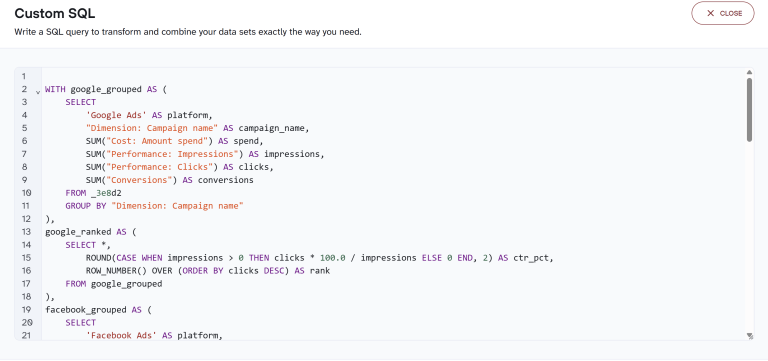
Coupler.io addresses it with SQL transformations. These are persistent queries that handle:
- Window functions
- Rolling comparisons
- Cohort logic
- Pivots
- Deduplication
- Cross-source schema normalization.
You describe what you want in plain language, Coupler AI generates the SQL, and the query stays visible for your review. It also refreshes with every sync.
The prepared dataset feeds AI conversations, but also dashboards, spreadsheets, and other team members. The numbers are consistent everywhere. And when the analysis is the output (a cross-channel performance table, a cohort retention matrix…), the transformed dataset can go straight into a report without an AI step at all.
Six practical examples here: AI Data Analysis With SQL Transformations.
The second layer: AI Context and AI Agent Skills
AI without context can produce confident, plausible answers based on missing information. Say your team deliberately narrows Meta Ads targeting to attract higher-quality leads. CPL rises 30%, so Claude reads it as underperformance and recommends lowering bids. The reasoning is logical, but the recommendation is wrong. Claude doesn’t know the increase was intentional or that those leads convert three times faster.
A direct Meta MCP connection doesn’t fill in that missing context. It gives Claude access to Marketing API data, but that data doesn’t contain your business rules. Claude can’t know which conversions count toward ROAS or why a campaign was deliberately paused. It also can’t infer your campaign naming conventions, attribution changes, or metric rules such as why Reach shouldn’t be summed across campaigns.
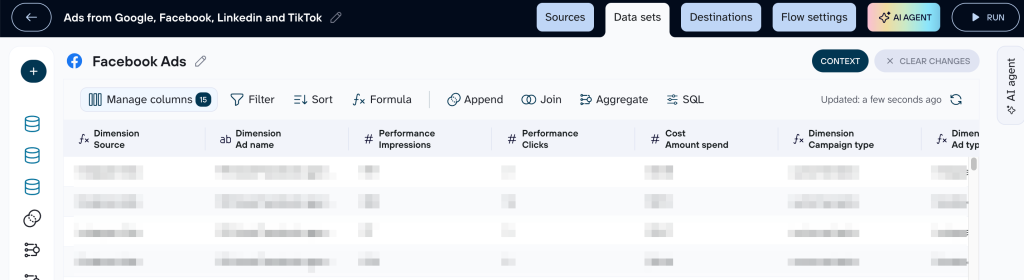
AI Context in Coupler.io lets you document this information at the dataset level. Add the definitions and business rules the model can’t infer from the data itself, and that context is available with every query. Coupler AI can also analyze the full dataset and generate a first draft, with TODOs for details that require your input.
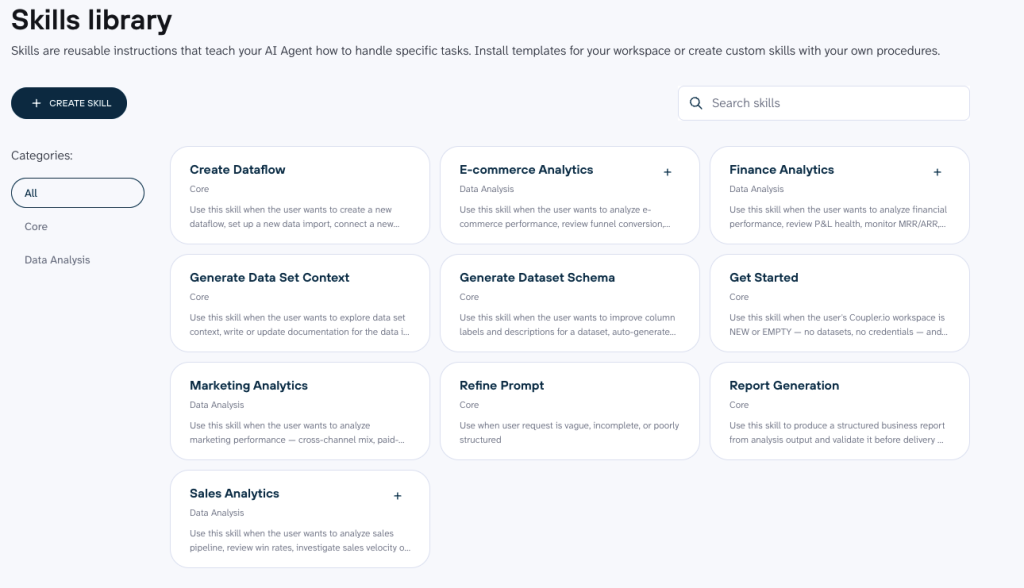
AI Agent Skills add a repeatable method for analyzing that contextualized data. Each Skill defines what data to use and the analytical steps to follow, along with the expected output and validation checks. Instead of rebuilding the methodology in a new prompt every week, the same workflow can run against refreshed data.
For Meta Ads, you could use a Skill to review ROAS and CPA, check budget pacing, or identify attribution gaps. Another Skill could audit campaigns to find cases where spend is rising without a corresponding increase in conversions. Skills can run in Coupler.io or through supported AI tools such as Claude and ChatGPT.
Context and Skills work together. Each Skill opens with a context check before the analysis starts. If the dataset has no Context, the analysis doesn’t run. This means recurring analyses use the business rules and definitions stored with the dataset instead of relying on the model to reconstruct them from each prompt.
Meta’s MCP has no equivalent: every conversation starts fresh.
The final layer: the Analytical Engine itself
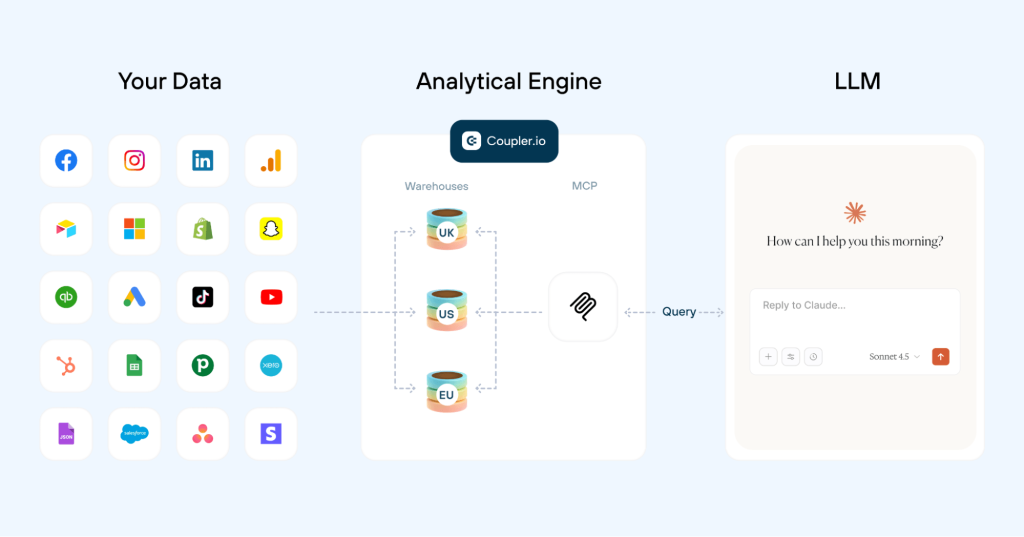
Coupler.io’s Analytical Engine keeps the actual calculations outside the language model:
- Coupler.io gives the AI the dataset schema and a sample of the data rather than loading the full dataset into the conversation.
- The AI translates your question into a SQL query.
- The Analytical Engine runs that query against the full dataset and calculates the result.
- The AI receives the computed result and interprets it for you.
In other words: the Analytical Engine calculates, the AI interprets.
So when you ask, “What was my ROAS last week?”, the model isn’t left to interpret unfamiliar data, squeeze a full dataset into its context window, and calculate the answer itself. You’ll get an answer grounded in your actual data and the way your business defines it.
👉 To sum up, the Coupler.io stack works like this: SQL transformations prepare the dataset. Context and Skills add business meaning and repeatability. The Analytical Engine computes the answer. By the time the AI receives the result, there’s nothing left for it to guess at.
Safe, read-only Meta Ads reporting through Coupler.io.
Start for freeMeta Ads MCP for Claude vs. Coupler.io: practical use cases
💡 Some of these prompts work with either path (Coupler.io or Meta Ads MCP). The difference is in the data accuracy and reliability of the numbers that come back. But there’s a ceiling. Meta’s MCP connects to Meta Ads and nothing else, so the moment you need to compare data across platforms, you’ve hit the limit. The Coupler.io use cases below start where that limit kicks in.
Meta Ads MCP use cases
Once a Meta Ads MCP connection is live, you can talk to your campaigns in plain language.
Start with a reporting question and Claude will pull the data and give you a ranked view.
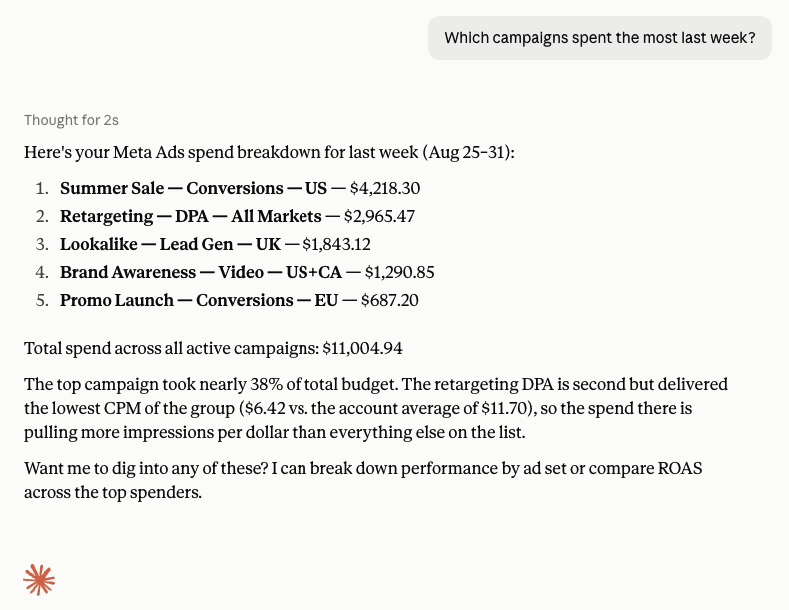
Then go deeper:
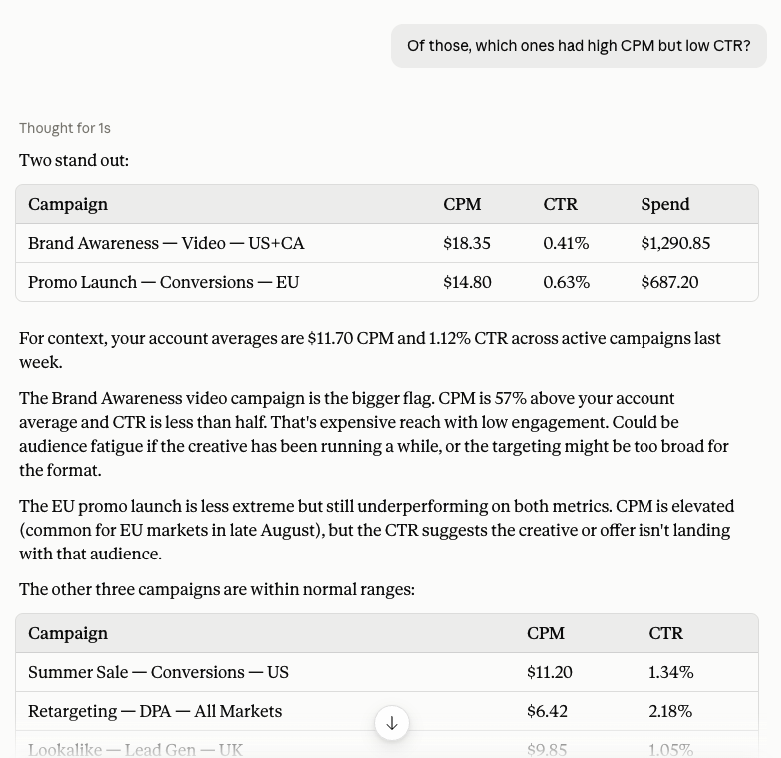
Push further, and you’re getting into cross-period analysis that would normally mean exporting two date ranges and building a comparison in Google Sheets:
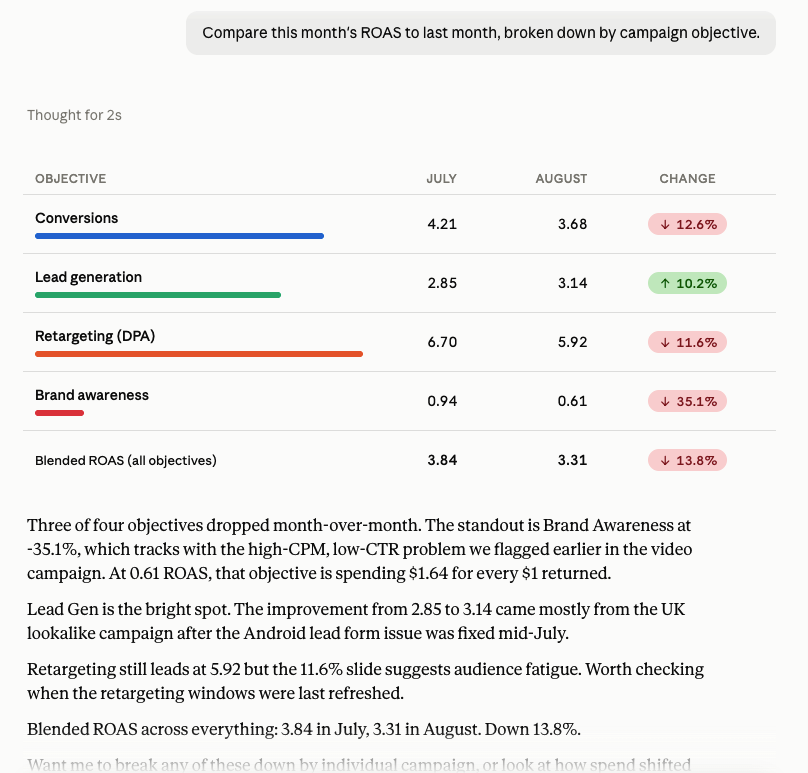
⚠️ Bear in mind: with Meta’s MCP, the AI may need to calculate ROAS, percentage changes, and aggregations itself.
Coupler.io use cases
Coupler.io opens up categories of analysis that Meta’s MCP can’t touch, because the data preparation, cross-source scope, and calculation layer are already in place. Here’s what that looks like in practice.
(For a wider look at what’s possible beyond ad platforms, see our guide to MCP use cases across marketing, e-commerce, finance, and more.)
Cross-channel analysis
If you’re connected through Coupler.io, you can go cross-channel in the same conversation:
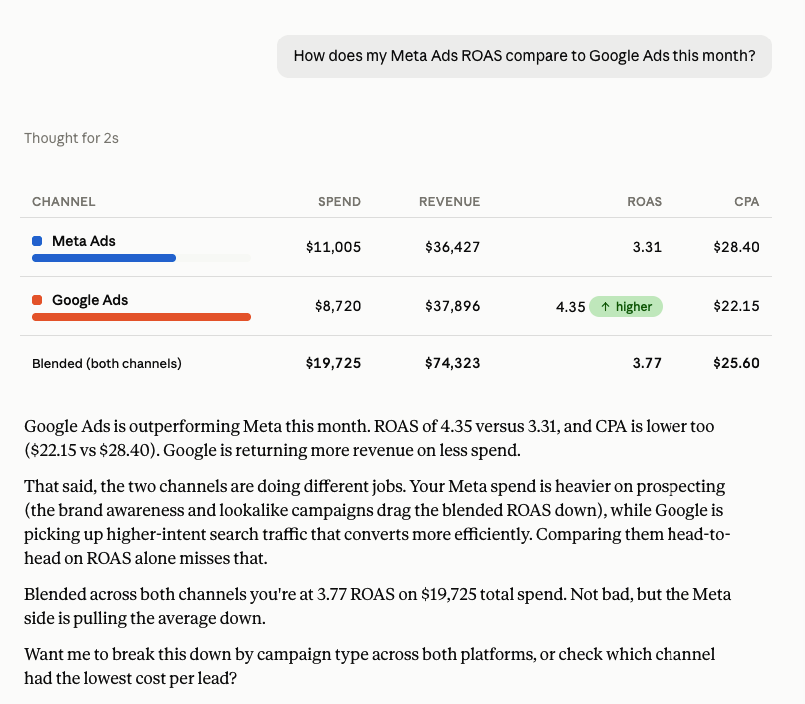
This kind of cross-platform reporting is only possible when all your sources feed into one workspace.
Through Meta’s official server, you’re limited to Meta Ads data only, so blended reporting means switching tools or exporting numbers into a spreadsheet. (Running Google Ads alongside Meta? See our Coupler.io vs Google Ads MCP comparison for the same breakdown on the Google side.)
Clear Performance Ads runs their entire client reporting operation across Google Ads, Meta Ads, and Amazon Ads through Coupler.io. One person, 15 minutes a week for all client reporting.
“I found Coupler.io through research and tried it out. Really liked how simple and easy it was. It’s been great ever since.” — Lance Johnson
Read more: How Clear Performance Ads built accurate, cross-platform client reporting, without the manual work.
Additional cross-channel analysis prompts:
Compare ROAS across Meta Ads, Google Ads, and TikTok Ads for the last 30 days. Break it down by campaign objective so I can see which channel performs best for conversions vs. awareness.What's my blended customer acquisition cost across all paid channels this month? Show me each channel's CAC individually and the blended number, and flag any channel where CAC increased more than 15% compared to last month.If I moved $2,000 from my lowest-ROAS channel to my highest-ROAS channel, what would last month's blended return have looked like? Show me the current split and the projected split side by side.
Cut your Meta Ads reporting time in half
Try Coupler.io for freePrompts that exercise the Analytical Engine
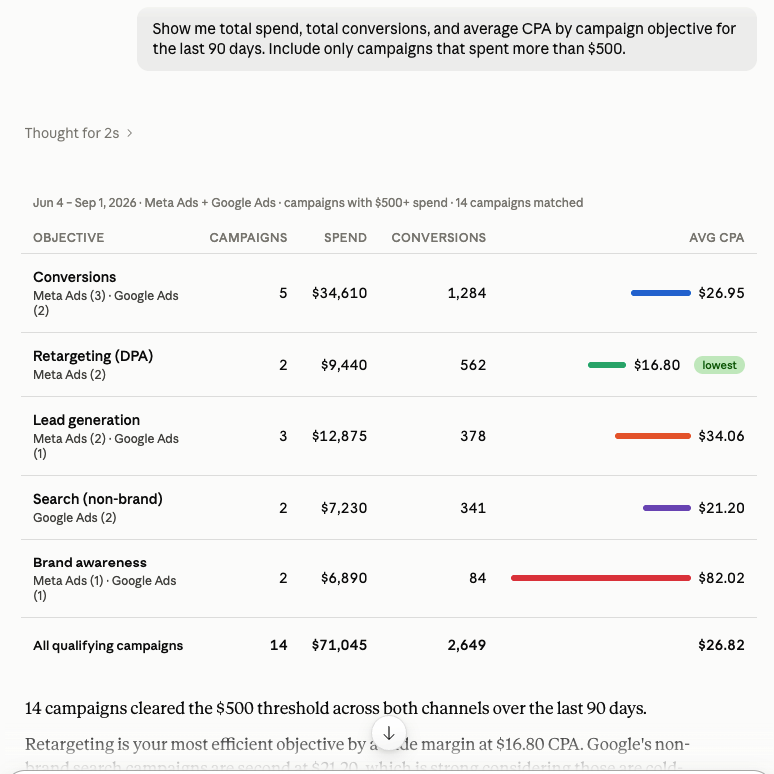
Join my Meta Ads campaign data with my Google Analytics landing page data and show me which campaigns are driving the most engaged sessions. Sort by session duration, not just clicks.Compare this month's Meta Ads performance to the same month last year, broken down by campaign objective. Show spend, ROAS, and CPA side by side with the year-over-year percentage change.
(For a deeper look at how SQL transformations work with these kinds of queries, see AI Data Analysis With SQL Transformations.)
Prompts that use business context
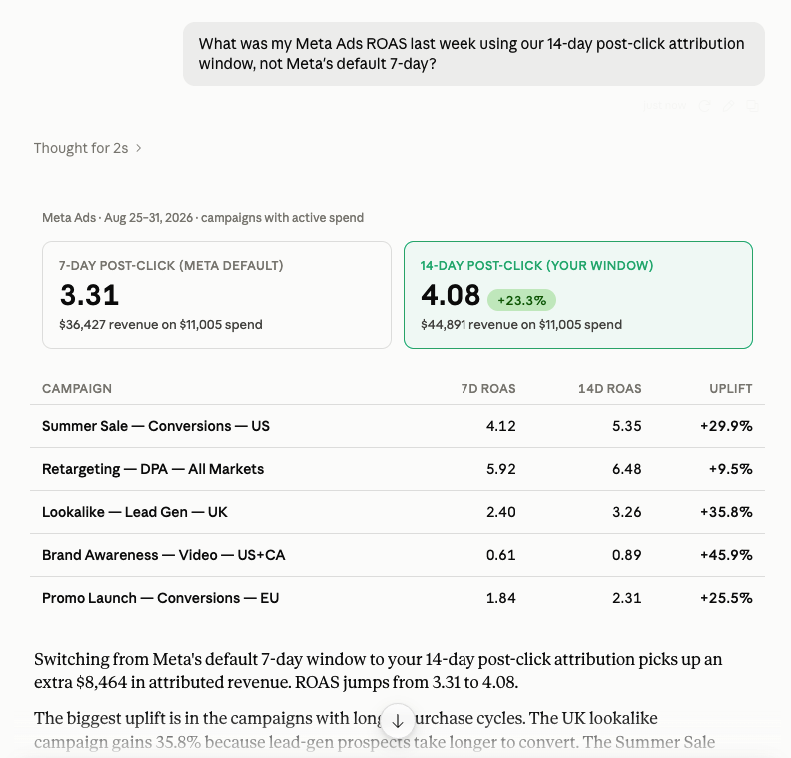
Show me qualified leads from Meta Ads this month. Use our definition of qualified: lead score above 40 and form submission on a pricing page, not just any conversion event.What's my true campaign CPA this month if we exclude internal test conversions and employee clicks, the way we do for client reporting?
Prompts feeding non-AI destinations
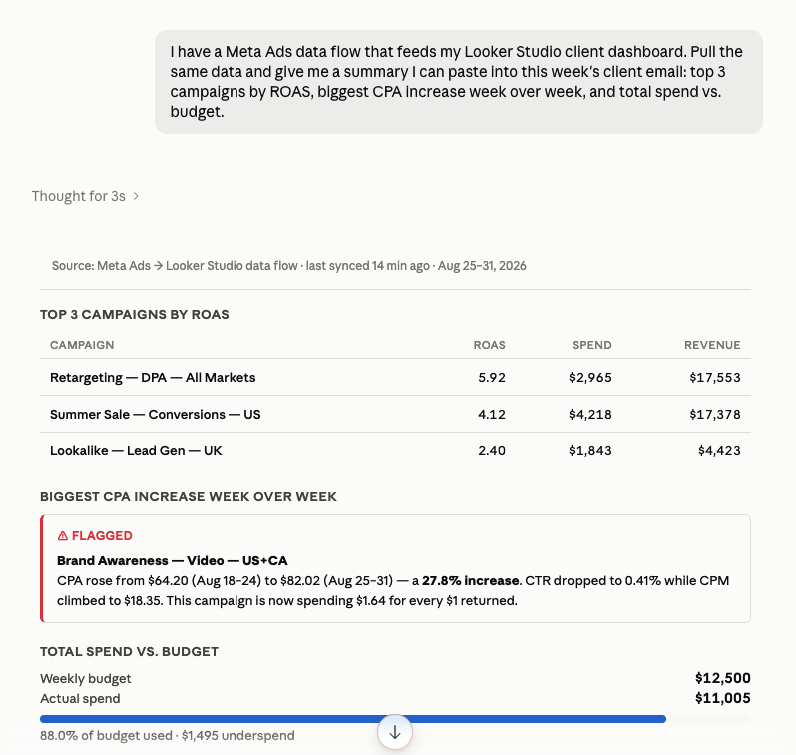
Using the same Meta Ads dataset that powers my Google Sheets client report, flag any campaigns where spend is more than 10% over the monthly budget pacing line. List them with current spend, projected end-of-month spend, and ROAS.I need to update my Power BI executive summary. From the same Meta Ads data flow, give me a four-sentence narrative covering total spend vs. budget, best-performing campaign by ROAS, worst-performing campaign by CPA, and the one change I should make this week.
| 💡 Disclaimer: All of these prompts work in Claude, ChatGPT, Gemini, Perplexity, or any other AI tool connected through Coupler.io. They also work directly inside Coupler.io through the AI Agent. As long as Meta Ads is the source connected via Coupler.io, the system behind the scenes is the same everywhere. So, it doesn’t matter if you ask in Claude or Coupler.io AI Agent. |
Coupler.io vs Meta Ads MCP comparison: which one fits your workflow?
| Feature | Meta’s official MCP | Coupler.io |
|---|---|---|
| Setup | Meta Business OAuth, minutes | Browser sign-in, minutes |
| Access type | Read and write. New items paused, edits go live immediately | Read-only by design |
| How calculation works | AI computes metrics from raw numbers | Analytical Engine runs SQL, returns verified calculations |
| Data freshness | Pulled on demand each time the AI calls a tool | As often as every 15 min |
| Schema and context | Raw API field names. AI infers meaning | Pre-loaded column definitions, data types, company-specific context |
| Repeatable workflows | None. Each conversation starts fresh | Pre-built and custom Skills for recurring analyses |
| Cross-platform scope | Meta Ads only | 400+ sources |
| Data security | OAuth-scoped. AI has direct read/write to your ad account | Secure middle layer. SOC 2 Type II, GDPR, HIPAA, DORA. |
| Non-AI destinations | None | Looker Studio, Power BI, Google Sheets, BigQuery, Snowflake, Tableau |
| Campaign management | Yes. Create, edit, pause from inside Claude | No. Reporting and analysis only |
| Best for | Meta-only teams that want campaign management through AI | Teams that need trusted numbers across platforms for reports and dashboards |
Meta’s MCP is a decent choice if your work is Meta-only and you want to manage campaigns directly through AI. It’s free during the open beta and gives you 29 tools with direct API access, making it a strong fit for teams focused entirely on the Meta ecosystem.
Go with Coupler.io if reliable reporting and cross-channel analysis are the priority. It’s better suited to teams that want calculations handled outside the LLM, company-specific context applied to their data, and the same prepared data available across AI tools, dashboards, spreadsheets, and data warehouses.
Build cross-channel PPC reporting for Claude
Try Coupler.io for freeFAQ
Can I connect Facebook Ads to AI without coding?
Yes, through either path. Meta’s official MCP uses OAuth, no code needed. Coupler.io also connects through a browser sign-in. The only option that requires technical setup is self-hosted open-source servers, which need a Meta access token and a runtime environment.
Is Meta’s official MCP server free?
Free during the open beta that launched April 2026. Meta hasn’t announced long-term pricing. If cost is the deciding factor today, Meta’s server wins for single-source Meta Ads work. Factor in the time spent verifying AI-calculated numbers, and the comparison shifts.
Can Meta’s MCP change my live campaigns?
Yes. It has full write access. New campaigns, ad sets, and ads it creates land in PAUSED status, so nothing spends money without a human activating it. But edits to existing campaigns (budget changes, targeting updates) go live immediately. There’s no confirmation step for those. Coupler.io is read-only by design, which means there’s no risk of accidental changes to your ad account.
Do I need a Meta access token for Coupler.io?
No. Coupler.io handles the connection through OAuth. A Meta access token is only needed if you’re setting up a self-hosted open-source Facebook ads MCP server.
What are Coupler.io Skills, and does Meta’s MCP have something similar?
Skills are pre-built or custom workflows that run through Coupler.io’s AI Agent. Instead of writing analysis prompts from scratch each time, you pick a Skill or create your own, and it runs the same analysis with refreshed data. The Skills library includes workflows for marketing analytics, campaign audits, finance, and e-commerce. Meta’s MCP does not have an equivalent, so each AI conversation starts without any saved workflow logic.




