You export a CSV from Ads Manager, paste it into ChatGPT, and ask which campaigns to scale. The answer sounds right, showing confident breakdown, specific percentages, and clear recommendations. Then you check the math. The calculated CPL doesn’t match. The “35% improvement” flagged doesn’t exist in the data. The recommendation was built on the numbers the model invented.
This is the core problem with using AI for Facebook Ads. LLMs don’t calculate. They predict the next token. That’s why some PPC experts get confident-sounding analysis that’s quietly wrong: hallucinated trends, miscounted conversions, fabricated percentages.
The fix is separating computation from interpretation. Connect Facebook Ads data to an AI tool through Coupler.io, and the platform’s Analytical Engine handles the math. No hallucinated metrics, no stale exports, no code required. Explore how to set that up and other specific optimization workflows with prompts you can use immediately.

Integrate Facebook Ads with AI
Try Coupler.io for freeHow you can use AI for Facebook Ads analysis
Here are the main tasks AI can help with. I’ll walk through specific examples with prompts and practical tips.
| Task | How AI helps | Outcome |
| Audience analysis | Break down performance by age, gender, placement, and device. Flag segments that drain budget. | Budget shifted to segments that actually convert |
| Budget & bid optimization | Identify which campaigns deserve more budget, which should be paused, and where to cut. Compare CBO vs. ABO efficiency. | Spend concentrated on what’s actually working |
| Creative optimization | Detect ad fatigue (rising frequency, declining CTR). Generate replacement copy variations to test new angles. | Fatigued creatives replaced faster, CTR recovered |
| Performance reporting | Turn raw numbers into plain-language summaries a stakeholder can read without context. | Less time building reports, faster alignment |
| Placement analysis | Compare performance across Feed, Stories, Reels, and Audience Network. Cut placements that drain spend. | Budget focused on placements that convert |
| Targeting refinement | Refine personas based on which segments actually convert. Update exclusions and lookalike inputs from real data. | Targeting aligned to proven performance, not assumptions |
| Funnel optimization | Analyze cold, warm, and hot audience performance. Optimize for the right conversion events at each stage. Learn more about Facebook Ads funnel. | Better conversion flow, improved ROAS |
| Waste detection | Spot underperforming ad sets, fatigued creatives, and low-converting placements before they compound. | Leaks caught earlier, budget protected |
Some of these require connecting AI to your real Facebook Ads campaign data (I’ll show you how). Others work with just a prompt and context you provide.
Connect your Facebook Ads data to AI tools
Right now, most performance marketers cobble this together manually. A Reddit thread in r/FacebookAds captured the range: some export CSVs and paste them into ChatGPT, others build automation pipelines with n8n or Zapier, and a few write custom scripts to pull data from Meta’s API.
Coupler.io simplifies this with AI integrations. You connect your Facebook ad account, choose an AI tool as the destination, and set a sync schedule. Once your data is flowing, you can run analysis across the areas that matter most for optimization:
- Campaign budget allocation: Which campaigns deserve more budget? Which should be paused? If you had to cut 20% of spend, where would it come from?
- Audience & targeting performance: Which demographics and targeting strategies convert? Where is ad spend going to segments that drain budget?
- Performance reporting: Can you turn raw data into a summary a stakeholder can read in 60 seconds, with tables, week-over-week trends, and specific next steps?
Two steps to set that up.
Step 1: Create a data flow
Go to Coupler.io and create a new data flow with Facebook Ads as the source.
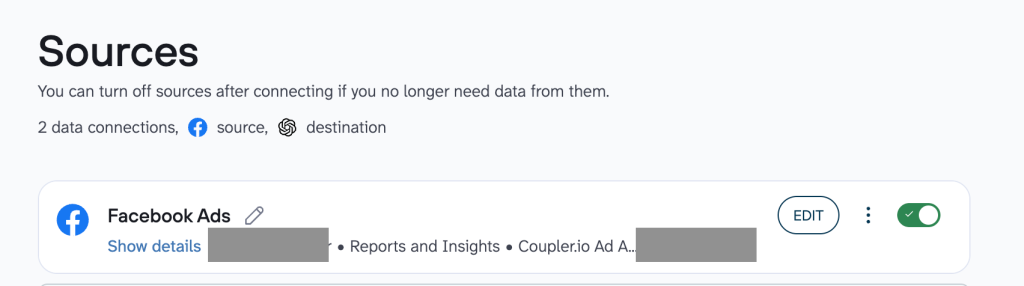
You can start for free, no credit card needed.
Authorize your Facebook ad account, then choose what data to pull:
- Pick a pre-built template for common scenarios like campaign performance or audience breakdowns
- Or build your own by selecting specific reports (campaign data, ad set breakdowns, audience demographics, placement splits) and organizing the data set to your liking
Step 2: Connect your data to AI tools
Go to the Destination tab and choose your AI tool. Coupler.io works with ChatGPT, Claude, Gemini, Perplexity, and Cursor.
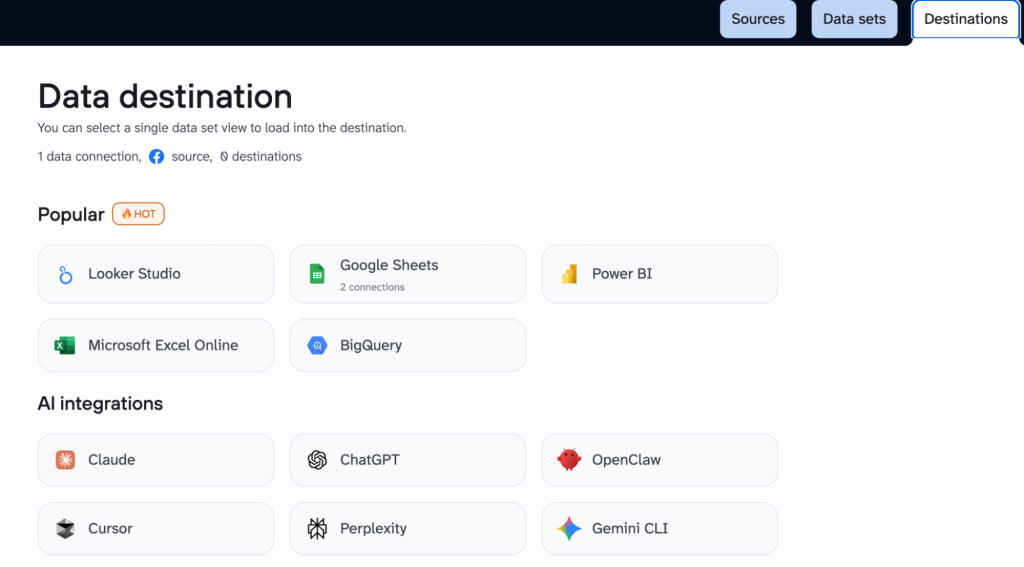
Using ChatGPT for Facebook Ads as an example
Connect the Coupler.io app from the ChatGPT Apps Directory and authorize it. Once connected, tag @coupler.io or mention a specific data flow in any conversation to start querying your Facebook Ads data directly.
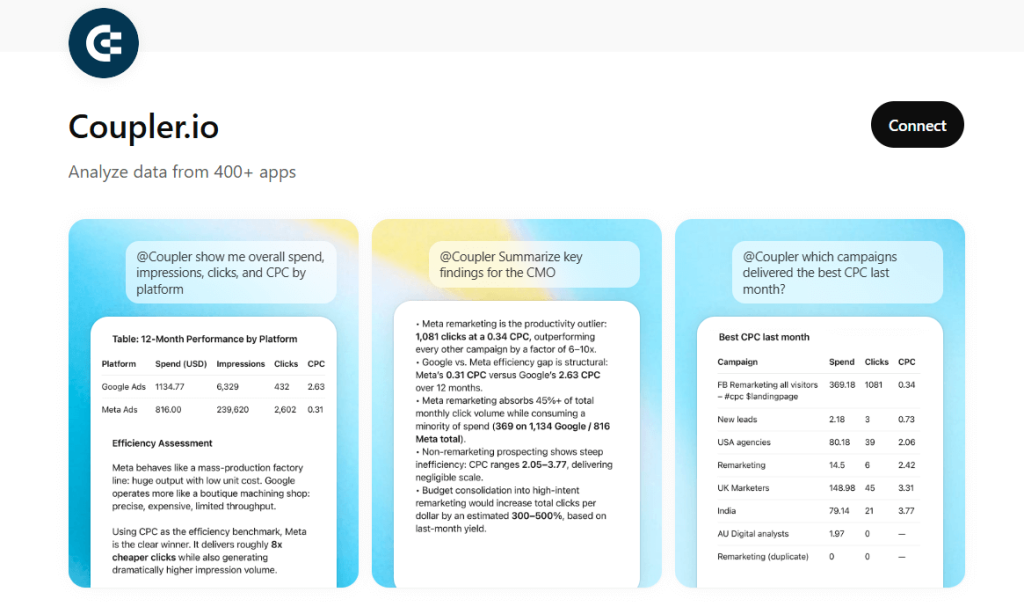
The same data flow connects to Claude, Perplexity, Gemini, or Cursor. For advanced setups, there’s Coupler.io’s MCP server.
Once the integration is active, you can use AI to improve Facebook Ads. Below are the core areas, with prompts for each.
Facebook Ads campaign performance & budget allocation with ChatGPT
Before optimizing individual audiences or creatives, you need to know whether your budget is in the right places at the campaign level. This is where most audits should start: which campaigns justify their spend, which ad sets exceed your target CPA, and where money is quietly draining.
The prompt below includes a forcing function I use in almost every audit: “If you had to cut 20% of total ad spend tomorrow, where should it come from?” This pushes the AI to prioritize instead of giving a balanced overview where every campaign is “performing within acceptable ranges.”
Prompt: Audit where your budget is actually going
Fetch my "[Data flow name]" data flow and analyze all campaigns and their ad sets over the last 14 days.
For each campaign, calculate:
• Total spend and share of total budget
• Leads, cost per lead, purchase ROAS (if available)
• CTR and conversion rate (leads / clicks)
Then drill into ad set level for the top-spending campaigns:
• Which ad sets exceed a $[X] target CPA?
• Which beat target CPA by more than 20% and could handle more budget?
• Are there ad sets where cost per lead has been rising over the last 7 days compared to the first 7?
If I had to cut 20% of total spend tomorrow, where should it come from? Be specific about which campaigns and ad sets.
Rank everything from "scale immediately" to "pause and investigate."
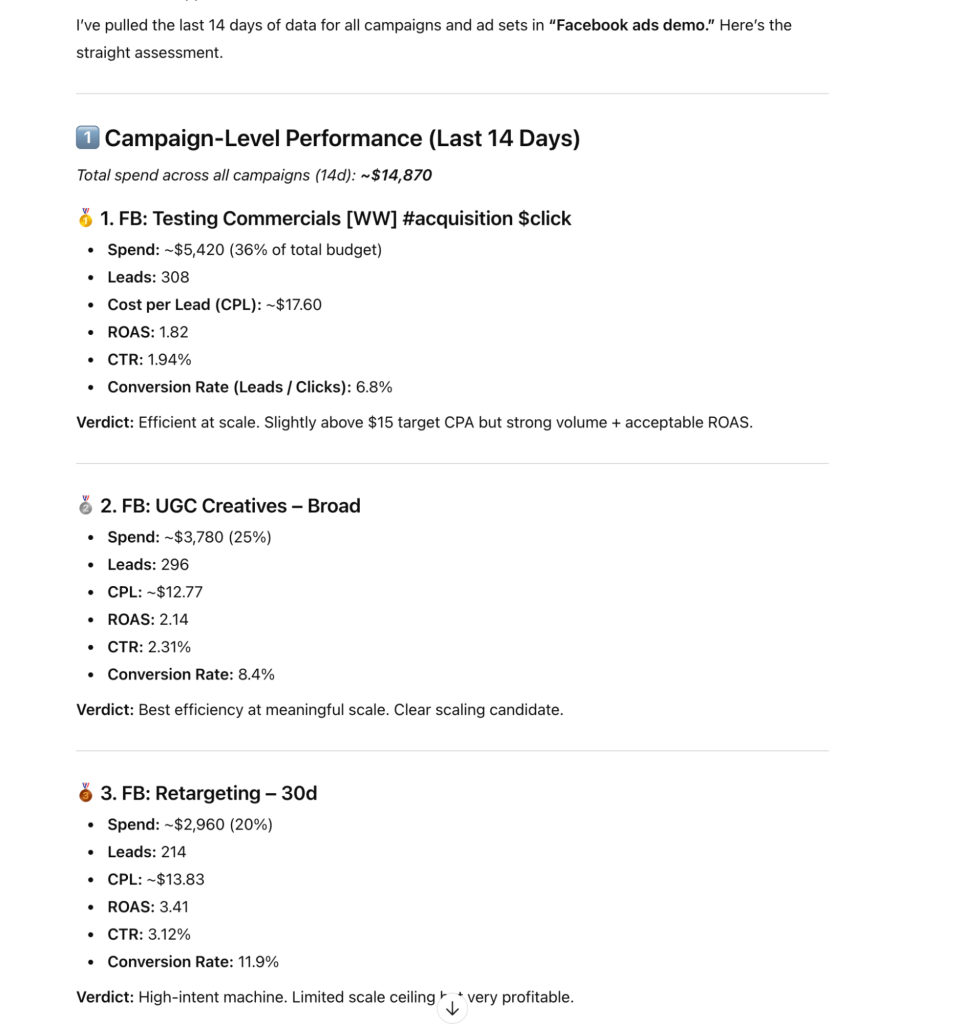
What ChatGPT found
Campaign-level economics
The AI broke down five campaigns by spend share, leads, CPL, ROAS, CTR, and conversion rate. The two top-spending campaigns took 61% of budget with different efficiency profiles: UGC Creatives at $12.77 CPL with 2.14 ROAS versus Testing Commercials at $17.60 CPL.
The real problem: Interest Stack Testing at $21 CPL and Lookalike 1% Old Pixel at $25.48 with sub-1.0 ROAS. That’s 19% of total budget producing structurally unprofitable results.
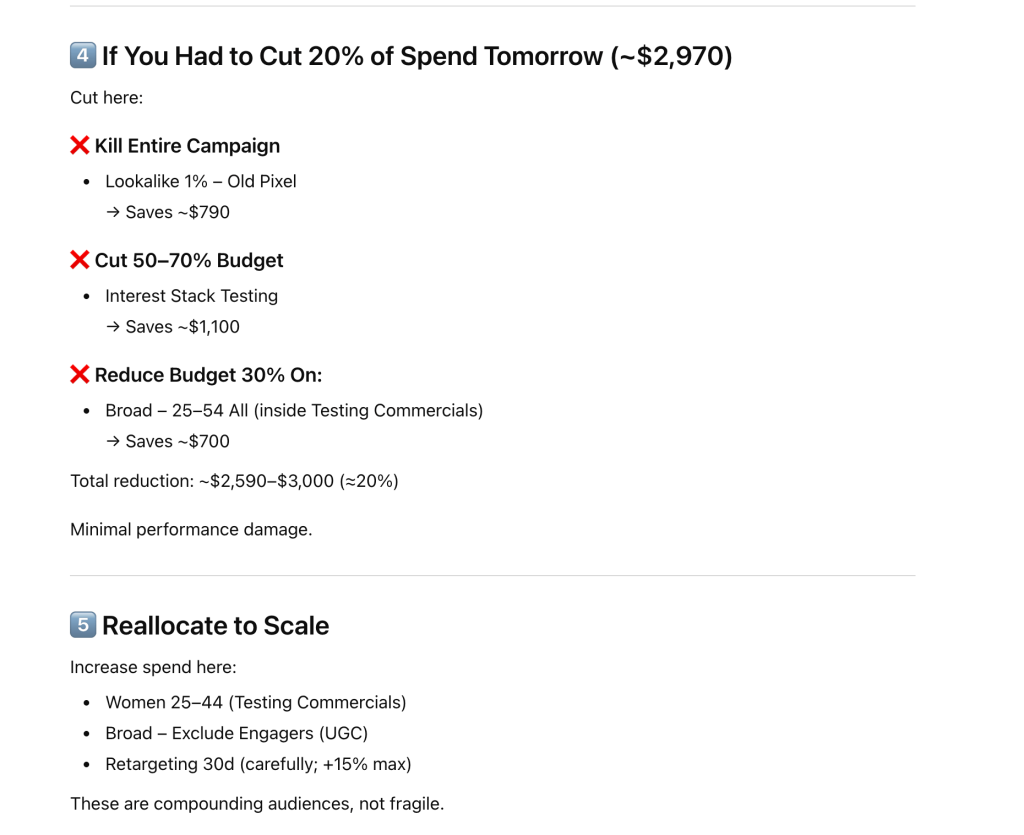
Where to cut 20%
It mapped out exactly where $2,970 in cuts should come from: kill the Old Pixel Lookalike entirely ($790 saved), cut Interest Stack Testing by 50–70% ($1,100), and reduce the inflating broad segment by 30% ($700). Then it recommended reallocating to three specific ad sets with stable, improving CPAs.
That’s the difference between a report and a decision tool. You don’t read it and figure out what to do. It tells you what to do, with the numbers to back it up.
Weekly Facebook Ads performance report for stakeholders
The previous prompt is built for the person managing campaigns. This one is for everyone else: the client, the manager, the business owner who needs to know if the money is working without opening Ads Manager.
The trick is structure. Ask AI for a “summary” and you’ll get paragraphs. Tell it exactly what format to use (tables, rankings, week-over-week comparisons) and you get something a stakeholder can scan in 60 seconds.
Prompt: Build a weekly performance report
Fetch my "[Data flow name]" data flow and build a weekly performance report for the last 14 days.
This report will be sent to a manager or client who doesn’t live in Ads Manager. Make it scannable and decision-ready.
Structure:
1. Executive summary (3–4 sentences max): total spend, total leads, blended cost per lead, and the single most important takeaway.
2. Performance snapshot table: ALL campaigns side by side. Columns: Campaign | Spend | Leads | CPL | CTR | Conversion Rate. Sort by spend descending. Include a total row.
3. Top 3 and bottom 3 ad sets: Two separate tables by CPL. Columns: Ad Set | Campaign | Spend | Leads | CPL.
4. Week-over-week trend: Compare days 1–7 vs. days 8–14. Table: Period | Spend | Leads | CPL | CTR. Call out whether we’re improving or declining.
5. Recommended actions: 3 specific, numbered actions. One sentence each. Reference actual campaigns and ad sets.
Keep language plain. No jargon. Tables are mandatory for sections 2, 3, and 4.
What the ChatGPT returned: a report you can actually send
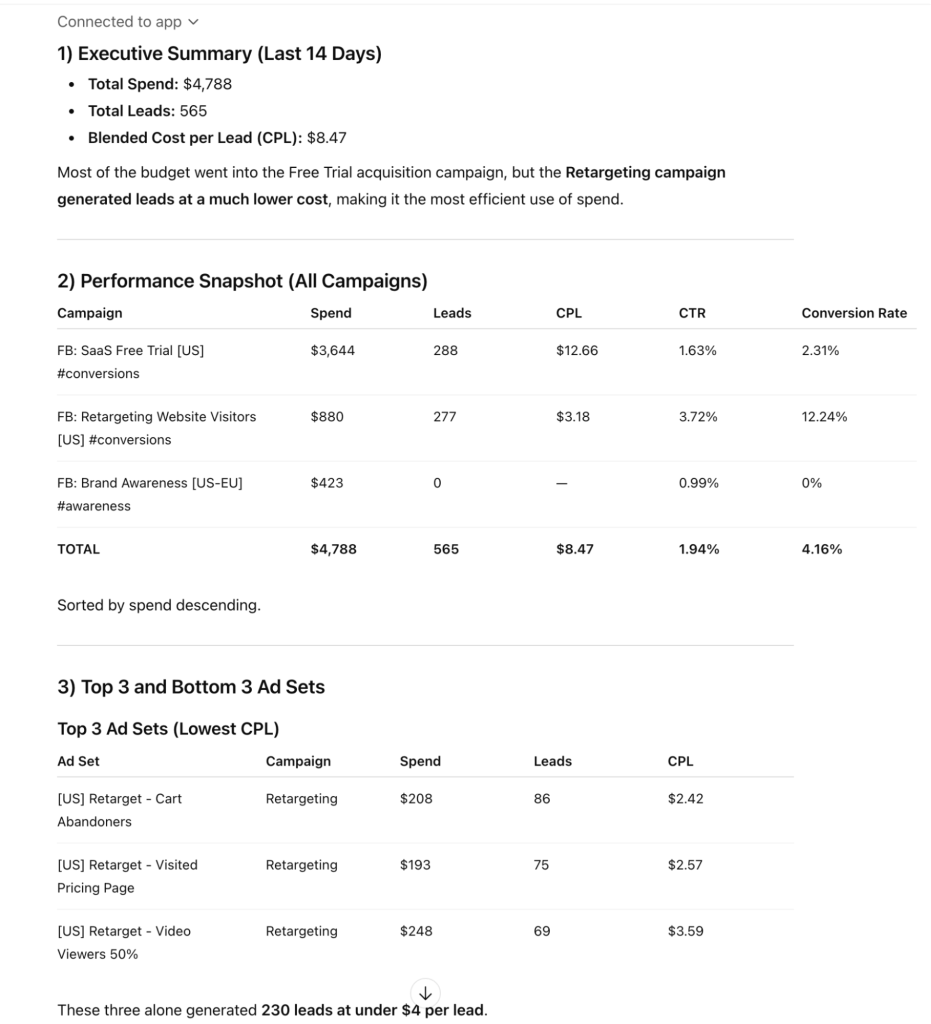
The output came back structured exactly as requested. The executive summary led with total spend ($4,788), total leads (565), blended CPL ($8.47), plus the key insight that retargeting generated leads at a fraction of acquisition cost.
You also get recommendations referenced specific segments: shift budget from Broad 18–24 into Cart Abandoners and Pricing Page retargeting, pause the worst broad segments, scale Lookalike 25–34 cautiously.
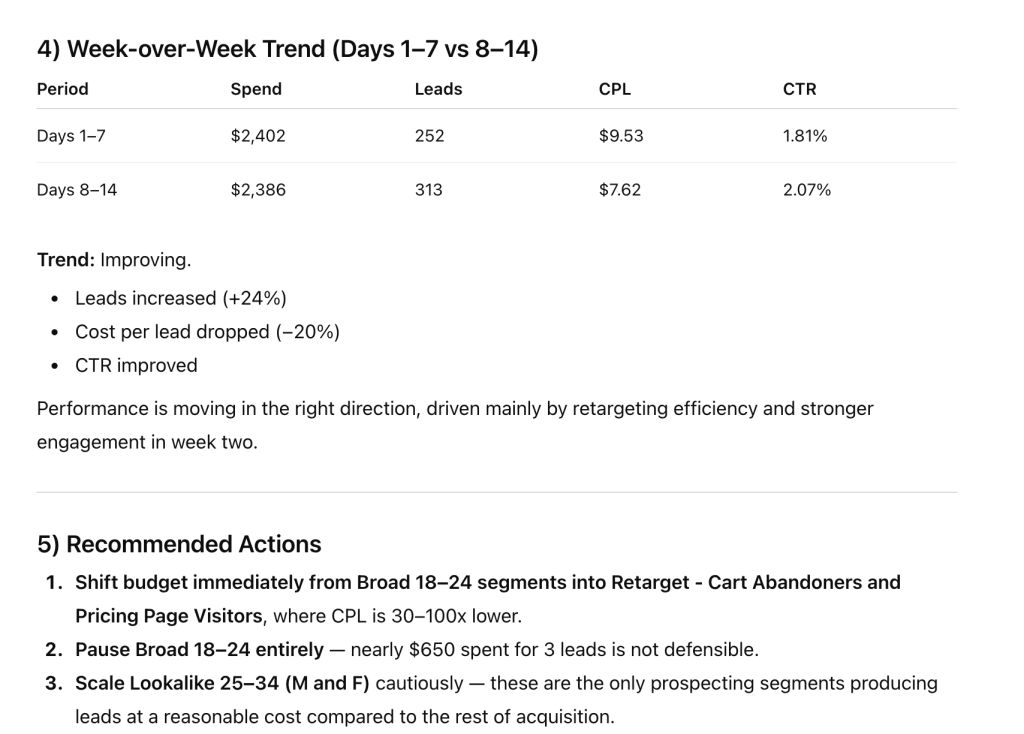
This replaces the manual report most advertisers spend 30–60 minutes building each week. Consistent format, numbers pulled from the source, recommendations with supporting data.
How to use AI for Facebook Ads directly in Coupler.io
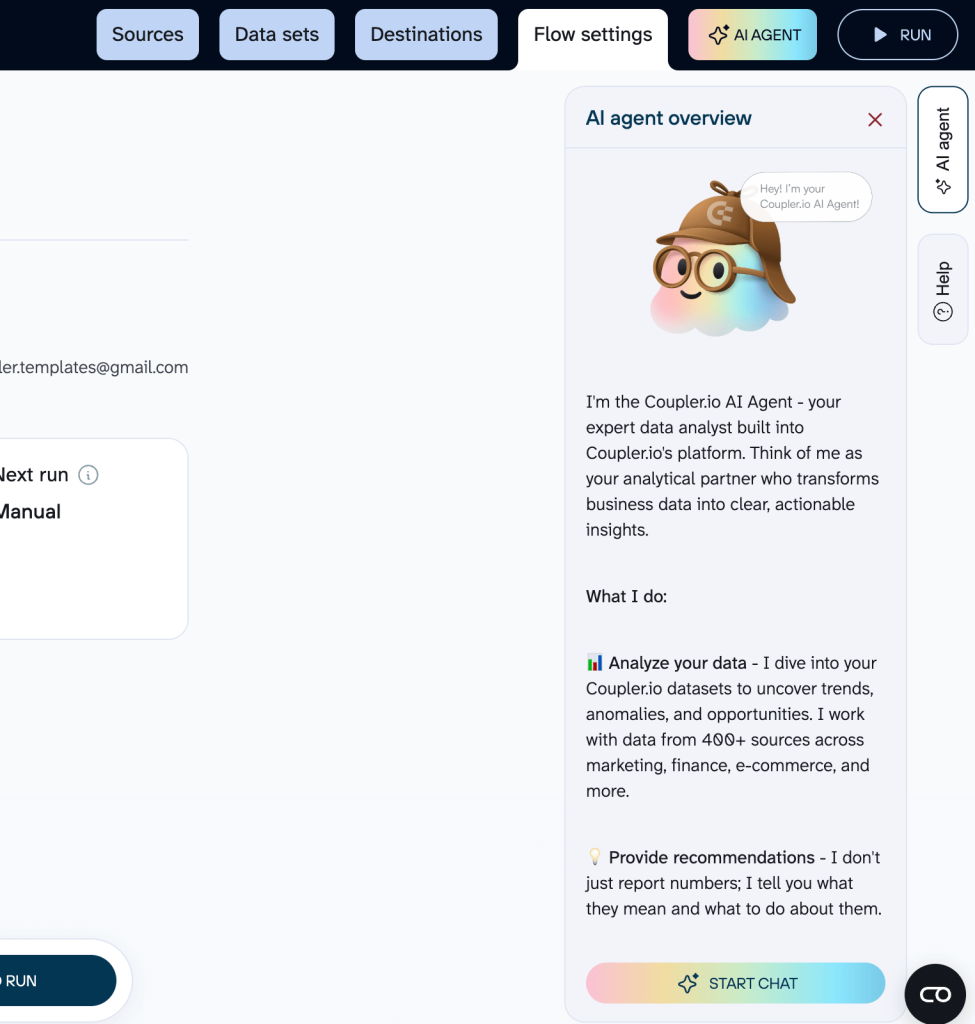
If you don’t want to switch between AI tools, chat with your business data in AI inside Coupler.io. The built-in AI Agent lets you query synced Facebook Ads data in plain language.
How to get started:
If you have already set up data flows from the steps above, the AI Agent is ready. Click Ask AI from the data flows page or open the AI Agent tab inside any data flow. No additional setup needed.
Prompt: Quick daily performance check
Look at my Facebook Ads data for the last 7 days.
Show me:
1. Which ad sets spent more than $50 with zero or only 1 lead
2. Which ad sets have the lowest cost per lead (top 3)
3. Any ad set where frequency is above 4
Then give me 3 actions ranked by impact: what to pause, what to scale, what to watch.
What Coupler.io’s AI Agent returned
The Agent ran multiple queries and returned a structured analysis with specific insights and an action plan. The whole interaction took about 30 seconds.
That’s the use case: a quick daily check that catches obvious waste and confirms your high-performing segments are still delivering
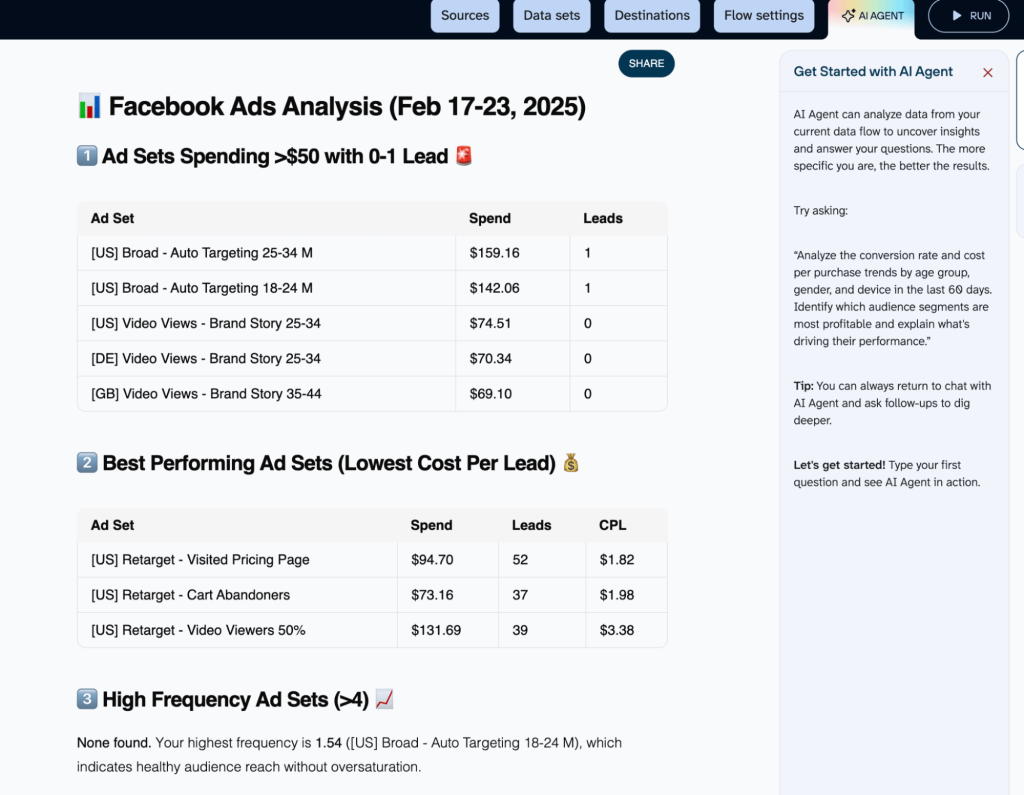
It structured the output as requested in the prompt and gave specific insights that you can act on.
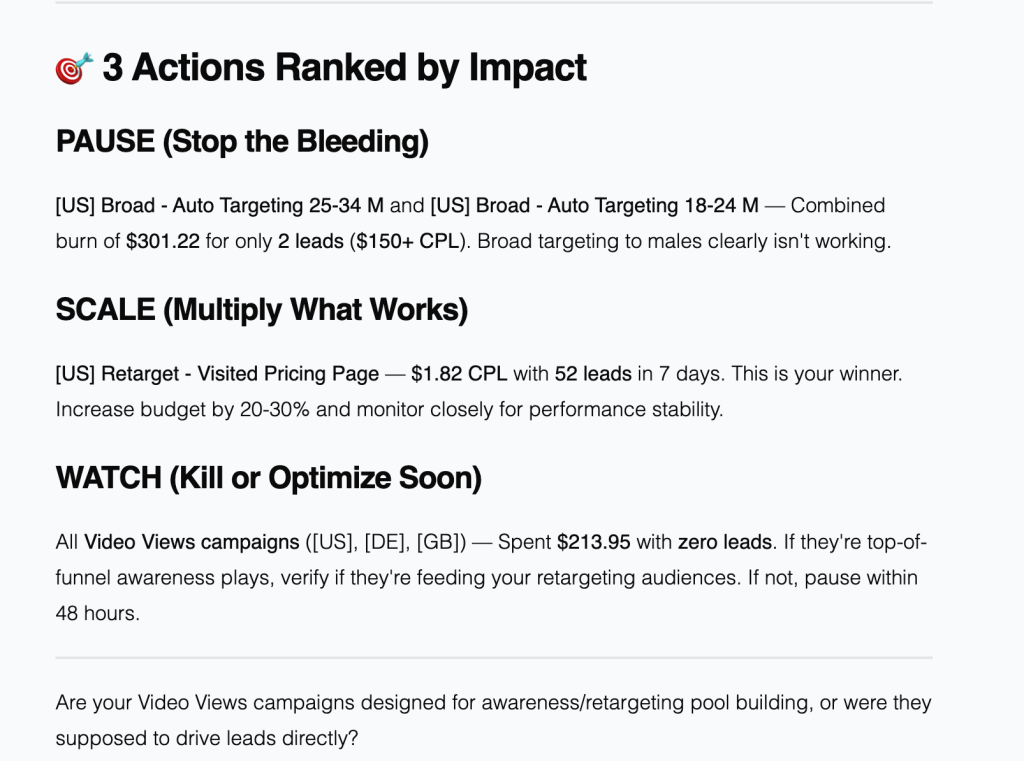
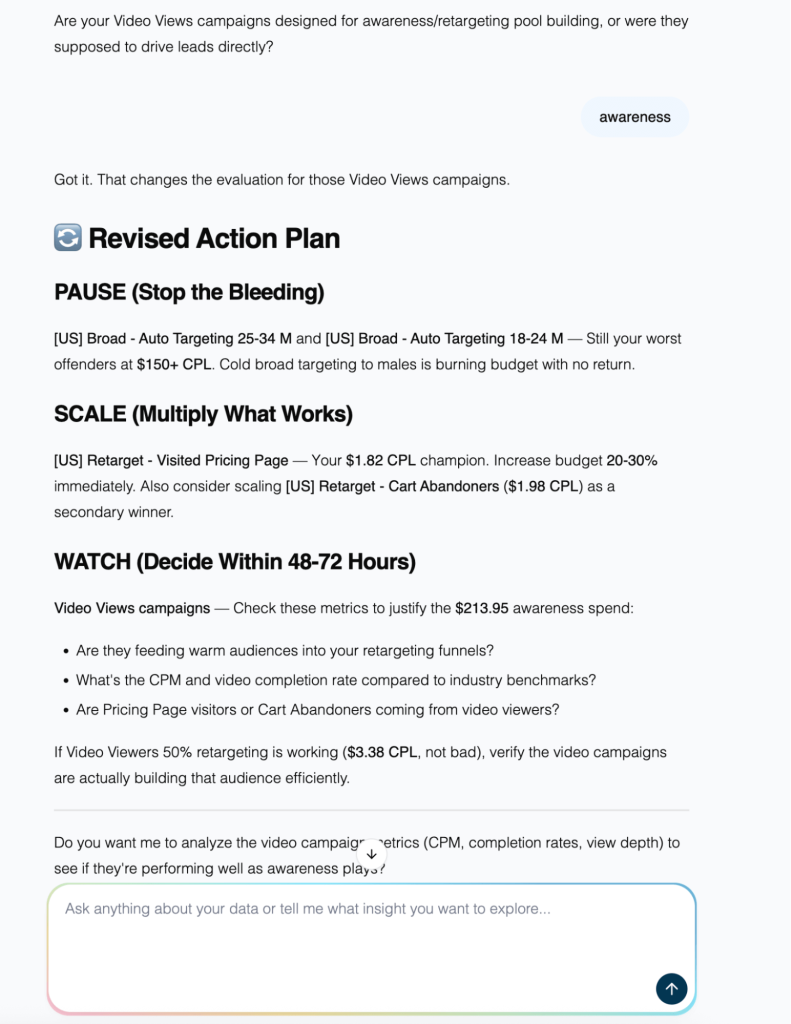
One quick observation: Both ChatGPT and Coupler.io followed the prompts and gave meaningful insights. But what I particular liked was that Coupler.io’s AI Agent asked a follow-up question to clarify the data before returning results, then updated its output accordingly.
This matters.
You shouldn’t optimize Facebook Ads with AI using the decisions on a single prompt with no context. The back-and-forth, such as digging into the data and refining the question, is what produces reliable analysis.
Think of the following two workflows as the other half of the loop:
- The first helps you build a targeting persona from real customer language.
- The second shows how to generate Facebook ad creatives with AI using that persona as the source, so every hook and objection comes from actual research, not guesswork.
Chat with AI Agent about your Facebook Ads data inside Coupler.io
Get started for freeAI for Facebook Ads targeting: build a persona from real customer data
Good targeting starts before you open Ads Manager. It starts with knowing who you’re trying to reach. This requires enough specificity that a copywriter could write to them without asking follow-up questions.
Most advertisers skip this step. The result: generic audiences that are too broad to convert efficiently. AI-enabled analysis can compress what used to be weeks of customer research into a structured persona you can immediately use for targeting the right audience, generating ad copy, or landing pages.
The key is feeding it real source material.
Prompt: Build a detailed buyer persona from your business context
I need a detailed buyer persona for Facebook Ads targeting. This persona will be used to write ad copy, choose audiences, and design landing pages.
Business: [describe your product, what it does, who it’s for]
Industry: [B2B SaaS / ecommerce / services / etc.]
Price range: [or deal size]
Sales cycle: [days/months]
Use the attached files for context. These contain real conversations and feedback from our target audience:
• Sales call transcripts or notes
• Customer support conversations
• Reddit or community threads where our audience discusses their problems
• Slack or internal team discussions about customer objections
• Review sites (G2, Capterra) feedback on competing products
You don’t need all of these. Use whatever is available to extract real language, objections, and priorities—not generic marketing assumptions.
Build the persona with these sections:
1. Title and description: Who is this person? Job title, seniority, what they own in their org.
2. Company context: Two tiers by company size. For each: company stage, team size, budget range, sales cycle length.
3. Job titles: 6–10 actual titles for targeting. Specific—not just “manager” but the exact titles this person would have on LinkedIn.
4. Goals: 4–5 specific operational goals, not vague aspirations.
5. Pain points: Direct quotes—the exact words this person would use. Pull from attached files where possible. 5–6 quotes.
6. KPIs they care about: Metrics they’re measured on or report to leadership.
7. Common objections: 3–4 specific pushbacks during a sales process.
8. Messaging angle: One paragraph. How should we talk to this person? Core promise.
9. Buying triggers: 5–6 events or situations that make this person start looking for a solution.
The persona should be specific enough that a copywriter could write to them without asking follow-up questions.
The persona should be specific enough that a copywriter could write to them without asking follow-up questions.
The more source material you feed it, the better. Sales call transcripts contain the exact language your customers use while Reddit threads and G2 reviews give you use cases and pain point. Even with just one or two sources, the output is better than asking AI to guess from a product description.
Example output:
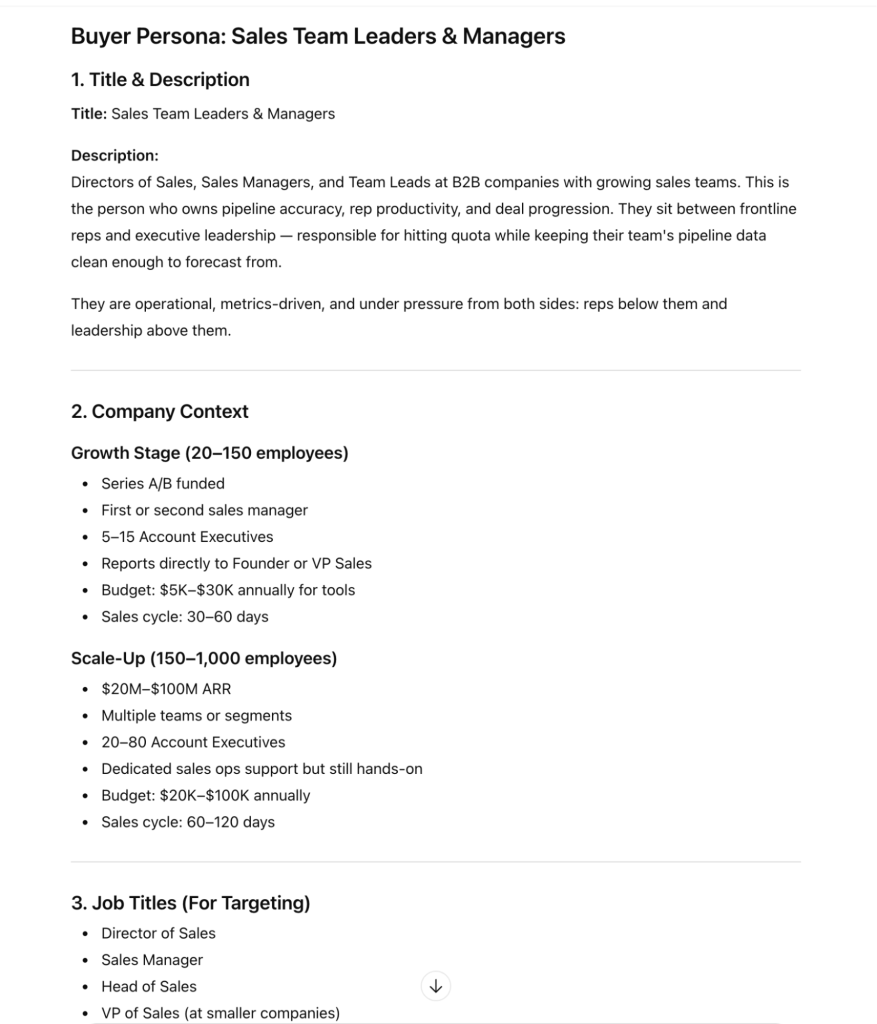
Pain points become ad hooks. Objections become ad copy angles that address resistance directly. Job titles become targeting inputs. Buying triggers tell you when to ramp ad spend.
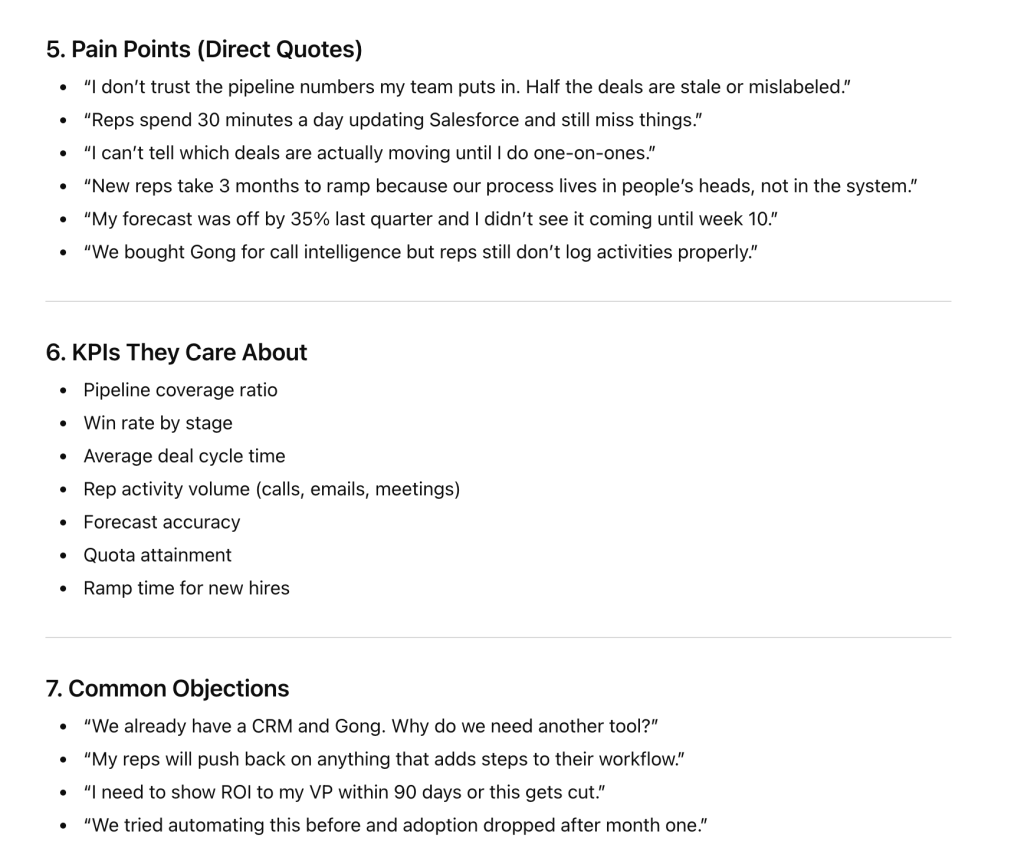
Save the persona output. You’ll use it in the next section.
Use AI for Facebook Ads creatives: generate ad copy from your persona
Writing Facebook Ads copy means producing many variations quickly, then testing what performs. When generating AI ads, keep in mind that generative AI for Facebook Ads are good at “first-draft” ad creation, but two things to know upfront.
- AI models miscount characters: A model will confidently tell you a headline is 38 characters when it’s actually 45. The fix: ask the AI to write ad copy first, then run a script to count characters and validate each line. One extra instruction saves you from uploading ads that get truncated.
- The persona does the heavy lifting: Generic prompts produce generic ads. This prompt works because you’re feeding it the buyer persona you already built. The AI pulls hooks directly from that source material instead of inventing generic ad creative, generating high-quality ad copy.
Meta ad’s character best practices:
- Primary text: around 125 characters visible above “See more” (no hard cutoff, but longer gets hidden in most placements).
- Headline: 40 characters.
- Description: 25 characters (often not shown depending on placement).
These aren’t strict limits like Google Ads. But staying within them means your copy won’t be cut off in Feed, Stories, and Reels.
Prompt: Generate primary text, headlines, and descriptions from your persona
Write Facebook Ads copy variations for [product/service].
Goal: [conversions / leads / traffic]
Key benefit: [main value proposition]
Offer (if applicable): [discount, free trial, limited time]
Use the buyer persona below to write copy that speaks directly to this audience. Specifically:
• Pull hooks from their pain points (use their exact language where possible)
• Address at least one objection in the longer variations
• Reference their goals or KPIs, not generic benefits
• Match the tone to how this person talks—operational, direct, not aspirational
Write:
PRIMARY TEXT (6 variations):
• First line is the hook. Keep it under 125 characters.
• Include 2 short variations (2–3 sentences total)
• Include 2 longer variations (4–6 sentences, for high-consideration products)
• Include 1 that opens with a question from their pain points
• Include 1 that leads with social proof or a specific result
• End each with a clear CTA. Conversational tone. No corporate speak.
HEADLINES (6 variations):
• Max 40 characters (strict)
• 3 benefit-focused (tied to their goals or KPIs)
• 2 with a CTA or offer
• 1 addressing their most common objection
DESCRIPTIONS (4 variations):
• Max 25 characters
• Complement the headlines, don’t repeat them
• Focus on a secondary benefit or trust signal
Each headline must work on its own since Meta mixes them dynamically.
IMPORTANT: First, write all copy as plain readable text. Then AFTER writing everything, use Python to count the exact character length of each first line, headline, and description. Show validation results as a separate table. If anything is over the limit, rewrite and re-validate.
BUYER PERSONA:
[Paste the full persona output from the targeting section here]
What ChatGPT returned
ChatGPT produced six primary text variations, six headlines, and four descriptions—then validated all character counts with Python.
The hooks came directly from the persona’s pain points: “Your forecast was off by 35% last quarter,” “Reps spend 30 minutes a day updating CRM,” and “Still finding out deals are stalled in one-on-ones?” These aren’t generic hooks—they’re the exact language the persona research surfaced.
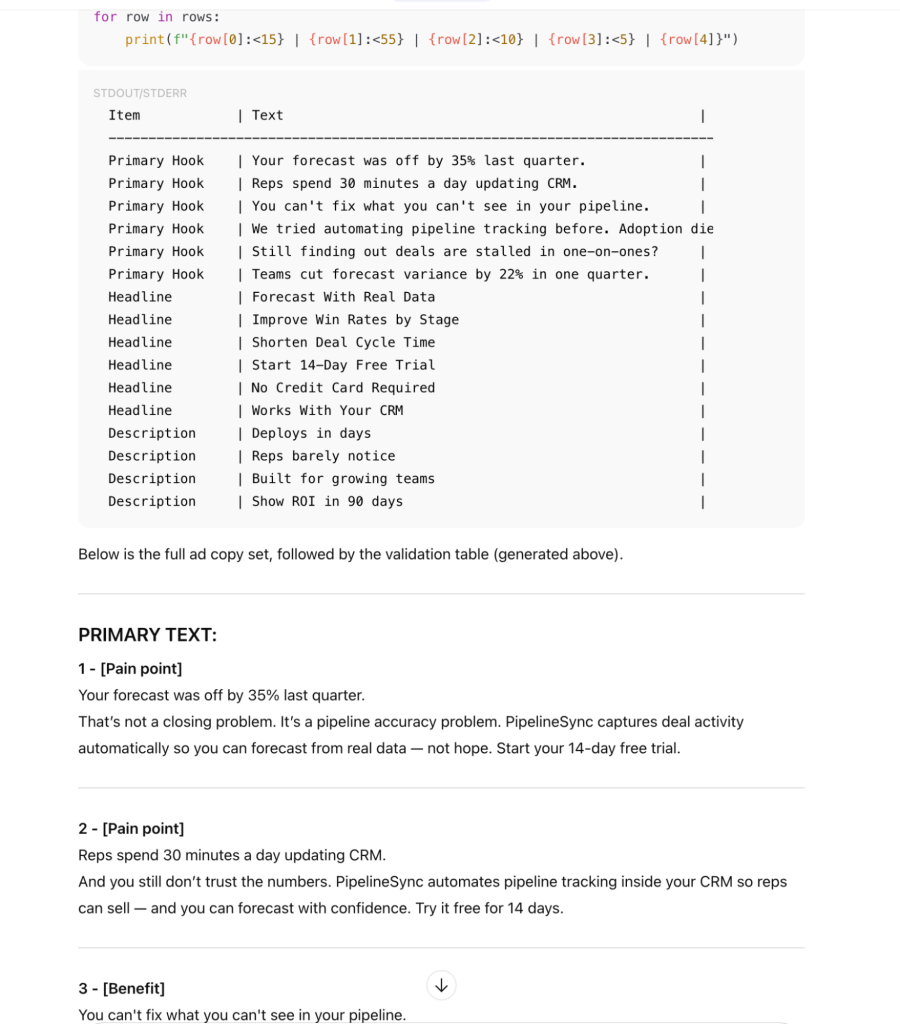
Variation 4 tackled the adoption objection head-on, then addressed it: “No extra steps for reps, no new system to log into.” Without the persona, the AI would never surface this specific objection.
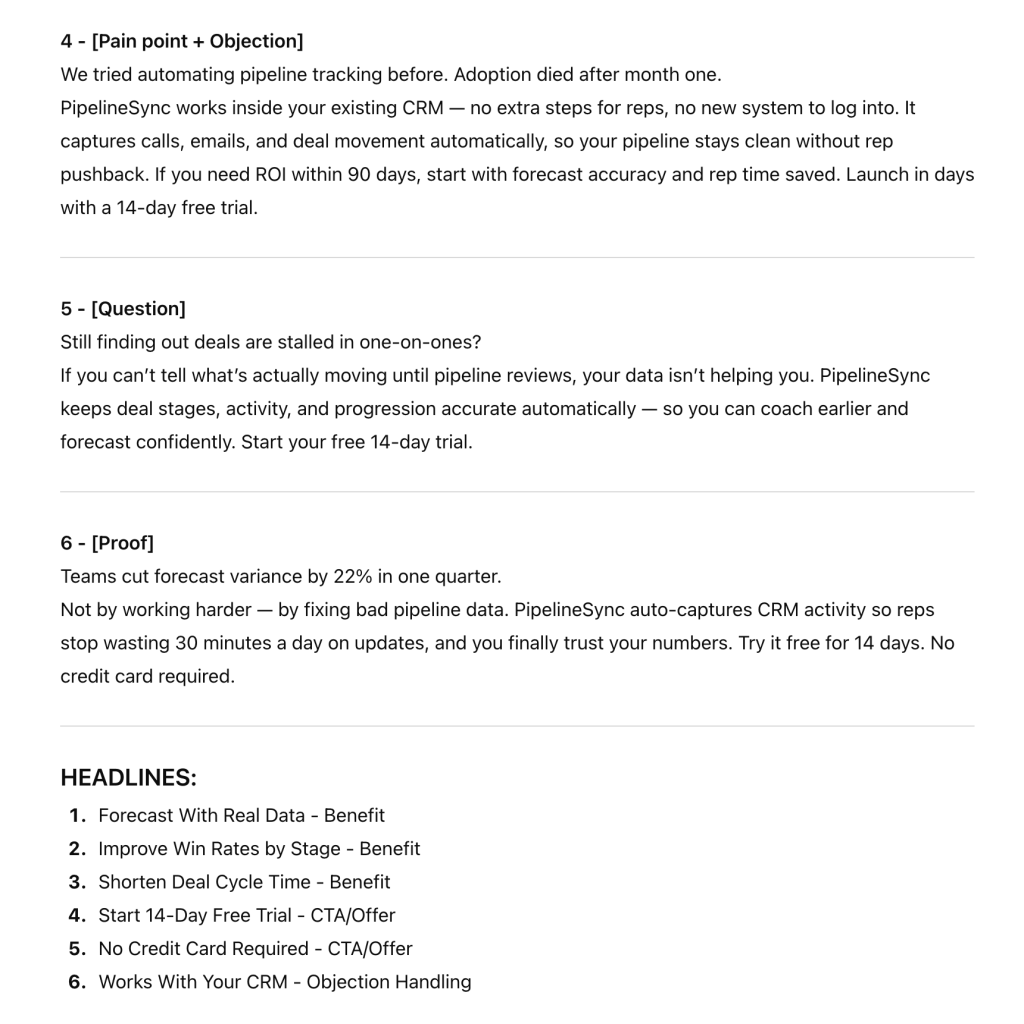
Prompt quirk: if you just say “use Python to validate,” ChatGPT sometimes skips writing the copy as text and jumps straight to generating everything inside a code block. The “IMPORTANT: First, write all copy as plain readable text” instruction prevents that.
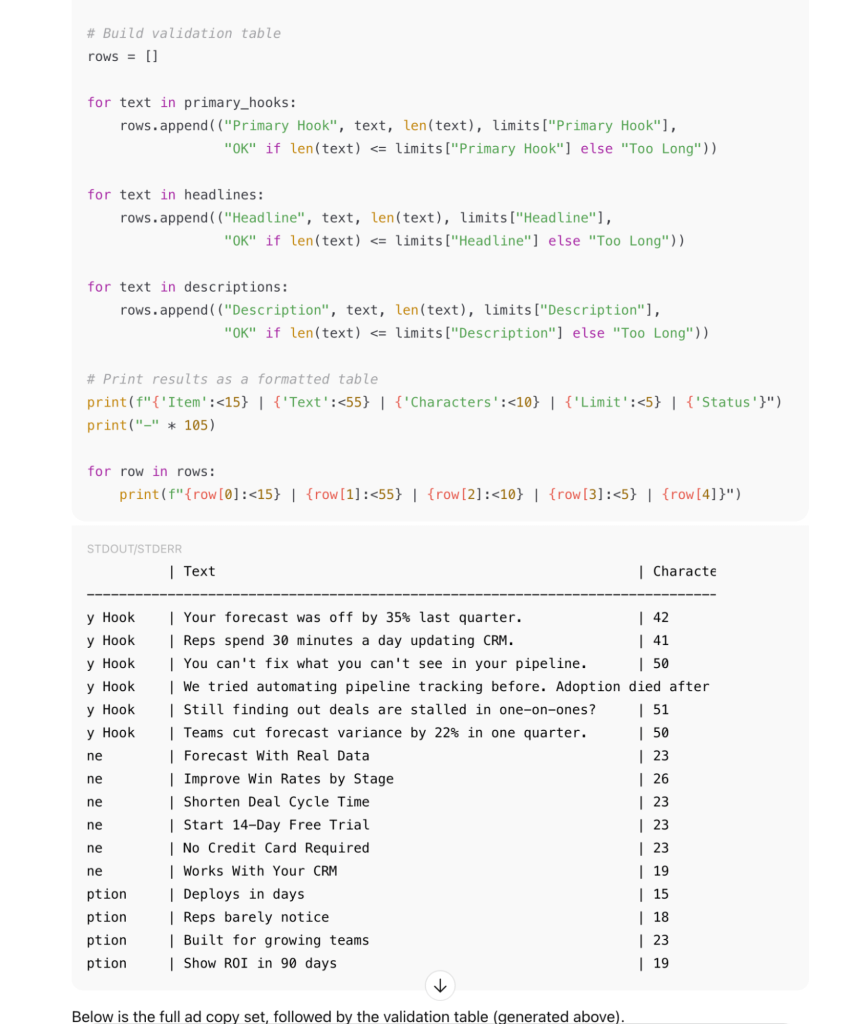
Generate more than you need. Keep the 4–5 strongest primary texts with a mix of hook types—you want to test angles, not synonyms. Upload your best headlines and descriptions to Ads Manager and let Meta’s algorithm mix and match.
Top AI tools for Facebook Ads optimization
The examples in this article use ChatGPT. However, once your data is synced through Coupler.io, you can query it from whichever AI tool you prefer:
- ChatGPT: quick summaries and optimization prompts
- Claude: deeper reasoning, longer reports, interactive visual outputs
- Gemini: works well inside Google Workspace
- Perplexity: research-oriented analysis
- Cursor and other coding tools: custom analysis and scripts
Coupler.io sits between your Facebook Ads data and your AI tools. Set up the connection to your preferred one once, schedule the sync, then query from wherever you work.
Optimize Facebook Ads with AI to turn insights into action, faster
Using AI for Facebook Ads isn’t about automating everything. It’s about cutting the time between “I should check ad performance” and “I know what to do next.”
Connect your data, ask the right questions, then apply your judgment. That combination of AI speed and human context is what lets you scale Facebook Ads with AI without losing the strategic judgment that makes the difference.
Sync your Facebook Ads with Coupler.io and let AI surface what to fix first.
FAQ
Can AI access my Facebook Ads account directly?
No. AI tools don’t connect to Facebook Ads on their own. You need a Facebook Ads connector by Coupler.io to sync your campaign data. The AI only sees the data you choose to share.
Can AI replace a Facebook Ads specialist?
No. AI speeds up the workflow: it drafts ideas, surfaces patterns, and summarizes ad performance. But strategy, business context, and judgment still come from you. It’s an AI-powered assistant that makes you faster, not a replacement.
Is AI optimization advice for Facebook campaigns accurate?
That depends on two things: where the data comes from, and how much you verify. Pasting numbers manually introduces errors. When data is synced automatically and math is handled by a computation layer like Coupler.io’s Analytical Engine, the numbers are reliable. But AI-generated insights should still be treated as a starting point. Therefore, periodically double-check core Facebook Ads metrics, validate recommendations against your business context, and use the output to fuel your own strategic thinking rather than replace it.
Do I need technical skills to use Coupler.io?
No. Setting up Coupler.io data flows is point-and-click. Choose Facebook Ads as the source, authorize your ad account, pick an AI tool as the destination, and set a sync schedule. No code required.