ChatGPT can do serious analytics work with your Facebook Ads figures. But ChatGPT has no native Facebook Ads connector to get that data into conversation. Manually exported snapshots go stale before you finish reading them. API pipelines and custom MCP servers solve the freshness problem but require coding skills. None of these workarounds is perfect.
I’ve gone through various methods to connect Facebook Ads to ChatGPT, from a simple file upload to a fully automated live integration. In this article, I’ll show you how each one works, what it costs you in time and technical effort, and which best fits your specific needs.
Select the right method to connect Facebook Ads to ChatGPT
The right choice comes down to three things:
- How often do you need to get fresh Facebook Ads data to ChatGPT?
- How much technical overhead can your team absorb?
- Are you running a one-time analysis or recurring reporting?
Here’s how each method stacks up:
| Method | Setup time | ChatGPT plan needed | Technical skill | Data freshness | Best for |
| Coupler.io App for ChatGPT | ~5 min | All plans | None | Auto-refresh on schedule | Recurring PPC analysis and reporting through a secure middle layer between Facebook Ads and ChatGPT |
| Manual export and upload to ChatGPT | ~3 min | All plans | None | Manual re-export every time | One-off analysis use cases: when you need a quick answer and don’t require recurring reports |
| Google Drive app in ChatGPT as an intermediate data layer | ~5 min | Paid plans only | None | Manual re-upload | Teams that store ad exports in Google Drive and want to pull them into ChatGPT without uploading a file every time |
| Custom MCP server integration | Hours to days | Paid plans only | Python or Node.js | Live/real-time | Live Facebook Ads queries in ChatGPT with full control over how data is structured before it reaches the chat |
| Direct pipeline to the OpenAI API | Hours to days | N/A (API, not ChatGPT UI) | Python or Node.js | Custom schedule | Automated, no-UI workflows where scripts pull Facebook Ads data and deliver it to the OpenAI API on a schedule or event trigger |
| Function calling | Hours to days | N/A (API, not ChatGPT UI) | Python or Node.js | On-demand per query | Dynamic conversational analytics where ChatGPT fetches only the specific figures it needs per question, rather than loading the entire dataset upfront |
If you want the most recent Facebook Ads data in ChatGPT without writing code or managing file uploads, Coupler.io is the most practical path from data to insight.

Explore your Facebook Ads data in ChatGPT
Get started for freeConnect Facebook Ads data to ChatGPT with Coupler.io
Coupler.io is a no-code data integration and AI analytics platform available as an app in ChatGPT. It connects to 400+ business applications, including Facebook Ads, so ChatGPT can access data in chat. From there, you just ask questions in plain language and get immediate insights.
ChatGPT does not get access to your Facebook Ads account and all the data you have there. Coupler.io acts as a secure middle layer between your Facebook Ads data and ChatGPT. Instead of sending raw data into the AI, you control exactly what can be queried.
When you ask a question, ChatGPT sends a request to Coupler.io, which processes it inside its own analytical engine. Only the calculated results are returned, and ChatGPT interprets them into a human-readable answer. This setup gives you more control, keeps your data protected, and avoids exposing sensitive information to the AI directly.
Try it out for free. Click Proceed in the form below to get started:
Next, sign up for Coupler.io (no credit card required) and follow the step-by-step below.
Step 1: Create a data flow for Facebook Ads data
You have two options to create a data flow:
- From a template: If you’d rather skip the setup of Facebook Ads metrics and dimensions, Coupler.io data set templates give you a shortcut. Each one is a preconfigured package of transformations and ready-made report views assembled by Coupler.io’s data analysts.
- From scratch: This option gives you full control over what data is pulled and how it’s structured. It’s useful when you need a custom dataset tailored to your analysis. You will need to select the report type like Reports and Insights, List of Campaigns, etc.
For both options, start by connecting the Facebook account linked to your Ads Manager. You’ll be redirected to Facebook to sign in and grant Coupler.io access to your data.
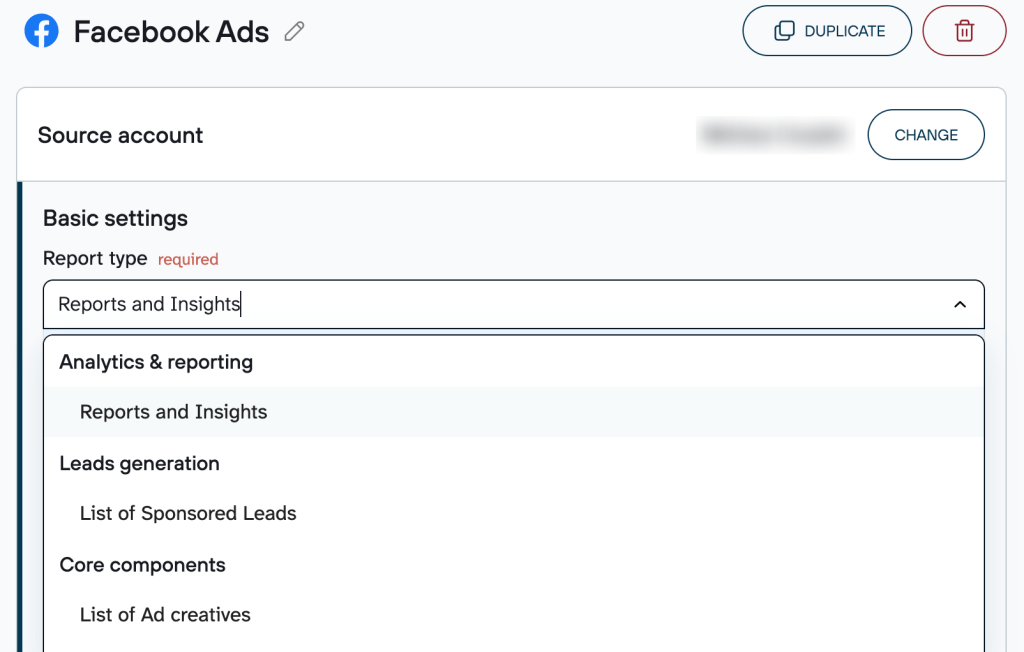
Depending on the report type, you’ll also need to specify additional parameters. For instance, if you select Reports and Insights, you must choose ad accounts from where to pull data, report period, metrics and dimensions, as well as attribution settings.
Before moving to the next step, Coupler.io allows you to connect multiple sources in one data flow. You can merge records from different report types and accounts within Facebook, or even blend data from other ad platforms and applications.
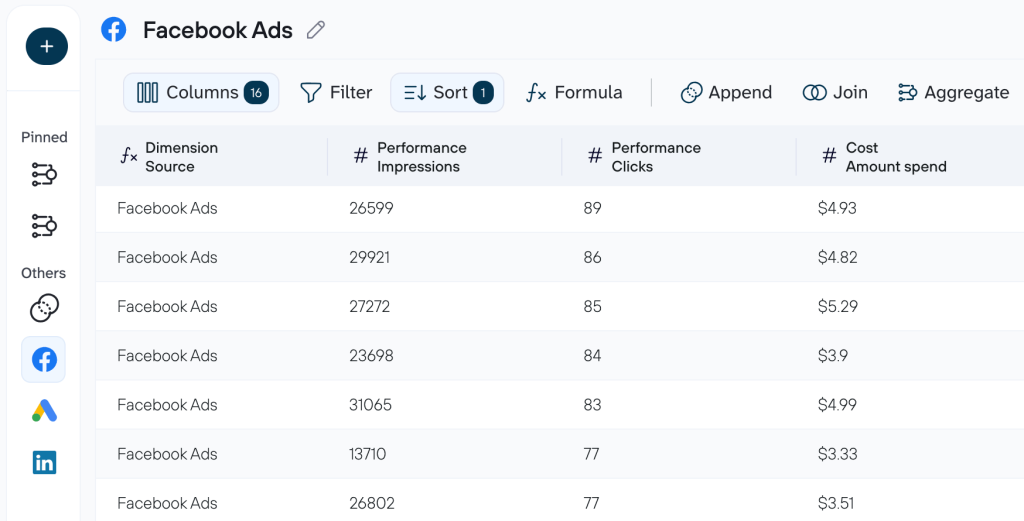
Step 2: Connect ChatGPT
Once your data is prepared, click Get the Coupler.io app to open the Coupler.io connection page in ChatGPT Apps. Complete the setup there, return to Coupler.io, and run the data flow.
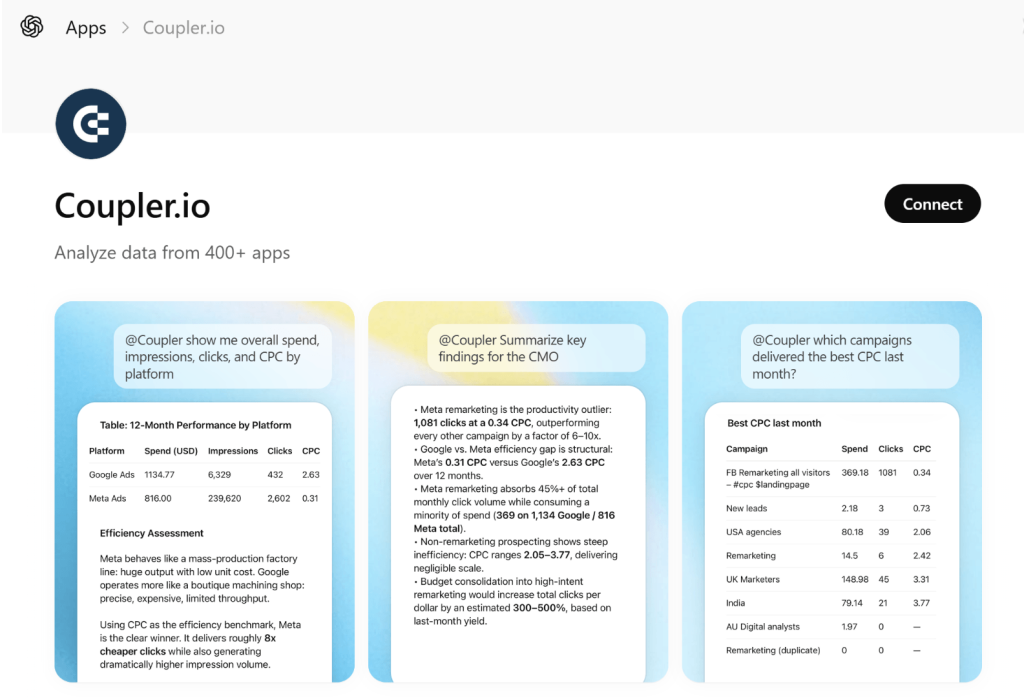
Toggle on the Automatic data refresh and set your preferred schedule. Your Facebook Ads figures can be updated as frequently as every 15 minutes. Click Save and run to activate your automation.
With automatic refresh enabled, Coupler.io keeps your records up-to-date on the selected schedule. But to make completely sure ChatGPT is working with the latest figures, ask it to re-fetch the data from the most recent run or start a new chat.
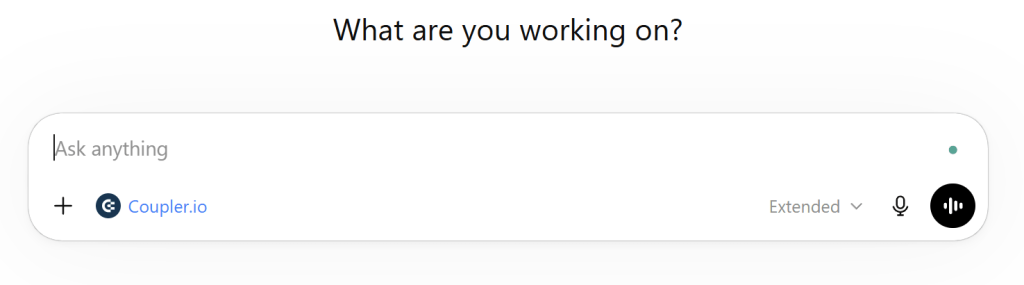
After the successful run, open ChatGPT and start a new conversation. ChatGPT will ask for permission to connect to the Coupler.io MCP server. Once you confirm, you can start asking questions about your Facebook Ads figures directly in the chat.
Connect Facebook Ads data to ChatGPT with Coupler.io
Get started for freeHow can you analyze your Facebook Ads campaigns in ChatGPT?
To demonstrate how AI-powered paid advertising analysis works in practice, I’ve connected a Facebook Ads dataset to ChatGPT. My goal is to analyze Facebook Ads data to get a clean campaign-wide performance snapshot before making any optimization decisions.
To do that, I used this prompt:
You are a paid media analyst. I uploaded a Facebook Ads dataset.
Work only with the fields that exist in the uploaded file. Do not use external benchmarks, do not assume dates, placements, audiences, conversions, or any metrics not present in the file.
If a metric is unavailable, say “Not available in uploaded data.”
First, identify the columns in plain English. Then, analyze the dataset as one campaign.
Use these rules:
Treat each repeated block as one row.Available fields may include: Platform, Impressions, Clicks, CPC, Objective, Account, Campaign Name.Derive Estimated Cost as Clicks × CPC.Derive CTR as Clicks / Impressions × 100.Do not calculate ROAS, CPM, frequency, conversion rates, or placement-level metrics unless those columns actually exist.
Produce 4 sections:
1. Dataset Check
State:
Number of rowsDistinct campaign namesDistinct objectivesWhich metrics are directly available vs derived
2. Campaign Snapshot
Create a table:
Metric | Value |
Total Impressions | |
Total Clicks | |
Weighted Average CTR % | |
Weighted Average CPC | |
Estimated Total Cost | |
Lowest CPC Row | |
Highest CPC Row | |
Lowest CTR Row | |
Highest CTR Row |
3. Distribution View
Create a table showing:
Rows:
ImpressionsClicksCPCCTREstimated Cost
| Metric | Min | Median | Max |
4. Analyst Readout
Write 3 short bullets:
What the campaign is doing wellWhat looks uneven or unstableWhich metric should be prioritized next, based only on this file
I received the following response:
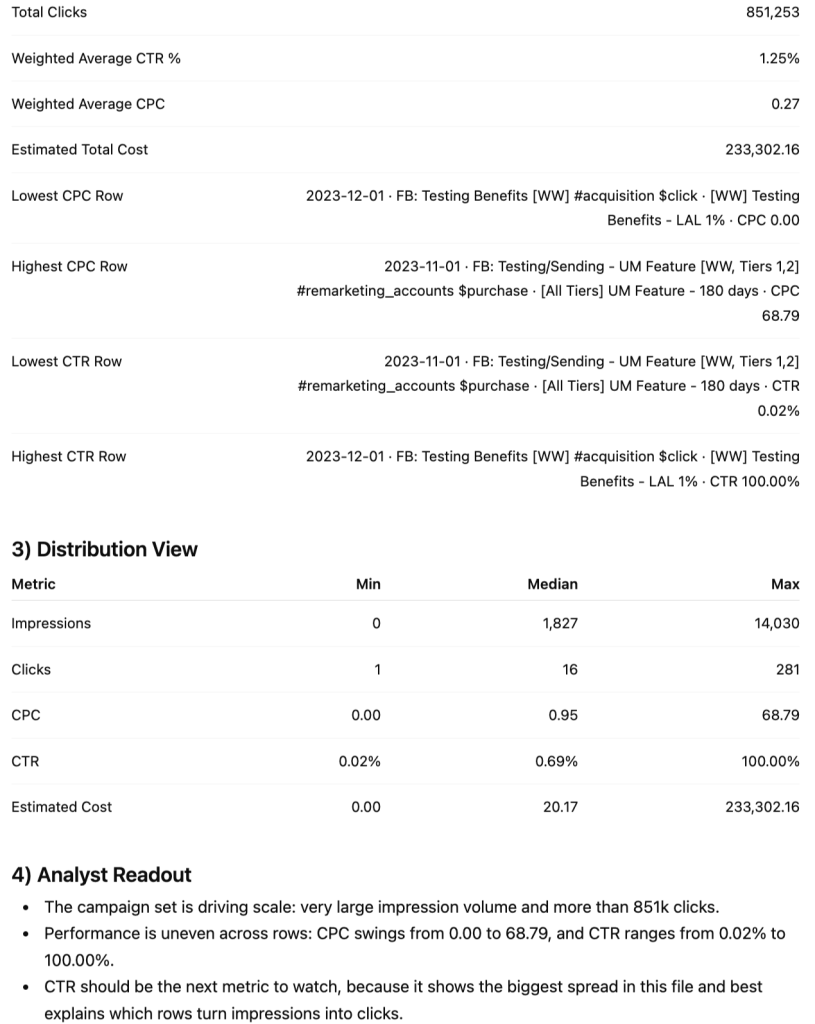
ChatGPT’s snapshot showed strong scale, with 68.3 million impressions and 851k clicks. But the distribution view exposed a major inconsistency: CPC ranged from $0.00 to $68.79, and CTR from 0.02% to 100%. That made CTR the most useful metric to examine next.
Rather than trying to inspect 7,223 rows manually, I asked a follow-up question:
Based on that analysis, which rows in this dataset look most efficient and which ones look weakest? Rank them using only CPC and CTR, label each row as strong, neutral, or weak, and tell me which rows I should protect, watch, or cut back first.
Below is the output I got:
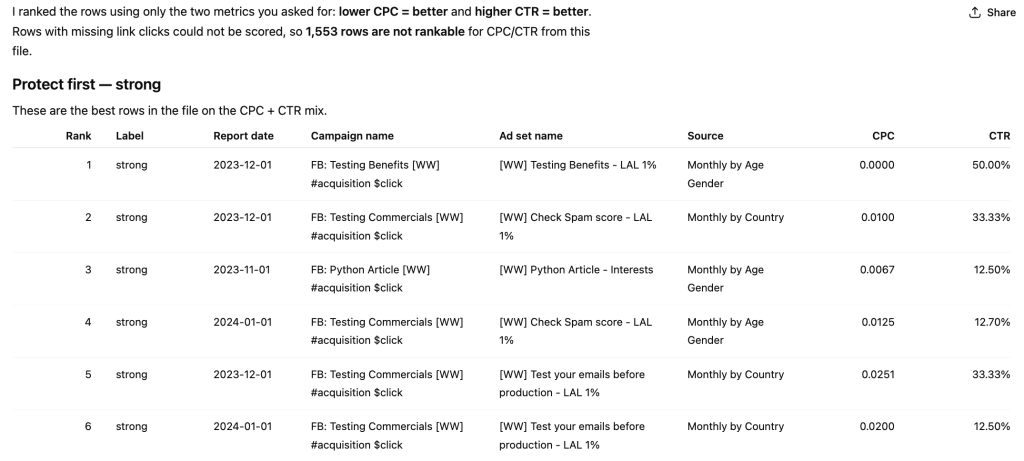
ChatGPT ranked each row using lower CPC and higher CTR. The strongest rows clustered around acquisition campaigns targeting lookalike audience segments. These showed CPCs as low as $0.00-$0.03 and relatively high CTRs compared to the rest of the dataset. The weakest rows appeared in remarketing and purchase-focused campaigns, where CPCs reached $55-$68, and CTR dropped below 0.05%. This shows an imbalance between cost and engagement.
Based on ChatGPT’s row-level analysis, here’s what you can act on:
- Don’t let top-line averages mask row-level chaos. A weighted average CPC of $0.27 looks healthy until you see individual rows hitting $68.79. Always pressure-test aggregates with a distribution view before concluding.
- Protect acquisition LAL rows first. The strongest performers were consistently lookalike-audience acquisition campaigns with click objectives – low CPC, high CTR, and no conversion dependency required to justify their spend.
- Remarketing rows with purchase objectives need immediate review. High CPC + low CTR in the same row means the target audience is expensive to reach and unresponsive to the ad. Before cutting, check whether these rows have conversion data elsewhere in your stack – if they do, cost-per-click alone doesn’t tell the full story.
- Add spend data for the next iteration. This dataset derived the estimated cost from clicks × CPC, which only covers rows where both fields exist. If you connect a direct spend export, you’ll get accurate budget allocation and make the protect/watch/cut ranking fully reliable.
Instead of digging through thousands of rows by hand, this entire breakdown, from snapshot to row-level ranking, came together in one conversation. Both steps above are exactly what two skills by Coupler.io automate:
- Facebook Ads Performance Review for the campaign-wide snapshot
- Facebook Ads Waste and Scale for the row-level protect/watch/cut ranking
Analyze Facebook Ads performance with ChatGPT using Coupler.io
Get started for freeOther methods to connect your Facebook Ads data to ChatGPT
Beyond Coupler.io, there are several other ways to connect Facebook Ads to ChatGPT. Each option comes with its own tradeoffs in setup complexity, data freshness, and technical overhead. Here’s what each one is about. 👇
Manual export and upload to ChatGPT
It’s the most straightforward path from Facebook Ads to ChatGPT. You export a file, upload it, and start asking questions. For occasional, low-stakes analysis, it’s often the first thing people try – and it works.
You just need to open Meta Ads Manager, set your date range, apply any filters, and export as a CSV or Excel file.
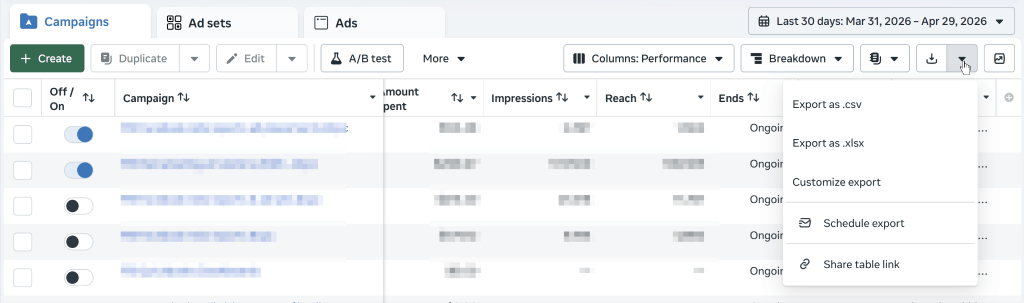
Then upload that file directly into a ChatGPT conversation. ChatGPT reads the contents and lets you ask questions, run comparisons, or summarize results based on what’s inside.
It’s a practical choice when you need a one-off analysis, have no developer resources, or want to test what ChatGPT can do with data before committing to a more involved setup. But the tradeoff is that every new analysis means a new export. The data goes stale the moment you download it. If you’re working across multiple accounts or date ranges, you’ll quickly find yourself juggling a pile of files. It’s not built for dashboards, recurring reports, or anything that needs to reflect live ad performance.
Google Drive app in ChatGPT as an intermediate data layer
ChatGPT’s native Google Drive App (connector) allows you to reference files stored in Drive directly inside a conversation. It acts as a lightweight middle layer between your Facebook Ads exports and ChatGPT.
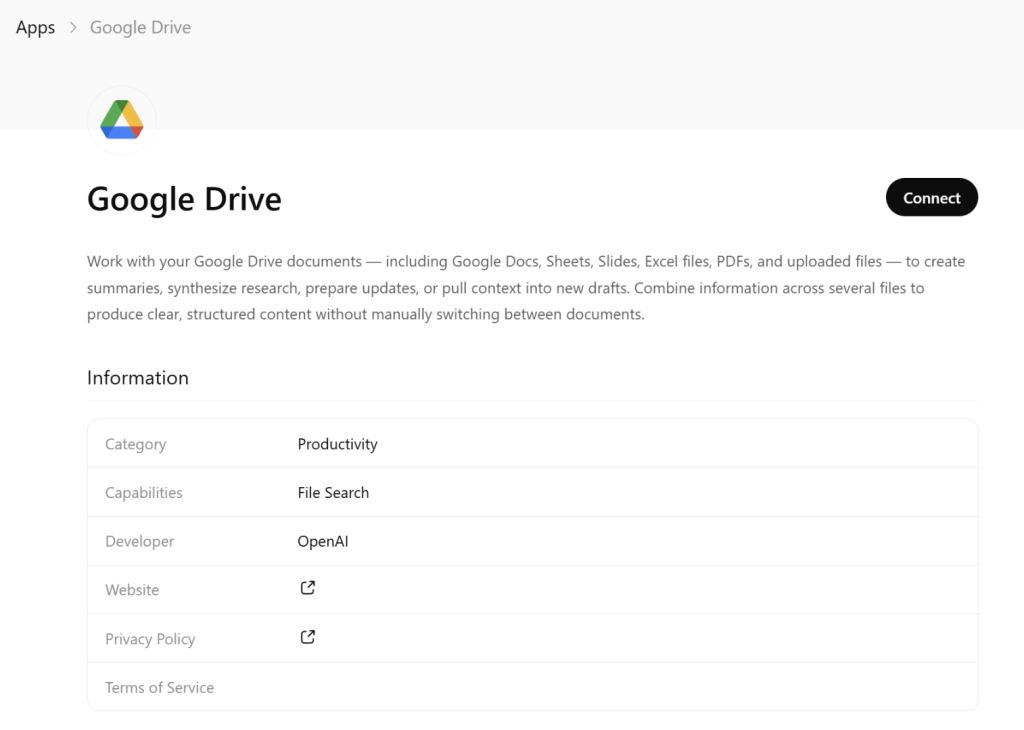
Note: The Google Drive app in ChatGPT has plan-based limitations.
Save your Facebook Ads data as a file, upload it to Drive, and connect your Google Drive account in ChatGPT. From that point, ChatGPT can access your data within a conversation.
This works well when your team already stores exports in Drive, and you want a faster, more consistent way to bring data into ChatGPT with less upload friction. However, it’s still file-based. Freshness depends entirely on how often someone updates the file, and ChatGPT is reading a snapshot, not a live feed. Large or multi-sheet files can also be parsed inconsistently, so it’s best suited for clean, single-table exports.
Custom MCP server integration
MCP (Model Context Protocol) is an open standard that lets ChatGPT connect to external data sources through a structured interface. With a custom-built MCP server around the Facebook Marketing API, ChatGPT can query real-time ad data on demand, no exports needed.
You build and host a server that wraps the Facebook API and exposes a set of defined tools: things like get_campaign_performance, list_ad_sets, or fetch_creative_insights. When someone asks, “How did our retargeting campaigns perform last week?”, ChatGPT calls the relevant tool, the server fetches live data from Facebook, and the result comes back directly into the conversation. Authentication, pagination, and data shaping all happen server-side before anything reaches ChatGPT.
It’s the right choice when you want analysts to query live campaign data through natural language. Or when you need a ChatGPT connector to combine Facebook Ads data with other sources through a unified interface. The catch is that it requires real backend development work – and ongoing maintenance. Facebook’s API has rate limits, versioning requirements, and enough edge cases to keep an engineer busy. For teams with infrequent or simple reporting needs, it’s more infrastructure than the problem warrants.
Direct pipeline to the OpenAI API
This approach involves writing a script that pulls data from the Facebook Marketing API and sends it straight to the OpenAI API. It’s the most technically demanding option on this list, but also the most powerful for automated or high-volume workflows.
A script (typically Python or Node.js) authenticates with the Facebook API, requests the performance data you need, and formats it into a prompt or structured message. That payload goes to the OpenAI API, and the response gets routed wherever it needs to go: a spreadsheet, a Slack message, a database, or another system downstream. The whole flow can run on a schedule, fire on a trigger, or sit inside a larger data pipeline.
It’s best suited for teams that need fully automated reporting with no humans in the loop, high-frequency cadences (daily, hourly), or outputs that feed into other systems programmatically. You do need familiarity with both APIs – Facebook’s versioning and token management require ongoing attention. Plus, large datasets need careful prompt construction to avoid context window issues. Silent failures are also a real risk if monitoring isn’t built in from the start.
Function calling
Function calling lets ChatGPT decide mid-conversation when to fetch data, rather than relying on everything being loaded upfront. Instead of receiving a full dataset at the start, ChatGPT calls a defined function when it needs specific information to answer a question.
You define a set of functions, describe them in the API call, and ChatGPT takes it from there. Something like get_spend_by_campaign(date_range, account_id) or compare_ad_creative_performance(creative_ids). When a user asks a question that requires data, ChatGPT identifies the right function and the right parameters. Your application intercepts the call, queries Facebook’s API, and returns the result. ChatGPT uses that result to respond – and if the answer requires data from more than one function, the loop runs again within the same conversation turn.
It’s a strong fit for conversational analytics tools where users ask unpredictable questions in natural language, and where pre-fetching all possible data upfront would be wasteful. However, the function call loop brings engineering overhead. Each round-trip between ChatGPT, your app, and Facebook’s API adds latency. And poorly scoped function definitions can send ChatGPT down the wrong path. Multi-turn flows also need thorough logging – without it, tracing where something went wrong becomes genuinely difficult.
Key challenges when connecting Facebook Ads to ChatGPT and how Coupler.io tackles them
Each alternative method described above can get the job done. But when reporting demands increase in volume or complexity, the limitations become hard to ignore. Here’s what challenges you’re likely to face and how Coupler.io addresses each one.
Challenge 1: Your data is already obsolete by the time you start analyzing it
Manual CSV exports capture a single point in time. The second you download the file, it starts going stale. For active campaigns where ad spend, CTR, and CPC shift throughout the day, a morning export can lead to afternoon decisions based on numbers that no longer reflect reality. Even the Google Drive approach only helps if someone remembers to refresh the file first.
Instead, Coupler.io connects ChatGPT directly to your Facebook Ads data and keeps it up-to-date through automatic refresh schedules as frequent as every 15 minutes. To work with the latest figures in any conversation, simply ask ChatGPT to re-fetch data from the most recent run or open a new chat.
Challenge 2: Manual exports from Facebook Ads to ChatGPT drain hours every week
Exporting a CSV, uploading it to ChatGPT, running your analysis, and repeating it the next day sounds manageable until you’re doing it daily across multiple campaigns. Each step is small, but the overhead adds up fast, especially for weekly Facebook Ads performance reviews or client-facing reports.
In comparison, Coupler.io runs the data pipeline automatically on whatever schedule you set. The connection to ChatGPT stays live in the background. So you spend time on the analysis itself, not on the logistics of getting data into the conversation.
Challenge 3: Cross-account reporting quickly becomes a manual juggling act
Meta Ads Manager doesn’t make it easy to pull consolidated data across multiple accounts in one export. Agencies managing several clients and in-house teams running regional accounts have to export per account, align date ranges, and merge files manually.
With Coupler.io, you can blend data from multiple Facebook Ads accounts, different report types, and other ad platforms, such as Google Ads, TikTok Ads, etc., into a single dataset. ChatGPT can then analyze everything across accounts, platforms, and objectives within a single conversation.
Challenge 4: Custom ChatGPT integrations require engineering investment
A custom MCP server or direct OpenAI API pipeline can solve most of the problems above. But Facebook’s OAuth flow, token expiration cycles, API versioning, rate limit handling, and error logging all require ongoing attention, not just at build time. For teams without dedicated engineering resources, the maintenance burden alone can make these approaches impractical.
Coupler.io removes this burden entirely. It handles the Facebook Ads connection without requiring backend development or ongoing maintenance on your end. You get the reliability of a live integration without the infrastructure overhead and without a developer needed to keep it running.
Analyze Facebook Ads using ChatGPT with no coding
Try Coupler.io for free