How to Connect Mailchimp to Claude for AI-Driven Email Marketing Analytics

Mailchimp offers multiple reports for tracking campaigns, but they’re all spread across different views, making it hard to analyze your email marketing efforts properly. Campaign stats sit in one report, audience growth in another, automations somewhere else, and the reports that tie them together are locked behind higher plans.
When you connect Mailchimp to Claude, you simply ask questions across all your available data in plain language. With the Coupler.io connector, Claude interprets reliable, up-to-date data, and calculations are run on the data layer, so answers come back fast and hold up.
This guide covers how to connect Mailchimp to Claude, the prompts I’d use, and the other methods worth knowing about.

Connect Mailchimp to Claude with Coupler.io
Start for freeChoose the right method to connect Mailchimp to Claude
There’s more than one way to get Mailchimp data into Claude. Some are built for quick lookups inside a chat and others for recurring analysis on data that stays fresh.
Here’s how the main options compare:
| Connection method | Setup effort | Who does the math | Best for | Watch out for |
|---|---|---|---|---|
| Coupler.io | Low, no code, up to 5 minutes | Analytical Engine runs the math, Claude interprets it | Recurring analysis, verified metrics, scheduled refresh, blending Mailchimp with other sources | Refresh frequency depends on your plan |
| Community Mailchimp MCP server (not official) | Medium, self-hosted with your API key | Claude, on raw API data | Developers who want a free, in-Claude option | Unofficial and community-maintained; no calculation or prep layer; you own the hosting, the API key, and the write-access risk |
| Manual export (CSV/ZIP) | Low per export, high over time | You, in a spreadsheet | One-off analysis of a single report | Sent campaigns only, static snapshot, no refresh |
| API scripts / function calling | High, requires engineering | Your code, then Claude | Custom pipelines and product features | Build-and-maintain cost, ongoing upkeep as the API changes |
Note: Mailchimp has its own AI, but there’s no option to analyze your data in Claude, you can use it for other purposes only:
-
- Intuit Mailchimp connector in Claude’s directory for building campaigns
-
- Mailchimp’s Analytics AI does reporting but only inside Mailchimp on a paid plan.
If you want reliable answers about performance over time, across audiences, or joined with data from outside Mailchimp, you need a layer that prepares the data first and keeps it current. That’s what Coupler.io does best. Here’s how it works:
Connect Mailchimp to Claude with Coupler.io
Coupler.io is a no-code data integration platform and AI analytics solution. It pulls data from 400+ sources, prepares it, and delivers it to spreadsheets, dashboards, warehouses, and AI tools like Claude, ChatGPT, and Gemini through its MCP server.
Once the connection is live, Coupler.io acts as the LLM data connector between Mailchimp and Claude. This way Claude reaches your data only through a secure, read-only channel powered by Coupler.io’s MCP server.
For Mailchimp specifically, the value is in what happens before Claude ever sees the data.
Coupler.io can combine your campaigns, automations, and audience data into one dataset, calculate the rates you care about, and hide the fields you don’t want to expose to AI. The Mailchimp data connector handles the extraction; you handle the questions.
You ask in plain language → Coupler.io runs the calculations → Claude explains what’s happening.
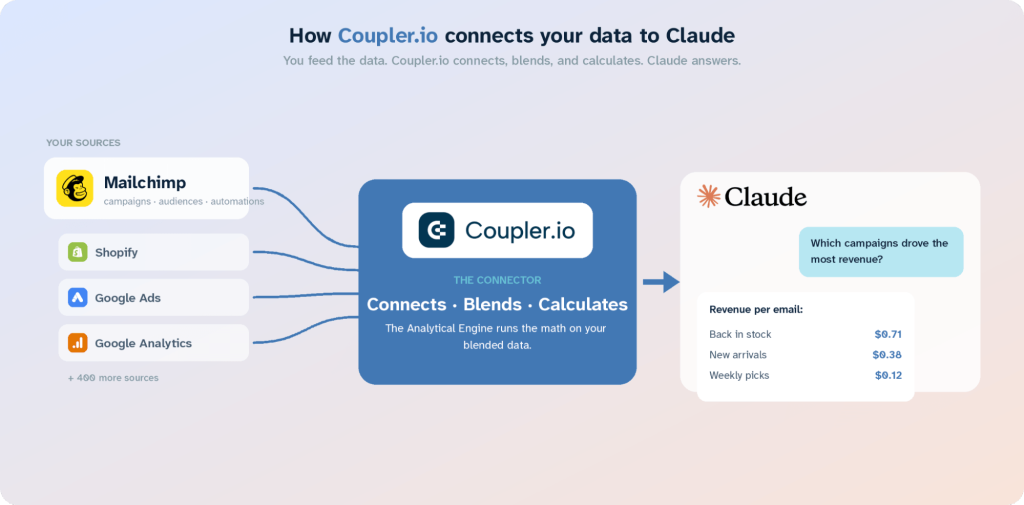
Here’s how to connect Mailchimp to Claude and have the data refresh on a schedule:
Step 1: Create a data flow for Mailchimp data
Sign up for Coupler.io. It’s free and doesn’t need a credit card. Create a new data flow with Mailchimp as the source and Claude as the destination. Feel free to use this preset form to get started right away.
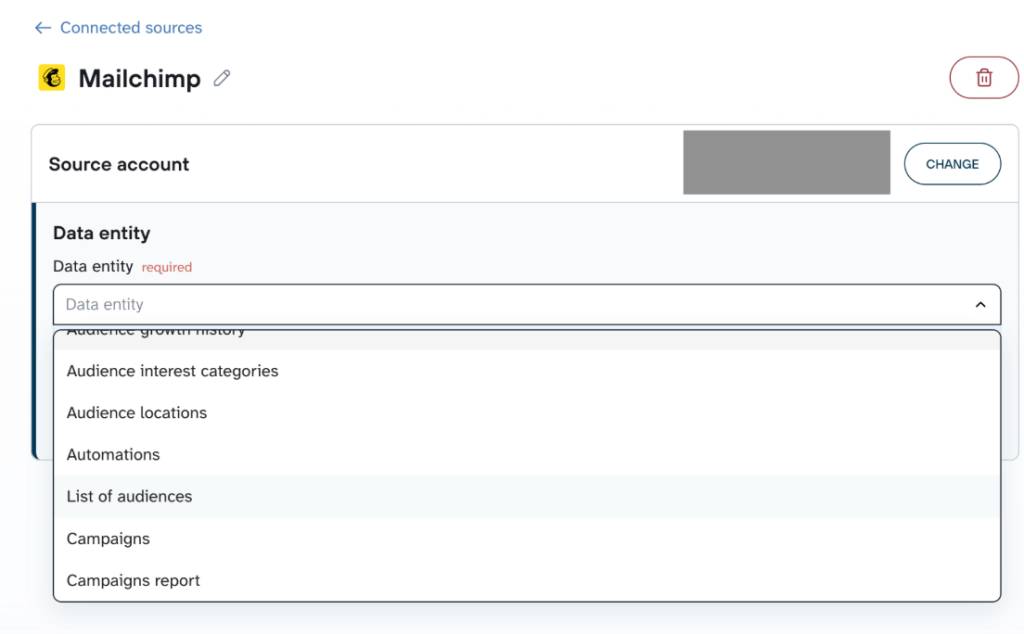
Authorize your Mailchimp account, then pick a data entity. Once connected, you can choose what data you want to export:
- Campaigns and Campaigns report for performance metrics (opens, clicks, bounces, unsubscribes, delivery rate, click-to-open rate)
- Lists/Audiences and Members for subscriber-level detail (signup source, tags, merge fields, activity)
- Automations for workflow send counts and trigger details
- Audience growth history, activity, locations, and interest categories for deeper segmentation
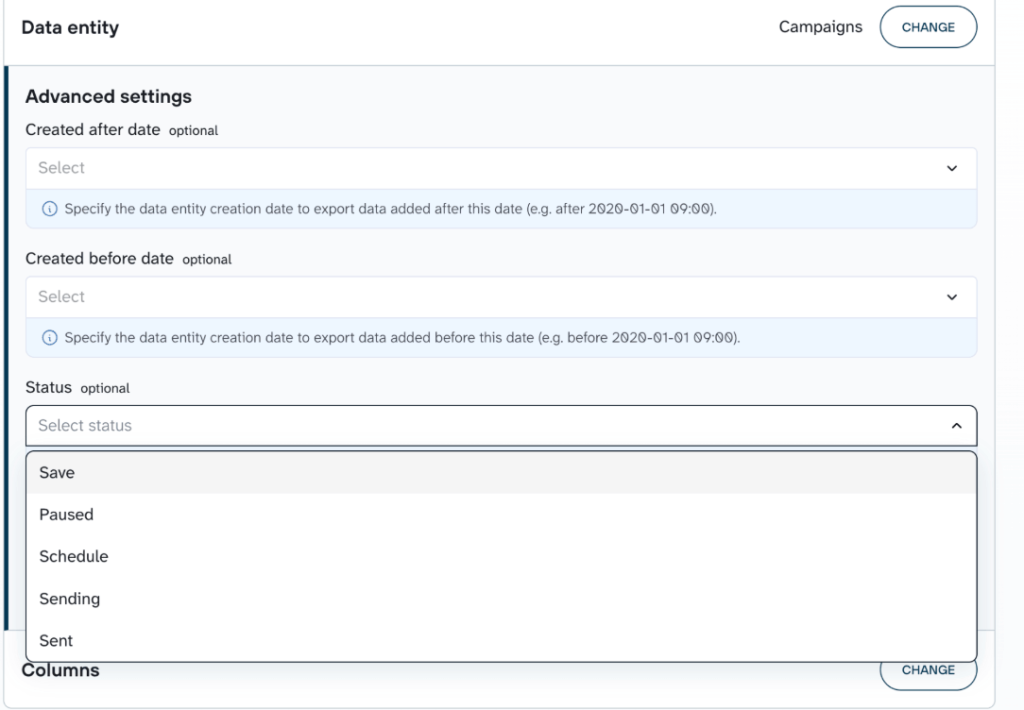
Depending on the data entity, you will have options to filter by date range, status or applicable filters so you only pull what you need.
If you want more than one entity in your data set, add the needed ones to the same flow. Coupler.io allows you to combine information from multiple Mailchimp entities or other apps and blend it into a single dataset. Check out all the available Claude integrations.
Step 2: Organize your data and add context
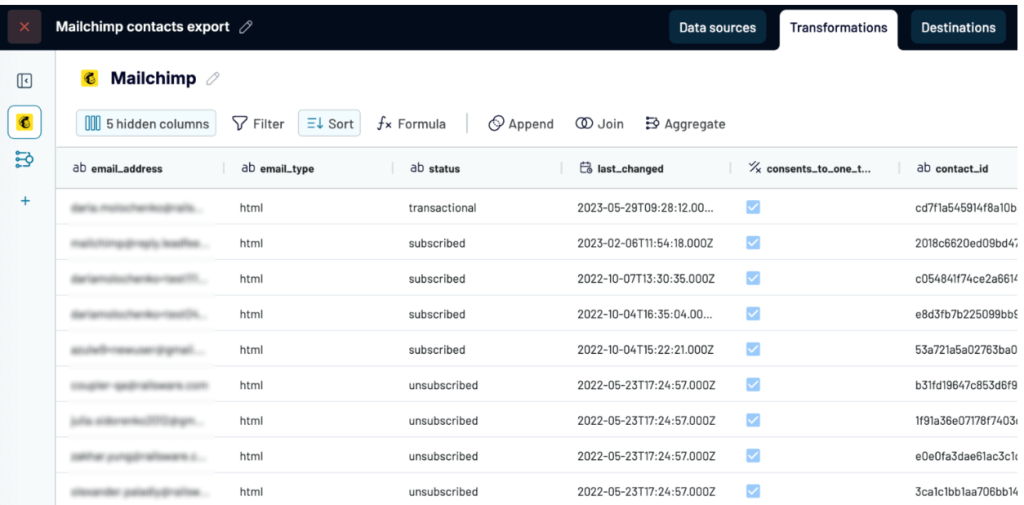
Coupler.io pulls a preview of your data and here’s when you can apply transformations and verify what gets sent to Claude.
You can hide columns, filter rows, edit fields, and blend multiple sources into one dataset. If you run separate audiences or multiple Mailchimp accounts, you can merge them here. If you want revenue in the picture, you can blend in Shopify or WooCommerce orders.
Filter out irrelevant columns and hide sensitive fields so the AI only works with data you’ve approved. When you use this Coupler.io connector, Claude never connects to your Mailchimp account directly; it only sees the prepared dataset.
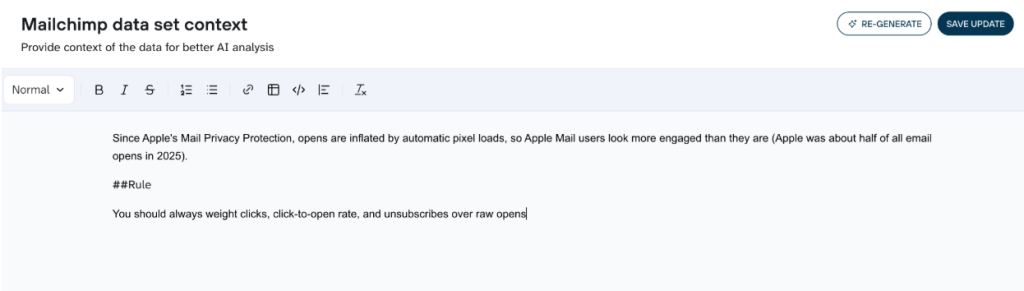
You can also add business context, like what a “conversion” means in your workflow or how your tags map to segments, so Claude’s answers are specific to your business instead of generic.
For Mailchimp specifically, this is the place to handle the open-rate problem. Since Apple’s Mail Privacy Protection, opens are inflated by automatic pixel loads, so Apple Mail users look more engaged than they are (Apple was about half of all email opens in 2025). Add a note in context telling Claude to weight clicks, click-to-open rate, and unsubscribes over raw opens.
Step 3: Connect Claude and start the conversation
When your data set is ready, click Destinations and select Claude.
Click Get Connector, follow the instructions and authorize Claude to access the data. You’ll be redirected to Claude for the connector setup.
When the connection is up and running, go back to Coupler.io and click Save and Run so the data starts flowing.
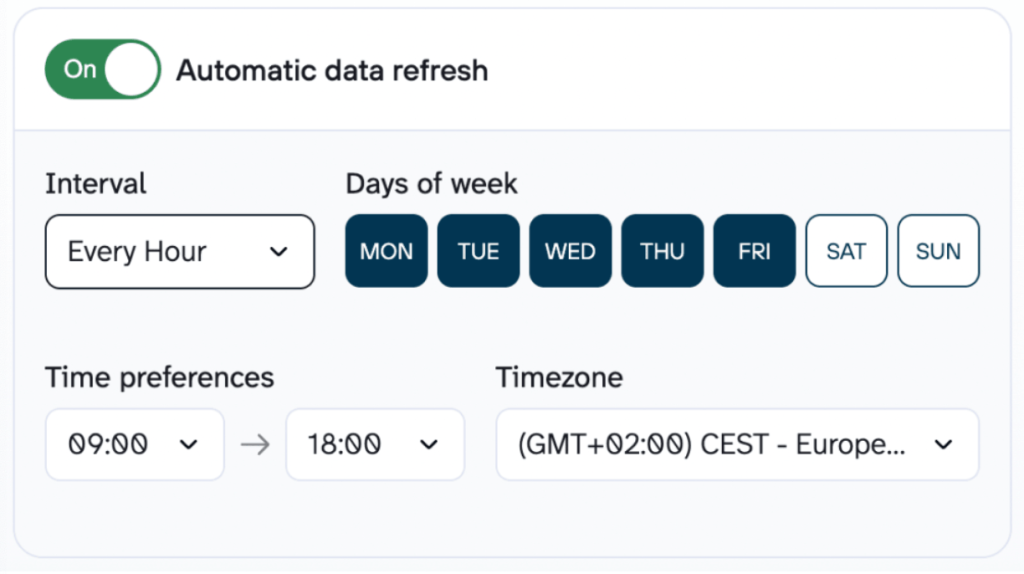
Set a refresh schedule so your data stays current, for example every morning before you start work, then Save and Run. This is how you automate Mailchimp and Claude analysis on an ongoing basis: the data refreshes on its own and every question you ask runs against the latest numbers.
Once the run finishes, open Claude and check the connector is active.
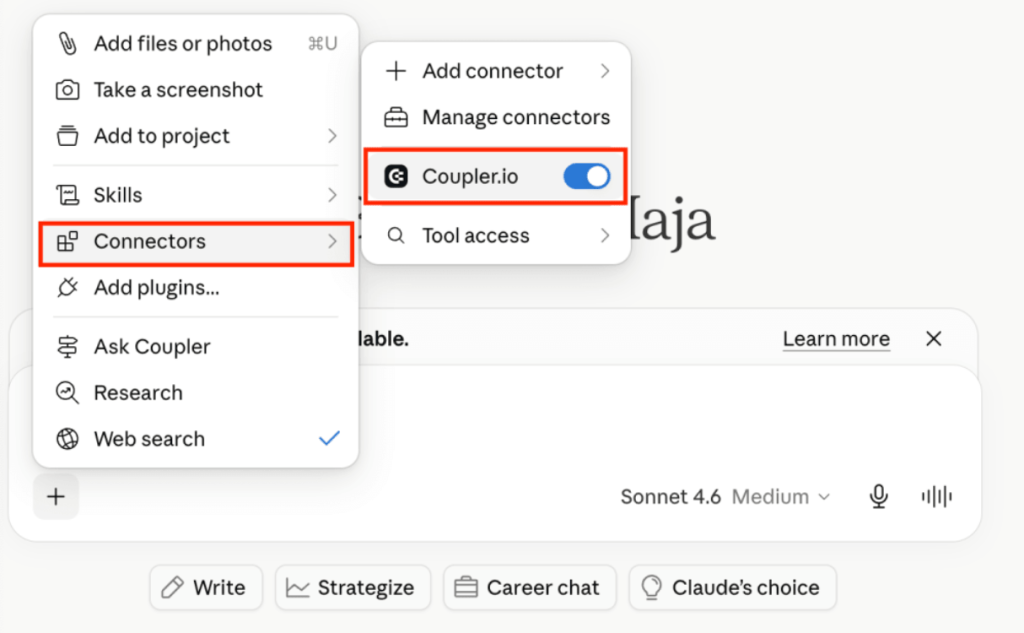
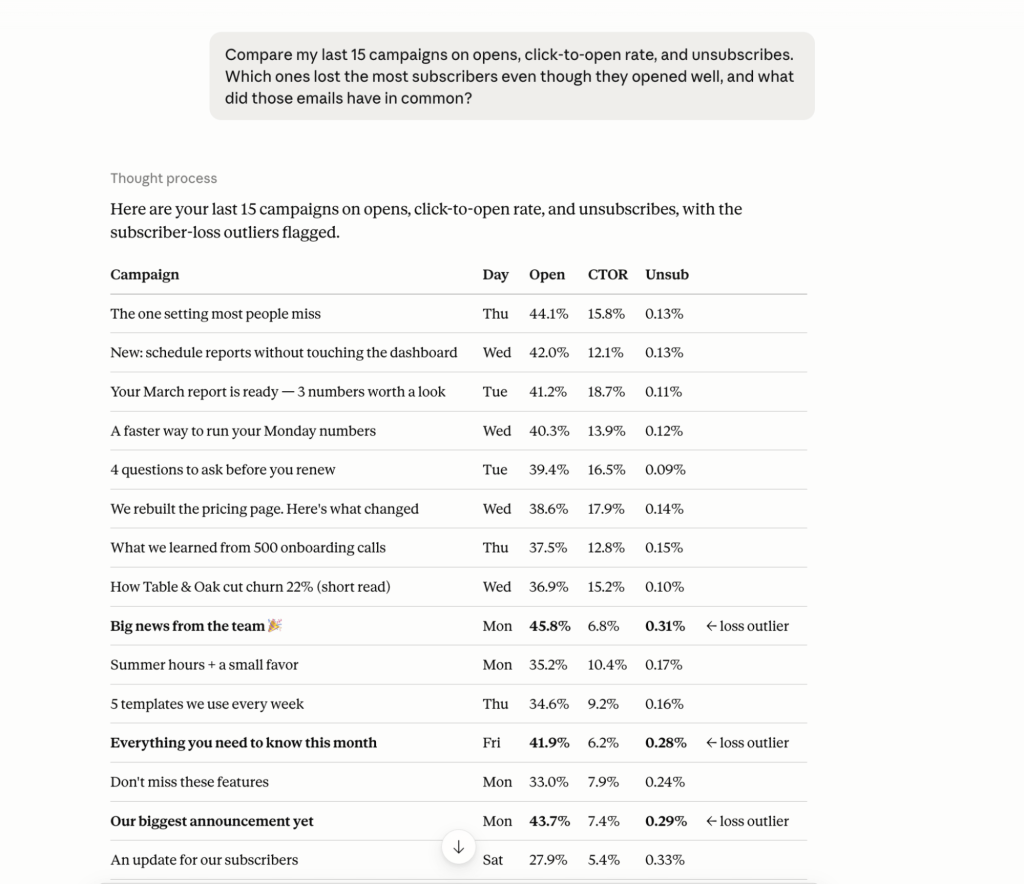
You can start asking questions. Here’s a first prompt tied to a real decision:
Compare my last 15 campaigns on opens, click-to-open rate, and unsubscribes.
Which ones lost the most subscribers even though they opened well,
and what did those emails have in common?
Claude will return an analysis and you can continue to chat for follow-up questions on the same data set.
Try verified email analytics in Claude with Coupler.io
Get started for freeExamples of how you can analyze Mailchimp data in Claude
Once you have your Mailchimp data connected to Claude via Coupler.io here are four ways to start getting relevant insights from it. Each one answers a question that’s slow or impossible inside Mailchimp itself.
Rebuild Mailchimp’s paid-tier comparison report for free
Side-by-side campaign comparison is something Mailchimp keeps for paying customers. Its comparative reports sit on higher plans, and the newer Analytics AI is paid-plans-only.
The raw numbers behind those reports are available through Campaigns report entity in the data flows so you can reproduce that comparison yourself.
Pull the campaign metrics, and let Claude analyze using this prompt:
Rank every campaign I sent in the last three months by click-to-open rate, and lay it out so the pattern is obvious at a glance.
Start with a 2-sentence verdict: what separates my best campaigns from my worst.
Then a ranked table: subject line, send day, CTOR, unsubscribe rate — with the CTOR column shown as a small bar so I can see the drop-off.
Then group the campaigns by send day and show average CTOR per day, so I can see if timing is driving this.
Finally, flag any campaign with high opens but low CTOR — those are subject lines that oversold. Weight CTOR and unsubscribes over raw opens.
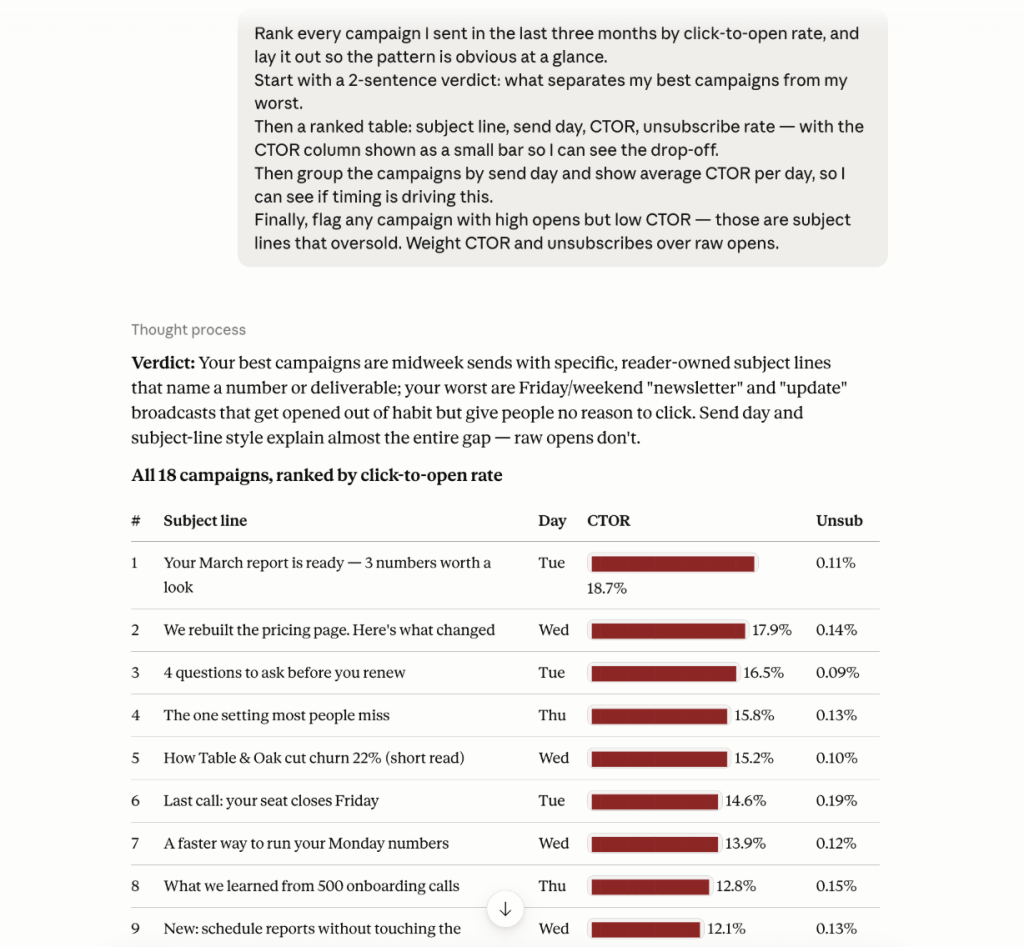
That’s the side-by-side comparison Mailchimp keeps for paid plans, rebuilt from data you can export even on the free one. Read it top to bottom: the verdict tells you what separates your best sends from your worst, the send-day rollup shows whether timing is driving the gap, and the oversold flag catches the campaigns that looked like winners on opens but didn’t earn the click.
Run a weekly list-health check that updates itself
This one leans on something the native connector can’t do: scheduled refresh. Because Coupler.io keeps the dataset current, you can turn a one-time question into a standing report.
Set your data flow to refresh daily, then ask Claude to run the same health as a scheduled task.

The goal is to catch problems while they’re small, especially deliverability issues that quietly compound.
I want the health of my email list before I plan this week's sends. Is anything starting to go wrong that I should catch early? How is my deliverability looking: are my bounces or unsubscribes getting worse than they've been? And am I actually growing, or does it just look that way before you subtract the people who unsubscribed or got cleaned out? Also, analyze the campaigns from past week and flag successes, learning I can apply to my next campaigns and any red flags.
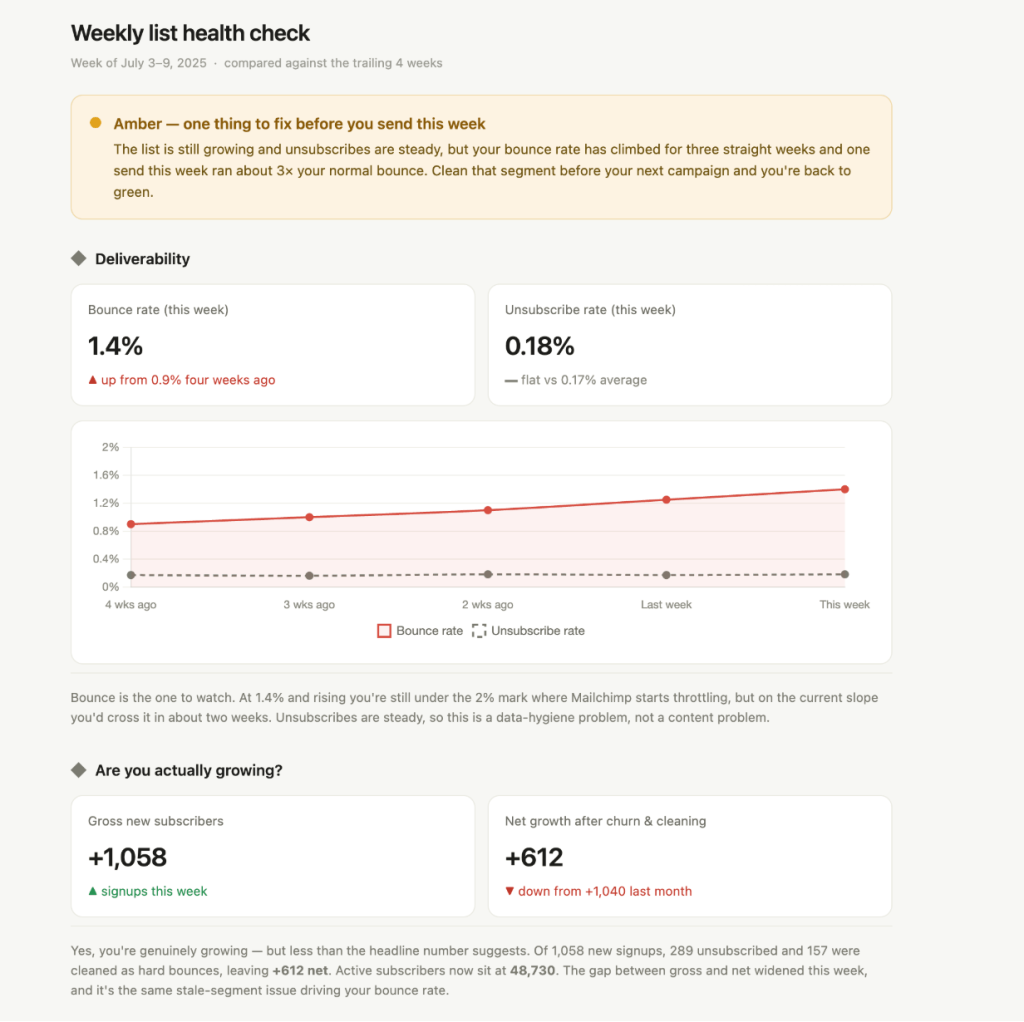
This prompt gave me a quick visual health check on my deliverability and growth. Plus, actionable insights that can help plan the week ahead.
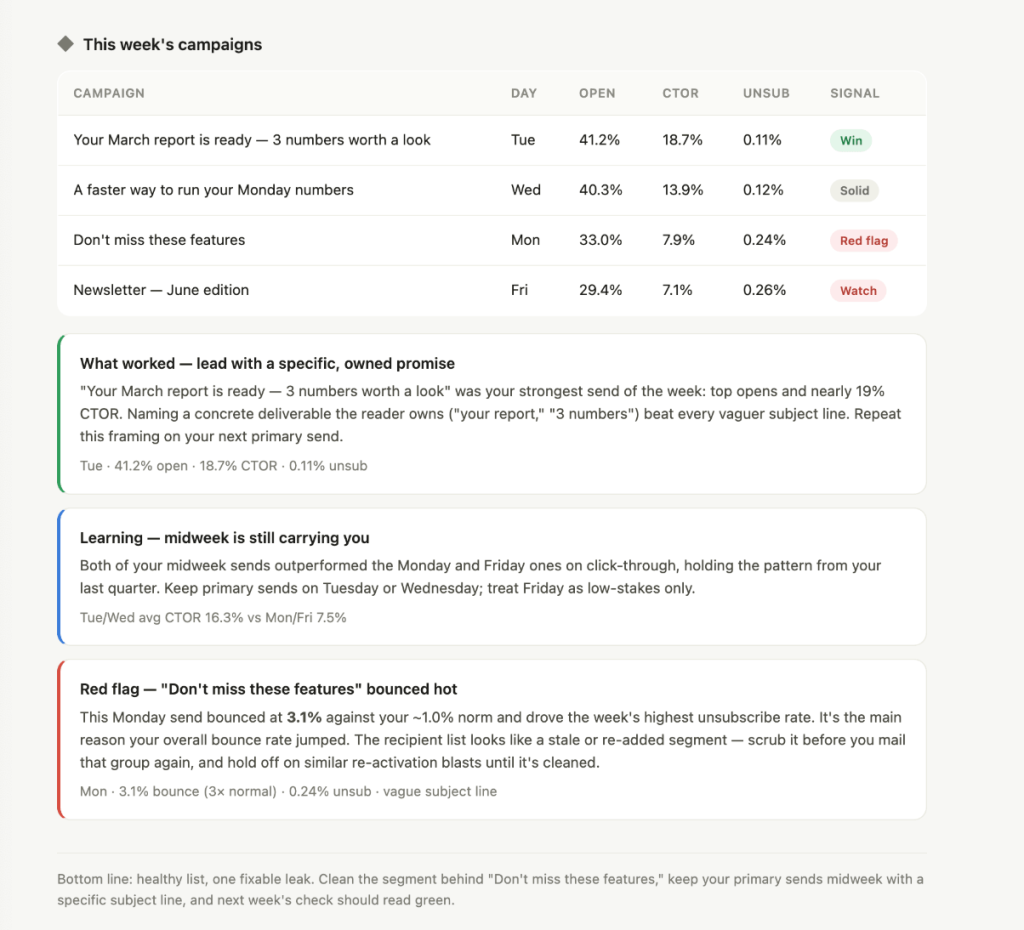
Ask Claude to save this as a scheduled artifact that you can rerun weekly, or pipe it into Slack or Notion for the team. The win is that it refreshes itself. Instead of remembering to pull data, you open a current read every Monday and catch a bounce rate creeping toward 2% before Mailchimp starts throttling your sends.
Find which campaigns actually drove revenue, not just opens
Opens and clicks don’t pay the bills. Mailchimp’s native reports stop at engagement, and while its new Analytics AI can now fold in Shopify or WooCommerce revenue, that only works on a paid plan and only for Mailchimp’s own ecommerce integrations.
If your orders live somewhere else, or you’re on the free plan, you still can’t see which campaign actually drove sales.
Coupler.io closes that gap on any plan by blending Mailchimp campaign data with Shopify, WooCommerce, or another order source in the same data flow.
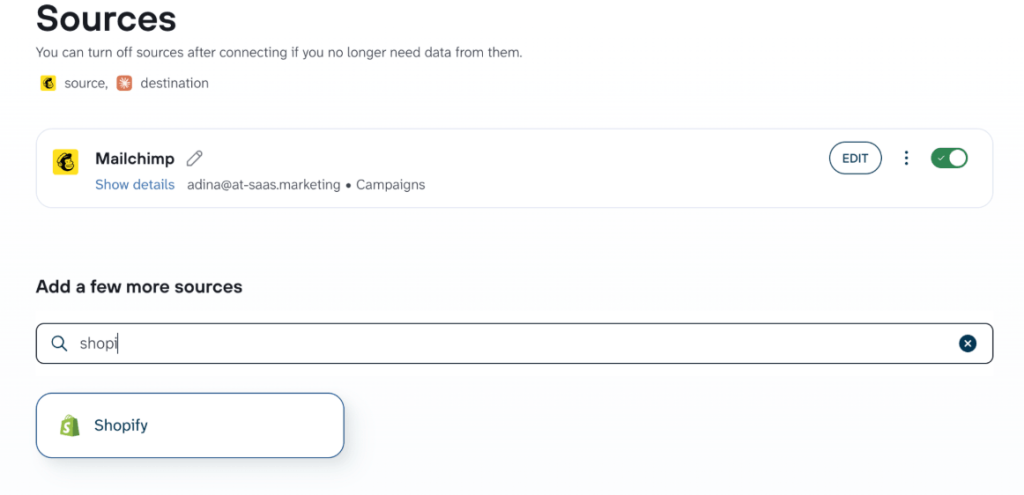
Then you can ask the question that actually matters. Try this prompt:
For each campaign last quarter, show me how many clicks turned into orders within a few days of sending and how much revenue each one drove. Rank them by revenue per email instead of open rate, and point out the campaigns that looked great on opens but didn't actually sell.
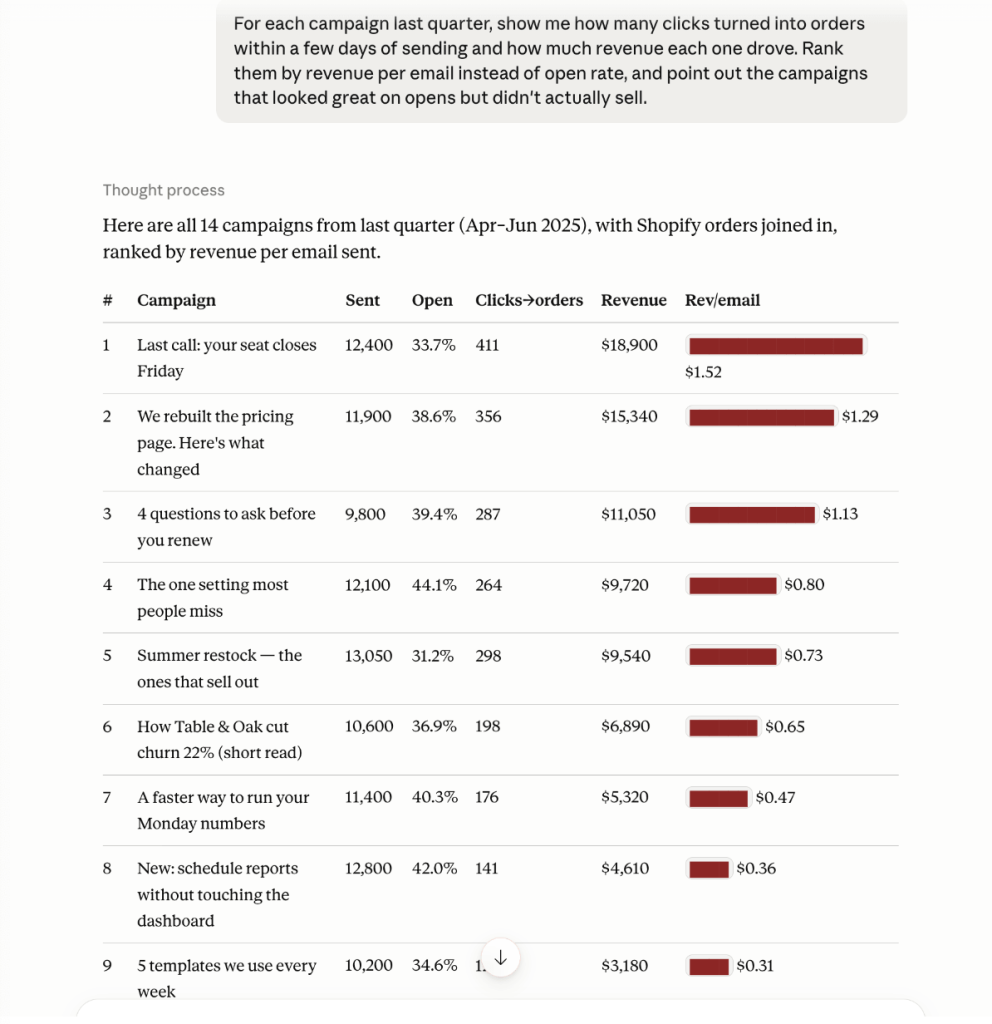
A campaign that ranks high on opens but low on revenue per email is engagement without intent, usually a subject line writing a check the offer doesn’t cash.
The reverse, low opens but high revenue, is a segment or offer worth sending to more often. It’s a call that’s hard to make inside Mailchimp unless your store is one of its native integrations and you’re on a paid plan. With Coupler.io you can pull orders from any source, on any plan.
See which signup sources bring subscribers who actually engage
Not all subscribers are worth the same. A signup source that inflates your list with people who never open is costing you deliverability, not helping it. Mailchimp stores signup source and tags at the member level, but connecting that to campaign engagement is the kind of join it won’t do for you.
Blend the Members entity with your Campaigns report and let Claude segment it.
Break my subscribers down by how they signed up. For each signup source,show me how well they open and click and how many unsubscribe in their first few months. Which sources bring people who actually engage,and which ones are just padding the list?
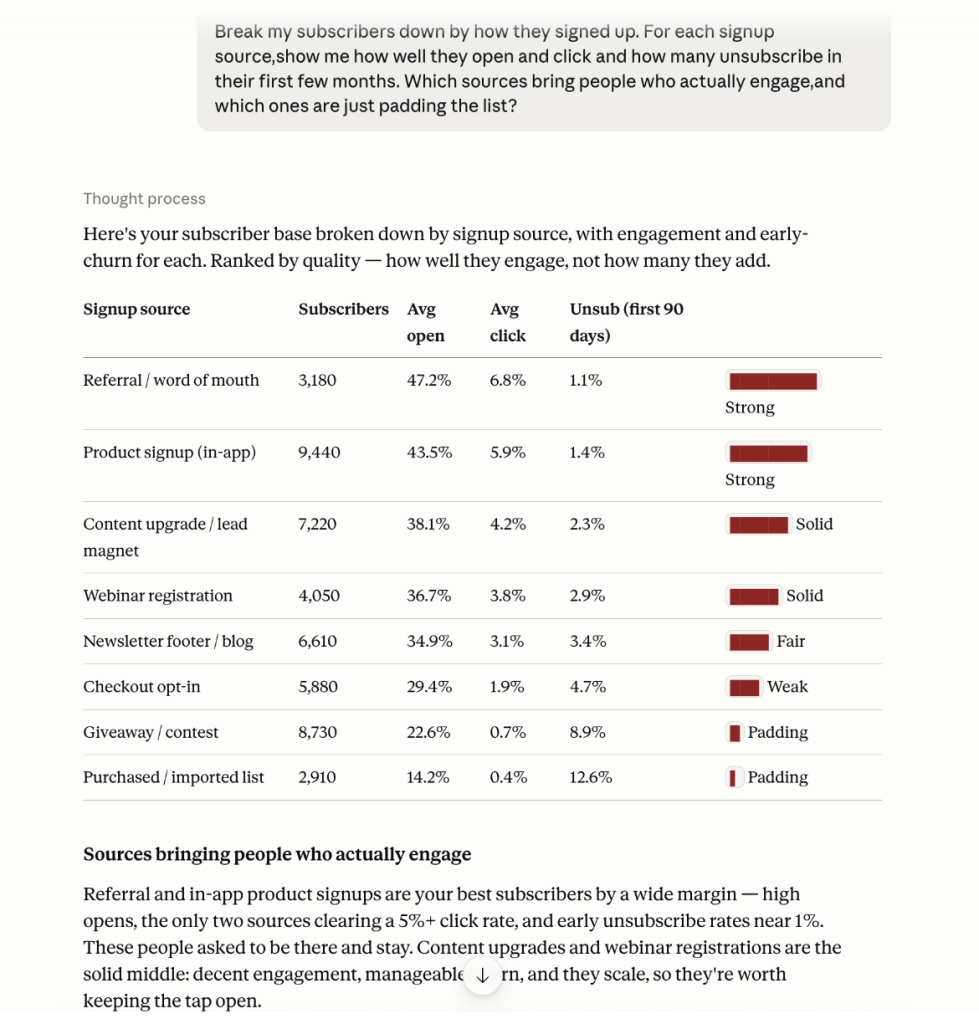
You should worry about high volume but low engagement, especially anything under a 1% click rate: they’re dragging your deliverability, not building your list.
Tighten the opt-in and focus on sources that bring subscribers who open and buy. It’s the fastest way to learn whether your list is actually growing or just getting bigger, and it’s a join Mailchimp won’t do for you.
Get Mailchimp data in Claude with Coupler.io
Try it freePrompts to analyze Mailchimp data in Claude
The use cases above are the walkthroughs. These are the copy-paste prompts for when you just want to get moving. Each one covers a different angle. Point them at your data and adjust the specifics to your account.
Subject-line performance
Use this when you want to know which headline styles actually earn opens, so you can write more of what works:
Look at the subject lines across my last 40 campaigns and group them by style(question, offer, curiosity, plain). Which style gets me the best opens, and show me a few of the best-performing subject lines.
Send-time patterns
Run this when you’re deciding when to schedule sends and want the timing backed by your own history, not a generic best-practice chart:
Based on when I've sent emails and how they performed, when's the best
day and time for me to send? And how sure can I be, given how many
campaigns I've actually sent?
Automation workflow vs broadcast
Pull this up when you’re weighing whether an automation or a one-off newsletter deserves more of your effort:
How do my automation workflow emails stack up against my regular newsletters on opens, clicks, and unsubscribes? Where is a one-off newsletter actually beating an automation, and where should the automation be pulling more weight?
Re-engagement candidates
Use this before a win-back campaign to find the lapsed subscribers worth targeting and how to approach them:
Find the subscribers who used to open my emails regularly but have gone quiet over the last few months. How many are there,
and what's a good angle to win them back?
Benchmark check
Run this when you want to know where you stand against industry norms and which single metric to fix first
How do my open and click rates compare to typical email marketing benchmarks for my industry? Tell me where I'm ahead, where I'm behind,
and the one metric worth fixing first.
Deliverability watch
Check this when you suspect a send hurt your sender reputation and want the outliers flagged with numbers:
Show me any campaign in the last six months where bounces or unsubscribes were way above my usual. List them with the numbers,
and give me your best guess at what went wrong.
What matters when you connect Mailchimp data to Claude
Getting the data into Claude is easy. Getting reliable answers out depends on four things:
Business context so Claude doesn’t make assumptions
Raw campaign data forces Claude to guess at your definitions. Does “engaged” mean opened, clicked, or purchased? What does a tag like “VIP” actually mean?
With Coupler.io you attach that context once, and it travels with every query Claude makes about your data. Tell it that your welcome flow is the three emails tagged “onboarding,” and Claude stops treating them as unrelated sends.
Accurate calculations not hallucinations
Language models are not calculators. Ask Claude to compute a weighted open rate across five audiences of different sizes directly from raw rows and it can produce a confident, wrong number.
Coupler.io’s Analytical Engine runs the math first: it queries your dataset, performs the calculations, validates them, and passes only the verified results to Claude. Claude explains the numbers instead of inventing them. That’s the difference between an answer you can act on and one you have to double-check.
Ready-to-use skills with specific instructions
Coupler.io has a repository of pre-built analysis skills for Claude that cover common patterns, so you don’t have to write the same email-performance prompt from scratch every time.
For Mailchimp data, that means faster starts on the recurring questions like campaign comparison and list-health review. Copy the skills and adapt them to your business.
Multi-destination for consistent data across all your reports
The same data flow that is connected to Claude can also load data to a Mailchimp dashboard. Send your Mailchimp data to Claude for conversational analysis and to Looker Studio or Power BI for a standing visual report at the same time.
You prepare the data once and use it in both places, instead of maintaining two separate exports. When the data refreshes, all your reports have the same numbers.
What about the native Mailchimp Claude connector or its own AI tool?
Mailchimp has shipped two AI features that sound like they might replace this setup. Neither analyzes your data in Claude, so it’s worth being clear on what each one does.
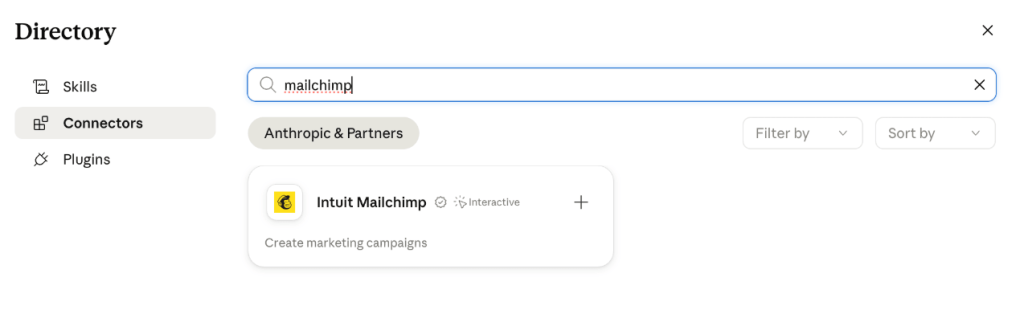
Intuit Mailchimp Claude connector in Claude’s directory
This is a campaign builder, not an analytics tool. Its tools cover campaign planning, editing, theming, and image generation, and it pulls your history to personalize what it drafts.
You can go from a brief to a ready-to-launch campaign inside a Claude chat, then send it from Mailchimp. What you can’t do is ask it how last quarter’s campaigns performed. If you found this Claude Mailchimp connector expecting analytics, that’s the mismatch: it writes campaigns, it doesn’t report on them.
Mailchimp’s Analytics AI
This is Mailchimp’s in-app AI for reporting and analysis. Launched in May 2026, it’s a conversational analytics agent built into Mailchimp that answers questions about campaign performance, audience behavior, and revenue, and it can fold in ecommerce data from Shopify, WooCommerce, and Wix.
It’s useful, and it’s included on all paid Mailchimp plans.
Two things to know: it isn’t on the free plan, and it lives inside Mailchimp. This means it runs on Mailchimp’s model, in Mailchimp’s interface, on Mailchimp’s own integrations. It won’t bring in Google Ads, GA4, a CRM, or another email tool, it won’t run in Claude, and it can’t push the same data to your BI stack.
That’s the difference between Analytics AI and a Mailchimp Claude integration through Coupler.io. If all your data lives in Mailchimp plus Shopify and you’re happy working inside Mailchimp on a paid plan, Analytics AI may be all you need.
If you want to analyze in Claude, blend Mailchimp with any of 400+ other sources, get calculations verified outside the model, and reuse the same prepared data in a dashboard, Coupler.io is the one that does that, on any Mailchimp plan including free.
Other ways to connect Mailchimp to Claude
Apart from Coupler.io and Mailchimp’s own AI, a few more methods exist for one off analysis or a more technical approach.
Manual exports
Mailchimp lets you export sent campaigns from Account & billing -> Settings-> Manage my data.
You get a ZIP with a campaigns.csv file plus HTML and TXT versions of each email. There’s no export button for campaign reports as such, only for templates, so this is a snapshot of what you sent, not a live feed.
It’s fine for a one-off look at a single report.
For anything recurring this is not sustainable: it only covers sent campaigns, the data is stale the moment you download it, and there’s no scheduling.
If you find yourself exporting the same file every week, that’s the signal to automate Mailchimp reporting instead. We’ve covered exporting Mailchimp campaigns and exporting contacts if you want to understand more about the manual ways to get your data from Mailchimp.
Mailchimp MCP servers
“Mailchimp mcp” is a common search, but do they actually have one?
Mailchimp’s only official Model Context Protocol (MCP) server covers Transactional Messaging for sending transactional email, not for marketing analytics.
For the Marketing API, the capable options are community-built, which are not official MCP servers from Mailchimp. The most complete one I’ve seen is damientilman/mailchimp-mcp-server, an open-source server with 70+ tools spanning campaigns, audiences, members, reports, and ecommerce, including per-link click analytics and revenue attribution.
It’s free, runs on your own Mailchimp API key, works with Claude Desktop and Claude Code, and ships with read-only and dry-run safety modes. The author built it with Claude Code and maintains it in the open, and the ClaudeAI community has tried it.
A community project can change, break, or stop being maintained; you’re responsible for hosting it and safeguarding an API key that can write to your account; and Claude computes from the raw API responses, so the math is only as reliable as the model on any given query.
Managed no-code routers like Composio and Zapier can also expose Mailchimp inside Claude if you’d rather not self-host. Coupler.io’s connector is MCP-based too, but it’s a ready-to-use Claude connector with the Analytical Engine and a data-prep layer behind it, so there’s no server to run and the numbers are verified before Claude sees them.
API scripts and function calling
If you have engineering support, you can work directly with the Mailchimp Marketing API. A script gives you a fixed pipeline you schedule and run.
Function calling lets Claude decide which API call to make based on the question, the way AI agents do, which suits unpredictable, conversational queries better.
This method requires you to understand how to work with an API, and maintain the setups over time. For example, if Mailchimp changes an endpoint, your code is your problem. This route makes sense when you’re building a product feature or an internal tool with requirements a connector can’t meet, not when you just want to analyze your campaigns.
Tools like Cursor or Claude Code can speed up writing that integration, but they don’t remove the maintenance.
How to choose the right Mailchimp Claude integration method
- If you want to draft and send campaigns from a Claude chat, the Intuit Mailchimp Claude connector is built for that. Just don’t expect analytics data.
- If your data lives in Mailchimp plus Shopify or WooCommerce, you’re on a paid plan, and you’re happy working inside Mailchimp, its own Analytics AI assistant is worth trying first.
- If you need a specific report once and never again, a manual export into Claude will be good enough.
- If you’re technical, comfortable running an unofficial server, and want a free option, the community Mailchimp MCP server gets raw data into Claude, with the maintenance and trust trade-offs of self-hosting.
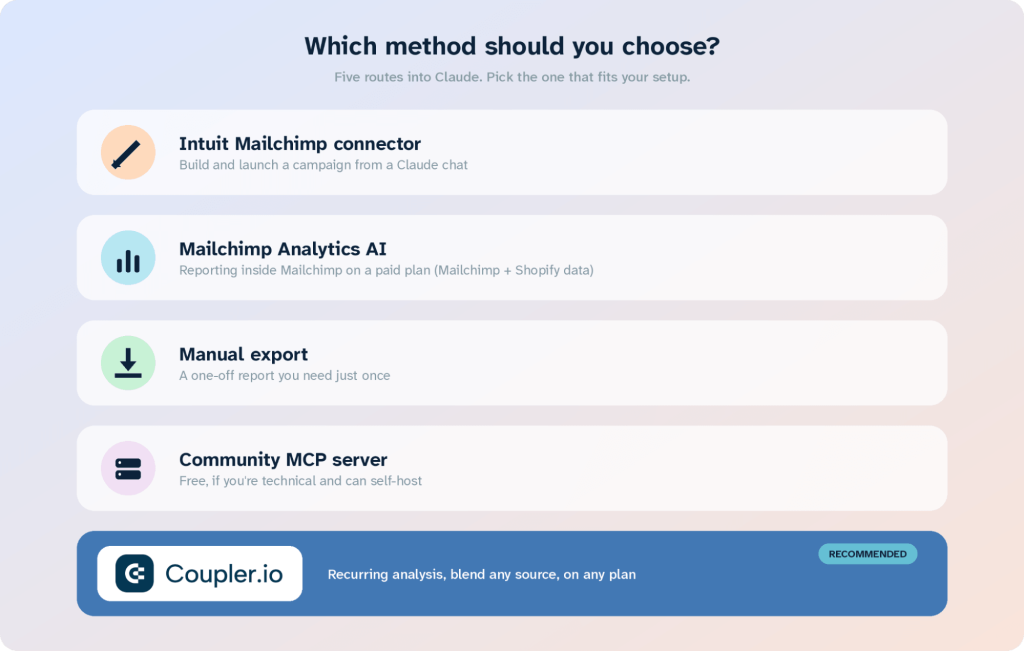
For everyone else, meaning anyone doing recurring email analysis, comparing performance over time, joining Mailchimp to revenue or ad data from outside its ecosystem, or wanting reports that stay current on any plan, Coupler.io is the direct and easy to setup Mailchimp to Claude integration.
It prepares the data, keeps the math reliable, refreshes on a schedule, and only shows Claude what you’ve approved. A Mailchimp Claude integration built this way holds up week after week.
Connect 400+ data sources to Claude with Coupler.io
Sign up for freeFAQs
Is it safe to connect Mailchimp to Claude?
With Coupler.io, Claude never connects to your Mailchimp account directly. It only sees the dataset you’ve prepared, with sensitive fields hidden and columns you’ve approved. The connection is token-based and read-only, and Coupler.io is SOC 2 Type II, GDPR, and HIPAA compliant. You decide what data leaves Mailchimp before any AI tool sees it.
Can I connect multiple Mailchimp audiences or accounts?
Yes. A single data flow can pull multiple audiences, and Coupler.io can merge data from more than one Mailchimp account into one dataset, so you can analyze everything together instead of switching between accounts.
Does this work with both Claude Desktop and Claude Web?
Yes. The Coupler.io connector works through Claude’s web and desktop apps via the MCP server, so you can query your Mailchimp data from either.
Can I combine Mailchimp with other data sources in the same analysis?
Yes, and it’s one of the stronger reasons to use Coupler.io. You can blend Mailchimp with Shopify, WooCommerce, Google Analytics, or another email platform in the same data flow, then ask Claude questions that span all of them, like whether email clicks turned into store revenue.
Do I still need Coupler.io if Mailchimp has Analytics AI?
Analytics AI is a solid in-Mailchimp option on paid plans, especially if your data is just Mailchimp plus Shopify or WooCommerce. Coupler.io is the better fit when you want to analyze in Claude, blend Mailchimp with sources outside its ecosystem like Google Ads, GA4, or a CRM, get verified calculations, or work on the free plan.