Shopify keeps your store numbers isolated in separate reports for orders, products, customers, and inventory. Answering a basic question, like which products remain profitable after discounts and refunds, usually means exporting multiple files and manually matching SKUs in a spreadsheet.
Shopify now offers its own ChatGPT connector (plugin), but it is designed for store management: looking up orders, updating prices, or applying discounts. Recurring analysis requires a different setup capable of joining multiple datasets at once.
On the reporting side, learning how to connect Shopify to ChatGPT comes down to using a structured, auto-refreshing dataset instead of static exports. You can describe the data flow you need in plain language, and Coupler.io builds it for you directly within the conversation.
How to connect Shopify to ChatGPT with Coupler.io
Coupler.io is a data integration platform and AI analytics solution. It pulls data from 400+ business apps and delivers it, structured and refreshed, to AI tools, dashboards, spreadsheets, and warehouses.
E-commerce data is where this relational structure proves its worth. A Shopify order is rarely just a single flat row. It connects line items, discounts, shipping details, refund transactions, and customer records. Likewise, products link to specific variants and location-based inventory levels. Flattening all that complexity into a basic CSV erases the very connections needed to answer your questions.
Step 1: Set up the data flow in ChatGPT
Create a free Coupler.io account, no credit card required. Then add the Coupler.io plugin in ChatGPT settings and authorize it. This is a one-time step. Every chat after that can build and manage data flows.
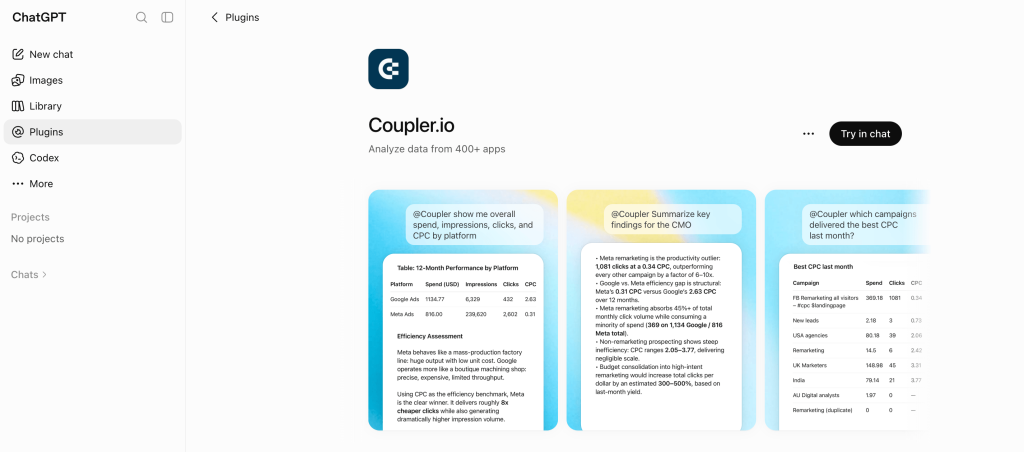
Open a new chat and say what you want in plain language, for example:
“Connect my Shopify orders, refunds, and inventory. Refresh daily.”
If Coupler.io does not have credentials for that store yet, ChatGPT hands you a secure link to authorize Shopify yourself. Each source has to be connected directly, for security reasons, so this is the one step the AI cannot do on your behalf. You will see the same check-in whenever it is about to add a source or change a flow, which keeps you in control of what gets connected.
The same approach applies if you connect Shopify to Claude or your custom AI agent. The Coupler.io MCP has built-in AI skills to create data flows, analyze data, and more.
Step 2: Confirm the entities and start asking
Before executing the flow, ChatGPT confirms which data entities it will pull and how frequently. Always cross-check this list against the specific questions you plan to ask.
The core entities include Orders, Products, Inventory, and Customers. Beneath each primary entity sit detailed sub-breakdowns, such as line items, refund transactions, product variants, shipping details, and fulfillments.
Choose your data entities based on the business question rather than default settings:
- Revenue after refunds needs orders with line items plus refund transactions.
- Restocking decisions need products, variants, and inventory together.
- Retention work needs customers joined to order history.
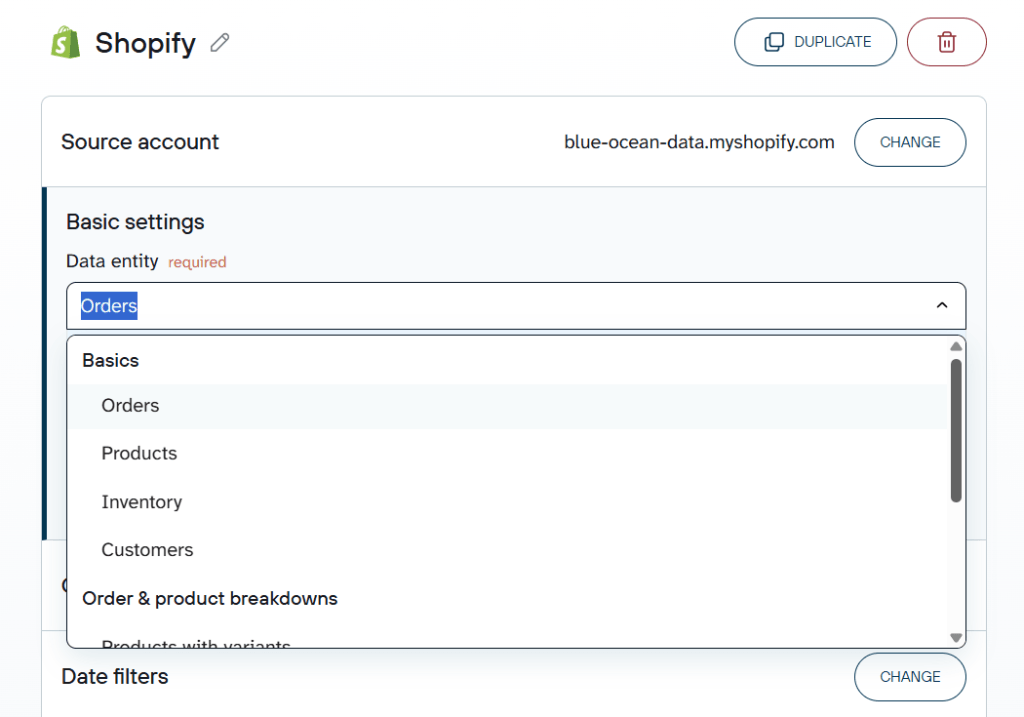
Once the flow runs, ask your first question in the same window. ChatGPT queries the Shopify dataset through Coupler.io and answers in plain language.

Connect Shopify to ChatGPT with Coupler.io
Start for freeWant more control? Build the flow in the Coupler.io app
Starting in the chat is faster. Starting in the Coupler.io app gives you control over what the dataset looks like before ChatGPT ever queries it. It is the better path when you want to:
- Choose specific columns and leave the rest out, which matters for customer data.
- Send the same data to a second destination, like Google Data Studio to create a Shopify dashboard for the ops team, alongside ChatGPT.
- Manage several Shopify stores in one place, with a store identifier on every row.
- Write your business rules once in the context editor instead of repeating them in each conversation.
- Hand the flow to a colleague who will maintain it later without touching a chat window.
The walkthrough is short: create a data flow → connect your Shopify account → organize data set → choose ChatGPT as the destination → set the refresh schedule → run it!
Learn how to export data from Shopify to spreadsheets, data warehouses, dashboards, and other reporting tools.
Try it right away for free using the form below. No credit card is required.
What matters when you connect Shopify data to ChatGPT
Integrating ChatGPT with Shopify is the easy part. But can you trust the answers? This part of the setup requires more of your attention. Here are four things you need to keep in mind:
Your store’s definitions
Shopify fields do not explain your internal rules. Does a gift card purchase count as revenue? Are wholesale samples in or out of average order value? Is refund rate calculated on units or on transactions?
Write those rules once in Coupler.io’s context editor, and they stick to every query. A useful starting set for a store looks like this:
- Net revenue = gross sales minus discounts minus refunds. Gift cards are not product revenue.
- Exclude orders tagged test, internal, or wholesale_sample from performance analysis.
- Refund rate = refunded units divided by units sold.
- Group sales sources containing instagram, facebook, or fb under Meta.
Without that, the model picks a reasonable-sounding definition, and you get a number nobody can verify against Shopify Admin.
Calculations belong outside the model
LLMs are weak at arithmetic across large datasets and strong at explaining what the arithmetic means. Ask ChatGPT to compute net revenue across thousands of order lines, refunds, and discounts on its own, and small errors will creep in almost unnoticed.
Instead of forcing ChatGPT to calculate complex math across thousands of rows, Coupler.io’s Analytical Engine handles the data processing and checks the calculations first. Once ChatGPT receives those accurate numbers, it focuses on explaining the trends and key takeaways.
Built-in skills for ecommerce questions
Store reviews tend to repeat. Which products are profitable, which ones are quietly draining revenue through returns, and whether repeat buyers are growing: the same core questions come up every single week.
This is where the ecom-analytics skill comes in. Instead of defining what “profitable” or “repeat buyer” means in every single prompt, the skill handles the business logic automatically. It calculates conversion funnels, average order value, repeat purchases, and top-performing products consistently across Shopify, WooCommerce, Magento, and other ecommerce platforms. Rather than relying on ChatGPT to interpret your wording, you get answers back in plain language for immediate reading, or as structured JSON to feed into another tool or ecommerce dashboard.
If your store review involves the same questions every week, using ecom-analytics turns a recurring 20-minute prompt-writing task into a default. You skip drafting an analysis brief from scratch and jump straight to the insights.
Two additional skills are worth layering alongside it: generate-data-set-context, which documents your dataset’s structure so the model understands the schema, and report-generation, which packages the findings into a stakeholder-ready summary without requiring a second pass. Combined, they deliver a complete review that covers product profitability, inventory risk, and repeat-purchase trends, already formatted for whoever reads it next.
Skills are free on every plan (including the free tier). You can explore the full collection on the Coupler.io AI agent skills page or clone them directly from the open-source GitHub repository to adapt them to your own metrics.
One connection, several destinations
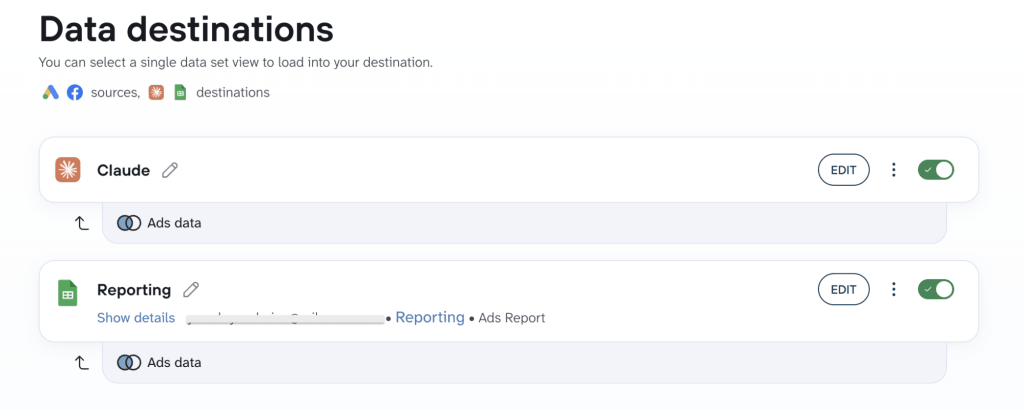
The finance team wants a spreadsheet. The weekly review wants a dashboard. You want a chat window. All three can run off the same Shopify data flow, refreshed on the same schedule, instead of three exports that quietly drift apart.
What data does the model have access to
Connecting your Shopify store to AI tools raises a fair question about customer data, and the honest answer is that you decide the scope. ChatGPT can only query the data flows you point at it, and only in read mode. It cannot change a price, cancel an order, or touch anything in Shopify Admin.
For customer analysis, keep the dataset narrow. Customer ID, customer type, order count, revenue, and cohort month answer almost every retention question. Full names, phone numbers, and shipping addresses answer none of them, so leave those columns out of the flow.
Examples of using ChatGPT for Shopify data analysis
To get useful insights, ask about a real choice you need to make. A general prompt like “analyze my store” leads to generic output, while “which products should I stop discounting?” gives you an immediate and actionable answer.
Rank products by net revenue after discounts and refunds
Gross sales flatter everything. A product can top the sales report and still be one of your weakest earners once you back out promotional discounts and returned units. This is the calculation that needs orders, line items, discounts, and refund transactions in the same view.
“Rank products by net revenue for the last 30 days. Show product name, SKU, gross sales, discounts, refunds, net revenue, units sold, and refund rate. Flag any product where net revenue is less than 70% of gross sales and tell me whether discounting or refunds caused the gap.”
You get a product-level table that separates gross from net, with the problem products called out rather than buried in row 40.
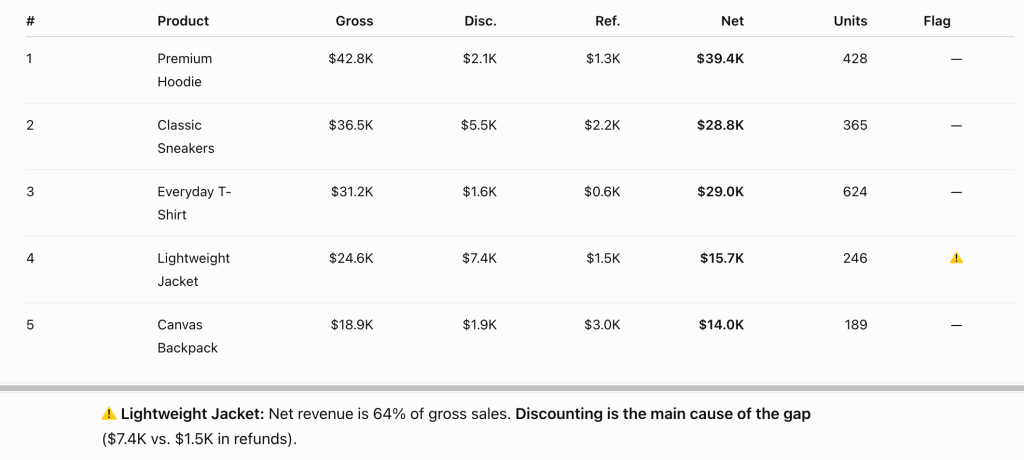
What to do with it: a wide gross-to-net gap driven by discounts is a pricing decision, and one driven by refunds is a product or description problem. They look identical in the sales report and need opposite fixes.
Catch bestsellers before they run out of stock
Shopify’s inventory management report tells you what stock you have, but it doesn’t tell you how long that stock will last at the rate you are currently selling. That answer needs sales velocity and inventory levels side by side.
Connect Shopify inventory to ChatGPT along with the last month of orders, and the question becomes a timing question instead of a list.
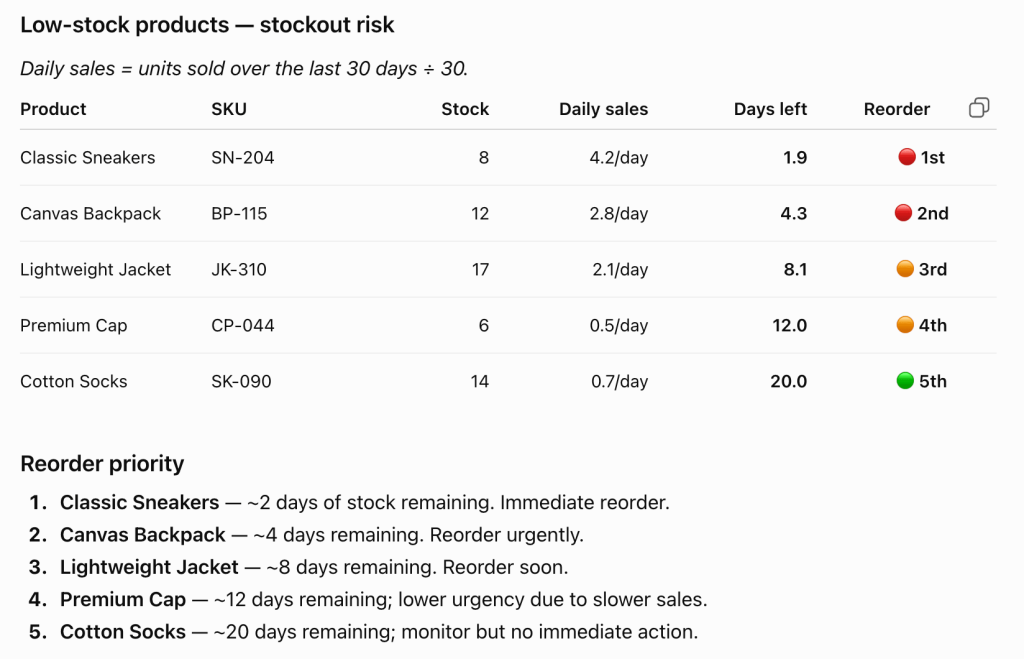
“For every product with fewer than 20 units in stock, calculate average daily sales over the last 30 days and estimate days until stockout. Return product name, SKU, current inventory, daily sales rate, days of stock left, and which ones to reorder first.”
What to do with it: sort by days of stock left, not by units remaining. A product with 18 units and three sales a day is more urgent than one with 6 units and one sale a week, and the raw inventory report ranks them the other way round.
See which channels bring customers back, not just in
Paid channels get judged on first purchases, which is how a channel that buys one-time discount hunters keeps looking healthy. Repeat rate by acquisition channel tells a different story, and it needs Shopify customer and order history blended with an ad platform in the same flow.
Add Google Ads or Meta Ads as a second source in the same data flow, then ask:
“Group customers by acquisition channel using first-order source. For each channel, show customers acquired, repeat purchase rate, average order value on first versus later orders, and revenue per customer over 90 days. Which channel looks worst on cost per acquisition but best on repeat rate?”
What to do with it: a channel with a mediocre cost per acquisition and a strong repeat rate is usually underfunded. One with cheap acquisition and near-zero repeat purchases is buying volume, not customers.
Blend Shopify with 400+ sources in ChatGPT
Sign up for freePrompts to analyze Shopify data in ChatGPT
A set to run once your data flow is live, beyond the use cases above.
Daily sales trend and AOV
Show daily orders, revenue, and average order value for the last 30 days. Is AOV trending up, down, or flat, and which days pulled the average in that direction?
Revenue by sales source
Break down orders, revenue, and average order value by sales source for the last 60 days. Which sources bring the highest order value, and which bring volume at low value?
Discount code effectiveness
Compare discount code usage across the last quarter. For each code show orders, revenue, average discount per order, and whether those customers had ordered before. Which codes brought new buyers and which mostly discounted orders that would have happened anyway?
Stockout risk
For every product with stock below 20 units, calculate days until stockout based on the last 30 days of sales velocity. List them in reorder priority.
Refund concentration
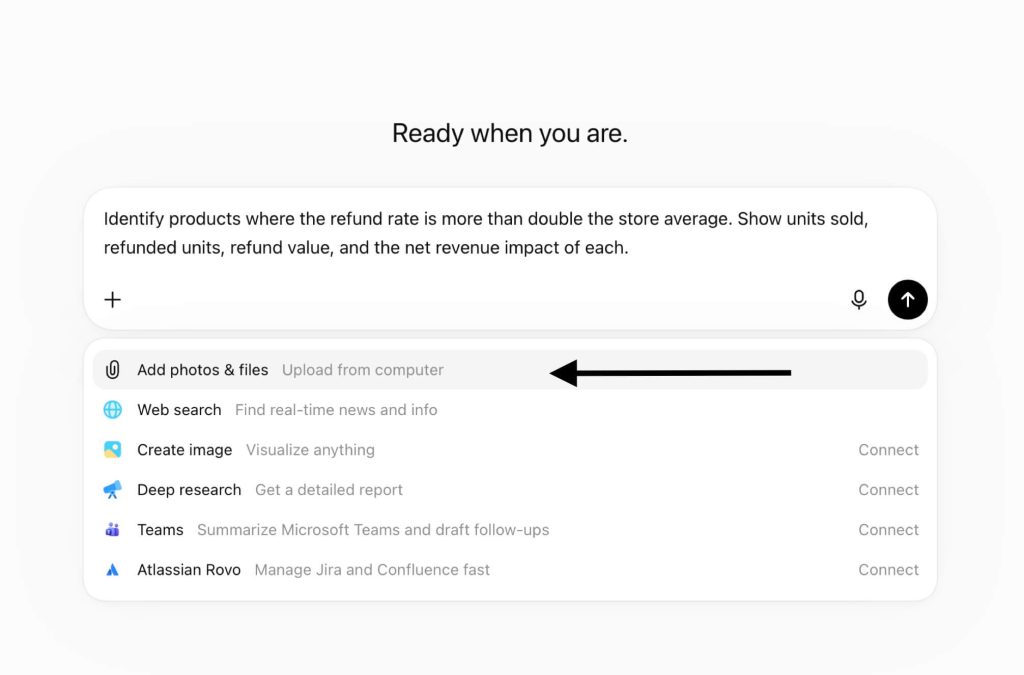
Identify products where the refund rate is more than double the store average. Show units sold, refunded units, refund value, and the net revenue impact of each.
Abandoned carts
Compare abandoned carts with completed orders over the last 30 days. Show cart value, the products abandoned most often, and how many of those shoppers ordered later anyway.
Coupler.io vs. Shopify’s native ChatGPT connector (plugin)
The Shopify connector (ChatGPT plugin) and Coupler.io get compared often, and they are not really competing. They do different jobs. Content creation is a third job again: using ChatGPT for product descriptions has nothing to do with either tool in this comparison.
Shopify’s app is the one to install if you want to add ChatGPT to Shopify store operations: checking today’s unfulfilled orders, updating a price, creating a discount code, rewriting product descriptions, uploading a product photo and asking to add products to the Shopify catalog. It acts on your live store, which is exactly the point and also the reason to scope it carefully. There is no draft step.
Coupler.io does not touch your store; it builds a queryable dataset from it. That difference shows up the moment a question needs history, several entities at once, or data from outside Shopify.
| Shopify’s connector app | Coupler.io | |
|---|---|---|
| Main job | Store operations in natural language | Recurring analysis of store data |
| Writes to your store | Yes, live | No, read-only |
| Historical depth | What the Admin API returns for the request | A dataset that builds up over time on a refresh schedule |
| Data from outside Shopify | No | Yes, blended into the same flow from 400+ sources |
| Who runs the calculations | ChatGPT, on what the API returns | Coupler.io’s Analytical Engine, before ChatGPT sees the numbers |
| Business definitions | Restated per conversation | Stored once in the context editor |
Plenty of stores run both. Use Shopify’s app for the ten-second ops task, and use Coupler.io when the question is about performance. If your week involves the same four reports every Monday, that is the case for a ChatGPT Shopify integration built on a scheduled dataset rather than on live API calls.
Other ways to connect Shopify to ChatGPT
There is more than one way to integrate Shopify with ChatGPT. Coupler.io is the strongest fit for recurring analysis, but a Shopify ChatGPT integration can also run through a manual export, Shopify’s own app, or code your team maintains. Here is how they compare and where each one falls short. Storefront chat apps are a separate category again: an AI assistant installed from the Shopify App Store answers customer inquiries on your site and gives shoppers multilingual support, which is customer service rather than reporting.
| Method | Setup effort | Who does the math | Best for | Watch out for |
|---|---|---|---|---|
| Coupler.io | Low, no code, few minutes | Coupler.io’s Analytical Engine | Recurring analysis across related Shopify data and other sources | You still choose the right entities and keep business context current |
| Manual export | Low once, repetitive after that | You clean the file, then ChatGPT works from it | A single one-off question on one dataset | One report per export, no scheduling, no joins between reports |
| Shopify’s connector app | Low | ChatGPT, on live API responses | Store operations and quick lookups | Actions execute live with no undo, and it is not built for historical analysis |
| Shopify AI Toolkit | Medium to high | Your coding agent | Development work against Shopify APIs, GraphQL, and themes | Aimed at developers, not merchants doing reporting |
| API scripts and function calling | High | Your code, or ChatGPT on its output | Custom internal pipelines with engineering support | Auth, scopes, rate limits, endpoint changes, and error monitoring |
Manual export from Shopify Admin
Export the report you need as CSV or Excel, upload it, ask your question. For a one-off investigation on a single dataset, this is the fastest path and there is no reason to build a pipeline for it. Zapier sits close to this: useful for pushing individual Shopify records into another app as they happen, but it moves events one by one instead of assembling a dataset you can query.
It breaks on two things. Shopify exports one report type at a time, so orders, products, and customers each come down separately with no join between them, which rules out most of the questions in this article. And Shopify export files often carry summary rows and totals alongside the real records. Leave those in and the model counts them as orders.
Shopify AI Toolkit
Released in April 2026, the AI Toolkit connects AI agents like Codex, Claude Code, and Cursor to Shopify’s Admin API and GraphQL schemas. It is a developer tool for building and extending stores.
It gets mentioned in the same breath as the connector apps, so it is worth separating: a Shopify AI integration aimed at your developers is not the same thing as one aimed at whoever runs the weekly numbers. If your task is a theme change or an app extension, this is the right tool. If your task is a refund analysis, it is not.
Custom GPTs
A custom GPT sits between the two: you build it in OpenAI’s GPT builder, add actions, and point those actions at endpoints that return your Shopify data. For a narrow task, like a support GPT that looks up order status, that is enough.
For reporting, custom GPTs inherit the limits of the API route below, because someone still has to build and host the endpoints behind the actions, and each GPT only answers with what you wired into it.
API scripts and function calling
Registering a custom app against the Shopify Admin API gives you full control over what gets pulled and when. With engineering support and a specific internal process to automate, it is a legitimate build.
The cost shows up later. API keys, tokens, and scopes need managing, rate limits need retry logic, and Shopify versions its API twice a year, so a working script needs maintenance rather than a launch date. Function calling through the ChatGPT API has the same shape: the model decides which function to call, but you still build and maintain the functions, the auth, and the error handling behind them.
For a marketing, ecommerce, or operations team without a developer on hand, this is more machinery than the question deserves.
Choose the right Shopify ChatGPT integration for your ecommerce
Answer these questions to decide which option best meets your needs.
How often do you need the answer? Once, and a manual export is fine. Every week, and you want a scheduled flow, because the export step is what quietly stops happening by month three.
Does the question span more than one entity? Net revenue, restocking, and retention all do. A Shopify integration with ChatGPT built on a single flat export cannot answer them, no matter how good the prompt is.
Are you reporting or operating? Shopify’s own app is better for operating. Coupler.io is better for reporting. Running both is normal.
Who maintains it in six months? If the answer is nobody in particular, that rules out the API route regardless of how clean the first version looks.
For most e-commerce businesses, the most reliable Shopify ChatGPT integration is a scheduled Coupler.io flow. It keeps your relational data connected, processes heavy calculations before the chat even starts, and ensures your custom business rules stay consistent from one conversation to the next.
Frequently asked questions
Is it safe to connect Shopify data to ChatGPT?
Shopify data goes through Coupler.io before ChatGPT queries it, which gives you a controlled layer in between. The connection is read-only, so nothing in your store can be changed from the chat, and ChatGPT can only reach the data flows you connected to it. Coupler.io is SOC 2 Type II certified and GDPR compliant. Keep personal fields out of the dataset unless an analysis needs them, which is also the simplest position to hold under GDPR or CCPA.
Which Shopify data can I analyze this way?
Orders, Products, Inventory, and Customers, plus the order and product breakdowns like orders with line items, refund transactions, and products with variants. Using ChatGPT to analyze Shopify sales data works best when you pull the related entities together rather than one at a time.
Can I connect more than one Shopify store?
Yes, either as separate data flows or combined into one. If you combine them, keep a store identifier on every row, such as store name, region, or brand. Without it, the totals merge, and you lose the differences between markets.
Can I blend Shopify with my ad platforms?
Yes, and it is one of the better reasons to set this up. Google Ads, Meta Ads, TikTok Ads, GA4, Klaviyo, and over 400 other ChatGPT integrations can feed the same flow, so a question can cross from ad spend to orders to repeat purchases in the same conversation.
Do I need the Coupler.io app at all?
Not to get started. You can build the flow entirely by describing what you need in ChatGPT. The app is where you go for column-level control, blending, business context, extra destinations, and anything you want a non-technical colleague to maintain later.
Does this make my products discoverable to shoppers on ChatGPT?
No, and the two are worth separating. A data flow sends your store data to you. Product discovery works the other way round: OpenAI reads a product feed, then shows product listings, prices, and customer reviews to shoppers in the conversation. Instant Checkout completes the purchase there. Instant Checkout runs on the Agentic Commerce Protocol (ACP), which OpenAI built with Stripe, and the order still settles through Shopify checkout.
Getting into those results is a merchandising job: feed quality, accurate product data, and JSON-LD structured data on your product pages. Agentic storefronts are early, so most stores end up running both tracks: an agentic storefront presence for demand and a reporting setup like this one for the numbers behind it.