Most marketers start the same way: export a CSV from Google Ads, upload it to claude.ai, and ask a question. It works for a quick check. But as soon as campaigns change, the analysis is already outdated. What starts as a simple workflow turns into a recurring time sink.
I’ll walk through the best way to connect Google Ads to Claude with Coupler.io and explain other options available.
Connect Google Ads to Claude using Coupler.io
Coupler.io acts as the bridge between your Google Ads account and Claude. It handles the connection, data processing, and refresh cycle through a secure MCP connector. This data integration platform for AI analytics supports 400+ data sources and processes data outside of Claude. The setup is no-code and gives you a real-time link between your ad accounts and an ai-powered analysis layer.
That separation matters more than it sounds. Claude is designed to interpret data, not to process it at scale. When you send a large Google Ads dataset directly to Claude without a processing layer, you risk calculation errors, inconsistent metrics, and answers that look right but aren’t.
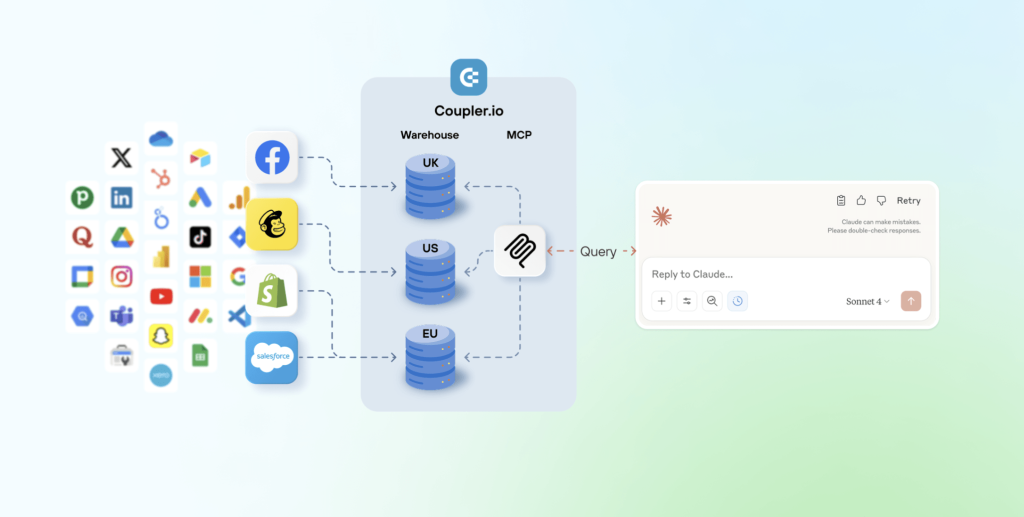
Coupler.io’s Analytical Engine runs SQL queries against your actual data and passes computed results to Claude. The AI handles the interpretation. Coupler.io handles the math. You get to focus on what the numbers mean and how to optimize your campaigns.
Here’s how the Google Ads to Claude connection works.
Step 1: Create a data flow in Coupler.io
Sign up for a free Coupler.io account and set up a new data flow, selecting Google Ads as your data source. Or just use the form below with preset Google Ads and Claude as source and destination apps.
Link your Google account and select the report type you want to work with.
You can either create a data flow from scratch and organize the data to work with on your own. Or get started with a prebuilt data set template to organize your Google Ads data and make it instantly ready for reporting and, of course, analytics in Claude. The available data transformation options allow you to filter by date range, hide personally identifiable information, reorder or remove columns, and aggregate Google Ads metrics. This is where you shape the dataset Claude will query.
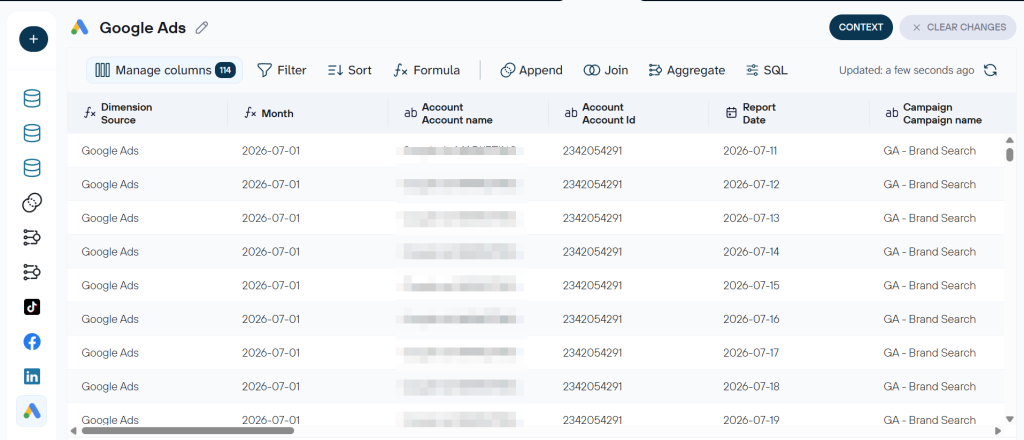
Coupler.io lets you combine multiple sources in a single data flow. If you want to analyze Google Ads alongside Meta Ads, LinkedIn Ads, or Google Analytics, you can merge them here before the data ever reaches Claude.
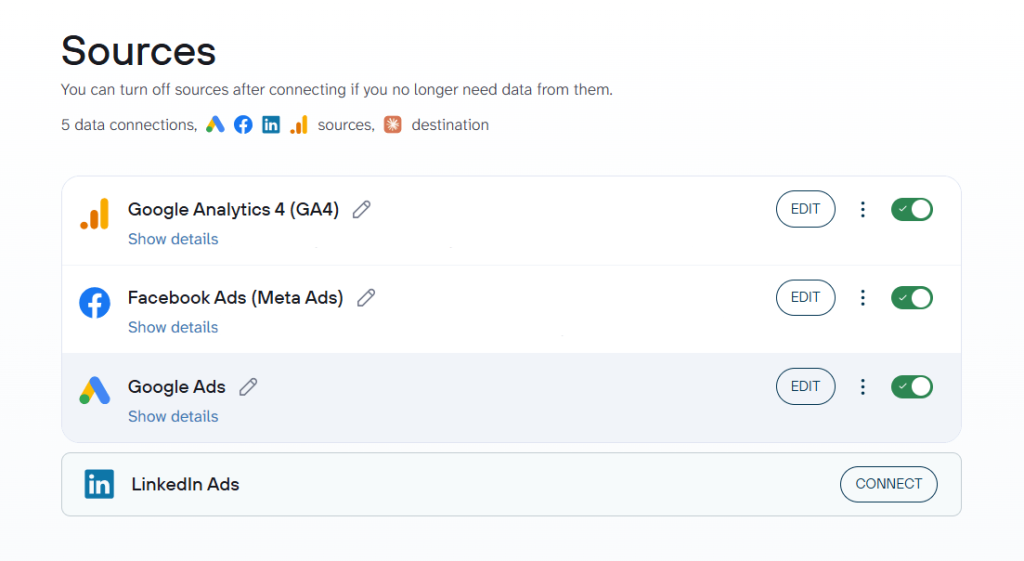
Step 2: Connect your Google Ads data to Claude
When your Google Ads data set is ready, time to configure Claude as the destination. Click Get connector.
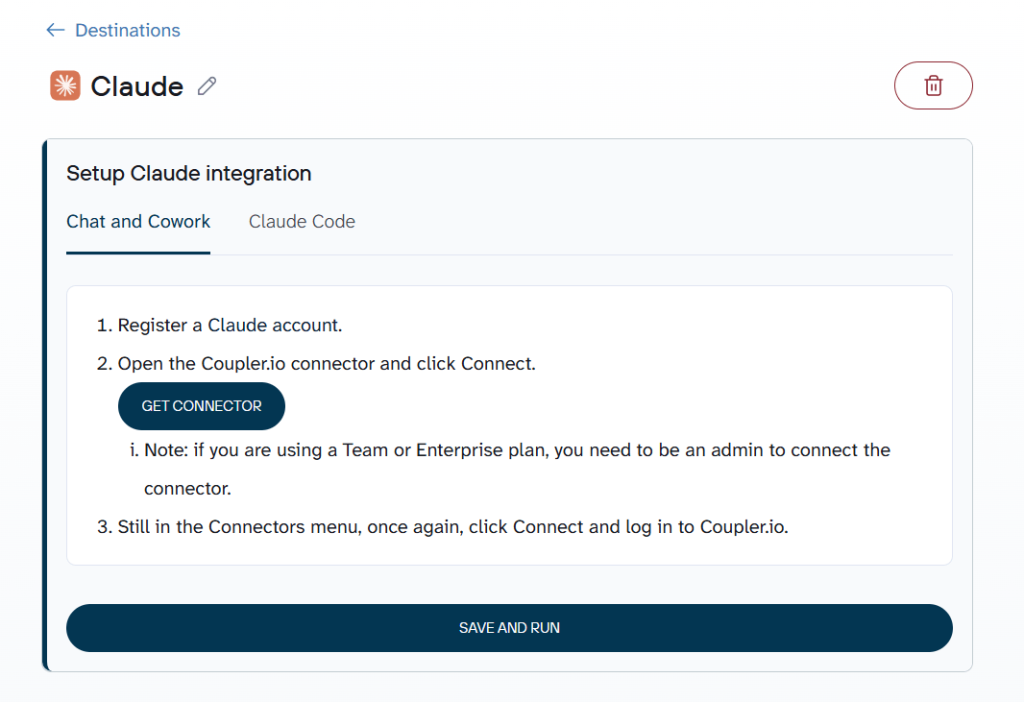
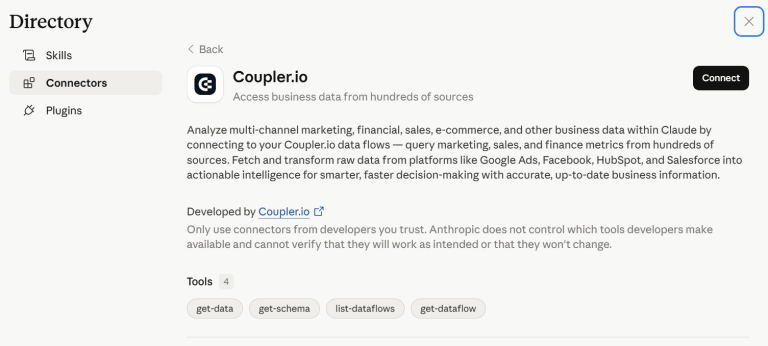
You will land on the Coupler.io connector page inside Claude, where a short authorization flow finalizes the setup. Claude will ask for permissions to access the connector. Confirm, and the link is live.
Head back to Coupler.io to run the data flow and schedule how often it refreshes. That schedule is what keeps Claude’s answers up to date without any manual work on your end.
Step 3: Ask Claude about your Google Ads data
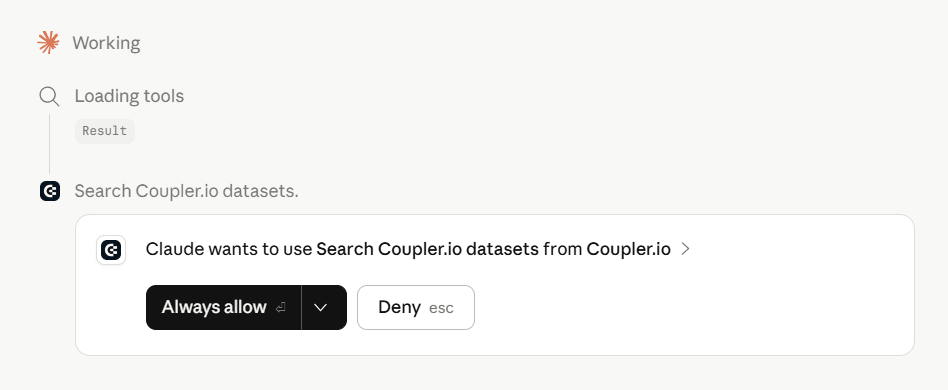
Start a new conversation in Claude. When your question involves Google Ads data, Claude will ask permission to connect to the Coupler.io MCP server. Once you confirm, it can query your data flow directly and interpret the results performed by the Coupler.io analytical engine. Ask questions in plain English, and Claude translates your natural language prompts into data queries behind the scenes. I’ll show some hands-on examples in the next section.

Connect your data from Google Ads to Claude with Coupler.io
Get started for freeAnalyze your Google Ads campaigns in Claude
I set up a data flow in Coupler.io to connect Google Ads to Claude and ran three analyses covering the decisions that come up most often in campaign management. Here is what each one revealed.
Search term analysis – find what is draining your budget
Search term reports are where most Google Ads waste hides. Google’s shift toward semantic matching means match types are broader than they used to be. Pulling a search term report used to be a manual chore. With this setup, Claude does it for you.
Often, by the time you spot the irrelevant queries, they have already spent real budget. This kind of audit takes a human analyst 30 to 45 minutes to do manually. With the following prompt, Claude generated the results in seconds:
You are a Google Ads analyst with access to my [your data flow] data flow.Using the available data, do the following:1. List all search terms that have generated clicks but zero conversions,2. For each term, flag whether it was added as a keyword or remains unmanaged.3. Identify terms that appear semantically unrelated to the core campaign4. Calculate the total spend attributed to zero-conversion search terms5. Summarize in three bullet points: what to add as negatives immediately, |
Here’s what Claude surfaced:
In this dataset, the real issue is not waste. It is control.
Around 85% of spend is coming from match-type expansions and close variants, not from keywords I explicitly added.
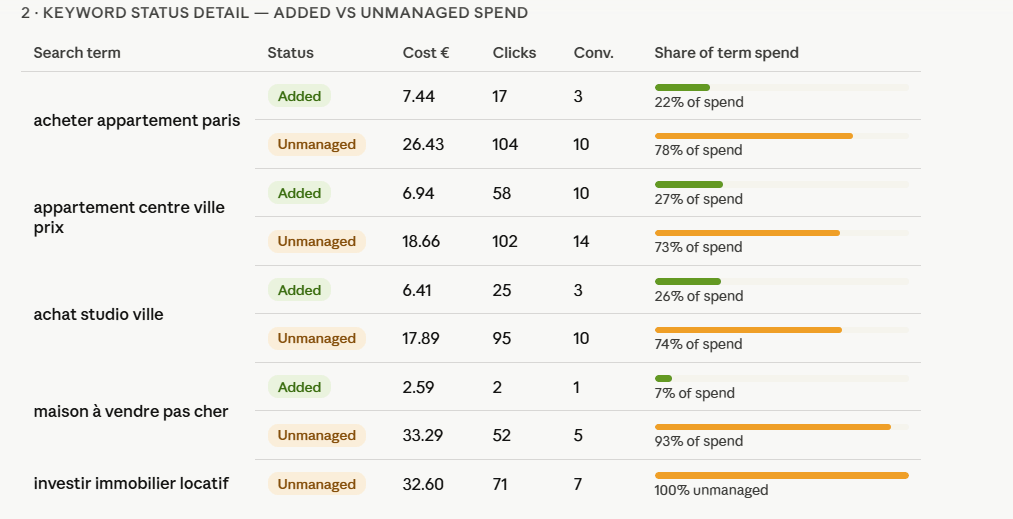
That shifts the problem entirely. It is not about “bad queries”. It is about Google deciding where most of my budget goes.
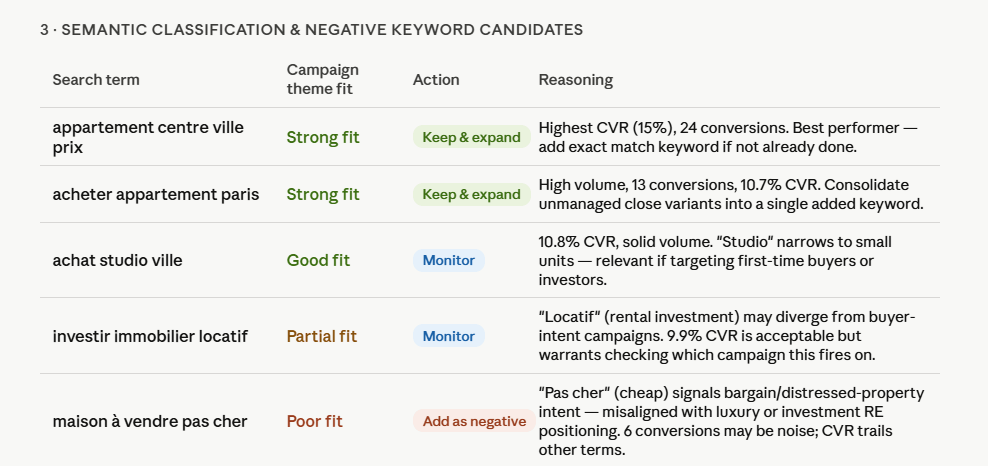
What to do with Claude’s response:
- Don’t focus only on zero-conversion spend. Look at who controls the spend
- Promote high-performing queries into exact match to regain bidding and coverage control
- Exclude terms with misaligned intent, even if they generate some conversions
- Monitor “in-between” queries and segment them into the right campaigns
- Reduce reliance on match-type expansions that dilute control and learning
Keyword efficiency by match type – where your budget is actually working
Match type strategy is one of the most consequential decisions in a Google Ads account, and it needs to be audited properly. Broad match pulls volume. Exact match controls intent. Phrase match sits in between.
But which one is actually delivering results in your account?
With this prompt, Claude can answer that in one structured query:
You are a Google Ads performance analyst with access to my [your Keyword data flow] data flow.Using the available keyword data, complete the following:1. Group all keywords by match type and calculate for each group:2. Identify which match types have generated zero conversions despite |
Claude exposed a major illusion in how this account handles its keywords: this account looks like it uses multiple match types. In reality, it doesn’t.
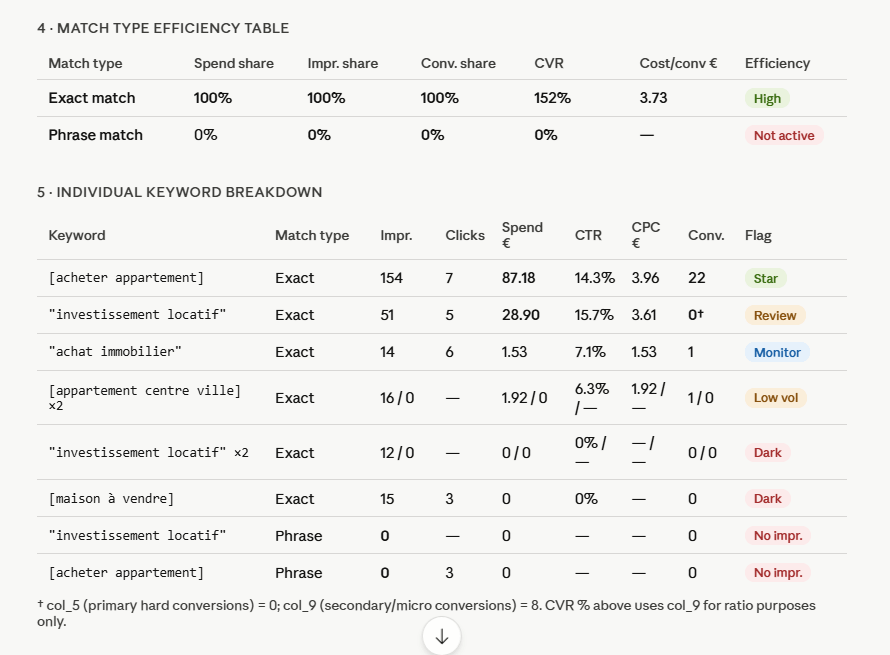
All impressions, all spend, and all conversions are coming from exact match. Phrase match is enabled, but completely inactive. It generates zero impressions, meaning it is not even entering auctions.
For the keywords that show strong conversion volume, there is a nuance. Most of it comes from secondary signals, not hard conversions. That means performance can look better than it actually is if you don’t separate the two.
The diagnostic verdict, courtesy of Claude:
- Do not assume your match types are working. Verify which ones actually generate impressions
- Treat “high CTR + zero conversions” as a landing page or offer issue, not a keyword issue
- Remove or fix keywords that never enter auctions. Enabled does not mean active
- Separate micro-conversions from real conversions before judging performance
- Avoid running a “single match type account” unintentionally. It limits scale and testing
Impression share tells you how visible your campaigns are relative to how visible they could be. But the split between budget loss and rank loss is what actually informs the right action. If you are losing to budget, the fix is increasing spend. If you are losing to rank, the fix is improving Quality Score or bids. Confusing the two wastes money.
Here is the framework I gave Claude for picking the right fight:
You are a paid search analyst with access to my [data flow name] data flow. |
Claude returned a sort of Google Ads dashboard with a breakdown across the real estate campaigns:
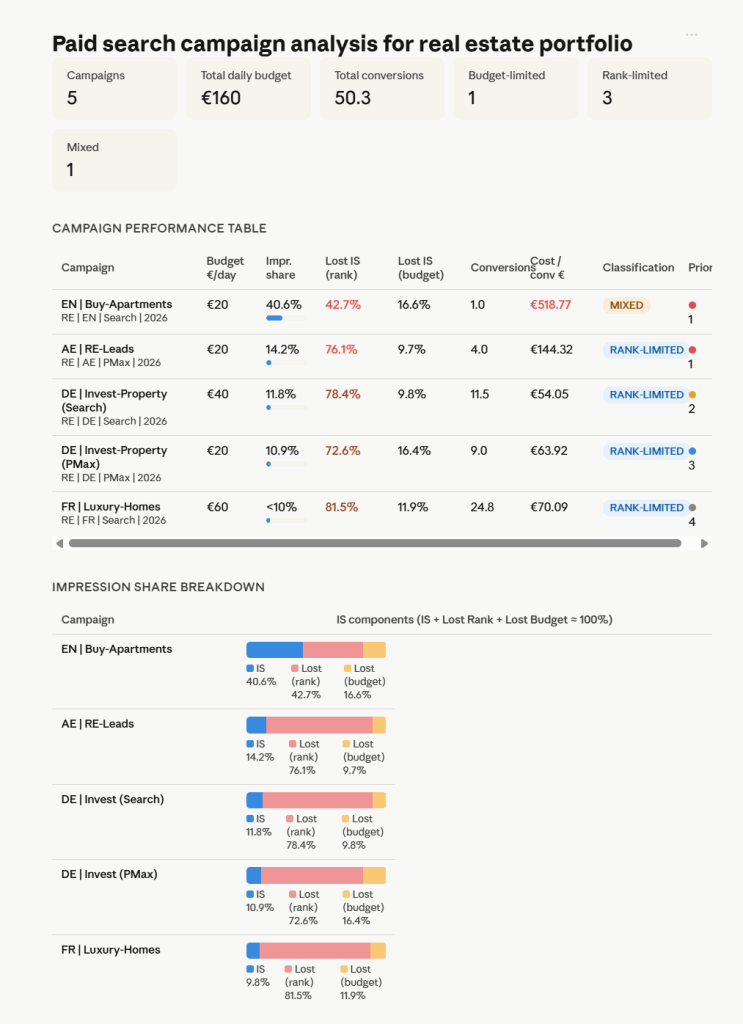
Despite one campaign being clearly flagged as structurally broken, the majority of campaigns are losing heavily to rank due to a misaligned bid strategy. That makes it a quick, high-impact fix that does not require additional budget.
Key takeaways to implement from Claude:
- Do not increase budgets by default. First identify whether the issue is rank or budget.
- Treat high CPA campaigns as diagnosis problems, not scaling opportunities.
- Look for “good CPA + low impression share” as your clearest scaling signal.
- Fix bid strategies and configuration issues before touching budgets.
- Only increase budget when it is clearly the limiting factor, not when it is assumed to be.
Analyze your Google Ads data in Claude using Coupler.io
Get started for freeOther methods to get Google Ads data into Claude
Coupler.io is efficient for recurring reporting and analytics of PPC campaigns since it allows you to connect Google Ads data to Claude.
At the same time, it’s not the only option to do the job. Some teams export from the Google Ads Manager directly. Others pipe data to ChatGPT or other LLMs. Depending on your technical setup and how often you need updated data, there are other paths worth knowing about. Each comes with a different cost in time and complexity.
Manual upload to Claude
This method is the most straightforward. Export a report from Google Ads as a CSV or Excel file and upload it into a Claude conversation using the attachment button.
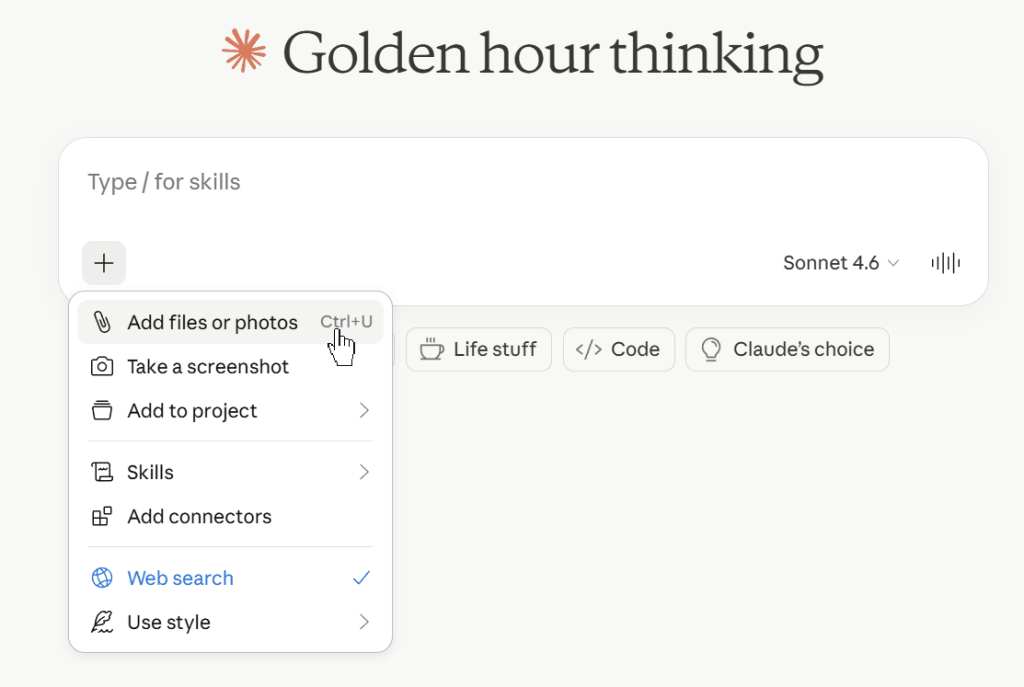
It works well for one-off analysis: a specific campaign audit, a quick keyword review before a meeting, or a test to see what Claude can do with your data.
The catch is obvious: the data is a snapshot. It goes stale the moment you download it. Every new analysis means another export, another upload, and another round of manually checking whether the numbers still reflect reality. For anything that needs to track live performance, this approach breaks down fast.
Google Ads MCP by Google
Model Context Protocol is an open standard developed by Anthropic that lets AI models connect to external tools, databases, and systems. Google offers an open-source MCP server for the Google Ads API. It lets an LLM query your Google Ads account directly to pull campaign data, keyword performance, search term reports, and other information.
The setup, however, is developer-grade. You need to enable the Google Ads API, create OAuth credentials in Google Cloud Console, obtain a developer token, configure a google-ads.yaml file with your credentials, and install the server locally using Python. The project is primarily documented for use with Gemini, so connecting it to Claude means working without official integration guides.
For teams with engineering resources and a need for direct, read-only API access, it can work. But for marketers who want to connect Google Ads to Claude without touching a terminal, Coupler.io’s MCP connector does the same job with no code and no infrastructure to maintain. So, when you choose between Coupler.io vs Google Ads MCP, consider the tech skills you and your team have.
Custom MCP connection
A custom MCP connection lets you point Claude at any tool or database that has no pre-built connector available, which includes most internal systems and proprietary data sources.
For Google Ads specifically, this would mean building an MCP server that wraps the Google Ads API. That server exposes tools Claude can call mid-conversation to fetch live campaign data, keyword performance, or search term reports. When it works, it is powerful: Claude queries your data in real time without any manual file handling.
The cost is dedicated engineering work. You need to develop and host the server, stay on top of Google Ads API versions and auth, and troubleshoot any issues between Claude, MCP, and Google. This can make sense for teams with engineering capacity and a need for custom data shaping or bidirectional integrations. For most marketing teams, though, it is more infrastructure than the use case requires.
Coupler.io’s connector is also MCP-based but comes ready to use, without the build-and-maintain overhead.
Claude API integration
The Claude API lets developers build a direct pipeline to connect Google Ads to Claude inside a custom application. Data reaches Claude through two main patterns.
- Tool use (function calling) is suited for live, structured data. You define functions that Claude can call mid-conversation, each one querying a specific data source. A user asks a question, Claude calls the right function, your backend pulls from the Google Ads API, and the result comes back into the conversation. This works well when queries are unpredictable and pre-fetching all data upfront would be wasteful.
- RAG (retrieval-augmented generation) is suited for document-heavy knowledge: strategy briefs, historical reports, creative guidelines. Your backend chunks and indexes these documents in a vector database, and Claude retrieves only what is relevant to each question.
Both approaches give you full architectural control and are the right choice if you are embedding Google Ads intelligence into your own product. The trade-off is that all the data logic, validation, and accuracy sit entirely on your backend.
Claude reasons from whatever it receives. If your backend fetches the wrong date range, joins tables incorrectly, or passes incomplete records, Claude will produce a confident answer built on bad inputs. It has no way to flag that the data itself is the problem. This is the most powerful option and the most demanding one to implement and maintain.
Common mistakes with Google Ads and Claude
Static exports instead of a live data connection
The typical scenario: you export a CSV from Google Ads, upload it to Claude, and run your analysis. The problem is that the data is already a snapshot. Campaigns pause, budgets shift, and keywords gain or lose impression share between your export and your decision. Claude has no way to know what changed. For any analysis that informs budget decisions or optimization actions, stale data produces stale recommendations.
Sending large Google Ads datasets to Claude without a processing layer
Another common trap is passing a full keyword or search term export directly to Claude and asking it to calculate efficiency metrics across hundreds of rows. Claude is built for interpretation, not computation at scale.
Without a processing layer between Google Ads and Claude that runs the calculations first, you risk errors in aggregated metrics, inconsistent totals, and answers that look plausible but don’t hold up. This is why Coupler.io’s Analytical Engine runs the SQL query and hands Claude the output, rather than the raw data.
Skipped data preparation before analysis
Raw Google Ads exports are not analysis-ready by default. When you download a report from Google Ads, the file comes with a date range header at the top and a totals row at the bottom. Send that directly to Claude and you will run into a problem that is easy to miss. Claude may read the totals row as a campaign entry and fold it into comparisons or averages, inflating every metric it touches. The date range header can also confuse which time period Claude assumes the data covers.
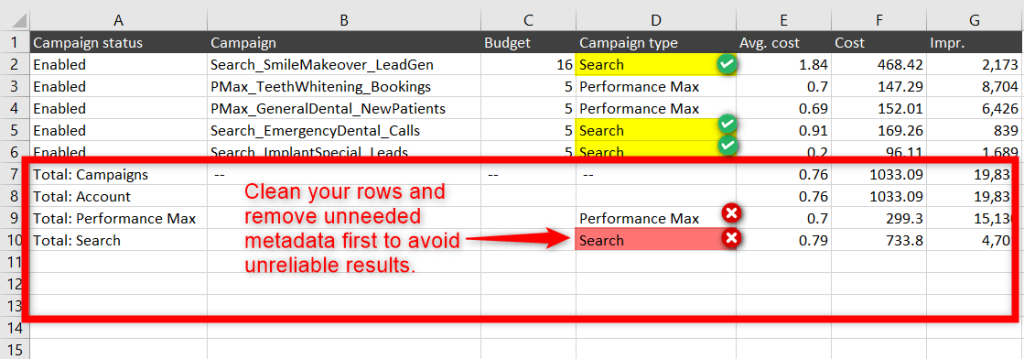
None of this shows up as an error. Claude produces clean-looking output regardless. The analysis looks right until you check the numbers against your actual account.
The same issue applies to column names that do not match what you are asking and granular breakdowns that push the dataset beyond what the context window handles well. Mixed date ranges that blend periods you would never compare intentionally cause the same problem.
Before sending any Google Ads export to Claude, strip the totals row, remove anything above the column headers, and make sure every row represents one distinct data point. That five-minute cleanup is what separates reliable output from confident-sounding noise.
Siloed Google Ads data without cross-source context
Analyzing Google Ads performance in isolation is one of the most common blind spots. A campaign with a high CPC might look inefficient on its own but converts at a lower cost than your Meta campaigns when you account for downstream behavior. Claude can only surface that comparison if it has access to both datasets. Running Google Ads alone misses the attribution patterns that justify or challenge your budget allocation.
Use one solution to connect PPC platforms like TikTok Ads, Google Ads, and Facebook Ads to Claude.
The right Google Ads integration with Claude for your use case
The choice comes down to how often your data needs to be fresh, whether you need cross-channel context, and how much engineering capacity your team has.
Manual upload covers occasional, contained analysis. The Claude API and custom MCP connections suit teams building internal tooling with dedicated development resources. Coupler.io covers the space in between: automated, cross-source, and accurate without writing a line of code.